
SPEEDSTER - Speed measuring instrument BUSHNELL - Free user manual and instructions
Find the device manual for free SPEEDSTER BUSHNELL in PDF.


| Product type | Speed indicator gun (radar) |
| Brand | Bushnell |
| Model | Speedster |
| Dimensions (L x W x H) | 109 mm x 86 mm x 183 mm |
| Weight | 369 g |
| Power supply | 6 AA batteries (up to 20 hours of operation) |
| Operating temperature range | 0 to 40 °C |
| Accuracy | +/- 1 MPH (subject to cosine effect) |
| Speed range (baseballs) | 6 to 110 MPH (10 to 176 km/h) up to 22.8 m |
| Speed range (cars) | 6 to 200 MPH (10 to 320 km/h) up to 411.5 m |
| Measurement modes | Speed only / Speed + baseball statistics |
| Main functions | Real-time measurement, display of last speed and average speed, ball/strike/pitch counts for 8 pitchers |
| Display | LCD with active radar icon |
| Control keys | Power On/Off, Trigger, Enter, Up/Down arrows, Page |
| Auto shut-off | After 30 minutes of inactivity |
| Included accessories | Padded case, adjustable strap (wrist/shoulder) |
| Warranty | 2 years limited |
| Maintenance and cleaning | Clean with a soft, dry cloth. Store in the supplied case. |
| Safety | For accurate measurement, stand in line with the target's movement (avoid lateral angles). The cosine effect increases error with angle. |
| General information | Complies with FCC regulations section 15 (Class B). Uses Doppler radar technology and digital signal processing (DSP). |
| Spare parts and repairability | Contact Bushnell after-sales service. See warranty for return procedure. |
Frequently Asked Questions - SPEEDSTER BUSHNELL
User questions about SPEEDSTER BUSHNELL
0 question about this device. Answer the ones you know or ask your own.
Ask a new question about this device
Download the instructions for your Speed measuring instrument in PDF format for free! Find your manual SPEEDSTER - BUSHNELL and take your electronic device back in hand. On this page are published all the documents necessary for the use of your device. SPEEDSTER by BUSHNELL.
USER MANUAL SPEEDSTER BUSHNELL
Congratulations on the purchase of your Bushnell® Speedster™. The Speedster is a precision instrument designed to provide many years of enjoyment. This booklet will help you achieve optimum performance by explaining its adjustments and features as well as how to care for this precise speed and statistic measuring instrument. To ensure optimal performance and longevity, please read these instructions before using your Bushnell Speedster.
INTRODUCTION
Your Bushnell Speedster uses digital technology and DSP (Digital Signal Processing) to provide instantaneous and accurate Real-Time speed measurements to +/- One-Mile Per Hour (MPH) accuracy. For example, with the TRIGGER engaged, you can see the Real-Time speed measurement of a moving object as it accelerates or de-accelerates. The Bushnell Speedster is a handy, multi-functional speed gun for all kinds of sports enthusiasts. Track everything from pitching speeds to cars at the racetrack. The Bushnell Speedster measures the speed of a baseball at 6-110 MPH from 75+ feet away from the ball, and the speed of a racecar from 6-200 MPH at 1,350 feet away. Unlike any other speed gun available, the Speedster allows you to keep statistics for baseball and softball, and provides last and average speeds for any type of object measured.
BATTERY INSTALLATION
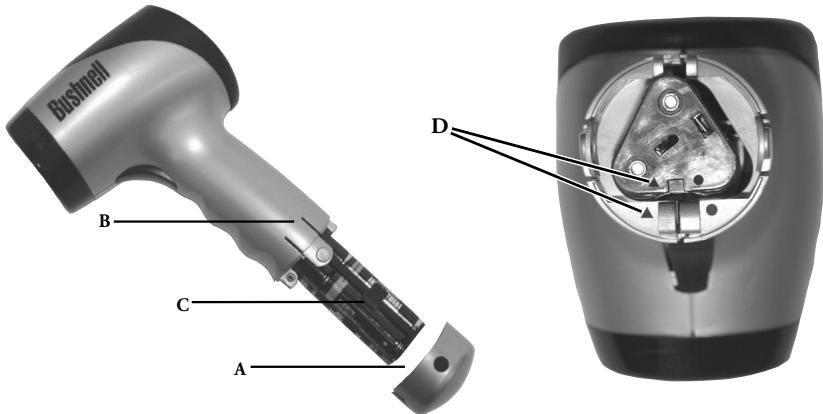
Your Bushnell Speedster operates on six AA alkaline batteries. To install, remove the battery cover (A) by depressing both sides of the handle bottom (B). Remove the battery cartridge (C) and install the batteries so that the positive (+) and negative (-) terminals of the batteries match the markings inside the battery cartridge. Insert the battery cartridge so that the symbols ( ) located on the battery cartridge line up and match the symbols ( ) located on the handle housing (D). Place the battery cover (A) back onto the handle so that the textured side of the battery cover matches the textured surface of the handle grip area.
ATTENTION!
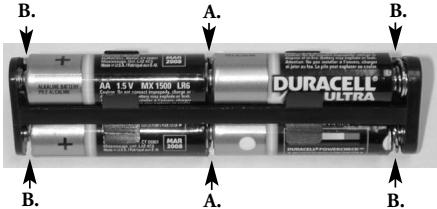
After insertion of batteries into the battery cartridge, you need to make sure that all batteries within the battery cartridge are making contact with each other (A), and that each end of the battery is touching the cartridge contacts (B).
USER INPUT SWITCHES
Your Bushnell Speedster operates on six AA batteries. Make sure they have been installed according to the instructions listed in the battery installation section.
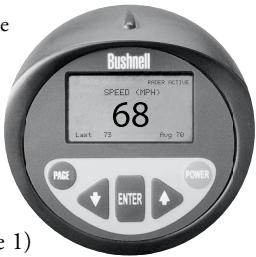
There are six switches on the Speedster, five of which are on the back display panel and one is a "TRIGGER" position switch. The switches are labeled as:
- POWER (On/Off)
- TRIGGER (Activates radar)
- ENTER
- () (Up Arrow)
- () (Down Arrow)
6.PAGE
(Figure 1)
A QUICK START LESSON
- Turn the Speedster "ON" by pressing the POWER button.
- The following introduction screen will appear for 2-3 seconds.

- After the above introduction screen has appeared for 2-3 seconds, the Speedster will automatically proceed to the following SPEED screen.
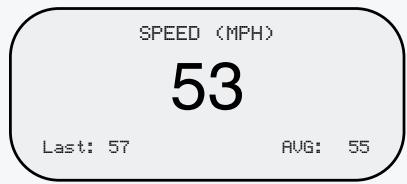
- Aim the Speedster at the target and depress the TRIGGER. As a quick reference to accuracy, remember to keep your targets direction of travel in a direct line with you, and not perpendicular to you.
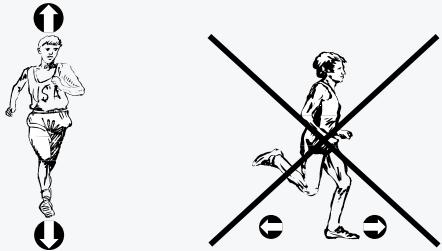
Your Bushnell Speedster can be configured for several different modes of operation. These are described in the following "GETTING STARTED" section.
NOTE: The Speedster contains an automatic battery saving shut-off feature. After 30 minutes of non-use, the Bushnell Speedster will automatically shut off.
The Speedster automatically saves data for later use to internal memory while in the "SPEED + BASEBALL STATS" Mode. Data captured in the "SPEED" only mode can not be saved to internal memory.
The Speedster comes with a padded carrying case and adjustable strap that can be used as a hand-strap or neck-strap. Simply thread the strap through the lanyard pin located at the bottom of the handle.
GETTING STARTED
To turn the Speedster "ON" simply press the "POWER" button. Once you have done so, you will see the following introduction screen for approximately 2-3 seconds (Figure 2)

(Figure 2)
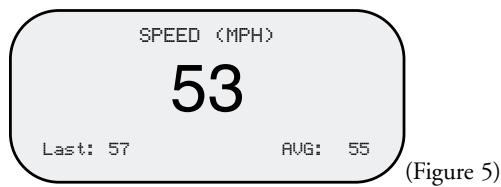
After the above introduction screen has appeared for 2-3 seconds, it will automatically take you to the following "SPEED" screen (Figure 5).
SPEED SCREEN
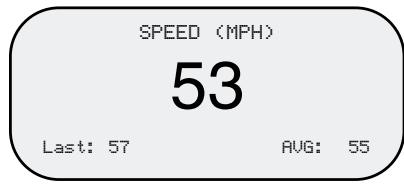
(Figure 5)
At this point, you are ready to capture speed. However, if you desire to track baseball statistics as well as speed, press the PAGE button to advance to the SETUP screen (Figure 3).
SETUP Screen
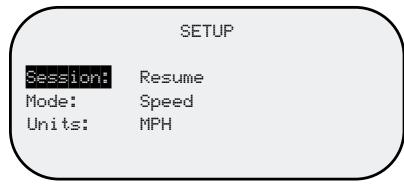
(Figure 3)
SETUP SCREEN DEFINITIONS
SESSION Resume: Continues average and last speed display and calculations, and all player statistics (Pitches, Balls, Strikes) from previous sessions (SPEED + BASEBALL STATS Mode only) Clear Memory: Clears (erases) all stored players' information, and average and last speed memory, display and calculations
MODE Speed + Baseball Stats: Allows the user to record speed and enter Baseball Statistics for up to eight separate pitchers. Provides current, last, and average speed, total pitch, strike, and ball count.
Speed Only: Allows the user to capture current, last, and average speed.
UNITS MPH: Speed will be displayed in Miles Per Hour
KPH: Speed will be displayed in Kilometers Per Hour
(NOTE: Average Speed = Sum of all recorded speeds / Number of recorded speeds)
The Bushnell Speedster is capable of tracking current, last, and average speed, balls, strikes, and pitch count for up to 8 pitchers while you are in the SPEED + BASEBALL STATS Mode. If you desire to record speed only, you can choose the SPEED Mode. SPEED mode is capable of recording and displaying last and average speeds. The ENTER button must be pressed after each speed is acquired in order to update Last and Average speed calculations. In SPEED mode, the speed displayed will appear in a larger font in comparison to the speed displayed in SPEED + BASEBALL STATS mode.
MANUEVERING WITHIN THE SETUP SCREEN
To move from one line position to the next (e.g. SESSION to MODE).
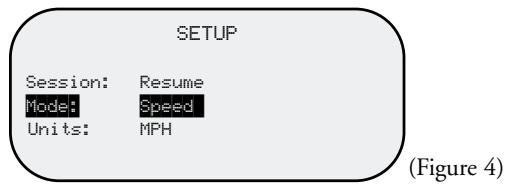
SESSION will appear in reverse image text (See Figure 3). Press the () key. Now MODE will appear in reverse image text. To change from SPEED to SPEED+ BASEBALL STATS, press ENTER so that SPEED text is also in a reverse image (see figure 4). Then press the () or () arrow key and SPEED + BASEBALL STATS will appear in reverse image text. To SAVE your selection, press ENTER. To move from MODE to UNITS, press the () arrow key. Follow the same procedures as described above. Once you are satisfied with your selections for Session, Mode, and Units, press the PAGE button.
NOTE: If both line position and field are in reverse image text as pictured in Figure 4, you must press ENTER to proceed.
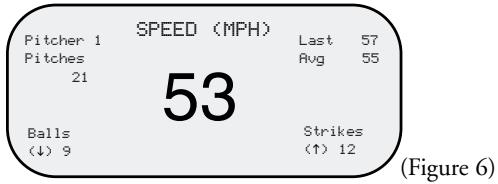
Pressing the PAGE button forwards you to the next page. Depending upon the MODE you chose above, you will now see the SPEED screen (Figure 5) or SPEED + BASEBALL STATS screen (Figure 6).
SPEED SCREEN
SPEED + BASEBALL STATS SCREEN
While in the SPEED + BASEBALL STATS Screen (Figure 6), you are able to manually enter balls and strike data by pressing the press the () button for BALLS and press the () button for STRIKES. Balls and strikes can not be recorded while the TRIGGER is engaged (or while RADAR ACTIVE icon is displayed).
MANUEVERING WITHIN THE PLAYER EDIT SCREEN
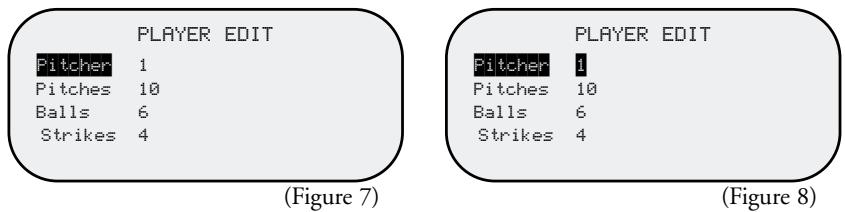
The Speedster is capable of keeping pitching statistics separate from one pitcher to the next. If a new pitcher is coming onto the mound, or if you desire to keep pitching statistics for the opposing side, PAGE to the PLAYER EDIT Screen (Figure 7). Once you are there, you will see that the PITCHER text is in reverse image. Now press the ENTER button so that "1" is in reverse image (Figure 8). Then press the () button to increment to pitcher number 2. To SAVE your selection, press ENTER. You are now ready to keep statistics for Pitcher 2. Follow the same procedure for future pitchers.
HOW TO EDIT BALL / STRIKES DATA
You can make edits to the BALL and STRIKE data in the PLAYER EDIT Screen (Figure 7). To get to the PLAYER EDIT screen, press the PAGE button until it appears. To move from PITCHER to BALLS, press the () arrow key until BALLS text is in reverse image. Then press ENTER so that the numerical ball data is also in reverse image. At this point, you can add ball count by pressing the () button, or () to decrease ball count. When you are satisfied with the edit, press ENTER. If you need to edit STRIKES, follow the same procedure. When complete, press the PAGE button twice to return to the SPEED + BASEBALL STATS screen.
NOTE: If both fields are in reverse image text, you must press ENTER to proceed.
HOW PITCH COUNT IS CALCULATED
The Speedster will calculate and display Average and Last speed after the TRIGGER has been released and the ENTER button pressed. This must occur after every speed measurement. Pitch count is entered into the system the same way. Once a speed has been acquired and is locked onto the screen, release the TRIGGER and press the ENTER button. Once you have done this, the pitch count increases.
NOTE: Pitch count can not be edited.
PLAYER EDIT Screen
A target can be anything that is moving. To acquire the speed of a target, with the Speedster powered on, aim the Speedster at the target and depress the TRIGGER. The RADAR ACTIVE icon will appear in the upper right corner of the LCD display. This indicates the Doppler Radar is functioning. The speed of the target will appear on the LCD display. When the speed appears, release the trigger so that the speed displayed will "lock" on the display for easy viewing. The units of measure will appear at the top of the LCD screen and can be changed from MPH to KPH, or vice versa via the SETUP screen.
The Bushnell Speedster is capable of tracking Last and Average speeds. If you desire for the Speedster to record and track Last and Average speeds, simply press the ENTER button after every speed measurement is locked onto the LCD display. A speed is locked onto the LCD display after the release of the TRIGGER. The Speedster will automatically save this data for later use to internal memory while in the "SPEED + BASEBALL STATS" Mode. Data captured in the "SPEED" only mode can not be saved to internal memory.
There are certain mathematical properties of Doppler Radar that affect the accuracy of your Bushnell Speedster. Please read COSINE AFFECT ON TARGET VELOCITY below. As a quick reference to accuracy, remember to keep your targets direction of travel in a direct line with you, and not perpendicular.
COSINE EFFECT ON TARGET VELOCITY
The Speedster will measure the relative speed of a target as it approaches the Speedster. If the target is in a direct line (collision course) with the Speedster the measured speed will be exact. As the angle of incidence increases, if you move either right or left of this direct line, the accuracy will decrease. The measured speed will decrease as you move off this centerline. This phenomenon is called the Cosine Effect. It is so called because the measured speed is directly related to the cosine of the angle between the Speedster and the target's direction of travel. Figure 9 below relates this to a little league baseball field.
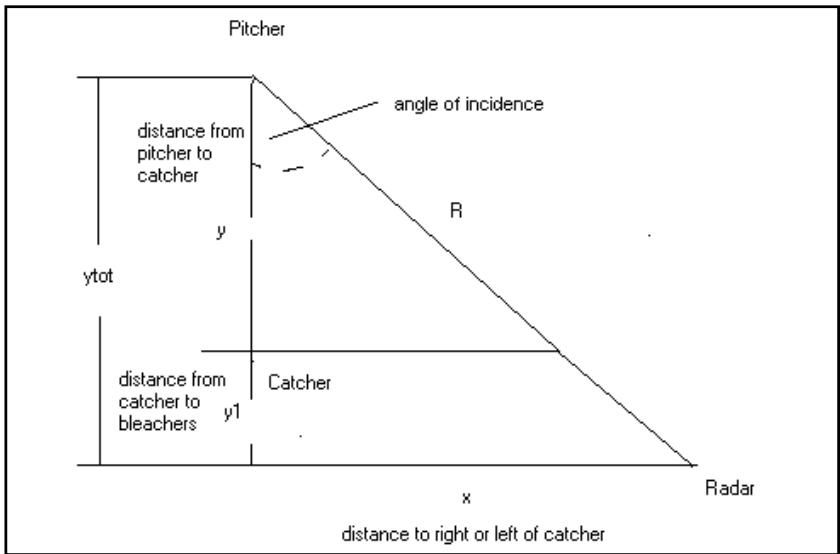
Table 1 below gives calculated distances for the Figure 9 above.
Table 1
| Total distance Pitcher to seats (ytot) | Distance off center (x) at a 10° angle (gives a 1.5% error) | Distance off center (x) at a 20° angle (gives a 6% error) | Distance off center (x) at a 30° angle (gives a 13% error) |
| 30 | 5 ft. | 10 ft. | 17 ft. |
| 40 | 7 ft. | 14 ft. | 23 ft. |
| 50 | 8 ft. | 18 ft. | 28 ft. |
| 60 | 10 ft. | 21 ft. | 34 ft. |
| 70 | 12 ft. | 25 ft. | 40 ft. |
| 80 | 14 ft. | 29 ft. | 46 ft. |
| 90 | 15 ft. | 32 ft. | 51 ft. |
| 100 | 17 ft. | 36 ft. | 57 ft. |
According to the table, assuming the average distance from the pitcher to catcher (y) is 60 feet, there will also be an average distance behind the catcher to the seats (y1). This is assumed to be an average of 20 feet. So the total distance from pitcher to Speedster (ytot) is 80 feet for this example. This is the straight-line direction of ball travel, not the distance from the pitcher to the actual Speedster position, which is R.
If you sit at a distance of 14 ft. off center of the direct pitcher to catcher line, then you have an angle of incidence of 10^ . Most importantly, this gives you an error of 1.5% in measured speed, which is acceptable. Following the chart across, if you sit 29 ft. off center this correlates to a 20^ angle and a 6% error. See the Measured Speed vs Angle chart for more information on error percentage.
As noted earlier, the larger the angle of incidence the greater the error in the measured speed. Figure 10 below indicates the percent error vs. the angle of incidence.
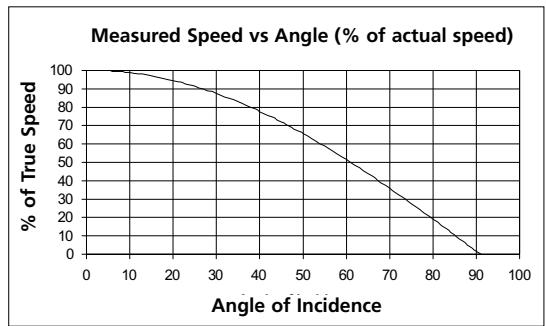
(Figure 10)
The graph indicates that at an angle of 0^ (direct line) there is no error. If there is an angle of 10^ the error is about 1.5% , for a 20^ angle it is about 6% and for a 30^ angle the error is about 13% , probably unacceptable for baseball pitches.
GENERAL SWITCH OPERATION IN DETAIL
- POWER (On/Off)
a. Is always active, regardless of which screen or mode the unit is in
b. Press to turn the unit on and off
c. Is an immediate power off, all DSP and radar activity ceases immediately
d. Unit will always return to the last setting used each time the device is turned on (SPEED or SPEED + BASEBALL STATs) and UNITS (MPH OR KPH). The only exception to this: The unit will always bring up the RESUME field within the SESSION line position.
- TRIGGER (Activates Radar for Speed Measurement)
a. Press and hold to turn on the transmitter and perform speed processing. "RADAR ACTIVE" Icon will be displayed at the top right corner of the LCD.
b. Release to turn off the transmitter and to lock display with current speed displayed
- ENTER - all modes
a. When measuring speeds in SPEED and SPEED + BASEBALL STATS Modes
i) Used to accept current locked display speed and Average and Last speeds into the LCD screen. Also accepts number of pitches while in the SPEED + BASEBALL Mode.
b. When making selections in SETUP screen
i) Used to select field options within SESSION, MODE, and UNITS
ii) Used to select field for edit within SESSION, MODE, and UNITS and accepts the selection
- () (Down Arrow)
a. SETUP and PLAYER EDIT Screens
i) Used to move down one line position
ii) Used to decrement/change selected parameter when editing a field and PLAYER
b. SPEED + BASEBALLSTATS Mode
i) Used to increment BALL count
- () (Up Arrow)
a. SETUP and PLAYER EDIT Screens
i) Used to move up one line position
ii) Used to increment/change selected parameter when editing a field
b. SPEED + BASEBALL STAT'S Mode
i) Used to increment STRIKE count
- PAGE
a. Use to page (scroll) through screens
b. Will update memory with currently displayed information when in SETUP or PLAYER EDIT screens before scrolling to next page
NOTE: The Speedster contains an automatic battery saving shut-off feature. After 30 minutes of non-use, the Bushnell Speedster will automatically shut off.
The Speedster automatically saves data for later use to internal memory while in the "SPEED + BASEBALL STATs" Mode. Data captured in the "SPEED" only mode can not be saved to internal memory.
SETUP SCREEN SWITCH OPERATION IN DETAIL
- () (Up Arrow)
a. Selects Line Position (SESSION, MODE, UNITS)
i) Moves up one line position if no field has been selected for editing (Current line position will be shown in reverse image text).
ii) Increment/changes field if field has been selected for editing (both line position AND field will be shown in reverse image text).
- () (Down Arrow)
a. Selects Line Position
i) Moves down one line position if no field has been selected for editing (Current line position will be shown in reverse image text).
ii) Decrement/changes field if field has been selected for editing (both line position AND field will be shown in reverse image text)
- ENTER
a. Selects field to be edited
b. Accepts and saves current value displayed in field
- PAGE
a. Will accept and save all choices currently displayed on the SETUP screen
b. Will scroll to the next screen
c. Next screen displayed determined by operation choices
- TRIGGER (Activate Radar)
a. Has no effect while in SETUP screen
- POWER (On/Off)
a. Will power unit on or off
PLAYER EDIT SCREEN SWITCH OPERATION IN DETAIL
- () (Up Arrow)
a. Select Pitcher / Balls / Strikes
i) Moves up one line position if no field has been selected for editing (Current line position will be shown in reverse image text)
ii) Increment Pitcher number / Balls / Strikes if field has been selected for editing
(1) Maximum Player choice is 8
(2) Maximum count is 999
- () (Down Arrow)
a. Select Pitcher / Balls / Strikes
i) Moves down one line position if no field has been selected for editing (Current line position will be shown in reverse image text)
ii) Decrement Pitcher number, Balls, Strikes, if field has been selected for editing
- ENTER
a. Selects field for editing (Current line position AND field will be shown in reverse image text)
- PAGE
a. Will accept and save all edit choices displayed (as long as lime position AND field are not both in reverse image text)
b. Will scroll to the next screen
- TRIGGER (Activate Radar)
a. Has no effect while in PLAYER EDIT screen
- POWER (On/Off)
a. Will cancel all current activity of radar
b. Current player edits will NOT be saved for future operation (unless the PAGE button is pressed before powering off)
c. Unit will be powered down per description in General Switch Operation
WHAT TECHNOLOGY DOES THE SPEEDSTER USE?
The Speedster contains a K-Band microwave RF transmitter whose signal gets reflected by the target object. The reflected signal will have a "Doppler Shift:" proportional to the target speed. This Doppler frequency shift is detected in the receiver, amplified, filtered, and then digitized in an Analog to Digital Converter (ADC), and passed on to the Digital Signal Processing (DSP) chip. Using complex fast fourier transform software algorithms, the DSP chip filters out false and low-level return signals, to identify and display the speed of the desired target. The speed, along with various statistics and averages are then displayed on the LCD display.
SPECIFICATIONS
| Speed Performance: | Balls: 6-110 MPH / 10-176 KPH from 75+ Feet Cars: 6-200 MPH / 10-320 KPH from 1350 Feet |
| Accuracy: | +/- One MPH (see Cosine Effect section) |
| Battery Type: | AA (6) |
| Operating Time: | Up to 20 hours |
| Operating Temperature Range: | 32-104 F / 0-40 C |
| Length: | 4.3 Inches / 109 mm |
| Width: | 3.4 Inches / 86 mm |
| Height: | 7.2 Inches / 183 mm |
| Weight: | 13 Ounces / 369 Grams |
INFORMATION TO THE USER
Changes or modifications to the Bushnell Speedster Speed Gun, instruction manual or printed materials, not expressly approved by Bushnell for compliance could void the user's authority to operate the equipment.
NOTE: This equipment has been tested and found to comply with the limits for a Class B digital device, pursuant to part 15 of the FCC Rules. These limits are designed to provide reasonable protection against harmful interference in a residential installation. This equipment generates, uses and can radiate radio frequency energy and, if not installed and used in accordance with the instructions, may cause harmful interference to radio communications. However, there is no guarantee that interference will not occur in a particular installation. If this equipment does cause harmful interference to radio or television reception, which can be determined by turning the equipment off and on, the user is encouraged to try to correct the interference by one or more of the following measures:
- Reorient or relocate the receiving antenna.
- Increase the separation between the equipment and receiver.
- Connect the equipment into an outlet on a circuit different from that to which the receiver is connected.
- Consult the dealer or an experienced radio/TV technician for help.
WARRANTY / REPAIR
TWO-YEAR LIMITED WARRANTY
Your Bushnell® product is warranted to be free of defects in materials and workmanship for two years after the date of purchase. In the event of a defect under this warranty, we will, at our option, repair or replace the product, provided that you return the product postage prepaid. This warranty does not cover damages caused by misuse, improper handling, installation, or maintenance provided by someone other than a Bushnell Authorized Service Department.
Any return made under this warranty must be accompanied by the items listed below:
1) A check/money order in the amount of $10.00 to cover the cost of postage and handling
2) Name and address for product return
3) An explanation of the defect
4) Proof of Date Purchased
5) Product should be well packed in a sturdy outside shipping carton, prevent damage in transit, with return postage prepaid to the address listed below:
IN U.S.A. SEND TO:
Bushnell Performance Optics
Attn.: Repairs
8500 Marshall Drive
Lenexa, Kansas 66214
IN CANADA SEND TO:
Bushnell Performance Optics
Attn.: Repairs
25A East Pearce Street, Unit 1
Richmond Hill, Ontario L4B 2M9
For products purchased outside the United States or Canada please contact your local dealer for applicable warranty information. In Europe you may also contact Bushnell at: 33 141 44 94 80
Bushnell Performance Optics Service Centre
Columbusstraat 25
3165 AC Rotterdam
The Netherlands
- This warranty gives you specific legal rights. You may have other rights which vary from country to country.
©2002 Bushnell Corporation
- POWER (On/Off) = ALIMENTATION (marche/arret)
- POWER (On/Off) = ALIMENTATION (marche/arret)
- POWER (On/Off) = ALIMENTATION (marche/arret)
25A East Pearce Street, Unit 1
Richmond Hill, Ontario L4B 2M9
Bushnell Performance Optics Service Centre
Columbusstraat 25
3165 AC Rotterdam
Pays-Bas
©2002 Bushnell Corporation
25A East Pearce Street, Unit 1
Richmond Hill, Ontario L4B 2M9
Bushnell Performance Optics Service Centre
Columbusstraat 25
3165 AC Rotterdam
Paises Bajos
©2002 Bushnell Corporation
GARANTIE / REPARATUR
ZWEIJAHRIGE BESCHRANKTE GARANTIE
25A East Pearce Street, Unit 1
Richmond Hill, Ontario L4B 2M9
Bushnell Performance Optics Service Centre
Columbusstraat 25
3165 AC Rotterdam
Niederlande
©2002 Bushnell Corporation
ENGLISH
Instruction Manual. 1-12
Quick Start Lesson Guide. 3