
MOBILE LP - Turntable ION - Free user manual and instructions
Find the device manual for free MOBILE LP ION in PDF.



| Brand | ION |
| Model | MOBILE LP |
| Category | Vinyl player |
| Product type | Portable turntable with USB conversion |
| Playback speeds | 33, 45 and 78 RPM |
| Main functions | Vinyl playback, digital conversion via USB, built-in speaker, RCA and headphone outputs |
| Connectivity | USB, RCA (line out), 1/8" and 1/4" headphone jacks, 1/8" line in |
| Power supply | 6 D batteries (not included) or included AC adapter |
| Included software | EZ Vinyl Converter for vinyl transfer |
| Controls | Volume adjustment, tone (bass/treble), speed (Pitch ±10%), RPM selector |
| Included accessories | Dust cover, 45 RPM adapter, USB cable, power cable |
| Care and cleaning | Clean with a soft, dry cloth. Avoid abrasive products |
| Safety | Read the safety instructions booklet before use. Turn off before any connection |
| Spare parts and repairability | Replaceable stylus cartridge. Other parts available on the ION Audio website |
| Dimensions (approx) | Approx. 35 x 30 x 12 cm |
| Weight (approx) | Approx. 3 kg |
Frequently Asked Questions - MOBILE LP ION
User questions about MOBILE LP ION
0 question about this device. Answer the ones you know or ask your own.
Ask a new question about this device
Download the instructions for your Turntable in PDF format for free! Find your manual MOBILE LP - ION and take your electronic device back in hand. On this page are published all the documents necessary for the use of your device. MOBILE LP by ION.
USER MANUAL MOBILE LP ION

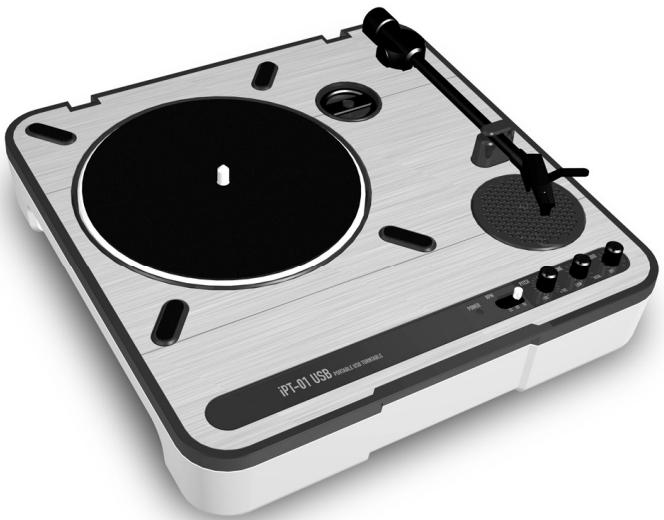
iPTUSB PORTABLE TURNTABLE
Quick Start Owner's Manual
ENGLISH :
The USB turntable connects directly to your computer to turn your treasured vinyl recordings into digital music. We have included software to aid you in converting your vinyl recordings:
EZ Vinyl Converter is the quickest and easiest way to turn your recordings into digital media. EZ Vinyl Converter conveniently saves your recordings in your iTunes library. Novice users may find this application preferable. We have included a handy Quickstart Guide with step-by-step instructions on software installation and operation.
To install the software: simply insert the included CD into your computer and follow the on-screen instructions. After you finish converting your vinyl, you can then burn to CD or load onto portable media devices.
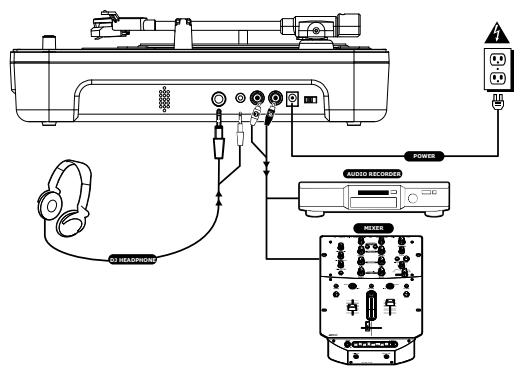
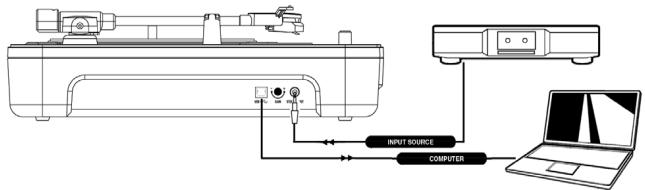
CONNECTION DIAGRAM
- Make sure all items listed on the front of this guide are included in the box.
- READ SAFETY INSTRUCTION BOOKLET BEFORE USING THE PRODUCT.
- Study this setup diagram.
Note: This turntable can be used as a standalone unit, as well as with the items listed in the quick setup diagram.
- Make sure all devices are turned off and all faders and gain knobs are set to "zero"
- Connect all stereo input sources as indicated in the diagram.
- Connect the stereo output devices to power amplifier(s), tape decks, and/or other audio sources.
-
Plug all devices into power.
-
Switch everything on in the following order.
Turntable
- Mixer (not included)
- last, any amplifiers or output devices (not included)
- When turning off, always reverse this operation by,
turning off amplifiers (not included)
- mixer (not included)
Turntable
- Go to http://www.ion-audio.com for product registration.
More information about this product may be found at http://www.ion-audio.com
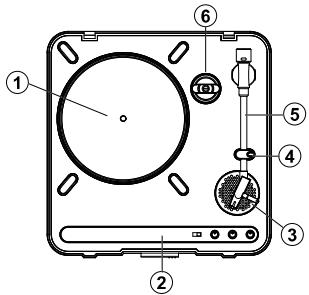
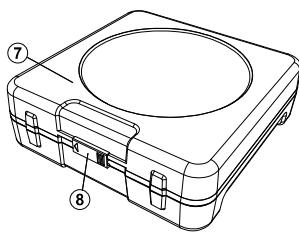
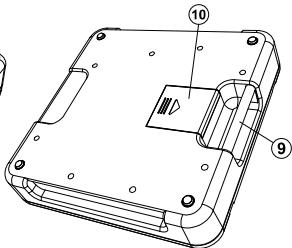
- Platter: Place your record on the platter.
- Control Panel: Please see the alternate detailed section on the control panel features.
- On Board Speaker: Use this speaker to listen to the audio.
- Tone Arm Clip: Use this clip to secure your tonearm when storing and transporting the unit.
- Tonearm: This unit comes with a ready to use pre-balanced tonearm and cartridge. The cartridge is user replaceable with parts from your distributor located in the warranty guide. The platter starts spinning once the tonearm is lifted over the record.
-
45 Adapter: Use this adapter with 45 rpm records.
-
Dust Cover: This cover protects the turntable from dust and abuse while not in use or while in transport.
- Dust Cover Latch: This latch holds the dustcover securely in place, and can easily be opened by sliding it to the left.
- Carry Handle: Use this handle easily remove the unit from record crates and bags, as well as carrying it in transport.
- Battery Cover: This holds the batteries securely in place during use and transport. It easily slides open and closed as indicated on the cover itself.
NOTE: This unit uses 6 "D" cell batteries (not included). They should be installed in the proper direction indicated.
OUTPUT PANEL FEATURES
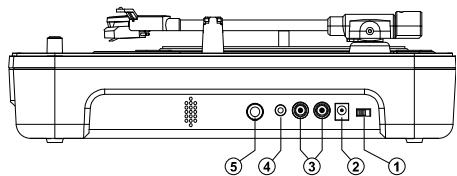
- Power Switch: Use this switch to turn the power on and off.
- AC In: This turntable is designed to work with either batteries or the power supply cord that comes with it. While the power is switched off, plug the power supply into the turntable first, then plug it into the wall power outlet, then switch on. NOTE: This unit can also be powered by 6 "D" Cell batteries (Not Included).
- Master Output (RCA): This "line level" output is for connecting to the input of an external audio device such as a DJ mixer, tape recorder, CD Burner, PA system, powered speaker, or a home stereo. The level of the master stereo output signal is controlled by the audio level control.
- 1/8" Headphone Jack: Use this jack with the 1/8" mini headphones plug. NOTE: Be sure the volume control is set to the OFF position before plugging in any headphones to avoid permanent hearing damage.
- 1/4" Headphone Jack: Use this jack with the 1 / 4 " headphones plug. NOTE: Be sure the volume control is set to the OFF position before plugging in any headphones to avoid permanent hearing damage.
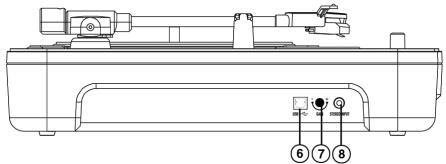
- USB Audio Output: Use the included USB Cable to connect your turntable to your computer. Refer to the software instruction guide before plugging in your turntable.
- Gain: This knob can be used to adjust the gain level of the audio signal from the turntable. If the audio from the turntable is too quiet or too loud, use this knob to adjust the volume setting.
- 1/8" Stereo Line Input: Connect Tape Players, Reel to Reel, or any other audio source here. This signal is sent to the computer through the USB connection. Make sure that your phono cartridge is installed while using this input for maximum sound quality. Also make sure that your RCA jacks are either plugged into an input device or not in contact with metal.
Note: The 1/8" audio input is not routed to the turntable's RCA output jacks, only to your computer via USB.
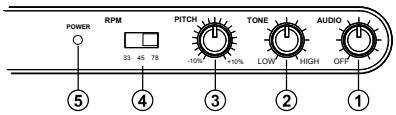
- Audio Level Control: This rotary control adjusts the volume level of the onboard speaker, headphone and line out outputs. NOTE: Make sure the Audio Level Control is set to OFF when connecting any alternate audio output devices.
-
Tone Control: This feature allows you to adjust the low and high frequency audio levels.
-
Pitch Control: This knob adjusts the pitch of the music + / - 10% . In the center position the pitch is at 0% .
NOTE: In order for the pitch to be adjusted, the tempo also changes according to what the pitch setting.
- RPM Selection Switch: This switch selects the RPM of the turntable platter -- 33, 45, and 78 RPM.
- Power LED: This LED indicates that the power switch on. Make sure the power is off when storing or transporting the unit, to avoid wasting battery power.
BATTERY INSTALLATION
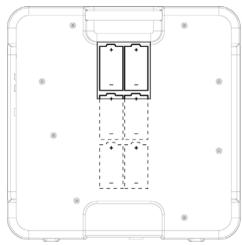
This product can be powered by 6 "D" Cell batteries. They should be loaded as show above, with the positive end toward the handle.
(ESPANOL) MANUAL DE COMENZO RAPIDO DEL LECTOR
CONTENIDO DE LA CAJA
IPTUSB
TRANSFORMADOR DE CORRIENTE
CORDON USB
- CD DE INSTALLACION
- MANUAL DE INICIO RÁPIDO DE IPTUSB
- MANUAL DE INICIO RÁPIDO DE EZ VINYL CONVERTER