
CASQUE QUIETCOMFORT 3 - Noise Cancelling Headphones BOSE - Free user manual and instructions
Find the device manual for free CASQUE QUIETCOMFORT 3 BOSE in PDF.



User questions about CASQUE QUIETCOMFORT 3 BOSE
0 question about this device. Answer the ones you know or ask your own.
Ask a new question about this device
Download the instructions for your Noise Cancelling Headphones in PDF format for free! Find your manual CASQUE QUIETCOMFORT 3 - BOSE and take your electronic device back in hand. On this page are published all the documents necessary for the use of your device. CASQUE QUIETCOMFORT 3 by BOSE.
USER MANUAL CASQUE QUIETCOMFORT 3 BOSE
Bose® QuietComfort® 3 Acoustic Noise Cancelling® Headphones
Owner's Guide
Brugervjledning
Bedienungsanleitung
Guía de uso
Please read this owner's guide
Please take the time to follow the instructions in this owner's guide carefully. It will help you to properly use your new Bose® product and enjoy its features. Please save this owner's guide for future reference.

WARNING
- To reduce the risk of fire or electric shock, do not expose the battery charger to rain or moisture. Do not expose the charger to dripping or splashing of liquids.
- The battery charger must be used indoors. It is neither designed nor tested for use outdoors, in recreation vehicles, or on boats.
- Charge the battery only on a charger approved by Bose Corporation. Do not continue charging the battery if it does not reach full charge within the specified charging time. Doing so may cause the battery to become hot, rupture, or ignite. If you see any heat deformation or leakage, properly dispose of the battery.
- Do not expose the battery to temperatures greater than 212^ ( 100^ ). If exposed to excessive heat, the battery can catch fire and explode.
- Do not place the battery in direct sunlight, or use or store it inside cars in hot weather where it can be exposed to temperatures in excess of 140^ ( 60^ ). Doing so may cause the battery to generate heat, rupture, or ignite. Using the battery in this manner also may result in a loss of performance and a shortened life expectancy.
- Do not short circuit the battery. Avoid placing it around metal objects such as keys, pocket change, paper clips, and jewelry.
- Do not hit the battery with a hammer, step on, throw or drop it to expose it to a strong shock. Do not pierce the battery with a sharp object such as a nail. Do not crush, dent, or deform the battery in any way. If the battery becomes deformed, properly dispose of it.
- The battery used in this device may present a risk of fire or chemical burn if mistreated. Do not disassemble, heat above 212^ (100^) , or incinerate. Replace battery with Bose part PC40229 only. Use of another battery may present a risk of fire or explosion.

CAUTIONS
- Do not allow the battery to get wet. Avoid using it in high humidity environments.
- Avoid electrostatic discharge to the battery.
- Do not drop or sit on the headphones, or allow them to be immersed in water.
- Long-term exposure to loud music may cause hearing damage. It is best to avoid extreme volume when using these headphones, especially for extended periods.
- Do not use these headphones when operating a motor vehicle on a public road, or where the inability to hear outside sounds may present a danger to you or others.
- Sounds that you rely on as reminders or warnings may have an unfamiliar character when you are using the headphones. Be aware of how these sounds vary in character, so you can recognize them as needed.

Please dispose of used or damaged batteries promptly and properly, following any local regulations. Keep away from children. Do not incinerate.
To return batteries for recycling, contact Bose or your Bose dealer. In the United States only, call 1-800-905-2180. For other regions, see the contact information on the inside back cover.

This product conforms to the EMC Directive 89/336/EEC and to the Low Voltage Directive 73/23/EEC. The complete Declaration of Conformity can be found at www.bose.com/static/compliance/index.html.
- Read these instructions - for all components before using this product.
- Keep these instructions – for future reference.
- Heed all warnings - on the product and in the owner's guide.
- Follow all instructions.
- Do not use this product near water or moisture - Do not use this product near a bathtub, washbowl, kitchen sink, laundry tub, in a wet basement, near a swimming pool, or anywhere else that water or moisture are present.
- Clean only with a dry cloth – and as directed by Bose Corporation. Unplug the battery charger from the wall outlet before cleaning.
- Do not block any ventilation openings. Install in accordance with the manufacturer's instructions.
- Do not install near any heat sources, such as radiators, heat registers, stoves, or other apparatus (including amplifiers) that produce heat.
- Only use attachments/accessories specified by Bose.
- Unplug the battery charger during lightning storms or when unused for long periods of time – to prevent damage to this product.
- Refer all servicing to qualified service personnel. Servicing is required when the apparatus has been damaged in any way: such as power-supply cord or plug is damaged; liquid has been spilled or objects have fallen into the apparatus; the apparatus has been exposed to rain or moisture, does not operate normally, or has been dropped – Do not attempt to service this product yourself. Opening or removing covers may expose you to dangerous voltages or other hazards. Please call Bose to be referred to an authorized service center near you.
Compliance with FCC rules (U.S.A., only)
This device complies with Part 15 of the FCC rules. Operation is subject to the following two conditions: (1) This device may not cause harmful interference, and (2) this device must accept any interference received, including interference that may cause undesired operation.
NOTICE
This equipment has been tested and found to comply with the limits for a Class B digital device, pursuant to Part 15 of the FCC rules. These limits are designed to provide reasonable protection against harmful interference in a residential installation. This equipment generates, uses, and can radiate radio frequency energy and, if not installed and used in accordance with the instructions, may cause harmful interference to radio communications. However, this is no guarantee that interference will not occur in a particular installation. If this equipment does cause harmful interference to radio or television reception, which can be determined by turning the equipment off and on, you are encouraged to try to correct the interference by one or more of the following measures:
Reorient or relocate the receiving antenna.
- Increase the separation between the equipment and receiver.
- Connect the equipment to an outlet on a different circuit than the one to which the receiver is connected.
- Consult the dealer or an experienced radio/TV technician for help.
FCC WARNING
- Changes or modifications not expressly approved by the party responsible for compliance could void the user's authority to operate this equipment.
- Proper connections must be used for connection to a host computer and/or peripherals in order to meet FCC emission limits.
Introducing the QuietComfort® 3 Acoustic Noise Cancellation® headphones
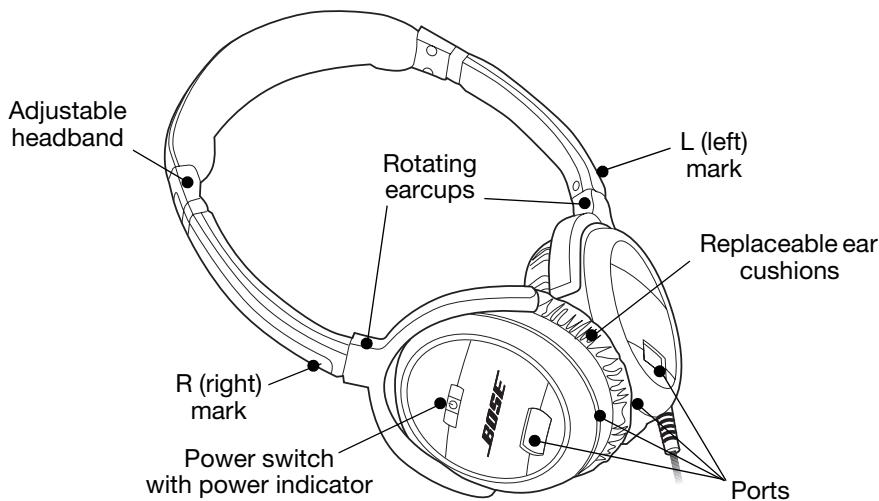
Thank you for purchasing the QuietComfort® 3 Acoustic Noise Cancelling® headphones from Bose. Our innovative technologies enable these on-ear headphones to reduce unwanted distractions while providing you with lifelike audio performance and a comfortable fit.
Accessories included:
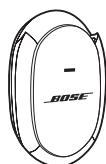
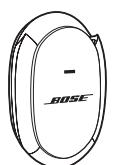
Battery charger

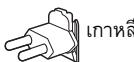
N. America/Japan

China

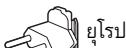
Europe

Korea

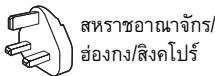
U.K./Hong-Kong/ Singapore
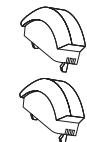
Batteries

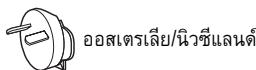
Australia/New Zealand
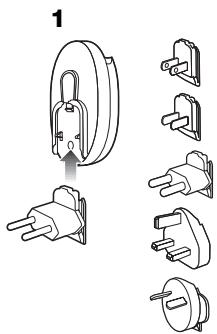
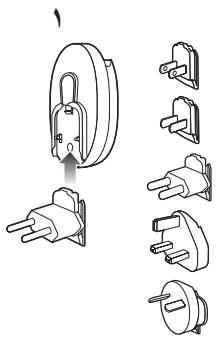
Battery charger plug adapters
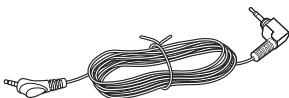
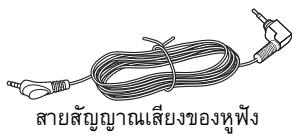
Headphones audio cord
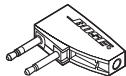
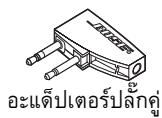
Dual-plug adapter
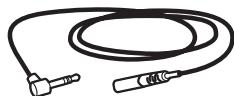
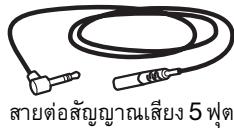
5 ft. (1.5 m) audio extension cord

114 in. (6.3 mm) stereo phone plug adapter
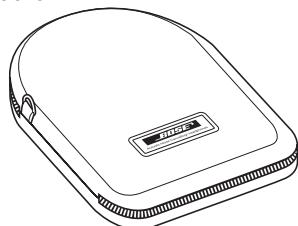
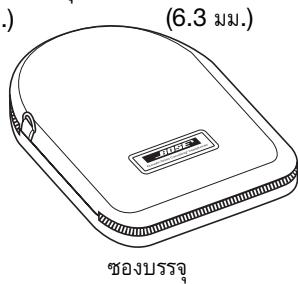
Carrying case
IMPORTANT: Before initial headphone use, it is important to fully charge the battery for a minimum of two hours. See "Charging the battery" on page 5.
Charging the battery
Initial charging time for a new battery is approximately two hours. After that, charging time varies depending on the battery charge state.
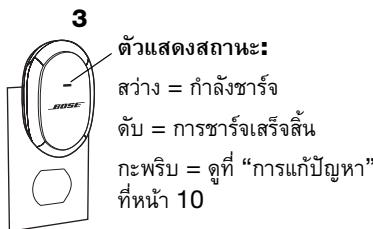
- Choose the correct plug adapter and attach it to the charger.
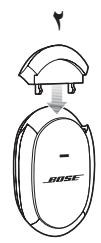
- Insert the battery into the charger.
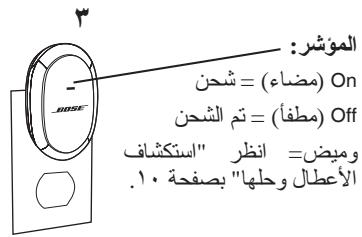
- Plug the charger into a live AC (mains) outlet.
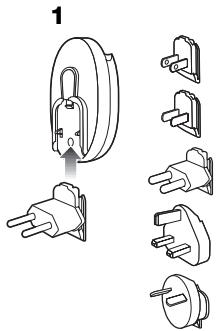
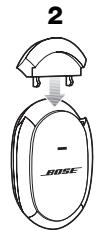
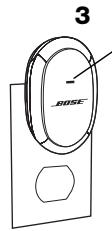
Indicator:
On = Charging
Off = Charging complete
Flashing = See
"Troubleshooting" on page 10.
IMPORTANT: DO NOT STORE A BATTERY IN THE CHARGER.
- After charging, unplug the battery charger and remove the battery.
- Storing a battery in the charger diminishes the charged state of the battery over time and may permanently reduce the capacity of the battery.
Battery handling and precautions
- The battery does not have to be completely discharged in order to charge it. You can charge the battery at any time.
- Never leave the battery in a discharged state. Charge after use and before storage.
- Avoid extreme temperatures when charging the battery. Battery charging should occur within the temperature range of 32^ (0^) to 95^ (35^) .
- A fully charged battery provides approximately 20 hours of use. Replace the battery when it no longer provides adequate power after charging. To order a replacement battery, see "Troubleshooting" on page 10.
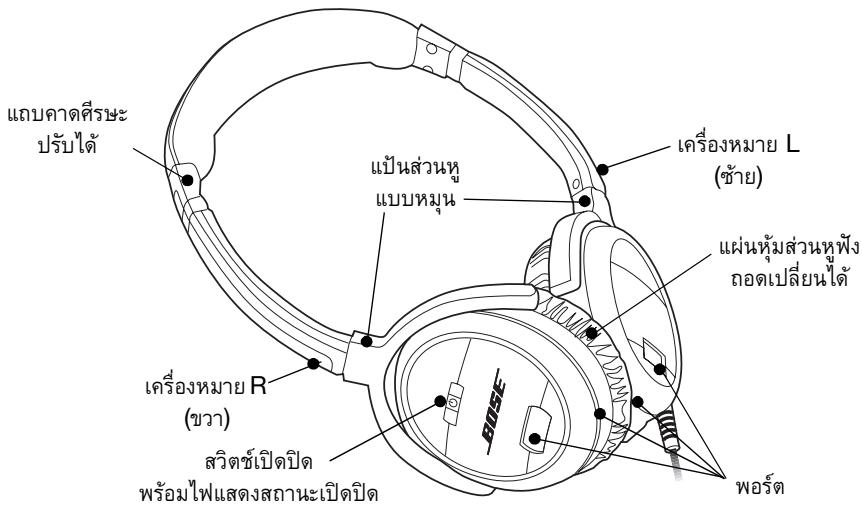
- Keep the terminals on the battery, in the charger, and in the right earcup of the headphones clean at all times. Dirty terminals may cause poor electrical connections and affect performance. For cleaning instructions, see "Cleaning" on page 10.
Installing the battery
Be sure to fully charge the battery before first use. See "Charging the battery" on page 5.
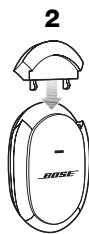
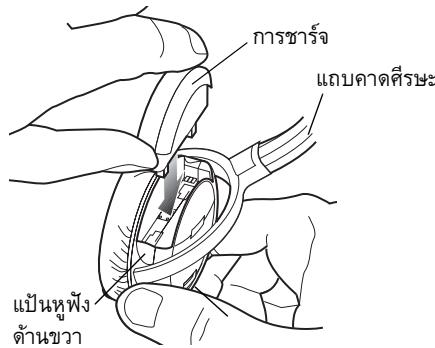
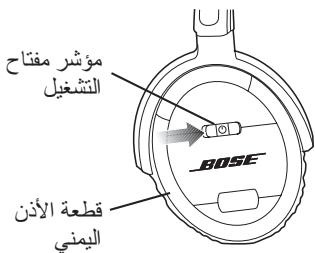
- Make sure the headphones power switch is off.
- Hold the headphones right earcup as shown.
- Insert the battery into the compartment. Be sure to push the battery all the way in until it is flush with the earmcup.
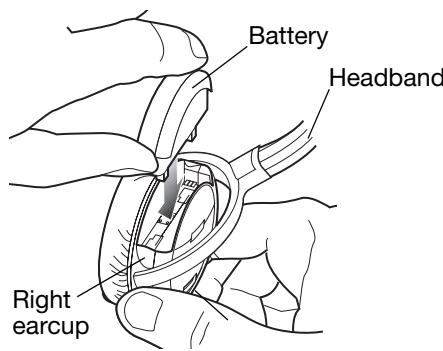
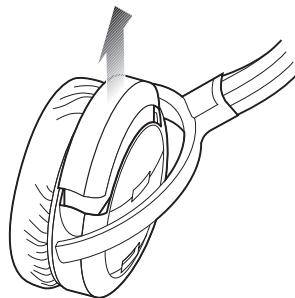
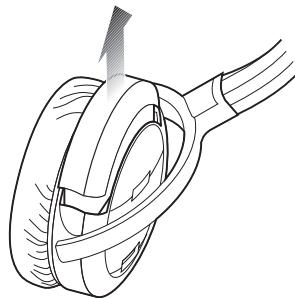
Removing the battery for charging
Perform Step 1 and 2 and lift the battery straight up and out of the battery compartment.
Wearing your headphones
You can use your headphones only for noise reduction or for listening to audio along with the benefit of noise reduction.
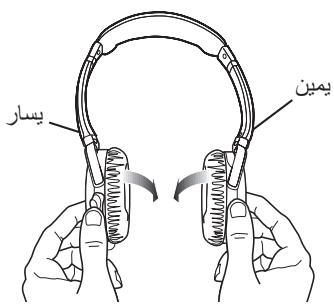
As you put on the headphones, observe the L (left) and R (right) markings that identify the left and right earcups. Adjust the headband so it rests gently on top of your head and the earcup cushions fit comfortably on your ears.
Using your headphones for audio with noise reduction
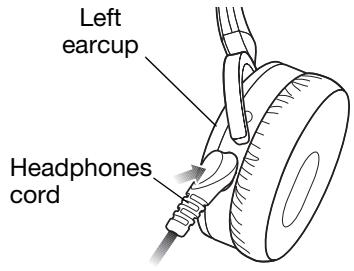
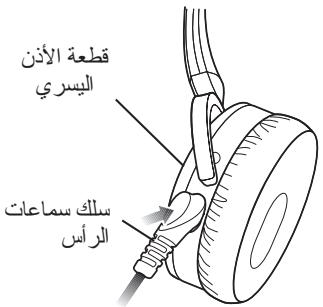
For listening to an audio source, you need to use the supplied headphones cord.
- Plug the appropriate end of the headphones cord into the left earcup.
- Plug the other end of the cord into the audio device (see "Connecting to portable and home audio devices" on page 8).
- Turn on the audio device, making sure the volume is initially set to a low level.
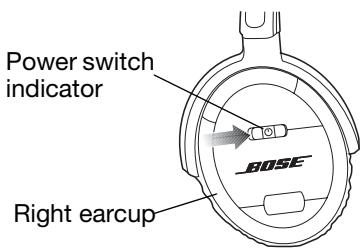
- Turn on your headphones. The power switch indicator should light.
- Set the volume level using the volume control on the audio device.
Using your headphones only for noise reduction
When using the headphones only for noise reduction, you do not need to connect the headphones cord. Just turn on your headphones and put them on your head.
When the battery needs charging
- When the power switch indicator starts flashing the battery is in a low-charge state. From the moment the indicator starts flashing, the battery has about four hours of life left.
- When replacing a battery, make sure you charge the new battery for a minimum of two hours. See "Charging the battery" on page 5.
- Before storing the battery for an extended period of time, fully charge the battery to maximize its life.
Connecting to portable and home audio devices
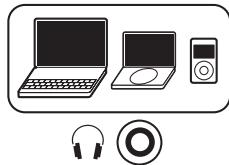
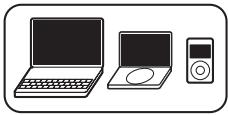
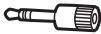
The 3.5 mm plug on the headphones cord allows you to connect your headphones to a variety of audio devices that use a 3.5 mm output jack:
- CD, DVD, or MP3/digital audio player
- Desktop or laptop personal computer
To connect to a home stereo system that has a 1/4 -in. (6.3 mm) stereo output jack, use the 1/4 -in. (6.3 mm) stereo adapter plug included with your headphones.
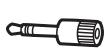
Plug the headphone cord into the stereo plug adapter and insert it into the output jack on your stereo system.
Connecting to airline audio systems
The audio output connections on airline audio systems vary, but they typically have dual or single 3.5mm output jacks.
Note: Airline audio may not equal the high-quality audio you experience from a home stereo or portable source.
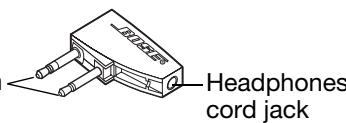
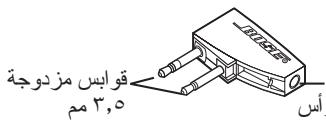
Connecting to dual output jacks
Plug the headphone cord into the dualplug adapter and insert it into the dual output jacks.

Dual 3.5 mm plugs
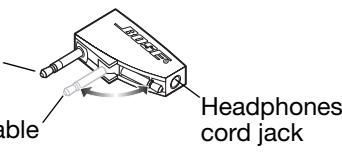
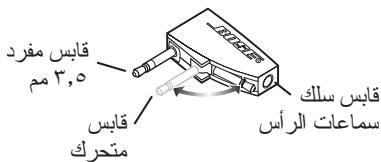
Connecting to a single output jack
Pivot the movable plug so that it snaps in place against the adapter body. Plug the headphone cord into the adapter and insert it into the single output jack.
The dual-plug adapter lowers the volume levels of strong audio output signals that
are common on airline systems. If you find that the volume level is too low, remove the adapter and plug the headphone cord directly into the 3.5 mm output jack.

Single 3.5 mm plug
Movable plug
Folding and storing
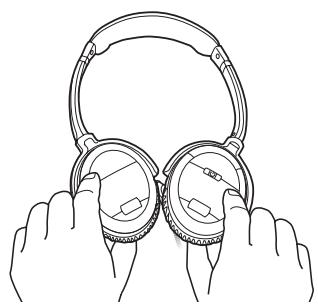
QuietComfort® 3 Acoustic Noise Cancelling® headphones feature rotating earcups that fold flat for easy, convenient storage.
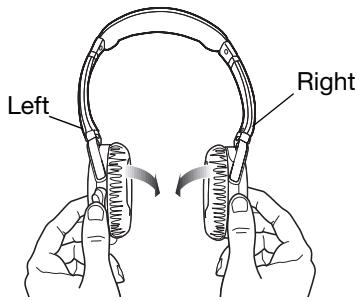
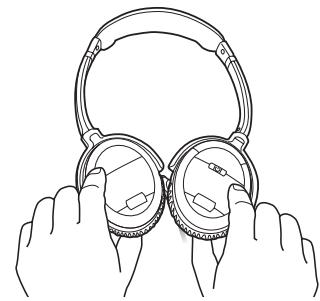
CAUTION: The earcups rotate only in one direction. Incorrectly rotating the earcups can damage the headphones.
Using the carrying case
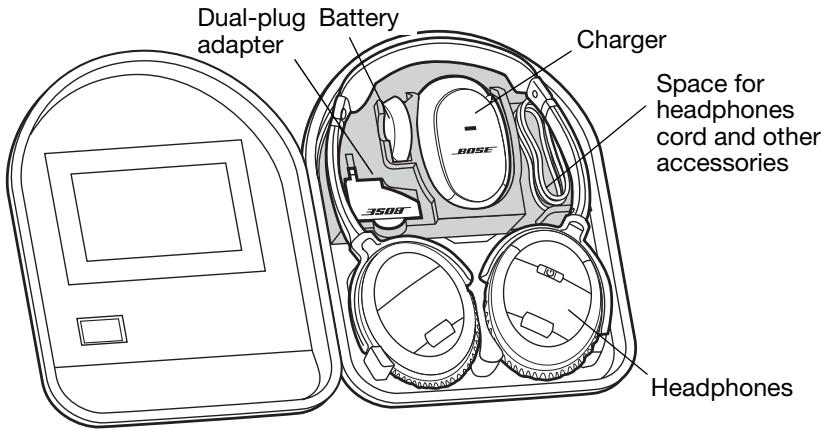
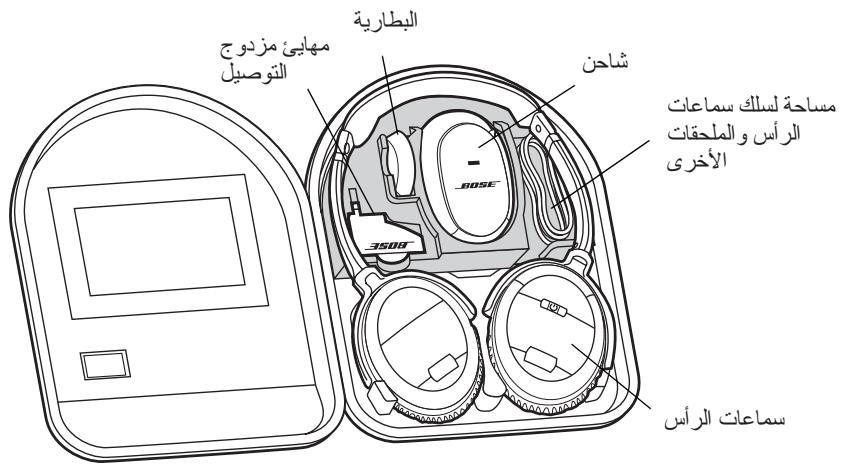
The carrying case provides safe storage for your headphones and its accessories. The foam tray holding the battery and charger is removable, allowing you to store other items, such as an MP3 player, in the case.
Note: To maximize battery life, always charge the battery before storing it and never store the battery in the charger.
Cleaning
Scheduled cleaning is not required. However, you can simply wipe the outside surface of the headphones with a damp cloth, as needed. Also, be sure that the earcup ports are clear and that no moisture is allowed into the earcups. Use only a dry cloth to clean the electrical contacts on the battery, in the charger, or in the battery compartment of the headphones.
CAUTIONS:
- Be sure to unplug the battery charger before cleaning it.
- DO NOT use a moist cloth to clean the electrical contacts on the battery, in the charger, or in the battery compartment of the headphones.
Troubleshooting
If you experience any trouble using your headphones, try the instructions in the following table. If you still need help, call for technical assistance. In the United States only, call 1-800-905-2180. For other regions, see the contact information on the inside back cover.
| Problem | What to do |
| No noise reduction | ·Make sure the headphones power switch is on. ·Charge the battery. |
| Low or no volume | ·Make sure the audio source is on and the volume is turned up. ·Do not use the dual-plug adapter. ·Check the headphones cord connection at the source and the earcup. |
| Crackling noise; intermittent loss of noise reduction | ·Charge the battery. ·Clean the contacts on the battery and in the battery compartment. See “Cleaning” on page 10. ·Replace the battery. |
| Low rumbling sound | ·Adjust earcup fit on your ears. ·Make sure earcup ports are not blocked. |
| Charger indicator is flashing | ·Remove the battery, wait 10 seconds, and insert it again. ·Unplug the charger, wait 10 seconds, and plug it in again. ·Make sure the air temperature is within the acceptable range for charging, 32°F (0°C) to 95°F (35°C). ·Replace the battery. ·Replace the charger. |
| Short battery life after charging | ·Replace the battery. ·Replace the charger. |
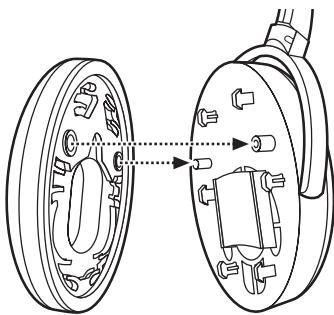
Reattaching earcup cushions
If an earcup cushion becomes detached from the earcup:
- Align the two holes on the back of the cushion with the two posts on the earcup.
- Push the cushion onto the earcup.
- Press in around the outside edge of the cushion to snap it in place.
- Make sure the cushion is flush all the way around and that there are no gaps between the cushion and the earcup.
Accessories
You can purchase accessories from your Bose® dealer, on the internet (www.bose.com), or by placing an order over the phone. See the inside back cover for contact information.
- Battery
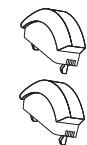
- Replacement ear cushions
- Battery charger
- Accessory kit (includes adapters and extension cord)
- Carrying case
Power ratings
Battery charger: 100VAC - 240VAC, 5.5W Battery: 3.7VDC, 200mAh
WAARSCHUWING VAN DE FCC
EMC Directive 89/336/EEC Low Voltage
Directive 73/23/EEC 15000000000000000000000000000000000000000000000000000000000000000000000000000000000000000000
- 1
- 1
- 157017272727272727
- 电
- 1
- 田
- 田()
- 1uoguiunuaouo/ouunueauBose
- nanaananaananaananaananaananaananaananaananaananaananaananaananaananaananaananaananaananaananaananaananaananaananaananaananaananaananaananaananaananaananaananaananaananaananaananaananaananaananaananaananaananaananaananaananaananaananaananaananaananaanana
- 1
FCC (w
nnaeaeeneaee n 15 nee e ee FCC nne nane aen ananen anen anen anen anen (1) nne nne nne nne nne nne nne nne nne nne nne nne nne nne nne nne nne nne nne nne nne nne nne nne nne nne nne nne nne nne nne nne nne nne nne nne nne nne nne nne nne nne nne nne nne nne nne nne nne nne nnee
J
fCFC 15 10000000000000000000000000000000000000000000000000000000000000000000000000
QuietComfort 3 Acoustic Noise Cancelling
Qeet Cnng 3 Acoustic Noise Cancelling nn Bose
y
unnnnnae
1.11100
aunnnnna

aunnnnnae annnnnne nnnnnnne aannnne
(1.5 u.)
山

5
n723 00000000
y
- 1
2017年:
- wannnnnnae nnne nnnnnae annnnae annnnae aannee
- 1
nnaananaananaananaananaananaananaananaananaananaananaananaananaananaananaananaananaananaananaananaananaananaananaananaananaananaananaananaananaananaananaananaananaananaananaananaananaananaananaananaananaananaananaananaananaananaananaananaananaananaananaanaraannananana anannannannannannannannannannannannannannannannannannannannannannannannannannannannannannannannannannannannannannannannannannannannannannannannannannannannannannannannannannannannannannannannannannannannannannannannannannannannannannannannannannannannannannannannannannannannannnnnnnnnnnnnnnnnnnnnnnnnnnnnnnnnnnnnnnnnnnnnnnnnnnnnnnnnnnnnnnnnnnnnnnnnnnnnnnnnnnnnnnnnnnnnnnnnnnnnnnn
- ·
- 95°F (35°C)
10
“nnaananaananaananaananaananaananaananaananaananaananaananaananaananaananaananaananaananaananaananaananaananaananaananaananaananaananaananaananaananaananaananaananaananaananaananaananaananaananaananaananaananaananaananaananaananaananaananaananaananaananaanaraannnnnnnnnnnnnnnnnnnnnnnnnnnnnnnnnnnnnnnnnnnnnnnnnnnnnnnnnnnnnnnnnnnnnnnnnnnnnnnnnnnnnnnnnnnnnnnnnnnnnnnnnnnnnnnnnnnnnnnnnnnnnnnnnnnnnnnnnn
mnnnne
y
- 3.
7777777777
nunw 1 u2 2 nnnnnaaannn
mnnnne
y
©2006 Bose Corporation. <|im_start|>assistant ©2006 Bose Corporation. <|im_start|>assistant ©2006 Bose Corporation. <|im_start|>assistant ©2006 Bose Corporation. <|im_start|>assistant ©2006 Bose Corporation. <|im_start|>assistant ©2006 Bose Corporation. <|im_start|>assistant ©2006 Bose Corporation. <|im_start|>assistant ©2006 Bose Corporation. <|im_start|>assistant ©2006 Bose Corporation. <|im_start|>assistant ©2013 BDOX, Inc. ©2013 BDOX, Inc. ©2013 BDOX, Inc. ©2013 BDOX, Inc. ©2013 BDOX, Inc. ©2013 BDOX, Inc. ©2013 BDOX, Inc. ©2013 BDOX, Inc. ©2013 BDOX, Inc. ©2013 BDOX, Inc. ®
垣公OoI OoI OoI OoI OoI OoI OoI OoI OoI OoI OoI OoI OoI OoI OoI OoI OoI OoI OoI OoI OoI OoI OoI OoI OoI OoI OoI OoI OoI OoI OoI OoI OoI OoI Ooo
a a a a a a a a a a a a a a a a a a a a
i 1
jai 1
g j 1
l_g( 1) ≤ L ≤ 0
1 2 3 4 5 6 7 8 9
L
(www.bose.com)
aill llll 1000 gall llll 1000
jdlalwglld
(yaiellwagjiaj)clllall
Jaaie
Aolll Li
1000
aclw ylll 1. . jaiu Jy Cg, V:
a jll ic a iiaaii aaii aiil cai lal g jlll bail wai kai yai gao j uai lii aaiy 1000000000000000000000000000000000000000000000000000000000000
:
aaii i 1
y
J
LgUgJbcIc
aellal lal 1-800-905-2180 aaii aai i
ailllll lglgagall llaal
| الل | العربية |
| .العربية الحرفية حسيلة ممن نهير لاني بعس و صحيى . . . . . . . . . . . . . . . . . . . . . . . . . . . . . . . . . . . . . . . . . . . . . . . . . . . . . . . . . . . . . . . . . . . . . . . . . . . . . . . . . . . . . . . . . . . . . . . . . . . . . .العربية الحرفية الحرفية ممن نهير لاني بعس و صحيى . . . . . . . . . . . . . . . . . . . . . . . . . . . . . . . . . . . . . . . . . . . . . . . . . . . . . . . . . . . . . . . . . . . . . . . . . . . . . . . . . . . . .. .العربية الحرفية الحرفية ممن نهير لاني بعس و صحيى . . . . . . . . . . . . . . . . . . . . . . . . . . . . . . . . . . . . . . . . . . . . . . . . . . . . . . . . . . . . . . . . . . . . . . . . . . .. .العربية الحرفية الحرفية ممن نهير لاني بعس و صحي芮. .العربية الحرفية الحرفية ممن نهير لاني بعس و صحي芮. .العربية الح註冊. .العربية الح註冊. .العربية الح註冊. .العربية الح註冊. .العربية الح註冊. .العربية الح註冊. .العربية الح註冊. .العربية الح註冊. .العربية الح註冊. .العربية الح註冊. .الع-ie. .الع-ie. .الع-ie. .الع-ie. .الع-ie. .الع-ie. .الع-ie. .الع-ie. .الع-ie. .الع-ie. .الع-ie. .الع-ie. .الع-ie. .الع-ie. .الع-ie. .الع-ie. .الع-ie. .الع-ie. .الع-ie. .الع-ie. .الع PIE. .الع PIE. .الع PIE. .الع PIE. .الع PIE. .الع PIE. .الع PIE. .الع PIE. .الع PIE. .الع PIE. .الع PIE. .الع PIE. .الع PIE. .الع PIE. .الع PIE. .الع PIE. .الع PIE. .الع PIE. .الع PIE. .الع PIE. .العPie. .العPie. .العPie. .العPie. .العPie. .العPie. .العPie. .العPie. .العPie. .العPie. .العPie. .العPie. .العPie. .العPie. .العPie. .العPie. .العPie. .العPie. .العPie. .العPie. .العpie. .العpie. .العpie. .العpie. .العpie. .العpie. .العpie. .العpie. .العpie. .العpie. .العpie. .العpie. .العpie. .العpie. .العpie. .العpie. .العpie. .العpie. .العpie. .العpie. .الع pie. .العpie. .العpie. .العpie. .العpie. .العpie. .العpie. .العpie. .العpie. .العpie. .العpie. .العpie. .العpie. .العpie. .العpie. .العpie. .العpie. .العpie. .العpie. .العpie. .العPie. .العpie. .العpie. .العpie. .العpie. .العpie. .العpie. .العpie. .العpie. .العpie. .العpie. .العpie. .العpie. .العpie. .العpie. .العpie. .العpie. .العpie. .العpie. .العPie. .العPie. .العpie. .العpie. .العpie. .العpie. .العpie. .العpie. .العpie. .العpie. .العpie. .العpie. .العpie. .العpie. .العpie. .العpie. .العpie. .العpie. .العpie. .العPie. .العpie. .العPie. .العpie. .العpie. .العpie. .العpie. .العpie. .العpie. .العpie. .العpie. .العpie. .العpie. .العpie. .العpie. .العpie. .العpie. .العpie. .العpie. .العpie. .العPie. .العPie. .العPie. .العpie. .العpie. .العpie. .العpie. .العpie. .العpie. .العpie. .العpie. .العpie. .العpie. .العpie. .العpie. .العpie. .العpie. .العpie. .العpie. .العPie. .العpie. .العpie. .العPie. .العpie. .العpie. .العpie. .العpie. .العpie. .العpie. .العpie. .العpie. .العpie. .العpie. .العpie. .العpie. .العpie. .العpie. .العpie. .العpie. .العPie. .العpie. .العPie. .العPie. .العpie. .العpie. .العpie. .العpie. .العpie. .العpie. .العpie. .العpie. .العpie. .العpie. .العpie. .العpie. .العpie. .العpie. .العpie. .العpie. .العPie. .العPie. .العpie. .العPie. .العpie. .العpie. .العpie. .العpie. .العpie. .العpie. .العpie. .العpie. .العpie. .العpie. .العpie. .العpie. .العpie. .العpie. .العpie. .العpie. .العPie. .العPie. .العPie. .العPie. .العpie. .العpie. .العpie. .العpie. .العpie. .العpie. .العpie. .العpie. .العpie. .العpie. .العpie. .العpie. .العpie. .العpie. .العpie. .العPie. .العpie. .العpie. .العpie. .العPie. .العpie. .العpie. .العpie. .العpie. .العpie. .العpie. .العpie. .العpie. .العpie. .العpie .العpie .العpie .العpie .العpie .العpie .العpie .العpie .العpie .العpie .العpie .العpie .العpie .العpie .العpie .العpie .العpie .العpie .العpie .العpie .العpie. .العpie .العpie .العpie .العpie .العpie .العpie .العpie .العpie .العpie .العpie .العpie .العpie .العpie .العpie .العpie .العpie .العpie .العpie .العpie. .العpie. .العpie .العpie .العpie .العpie .العpie .العpie .العpie .العpie .العpie .العpie .العpie .العpie .العpie .العpie .العpie .العpie .العpie .العpie |
Jusu Jusu Jusu Jusu Jusu Jusu Jusu Jusu Jusu Jusu Jusu Jusu Jusu Jusu Jusu Jusu Jusu Jusu Jusu Jusu Jusu Jusu Jusu Jusu
aai jai jai jai
i 1
Jaaie
Laa Jauu, a yjaiy jaii yai i yaiy i yaiy i yaiy i yaiy i yaiy i yaiy i yaiy i yaiy i yaiy i yaiy i yaiy i yaiy i yaiy i yaiy i yaiy i yaiy i yaiy i yaiy i yaiy i yaiy i yaiy i yaiy i yaiy i yaiy i yaiy i yai
MP3 Jia 120 120
Jalllg lllba liy jia puc yuy, gaiy / / la lac yu bly / ly jia / / ay jybu/ juy la /

a jiaai g aagaaal o gao
j 10
a 10 j 100
MP3 DVD CD
Jaa JcKa 1
1/4 1/4 1/4 1/4 1/4 1/4 1/4 1/4 1/4 1/4 1/4 1/4 1/4 1/4
cll cllaw 2gall (al7,1)
aaii i 1

gagagagagagagagagagagagagagagagagagagagagagagagagagagagagagagagagagagagagagagagagagagagagagagagagagagagagagagagag
jLslole jyie ayall bgbill cysa yll
4
j 1 j 1 j 1 j 1 j 1 j 1 j 1 j 1 j 1 j 1 j 1 j 1 j 1 j 1 j 1 j 1 j 1 j 1 j 1 j 1 j 1 j 1 j 1 j 1 j 1 j 1 j 1 j 1 j 1 j 1 j 1 j 1 j 1 j 1
Jg jjio jiu Jua


a
a
j 1
.
#
a jaiy a jaiy a jaiy a jaiy a jaiy a
a
aannnnn nn nnnnnn
jai jai
y
a a a a a a a a a a a a a a a a a a a a a a a a a a
A
Jr JcLw 1
aaii iiaii 1 aiei iiaii iiaii iiaii iiaii iiaii iiaii iiaii iiaii iiaii iiaii iiaii iiaii iiaii iiaii iiaii iiaii iiaii iiaii iiaii iiaii iiaii iiaii iiaii iiaii iiaii iiaii iiaii iiaii iiaii iiaii iiaii iiaii iiaii iiaii
e gagaaagaaagaaagaaagaaagaaagaaagaaagaaagaaagaaagaaagaaagaaagaaagaaagaaagaaagaaagaaagaaagaaagaaagaaagaaagaaagaaagaaagaaagaaagaaagaaagaaagaaagaaagaaagaaagaa
Jn Jn Jn Jn Jn Jn Jn Jn Jn Jn Jn Jn Jn Jn Jn Jn Jn Jn Jn Jn Jn Jn Jn Jn Jn Jn Jn Jn Jn Jn
.
clceau jao dall ooll
J 1
1
gall jzjll (jzill)
(Λαιαγίν)“aβjiallglal
Joo 10000000000000000000000000000000000000
ailll laiiaic gail
i 1
L
Ciiia 1i i 1i 1i 1i
g 2 g aal g aal g
i
Lao gai
Jalillll lalssy jg cysall ssjill 1
Jbll Jbll
Jaaa jaii Jill gis 1ay jaii Jaa
J 1
a
aaiiie iiee ie eieieieieieieieieieieieieieieieieieieieieieieieieieieieieieieieieieieieieieieieieie
a 1
a 1
i j sill g d y g i a p. lalbae ie ia aai al
J 1
()()
aLs aIb jgi jc jaoia Iocic ayjball uJyau pa, piauui Jn oae L · gai JolSly aiaiaiaai ayjball jgi
- 4a: "IeJg UbcI IiLil" Jbi iOy yjbl, jaii
aillll lgl gaiiall gale gall -alil
i
a 10
y 1 y
aillly glll lal l Jaiy a. Bose ai y ci y gi - bie ay iae aee
AaBaa
Cilll 4y Cllaii y jll p. aygill ciee aay pa
aal alalalalalalalalalalalalalalalalalalalalalal
oall oai jaiil piaiail aji
U FCC 11111111111111111111111111
1
e 1
Bose
#
clall gaaag aegg wglal glll clll alal
aie aiee eae eae eae eae eae eae eae eae eae eae eae eae eae eae eae eae eae eae eae eae eae eae eae eae eae eae eae eae eae eae eae eae eae eae eae eae eae eae eae eae eae eae eae eae
aIygbcljialogos,ajllcLaw
alaw jzll Kiy d laie gle yj bge o jy jil jil cldlaw piai w
i 1
a 1
jllie lle cilll laii iiai 10aia aiae
a a a a a a a a a a a a a a a a a a a a a a a a a
LjIJIJIJIJIJIJIJIJIJIJIJIJIJIJIJIJIJIJIJIJIJIJIJIJIJIJIJIJIJIJIJIJIJIJIJIJIJIJIJIJIJIJIJIJIJIJIJIJIJIJIJIJIJIJIJIJIJIJIJIJIJIJIJIJIJIJIJIJIJIJIJIJIJIJIJIJIJIJIJIJIJIJIJIJIJIJIJIJIJIJIJIJIJIJIJIJIJIJIJIJIJ
73/23/EEC EMC Directive 89/336/EEC A a a a a a a a a a a a a a a a a a a a
- Bose® QuietComfort® 3 Acoustic Noise Cancelling® Headphones
- Please read this owner's guide
- WARNING
- CAUTIONS
- Please dispose of used or damaged batteries promptly and properly, following any local regulations. Keep away from children. Do not incinerate.
- Compliance with FCC rules (U.S.A., only)
- NOTICE
- FCC WARNING
- Introducing the QuietComfort® 3 Acoustic Noise Cancellation® headphones
- Accessories included:
- Charging the battery
- Indicator:
- IMPORTANT: DO NOT STORE A BATTERY IN THE CHARGER.
- Battery handling and precautions
- Installing the battery
- Removing the battery for charging
- Wearing your headphones
- Using your headphones for audio with noise reduction
- Using your headphones only for noise reduction
- When the battery needs charging
- Connecting to portable and home audio devices
- Connecting to airline audio systems
- Connecting to dual output jacks
- Connecting to a single output jack
- Folding and storing
- Using the carrying case
- Cleaning
- CAUTIONS:
- Troubleshooting
- Reattaching earcup cushions
- Accessories
- Power ratings
- WAARSCHUWING VAN DE FCC
- FCC (w
- J
- QuietComfort 3 Acoustic Noise Cancelling
- n723 00000000
- nnaananaananaananaananaananaananaananaananaananaananaananaananaananaananaananaananaananaananaananaananaananaananaananaananaananaananaananaananaananaananaananaananaananaananaananaananaananaananaananaananaananaananaananaananaananaananaananaananaananaananaanaraannananana anannannannannannannannannannannannannannannannannannannannannannannannannannannannannannannannannannannannannannannannannannannannannannannannannannannannannannannannannannannannannannannannannannannannannannannannannannannannannannannannannannannannannannannannannannannannannnnnnnnnnnnnnnnnnnnnnnnnnnnnnnnnnnnnnnnnnnnnnnnnnnnnnnnnnnnnnnnnnnnnnnnnnnnnnnnnnnnnnnnnnnnnnnnnnnnnnnn
- mnnnne
- 7777777777
- L
- Aolll Li
- LgUgJbcIc
- a jiaai g aagaaal o gao
- gagagagagagagagagagagagagagagagagagagagagagagagagagagagagagagagagagagagagagagagagagagagagagagagagagagagagagagagag
- a
- #
- Jr JcLw 1
- e gagaaagaaagaaagaaagaaagaaagaaagaaagaaagaaagaaagaaagaaagaaagaaagaaagaaagaaagaaagaaagaaagaaagaaagaaagaaagaaagaaagaaagaaagaaagaaagaaagaaagaaagaaagaaagaaagaa
- i
- Lao gai
- a 1
- 1
Brand : BOSE
Model : CASQUE QUIETCOMFORT 3
Category : Noise Cancelling Headphones