USER MANUAL C65 PLANTRONICS
Plantronics Acoustics
Italia Srl
Milano, Italia
Numero Verde: 800 950934
+39029511900
Plantronics B.V.
Plantronics Iberia, S.L.
Madrid, Espana
Tel: 902 41 51 91
+34916404744
Plantronics Sarl
Noisy-le-Grand, France
No Indigo: 0825 0825 99
0,15∈T°C/mn
+33 (0)1 41 67 41 41
Nordic Region
Tel: Finland: 0201 550 550
Tel: Sverige: 031 28 95 00
Tel: Danmark: 44 35 05 35
Plantronics Middle East,
Eastern Europe, Africa
and India
Tel: +44 (0)1793 842443
Plantronics Ltd, Interface Business Park, Bincknoll Lane,
Wootton Bassett, Wiltshire SN4 8QQ. ENGLAND
www.plantronics.com

PLANTRONICS
World Leader in Communications Headsets

36923-01 Rev A
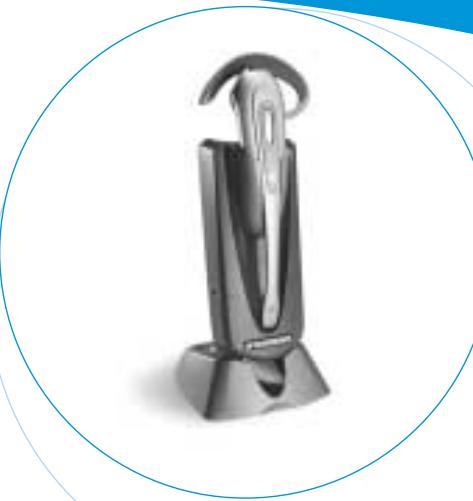
C65 DECT™
WIRELESS
HEADSET SYSTEM
User Guide
Bedienungsanleitung
Brugervejledning
Manual del usuario
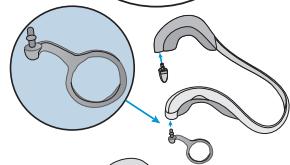
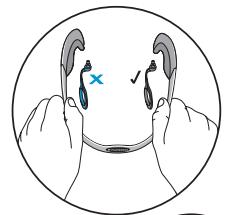
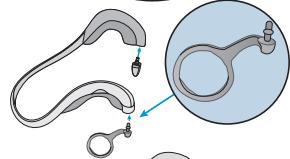
NECKBAND Available only as an accessory.
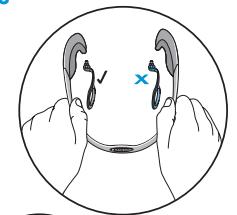
FIG.3.3
LISTEN VOLUME ADJUST
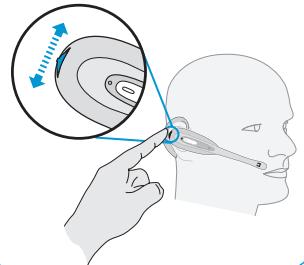
FIG.4.1
MUTE FEATURE
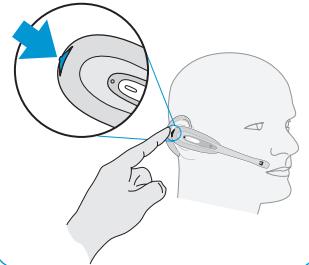
FIG.4.2
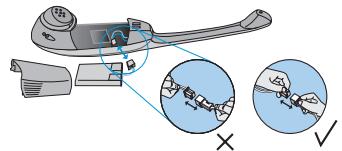
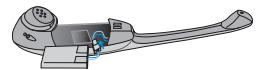
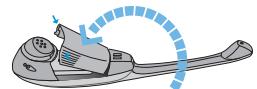
INSTALLING A REPLACEMENT BATTERY
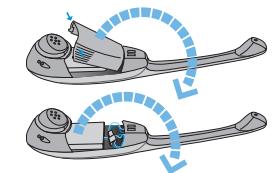
FIG.5
UK ENGLISH
Page 6-13
D DEUTSCH
Seite 14-21
DK DANSK
Side 22-29
E ESPANOL
Pagina 30-37
F FRANÇAIS
Page 38-45
ITALIANO
Pagina 46-53
N NORSK
Side 54-61
NL NEDERLANDS
Pagina 62-71
P PORTUGUES
Pagina 72-79
SF SUOMI
Sivut 80-87
S SVENSKA
Sida 88-97
Plantronics 2 year Warranty and Repair Service
UK Products under warranty are replaced free of charge.
All units serviced to full production standards using original factory parts.
0800 410014
Produkte werden innerhalb der Garantizezeit kostenfrei repartiert oder ersetzt.
Der Service erfolgt gemäß den Produktionsstandards unter Verwendung von Originalteilen. 02222/8302-134
DK - Produktur daskket of garanti vil blive ombyett unden beregnung.
Alle eheder efterses i henhold til produktionsstandards og ved brug af origine fabriksede. +45 44 35 05 35
Los productos en periodo de garantia seran reparados libre de cargos.
- Todas las unidas de preparadas seguinsteindures defunacionamento a pleno rendimiento con piezas originales de fabricula. 902 415191
F Les produits sous garantie sont replacees gratuitelement.
Les réparations répondent aux normes de production et mettent en œuvre des pieces d'origine. 0825 0825 99
I prodotti in garanzia verranno sottulti gratuitemente.
L'assistenza di tutte le unita viene effettuta in conformità con gli standardi produzione utilizzando porti di ricombio originali. 02 9511900
N Produktet erstattes freiigaritperiode.
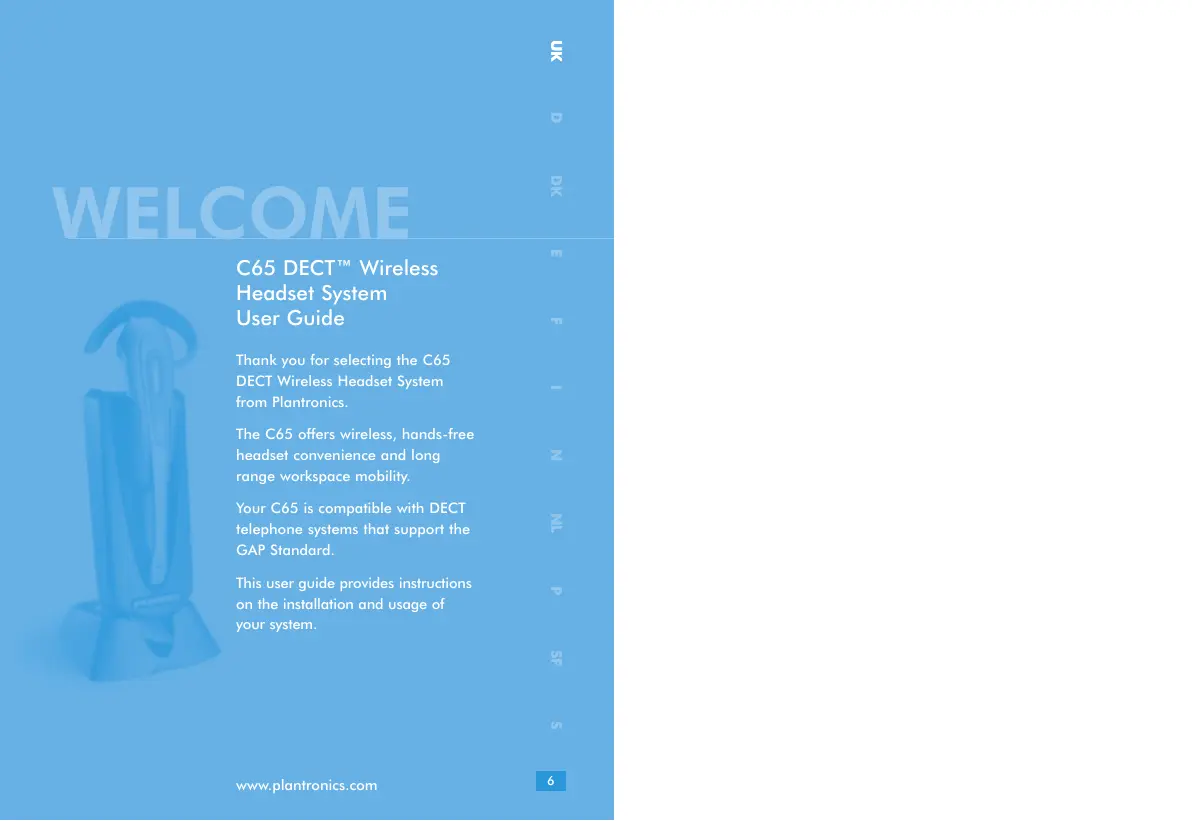
Thank you for selecting the C65 DECT Wireless Headset System from Plantronics.
The C65 offers wireless, hands-free headset convenience and long range workspace mobility.
Your C65 is compatible with DECT telephone systems that support the GAP Standard.
This user guide provides instructions on the installation and usage of your system.
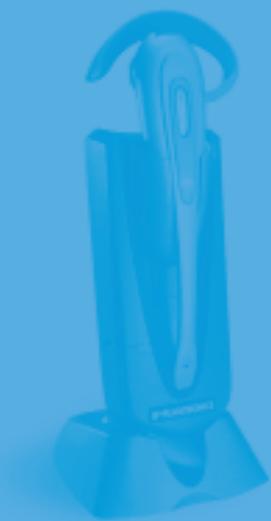
DIAGRAM KEY
HEADSET
1 Microphone
2 Speaker
3 Talk Button
4 Volume/Mute Control
5 On-line Indicator
6 Charge Contacts
7 Battery Door
DESK CHARGER
8 AC Power Adapter
9 AC Power Adapter Port
10 Headset Docking Cradle
11 Charge Contacts
12 Charge Indicator
13 Power Indicator
14 Stand
15 Stand Pegs
16 Desk Charger Module
Please read the following instructions before use:
General:
- Operating temperature +4^ to +49^ .
- Storage temperature +4^ to +49^ .
-
The product is suitable for indoor use only.
To reduce the risk of electric shock, explosion or fire:
-
Use only the AC power adapter supplied.
- Ensure that the voltage rating (e.g. 230V 50Hz) corresponds to the local mains supply you intend to use.
- Use only the correct battery type - part number - 64327-01.
- Do not disassemble the product.
- Keep all products, cords and cables away from operating machinery.
- Avoid contact with liquids.
Battery Safety:
Plantronics B.V. hereby declares that this C65 DECT Wireless Headset System is in compliance with the essential requirements and other relevant provisions of Directive 1999/5/EC.
The C65 complies with the EU recommendations on human exposure to electromagnetic fields.
1. GETTING STARTED
To use your Plantronics C65 DECT Headset System, please follow these simple steps:
- Install your C65 desk-charger.
- Charge your headset battery.
- Register your headset to your DECT telephone.
- Choose you headset wearing style.
INSTALLING THE DESK CHARGER
To install the desk-charger simply connect to the AC Power Adapter as shown in Fig. 2 on page 1. Then attach the stand by inserting the Stand Pegs into the locating holes on the underside of the Desk Charger Module.
This will create the finished desk charger assembly (refer to Fig.3, page 1).
CHARGING THE BATTERY
To charge the headset battery, place the headset into the DOCKING CRADLE. During charging the CHARGE indicator will be illuminated. When the headset is fully charged, the CHARGE indicator will extinguish.
The headset must be charged for a minimum of 1 hour prior to use - 3 hours to fully charge.
REGISTERING YOUR HEADSET
Prior to using your C65 headset for the first time, you MUST register(1) it with your DECT telephone.
Before attempting to register the C65 headset, first read the instructions for registering a new DECT handset in the manual supplied with your DECT telephone. The process for registering the C65 headset will be very similar and the information below describes the registration sequence for a typical DECT telephone.
- Change the system Authentication code of your DECT telephone to 0000 to match the preset PIN of the C65 headset. Your DECT telephone manual will describe how to do this.
Note: Many DECT telephones already use 0000 as their default Authentication code, so you may not need to change it.
- Place the DECT telephone base in subscription mode by following the instructions in your DECT telephone manual.
- Do not follow the DECT telephone manual instructions to place the handset in registration mode as this will register the handset rather than the headset. Instead, activate headset registration mode by PRESSING the Volume Mute Control as if to activate Mute (see Fig 4.2) but HOLDING until the ON-LINE indicator illuminates.
- Complete registration by following any remaining instructions in your DECT telephone manual.
Important: Your DECT telephone system must comply with the Generic Access Protocol (GAP) standard to work with the C65 headset. Most modern DECT systems comply with the GAP specification, but some older systems may not. If in doubt, check the documentation supplied with your DECT telephone.
For more information, visit www.plantronics.com which provides a list of compatible DECT telephone systems and provides detailed headset registration instructions for the most common models of DECT telephone.
(1) Registration is sometimes also referred to as subscription or pairing.
CHOOSE YOUR HEADSET WEARING STYLE
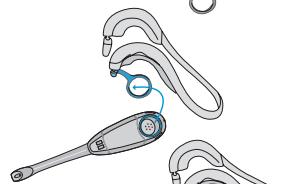
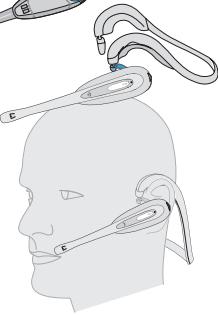
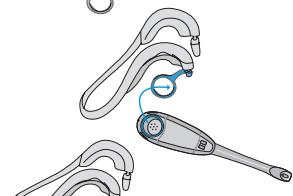
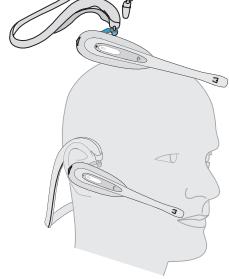
The C65 is provided with a choice of headband and earloop (3 sizes) wearing styles. A neckband is also available as an accessory. Refer to pages 2-3 for instructions on how to connect and adjust your choice of wearing style.
2. USING YOUR HEADSET
ANSWERING A CALL
To answer a call, wait for the headset to ring, then PRESS and RELEASE the TALK button.
MAKING A CALL
- Initiate a call by dialling using your telephone keypad and wait for the call to connect. You can then continue your call using the handset or transfer the call to your headset.
- To take the call on your headset, follow the instructions in your DECT telephone manual for transferring a call to another registered handset and select the internal extension identifier[2] for the headset as the transfer destination device.
- The ring tone will then sound in the headset. PRESS the headset TALK Button to complete the transfer, and continue with your call using the headset.
[2] The headset internal identifier is assigned during the registration process, but can normally be modified if desired. Consult your DECT telephone manual for more information.
ADJUSTING THE LISTEN VOLUME
See Fig. 4.1 on page 4.
MUTE FEATURE
The mute feature, when activated, allows you to hear the person you are calling, but they cannot hear you.
To mute a call PRESS and RELEASE the VOLUME/MUTE control (see Fig.4.2 on page 4). Two tones indicate the mute feature is on. Whilst mute is enabled, the headset also sounds two short tones every 15 seconds.
To de-activate mute, PRESS and RELEASE the VOLUME/MUTE control again.
3. AUDIBLE WARNINGS
The headset provides status information and signals a warning by sounding beeps as described below:
| Condition | Warning | Corrective Action |
| C65 is at maximum operating distance from your DECT telephone | DOUBLE beep | Walk closer to your DECT telephone base |
| Battery charge level is low | SINGLE beep every 10 seconds | Re-charge the headset battery immediately |
| MUTE on | DOUBLE beep every 15 seconds | Press the VOLUME/MUTE button to deactivate mute |
4. REPLACING THE BATTERY
To install a new battery, please refer to Fig.5 on page 4.
5. TROUBLESHOOTING
PROBLEM
My headset stops responding to button presses.
Remove and re-install the battery pack (see Fig.5 on page 4).
PROBLEM
My headset does not work with my telephone.
Ensure your battery is fully charged.
Ensure you have registered the headset with your DECT telephone (see section Registering Your Headset).
PROBLEM
Callers cannot hear me.
Ensure the microphone is aligned with your mouth.
Check that the headset is not in MUTE mode.
PROBLEM
I cannot hear callers.
Increase the volume using the VOLUME/MUTE control.
Ensure the headset speaker is positioned snugly over your ear.
MAINTENANCE HINTS
- Unplug the AC Power Adapter from the mains supply before cleaning.
- To clean the headset, remove the headset from the wearing attachment and wipe clean.
- Clean the equipment with a damp (not wet) cloth.
- Do not use solvents or other cleaning agents.
OPTIONAL PARTS & ACCESSORIES
There are a range of Plantronics accessories designed to enhance the functionality of your C65 DECT Wireless Headset System. Please contact your Plantronics Supplier for further details.
- Battery
- Battery Door
- AC Power Adapter (UK only)
- AC Power Adapter (Europe excluding UK)
- Spare C65 Headset
- Earloops (pack of 3)
- Neckband
- Headband
WARRANTY AND SERVICE
- Plantronics guarantees the satisfactory condition of the equipment with regard to manufacturing and material defects for 2 years from the date of purchase. (Please retain the original receipt).
- This product should be installed and used in accordance with the instructions detailed in this user guide, and serviced at an approved Plantronics Service Centre. Failure to comply with these conditions may render the warranty void.
- This does not affect your statutory rights.
WILLKOMMEN
DELE OG TILBEHOR (EKSTRAUDSTYR)
Plantronics B.V. hereby declares that this C65 DECT Wireless Headset System is in compliance with the essential requirements and other relevant provisions of Directive 1999/5/EC.
O auriculardeerou de responder as pressoes dos botoes
GARANTIA E ASSISTÊNCIA