
LATITUDE C510 - Laptop DELL - Free user manual and instructions
Find the device manual for free LATITUDE C510 DELL in PDF.



| Product type | Professional laptop |
| Brand | DELL |
| Model | Latitude C510 |
| Processor | Intel Pentium III or Celeron (up to 1.2 GHz) |
| RAM (Random Access Memory) | 128 MB to 512 MB SDRAM |
| Hard drive | 20 GB to 40 GB |
| Screen | 14.1-inch TFT (1024x768) |
| Dimensions (W x D x H) | 328 mm x 276 mm x 42 mm |
| Weight | Approximately 2.8 kg |
| Power supply | 65 W AC adapter, Lithium-Ion battery |
| Battery life | Approximately 2 to 3 hours |
| Operating system | Microsoft Windows 2000 or Windows XP |
| Connectivity | USB 1.1 ports, VGA, serial, parallel, Ethernet 10/100, 56k modem |
| Main functions | Mobile office, word processing, internet browsing, professional applications |
| Maintenance and cleaning | Clean with a soft dry cloth; avoid liquids; dust the ventilation grilles |
| Security | Kensington lock, BIOS password, system password protection |
| Spare parts and repairability | RAM, hard drive, battery, AC adapter, keyboard, touchpad |
| Operating temperature | 10 °C to 35 °C |
| Operating humidity | 20% to 80% non-condensing |
| Certifications | CE, FCC, UL |
| Warranty | Manufacturer's 1-year warranty (depending on country) |
Frequently Asked Questions - LATITUDE C510 DELL
User questions about LATITUDE C510 DELL
0 question about this device. Answer the ones you know or ask your own.
Ask a new question about this device
Download the instructions for your Laptop in PDF format for free! Find your manual LATITUDE C510 - DELL and take your electronic device back in hand. On this page are published all the documents necessary for the use of your device. LATITUDE C510 by DELL.
USER MANUAL LATITUDE C510 DELL
System Information Guide
Příručka k zařízení
Systeminformation
Järnestelmätiedot
Notes, Notices, and Cautions

NOTE: A NOTE indicates important information that helps you make better use of your computer.

NOTICE: A NOTICE indicates either potential damage to hardware or loss of data and tells you how to avoid the problem.

CAUTION: A CAUTION indicates a potential for property damage, personal injury, or death.
Abbreviations and Acronyms
For a complete list of abbreviations and acronyms, see the User's Guide. In Windows 98 and Windows 2000, click the Start button on the Microsoft® Windows® desktop, point to Programs—> User's Guides, and click the Dell User's Guide icon. In Windows XP, click the Start button, click Help and Support, click User and system guides, and click User Guide.
Information in this document is subject to change without notice. © 2001-2003 Dell Computer Corporation. All rights reserved.
Reproduction in any manner whatsoever without the written permission of Dell Computer Corporation is strictly forbidden.
Trademarks used in this text: Dell, the DELL logo, Latitude, TrueMobile, and AccessDirect are trademarks of Dell Computer Corporation; Microsoft and Windows are registered trademarks of Microsoft Corporation.
Other trademarks and trade names may be used in this document to refer to either the entities claiming the marks and names or their products. Dell Computer Corporation disclaims any proprietary interest in trademarks and trade names other than its own.
Contents
CAUTION: Safety Instructions 5
General 5
Power 6
Battery 7
Air Travel 8
EMC Instructions 8
When Using Your Computer 9
Ergonomic Computing Habits 10
When Working Inside Your Computer 10
Protecting Against Electrostatic Discharge 11
Battery Disposal 11
Finding Information and Assistance 12
Setting Up Your Computer 14
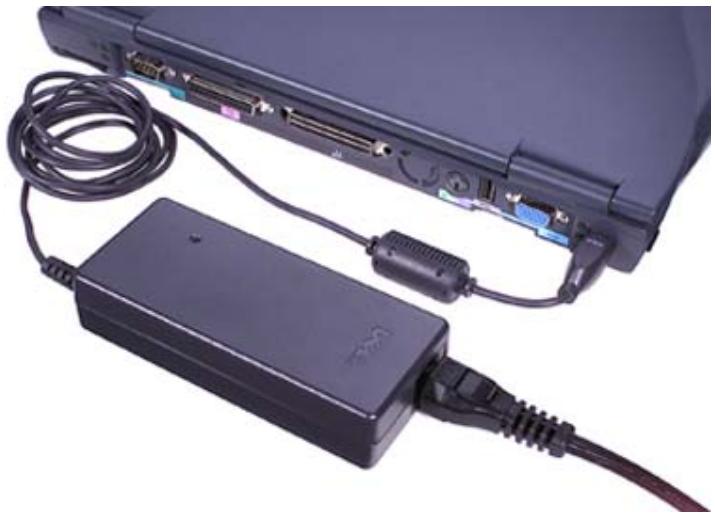
Connecting the AC Adapter 14
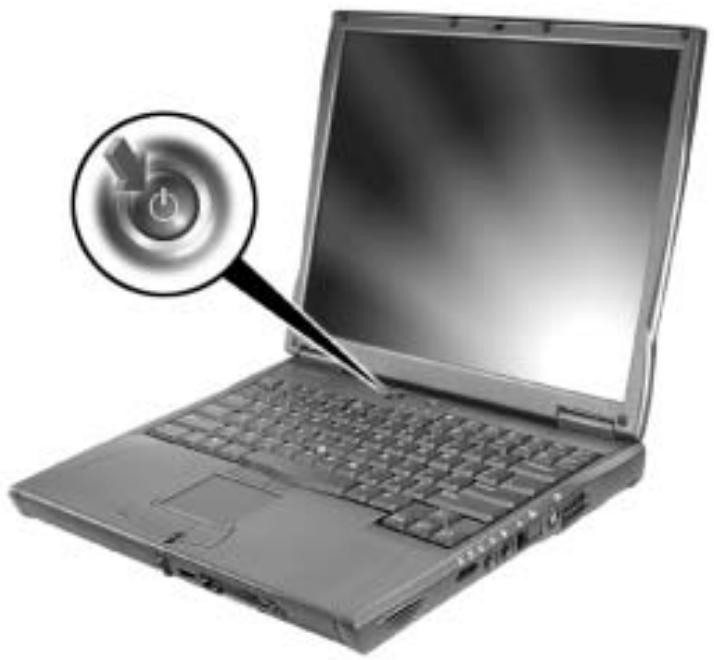
Turning On the Computer 15
About Your Computer 15
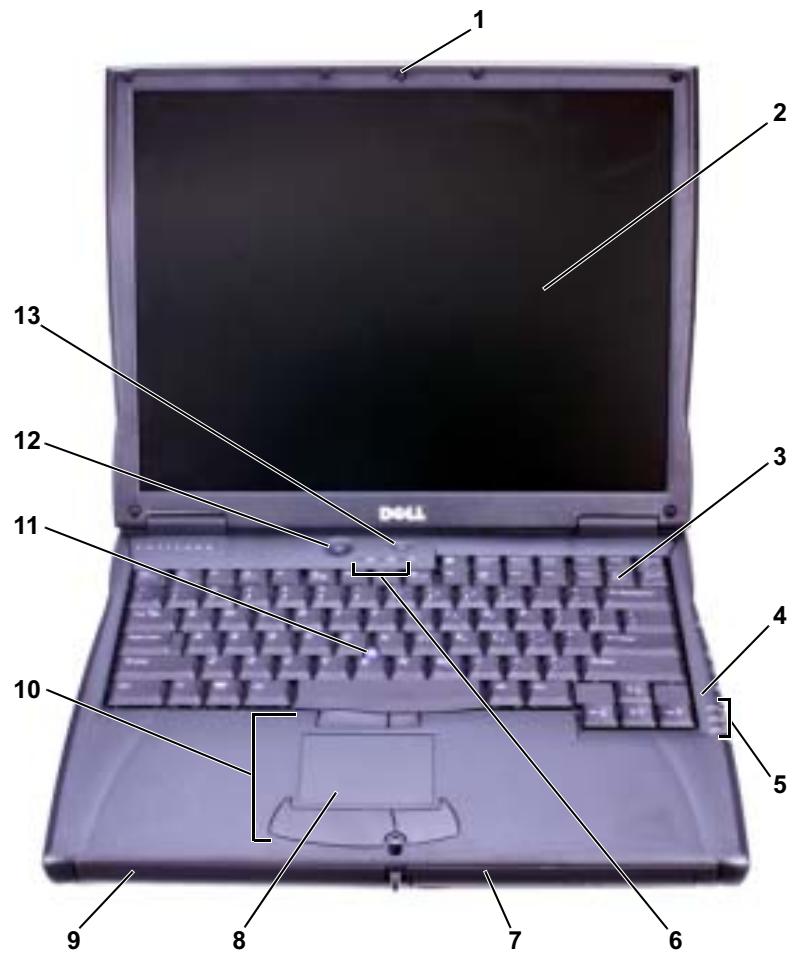
Front View 15
Left Side View 17
Right Side View. 18
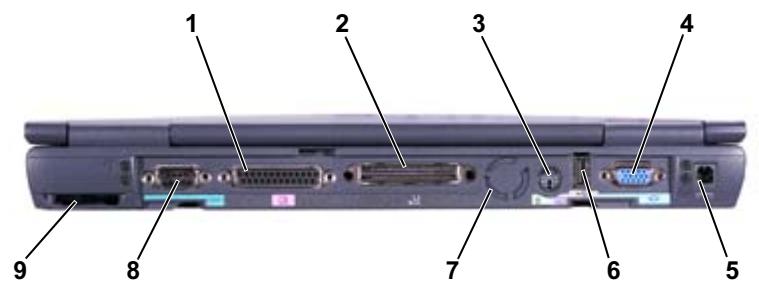
Back View 19
Replacing a Battery 19
Regulatory Notices 20
Running the Dell Diagnostics 21

CAUTION: Safety Instructions
Use the following safety guidelines to help ensure your own personal safety and to help protect your computer and working environment from potential damage.
General
- Do not attempt to service the computer yourself unless you are a trained service technician. Always follow installation instructions closely.
- If you use an extension power cable with your AC adapter, ensure that the total ampere rating of the products plugged in to the extension power cable does not exceed the ampere rating of the extension cable.
- Do not push objects into air vents or openings of your computer. Doing so can cause fire or electric shock by shorting out interior components.
- Do not store your computer in a low-airflow environment, such as a carrying case or a closed briefcase, while the computer is turned on. Restricting airflow can damage the computer or cause a fire.
- Keep your computer away from radiators and heat sources. Also, do not block cooling vents. Avoid placing loose papers underneath your computer; do not place your computer in a closed-in wall unit or on a bed, sofa, or rug.
- Place the AC adapter in a ventilated area, such as a desk top or on the floor, when you use it to run the computer or to charge the battery. Do not cover the AC adapter with papers or other items that will reduce cooling; also, do not use the AC adapter inside a carrying case.
- The AC adapter may become hot during normal operation of your computer. Use care when handling the adapter during or immediately after operation.
- Do not allow your portable computer to operate with the base resting directly on exposed skin for extended periods of time. The surface temperature of the base will rise during normal operation (particularly when AC power is present). Allowing sustained contact with exposed skin can cause discomfort or, eventually, a burn.
- Do not use your computer in a wet environment, for example, near a bath tub, sink, or swimming pool or in a wet basement.
- If your computer includes an integrated or optional (PC Card) modem, disconnect the modem cable if an electrical storm is approaching to avoid the remote risk of electric shock from lightning via the telephone line.

CAUTION: Safety Instructions (continued)
- To help avoid the potential hazard of electric shock, do not connect or disconnect any cables or perform maintenance or reconfiguration of this product during an electrical storm. Do not use your computer during an electrical storm unless all cables have been disconnected and the computer is operating on battery power.
- If your computer includes a modem, the cable used with the modem should be manufactured with a minimum wire size of 26 American wire gauge (AWG) and an FCC-compliant RJ-11 modular plug.
- Before you open the memory module/Mini PCI card/modem cover on the bottom of your computer, disconnect all cables from their electrical outlets and disconnect the telephone cable.
- If your computer has both a modem RJ-11 connector and a network RJ-45 connector, which look alike, make sure you insert the telephone cable into the RJ-11 connector, not the RJ-45 connector.
PC Cards may become very warm during normal operation. Use care when removing PC Cards after their continuous operation. - Before you clean your computer, disconnect the computer from the electrical outlet. Clean your computer with a soft cloth dampened with water. Do not use liquid or aerosol cleaners, which may contain flammable substances.
Power
- Use only the Dell-provided AC adapter approved for use with this computer. Use of another AC adapter may cause a fire or explosion.
- Before you connect the computer to an electrical outlet, check the AC adapter voltage rating to ensure that the required voltage and frequency match the available power source.
- To remove the computer from all power sources, turn the computer off, disconnect the AC adapter from the electrical outlet, and remove any battery installed in the battery bay or module bay.
- To help prevent electric shock, plug the AC adapter and device power cables into properly grounded power sources. These power cables may be equipped with 3-prong plugs to provide an earth grounding connection. Do not use adapter plugs or remove the grounding prong from the power cable plug. If you use a power extension cable, use the appropriate type, 2-prong or 3-prong, to mate with the AC adapter power cable.

CAUTION: Safety Instructions (continued)
- Be sure that nothing rests on your AC adapter's power cable and that the cable is not located where it can be tripped over or stepped on.
- If you are using a multiple-outlet power strip, use caution when plugging the AC adapter's power cable into the power strip. Some power strips may allow you to insert the plug incorrectly. Incorrect insertion of the power plug could result in permanent damage to your computer, as well as risk of electric shock and/or fire. Ensure that the ground prong of the power plug is inserted into the mating ground contact of the power strip.
Battery
- Use only Dell™ battery modules that are approved for use with this computer. Use of other types may increase the risk of fire or explosion.
- Do not carry a battery pack in your pocket, purse, or other container where metal objects (such as car keys or paper clips) could short-circuit the battery terminals. The resulting excessive current flow can cause extremely high temperatures and may result in damage to the battery pack or cause fire or burns.
- The battery poses a burn hazard if you handle it improperly. Do not disassemble it. Handle a damaged or leaking battery pack with extreme care. If the battery is damaged, electrolyte may leak from the cells and may cause personal injury.
- Keep the battery away from children.
- Do not store or leave your computer or battery pack near a heat source such as a radiator, fireplace, stove, electric heater, or other heat-generating appliance or otherwise expose it to temperatures in excess of 60^ (140^) . When heated to excessive temperatures, battery cells could explode or vent, posing a risk of fire.
- Do not dispose of your computer's battery in a fire or with normal household waste. Battery cells may explode. Discard a used battery according to the manufacturer's instructions or contact your local waste disposal agency for disposal instructions. Dispos of a spent or damaged battery promptly.
CAUTION: Safety Instructions (continued)
Air Travel
-
Certain Federal Aviation Administration regulations and/or airline-specific restrictions may apply to the operation of your Dell computer while you are on board an aircraft. For example, such regulations/restrictions may prohibit the use of any personal electronic device (PED) that has the capacity for intentional transmission of radio frequency or other electromagnetic signals while on an aircraft.
-
In order to best comply with all such restrictions, if your Dell portable computer is equipped with Dell TrueMobile™ or some other wireless communication device, please disable this device before you board the aircraft and follow all instructions provided by airline personnel with regard to such device.
- Additionally, the use of any PED, such as a portable computer, may be prohibited in aircraft during certain critical phases of flight, for example, takeoff and landing. Some airlines may further define the critical flight phase as any time the aircraft is below 3,050m (10,000 ft). Please follow the airline's specific instructions as to when the use of a PED is allowed.
EMC Instructions
Use shielded signal cables to ensure that you maintain the appropriate EMC classification for the intended environment. For parallel printers, a cable is available from Dell. If you prefer, you can order a cable from Dell at its worldwide website at www.dell.com.
Static electricity can harm electronic components inside your computer. To prevent static damage, discharge static electricity from your body before you touch any of your computer's electronic components, such as a memory module. You can do so by touching an unpainted metal surface on the computer's input/output panel.
When Using Your Computer
Observe the following safe-handling guidelines to prevent damage to your computer:
- When setting up the computer for work, place it on a level surface.
- When traveling, do not check the computer as baggage. You can put your computer through an X-ray security machine, but never put your computer through a metal detector. If you have the computer checked by hand, be sure to have a charged battery available in case you are asked to turn on the computer.
- When traveling with the hard drive removed from the computer, wrap the drive in a nonconducting material, such as cloth or paper. If you have the drive checked by hand, be ready to install the drive in the computer. You can put the hard drive through an X-ray security machine, but never put the drive through a metal detector.
- When traveling, do not place the computer in overhead storage compartments where it could slide around. Do not drop your computer or subject it to other mechanical shocks.
- Protect your computer, battery, and hard drive from environmental hazards such as dirt, dust, food, liquids, temperature extremes, and overexposure to sunlight.
- When you move your computer between environments with very different temperature and/or humidity ranges, condensation may form on or within the computer. To avoid damaging the computer, allow sufficient time for the moisture to evaporate before using the computer.

NOTICE: When taking the computer from low-temperature conditions into a warmer environment or from high-temperature conditions into a cooler environment, allow the computer to acclimate to room temperature before turning on power.
- When you disconnect a cable, pull on its connector or on its strain-relief loop, not on the cable itself. As you pull out the connector, keep it evenly aligned to avoid bending any connector pins. Also, before you connect a cable make sure both connectors are correctly oriented and aligned.
- Handle components with care. Hold a component such as a memory module by its edges, not its pins.
- When preparing to remove a memory module from the system board or disconnect a device from the computer, turn off the computer, disconnect the AC adapter cable, remove any battery installed in the battery bay or module bay, and then wait 5 seconds before proceeding to help avoid possible damage to the system board.
When Using Your Computer (continued)
- Clean the display with a soft, clean cloth and water. Apply the water to the cloth; then stroke the cloth across the display in one direction, moving from the top of the display to the bottom. Remove moisture from the display quickly and keep the display dry. Long-term exposure to moisture can damage the display. Do not use a commercial window cleaner to clean your display.
- If your computer gets wet or is damaged, follow the procedures described in "If Your Computer Gets Wet" or "If You Drop or Damage Your Computer" in the User's Guide. If, after following these procedures, you confirm that your computer is not operating properly, contact Dell (see "Getting Help" in the User's Guide for the appropriate contact information).
Ergonomic Computing Habits
CAUTION: Improper or prolonged keyboard use may result in injury.
CAUTION: Viewing the display or external monitor screen for extended periods of time may result in eye strain.
For comfort and efficiency, observe the ergonomic guidelines in the User's Guide when setting up and using your computer.
When Working Inside Your Computer
Before removing or installing memory modules, Mini PCI cards, or modems, perform the following steps in the sequence indicated.
- NOTICE: The only time you should ever access the inside of your computer is when you are installing memory modules, a Mini PCI card, or a modem.
NOTICE: Wait 5 seconds after turning off the computer before disconnecting a device or removing a memory module, Mini PCI card, or modem to help prevent possible damage to the system board.
1 Shut down your computer and turn off any attached devices.
2 Disconnect your computer and devices from electrical outlets to reduce the potential for personal injury or shock. Also, disconnect any telephone or telecommunication lines from the computer.
3 Remove the main battery from the battery bay and, if necessary, the second battery from the module bay.
When Using Your Computer (continued)
4 Ground yourself by touching any unpainted metal surface on the back of the computer.
While you work, periodically touch the unpainted metal surface to dissipate any static electricity that might harm internal components.
Protecting Against Electrostatic Discharge
Static electricity can harm electronic components inside your computer. To prevent static damage, discharge static electricity from your body before you touch any of your computer's electronic components, such as a memory module. You can do so by touching any unpainted metal surface on the back of the computer.
As you continue to work inside the computer, periodically touch any unpainted metal surface on the back of the computer to remove any static charge your body may have accumulated.
You can also take the following steps to prevent damage from electrostatic discharge (ESD):
- When unpacking a static-sensitive component from its shipping carton, do not remove the component from the antistatic packing material until you are ready to install the component. Just before unwrapping the antistatic packaging, be sure to discharge static electricity from your body.
- When transporting a sensitive component, first place it in an antistatic container or packaging.
- Handle all sensitive components in a static-safe area. If possible, use antistatic floor pads and workbench pads.

Battery Disposal
Your computer uses a lithium-ion battery and a nickel-metal hydride (NiMH) coin-cell battery. For instructions about replacing the lithium-ion battery in your computer, see "Replacing a Battery" on page 19. The NiMH battery is a long-life battery, and it is very possible that you will never need to replace it. However, should you need to replace it, the procedure must be performed by an authorized service technician.
Do not dispose of the battery along with household waste. Contact your local waste disposal agency for the address of the nearest battery deposit site.
Finding Information and Assistance
The following table lists the resources that Dell provides as support tools. Additional resources may be shipped with your computer.
Resources and Support Tools
Resource
Contents
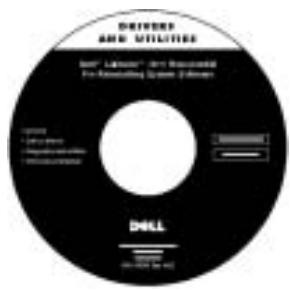
Drivers and Utilities CD
Dell Diagnostics
- Drivers
- Utilities
- Computer and device documentation
Using the Resource
See the main menu on the Drivers and Utilities CD that came with your computer. Use the pull-down menu to make selections appropriate for your computer.
Documentation and drivers are already installed on your computer when shipped from Dell. You can use this CD to access documentation, reinstall drivers, or run diagnostics tools.
For more information, see your computer User's Guide.
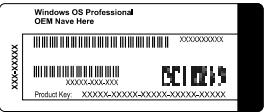
Service and Registration Labels
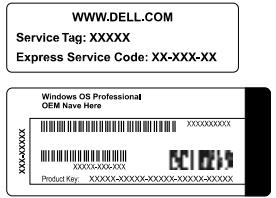
Express Service Code and Service Tag Sequence
- Product Key (also called the Product ID or Certificate of Authenticity [COA])
The Express Service Code and Service Tag Sequence are unique identifiers for your Dell™ computer.
You will need the Product Key (or Product ID) number to complete the operating system setup.
Operating System CD
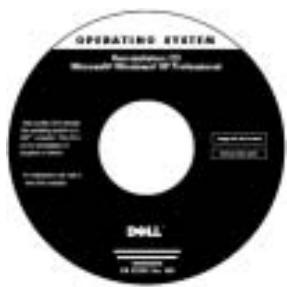
To reinstall your operating system, use the Operating System CD that came with your computer.
NOTE: The Operating System CD may not include all the latest drivers for your computer. If you reinstall your operating system, use the Drivers and Utilities CD to reinstall drivers for the devices shipped with your computer.
For more information about installing your operating system, see the Dell-installed Microsoft Windows Setup Guide that came with your computer.
| Resource | Contents | Using the Resource |
| Dell Support website · Technical support and information · Downloads for your system · Order or delivery status · Hints and tips, technology papers, service information | Go to support.dell.com and complete the one-time registration. · Get help with general usage, installation, and troubleshooting questions. · Obtain answers to technical service and support questions. · Get the latest versions of the drivers for your system · Access documentation about your system and devices. · Join online discussions with other Dell customers and Dell technical professionals. · Explore a list of online links to Dell's primary vendors. | |
| Premier Support.Dell.com | Dell Premier Support website · Service call status · Top technical issues by product · Frequently asked questions by product number · Customized service tags · System configuration detail | Go to premiersupport.dell.com: The Dell Premier Support website is customized for corporate, government, and education customers. This site may not be available in all regions. |
Setting Up Your Computer
1 Unpack the accessories box.
2 Set aside the contents of the accessories box, which you will need to complete the setup of your computer.
The accessories box also contains user documentation and any software or additional hardware (such as PC Cards, drives, or batteries) you have ordered.
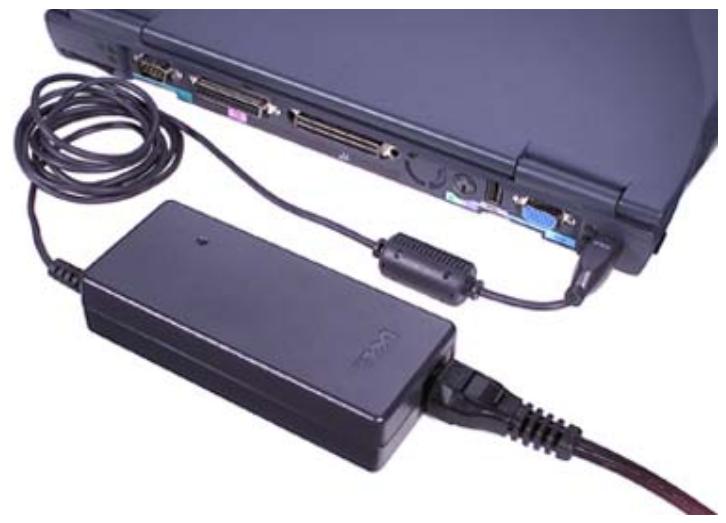
Connecting the AC Adapter
AC Adapter Connection
Turning On the Computer
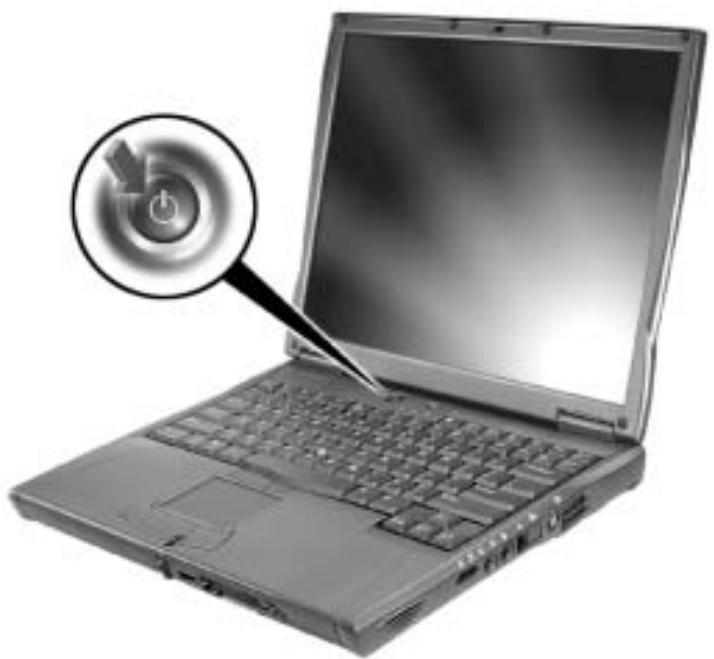
To turn on the computer, open the computer display and press the power button.

NOTE: Do not dock the computer until it has been turned on and shut down at least once.
Power Button
About Your Computer
Front View

CAUTION: Do not block, push objects into, or allow dust to accumulate in the air vents. Doing so can damage the computer or cause a fire.
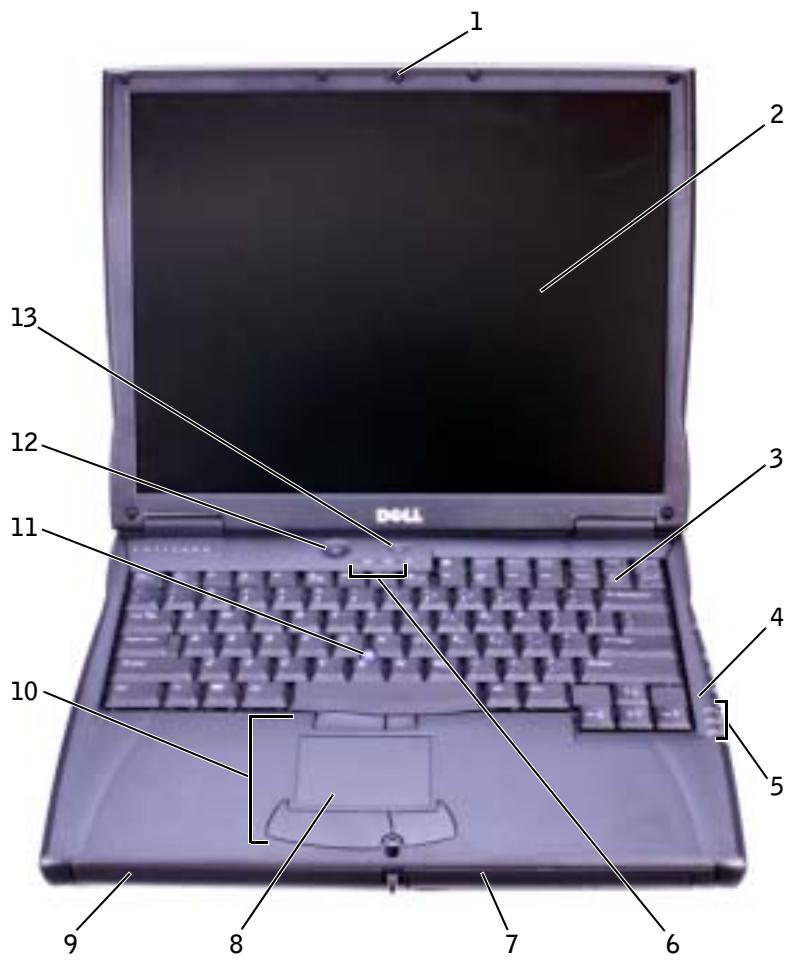
| 1 | display latch | 8 | touch pad |
| 2 | display | 9 | battery bay |
| 3 | keyboard | 10 | track stick/touch pad buttons |
| 4 | microphone | 11 | track stick |
| 5 | device status lights | 12 | power button |
| 6 | keyboard status lights | 13 | AccessDirect™ button |
| 7 | module bay |
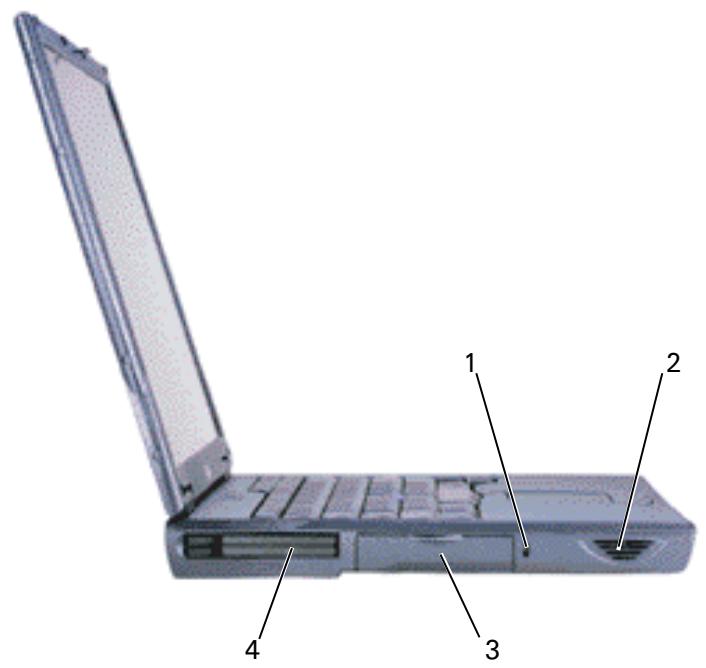
Left Side View
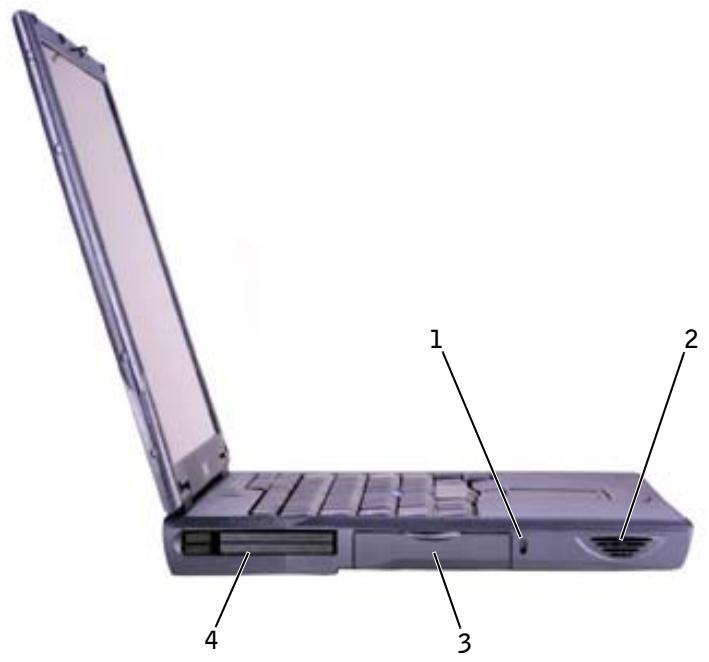
1 security cable slot
2 speaker
3 hard drive bay
4 PC Card slot
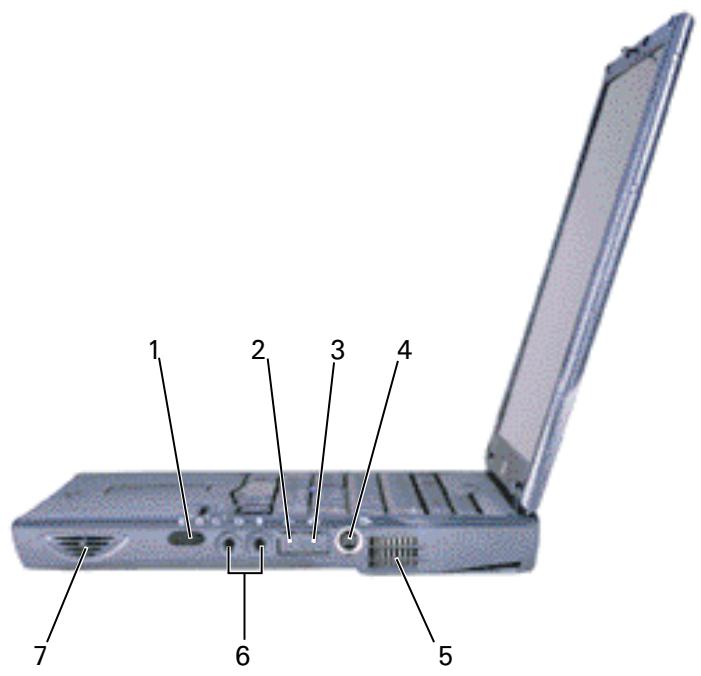
Right Side View

CAUTION: Do not block, push objects into, or allow dust to accumulate in the air vents. Doing so can damage the computer or cause a fire.
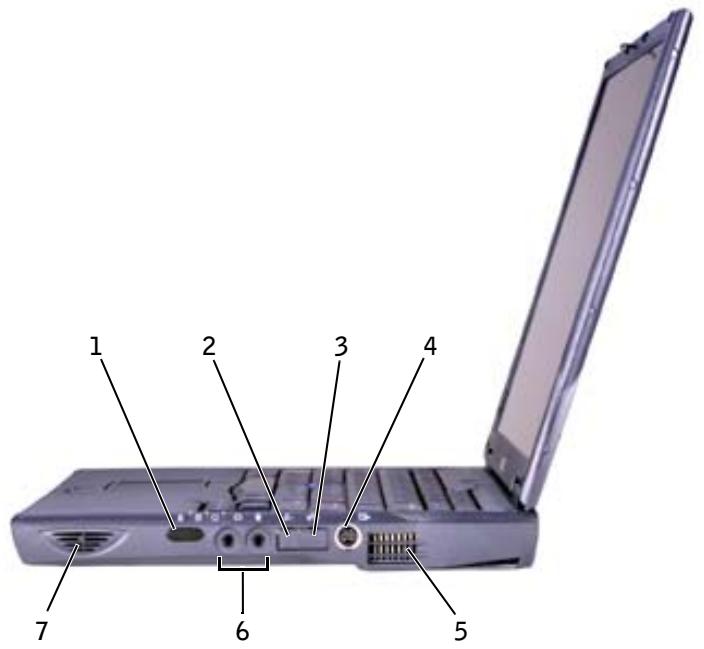
| 1 | infrared sensor | 5 | air vent |
| 2 | modem connector | 6 | audio connectors |
| 3 | network connector | 7 | speaker |
| 4 | S-video TV-out connector | ||
Back View

NOTICE: To avoid damaging the computer, wait 5 seconds after turning off the computer before you disconnect an external device.

CAUTION: Do not block, push objects into, or allow dust to accumulate in the air vents. Doing so can damage the computer or cause a fire.
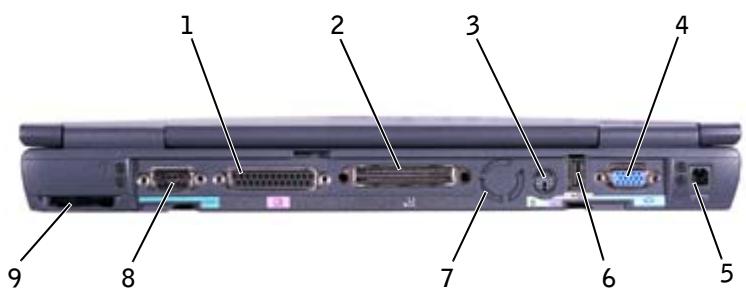
| 1 | parallel connector | 6 | USB connector |
| 2 | docking connector | 7 | fan |
| 3 | PS/2 connector | 8 | serial connector |
| 4 | video connector | 9 | air vent |
| 5 | AC adapter connector |
Replacing a Battery

CAUTION: Using an incompatible battery may increase the risk of fire or explosion. Replace the battery only with a compatible battery purchased from Dell. The lithium-ion battery is designed to work with your Dell™ computer. You can also use the battery in any Latitude™ C-Family computer except for Latitude CS or CSx computers. Do not use a battery from other CS or CSx computers with your computer.

NOTICE: To avoid data loss, do not replace a battery while the computer is turned on unless the computer is connected to an electrical outlet or a second battery is installed.

NOTICE: If you choose to replace the battery with the computer in standby mode, you have up to 4 minutes to complete the battery replacement. After 4 minutes, the computer shuts down and you will lose any unsaved data.
1 Ensure that computer is either turned off, in a power management mode, or connected to an electrical outlet.
2 If the computer is docked, undock it.
3 Slide and hold the battery bay (or module bay) latch release on the bottom of the computer, and then remove the battery from the bay.
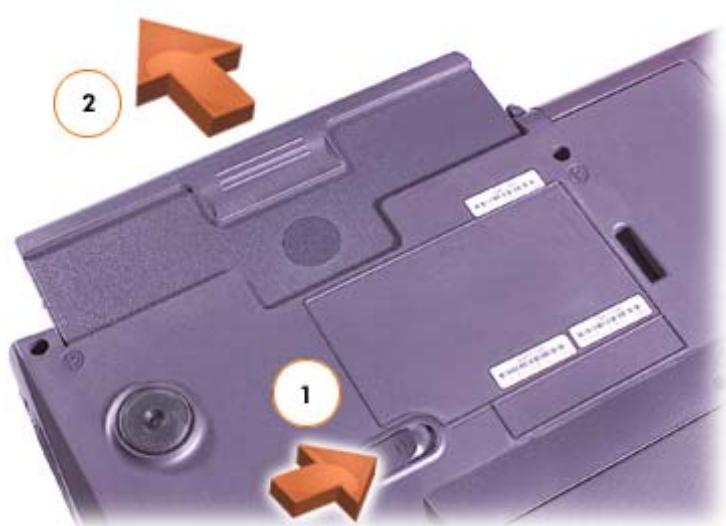
4 Slide the battery into the bay until the latch release clicks.
Regulatory Notices
Electromagnetic Interference (EMI) is any signal or emission, radiated in free space or conducted along power or signal leads, that endangers the functioning of a radio navigation or other safety service or seriously degrades, obstructs, or repeatedly interrupts a licensed radio communications service. Radio communications services include but are not limited to AM/FM commercial broadcast, television, cellular services, radar, air-traffic control, pager, and Personal Communication Services (PCS). These licensed services, along with unintentional radiators such as digital devices, including computers, contribute to the electromagnetic environment.
Electromagnetic Compatibility (EMC) is the ability of items of electronic equipment to function properly together in the electronic environment. While this computer has been designed and determined to be compliant with regulatory agency limits for EMI, there is no guarantee that interference will not occur in a particular installation. If this equipment does cause interference with radio communications services, which can be determined by turning the equipment off and on, you are encouraged to try to correct the interference by one or more of the following measures:
Reorient the receiving antenna.
Relocate the computer with respect to the receiver.
- Move the computer away from the receiver.
- Plug the computer into a different outlet so that the computer and the receiver are on different branch circuits.
If necessary, consult a Dell Technical Support representative or an experienced radio/television technician for additional suggestions.
Running the Dell Diagnostics
Dell provides a number of tools to help you if your computer does not perform as expected. For information on these help tools, see your User's Guide.
If you have a computer problem and are unable to access the online User's Guide, use the Dell Diagnostics to help you determine the cause of the problem and to help you solve it. The Diagnostics are on the Drivers and Utilities CD that came with your computer.

NOTE: Run the Diagnostics before you call Dell technical support because the diagnostic tests provide information you may need when you call.
To start the Diagnostics, perform the following steps:
1 Turn off the computer.
2 Undock the computer if you have it docked.
3 Turn on the computer.
4 Press F2 at the start of the boot routine to access the system setup menu.
NOTE: Write down your current boot sequence in the event you want to restore it after running the Dell Diagnostics.
5 Select the following boot sequence and exit the system setup program:
- Boot First Device: Diskette Drive
- Boot Second Device: CD/DVD/CD-RW Drive
- Boot Third Device: Internal HDD
6 Insert the Drivers and Utilities CD into the CD drive.
7 Turn the computer off.
8 Turn the computer on. The computer starts and automatically begins to run the Dell Diagnostics.
9 When you have completed running diagnostics, remove the Drivers and Utilities CD from the CD drive.
To change the boot sequence, repeat steps 1 through 6, customizing the boot sequence to fit your needs. Then restart your computer.
When you start the diagnostics, the Dell logo screen appears, followed by a message telling you that the diagnostics is loading. After the diagnostics loads, the Diagnostics Menu appears.
To select an option from this menu, highlight the option and press Enter, or press the key that corresponds to the highlighted letter in the option you choose.
Příručka k zařízení
Disk CD Operating System
Express Service Code: XX-XXX-XX
Azonositocimkek
Premier Support.Dell.com
A Dell Premier Support webhely
Dysk CD Drivers and Utilities
3aKoHOdaTeJIbCTBO I cTaHdapTbI 206
3anyck nporpaMMbl Dell Diagnostics 207

Premier Support.Dell.com
Be6-cairr Dell Premier Support
CocToHHe3aBKN Ha 06cIyKbAHHe
OCHOBHbIeTexHHueckHe BOIIPOcBi, IIO IIPOdyKTam
- ChaTo 3aIaBaEmbIe BOIIpoCbI, IIO HOMepaM IIPOJyKTOB
- Bыбор по метке
пронзвдтеля
CBeHnO KOHgypaHH CHCTEMBI
Iocetnte caT premiersupport.dell.com.
Be6-y3eJ Dell Premier Support hactpnaBaetcIJIa KOpIIopaTHBbIX IIOJIb3OBAteJIeI, rOcyIapCTBeHHbIX H o6pa3OBAteJIbHbIX yUpeKJdeHn.
3TOT caIT IOCTyIeH He BO BCex perHOHax.
yctaHObKa KOMNbIOTepa
1 PacnakyIte Kopo6Ky c npHnHaJIeJxKHOCTaMn.
2 OTIOKHTe B cTOpOHy Te IIpHnAJIeXHocTH, KOToPbIe He IIOHaIO6rTcI JIIa3aBepIiEHHy yCTaHOBKn.
B Kopo6ke c npHnHaJIeJxHocTMy HaxoIHTcayIOKymeHTaIIy IIOJIb3OBATeJIy, a TaKKe Bce 3aKa3aHHoe Bamn IIporpaMMHOe o6ecIeHne I DOIOJIHNHeJIbHbIe KOMIOHEtBi (IIaTb PC Card, INsCKOBdI, aKKymJITOpHbIe 6aTapeN t.II.).
Подкlioуене aадапетера nepemehHoro toka
IopknlueHne aandaTepa nepemehhoro toka
BkJIoueHne kOMNbIOTepa
TO_b BkJIIOHTb KOMIbIOTep, OTKpOITe KpbIiKy IINcIIJEA HNaKMHTe KHOIIKY IIHTaHHa.

PIMMEUHHe npctbIKOBbIaTe KOMbHTep Do Tex nop, noka xoty 6bl Odn pa3 He BkIOuHTe N He BbIKIOUHTe eTo.
Khonka nntaHn
O kOMnblTepe
Bvndcpeepn

IPEyPExKDEHNE. He 3aKpbBaIte Bo3dyXo3a6OpHNK, He BCTaBJaIe T B Hero npedMeTb I cJeDnte, YTo6bl B HEm He HaKaanNBAJacb Nblb. 3TO MoKeT nobpeDHTb KOMNbOTep HnnpNBecTn K noxapy.
1 IaTnIK HHPaKpaCpOH CBA3H
5 BO3JyXo3a6OpHnK
2 pa3bem MOJema
6 ayIInOpa3BeMbI
3 ceTeBOI pa3bEm
7 HHaHnK
4 pa3bem S-Video TV-out
BnDc3aAn
3AMEUAHNE. UTo6bI He NOBpeiNTb KOMNbIOTep, IocJIe erO BByIKHouEHNr IIOOXJITe 5 cekyHd, npexJe Yem OTcoEINHrTb BHeuHHe yCTpoIcTBo.
PPEyPExEHE. He 3aKpbIbAte Bo3dyxo3a6OpHnK, He BCTaBnTe B Hero npedMeTbI n CneDHTe, YTO6bl B HEm He HakaJIbBaJacb nbIb. 3To MoKet nobpeDHTb KOMnbOTep nIi npNBecTn K noXapy.
3aKoHoaTeJIbCTBOI cTaHdapTbI
Длктрогнгныеnomexn(Electromagnetic Interference-EMI)-3TOЛьбoeи3Iучehne HIN CNHJIbI,H3JIyuaembIe B CBO6OДHOM IIpocTpaHCTBe,a TaKJce BIOJIb CNIOBbIX HIN CNHJIbHbIX Ka6eJIe.ОHH yrpoKaHT pa6Ote paDNHOABHraUHNOHHbIX ClyJ6и IpyTHx ClyJ6 6e3OIIaChOcTHN,a TACKe 3NaHTeJIbHo UxyIlaHOT,3aTpYdHЯOT HIN IepNoIHyecKn IIpepbIbAHT pa6Otu JInSeH3nPoBaHHOcIyJ6bI paDNOCBzN.K cIyJ6aM paDNOCBzN OTHOCTC,B YacTHOCTN,KOMMepeCkoE paDNOBuHaHne B DnHaPZoHe AM/FM,TeJIeBnDEHne, COTOBAcCB3b,pAnIOLOKAuONHbIe UcTaHOBKN,abNAIDNCITpepckHe cIyJ6bI,IeINJXHHROBbIE cIyJ6bI N cIyJ6bI IepCoHAIbHOcBzN (Personal Communication Services -PCS).3TN JInSeH3nPoBaHbIe cIyJ6bI IN HCToUYHKn HeIIpeDnHaMepeHHOrO H3IyUeHNs,HaIPmEp IINΦpOBbIe ycTPOIcTBa(BKJIIOUaKOMIIbHTepbl),co3JaOT 3JIeKtPOMaRHTHyO cpeNy.
YTO6bI Bb6paTb IyHKT MeHIO, BblJeJIHTe eI O H NaKMHTe KJIaBHIIy Enter HJIN KJIaBHIIy, COOTBeTCTBvIooI IOJcBueeHHoB 6yKBe B Bbl6paHHOM IyHKTe MeHIO.
Disk CD Drivers and Utilities
- Dell Diagnostics
Ovladace - Pomocky
- Dokumentácia k počitaču a prislušnám zariadeniam
Vyuzitie
Disk CD Operating System
Vyuzitie
© 2001-2003 Dell Computer Corporation. Vse pravice pridrzane.
Vsakrsno reproducieranje brez pisega dovoljenja druzbé Dell Computer Corporation je strogo prepovedano.
Blagovne znamke, uporabljene v tem besedilu: Dell, logotip DELL, Latitude, TrueMobile in AccessDirect so blagovne znamke druzbe Dell Computer Corporation; Microsoft in Windows sta zašiteni blagovni znamki druzbe Microsoft Corporation.
Dn Driers and Utilities 9
.
pTn, pnnn. 1-6 by nn, nnnn nn
JUN
nnnnn mnpnv nnnynn Dell bnuyn ynnnn nnnn npna nya
. Diagnostics yon yon, (mpy nn) Diagnostics nnny
JNNN NNNN NNNN
n nn nnnnnnnnnnnnnnnnnnnnnnnnnnnnnnnnnnnnnnnnnnnnnnnnnnnnnnnnnnnnnnnnnnnnnnnnnnnnnnnnnnnnnnnnnnnnnnnnnnnnnnnnnnnnnnnnnnnnnnnnnnnnnnnnnnnnnnnnnnnnnnnnn
. npnn nn nnnn
.
.
Dell D ell
Dell Diagnostics yy (Dell yjnnn)
Dell
JN NNNN NNNN NNNN NNNN NNNN NNNN NNNN

17N 17N 17N 17N 17N 17N 17N 17N 17N
Nnyn npnn n nn nnnn nn nnnnnnnnnnnnnnnnnnnnnnnnnnnnnnnnnnnnnnnnnnnnnnnnnnnnnnnnnnnnnnnnnnnnnnnnnnnnnnnnnnnnn
n nnnn nn nnnn nn nnnn nnnn
| 5 | 1 |
| 6 | 2 |
| 7 | 3 |
| S-video, TV-out | 4 |
| premiersupport.dell.com dell-premier-dell.com dell-premier-dell.com dell-premier-dell.com dell-premier-dell.com dell-premier-dell.com dell-premier-dell.com dell-premier-dell.com dell-premier-dell.com dell-premier-dell.com dell-premier-dell.com dell-premier-dell.com dell-premier-dll.com dell-premier-dell.com dell-premier-dell.com dell-premier-dell.com dell-premier-dell.com dell-premier-dell.com dell-premier-dell.com dell-premier-dell.com dell-premier-dell.com dell-premier-dell.com dell-premier-dell.com dell-premier-dell.con dell-premier-dell.com dell-premier-dell.com dell-premier-dell.com dell-premier-dell.com dell-premier-dell.com dell-premier-dell.com dell-premier-dell.com dell-premier-dell.com dell-premier-dell.com dell-premier-dell.com dell-premier-dell.com |
YIOI YIN
Dell-Dell
.
n nn nn nn nn
| Drivers and Utilities drivers and Utilities drivers and Utilities drivers and Utilities drivers and Utilities drivers and Utilities drivers and Utilities drivers and Utilities drivers and Utilities drivers and Utilities drivers and Utilities drivers and Utilities drivers and Utilities drivers and Utilities drivers and Utilities drivers and Utilities drivers and Utilities drivers and Utilities drivers and Utilities drivers and Utilities drivers and Utilities drivers and Utilities drivers and Utilities drivers and Utilities drivers and Utilities drivers and Utilities drivers and Utilities drivers and Utilities drivers and Utilities drivers and Utilities drivers and Utilities drivers and Utilities drivers and Utilities drivers and Utilities drivers and Utilities drivers and Utilities drivers and Utilities drivers and Utilities drivers and Utilities drivers and Utilities drivers and Utilities drivers and Utilities drivers and Utilities drivers and Utilities drivers and Utilities drivers and Utilities drivers and Utilities drivers and Utilities drivers and Utilities drivers and Utilities drivers and Utilities .drivers and Utilities .drivers and Utilities .drivers and Utilities .drivers and Utilities .drivers and Utilities .drivers and Utilities .drivers and Utilities .drivers and Utilities .drivers and Utilities .drivers and Utilities .drivers and Utilities .drivers and Utilities .drivers and Utilities .drivers and Utilities .drivers and Utilities .drivers and Utilities .drivers and Utilities .drivers and Utilities .drivers and Utilities .drivers and Utilities .drIVERS and Utilities .drivers and Utilities .drivers and Utilities .drivers and Utilities .drivers and Utilities .drivers and Utilities .drivers and Utilities .drivers and Utilities .drivers and Utilities .drivers and Utilities .drivers and Utilities .drivers and Utilities .drivers and Utilities .drivers and Utilities .drivers and Utilities .drivers and Utilities .drivers and Utilities .drivers and Utilities .drivers and Utilities .drivers and Utilities .drves and Utilities .drivers and Utilities .drivers and Utilities .drivers and Utilities .drivers and Utilities .drivers and Utilities .drivers and Utilities .drivers and Utilities .drivers and Utilities .drivers and Utilities .drivers and Utilities .drivers and Utilities .drivers and Utilities .drivers and Utilities .drivers and Utilities .drivers and Utilities .drivers and Utilities .drivers and Utilities .drivers and Utilities .drivers and Utilities .drives and Utilities .drivers and Utilities .drivers and Utilities .drivers and Utilities .drivers and Utilities .drivers and Utilities .drivers and Utilities .drivers and Utilities /drivers and Utilities .drivers and Utilities .drivers and Utilities .drivers and Utilities .drivers and Utilities .drivers and Utilities .drivers and Utilities .drivers and Utilities .drivers and Utilities .drivers and Utilities .drivers and Utilities .drivers and Utilities .drivers and Utilities .drivers and Utilities .drivers and Utilities .drivers and Utilities .drivers and Utilities .drivers and Utilities .drivers and Utilities .drivers and Utilities /drivers and Utilities /drivers and Utilities /drivers and Utilities /drivers and Utilities /drivers and Utilities /drivers and Utilities /drivers and Utilities /drivers and Utilities /drivers and Utilities /drivers and Utilities /drivers and Utilities /drivers and Utilities /drivers and Utilities /drivers and Utilities /drivers and Utilities /drivers and Utilities /drivers and Utilities /drivers and Utilities /drivers and Utilities /drivers and Utilities .drivers and Utilities /drivers and Utilities /drivers and Utilities /drivers and Utilities /drivers and Utilities /drivers and Utilities /drivers and Utilities /drivers and Utilities /drivers and Utilities /drivers and Utilities /drivers and Utilities /drivers and Utilities /drivers and Utilities /drivers and Utilities /drivers and Utilities /drivers and Utilities /drivers and Utilities /drivers and Utilities /drivers and Utilities .drivers and Utilities .drivers and Utilities /drivers and Utilities /drivers and Utilities /drivers and Utilities /drivers and Utilities /drivers and Utilities /drivers and Utilities /drivers and Utilities /drivers and Utilities /drivers and Utilities /drivers and Utilities /drivers and Utilities /drivers and Utilities /drivers and Utilities /drivers and Utilities /drivers and Utilities /drivers and Utilities /drivers and Utilities .drivers and Utilities /drivers and Utilities .drivers and Utilities /drivers and Utilities /drivers and Utilities /drivers and Utilities /drivers and Utilities /drivers and Utilities /drivers and Utilities /drivers and Utilities /drivers and Utilities /drivers and Utilities /drivers and Utilities /drivers and Utilities /drivers and Utilities /drivers and Utilities /drivers and Utilities /drivers and Utilities /drivers and Utilities /drivers and Utilities .drivers and Utilities .drivers and Utilities .drivers and Utilities /drivers and Utilities /drivers and Utilities /drivers and Utilities /drivers and Utilities /drivers and Utilities /drivers and Utilities /drivers and Utilities /drivers and Utilities /drivers and Utilities /drivers and Utilities /drivers and Utilities /drivers and Utilities /drivers and Utilities /drivers and Utilities /drivers and Utilities /drivers and Utilities .drivers and Utilities /drivers and Utilities /drivers and Utilities .drivers and Utilities /drivers and Utilities /drivers and Utilities /drivers and Utilities /drivers and Utilities /drivers and Utilities /drivers and Utilities /drivers and Utilities /drivers and Utilities /drivers and Utilities /drivers and Utilities /drivers and Utilities /drivers and Utilities /drivers and Utilities /drivers and Utilities /drivers and Utilities /drivers and Utilities .drivers and Utilities /drivers and Utilities .drivers and Utilities .drivers and Utilities /drivers and Utilities /drivers and Utilities /drivers and Utilities /drivers and Utilities /drivers and Utilities /drivers and Utilities /drivers and Utilities /drivers and Utilities /drivers and Utilities /drivers and Utilities /drivers and Utilities /drivers and Utilities /drivers and Utilities /drivers and Utilities /drivers and Utilities /drivers and Utilities .drivers and Utilities .drivers and Utilities /drivers and Utilities .drivers and Utilities /drivers and Utilities /drivers and Utilities /drivers and Utilities /drivers and Utilities /drivers and Utilities /drivers and Utilities /drivers and Utilities /drivers and Utilities /drivers and Utilities /drivers and Utilities /drivers and Utilities /drivers and Utilities /drivers and Utilities /drivers and Utilities /drivers and Utilities /drivers and Utilities .drivers and Utilities .drivers and Utilities .drivers and Utilities .drivers and Utilities /drivers and Utilities /drivers and Utilities /drivers and Utilities /drivers and Utilities /drivers and Utilities /drivers and Utilities /drivers and Utilities /drivers and Utilities /drivers and Utilities /drivers and Utilities /drivers and Utilities /drivers and Utilities /drivers and Utilities /drivers and Utilities /drivers and Utilities .drivers and Utilities /drivers and Utilities /drivers and Utilities /drivers and Utilities .drivers and Utilities /drivers and Utilities /drivers and Utilities /drivers and Utilities /drivers and Utilities /drivers and Utilities /drivers and Utilities /drivers and Utilities /drivers and Utilities /drivers and Utilities /drivers and Utilities /drivers and Utilities /drivers and Utilities /drivers and Utilities /drivers and Utilities /drivers and Utilities .drivers and Utilities /drivers and Utilities /drivers and Utilities .drivers and Utilities .drivers and Utilities /drivers and Utilities /drivers and Utilities /drivers and Utilities /drivers and Utilities /drivers and Utilities /drivers and Utilities /drivers and Utilities /drivers and Utilities /drivers and Utilities /drivers and Utilities /drivers and Utilities /drivers and Utilities /drivers and Utilities /drivers and Utilities /drivers and Utilities .drivers and Utilities /drivers and Utilities .drivers and Utilities /drivers and Utilities .drivers and Utilities /drivers and Utilities /drivers and Utilities /drivers and Utilities /drivers and Utilities /drivers and Utilities /drivers and Utilities /drivers and Utilities /drivers and Utilities /drivers and Utilities /drivers and Utilities /drivers and Utilities /drivers and Utilities /drivers and Utilities /drivers and Utilities /drivers and Utilities .drivers and Utilities /drivers and Utilities .drivers and Utilities .drivers and Utilities .drivers and Utilities /drivers and Utilities /drivers and Utilities /drivers and Utilities /drivers and Utilities /drivers and Utilities /drivers and Utilities /drivers and Utilities /drivers and Utilities /drivers and Utilities /drivers and Utilities /drivers and Utilities /drivers and Utilities /drivers and Utilities /drivers and Utilities /drivers and Utilities .drivers and Utilities .drivers and Utilities /drivers and Utilities /drivers and Utilities .drivers and Utilities /drivers and Utilities /drivers and Utilities /drivers and Utilities /drivers and Utilities /drivers and Utilities /drivers and Utilities /drivers and Utilities /drivers and Utilities /drivers and Utilities /drivers and Utilities /drivers and Utilities /drivers and Utilities /drivers and Utilities /drivers and Utilities /drivers and Utilities .drivers and Utilities .drivers and Utilities /drivers and Utilities .drivers and Utilities .drivers and Utilities /drivers and Utilities /drivers and Utilities /drivers and Utilities /drivers and Utilities /drivers and Utilities /drivers and Utilities /drivers and Utilities /drivers and Utilities /drivers and Utilities /drivers and Utilities /drivers and Utilities /drivers and Utilities /drivers and Utilities /drivers and Utilities /drivers and Utilities .drivers and Utilities .drivers and Utilities .drivers and Utilities /drivers and Utilities .drivers and Utilities /drivers and Utilities /drivers and Utilities /drivers and Utilities /drivers and Utilities /drivers and Utilities /drivers and Utilities /drivers and Utilities /drivers and Utilities /drivers and Utilities /drivers and Utilities /drivers and Utilities /drivers and Utilities /drivers and Utilities /drivers and Utilities /drivers and Utilities .drivers and Utilities .drivers and Utilities .drivers and Utilities .drivers and Utilities .drivers and Utilities /drivers and Utilities /drivers and Utilities /drivers and Utilities /drivers and Utilities /drivers and Utilities /drivers and Utilities /drivers and Utilities /drivers and Utilities /drivers and Utilities /drivers and Utilities /drivers and Utilities /drivers and Utilities /drivers and Utilities /drivers and Utilities .drivers and Utilities /drivers and Utilities /drivers and Utilities /drivers and Utilities /drivers and Utilities .drivers and Utilities /drivers and Utilities /drivers and Utilities /drivers and Utilities /drivers and Utilities /drivers and Utilities /drivers and Utilities /drivers and Utilities /drivers and Utilities /drivers and Utilities /drivers and Utilities /drivers and Utilities /drivers and Utilities /drivers and Utilities /drivers and Utilities .drivers and Utilities /drivers and Utilities /drivers and Utilities /drivers and Utilities .drivers and Utilities .drivers and Utilities /drivers and Utilities /drivers and Utilities /drivers and Utilities /drivers and Utilities /drivers and Utilities /drivers and Utilities /drivers and Utilities /drivers and Utilities /drivers and Utilities /drivers and Utilities /drivers and Utilities /drivers and Utilities /drivers and Utilities /drivers and Utilities .drivers and Utilities /drivers and Utilities /drivers and Utilities .drivers and Utilities /drivers and Utilities .drivers and Utilities /drivers and Utilities /drivers and Utilities /drivers and Utilities /drivers and Utilities /drivers and Utilities /drivers and Utilities /drivers and Utilities /drivers and Utilities /drivers and Utilities /drivers and Utilities /drivers and Utilities /drivers and Utilities /drivers and Utilities /drivers and Utilities .drivers and Utilities /drivers and Utilities /drivers and Utilities .drivers and Utilities .drivers and Utilities .drivers and Utilities /drivers and Utilities /drivers and Utilities /drivers and Utilities /drivers and Utilities /drivers and Utilities /drivers and Utilities /drivers and Utilities /drivers and Utilities /drivers and Utilities /drivers and Utilities /drivers and Utilities /drivers and Utilities /drivers and Utilities /drivers and Utilities .drivers and Utilities /drivers and Utilities .drivers and Utilities /drivers and Utilities /drivers and Utilities .drivers and Utilities /drivers and Utilities /drivers and Utilities /drivers and Utilities /drivers and Utilities /drivers and Utilities /drivers and Utilities /drivers and Utilities /drivers and Utilities /drivers and Utilities /drivers and Utilities /drivers and Utilities /drivers and Utilities /drivers and Utilities /drivers and Utilities .drivers and Utilities /drivers and Utilities .drivers and Utilities /drivers and Utilities .drivers and Utilities .drivers and Utilities /drivers and Utilities /drivers and Utilities /drivers and Utilities /drivers and Utilities /drivers and Utilities /drivers and Utilities /drivers and Utilities /drivers and Utilities /drivers and Utilities /drivers and Utilities /drivers and Utilities /drivers and Utilities /drivers and Utilities /drivers and Utilities .drivers and Utilities /drivers and Utilities .drivers and Utilities .drivers and Utilities /drivers and Utilities .drivers and Utilities /drivers and Utilities /drivers and Utilities /drivers and Utilities /drivers and Utilities /drivers and Utilities /drivers and Utilities /drivers and Utilities /drivers and Utilities /drivers and Utilities /drivers and Utilities /drivers and Utilities /drivers and Utilities /drivers and Utilities /drivers and Utilities .drivers and Utilities /drivers and Utilities .drivers and Utilities .drivers and Utilities .drivers and Utilities .drivers and Utilities /drivers and Utilities /drivers and Utilities /drivers and Utilities /drivers and Utilities /drivers and Utilities /drivers and Utilities /drivers and Utilities /drivers and Utilities /drivers and Utilities /drivers and Utilities /drivers and Utilities /drivers and Utilities /drivers and Utilities /drivers and Utilities .drivers and Utilities .drivers and Utilities /drivers and Utilities /drivers and Utilities /drivers and Utilities .drivers and Utilities /drivers and Utilities /drivers and Utilities /drivers and Utilities /drivers and Utilities /drivers and Utilities /drivers and Utilities /drivers and Utilities /drivers and Utilities /drivers and Utilities /drivers and Utilities /drivers and Utilities /drivers and Utilities /drivers and Utilities /drivers and Utilities .drivers and Utilities .drivers and Utilities /drivers and Utilities /drivers and Utilities .drivers and Utilities .drivers and Utilities /drivers and Utilities /drivers and Utilities /drivers and Utilities /drivers and Utilities /drivers and Utilities /drivers and Utilities /drivers and Utilities /drivers and Utilities /drivers and Utilities /drivers and Utilities /drivers and Utilities /drivers and Utilities /drivers and Utilities /drivers and Utilities .drivers and Utilities .drivers and Utilities /drivers and Utilities .drivers and Utilities /drivers and Utilities .drivers and Utilities /drivers and Utilities /drivers and Utilities /drivers and Utilities /drivers and Utilities /drivers and Utilities /drivers and Utilities /drivers and Utilities /drivers and Utilities /drivers and Utilities /drivers and Utilities /drivers and Utilities /drivers and Utilities /drivers and Utilities /drivers and Utilities .drivers and Utilities .drivers and Utilities /drivers and Utilities .drivers and Utilities .drivers and Utilities .drivers and Utilities /drivers and Utilities /drivers and Utilities /drivers and Utilities /drivers and Utilities /drivers and Utilities /drivers and Utilities /drivers and Utilities /drivers and Utilities /drivers and Utilities /drivers and Utilities /drivers and Utilities /drivers and Utilities /drivers and Utilities /drivers and Utilities .drivers and Utilities .drivers and Utilities .drivers and Utilities /drivers and Utilities /drivers and Utilities .drivers and Utilities /drivers and Utilities /drivers and Utilities /drivers and Utilities /drivers and Utilities /drivers and Utilities /drivers and Utilities /drivers and Utilities /drivers and Utilities /drivers and Utilities /drivers and Utilities /drivers and Utilities /drivers and Utilities /drivers and Utilities /drivers and Utilities .drivers and Utilities .drivers and Utilities .drivers and Utilities /drivers and Utilities .drivers and Utilities .drivers and Utilities /drivers and Utilities /drivers and Utilities /drivers and Utilities /drivers and Utilities /drivers and Utilities /drivers and Utilities /drivers and Utilities /drivers and Utilities /drivers and Utilities /drivers and Utilities /drivers and Utilities /drivers and Utilities /drivers and Utilities /drivers and Utilities .drivers and Utilities .drivers and Utilities .drivers and Utilities .drivers and Utilities /drivers and Utilities .drivers and Utilities /drivers and Utilities /drivers and Utilities /drivers and Utilities /drivers and Utilities /drivers and Utilities /drivers and Utilities /drivers and Utilities /drivers and Utilities /drivers and Utilities /drivers and Utilities /drivers and Utilities /drivers and Utilities /drivers and Utilities /drivers and Utilities .drivers and Utilities .drivers and Utilities .drivers and Utilities .drivers and Utilities .drivers and Utilities .drivers and Utilities /drivers and Utilities /drivers and Utilities /drivers and Utilities /drivers and Utilities /drivers and Utilities /drivers and Utilities /drivers and Utilities /drivers and Utilities /drivers and Utilities /drivers and Utilities /drivers and Utilities /drivers and Utilities /drivers and Utilities .drivers and Utilities /drivers and Utilities /drivers and Utilities /drivers and Utilities /drivers and Utilities /drivers and Utilities .drivers and Utilities /drivers and Utilities /drivers and Utilities /drivers and Utilities /drivers and Utilities /drivers and Utilities /drivers and Utilities /drivers and Utilities /drivers and Utilities /drivers and Utilities /drivers and Utilities /drivers and Utilities /drivers and Utilities /drivers and Utilities .drivers and Utilities /drivers and Utilities /drivers and Utilities /drivers and Utilities /drivers and Utilities .drivers and Utilities .drivers and Utilities /drivers and Utilities /drivers and Utilities /drivers and Utilities /drivers and Utilities /drivers and Utilities /drivers and Utilities /drivers and Utilities /drivers and Utilities /drivers and Utilities /drivers and Utilities /drivers and Utilities /drivers and Utilities /drivers and Utilities .drivers and Utilities /drivers and Utilities /drivers and Utilities /drivers and Utilities .drivers and Utilities /drivers and Utilities .drivers and Utilities /drivers and Utilities /drivers and Utilities /drivers and Utilities /drivers and Utilities /drivers and Utilities /drivers and Utilities /drivers and Utilities /drivers and Utilities /drivers and Utilities /drivers and Utilities /drivers and Utilities /drivers and Utilities /drivers and Utilities .drivers and Utilities /drivers and Utilities /drivers and Utilities /drivers and Utilities .drivers and Utilities .drivers and Utilities .drivers and Utilities /drivers and Utilities /drivers and Utilities /drivers and Utilities /drivers and Utilities /drivers and Utilities /drivers and Utilities /drivers and Utilities /drivers and Utilities /drivers and Utilities /drivers and Utilities /drivers and Utilities /drivers and Utilities /drivers and Utilities .drivers and Utilities /drivers and Utilities /drivers and Utilities .drivers and Utilities /drivers and Utilities /drivers and Utilities .drivers and Utilities /drivers and Utilities /drivers and Utilities /drivers and Utilities /drivers and Utilities /drivers and Utilities /drivers and Utilities /drivers and Utilities /drivers and Utilities /drivers and Utilities /drivers and Utilities /drivers and Utilities /drivers and Utilities /drivers and Utilities .drivers and Utilities /drivers and Utilities /drivers and Utilities .drivers and Utilities /drivers and Utilities .drivers and Utilities .drivers and Utilities /drivers and Utilities /drivers and Utilities /drivers and Utilities /drivers and Utilities /drivers and Utilities /drivers and Utilities /drivers and Utilities /drivers and Utilities /drivers and Utilities /drivers and Utilities /drivers and Utilities /drivers and Utilities /drivers and Utilities .drivers and Utilities /drivers and Utilities /drivers and Utilities .drivers and Utilities .drivers and Utilities /drivers and Utilities .drivers and Utilities /drivers and Utilities /drivers and Utilities /drivers and Utilities /drivers and Utilities /drivers and Utilities /drivers and Utilities /drivers and Utilities /drivers and Utilities /drivers and Utilities /drivers and Utilities /drivers and Utilities /drivers and Utilities /drivers and Utilities .drivers and Utilities /drivers and Utilities /drivers and Utilities .drivers and Utilities .drivers and Utilities .drivers and Utilities .drivers and Utilities /drivers and Utilities /drivers and Utilities /drivers and Utilities /drivers and Utilities /drivers and Utilities /drivers and Utilities /drivers and Utilities /drivers and Utilities /drivers and Utilities /drivers and Utilities /drivers and Utilities /drivers and Utilities /drivers and Utilities .drivers and Utilities /drivers and Utilities .drivers and Utilities /drivers and Utilities /drivers and Utilities /drivers and Utilities .drivers and Utilities /drivers and Utilities /drivers and Utilities /drivers and Utilities /drivers and Utilities /drivers and Utilities /drivers and Utilities /drivers and Utilities /drivers and Utilities /drivers and Utilities /drivers and Utilities /drivers and Utilities /drivers and Utilities /drivers and Utilities .drivers and Utilities /drivers and Utilities .drivers and Utilities /drivers and Utilities /drivers and Utilities .drivers and Utilities .drivers and Utilities /drivers and Utilities /drivers and Utilities /drivers and Utilities /drivers and Utilities /drivers and Utilities /drivers and Utilities /drivers and Utilities /drivers and Utilities /drivers and Utilities /drivers and Utilities /drivers and Utilities /drivers and Utilities /drivers and Utilities .drivers and Utilities /drivers and Utilities .drivers and Utilities /drivers and Utilities .drivers and Utilities /drivers and Utilities .drivers and Utilities /drivers and Utilities /drivers and Utilities /drivers and Utilities /drivers and Utilities /drivers and Utilities /drivers and Utilities /drivers and Utilities /drivers and Utilities /drivers and Utilities /drivers and Utilities /drivers and Utilities /drivers and Utilities /drivers and Utilities .drivers and Utilities /drivers and Utilities .drivers and Utilities /drivers and Utilities .drivers and Utilities .drivers and Utilities .drivers and Utilities /drivers and Utilities /drivers and Utilities /drivers and Utilities /drivers and Utilities /drivers and Utilities /drivers and Utilities /drivers and Utilities /drivers and Utilities /drivers and Utilities /drivers and Utilities /drivers and Utilities /drivers and Utilities /drivers and Utilities .drivers and Utilities /driven 2017-18 |
(wn) nnwnnyn
4
Juvnn
yynn,000 brown by yyns nonynnya
.
n000177N n7759 nn
Pn,000 000nn nn nnnn nn nn nn nn nn nn nn nn nn nn nn nn nn nn nn nn nn nn nn nn nn nn nn nn nn nn nn nn nn nn nn nn nn nn nn nn nn nn nn nn nn nn nn nn nn nn nn nn nn nn nn nn nn nn nn nn nn nn nn nn nn nn nn nn nn nn nn nn nn nn nn nn nn nn nn nn nn nn nn nn nn nn nn nn nn nn nn nn nn nn nn nn nn nn nn
y
JNNTNNTNNTNNNNNNNNNN
nwn npwn npwn npwn npwn npwn npwn npwn npwn npwn npwn npwn npwn npwn npwn npwn npwn npwn npwn npwn npwn npwn npwn npwn npwn npwn npwn npwn npwn npwn npwn npwn npwn npwn npwn npwn npwn npwn npwn npwn npwn npwn npwn npwn npwn npwn npwn npwn npwn npwn npwnnpwnnpwnnpwnnpwnnpwnnpwnnpwnnpwnnpwnnpwnnpwnnpwnnpwnnpwnnpwnnpwnnpwnnpwnnpwnnpwnnpwnnpwnnpwnnpwnnpwnnpwnnpwnnpwnnpwnnpwnnpwnnpwnnpwnnpwnnpwnnpwnnpwnnpwnnpwnnpwnnpwnnpwnnpwnnpwnnpwnnpwnnpwnnpwnnpwnnpwn
nnnnnnnnnnnnnnnnnnnnnnnnnnnnnnn
(wn)wnnwnnnny
y nn n nn nn nn nn nn nn nn nn nn nn nn nn nn nn nn nn nn nn nn nn nn nn nn nn nn nn nn nn nn nn nn nn nn nn nn nn nn nn nn nn nn nn nn nn nn nn nn nn nn nn nn nn nn nn nn nn nn nn nn nn nn nn nn nn nn nn nn nn nn nn nn nn nn nn nn nn nn nn nn nn nn nn nn nn nn nn nn nn nn nn nn nn nn nn nn nn nn nn nn nn
NN NNNN NNNNNNNNNNNNN
. npnn nn
w wwn nn nnnn,wwv AC-n onnnn oy nn noonnn
JNNN NNNN NNNN NNNN NNNN NNNN
nN nN .nn nn nn nn nn nn nn nn nn nn nn nn nn nn nn nn nn nn nn nn nn nn nn nn nn nn nn nn nn nn nn nn nn nn nn nn nn nn nn nn nn nn nn nn nn nn nn nn nn nn nn nn nn nn nn nn nn nn nn nn nn nn nn nn nn nn nn
n nn nnnnnnnnnnnnnnnnnnnnnnnnnnnnnnnnnnnnnnnnnnnnnnnnnnnnnnnnnnnnnnnnnnnnnnnnnnnnnnnnnnnnnnnnnnnnnnnnnnnnnnnnn
N NNNNNNNNNNNNNNNNNNNNNNNNNNNNNNNNN
n nn nnnnnnnnnnnnnnnnnnnnnnnnnnn
nnnnnnnnnnnnnnnnnnnnnnnnnnnnnnnnnnnnnnnnnnnnnnnnnnnnnnnnnnnnnnnnnnnnnnnnnnnnnnnnnnnnnnnnnnnnn
n nn nnnn nn nnnnnnnnnnnnnnnnnnnnnnnnnnnnnnnnnnnnnnnnnnnnnnnnnnnnnnnnnnnnnnnnnnnnnnn
OONN NNNN NNNNNNNNNNNNNNNNNNNNN
n, n, n, n, n, n, n, n, n, n, n, n, n, n, n, n, n, n, n, n, n, n, n, n, n, n, n, n, n, n, n, n, n, n, n, n, n, n, n, n, n, n, n, n, n, n, n,
N NNNN NNNN NNNN NNNN NNNN NNNN NNNN
nnpnn n np,PC 00000000000000000000000000000
y
283 1
283 77
284 7wn
285 7710
286 110
286 (EMC) 10000000000000000000000000000000000000000000
287 1nnn nn
288 1
288 77n nynny
289 1000177N n7n nn
289 170
290 1
292 1nnn
292 AC-n
292 1
293 7uunnnn
293 1
295 7N
296 1
297 1
297 1nno nnn
298 1
299 Dell Diagnostics ny
NINNI NITIN,NIYN
nyn
yNnNnNnNnNnNnNnNnNnNnNnNnNnNnNnNnNnNnNnNnNnNnNnNnNnNnNnNnNnNnNnNnNnNnNnNnNnNnNnNnNnNnNnNnNnNnNnNnNnNnN
JIN IN NINN NINN, WITI WITI WITI WITI WITI WITI:


NINUNI DIX
Windows-Windows 98, Microsoft Windows Start 2000
Dell User's by n (wn) User's Guides (网) Programs Help and By, (n) Start, Windows XP- . (Dell wwn) Guide
. User Guide by User and System guides by Support
.
.2001-2003 Dell Computer Corporation
Dell Computer Corporation-
On AccessDirect-1 TrueMobile ,Latitude ,DELL wu wu ,Dell :wu wu wu wu wu wu wu wu wu wu wu wu wu wu wu wu wu wu wu wu wu wu wu wu wu wu wu wu wu wu wu wu wu wu wu wu wu wu wu wu wu wu
Microsoft Corporation
- System Information Guide
- Notes, Notices, and Cautions
- Abbreviations and Acronyms
- Contents
- CAUTION: Safety Instructions 5
- When Using Your Computer 9
- Finding Information and Assistance 12
- Setting Up Your Computer 14
- About Your Computer 15
- Replacing a Battery 19
- Regulatory Notices 20
- Running the Dell Diagnostics 21
- CAUTION: Safety Instructions
- General
- CAUTION: Safety Instructions (continued)
- Power
- Battery
- Air Travel
- EMC Instructions
- When Using Your Computer
- When Using Your Computer (continued)
- Ergonomic Computing Habits
- When Working Inside Your Computer
- Protecting Against Electrostatic Discharge
- Battery Disposal
- Finding Information and Assistance
- Resource
- Using the Resource
- Setting Up Your Computer
- Connecting the AC Adapter
- Turning On the Computer
- Power Button
- About Your Computer
- Front View
- Left Side View
- Right Side View
- Back View
- Replacing a Battery
- Regulatory Notices
- Running the Dell Diagnostics
- Příručka k zařízení
- Azonositocimkek
- Premier Support.Dell.com
- A Dell Premier Support webhely
- Dysk CD Drivers and Utilities
- 3aKoHOdaTeJIbCTBO I cTaHdapTbI 206
- 3anyck nporpaMMbl Dell Diagnostics 207
- yctaHObKa KOMNbIOTepa
- Подкlioуене aадапетера nepemehHoro toka
- BkJIoueHne kOMNbIOTepa
- O kOMnblTepe
- Bvndcpeepn
- BnDc3aAn
- 3aKoHoaTeJIbCTBOI cTaHdapTbI
- Vyuzitie
- Dell Diagnostics yy (Dell yjnnn)
- n nnnn nn nnnn nn nnnn nnnn
- YIOI YIN
- (wn) nnwnnyn
- n000177N n7759 nn
- (wn)wnnwnnnny
- NINNI NITIN,NIYN
- NINUNI DIX
Brand : DELL
Model : LATITUDE C510
Category : Laptop