
BT2040 - Bluetooth Headset JABRA - Free user manual and instructions
Find the device manual for free BT2040 JABRA in PDF.


| Product Type | Bluetooth Headset |
| Weight | 16 grams |
| Power Source | AAAA Battery (replaceable) |
| Talk Time | Up to 11 hours |
| Standby Time | Up to 6 months |
| Bluetooth Range | Up to 10 meters |
| Bluetooth Version | 2.0 |
| Supported Bluetooth Profiles | Headset Profile, Hands-Free Profile |
| Main Functions | Answer, end call, reject call, voice dialing, last number redial, call waiting, call hold |
| Care and Cleaning | Wipe with a dry cloth; avoid extreme temperatures (above 45°C or below -10°C) |
| Safety | Use at moderate volume to avoid hearing damage; do not use while driving in some jurisdictions |
| Spare Parts and Repairability | Not user-serviceable; contact authorized dealer for any replacement |
| Warranty | 2 years (limited) |
| Compatibility | Bluetooth phones supporting Headset and/or Hands-Free profiles |
Frequently Asked Questions - BT2040 JABRA
User questions about BT2040 JABRA
0 question about this device. Answer the ones you know or ask your own.
Ask a new question about this device
Download the instructions for your Bluetooth Headset in PDF format for free! Find your manual BT2040 - JABRA and take your electronic device back in hand. On this page are published all the documents necessary for the use of your device. BT2040 by JABRA.
USER MANUAL BT2040 JABRA
© 2007 GN A/S. All rights reserved. Jabra® is a registered trademark of GN A/S. All other trademarks included herein are the property of their respective owners. The Bluetooth® word mark and logos are owned by the Bluetooth SIG, Inc. and any use of such marks by GN A/S is under license. (Design and specifications subject to change without notice).
www.jabra.com
MADE IN CHINA


TYPE:BT2040
IC:2386C-BT2040
Jabra
ENGLISH
THANK YOU. 2
ABOUT YOUR JABRA BT2040 2
WHAT YOUR NEW HEADSET CAN DO. 3
GETTING STARTED 3
WEAR IT HOW YOU LIKE IT 5
HOW TO. 6
WHAT THE LIGHTS MEAN 7
BATTERYSAVINGMODE. 7
TROUBLESHOOTING & FAQ 7
NEED MORE HELP? 8
TAKING CARE OF YOUR HEADSET 8
WARNING! 8
WARRANTY 10
CERTIFICATION AND SAFETY APPROVALS. 12
GLOSSARY 13
THANK YOU
Thank you for purchasing the Jabra BT2040 Bluetooth® headset. We hope you enjoy it! This instruction manual will get you started and ready to make the most of your headset.
ABOUT YOUR JABRA BT2040
Light indicator (LED)
2 Answer/end button
3 Removeable earhook
4 Battery lid (backside)
5 AAAA battery
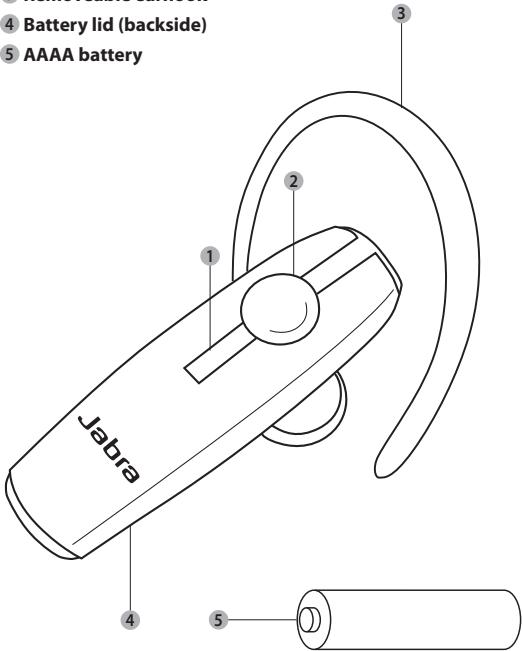
WHAT YOUR NEW HEADSET CAN DO
Your Jabra BT2040 lets you do all this:
Answer calls
End calls
Reject calls*
Voice Dialing
- Last number redialing
Call waiting*
- Place call on hold*
- Phone dependent
Specifications:
- Talk time up to 11 hours/standby time up to six months
Weight 16 grams - Operating range up to 10 meters (approx. 33 feet)
- Headset and hands-free Bluetooth profiles (see glossary)
- Bluetooth version 2.0 (see glossary)
GETTING STARTED
The Jabra BT2040 is easy to operate. You should follow these steps before using your headset:
- Open the lid and place the battery in the headset. Remember to observe correct positioning of the battery.
- Activate Bluetooth on your mobile phone (refer to the manual of your mobile phone)
- Turn your headset on.
- Pair your headset to your mobile phone
The answer/end button on the headset performs different functions depending on how long you press it.
| Instruction | Duration of press |
| Tap | Press briefly and let go |
| Press | Approx 2 seconds |
| Press and hold | Approx 5 seconds |
Exchanging the battery
A. To put the battery into the headset, slide the lid on the backside off, place the battery in the headset, and slide the lid back on. Ensure correct position of the battery.
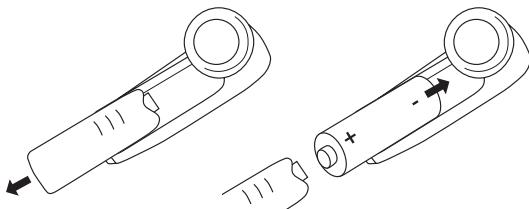
B. Note: The headset will warn you with 2 alternating tones when there is 25 minutes talk time left on your battery.
Turning your headset on and off
Press the answer/end button until you see a burst of blue flashes to turn on your headset
Press and hold the answer/end button until you see a burst of blue flashes to turn off your headset.
Please note that the LED indicator light turns off after 1 minute to save battery. To check if the headset is still on and connected, tap the answer/end button once. The indicator light should flash back with two single flashes if it is still on and connected.
Pairing the headset with your mobile phone
Headsets are connected to mobile phones using a procedure called 'pairing'. By following a few simple steps, a phone can be paired with a headset in a matter of minutes.
To pair the Jabra BT2040 with your mobile phone, just follow these three easy steps:
- Put the headset in pairing mode. When you turn on your Jabra BT2040 for the first time, the headset will automatically start up in pairing mode - i.e. it is discoverable for your phone. When the headset is in pairing mode, the LED indicator light is solid blue.
- Set your Bluetooth phone to 'discover' the Jabra BT2040. Follow your phone's instruction guide. First make sure that Bluetooth is activated on your mobile phone. Then set your phone to discover the headset. This usually involves going to a 'setup', 'connect' or 'Bluetooth' menu on your phone and selecting the option to 'discover' or 'add' a Bluetooth device.
- Your phone will find the headset under the name: Jabra BT2040. Your phone then asks if you want to pair with it. Accept by pressing 'Yes' or 'OK' on the phone and confirm with the passkey or PIN = 0000 (zeros). Your phone will confirm when pairing is complete.
In case of unsuccessful pairing, put the Jabra BT2040 into pairing mode manually. First, make sure the headset is off. Then press and hold the answer/end button for approximately 5 seconds until the LED has a solid blue light. The LED will flash before the light is constant - keep holding down the button until light is constant. When the headset is in pairing mode, repeat steps 2 and 3.
WEAR IT HOW YOU LIKE IT
The Jabra BT2040 is ready to wear without anearhook - simply insert it in your right or left ear. If you prefer to use theearhook, click it on as shown in illustration 4 from Quick Start Guide.
The Jabra BT2040 is ready to wear on your right ear. If you prefer the left ear, gently remove the earhook turn it 180^ degrees and reconnect it to the headset.
For optimal performance, wear the Jabra BT2040 and your mobile phone on the same side of your body or within line of sight. In general, you will get better performance when there are no obstructions between your headset and your mobile phone.
HOW TO...
Answer a call
- Tap the answer/end button on your headset to answer a call.
End a call
- Tap the answer/end button to end an active call.
Make a call
- When you make a call from your mobile phone, the call will (subject to phone settings) automatically transfer to your headset. If your phone does not support this feature, tap on the Jabra BT2040 answer/end button to transfer the call to the headset.
Reject a call*
- Press the answer/end button when the phone rings to reject an in-coming call. Depending on your phone settings, the person who called you will either be forwarded to your voice mail or hear a busy signal.
Adjust volume
- To adjust the volume, adjust the volume on your mobile phone.
Activate voice dialing*
- Press the answer/end button. For best results, record the voice-dialling tag through your headset. Please consult your phone's user manual for more information about using this feature.
Redial last number\*
- Double tap the answer/end button to radial last number
Call waiting and placing a call on hold*
This lets you put a call on hold during a conversation and answer a waiting call.
- Press the answer/end button once to put the active call on hold and answer the waiting call.
- Press the answer/end button to switch between the two calls.
- Tap the answer/end button to end the active conversation.
- Functions marked with * are dependent on your phone supporting these features. Check your phone's user manual for further information.
WHAT THE LIGHTS MEAN
| What you see | What this means about your headset |
| Solid blue light | In pairing mode |
| Slow single flash* | Connected to phone and in standby mode |
| Slow double flash* | Not connected to phone and in standby mode |
| Quick single flash | Active on call |
| Quick double flash | Incoming/Outgoing call in headset |
| Triple flash | Battery low |
- Light turns off after 1 minute to save battery.
BATTERY SAVING MODE
The headset goes into sleep mode after ten minutes if the mobile phone is not within range. Simply press the answer/end button to reactivate the headset.
TROUBLESHOOTING & FAQ
I hear crackling noises
- For the best audio quality, always wear your headset on the same side of the body as your mobile phone.
I cannot hear anything in my headset
- Increase the volume on the phone.
- Ensure that the headset is paired with the phone.
- Make sure that the phone is connected to the headset – if it does not connect either from the phone's Bluetooth menu or by tapping the answer/end button, follow the pairing procedure.
I have pairing problems even though my phone indicates otherwise
- You may have deleted your headset pairing connection in your mobile phone.
Follow the pairing instructions.
Will the Jabra BT2040 work with other Bluetooth equipment?
- The Jabra BT2040 is designed to work with Bluetooth mobile phones. It can also work with other Bluetooth devices that are compliant with Bluetooth version 1.1 or 1.2 or higher and support a headset and/or hands-free profile.
I cannot use Reject call, call on hold, Redial or voice dialling
- These functions are dependent on your phone supporting them. Please check your phone's manual for further details
NEED MORE HELP?
Phone 0800 0327026
support.uk@jabra.com
TAKING CARE OF YOUR HEADSET
Always store your headset with the power off and safely protected.
- Avoid storage at extreme temperatures (above 45^ / 113^ - including direct sunlight - or below -10^ / 14^ ). This can shorten battery life and may affect operation.
- High temperatures may also degrade performance. If exposed to water or other liquids, the device should be wiped clean from any traces of water.
WARNING!
Headsets are capable of delivering sounds at loud volumes and high pitched tones. Exposure to such sounds can result in permanent hearing loss damage. The volume level may vary based on conditions such as the phone you are using, its reception and volume settings, and the environment. Please read the safety guidelines below prior to using this headset.
Safety guidelines
1. Prior to using this product follow these steps
- before putting on the headset, turn the volume control on your mobile phone to its lowest level,
- put the headset on, and then
slowly adjust the volume control to a comfortable level.
2. During the use of this product
- Keep the volume at the lowest level possible and avoid using the headset in noisy environments where you may be inclined to turn up the volume;
If increased volume is necessary, adjust the volume control slowly; and - If you experience discomfort or ringing in your ears, immediately discontinue using the headset and consult a physician.
With continued use at high volume, your ears may become accustomed to the sound level, which may result in permanent damage to your hearing without any noticeable discomfort.
Using the headset while operating a motor vehicle, motorcycle, watercraft or bicycle may be dangerous, and is illegal in some jurisdictions. Check your local laws. Use caution while using your headset when you are engaging in any activity that requires your full attention. While engaging in any such activity, removing the headset from your ear area or turning off your headset will keep you from being distracted, so as to avoid accident or injury.
3. Keep out of reach of children:
The plastic bags the product and its parts are wrapped in are not toys for children. The bags themselves or the many small parts they contain may cause choking if ingested. Never try to dismantle the product yourself. None of the internal components can be replaced or repaired by users.
Only authorised dealers or service centres may open the product. If any parts of your product require replacement for any reason, including normal wear and tear or breakage, contact your dealer.
Avoid exposing the product to rain or other liquids.
4. Ignition of flammable atmospheres
Do not use the Headset in environments where there is a danger of ignition of flammable gases.
WARRANTY
Limited Two (2) -Year Warranty
GN A/S, warrants this product to be free from defects in materials and workmanship (subject to the terms set forth below) for a period of two (2) year from the date of purchase ("Warranty Period"). During the Warranty Period, GN will repair or replace (at GN's discretion) this product or any defective parts ("Warranty Service"). If repair or replacement is not commercially practicable or cannot be timely made, GN may choose to refund to you the purchase price paid for the affected product. Repair or replacement under the terms of this warranty does not give right to any extension or a new beginning of the period of warranty.
Claims under the Warranty
To obtain Warranty Service, please contact the GN dealer from which you purchased this product or visit www.gnnetcom.com or www.jabra.com for further information about customer support. You will need to return this Product to the dealer or ship it to the dealer or to GN (if so indicated on www.gnnetcom.com or www. jabra.com) in either its original packaging or packaging affording an equal degree of protection. You will bear the cost of shipping the product to GN. If the Product is covered by the warranty, GN will bear the cost of shipping product back to you after the completion of service under this warranty. Return shipping will be charged to you for products not covered by the warranty or requiring no warranty repair.
The Following information must be presented to obtain Warranty Service: (a) the product, and (b) proof of purchase, which clearly indicates the name and address of the seller, the date of purchase and the product type, which is evidence that this product is within the Warranty Period. Please further include (c) your return address. (d) daytime telephone number, and (e) reason for return. As part of GN/Jabra's efforts to reduce environmental waste you understand that the product may consist of reconditioned equipment that contains used components, some of which have been reworked. The used components all live up to GN/Jabra's high quality standards and comply with the GN product performance and reliability specifications. You understand that replaced parts or components will become the property of GN.
Limitation of Warranty
This warranty is only valid for the original purchaser and will automatically terminate prior to expiration if this product is sold or otherwise transferred to another party. The warranty provided by GN in this statement applies only to products purchased for use, and not for resale. It does not apply to open box purchases, which are sold "as is" and without any warranty. Specifically exempt from warranty are limited-life consumable components subject to normal wear and tear, such as microphone windscreens, ear cushions, modular plugs, ear tips, decorative finishes, batteries, and other accessories. This warranty is invalid if the factory-applied serial number, date code label, or product label has been altered or removed from this product. This Warranty does not cover cosmetic damage or damage due to misuse, abuse, negligence, Acts of Nature, accident, disassembling or modification of, or to any part of, the product. This Warranty does not cover damage due to improper operation, maintenance or installation, or attempted repair by anyone other than GN or a GN dealer which is authorized to do GN warranty work. Any unauthorized repairs will void this warranty.
REPAIRS OR REPLACEMENTS AS PROVIDED UNDER THIS WARRANTY ARE THE EXCLUSIVE REMEDY OF THE CONSUMER. GN SHALL NOT BE LIABLE FOR ANY INCIDENTAL OR CONSEQUENTIAL DAMAGES FOR BREACH OF ANY EXPRESS OR IMplied WARRANTY ON THIS PRODUCT. EXCEPT TO THE EXTENT PROHIBITED BY LAW, THIS WARRANTY IS EXCLUSIVE AND IN LIEU OF ALL OTHER EXPRESS AND IMPLIED WARRANTYES WHAT SO EVER, INCLUDING BUT NOT LIMITED TO THE WARRANTY OF MERCHANTABILITY AND FITNESS FOR A PRACTICAL PURPOSE.
NOTE! This warranty gives you specific legal rights. You may have other rights which vary from location to location. Some jurisdictions do not allow the exclusion or limitation of incidental or consequential damages or implied warranties, so the above exclusions may not apply to you. This warranty does not affect your legal (statutory) rights under your applicable national or local laws.
CERTIFICATION AND SAFETY APPROVALS
CE
This product is CE marked according to the provisions of the R & TTE Directive (1999/5/EC). Hereby, GN, declares that this product is in compliance with the essential requirements and other relevant provisions of Directive 1999/5/EC.
For further information please consult http://www.jabra.com
Within the EU this device is intended to be used in Austria, Belgium, Bulgaria, Cyprus, Czech Republic, Denmark, Estonia, Finland, France, Germany, Greece, Hungary, Ireland, Italy, Latvia, Lithuania, Luxembourg, Malta, Poland, Portugal, Romania, Slovakia, Slovenia, Spain, Sweden, The Netherlands, United Kingdom, and within EFTA in Iceland.
Bluetooth
The Bluetooth® word mark and logos are owned by the Bluetooth SIG, Inc. and any use of such marks by GN is under license. Other trademarks and trade names are those of their respective owners.
This device complies with Part 15 of the FCC Rules. Operation is subject to the following two conditions: (1) this device may not cause harmful interference, and (2) this device must accept any interference received, including interference that may cause undesired operation.
"Operation is subject to the following two conditions:
(1) this device may not cause interference, and
(2) this device must accept any interference, including interference that may cause undesired operation of the device."
GLOSSARY
- Bluetooth is a radio technology that connects devices, such as mobile phones and headsets, without wires or cords over a short distance (approx. 10 meters/33 feet). Bluetooth is safe to use. It is secure too, so once a connection has been made no-one can listen in and there is no interference from other Bluetooth devices either. Get more information at www.bluetooth.com.
- Bluetooth profiles are the different ways that Bluetooth devices communicate with other devices. Bluetooth phones support the headset profile, the hands-free profile or both. In order to support a certain profile, a phone manufacturer must implement certain mandatory features within the phone's software.
- Pairing creates a unique and encrypted link between two Bluetooth devices and lets them communicate with each other. Bluetooth devices will not work if the devices have not been paired.
- Passkey or PIN is a code that you enter on your Bluetooth enabled device (e.g. a mobile phone) to pair it with your Jabra BT2040. This makes your device and the Jabra BT2040 recognize each other and automatically work together.
- Standby mode is when the Jabra BT2040 is passively waiting for a call. When you 'end' a call on your mobile phone, the headset goes into standby mode.

Dispose of the product according to local standards and regulations.
www.jabra.com/wee