
G71UT - Guitar effects pedal ZOOM - Free user manual and instructions
Find the device manual for free G71UT ZOOM in PDF.

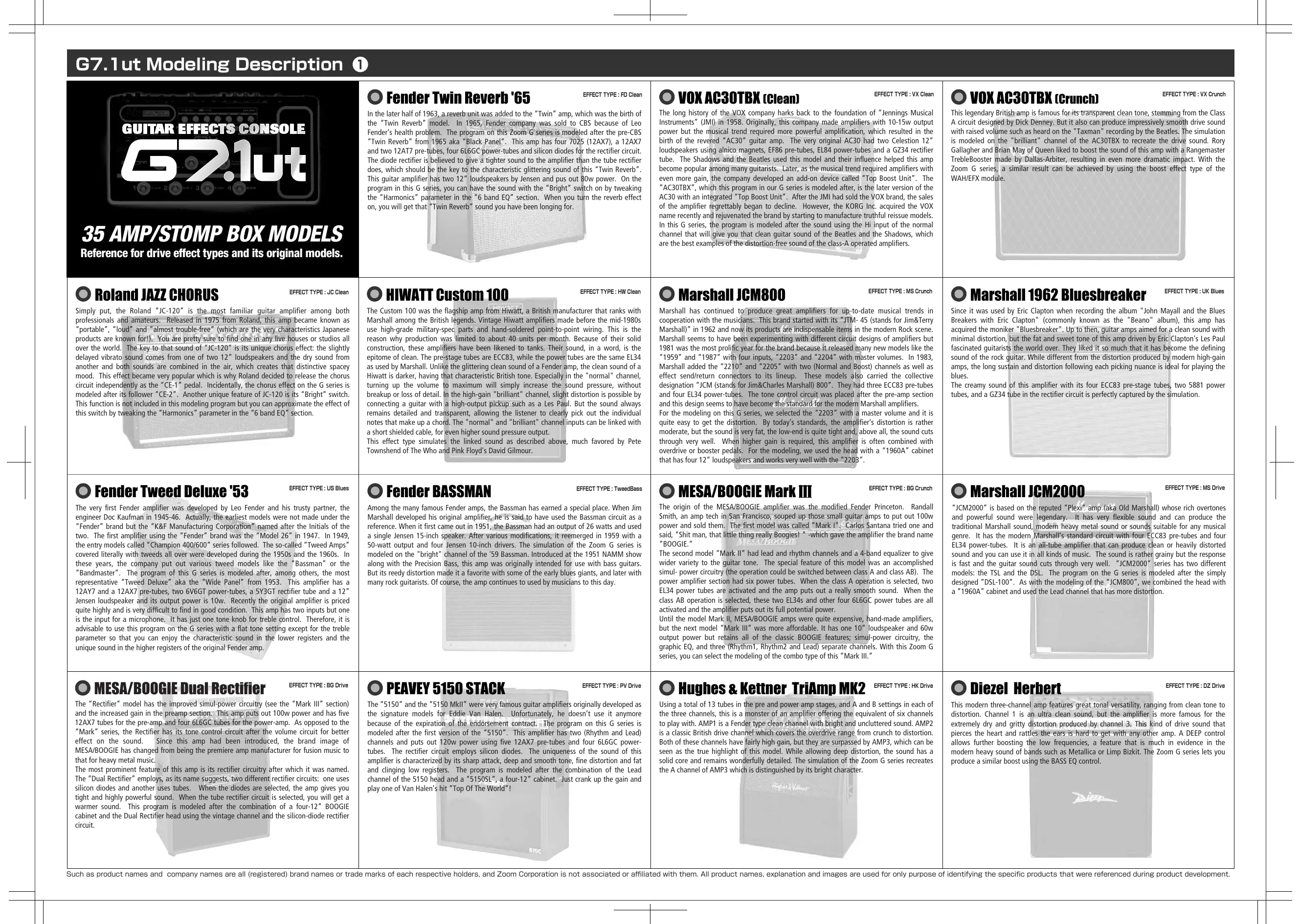

| Product Type | Guitar Effects Pedal |
| Brand | ZOOM |
| Model | G71UT |
| Dimensions | 235 x 460 x 81 mm |
| Weight | 4 kg |
| Power Supply | DC 15 V, 1.5 A via AD-0012 AC adapter |
| Sampling Frequency | 96 kHz |
| A/D Conversion | 24-bit, 64x oversampling |
| D/A Conversion | 24-bit, 128x oversampling |
| Signal Processing | 32-bit |
| Number of Effects | 92 effect types |
| Simultaneous Effect Modules | 9 |
| Patch Memory | 160 patches (80 preset + 80 user) |
| Tube Circuit | 12AX7 (Energizer) |
| Built-in Expression Pedal | Yes, with 4 command destinations |
| USB Audio Interface | Yes, 16-bit stereo (32/44.1/48 kHz) |
| MIDI | Input and output, program change and control change messages |
| Guitar Input | 1/4" mono phone jack, 1 MΩ impedance |
| Line Output | 2 x 1/4" mono phone jacks, switchable level -10 dBm / +4 dBm |
| Headphone Output | 1/4" stereo phone jack, 60 mW into 32 Ω |
| Maintenance | Clean with a soft, dry cloth. Do not use solvents. |
Frequently Asked Questions - G71UT ZOOM
User questions about G71UT ZOOM
0 question about this device. Answer the ones you know or ask your own.
Ask a new question about this device
Download the instructions for your Guitar effects pedal in PDF format for free! Find your manual G71UT - ZOOM and take your electronic device back in hand. On this page are published all the documents necessary for the use of your device. G71UT by ZOOM.
USER MANUAL G71UT ZOOM
GUITAR EFFECTS CONSOLE
67.1ut
Mode d'emploi
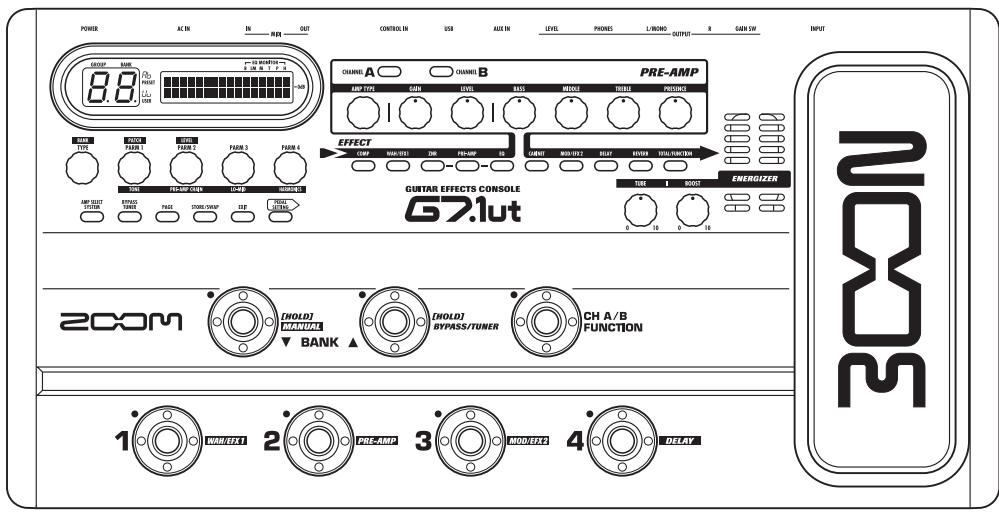
200m
PRECAUTIONS DE SECURITE ET D'EMPLOYOI
PRECAUTIONS DE SECURITE
PDL :Target1
Switch:Enable
ASTUCE
PDL Calibration Setting...min
PDL Calibration Setting...MAX
PatchDataDump Rx Receiving ...
ASTUCE
ZNR (ZOOM NOISE REDUCTION)
H.P.S (Harmonized Pitch Shifter)
Fender Twin Reverb '65 EFFECT TYPE : FD Clean In the later half of 1963, a reverb unit was added to the "Twin" amp, which was the birth of the "Twin Reverb" model. In 1965, Fender company was sold to CBS because of Leo Fender's health problem. The program on this Zoom G series is modeled after the pre-CBS "Twin Reverb" from 1965 aka "Black Panel". This amp has four 7025 (12AX7), a 12AX7 and two 12AT7 pre-tubes, four 6L6GC power-tubes and silicon diodes for the rectifier circuit. The diode rectifier is believed to give a tighter sound to the amplifier than the tube rectifier does, which should be the key to the characteristic glittering sound of this "Twin Reverb". This guitar amplifier has two 12" loudspeakers by Jensen and pus out 80w power. On the program in this G series, you can have the sound with the "Bright" switch on by tweaking the "Harmonics" parameter in the "6 band EQ" section. When you turn the reverb effect on, you will get that "Twin Reverb" sound you have been longing for.
The long history of the VOX company harks back to the foundation of "Jennings Musical Instruments" (JMI) in 1958. Originally, this company made amplifiers with 10-15w output power but the musical trend required more powerful amplification, which resulted in the birth of the revered "AC30" guitar amp. The very original AC30 had two Celestion 12" loudspeakers using alnico magnets, EF86 pre-tubes, EL84 power-tubes and a GZ34 rectifier tube. The Shadows and the Beatles used this model and their influence helped this amp become popular among many guitarists. Later, as the musical trend required amplifiers with even more gain, the company developed an add-on device called "Top Boost Unit". The "AC30TBX", which this program in our G series is modeled after, is the later version of the AC30 with an integrated "Top Boost Unit". After the JMI had sold the VOX brand, the sales of the amplifier regrettably began to decline. However, the KORG Inc. acquired the VOX name recently and rejuvenated the brand by starting to manufacture truthful reissue models. In this G series, the program is modeled after the sound using the Hi input of the normal channel that will give you that clean guitar sound of the Beatles and the Shadows, which are the best examples of the distortion-free sound of the class-A operated amplifiers.
Vox AC30TBX (Crunch) EFFECT TYPE: VX Crunch This legendary British amp is famous for its transparent clean tone, stemming from the Class A circuit designed by Dick Denney. But it also can produce impressively smooth drive sound with raised volume such as heard on the "Taxman" recording by the Beatles. The simulation is modeled on the "brilliant" channel of the AC30TBX to recreate the drive sound. Rory Gallagher and Brian May of Queen liked to boost the sound of this amp with a Rangemaster TrebleBooster made by Dallas-Arbiter, resulting in even more dramatic impact. With the Zoom G series, a similar result can be achieved by using the boost effect type of the WAH/EFX module.
Roland JAZZ CHORUS EFFECT TYPE:JC Clean
Simply put, the Roland "JC-120" is the most familiar guitar amplifier among both professionals and amateurs. Released in 1975 from Roland, this amp became known as "portable", "loud" and "almost trouble-free" (which are the very characteristics Japanese products are known for!). You are pretty sure to find one in any live houses or studios all over the world. The key to that sound of "JC-120" is its unique chorus effect: the slightly delayed vibrato sound comes from one of two 12^ loudspeakers and the dry sound from another and both sounds are combined in the air, which creates that distinctive spacey mood. This effect became very popular which is why Roland decided to release the chorus circuit independently as the "CE-1" pedal. Incidentally, the chorus effect on the G series is modeled after its follower "CE-2". Another unique feature of JC-120 is its "Bright" switch. This function is not included in this modeling program but you can approximate the effect of this switch by tweaking the "Harmonics" parameter in the "6 band EQ" section.
HIWATT Custom 100
The Custom 100 was the flagship amp from Hiwatt, a British manufacturer that ranks with Marshall among the British legends. Vintage Hiwatt amplifiers made before the mid-1980s use high-grade military-spec parts and hand-soldered point-to-point wiring. This is the reason why production was limited to about 40 units per month. Because of their solid construction, these amplifiers have been likened to tanks. Their sound, in a word, is the epitome of clean. The pre-stage tubes are ECC83, while the power tubes are the same EL34 as used by Marshall. Unlike the glittering clean sound of a Fender amp, the clean sound of a Hiwatt is darker, having that characteristic British tone. Especially in the "normal" channel, turning up the volume to maximum will simply increase the sound pressure, without breakup or loss of detail. In the high-gain "brilliant" channel, slight distortion is possible by connecting a guitar with a high-output pickup such as a Les Paul. But the sound always remains detailed and transparent, allowing the listener to clearly pick out the individual notes that make up a chord. The "normal" and "brilliant" channel inputs can be linked with a short shielded cable, for even higher sound pressure output. This effect type simulates the linked sound as described above, much favored by Pete Townshend of The Who and Pink Floyd's David Gilmour.
Marshall JCM800
Marshall has continued to produce great amplifiers for up-to-date musical trends in cooperation with the musicians. This brand started with its "JTM- 45 (stands for Jim&Terry Marshall)" in 1962 and now its products are indispensable items in the modern Rock scene. Marshall seems to have been experimenting with different circuit designs of amplifiers but 1981 was the most prolific year for the brand because it released many new models like the "1959" and "1987" with four inputs, "2203" and "2204" with master volumes. In 1983, Marshall added the "2210" and "2205" with two (Normal and Boost) channels as well as effect send/return connectors to its lineup. These models also carried the collective designation "JCM (stands for Jim&Charles Marshall) 800". They had three ECC83 pre-tubes and four EL34 power-tubes. The tone control circuit was placed after the pre-amp section and this design seems to have become the standard for the modern Marshall amplifiers. For the modeling on this G series, we selected the "2203" with a master volume and it is quite easy to get the distortion. By today's standards, the amplifier's distortion is rather moderate, but the sound is very fat, the low-end is quite tight and, above all, the sound cuts through very well. When higher gain is required, this amplifier is often combined with overdrive or booster pedals. For the modeling, we used the head with a "1960A" cabinet that has four 12" loudspeakers and works very well with the "2203".
Marshall 1962 Bluesbreaker
Since it was used by Eric Clapton when recording the album "John Mayall and the Blues Breakers with Eric Clapton" (commonly known as the "Beano" album), this amp has acquired the moniker. "Bluesbreaker". Up to then, guitar amps aimed for a clean sound with minimal distortion, but the fat and sweet tone of this amp driven by Eric Clapton's Les Paul fascinated guitarists the world over. They liked it so much that it has become the defining sound of the rock guitar. While different from the distortion produced by modern high-gain amps, the long sustain and distortion following each picking nuance is ideal for playing the blues.
The creamy sound of this amplifier with its four ECC83 pre-stage tubes, two 5881 power tubes, and a GZ34 tube in the rectifier circuit is perfectly captured by the simulation.
Fender Tweed Deluxe '53 EFFECT TYPE : US Blues
The very first Fender amplifier was developed by Leo Fender and his trusty partner, the engineer Doc Kaufman in 1945-46. Actually, the earliest models were not made under the "Fender" brand but the "K&F Manufacturing Corporation" named after the Initials of the two. The first amplifier using the "Fender" brand was the "Model 26" in 1947. In 1949, the entry models called "Champion 400/600" series followed. The so-called "Tweed Amps" covered literally with tweeds all over were developed during the 1950s and the 1960s. In these years, the company put out various tweed models like the "Bassman" or the "Bandmaster". The program of this G series is modeled after, among others, the most representative "Tweed Deluxe" aka the "Wide Panel" from 1953. This amplifier has a 12AY7 and a 12AX7 pre-tubes, two 6V6GT power-tubes, a 5Y3GT rectifier tube and a 12" Jensen loudspeaker and its output power is 10w. Recently the original amplifier is priced quite highly and is very difficult to find in good condition. This amp has two inputs but one is the input for a microphone. It has just one tone knob for treble control. Therefore, it is advisable to use this program on the G series with a flat tone setting except for the treble parameter so that you can enjoy the characteristic sound in the lower registers and the unique sound in the higher registers of the original Fender amp.
Fender BASSMAN
Among the many famous Fender amps, the Bassman has earned a special place. When Jim Marshall developed his original amplifier, he is said to have used the Bassman circuit as a reference. When it first came out in 1951, the Bassman had an output of 26 watts and used a single Jensen 15-inch speaker. After various modifications, it reemerged in 1959 with a 50-watt output and four Jensen 10-inch drivers. The simulation of the Zoom G series is modeled on the "bright" channel of the '59 Bassman. Introduced at the 1951 NAMM show along with the Precision Bass, this amp was originally intended for use with bass guitars. But its reedy distortion made it a favorite with some of the early blues giants, and later with many rock guitarists. Of course, the amp continues to be used by musicians to this day.
EFFECT TYPE: TweedBass
MESA/BOOGIE Mark III
The origin of the MESA/BOOGIE amplifier was the modified Fender Princeton. Randall Smith, an amp tech in San Francisco, souped up those small guitar amps to put out 100w power and sold them. The first model was called "Mark I". Carlos Santana tried one and said, "Shit man, that little thing really Boogies! -which gave the amplifier the brand name "BOOGIE."
The second model "Mark II" had lead and rhythm channels and a 4-band equalizer to give wider variety to the guitar tone. The special feature of this model was an accomplished simul- power circuitry (the operation could be switched between class A and class AB). The power amplifier section had six power tubes. When the class A operation is selected, two EL34 power tubes are activated and the amp puts out a really smooth sound. When the class AB operation is selected, these two EL34s and other four 6L6GC power tubes are all activated and the amplifier puts out its full potential power.
Until the model Mark II, MESA/BOOGIE amps were quite expensive, hand-made amplifiers, but the next model "Mark III" was more affordable. It has one 10^ loudspeaker and 60w output power but retains all of the classic BOOGIE features; simul-power circuitry, the graphic EQ, and three (Rhythm1, Rhythm2 and Lead) separate channels. With this Zoom G series, you can select the modeling of the combo type of this "Mark III."
Marshall JCM2000
"JCM2000" is based on the reputed "Plexi" amp (aka Old Marshall) whose rich overtones and powerful sound were legendary. It has very flexible sound and can produce the traditional Marshall sound, modern heavy metal sound or sounds suitable for any musical genre. It has the modern Marshall's standard circuit with four ECC83 pre-tubes and four EL34 power-tubes. It is an all-tube amplifier that can produce clean or heavily distorted sound and you can use it in all kinds of music. The sound is rather grainy but the response is fast and the guitar sound cuts through very well. "JCM2000" series has two different models: the TSL and the DSL. The program on the G series is modeled after the simply designed "DSL-100". As with the modeling of the "JCM800", we combined the head with a "1960A" cabinet and used the Lead channel that has more distortion.
MESA/BOOGIE Dual Rectifier EFFECT TYPE:BG Drive
The "Rectifier" model has the improved simul-power circuitry (see the "Mark III" section) and the increased gain in the preamp section. This amp puts out 100w power and has five 12AX7 tubes for the pre-amp and four 6L6GC tubes for the power-amp. As opposed to the "Mark" series, the Rectifier has its tone control circuit after the volume circuit for better effect on the sound. Since this amp had been introduced, the brand image of MESA/BOOGIE has changed from being the premiere amp manufacturer for fusion music to that for heavy metal music.
The most prominent feature of this amp is its rectifier circuitry after which it was named. The "Dual Rectifier" employs, as its name suggests, two different rectifier circuits: one uses silicon diodes and another uses tubes. When the diodes are selected, the amp gives you tight and highly powerful sound. When the tube rectifier circuit is selected, you will get a warmer sound. This program is modeled after the combination of a four-12" BOOGIE cabinet and the Dual Rectifier head using the vintage channel and the silicon-diode rectifier circuit.
PEAVEY 5150 STACK
The "5150" and the "5150 MkII" were very famous guitar amplifiers originally developed as the signature models for Eddie Van Halen. Unfortunately, he doesn't use it anymore because of the expiration of the endorsement contract. The program on this G series is modeled after the first version of the "5150". This amplifier has two (Rhythm and Lead) channels and puts out 120w power using five 12AX7 pre-tubes and four 6L6GC power-tubes. The rectifier circuit employs silicon diodes. The uniqueness of the sound of this amplifier is characterized by its sharp attack, deep and smooth tone, fine distortion and fat and clinging low registers. The program is modeled after the combination of the Lead channel of the 5150 head and a "5150SL", a four-12" cabinet. Just crank up the gain and play one of Van Halen's hit "Top Of The World!"
EFFECT TYPE : PV Drive
Hughes & Kettner TriAmp MK2
EFFECT TYPE: HK Drive
Using a total of 13 tubes in the pre and power amp stages, and A and B settings in each of the three channels, this is a monster of an amplifier offering the equivalent of six channels to play with. AMP1 is a Fender type clean channel with bright and uncluttered sound. AMP2 is a classic British drive channel which covers the overdrive range from crunch to distortion. Both of these channels have fairly high gain, but they are surpassed by AMP3, which can be seen as the true highlight of this model. While allowing deep distortion, the sound has a solid core and remains wonderfully detailed. The simulation of the Zoom G series recreates the A channel of AMP3 which is distinguished by its bright character.

EFFECT TYPE: DZ Drive
Diezel Herbert
This modern three-channel amp features great tonal versatility, ranging from clean tone to distortion. Channel 1 is an ultra clean sound, but the amplifier is more famous for the extremely dry and gritty distortion produced by channel 3. This kind of drive sound that pierces the heart and rattles the ears is hard to get with any other amp. A DEEP control allows further boosting the low frequencies, a feature that is much in evidence in the modern heavy sound of bands such as Metallica or Limp Bizkit. The Zoom G series lets you produce a similar boost using the BASS EQ control.
G7.1ut Modeling Description ②
BOSS OD-1
EFFECT TYPE:OverDrive
The "OD-1" released by BOSS in 1977 was originally developed for the simulation of the natural overdrive sound of tube amplifiers, but this stomp box turned out to be popular as the booster unit to connect to the input of the real tube amplifier to get tighter and more punchy sound with the increased gain. The "OD-1" employs the asymmetrical "clipper" section in its circuit design that uses three diodes to create the overdrive sound that is mild and rich in nuances. The pedal had been in production from 1977 to 1985, but now it is unexpectedly difficult to even find a used one. And if you could locate one, it would be astonishingly expensive. There have been many stomp boxes known as overdrive units. The most famous one is probably the "Tube Screamer" but we chose this very original overdrive pedal "OD-1". If you are lucky enough to use the real "OD-1", we invite you to try blind test to turn off all of the effect module except the "OD-1" on the Zoom G series and compare the sound of the modeling and that of the real one. We think that you will not hear any difference.
Obanez TS808
EFFECT TYPE:TS808
This is modeled on the early Tube Screamer introduced by Ibanez in 1979 for the non-US market. In Japan, it was sold under the Maxon name as the OD808. As the moniker implies, when using the pedal on its own, it produces natural distortion such as when driving a tube amp hard. But it often was used simply as a booster, with gain at 0 and volume at 10, to drive a full-up amp even further. Normally, this would not change the amplifier's sound, but a slight peak in the midrange results in a softer tone.
This pedal is also famous for being used by blues guitar legend Stevie Ray Vaughan who tragically perished in a helicopter crash.
PROCO RAT
EFFECT TYPE: RAT
This is one of the most widely used pedals. It has only three knobs (Distortion, Filter, Volume), but each knob has a wide adjustment range, allowing various types of sound. With distortion fully turned up, the fat, up-front sound is close to a Fuzz pedal. At the twelve o'clock position, the crunch sound brings out those fine picking nuances, allowing the player to tweak the sound by varying the playing style. As opposed to a regular tone control, the filter knob cuts the treble when turned clockwise. This is the secret behind the typical "RAT" sound. In the Zoom G series, this effect is simulated by the TONE parameter, but operation is reversed (treble is cut when turned counterclockwise).
BOSS DS-1
EFFECT TYPE:DS-1
This orange-colored pedal can be called the standard of distortion sound. Among the many distortion pedals from Boss, it is a real long-seller, along with the SD-1. In Japan, sales of the pedal ceased at one point (although production for the U.S. market continued), but as of 2005, the product is available again. This is the only Boss pedal to be reintroduced to the market in this fashion. The sound is trebly and very "distortion-like", but it can very well hold its own in a band. Favored by Joe Satriani and Nirvana's Kurt Cobain.
Dallas-Arbiter FUZZ FACE
"FUZZ FACE" was originally released from the Dallas-Arbiter company in 1966 encased in a uniquely designed housing that literally looked like a face. It is also famous as legendary guitarist Jimi Hendrix's favorite gear. He combined this "FUZZ FACE" with his Marshall amps because it was hard to get distorted sound from them at that time, and created avant-garde tones. The heavy and fat low end and the fuzz sound with long sustain are the characteristics of this effective device. The earliest model used two PNP germanium transistors and was very different in sound from the later models using silicon transistors. The theory of creating distorted sound is simple. Have you tried to connect the guitar to a microphone input on your radio cassette recorder to emulate that sound? You cannot go too wrong if you think that the circuitry of this device is similar to that. The program on this G series is modeled after this earliest version most satisfactorily.
Electro-Harmonix BIG MUFF
EFFECT TYPE:BigMuff
There are several versions of this pedal. The Zoom G series simulation is based on the so-called "Ram's Head" from the early seventies, characterized by very long sustain and rich distortion tapestry. Major names from the 70's associated with this sound are Carlos Santana and Robert Fripp of King Crimson. From the late eighties into the nineties, the grunge movement took over, with Nirvana's Cobain and J. Mascis of Dinosaur Jr. using the pedal to do their thing. Compared to an ordinary fuzz pedal, the BIG MUFF offers rich midrange and detailed distortion that maintain presence also when playing chords. The result is a wholly unique sound somewhere between distortion and fuzz.
Marshall Stack + SD-1
EFFECT TYPE:SD+M Stk
Ever since the dawn of rock, Marshall has been recognized as the best brand of amp for this genre. With the JCM800 series that appeared in the eighties, Marshall again pulled ahead of the pack. Among the various models of the series, the most successful must be the 100-watt 2203 featuring a master volume control. With its crisp and solid sound, it makes the guitar stand out gloriously in a band even over the vocals, something that hard rock guitarists really appreciate. However, for dashing leads with heavy riffs or right-hand playing, gain with this amp alone was still not enough. Driving the Marshall JCM800 with an overdrive pedal was the answer. This effect type recreates the sound of those glitzy hairspray bands from the eighties, using the Boss SD-1 as overdrive pedal.
Marshall Stack + FUZZ FACE
EFFECT TYPE: FZ+M Stk
At the Monterey Pop Festival in 1967, a guitar was smashed and burnt on stage, helped along by Zippo lighter fluid. Just before this poor Stratocaster gave up the ghost, its psychedelic colors disintegrating, it had been played with furious intensity and produced a sound unlike anything heard before. And that is also what this effect type, combining a Marshall SuperLead 100 with the FUZZ FACE from Dallas-Arbiter, attempts to do. It produces a wildly deformed sound that is not destined for delicate chords but for audacious dramatic leads with heavy sustain. Such as those of the legendary Jimi Hendrix.
O ZOD
EFFECT TYPE:ZOD
When playing an electric guitar, distortion is of course one of the essential style elements, but different guitarists will have different preferences. What this effect type does is exemplify the preferences of the Zoom G series developers. The smooth overdrive sound should lend itself to many playing styles, allowing finely nuanced changes. Warmth is better than with any stomp box, and loud volume will not cause the sound to become unpleasant. Just the right amount of sustain ensures that attack dynamics remain vibrant. Tracking your fingerwork with uncanny accuracy, the effect reproduces even the final tinge of the pick when it leaves the string. We believe that many guitarists will find here what they were looking for.
Extreme Distortion
EFFECT TYPE: ExtremeDS
This distortion program is developed especially for the G series. We deliberately made use of the characteristics of digital devices and even emphasized the edge of the digital sound to get the distortion to the maximum. The "TM-01" (Tri Metal) was the pedal that had the deepest distortion sound among the stomp boxes from ZOOM but was discontinued. It had as much as three diode-clipping stages and had very high gain. The "Extreme Distortion" is programmed to get the gain even higher. It raises the signal level to the maximum at the input stage and gets the wild distortion sound at the clipping stage. In fact, you won't change the distortion rate even if you lower the volume on your guitar! Its distortion is that deep. Contrary to the usual distortion effects whose sound gets thinner as you raise the gain, this "Extreme Distortion" won't lose the fatness and tightness of the sound.
EFFECT TYPE: Centaur
EFFECT TYPE: Guv'nor
KLON CENTAUR
This pedal is well known for two things: its capability of producing pure distortion without impairing the original sound, and its high price. Being four-and-a-half years in the making, the Centaur distinguishes itself from other famous pedals such as the Ibanez TS808 or the Boss OD-1. It is also often used as a booster, but whereas these vintage pedals add their characteristics to the amp sound, the Centaur creates a tone as if it were driven by the amp.
Marshall Guv'nor
The initial sales talk for this serious distortion pedal "Guv'nor" bearing the Marshall brand was that you could get the distortion sound of the Marshall amps with this small stomp box. Depending on which guitar amps you combine, you can actually get the Marshall amps distortion. There are two different versions of the Guv'nor: the Britain-made ones from 1988 and the Korean-made ones from 1998. The program on this G series is modeled after the original version from 1988. The Guv'nor's characteristic feature is the frequency point you can tweak using the "TREBLE" control. Even if you lower this parameter value, the sound will get fat instead of getting dullish. As you raise the value, the sound will get sweeter and clearer.
MXR Distortion+
EFFECT TYPE: dist+
MXR, a company founded in the seventies by two high school students, is famous for stomp boxes such as the Dynacomp and Phase 90. In the early days, their products were actually built and painted in a garage and set out to dry in the garden. As the story goes, sometimes small insects would get stuck on the surface, and the lot would be shipped out as is. The pedals soon gained worldwide fame in the seventies, but eventually lost their market share to "Made in Japan" products from Boss and others that provided high performance at lower cost. MXR disappeared from the scene, but in the late eighties, Jim Dunlop bought the rights and is now producing a number of re-issue models.
This pedal much beloved by Randy Rhoads who made the "distortion" moniker and sound famous the world over. The hard-edged tone stays detailed also when playing fast solos or riffs with the lower strings muted. The world of heavy metal and hard rock wouldn't be the same without it.
MATCHLESS HOT BOX
EFFECT TYPE:HotBox
The "HOT BOX" was released as a pedal preamp bearing the MATCHLESS brand. It uses two 12AX7A tubes for the truthful reproduction of the sound of the "MATCHLESS" guitar amplifiers. It has the compressed sound and the quick response, which are distinctive characteristics of tube amps. Its sound is fat and cuts through very well, too. Even if you crank up the gain to get a distorted sound, you will retain the nuances of the original guitar sound. Although it is categorized as preamp, the ideal way to get the best possible sound is to connect it, like usual stomp boxes, to the input of your guitar amp. Its design is also attractive: the case is polished like a mirror and the "MATCHLESS" logo lights up when you turn it on. This "Hot Box" is literally a magic box: you can get the signature sound of the "MATCHLESS" amps regardless of the guitar amplifier you connect it to.
BOSS MT-2
EFFECT TYPE : MetalZone
The "MT-2" ("METAL ZONE") has the strongest distortion. Its unique distortion sound has very fat mid to low range and it has a parametric EQ in addition to the Hi and Low EQs, which is the key to the scooped metal sound. This stomp box is reputed for its flexibility in sound because you can not only get that scooped metal sound by cutting the mid range and boosting the high and low range but also the overdrive sound by reducing the gain and boosting the mid range. This is one of the best-selling stomp boxes among many of the popular line-ups of BOSS products. Once connected, the Strat or the Les Paul will have the "MT-2" sound regardless of the types of guitar pickups. It was first introduced in 1991 and is still in the BOSS's catalog; a truly a long-seller!
Fender Combo + TS9
EFFECT TYPE:TS ^+ F Cmb
Opinion may be divided, but it can be argued that the most powerful and fat guitar sound ever was created by Stevie Ray Vaughan. He did this by putting extremely heavy-gauge strings that would fit an acoustic guitar on his old and battered Stratocaster. Add to this the full-up Fender amp and a small Ibanez pedal, and you are approaching magic territory. Just like this effect type does. Connect a Stratocaster and bend the third string near the 14th fret. Feel that smile appear on your face. If you want to express your feelings, give this one a go.
OZCombo
EFFECT TYPE:ZCombo
The Bluesbreaker or Bassman are wonderful combo amps, but nowadays, their gain can seem a little low. Sometimes you just want to combine the transparency and dynamics of these combo amps with a more intense level of distortion and sustain. The Z Combo (great name!) is the answer to your prayers. You get a midrange sound like adding up a Marshall and a Fender and dividing them by two, plus distortion that equals notching up the volume from 10 to 15 (or from 12 to 17 on the Bassman). While not intended for jazz or heavy metal, the sound is great for a wide range of other blues and rock styles.
O Z Stack
EFFECT TYPE:Z Stack
Which amplifier has the strongest distortion in the world? Is it the Rectifier, the Herbert, the TriAmp? No, it is the Z Stack that you find right here. The distortion is so strong that simply touching the fingerboard with your left hand (or right hand if you're left-handed) will produce sound. (This makes right-hand playing a snap.) But amazingly, a 9th chord will remain clearly identifiable as such, because the sound does not lose its core. The biggest problem of this amplifier is that it does not exist--except in the Zoom G series, that is. Give it a try if you are after really heavy sound.
Digital Fuzz
EFFECT TYPE: DigiFuzz
Forty years ago, my fellow guitar player used to crank up his amp trying to distort his guitar sound and make other guys of the band virtually deaf at the end of the rehearsal. When it was difficult to get the distorted sound out of the amplifiers like in those days, some guys made cuts in the cone loudspeakers to make the sound distorted, which was the origin of the sound of fuzz effects. The fuzz pedals were developed to reproduce that distortion-like sound. In other words, the trick of fuzz effect is to simulate the dirty distortion and that "broken" feel. This "Digital Fuzz" has the very effect described above. Its drastic distortion, relentless cut-offs and noises in the decay are the characteristics that one could simply describe as "broken". Its fat and tight sound can be seriously recommended for the fuzz maniacs to try. This is literally the Digital Dirty Fuzz that is only possible in the digital domain (are you brave enough to make cuts in your loudspeakers?).
O Z Clean
EFFECT TYPE:Z Clear
This is a clean sound that makes the drive module virtually disappear. The bass is tight, and a very slight treble emphasis creates vigor. Why choose this effect type, then? Try it when creating patches for arpeggios and cutting. You should get smoother and more rounded sound. If you want to produce clean guitar sound via a line input, excessive bass may make it sound as if the pick got caught between the strings. This effect type should solve such problems.
This USB/Cubase LE Startup Guide explains how to install Cubase LE on a computer, how to make the connection and settings of this unit, and how to record your instrument play.
Cubase LE Installation
Connections and Preparations
Recording with Cubase LE
Cubase LE Installation
Connections and Preparations
Recording with Cubase LE
Windows XP
To connect this unit to a computer running Windows XP and to enable audio input/output, proceed as follows.

Install Cubase LE on the computer.
When you insert the CD-ROM supplied with this product into the CD-ROM drive of the computer, the installer will start up automatically. Follow the on-screen instructions to install Cubase LE.

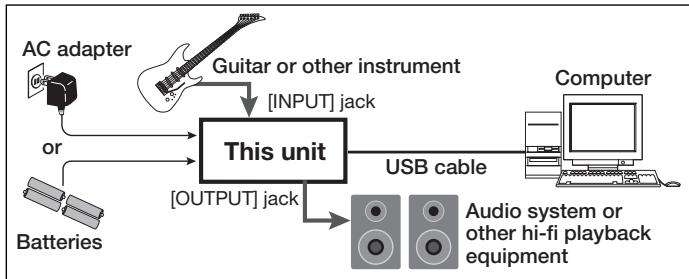
Connect this unit to the computer using a USB cable.
NOTE
- If you monitor the audio signal during recording via the audio output of the computer, there will be an audible latency. Be sure to use the [OUTPUT] jack of this unit to monitor the signal.
- When a device designed to use USB power is powered via the USB cable, insufficient power may result in unstable operation or error indications appearing on the display. In such a case, power the device from an AC adapter or batteries.
- Use a high-quality USB cable and keep the connection as short as possible. If power is supplied to a device designed to use USB power via a USB cable that is more than 3 meters in length, the low voltage warning indication may appear.
HINT
No special steps are necessary for canceling the USB connection. Simply disconnect the USB cable from the computer.
When you connect this unit for the first time to a computer running Windows XP, a message saying "New Hardware Found" will appear. Before proceeding, wait a while until this message disappears.

From the "Start" menu, select "Control Panel" and double-click "Sounds and Audio Devices".
The sounds and audio devices properties screen appears. Click the "Audio" tab and check whether "USB Audio CODEC" is selected as default device for audio playback and recording.
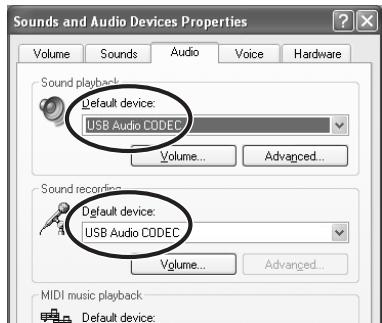
If another device is selected, use the "Default Device" pull-down menu to change the selection to "USB Audio CODEC".
When the setting has been made, click the OK button to close the sounds and audio devices properties screen.

Start Cubase LE.
A window asking whether to check the audio input/output port appears. Click OK to perform the check.

After Cubase LE has started up, access the "Devices" menu, select "Device Setup..." and click "VST Multitrack" in the list of devices.
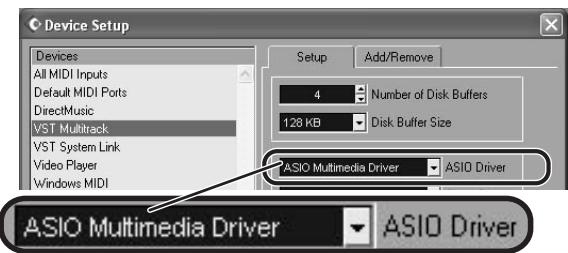
Check whether "ASIO Multimedia Driver" is selected as ASIO driver in the right part of the device setup window.

Click the "Control Panel" button in the device setup window. In the window that appears, click the "Advanced Options" button.
In the advanced options window, check whether "USB Audio CODEC" is selected as input port and output port.
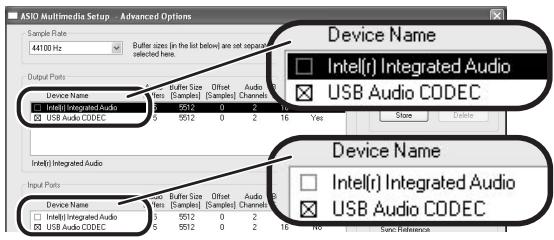
If not selected, click the respective box to place a check mark in it. When the setting has been made, click the OK buttons to close the windows and return to the normal post-startup Cubase LE screen.
HINT
- By clicking the Move up/Move down button in the advanced options window, you can change the priority sequence setting of the currently selected port. If you move "USB Audio CODEC" to the top of the list, it will also be at the top in the following VST input window.
- When you edit any of the settings in the advanced settings window, a window asking whether to check the audio input/output port appears. Click OK to perform the check.

Access the "Devices" menu and select "VST Inputs". The VST inputs window appears. Check whether the input port is active.

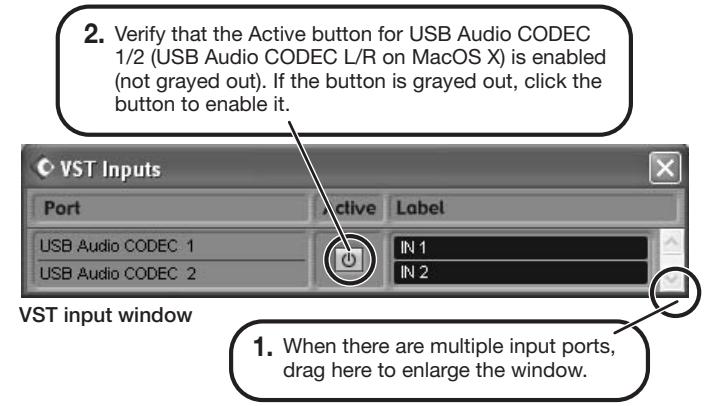
If the Active button is Off (grayed out), click the button to set it to On.
HINT
When multiple input ports are available for selection, you should scroll or enlarge the window and check the enable/disable settings for all ports.

Continued overleaf
Cubase LE Installation
Connections and Preparations
Recording with Cubase LE
MacOS X
To connect this unit to a computer running MacOS X and enable audio input/output, proceed as follows.

Insert the CD-ROM supplied with this product into the CD-ROM drive of the Macintosh computer.
The "Cubase LE" icon appears on the desktop.

Double-click the icon to open it, and use the "Cubase LE Installer" to install Cubase LE.
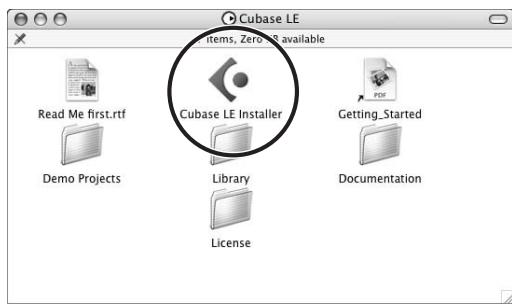

Connect this unit to the computer using a USB cable.
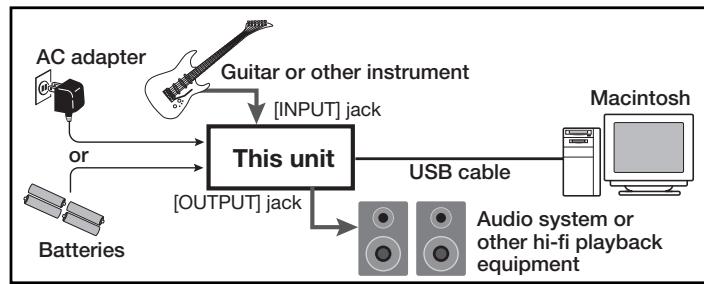
NOTE
- If you monitor the audio signal during recording via the audio output of the computer, there will be an audible latency. Be sure to use the [OUTPUT] jack of this unit to monitor the signal.
- When a device designed to use USB power is powered via the USB cable, insufficient power may result in unstable operation or error indications appearing on the display. In such a case, power the device from an AC adapter or batteries.
- Use a high-quality USB cable and keep the connection as short as possible. If power is supplied to a device designed to use USB power via a USB cable that is more than 3 meters in length, the low voltage warning indication may appear.
HINT
No special steps are necessary for canceling the USB connection. Simply disconnect the USB cable from the computer.

Open the "Applications" folder and then the "Utilities" folder, and double-click "Audio MIDI Setup".
The Audio MIDI Setup screen appears.
Click "Audio Devices" and check whether "USB Audio CODEC" is selected as default input/default output.
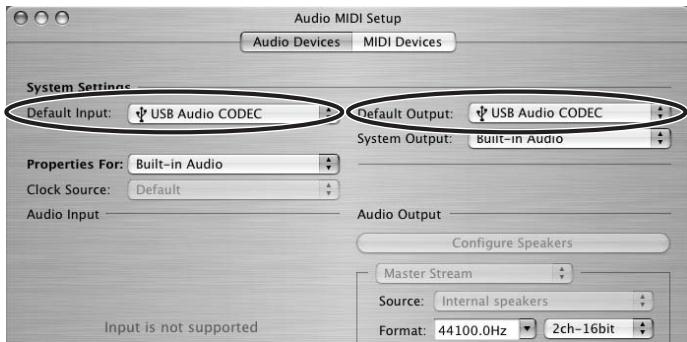
If another device is selected, use the pull-down menu to change the selection to "USB Audio CODEC".
When the setting has been made, close Audio MIDI Setup.

Start Cubase LE.
HINT
The Cubase LE program is installed in the "Applications" folder.

When Cubase LE has started up, access the "Devices" menu, select "Device Setup...", and click "VST Multitrack" in the list of devices.
Check whether "USB Audio CODEC(2)" is selected as ASIO driver in the right part of the device setup window.
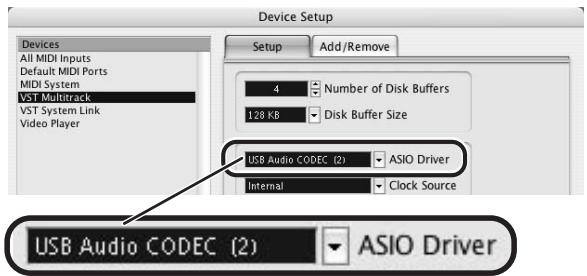
If another item is selected, use the pull-down menu to change the selection.
When the setting has been made, click the OK button to close the window.

Access the "Devices" menu and select "VST Inputs". The VST inputs window appears. Check whether the input port is active.
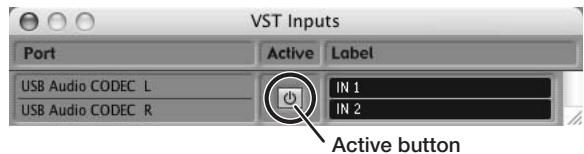
If the Active button is Off (grayed out), click the button to set it to On.

Continued overleaf

Access the "File" menu and select "New Project".
The new project window appears. Here you can select a project template.
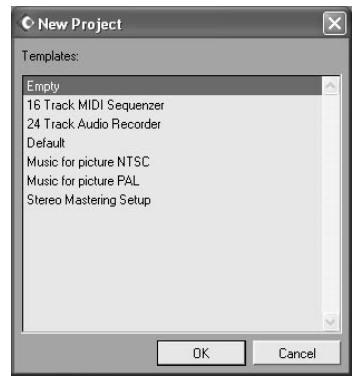

Make sure that the "Empty" template is selected, and click the OK button.
A window for selecting the project file save location appears

After specifying the project file save location (such as the desktop), click the OK button (Choose button in MacOS 10.4).
A new project is created, and the project window for controlling most of the Cubase LE operations appears.
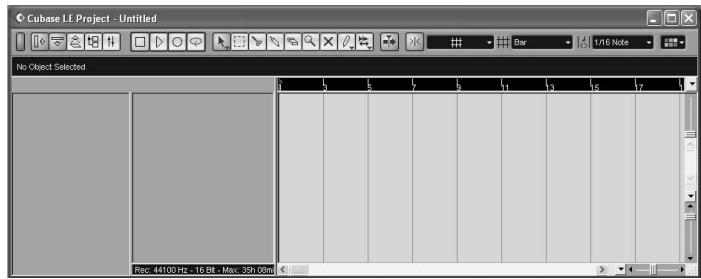
Project window

To create a new audio track, access the "Project" menu and select "Add track". In the submenu that appears, select "Audio".
A new audio track is added to the project window.
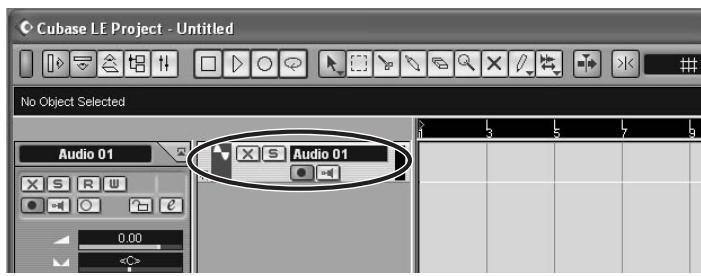
HINT
You can add several tracks at once by accessing the "Project" menu, selecting "Add track" and then selecting "Multiple..." in the submenu.

Make the following settings for the new audio track.
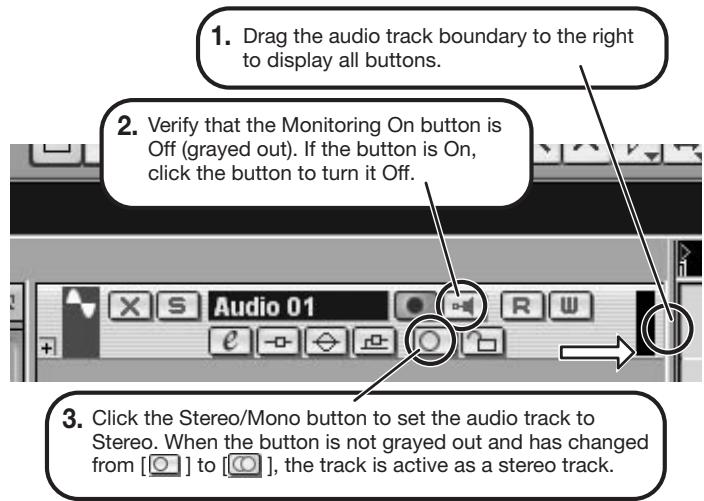

Access the "Devices" menu and select "VST Inputs".
The VST inputs window appears.
This window shows the available input ports and their active/inactive status.
You can perform the following steps here.

Connect the guitar or other instrument to the [INPUT] jack of this unit and select the desired patch.
The sound selected here will be recorded on the computer via the [USB] port.
![ZOOM G71UT - Connect the guitar or other instrument to the [INPUT] jack of this unit and select the desired patch. - 1](/content/2019/11/152274/images/b47f38f758682a0c3436de8f997b4e03b66100b5779b754a264b6af6f1be2528.jpg)
Access the "Devices" menu and select "Mixer".
The mixer window appears.
This window shows the channels assigned to created tracks.
You can perform the following steps here.
- Click here to select the port for the USB Audio CODEC 1/2 (USB Audio CODEC L/R on MacOS X) assigned as audio input port to the channel (see step 13).
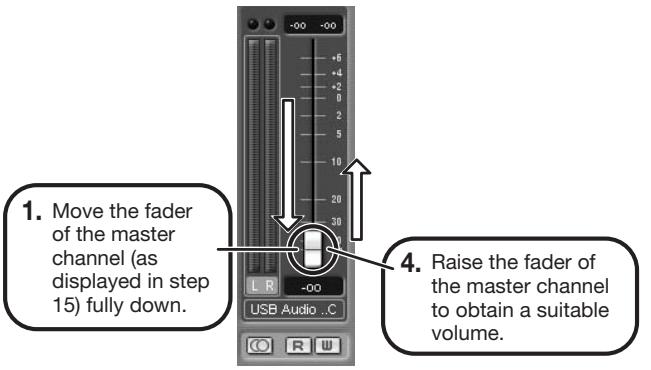
To adjust the playback level after recording, click this button to bring up the master channel of the mixer.
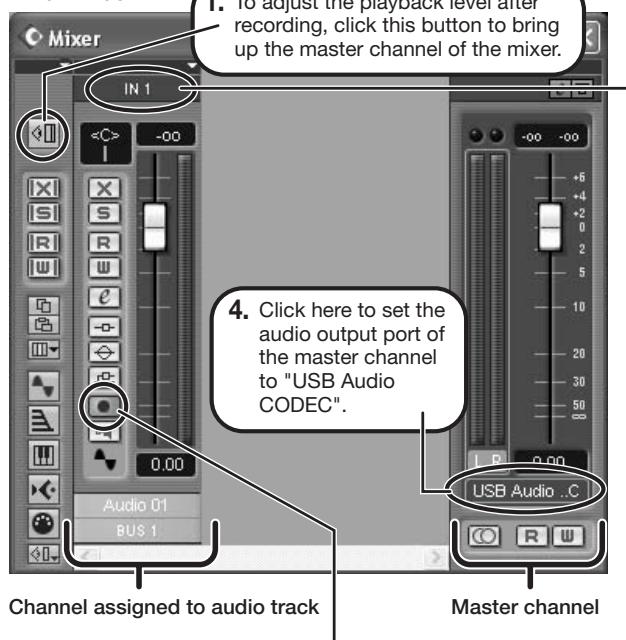
Mixer window
- Verify that the Record Standby button is shown in red. (If the button is grayed out, click the button to enable it. This will set the audio track to the recording standby condition.
HINT
When the Record Standby button is enabled, the level meter next to the fader shows the input level for the audio track. When the button is disabled, the output level for the audio track is shown.

While playing your instrument, adjust the output level of this unit to achieve a suitable recording level for Cubase LE.
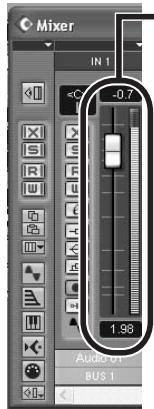
Level meter
When the audio track is in recording standby mode, its recording level is shown by the level meter for the assigned channel. The level should be set in such a way that the meter registers to a fairly high value but remains below the maximum point.
NOTE
- The level meter shows the signal level after internal processing by Cubase LE. Therefore a slight time lag may occur between playing a guitar or other instrument and the meter registering the change in level. This is normal and not a defect.
- The audio tracks of Cubase LE will be recorded with correct timing exactly matched to your instrument play. There will be no lag between already recorded tracks and newly added tracks.

Verify that the transport panel is shown.

Transport panel
If the transport panel is not shown, access the "Transport" menu and select "Transport Panel".

To start recording, click the Record button in the transport panel.

As you play your instrument, the waveform appears in real time in the project window.

To stop recording, click the Stop button in the transport panel.
Recording stops.

Check the recorded content.
To play the recording, perform the following steps.

Go to beginning of project
Play button
-
Use the controls on the transport panel to move to the beginning of the project.
-
Click the Play button in the transport panel to start playback.
HINT
If no sound is heard when you click the Play button after recording, check the settings in the VST input window (step 13) and the master channel output port setting (step 15) once more.
For optimum enjoyment
While using Cubase LE, other applications may slow down drastically or the message "Cannot synchronize with USB audio interface" may appear. If this happens frequently, consider taking the following steps to optimize the operation conditions for Cubase LE.
(1) Shut down other applications besides Cubase LE. In particular, check for resident software and utilities.
(2) Reduce plug-ins (effects, instruments) used by Cubase LE. When there is a high number of plug-ins, the computer's processing power may not be able to keep up. Reducing the number of tracks for simultaneous playback can also be helpful.
(3) Power the unit from an AC adapter
When a device designed to use USB power is powered via the USB port, the current supply may sometimes fluctuate, leading to problems. See if using an AC adapter improves operation.
If applications still run very slowly or the computer itself does not function properly, disconnect this unit from the computer and shut down Cubase LE. Then reconnect the USB cable and start Cubase LE again.
- GUITAR EFFECTS CONSOLE
- 67.1ut
- PRECAUTIONS DE SECURITE ET D'EMPLOYOI
- PRECAUTIONS DE SECURITE
- ASTUCE
- ZNR (ZOOM NOISE REDUCTION)
- H.P.S (Harmonized Pitch Shifter)
- Roland JAZZ CHORUS EFFECT TYPE:JC Clean
- HIWATT Custom 100
- Marshall JCM800
- Marshall 1962 Bluesbreaker
- Fender Tweed Deluxe '53 EFFECT TYPE : US Blues
- Fender BASSMAN
- MESA/BOOGIE Mark III
- Marshall JCM2000
- MESA/BOOGIE Dual Rectifier EFFECT TYPE:BG Drive
- PEAVEY 5150 STACK
- Hughes & Kettner TriAmp MK2
- Diezel Herbert
- G7.1ut Modeling Description ②
- BOSS OD-1
- Obanez TS808
- PROCO RAT
- BOSS DS-1
- Dallas-Arbiter FUZZ FACE
- Electro-Harmonix BIG MUFF
- Marshall Stack + SD-1
- Marshall Stack + FUZZ FACE
- O ZOD
- Extreme Distortion
- KLON CENTAUR
- Marshall Guv'nor
- MXR Distortion+
- MATCHLESS HOT BOX
- BOSS MT-2
- Fender Combo + TS9
- OZCombo
- O Z Stack
- Digital Fuzz
- O Z Clean
- Cubase LE Installation
- Connections and Preparations
- Recording with Cubase LE
- Windows XP
- Install Cubase LE on the computer.
- Connect this unit to the computer using a USB cable.
- NOTE
- HINT
- From the "Start" menu, select "Control Panel" and double-click "Sounds and Audio Devices".
- Start Cubase LE.
- MacOS X
- Access the "File" menu and select "New Project".
- Make the following settings for the new audio track.
- Access the "Devices" menu and select "VST Inputs".
- Connect the guitar or other instrument to the [INPUT] jack of this unit and select the desired patch.
- Access the "Devices" menu and select "Mixer".
- While playing your instrument, adjust the output level of this unit to achieve a suitable recording level for Cubase LE.
- Verify that the transport panel is shown.
- To start recording, click the Record button in the transport panel.
- To stop recording, click the Stop button in the transport panel.
- Check the recorded content.
- For optimum enjoyment
Brand : ZOOM
Model : G71UT
Category : Guitar effects pedal