
WII SPORTS - Video game NINTENDO - Free user manual and instructions
Find the device manual for free WII SPORTS NINTENDO in PDF.



User questions about WII SPORTS NINTENDO
0 question about this device. Answer the ones you know or ask your own.
Ask a new question about this device
Download the instructions for your Video game in PDF format for free! Find your manual WII SPORTS - NINTENDO and take your electronic device back in hand. On this page are published all the documents necessary for the use of your device. WII SPORTS by NINTENDO.
USER MANUAL WII SPORTS NINTENDO
NEED HELP WITH INSTALLATION, MAINTENANCE OR SERVICE?
Nintendo Customer Service
WWW.NINTENDO.COM
or call 1-800-255-3700
Nintendo's game pages, at
www.nintendocom/games,feature
walkthroughs, frequently-asked questions, and codes for many of our games. If your answer isn't there, check out our forums where you can exchange tips with other gamers online.
For more information about our forums, visit www.nintendo.com/community.
If you don't have access to the web-site, recorded tips for many titles are available on Nintendo's Power Line at (425) 885-7529. This may be a long-distance call, so please ask permission from whoever pays the phone bill.
BESOIN D'AIDE POUR L'INSTALLATION, L'ENTRETIEN OU LA RÉPARATION?
The Official Seal is your assurance that this product is licensed or manufactured by Nintendo. Always look for this seal when buying video game systems, accessories, games and related products.
- Some people (about 1 in 4000) may have seizures or blackouts triggered by light flashes or patterns, and this may occur while they are watching TV or playing video games, even if they have never had a seizure before.
- Anyone who has had a seizure, loss of awareness, or other symptom linked to an epileptic condition, should consult a doctor before playing a video game.
- Parents should watch their children play video games. Stop playing and consult a doctor if you or your child has any of the following symptoms:
Convulsions Eye or muscle twitching Altered vision Loss of awareness Involuntary movements Disorientation
-
To reduce the likelihood of a seizure when playing video games:
-
Sit or stand as far from the screen as possible.
-
Do not play if you are tired or need sleep.
-
Play video games on the smallest available television screen.
-
Play in a well-lit room.
-
Take a 10 to 15 minute break every hour.
WARNING - Repetitive Motion Injuries and Eyestrain
Playing videogames can make your muscles, joints, skin or eyes hurt. Follow these instructions to avoid problems such as tendonitis, carpal tunnel syndrome, skin irritation or eyestrain:
- Avoid excessive play. Parents should monitor their children for appropriate play.
Take a 10 to 15 minute break every hour, even if you don't think you need it. - If your hands, wrists, arms or eyes become tired or sore while playing or if you feel symptoms such as tingling, numbness, burning or stiffness, stop and rest for several hours before playing again.
If you continue to have any of the above symptoms or other discomfort during or after play, stop playing and see a doctor.
WARNING - Motion Sickness
Playing video games can cause motion sickness in some players. If you or your child feels dizzy or nauseous when playing video games, stop playing and rest. Do not drive or engage in other demanding activity until you feel better.
IMPORTANT LEGAL INFORMATION
This Nintendo game is not designed for use with any unauthorized
device. Use of any such device will invalidate your Nintendo product warranty. Copying of any Nintendo game is illegal and is strictly prohibited by domestic and international intellectual property laws. "Back-up" or "archival" copies are not authorized and are not necessary to protect your software. Violators will be prosecuted.
WARRANTY & SERVICE INFORMATION
You may need only simple instructions to correct a problem with your product. Try our website at www.nintendo.com or call our Consumer Assistance Hotline at 1-800-255-3700, rather than going to your retailer. Hours of operation are 6 a.m. to 7 p.m., Pacific Time, Monday - Sunday (times subject to change). If the problem cannot be solved with the troubleshooting information available online or over the telephone, you will be offered express factory service through Nintendo. Please do not send any products to Nintendo without contacting us first.
HARDWARE WARRANTY
Nintendo of America Inc. ("Nintendo") warrants to the original purchaser that the hardware product shall be free from defects in material and workmanship for twelve (12) months from the date of purchase. If a defect covered by this warranty occurs during this warranty period, Nintendo will repair or replace the defective hardware product or component, free of charge. The original purchaser is entitled to this warranty only if the date of purchase is registered at point of sale or the consumer can demonstrate, to Nintendo's satisfaction, that the product was purchased within the last 12 months.
GAME & ACCESSORY WARRANTY
Nintendo warrants to the original purchaser that the product (games and accessories) shall be free from defects in material and workmanship for a period of three (3) months from the date of purchase. If a defect covered by this warranty occurs during this three (3) month warranty period, Nintendo will repair or replace the defective product, free of charge.
SERVICE AFTER EXPIRATION OF WARRANTY
Please try our website at www.nintendo.com or call the Consumer Assistance Hotline at 1-800-255-3700 for troubleshooting information and repair or replacement options and pricing. In some instances, it may be necessary for you to ship the complete product, FREIGHT PREPAID AND INSURED FOR LOSS OR DAMAGE, to Nintendo. Please do not send any products to Nintendo without contacting us first.
WARRANTY LIMITATIONS
THIS WARRANTY SHALL NOT APPLY IF THIS PRODUCT: (a) IS USED WITH PRODUCTS NOT SOLD OR LICENSED BY NINTENDO (INCLUDING, BUT NOT LIMITED TO, NON-Licensed GAME ENHANCEMENT AND COPIER DEVICES, ADAPTERS, AND POWER SUPPLIES); (b) IS USED FOR COMMERCIAL PURPOSES (INCLUDING RENTAL); (c) IS MODIFIED OR TAMPERED WITH; (d) IS DAMAGED BY NEGLIGENCE, ACCIDENT, UNREASONABLE USE, OR BY OTHER CAUSES UNRELATED TO DEFECTIVE MATERIALS OR WORKMANSHIP; OR (e) HAS HAD THE SERIAL NUMBER ALTERED, DEFACED OR REMOVED.
ANY APPLICABLE IMplied WARRANTIES, INCLUDING WARRANTY OF MERCHANTABILITY AND FITNESS FOR A PARTICULAR PURPOSE, ARE HEREBY LIMITED IN DURATION TO THE WARRANTY PERIODS DESCRIBED ABOVE (12 MONTHS OR 3 MONTHS, AS APPLICABLE). IN NO EVENT SHALL NINTENDO BE LIABLE FOR CONSEQUENTIAL OR INCIDENTAL DAMAGES RESULTING FROM THE BREACH OF ANY IMPLIED OR EXPRESS WARRANTY. SOME STATES DO NOT ALLOW LIMITATIONS ON HOW LONG AN IMPLIED WARRANTY LASTS OR EXCLUSION OF CONSEQUENTIAL OR INCIDENTAL DAMAGES, SO THE ABOVE LIMITATIONS MAY NOT APPLY TO YOU.
This warranty gives you specific legal rights. You may also have other rights which vary from state to state or province to province.
Nintendo's address is: Nintendo of America Inc., P.O. Box 957, Redmond, WA 98073-0957 U.S.A.
This warranty is only valid in the United States and Canada.

CONTENT RATED BY:
CONTINUED BY
ESRB
All rights, including the copyright of game, scenario, music and program, reserved by Nintendo. TM, and the Wii logo are trademarks of Nintendo. © 2006 Nintendo. All rights reserved.

DOLBY
PRO LOGIC II
Manufactured under license from Dolby Laboratories. Dolby, Pro Logic, and the double-D symbol are trademarks of Dolby Laboratories.
This game is presented in Dolby Pro Logic II. To play games that carry the Dolby Pro Logic II logo in surround sound, you will need a Dolby Pro Logic II, Dolby Pro Logic or Dolby Pro Logic IIx receiver. These receivers are sold separately.
Welcome to Wii Sports!
With the Wii Remote, sports games have never felt better! Swing, hit, and throw like a natural with the Wii Remote.
With Wii Sports, you are a pro athlete, experience realistic sports sensations with controls that are close to the actual sports motions.
Using the Mii Channel, create caricatures of your friends and family and put them all right in the game with you.
With controls this simple, everyone can play, friends and family alike!
For specific information on how to play each sport, please see that sport's section of the instruction booklet.
Power Button: Turn power on or off
A Button: Confirm
B Button: Return to previous screen
HOME Button: Open/close the HOME menu
+ Button: Open/close the pause menu
Make sure that there are no people or objects around you before you play. If you're feeling tired, take a rest.
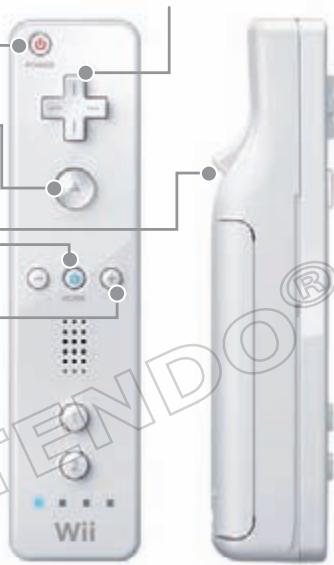
+Control Pad: Move
Getting Started
If your Wii console is on or is in standby mode, simply insert the Wii Sports Game Disc into the disc slot. Read the screen and press the A Button to move on.
You can insert a Wii Game Disc even if the Wii console's power is turned off. To play on a TV that supports a 16:9 screen ratio, select 16:9 HD/ED from the Wii Settings and adjust your television's screen ratio. Please refer to the Wii Operations Manual for more information.

Point the cursor at the Disc Channel on the Wii Menu and press the A Button.
On the Channel Preview screen, point at Play and press the A Button.
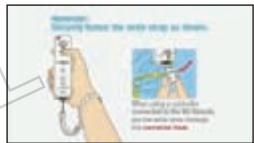
After a brief reminder to wear your Wii Remote strap, the title screen will appear.
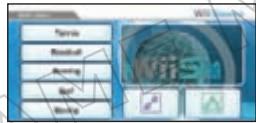
Main menu
Tennis - 1 to 4 players
Baseball - 1 to 2 players
Bowling - 1 to 4 players
Golf - 1 to 4 players
Boxing - 1 to 2 players
Training - 1 to 4 players
Fitness Test - single player
Selecting the Number of Players
On this screen, you can set the number of players for your game.
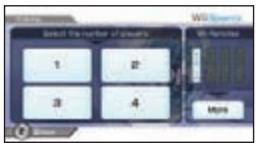
Add Wii Remotes
If you need to add more Wii Remotes, point at More and press the A Button. Then add a Wii Remote for each player. Aim each
Wii Remote at the screen and press the 1 and 2 Buttons at the same time to register it.
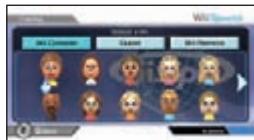
Select Mii
Select which Mii you will use. Select Wii Console to choose a Mii stored on this Wii Console. Select Guest to choose a generic Mii. Select Wii Remote to load a Mii that has been stored on your Wii Remote.
About Miis
Wii Sports uses the Miis you create in the Mii Channel to play the game. Wii Sports automatically saves the records (such as your personal best in each game) of each player.
Please be aware that your records will not be saved when you play with a guest Mii or one stored in the Wii Remote. In addition, if you delete a Mii from the Mii Channel, the saved data for that Mii is also erased. Be very careful when deleting a Mii once a play record is erased, you cannot recover it. Please refer to the Wii Operations Manual for information on making Mis in the Mii Channel.
Selecting a Play Style
Choose which hand to use for each sport, and then point at OK and press the A Button.
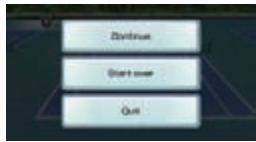
Pause menu
Press the +Control Pad during a game to open the pause menu.
Continue - Resume the game in progress.
Start over - Start this game over from the beginning.
Quit - Quit the current game and return to the menu.
HOME menu - Press the HOME Button during a game to open the HOME menu.
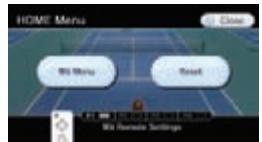
HOME menu
Wii menu - Return to the Wii Menu
Reset - Return to the title screen
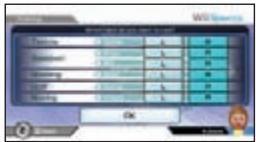
Wii Remote settings - Adjust Wii Remote volume, rumble feature setting, and connections.
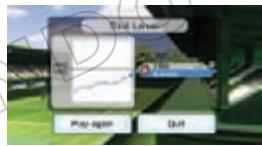
Skill Level
The screen shows your Mii's skill level. Your skill level won't change when you play against another player in tennis, baseball, or boxing.
Your skill level increases or decreases depending on how well you play. When your skill level goes above 1,000 points, you'll become
a Pro. However, if your skill level drops again, you can lose the title. The Wii Message Board records the days you rose to Pro status or lost
your Pro title, as well as when you set high scores.
Please read the Wii Channel Manual for more information about the Wii Message Board.

Tennis
1 to 4 players
Simply swing the Wii Remote to play a match of doubles tennis. You don't need to press any buttons. Each player needs his own Wii Remote.
The team that wins the required number of matches first wins the game.
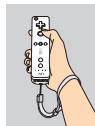
Holding the Wii Remote (for right-handed players)
- Hold it as would hold a tennis racket.
- Put your wrist through the Wii Remote strap and fasten it to prevent it from escaping your hand.
- Swing gently.
Serving


- Swing the Wii Remote up...
and then down to serve the ball. - Toss the ball up. You also can toss with the A Button.
- Hit the ball.
Strokes

Forehand

Backhand
- Judge the ball direction and swing accordingly. When the ball comes to your right, swing on the right side. When the ball approaches your left side, swing on the left. You can lob and give the ball a spin depending on how you hit.
Controlling the Ball
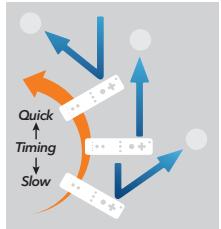
The timing of your stroke determines the direction the ball travels.
Saving Your Game
Wii Sports requires two blocks to save.
Baseball
1 to 2 players
Play a simple baseball game with a batter and pitcher. Fielding and running are handled automatically, so you can focus on the action. For a two-player game, you will need two Wii Remotes.
The game ends after three innings. If one player scores more than five runs over his opponent, the mercy rule applies, ending the game.
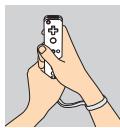
Holding the Wii Remote
(batting for right-handed players)
Hold the Wii Remote with both hands, just like you would a baseball bat. Hold it so the button side faces toward you.
- Put your wrist through the Wii Remote strap and fasten it to prevent it from escaping your hand.
Swing gently.

Batting
- Swing the Wii Remote as the ball crosses the plate - just like in real baseball!
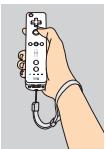
Holding the Wii Remote
(pitching for right-handed players)
- Hold the Wii Remote in your pitching hand.
- Put your wrist through the Wii Remote strap and fasten it to prevent it from escaping your hand.
- Swing gently.

Pitching
- Swing down the Wii Remote as if you would throw the ball. The speed of the ball changes depending on how quickly you swing the Wii Remote.

Inside or outside pitch
Right over the plate
Breaking Balls
(for right-handed players)
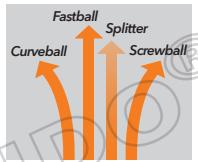
Hold down one of the buttons below and swing the Wii Remote.
None
Fastball

Curveball

Screwball

+B Splitter
Bowling
1 to 4 players
Roll a bowling ball with a simple sweep of your arm. You can also change the spin of your ball. Play with up to four players using a single Wii Remote.
Play a ten-frame game and compete for the best score.
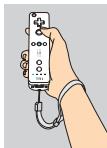
Holding the Wii Remote
(for right-handed players)
- Hold the Wii Remote in your throwing hand.
- Put your wrist through the Wii Remote strap and fasten it to prevent it from escaping your hand.
- Swing gently.
Moving and Aiming
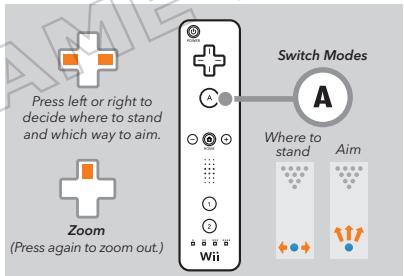
Throwing the Ball
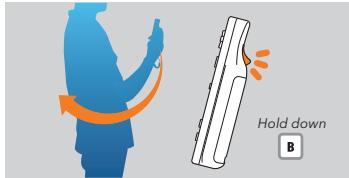
- Raise the Wii Remote to your chest and swing back.
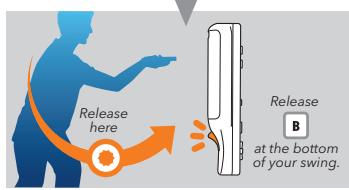
- Swing as if you are rolling a real bowling ball.
- Twist the Wii Remote to give the ball spin.
Swinging the club is as easy as swinging your Wii Remote. Up to four players can share a single Wii Remote.
The player with the fewest total strokes wins the game.
Holding the Wii Remote
(for right-handed players)
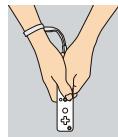
Hold the Wii Remote with both hands, just like you would a golf club.
- Put your wrist through the Wii Remote strap and fasten it to prevent it from escaping your hand.
Swing gently.
Practicing Your Swing
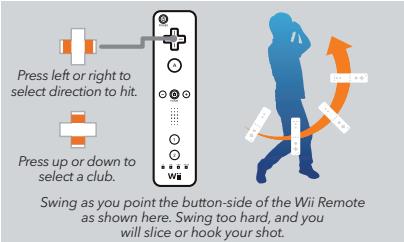
Hit the Course
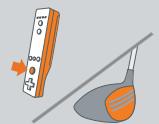
Swing the Wii Remote while holding down
Swing as you point the button-side of the Wii Remote as shown here.
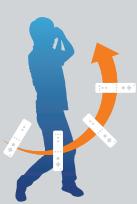
Putting
Swing the Wi Remote while holding down


Swing as you point the button-side of the Wii Remote as shown here.
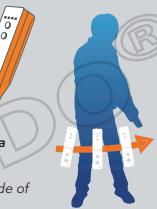
Power Gauge
Boxing uses both the Wii Remote and Nunchuk. When two players fight against each other, each player needs a Wii Remote and Nunchuk.
Each match has three one-minute rounds. The first player to be knocked out loses. If no one wins after three rounds, the winner is declared by judge's decision.
Holding the Wii Remote
(for right-handed players)
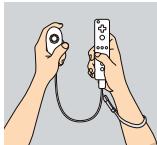
- Clutch the Wii Remote and Nunchuk in front of your chest and hold them up.
- Put your wrist through the Wii Remote strap and fasten it to prevent it from escaping your hand.
- Swing gently.
Punching
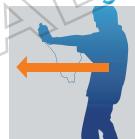
- Thrust out the Wii Remote and Nunchuk to punch with those hands.
To aim at the head, punch upward.
- To aim at the body, punch downward.
Blocking

- Hold the Wii Remote and Nunchuk in front of you to block.
Shifting Your Position

- Shift your body forward, back, left and right while holding the Wii Remote and Nunchuk.
Training Mode
There are three training games per sport. You can play each training game with 1-4 players. Multiple players can share a single Wii Remote. Players earn platinum, gold, silver, or bronze medals depending on their performance. The date you earn your medals will be recorded on the Wii Message Board. (See the Wii Channel Manual for information on the Wii Message Board.)
Wii Fitness Test (Once a day per Mii)
This fitness exam selects three training games for you to play. You will be judged on balance, stamina, and speed, and the combined results will determine your Wii Fitness Age. The results will be recorded on the Wii Message Board.
| DIRECTORS | UI PROGRAMMING | UI DESIGN | TECHNICAL SUPPORT | Junichi Aoyagi | PROGRAMMING | GENERAL PRODUCER | NOA PRODUCT |
| Keizo Ohta | Keichi Minato | MANAGEMENT | Hironobu Kakui | Keiko Akiyama | SUPPORT | Shigeru Miyamoto | TESTING |
| Takayuki Shimamura | Kazuya Sumaki | Takahiro Hamaguchi | Yoshito Yasuda | Kenji Nishida | Programming Support | Arnold A. Myers II | |
| Yoshikazu Yamashita | Koichi Kyuma | Group | EXECUTIVE PRODUCER | Zac Evans | |||
| DESIGN DIRECTOR | EFFECT DESIGN | DEBUG | Makoto Takano | Satoru Iwata | Shoji Hashimoto | Shuji Hashimoto | |
| ASSISTANT DIRECTOR | Junji Morii | Keijiro Inoue | Masataka Takemoto | Minoru Hatamoto | PACKAGE/MANUAL | Robert Crombie | |
| Shinya Hiratake | Sayaka Yano | Takuji Hotta | Shigeru Hirayama | Ryo Koizumi | NINTENDO OF | Kyle Hudson | |
| LEAD 3D DESIGN | Manabu Matsumoto | Shunsaku Kitamura | Kazuya Yoshioka | AMERICA (NOA) | Eric Bush | ||
| PROGRAM DIRECTOR | Ryuji Kobayashi | SOUND | Super Mario Club | Tadashi Ikegami | PROMOTION | PACKAGE/MANUAL | |
| Tsutomu Kaneshige | Yoshihisa Morimoto | DIRECTOR/MUSIC | Takaaki Kazuno | TAKASHI Endo | John Casebeer | ||
| Kazumi Totaka | Mii SUPPORT | Takashi Matsuda | Hiroaki Yamaguchi | Ross Hirai | |||
| GAME PROGRAMMING | 3D DESIGN | Hisashi Nogami | Takashi Matsuda | Hiroaki Yamaguchi | Julie Valdez | ||
| Kenta Sato | Taeko Sugawara | SOUND EFFECT/ | Ryutaro Takahashi | Takashi Saito | SPECIAL THANKS | ||
| Takeshi Miyamoto | Jun Takamura | PROGRAMMING | Yusuke Shiraiawa | Takayuki Sugano | Soichi Nakajima | NOA LOCALIZATION | |
| Ichiro Suzuki | Tomomi Iwasaki | Taro Bando | Jun Itto | Takeshi Shimada | Yoshiki Haruhana | MANAGEMENT | |
| Yuichiro Okamura | Masaiki Ishikawa | Masato Mizuta | Takahumi Masaoka | Tatsuhiro Tanoue | Makoto Wada | Jeff Miller | |
| Ryo Tanaka | Masanori Nakagawa | Tetsuya Sasaki | Norihide Sasaki | Leslie Swan | |||
| GAME/GRAPHIC | Hirotake Otsubo | SOUND SYSTEM | Kyohei Seki | Tomoaki Kuroume | Kenji Miki | Bill Trinen | |
| SYSTEM | Miki Watanabe | PROGRAMMING | Mai Okamoto | Toshikazu Kitani | HAL LABORATORY, INC. | Nate Bihldorff | |
| PROGRAMMING | Mari Shibata | Yoji Inagaki | Mitsuhiro Hikino | Yasuhiro Kawaguchi | All EAD | ||
| Takuhiro Dohta | Yasuki Tawaraishi | ASUKE TAMARAI | NOA LOCALIZATION | ||||
| UI DESIGN | VOICE | DEVELOPMENT | Yasunari Nishida | PRODUCER | Rich Amtower | ||
| SYSTEM | Emi Tomita | Josh Millman | ENVIRONMENT TEAM | Yasushi Ida | Katsuya Eguchi | Thomas Connery | |
| PROGRAMMING | Takako Ishii | Chiharu Itoh | Yusuke Akifusa | ||||
| Katsuhito Nishimura | Masanobu Sato | PROGRESS | Hajime Kojima | Yusuke Kurahash | CO-PRODUCER | ||
| Yusuke Shibata | Yoshifumi Masaki | MANAGEMENT | Hidetoshi Seki | Yusuke Kurahash | Kiyoshi Mizuki | ||
| Keio Kato | Junpei Otani |
VEUILLEZ LIRE ATTENTIVEMENT L'INTEGRALITE DU MODE D'EMPLOI DE LA Wii AVANT D'UTILISER VOITE SYSTÉME, VOITE DISQUE DE JEU, OU VOS ACCESSOIRES Wii. CE MODE D'EMPLOI COMPRENDE IMPORTANTES INFORMATIONS SUR VOITE SANTÉ ET VOITE SECURITÉ.
INFORMATIONS IMPORTANTES CONCERNANT VOTRE SECURITE: VEUILLEZ LIRE LES PRECAUTIONS SUIVANTES AVANT QUE VOUS OU VOTRE ENFANT NE JOUIZ À VOS JEUX VIDÉO.
Jugar video juegos could cause harassment of movements in some cases. If you are unsure, please contact us for more information.