HDG 5300 AW - Tumble drier HAIER - Free user manual and instructions
Find the device manual for free HDG 5300 AW HAIER in PDF.



User questions about HDG 5300 AW HAIER
0 question about this device. Answer the ones you know or ask your own.
Ask a new question about this device
Download the instructions for your Tumble drier in PDF format for free! Find your manual HDG 5300 AW - HAIER and take your electronic device back in hand. On this page are published all the documents necessary for the use of your device. HDG 5300 AW by HAIER.
USER MANUAL HDG 5300 AW HAIER
User Manual and Installation Instructions Gas & Electric Dryer
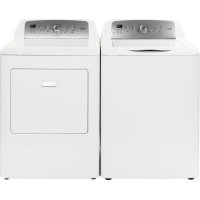
(Picture for illustration purposes only. Actual model may vary per model purchased.)
Model, Modèle, Modelo
HDE5000AW, HDG5000AW; HDE5300AW, HDG5300AW
CHDE5000AW; CHDE5300AW
TABLE OF CONTENTS
PAGE
IMPORTANT SAFETY INSTRUCTIONS 2-4
INSTALLATION INSTRUCTIONS 5-19
Tools and Materials Required 5
Electrical Requirements 5-6
Unpacking Your Dryer 6
Exhaust System Requirements 7-8
Gas Supply Requirements 9
Location of Your Dryer 10
Location of Your Dryer in a Closet 11
Manufactured (Mobile) Home Instruction 12
Changing the Drum Light 13
Electrical Installation 14
3-Wire Cord Connections 15
4-Wire Cord Connections 16
Gas Connections 17
Replacement Parts 19
OPERATING INSTRUCTIONS 20-33
Understanding the Control Panel (HDE/HDG5300AW, CHDE5300AW). 20-22
Understanding the Control Panel (HDE/HDG5000AW, CHDE5000AW). 22-24
Preparations before Drying 25
Load clothes into Dryer 26
Auto Dry Cycle (HDE/HDG5300AW, CHDE5300AW) 27-28
Auto Dry Cycle (HDE/HDG5000AW, CHDE5000AW) 29
Manual Dry Cycle (HDE/HDG5300AW, CHDE5300AW) 30
Manual Dry Cycle (HDE/HDG5000AW, CHDE5000AW) 31
Rack Dry Cycle (HDE/HDG5300AW, CHDE5300AW) 31
Rack Dry Cycle (HDE/HDG5000AW, CHDE5000AW) 32
Other Features 32
Normal Operating Sounds 33
CARE AND CLEANING GUIDE 33
TROUBLESHOOTING 34
LIMITED WARRANTY 35
IMPORTANT SAFETY INSTRUCTIONS
Before beginning installation, carefully read these instructions. This will simplify the installation and ensure the dryer is installed correctly and safely.
NOTE: The electrical service to the dryer must conform with local codes and ordinances and the latest edition of the National Electrical Code, ANSI/NFPA 70 or in Canada, CSA C22.1 Canadian Electrical Code Part 1.
NOTE: The gas service to the dryer must conform with local codes and ordinances and the latest edition of the National Fuel Gas Code, ANSI Z223.1 or in Canada, CAN/CGA B149.1.
NOTE: The dryer is designed under ANSI Z21.5.1 or ANSI/UL 2158 - CAN/ CSA C22.2 No. 112-97 (latest editions) for HOME USE ONLY. This dryer is not recommended for commercial application such as restaurants, beauty salons, etc.
WARNING
For your safety the information in this manual must be followed to minimize the risk of fire or explosion or to prevent property damage, personal injury or loss of life.
Combustible materials, gasoline, and other flammable vapors and liquids must not be stored near the dryer.
WHAT TO DO IF YOU SMELL GAS
- Do not try to light any appliance
- Do not touch any electrical switch. Do not use any phone in your building.
- Clear the room, building, or area of all occupants.
- Immediately call your gas supplier from a neighbor's phone. Follow the gas supplier's instructions.
- If you cannot reach your gas supplier, call the Fire Department.
Installations must be performed by a qualified or licensed contractor, plumber, or gasfitter qualified or licensed by the state, province, or region where this appliance is being installed.
IMPORTANT SAFETY INSTRUCTIONS
WARNING - To reduce the risk of fire, electric shock, or injury to persons when using your appliance, follow the basic precautions, including the following:
- Read all of the instructions before using this appliance.
- Don't dry articles that have been previously cleaned in, washed in, soaked in, or spotted with gasoline, dry clean solvents or other flammable explosive sub stains as they give off vapors which could ignite or explode.
- Do not allow children to play on or in the appliance. Close supervision of children is necessary when the appliance is used near children.
- Before the appliance is removed from service or discarded, remove the door to the drying compartment.
- Do not reach into the appliance if the drum is moving.
- Do not install or store this appliance where it will be exposed to water and/or to the weather.
- Do not tamper with controls.
- Do not repair or replace any part of the appliance or attempt any servicing unless specifically recommended in the user-repair instructions that you understand and have skills to carry out.
- Do not use fabric softeners or products to eliminate static unless recommended by the manufacturers of the fabric softener or product.
- Do not use heat to dry articles or products to eliminate static unless recommended by the manufacturers of the fabric softener or product.
- Clean lint screen before or after each load.
- Keep area around the exhaust opening and adjacent surrounding areas free from the accumulation of lint, dust and dirt.
- Keep the dryer area clear and free from items that would obstruct the flow of combustion and ventilation air through the louvered panel located on the rear of the dryer.
-
The interior of the appliance and the exhaust duct should be cleaned periodically by qualified service personnel.
-
Do not place items exposed to cooking oils in your dryer. Items contaminated with cooking oil may contribute to a chemical reaction than could cause a load to catch fire.
- If material has been used with any flammable liquids or solids, it should not be used in the dryer until all traces of flammable liquids and its fumes have been removed.
- This dryer must be properly installed in accordance with the installation instructions before it is used. See grounding instructions in the installations sections.
- Proper grounding must be ensured to reduce the risk of electric shock and force. Check with a qualified electrician or service personnel if you are in doubt as to whether the dryer is properly grounded.
- Use the dryer only for its intended purpose: drying clothes.
- Always disconnect dryer from electrical supply before attempting any service. Disconnect power cord by grasping the plug, not the cord.
- Replace worn power cord and/or loose plugs.
- To reduce the risk of electric shock or fire, do not use extension cords or adapters to connect dryer electrical power source.
SAVE THESE INSTRUCTIONS
DANGER
Risk of child entrapment. Before you throw away your old dryer, take off the door so that children may not get trapped inside.
Thank you for using our Haier product. This easy-to-use manual will guide you in getting the best use of your dryer.
Remember to record the model and serial number. They are on a label in back of the dryer.
Model number
Serial number
Date of purchase
Staple your receipt to your manual. You will need it to obtain warranty service.
INSTALLATION INSTRUCTIONS
WARNING
CAUTION Risk of Fire:
- Clothes dryer installation must be performed by a qualified installer.
- Install the clothes dryer according to the manufacturer's instructions and local codes.
- Do not install a clothes dryer with flexible plastic venting materials. If flexible metal (foil type) duct is installed, it must be of a specific type identified by the appliance manufacturer as suitable for use with clothes dryers. Flexible venting materials are known to collapse, be easily crushed and trap lint. These conditions will obstruct clothes dryer airflow and increase the risk of fire.
- To reduce the risk of severe injury or death, follow all installation instructions.
Tools and materials required
- Phillips-Head and flathead screwdrivers
- Channel-lock adjustable pilers
1/2-inch open-end wrench - Carpenter's level
- Measuring tape (12ft. min.)
Duct tape - Pipe thread sealer (Gas)
Rigid or flexible metal 4 inch (102cm) duct - Vent hood

Safety Warning:
- Before starting installation, make sure that the gas shut off valve is in the off position.
- All old gas connectors and gas piping should be discarded.
ELECTRICAL REQUIREMENTS (Electric Dryers)
Model Numbers: (CHDE/HDE5000AW and CHDE/HDE5300AW)
Circuit
Individual 30 Amp branch circuit fused with 30 Amp time-delay fuses or circuit breakers.
Power Supply
3 or 4 wire, 120/240 Volt , 1 Phase, 60 ~Hz , AC
Power Supply Cord Kit
(Not supplied when sold in US. Must be purchased to meet local electrical codes.) The dryer MUST employ a 3-conductor power supply cord NEMA 10-30 Type SRDT rated at 240 Volt AC minimum, 30 Amp, with 3 open end spade lug connectors with upturned ends or closed loop connectors and marked for use with clothes dryers.
(When sold in Canada - 4-wire power supply cord provided and attached on dryer)
Dryers being installed in a manufactured (mobile) home MUST employ a 4-wire power supply cord NEMA 14-30 type SRDT or ST (as required) rated to 240 Volt AC minimum, 30 Amp, with 4 open-end spade lug connectors with upturned ends or closed loop connectors and marked for use with clothes dryers. See Electrical Connections for more information on a 4-wire system.
Outlet Receptacle
NEMA 10-30R receptacle should be located so the power supply cord is accessible when the dryer is in the installed position. (Canada - NEMA 14-30R receptacle)
ELECTRICAL REQUIREMENTS (Gas Dryers)
Model Numbers: (HDG5000AW and HDG5300AW)
Circuit
Individual 15 Amp branch circuit fused with 15-Amp maximum time delay fuse or circuit breakers.
Power Supply
3 wire, 120 Volt, 1 Phase, 60Hz, AC
Power Supply Cord
The dryer is equipped with a 120 Volt 3-wire power supply cord.
NOTE: This dryer is equipped with a three-prong grounding plug for your protection against shock hazard and should be plugged into a properly grounded three-prong receptacle. Do not under any circumstance cut or remove grounding prong from plug.
Unpacking Your Dryer
- Remove all packaging material. This includes the foam base and all adhesive tape holding the dryer accessories inside and outside.
- Inspect and remove any remains of packaging, tape or printed materials before using the dryer.
EXHAUST SYSTEM REQUIREMENTS
WARNING
The following are specific requirements for proper and safe operation of your dryer. Failure to follow these instructions can create excessive drying times and fire hazards.
- Do not use plastic flexible duct to exhaust the dryer. Excessive lint can build up inside exhaust system and create a fire hazard and restrict air flow. Restricted air flow will increase drying time. If your present system is made up of plastic duct or metal foil duct, replace it with a rigid or flexible metal duct. Ensure present duct is free of any lint prior to installing dryer duct.
- The dryer must not be exhausted into any gas vent, chimney, wall, ceiling or any concealed space of a building. The dryer exhaust system MUST be exhausted to the outdoors. If the dryer is not exhausted outdoors, some fine lint will be expelled into the laundry area. An accumulation of lint in any area of the home can create a health and fire hazard.
- Exceeding the length of duct pipe or number of elbows allowed in the "Maximum Length" chart can cause an accumulation of lint in the exhaust system. Plugging the system could create a fire hazard, as well as increase drying times.
- Do not screen the exhaust ends of the vent system. Lint can become caught in the screen, increasing drying time. Use an approved vent hood to terminate the duct outdoors, and seal all joints with duct tape.
- All male duct pipe fittings must be installed downstream with the flow of air.
- Exhaust duct must not be connected or secured with screws or other fastening devices which extend into the interior of the duct.
- Do not allow combustible material (clothing, draperies/curtains, paper, etc.) to come in contact with exhaust system.

Explosion hazard:
Do not install the dryer where gasoline or other flammables are kept or stored. Failure to do so can result in death, explosion, fire or burns.
Exhaust Requirements:
Use only rigid of flexible metal duct and approved vent hood which has a swingout damper hat open when the dryer is in operation. When the dryer stops, the dampers automatically close to prevent drafts and the entrance of insects and rodents. To avoid restricting the outlet, maintain a minimum of 12 inches (30.5cm) clearance between the vent hood and the ground or any other obstruction. The vent flap should be able to move freely, although vertical orientation of the exhaust system is acceptable. Certain extenuating circumstances could affect the performance of the dryer:
- Only rigid metal duct work should be used.
- Venting vertically through a roof may expose the exhaust system to down drafts causing an increase in vent restriction.
- Running the exhaust system through an uninsulated area may cause condensation and faster accumulation of lint.
- Compression of crimping of the exhaust system will cause an increase in vent restriction.
- In Canada, that only those foil-type flexible ducts, if any, specifically identified for use with the appliance by the manufacturer shall be used. In the United States, that only those foil-type flexible ducts, if any, specifically identified for use with the appliance by the manufacturer and that comply with the UL Outline for clothes Dryer Transition Duct, Subject 2158A (2006), shall be used.
- In Canada, that the exhaust duct shall be 102mm in diameter. In the United States, the required exhaust duct diameter.
The exhaust system should be inspected and cleaned a minimum of every 12 months with normal usage. The more the dryer is used the more often you should check the exhaust system and vent hood for proper operation.
Side and Bottom Exhaust
For your convenience, your dryer can be exhausted through the side or the bottom. If you need to change the exhaust on the dryer to the side or the bottom of the cabinet, you will need to order the exhaust kit from your Haier dealer or call 1-800-313-8495
| RECOMMENDED MAXIMUM | ||
| Exhaust Hood Types | ||
| Recommended | Use only for short run installations | |
| (10.28 cm) | 4" DIA. 2-1/2' (5:35 cm) | |
| No. of 90° elbows | Rigid Metal | Rigid Metal |
| 0 | 90 ft. | 60 ft. |
| 1 | 60 ft. | 45 ft. |
| 2 | 45 ft. | 35 ft. |
| 3 | 35 ft. | 25 ft. |
The total length of flexible metal duct shall not exceed 94 inches.
GAS SUPPLY REQUIREMENTS
WARNING
Replace copper connecting pipe that is not plastic coated. Stainless steel or plastic-coated brass MUST be used.
- Installation MUST conform with local codes. In the absence of local codes, installation must conform with the National Fuel Gas Code, ANSI Z223.1 (latest edition) or in Canada, the current CAN/CGA B149.1
- The gas supply line should be 1/2 inch (1.27cm) pipe.
- If codes allow, flexible metal tubing may be used to connect your dryer to the gas supply line. The tubing MUST be constructed of stainless steel or plastic-coated brass.
- The gas supply line MUST have an individual manual shutoff valve installed within 6 feet (183cm) of the dryer in accordance with the National Fuel Gas Code, ANSI Z223.1/NFPA 54.
In Canada, an individual manual shut-off valve MUST be installed in accordance with the B149.1, Natural Gas and Propane Installation Code.
- A 1/8 inch (0.32cm) N.P.T. plugged tapping, accessible for test gauge connection, MUST be installed immediately upstream of the gas supply connection to the dryer.
- The dryer MUST be disconnected from the gas supply piping system during any pressure testing of the gas supply piping system at test pressures in excess of 1/2 psig (3.45kPa).
- The dryer MUST be isolated from the gas supply piping system during any pressure testing of the gas supply piping system at test pressures equal to or less than 1/2 psig (3.45 kPa).
- In an area exposed to dripping water or outside weather conditions.
- In an area where it will come in contact with curtains, thick carpet, or anything that will obstruct the flow of combustion and ventilation air.
- On carpet, floor must be solid with a maximum slope of 1 inch (2.54 cm). Any floor unevenness should be corrected with leveling legs located on the bottom of the dryer.
Installation in Alcove or Closet:
- DO NOT install your dryer in a closet with a solid door.
- A dryer installed in a bedroom, bathroom, alcove or closet MUST be exhausted outdoors.
- No other fuel burning appliance shall be installed in the same closet as the gas dryer.
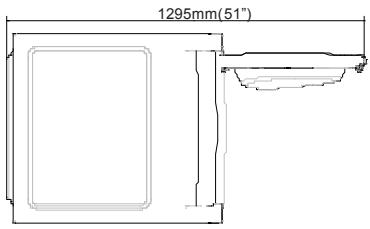
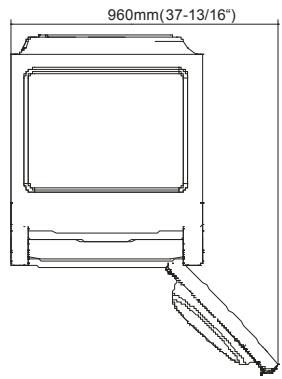
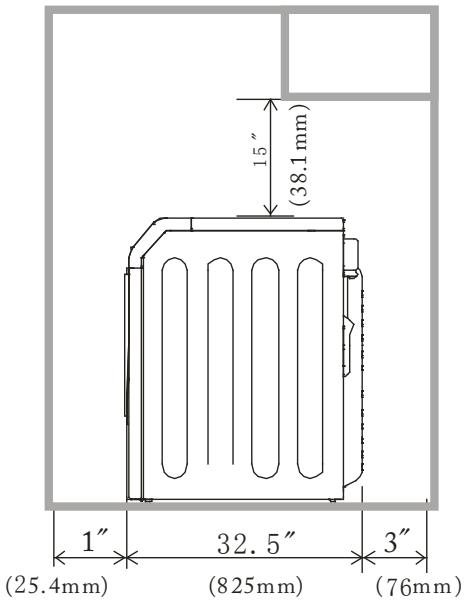
- Refer to the images on this page to ensure the installation provides the minimum amount of clearance required for ventilation.
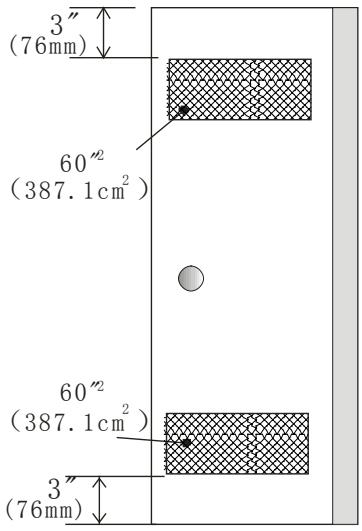
- When installing the dryer in a closet with a door, a minimum of 120 square inches (774.2 square cm) of ventilation in the door is required. Openings must be equally divided at the top and bottom of the door and airflow must be unobstructed. A louvered door with equivalent air openings for the length of the door is acceptable.

LOCATION OF YOUR DRYER IN A Closet OR RECESSED AREA
Following are instructions concerning and the minimum clearances required for any closet, recessed area, or customized under-counter installation:
Additional distances facilitate installation and servicing.
- Additional clearances might be required for wall, door and floor moldings.
- Additional distances of 1 in. (25.4mm) on all sides of the dryer is recommended to reduce noise transfer.
- For closet installation with a door, minimum ventilation openings in the top and bottom of the door are required. Louvered doors with equivalent ventilation openings are acceptable. Companion appliance spacing should be considered.
MANUFACTURED (MOBILE) HOME INSTALLATION
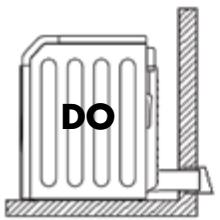
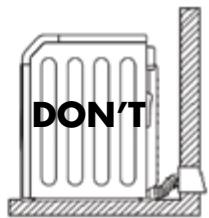
- Dryer MUST be exhausted outside (outdoors, not beneath the manufactured home) using metal ducting that will not support combustion. Metal ducting must be 4 inch (10.16 cm) in diameter with no obstructions. Rigid metal duct is preferred.
- If dryer is exhausted through the floor and area beneath the manufactured home is enclosed, the exhaust system MUST terminate outside the enclosure with the termination securely fastened to the mobile home structure.
- When installing a gas dryer into a manufactured home, a provision must be made for outside make up air. This provision is to be not less than twice the area of the dryer exhaust outlet.
- This dryer MUST be fastened to the floor using P/N 0030807988 Manufactured Home Installation Kit. Follow the instructions supplied with the kit.
- Refer to previous sections for other important venting requirements.
- Installation must conform to current Manufactured Home Construction & Safety Standard (which is a Federal Regulation Title 24 CFR-Part 32-80) or when such standard is not applicable, with American National Standard for Mobile Homes. In Canada, the CSA Z240 is applicable.
Correct
Incorrect
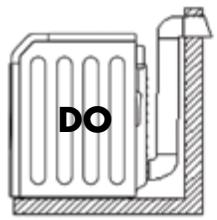
Correct
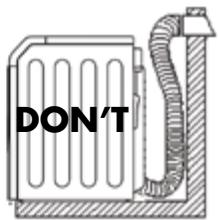
Incorrect
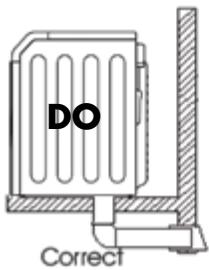
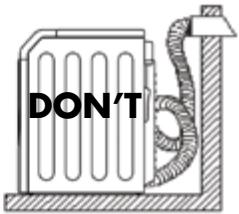
Incorrect
CHANGING THE DRUM LIGHT
- For your safety, please unplug the power cord before changing the drum light.
- Open the dryer door, find the location of the drum light. Using a phillip head screw driver remove the light cover (as shown below).
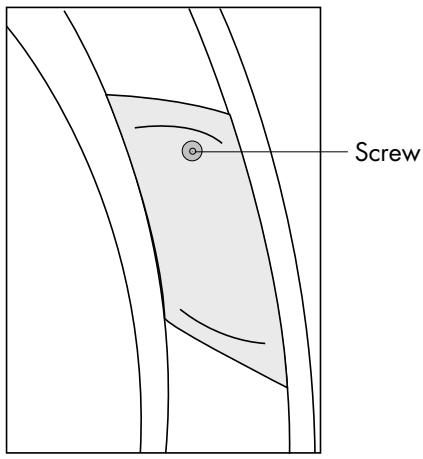
- Remove the bulb by turning it counterclockwise. Replace the bulb with a 15-watt lamp only, then install the cover and tighten the screw.
- Use your dryer after plugging it in the electrical socket.
ELECTRICAL INSTALLATION
WARNING
The following are specific requirements for proper and safe electrical installation of your dryer. Failure to follow these instructions can create electrical shock and/or fire hazard.
ELECTRIC Dryer (CHDE/HDE5000AW and CHDE/HDE5300AW)
GROUNDING INSTRUCTIONS
This appliance must be grounded. In the event of malfunction or breakdown, grounding will reduce the risk of electric shock by providing a path of least resistance for electric current. This appliance is equipped with a cord having an equipment-grounding conductor and a grounding plug. The plug must be plugged into an appropriate outlet that is properly installed and grounded in accordance with all local codes and ordinances. This appliance must be connected to a grounded metal, permanent wiring system, or an equipment-grounding conductor must be run with the circuit conductors and connected to the equipment-grounding terminal or lead on the appliance.
- This appliance must be properly grounded. Electrical shock can result if the dryer is not properly grounded. Follow the instructions in this manual for proper grounding.
- Do not use an extension cord with this dryer. Some extension cords are not designed to withstand the amounts of electrical current this dryer utilizes and can melt, creating electric shock and/or fire hazard. Locate the dryer within reach of the receptacle for the length power cord to be purchased, allowing some slack in the cord. Refer to the electrical requirements in this manual for the proper power cord to be purchased.
- A UL approved strain relief must be installed onto power cord. If the strain relief is not attached, the cord can be pulled out of the dryer and can be cut by any movement of the cord, resulting in electrical shock.
- Do not use an aluminum wire receptacle with copper-wired power cord and plug (or vice versa). A chemical reaction occurs between copper and aluminum and can cause electrical shorts. The proper wiring and receptacle is a copper-wired power cord with a copper-wired receptacle.
NOTE: Dryers operating on 208 Volt power supply sill have longer drying times than operation on 240 Volt power supply.

WARNING
Improper connection of the equipment grounding conductor can result in a risk of electrical shock. Check with a licensed electrician if you are in doubt as to whether the appliance is properly grounded.
GAS Dryer (HDG5000AW and HDG5300AW)
- Gas dryers are equipped with a factory installed three-prong 15 Amps 120 Volts (grounding) plug for your protection against shock hazard and should be plugged directly into a properly grounded three-prong receptacle. Do not cut or remove the grounding prong from this plug.
ELECTRICAL CONNECTIONS
ELECTRIC Dryer (HDE5000AW and HDE5300AW)
3-Wire System (US models only)
- Remove the screws securing the terminal block access cover and the strain relief mounting bracket located on the back of the dryer's upper corner.
- Install a U.L. approved strain relief into the power cord entry hole of the mounting bracket. Finger tighten the nut only at this time.
- Thread a U.L. Approved 30 Amp. Power cord, NEMA 10-30 Type SRDT, through the strain relief.
- Attach the power cord neutral (center wire) conductor to the brass colored center terminal on the terminal block. Tighten the screw securely.
- Attach the remaining two power cord outer conductors to the outer brass colored terminals on the terminal block. Tighten both screws securely. WARNING: Do not make a sharp bend or crimp wiring/conductor at connections.
- Reattach the strain relief mounting bracket to the back of the dryer with two screws. Tighten screws securely.
- Tighten the screws securing the cord restraint firmly against the power cord.
- Tighten the strain relief nut securely so that the strain relief does not turn.
- Reinstall the terminal block cover.
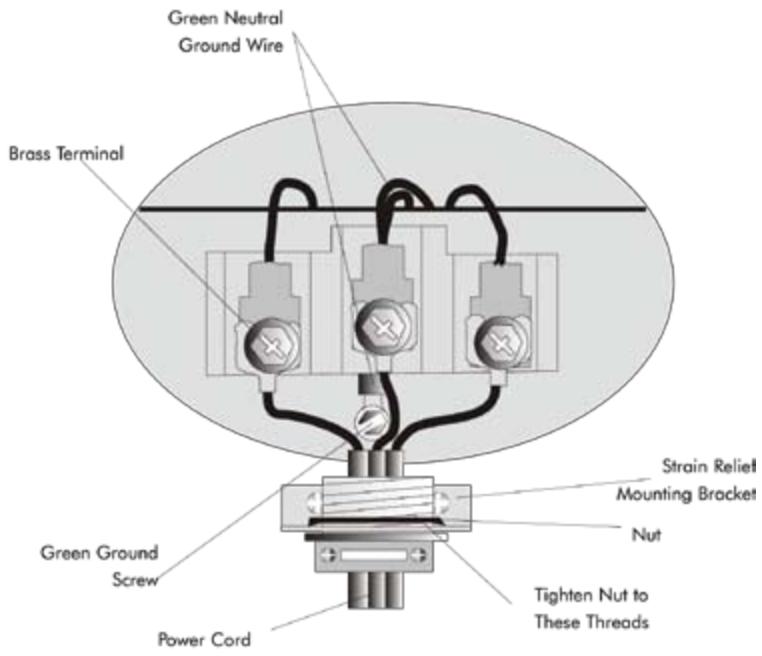
ELECTRIC Dryer (HDE5000AW and HDE5300AW)
4-Wire Cord Connections (US Models Only)
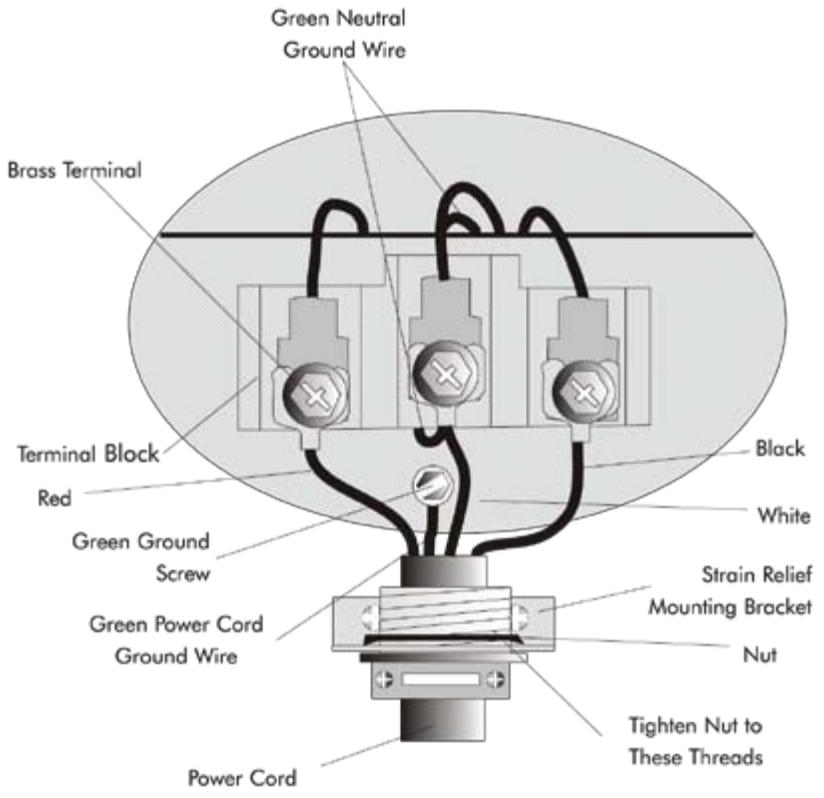
- Remove the screws securing the terminal block access cover and the strain relief mounting bracket located on the back of the dryer upper corner.
- Install a UL approved strain relief into the power cord entry hole of the mounting bracket. Finger tighten the nut only at this time.
- Remove the green neutral ground wire from the green ground screw located above the terminal block.
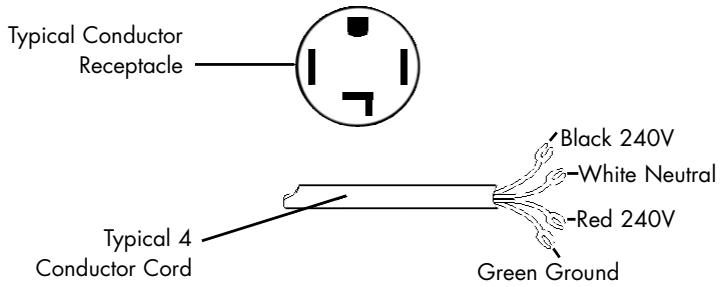
- Thread a U.L. approved 30 Amp power cord. NEMA 14-30 type ST or SRDT through the strain relief.
- Attach the green power cord ground wire to the cabinet with green ground screw.
- Attach the green wire conductors from the dryer and white (neutral) power cord conductors to the brass-colored center terminal on the terminal block. Tighten the screw securely.
- Attach the red and black power cord conductors to the outer brass-colored terminals on the terminal block.
Warning: Do not make a sharp bend or crimp the wiring /conductor at connections.
- Tighten the screws securing the cord restraint firmly against the power cord.
- Tighten the strain relief nut securely so that the strain relief does not turn.
- Reinstall the terminal block cover.
GAS CONNECTIONS
GAS Dryer (HDG5000AW and HDG5300AW)
NOTE: DO NOT connect the dryer to L.P. gas service without converting the gas valve. An L.P. Conversion Kit must be installed by a qualified gas technician.
- Remove the shipping cap from gas pipe at the rear of the dryer.
- Connect a 1/2 inch (1.27cm) I.D. semi-rigid or approved pipe from gas supply line to the 3/8 inch (0.96cm) pipe located on the back of the dryer. Use a 1/2 inch to 3/8 inch (1.27cm to 0.96cm) reducer for a connection. Apply an approved thread sealer that is resistant to the corrosive action of liquified gases on all pipe connections.
- Open the shutoff valve in the gas supply line.
- Test all connections by brushing on a soapy water solution. NEVER TEST FOR GAS LEAKS WITH AN OPEN FLAME.
- Connect the exhaust duct to the outside exhaust system. Use duct tape to seal all joints.
- With the dryer in its final position, adjust one or more of the legs until the dryer is resting solid on all four legs. Place a level on top of the dryer. THE DRYER MUST BE LEVEL AND RESTING SOLID ON ALL FOUR LEGS.
- Plug the power cord into a grounded outlet. NOTE: check to ensure power is OFF at circuit breaker/fuse box before plugging the power cord into the outlet.
- Turn on the power at the circuit breaker/fuse box.
CAUTION
Before operating the dryer, make sure the dryer area is clean and free from combustible materials, gasoline, and other flammable vapors. Also see that nothing (such as boxes, clothing, etc.) obstructs the flow of combustion and ventilation air through the louvered panel located on the rear of the dryer.
- Run the dryer through a cycle check for proper operation.
NOTE: On gas dryers, before the burner will light, it is necessary for the gas line to be bled of air. If the burner does not light within 45 seconds the first time the dryer is turned on, the safety switch will shut the burner off. If this happens, turn the dryer to "OFF" and wait 5 minutes before making another attempt to light.
NOTE: Follow instructions supplied with kit.
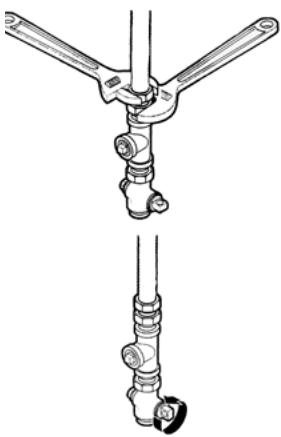
CONNECTING THE DRYER TO THE GAS SUPPLY
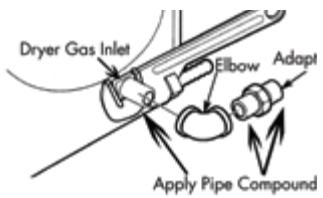
A) Connect female 3/8'' NPT elbow to gas inlet on dryer. Then connect 3/8'' flare union adapter to female elbow.
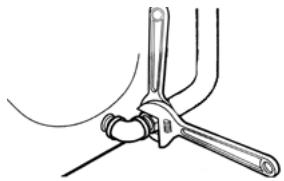
IMPORTANT: To prevent the inlet from twisting, please use a pipe wrench to secure the dryer gas inlet. Affix Teflon tape or pipe compound to adapter and gas inlet.
E) Use two adjustable wrenches to tighten every connection.
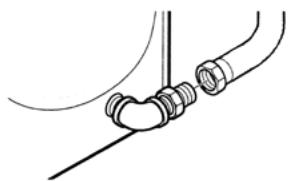
B) Attach the flexible metal gas line connector to the adapter.
C) Make sure flexible gas line seal is secure. Use two wrenches for the best possible connection.
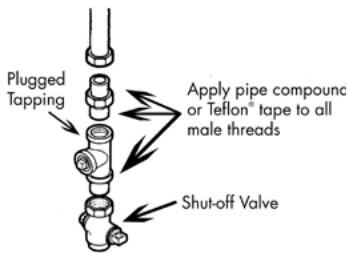
D) To check gas inlet pressure, attach 1/8 NPT plugged tapping to dryer gas line shut-off valve. Then connect flare union adapter to plugged tapping. Affix Teflon® tape to the threads of the adapter and plugged tapping to ensure seal.
IMPORTANT: Do not overtighten!
F) Open gas shut-off valve.
REPLACEMENT PARTS
Replacement parts and accessories for US and Canada can be purchased through Haier America at 1-800-313-8495

CAUTION
Label all wires prior to disconnection when servicing controls. Wiring errors can cause improper and dangerous operation. Check unit for proper operation after servicing.

WARNING
Discard or destroy the carton and plastic bags after the dryer is unpacked. Children should not be allowed to use them to play with. Cartons covered in rugs, bedspreads or plastic sheets can become an airtight chamber and cause suffocation leading to death. Make all packing materials inaccessible to children.

WARNING
The instructions in this manual and all other literature included with this dryer can not cover every possible condition and situation that may occur. Good safe practice and caution must be applied when installing, operating, and maintaining any appliance. If you are in doubt after installing, call a certified electrician to install and wire the dryer.
OPERATING INSTRUCTIONS
WARNING
To reduce the risk of fire, electric shock, or injury to persons, read all of the IMPORTANT SAFETY INSTRUCTIONS before using this appliance.
Understanding the Control Panel
HDE/HDG5300AW, CHDE5300AW
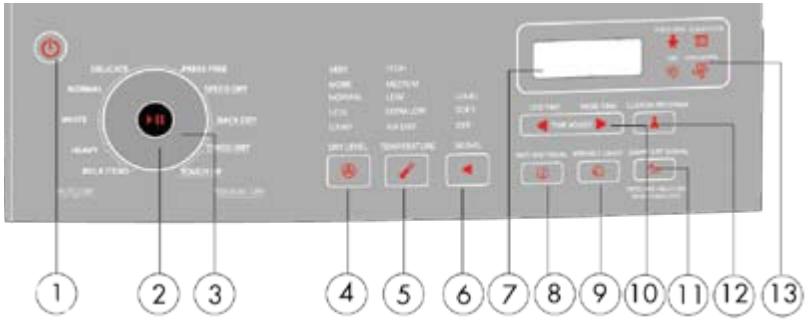
TOUCH SENSITIVE CONTROL PANEL
Power On/Off Pad: (1)
- Touch the pad to power dryer on. To power off, touch the pad for 2 seconds.
Start/Pause Pad: (2)
- Touch the pad to turn the dryer ON. Touch this pad for 2 second to start the dry process. Touch this pad for 2 second again to pause the activity during the dry cycle.
Dry Cycles: (3)
Manual Dry Cycles:
-
The "Manual Dry Cycles" pad will let you select an amount of drying time and a drying temperature as required by you. In this selection the remaining time on display shows the actual time remaining in the cycle. The actual time can be changed in the Manual Drying cycles by touching "More Time" or "Less Time" pads. Time for Auto Dry cycles can not change.
-
Speed Dry: Use for small loads that need a short drying time.
- Rack Dry: Used for items that should not tumble E.g. Sweaters, silk, lingerie or sneakers.
- Timed Dry: Use this cycle to dry heavy weight items like comforters, etc.
- Touch Up: This cycle removes wrinkles from items such as clothes packed in a suitcase or wrinkles in items from being left in the dryer too long.
Auto-Dry (Sensor Dry) Cycles:
- "Auto-Dry (Sensor Dry) cycles" pad will let you select your desired dry cycles. For your convenience, there are 6 fabric care dry cycles programmed in this mode: Bulk Items, Heavy, White, Normal, Delicate, Press Free. A sensor detects the moisture in the load and automatically adjust the drying time for optimum drying.
| Bulk Items | Drying bulky clothing, such as bed sheets. |
| Heavy | Heavy weight material such as jeans or bath towels. |
| White | For clothes such as linens and sheets. |
| Normal | Use to select normal clothes worn in daily use. |
| Delicate | Drying small quantity clothes and delicate fabric. |
| Press Free | For wrinkle-free, permanent press, and knits. |
Dry Level Pad: (4)
- Used to set drying level of auto-programs. If manual dry is selected, touching the pad will cause two beeps to sound. There are 5 selections: Very, More, Normal, Less, Damp. First select sensor dry cycle then adjust the dry level to how much you want to dry the load.
Note: Dry level selection can only be made while using the Auto (Sensor) Dry Cycles.
Temperature Pad: (5)
- Used to set drying temperature. There are 5 available drying temperatures: High, Medium, Low, Extra Low and Air Dry (No heat).
NOTE: In rack dry cycle the temperature selection is limited to Extra Low and Air Dry. For Auto Dry Cycles the temperature can be selected only for settings below the default setting, Air Dry cannot be selected.
Signal Pad: (6)
- Selects beeping volume or turns off the buzzer. You can choose loud, soft, or off. This controls the volume of beep when you touch any pads on the control panel or when the dry cycle is completed.
Digital Display (7)
- Indicates the remaining time during cycle operation.
Note: If the dryer has any problems, it will display an error message.
Anti Bacterial (8)
- This function can be selected only in certain cycles. Here the heat temp is raised to the highest dry level. This option can only be used with heavy, bulky items, White and Normal cycle.
Note: Cannot use on Delicates, Press Free or Manual Dry Cycles.
Wrinkle Saver Pad: (9)
- This convenient feature helps keep wrinkles from setting when you cannot unload the dryer at the end of a cycle. The dryer will stop and then rotate for a brief period every few minutes. Press the wrinkle saver pad to activate. This feature will work for 1 hour after the drying program is completed. Stop the setting at any time by pressing the wrinkle pad or by opening the dryer door.
More Time & Less Time Pad: (10)
- Used to set time from 0 to 2 hours when Timed Dry, Rock Dry, Speed Dry or Touch Up cycles selected.
Damp Dry Signal (11)
- If activated the dryer will beep when the load is approximately 80% dry. This will allow you to remove lightweight items that are dry or other items that you
Custom Program: (12)
- This allows you to save a favorite cycle, set the desired settings and touch "Custom Program" pad for 3 seconds. A beep will sound to indicate the cycle has been saved. To recall your custom cycle, touch the "Custom Program" pad before drying a load. To change the saved cycle, set the desired settings and "Custom Program" pad must be again programmed for 3 seconds. You can also program Anti-Bacterial, Wrinkle Saver and Damp Dry Signal. Touch custom program and touch start/pause pad to activate.
Function Light Indicator: (13)
- Child Lock: You can lock the controls to prevent any selections from being changed or You can lock the controls after you have started a cycle. Children can not accidentally start the dryer by touching pads when this option is selected. To lock the dryer, touch and hold "Damp Dry Signal" for 3 seconds. A single beep tone is heard and Child Lock will glow. To unlock the dryer, touch and hold the "Damp Dry Signal" for 3 seconds.
- Check Filter: After the power pad is touched, the Check Filter indicator will flash until Start/Pause is selected. This is just a reminder to clean the lint filter before the dry program starts.
- Dry: When lit this indicates the process the cycle is currently in drying mode.
- Cool Down: When lit this indicates the process the cycle is currently in cool down mode.
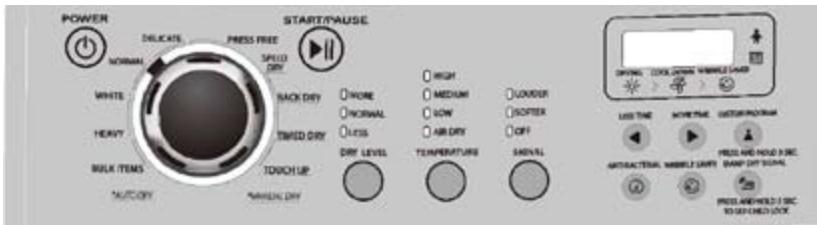
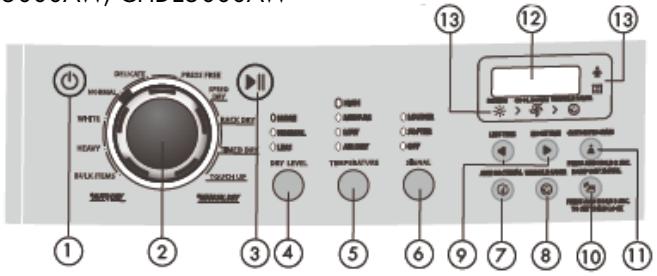
Understanding the Control Panel HDE/HDG5000AW CHDE5000AW
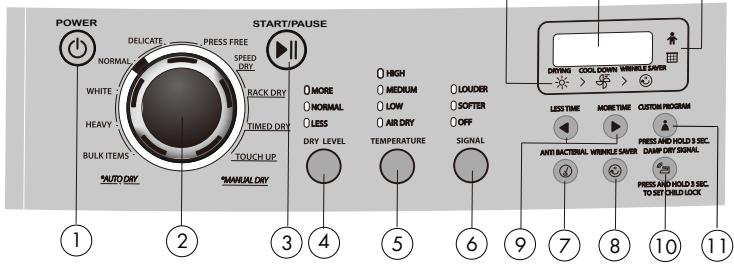
NOTE: Features may vary per model.
Power On/Off Button: (1)
- Press the button to power on the dryer. To power off, press button again.
Cycle Select Dial: (2)
- Select from the Auto-Dry cycles (Bulky Items, Heavy, White, Normal, Delicate and Press Free) or Manual Cycles (Touch Up, Time Dry, Rack Dry Cycle or Speed Dry).
| Bulk Items | Drying bulky clothing, such as bed sheets. |
| Heavy | Heavy weight material such as jeans or bath towels. |
| White | For clothes such as linens and sheets. |
| Normal | Use to select normal clothes worn in daily use. |
| Delicate | Drying small quantity clothes and delicate fabric. |
| Press Free | For wrinkle-free, permanent press, and knits. |
Start/Pause Button: (3)
- Press the button to turn the dryer ON. Press this button once to start the dry process. Press this button once again to pause the activity during the dry cycle.
Dry Levels: (4)
- Used to set drying levels of auto programs. There are 3 selections: More, Normal, and Less.
Note: Dry level selection can only be made while using the Auto (sensor) Dry Cycles.
Temperature Button: (5)
- Used to set drying temperatures. There are four available drying temperatures to choose from: High, Medium, Low, and Air Dry.
Note: In rack dry cycle the temperature selection is limited to Extra Low and Air Dry. For Auto Dry Cycles the temperature can be selected only for settings below the default setting, Air Dry cannot be selected.
Signal: (6)
- This feature selects the beeping volume or turns off the buzzer entirely. There are three choices: Louder, Soffer or Off.
Anti Bacterial (7)
- This function can be selected only in certain cycles. Here the heat temp is raised to the highest dry level. This option can only be used with heavy, bulky items, white and normal cycle.
Note: Cannot use on delicate fabrics
Wrinkle Saver Button: (8)
- This convenient feature helps keep wrinkles from setting when you cannot unload the dryer at the end of a cycle. The dryer will stop and then tumble for a brief period every few minutes. Press the wrinkle saver button to activate. This feature will work for 1 hour after the drying program is completed. Stop the setting at any time by pressing the wrinkle saver button or opening the dryer door.
More Time & Less Time Button: (9)
- Used to set time from 0 to 2 hours when Timed Dry, Rack Dry, Speed Dry or Touch Up cycle is selected.
Damp Dry Signal (10)
- If activated the dryer will beep when the load is approximately 80% dry. This will allow you to remove lightweight items that are dry or other items that you may wish to iron. This feature is available for "Auto Dry" cycles only.
Custom Program: (11)
- This allows you to save a favorite cycle, set the desired settings and press "Custom Program" button for 3 seconds. A beep will sound to indicate the cycle has been saved. To recall your custom cycle, press the "Custom Program" button before drying a load. To change the saved cycle, set the desired settings and "Custom Program" button must be pressed again for 3 seconds. You can also program Anti-Bacterial, Wrinkle Saver and Damp Dry Signal. Press custom program and press start/pause button to activate.
Digital Display: (12)
- Indicates the remaining time during cycle operation.
Note: If the dryer has any problems, it will display an error message.
Fuction Light Indicator: (13)
- Child Lock: You can lock the controls to prevent any selections from being changed. Or you can lock the controls after you have started a cycle. Children cannot accidentally start the dryer by touching pads when this option is selected.
seconds. A single beep tone is heard and Child Lock will glow. To unlock the dryer,press and hold the "Damp Dry Signal"for 3 seconds.
- Check Filter: After the power button is pressed, the Check Filter indicator will flash until Start/Pause is selected.

This is just a reminder to clean the lint filter before the dry program starts.
- Dry: When lit this indicates the process the cycle is currently in drying mode.

- Cool Down: When lit this indicates the process the cycle is currently in cool down mode.

PREPARATIONS BEFORE DRYING
- Sort clothes of the same kind (cotton, synthetics, woolen) to dry.
- Dark and light colored clothes should be separately dried. Fabrics prone to losing lint and those prone to adhering lint should be separately dried. Clothes prone to falling lint should be turned inside out before putting into the dryer.
- Make sure buttons and ornaments on the clothes are high temperature resistant and won't damage drum surface. Before loading, the clothes should have their zippers zipped up, buttons and hooks done up and belts tied so as to avoid entanglement or other obstacles.
- If possible, turn out the clothes pockets for uniform drying.
- Check if clothes remain soiled. If so, wash them again, otherwise soils may be permanently set.
- Small articles should be collected in a mesh bag before loading and drying, so as to avoid entanglement and ensure easy removal.
- Make sure the power socket is reliably grounded. The grounding terminal should not be connected to gas or tap water pipelines.
- Make sure exhaust duct has been properly connected.
- Make sure lint filter is clean and properly installed. If lint filter is not in place, tumbling items could enter the exhaust system and cause damage to the dryer. NOTE: Applies to Auto Dry cycle and Timed Dry cycle.
- For Rack Dry cycle, remove the lint filter and assemble the drying rack with its rear end slightly downward inclined. The configuration is as shown on page 26.
LOAD CLOTHES INTO DRYER
- The appropriate load should be 1/3 1/2 of the drum volume. The drum capacity is 7.5 Cubic Foot. Avoid too much load, as space is needed to allow clothes free rotation for uniform and wrinkle-proof drying.
- When drying big articles, only 2-3 pieces should be loaded at a time and supplemented with small and medium-sized articles.
- For delicate clothes or less load, two towels may be added to get better drying and wrinkle-proof effects.
- Do not excessively dry clothes to avoid wrinkles, shrinkage, roughness, electro-static charge accumulation, and/or more lint.
Rack Dry cycle
- This program is designed specially for articles like sport shoes. During drying, please make sure the articles are placed on the rack with no risk of entangling the baffles while the drum is rotating.
NOTE: If drying rack is not in place, rolling inner tub could collide with drying rack and causes damage to the dryer and drying rack.
Using the Dryer Rack
- Open the dryer door.
- Check that the drum is empty.
- Remove the lint filter. (Fig 1)
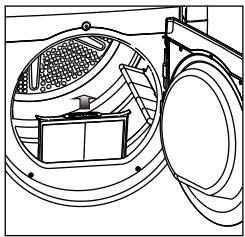
Fig.1
- Lift the dryer rack horizontally into the drum.(Fig.2)
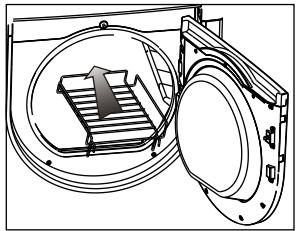
Fig.2
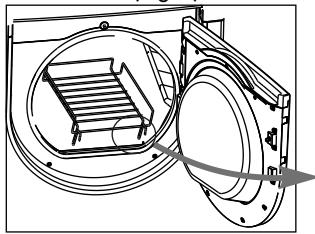
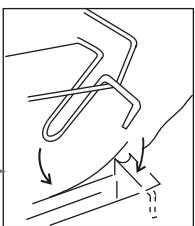
Fig.3
- Place the dryer rack so that the catches are inserted at the front and locked in place.(Fig.3)
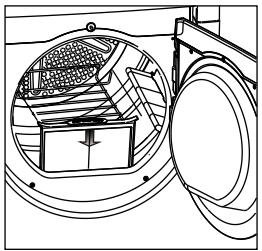
Fig.4
- Insert the lint filter, must be inserted flush with the drum edge.(Fig.4)
AUTO DRY CYCLE
HDE/HDG5300AW, CHDE5300AW
-
Touch the Power On/Off pad
-
The computer board will beep once and the dryer will change from off status to the initial operating status (NORMAL program).
- If the "Start/Pause" pad is not touched in 5 min after powering on, it automatically cuts off power and returns to off status.
- The dryer returns to off status immediately upon end of each cycle. Regardless, the status of the control panel, touching OFF will stop all operations.
- The default status is "NORMAL" program.
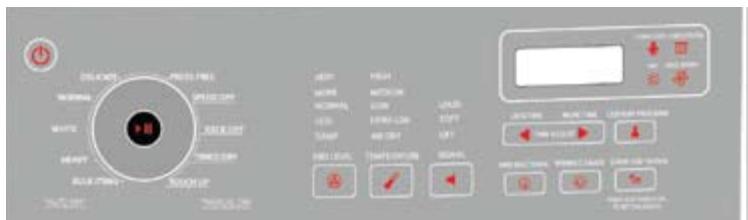
- Touch "Auto-Dry Cycles" pad to select a suitable full automatic cycle.
- The NORMAL program will be automatically selected after powering on. If another full automatic program is desired, touch "Auto-Dry Cycles" pad until corresponding indicator turns on.
- To select your desired settings, the "Custom Program" function should be chosen.
-
The dryer can memorize programs defined by user and display the previous program upon next application of this function.
-
Touch "Dry Level" pad to select a suitable drying level.
- Touch "Temperature" pad to select a suitable temperature.
-
Touch "Signal" pad, and the buzzer will sound upon end of a cycle.
-
The user may define three prompt sound conditions: "Louder", "Softer" and "Off".
-
Touch the "Wrinkle Saver" pad to select a suitable reserved drying program.
-
This convenient feature helps keep wrinkles from setting when you cannot unload the dryer at the end of a cycle. The dryer will stop and then tumble for a brief period every few minutes. Press the wrinkle saver pad to activate. Stop the setting at any time by pressing the wrinkle saver pad or opening the dryer door. This feature will work for 1 hour after the drying program is complete.
-
Touch "Anti Bacterial" pad.
-
This function can be selected only in certain cycles. Here the heat temp is raised to the highest dry level. This option can only be used with heavy, bulky items, white and normal cycle.
NOTE: Can not use on delicate fabrics
-
Touch "Damp Dry Signal"
-
If activated the dryer will beep when the load is approximately 80% dry. This will allow you to remove lightweight or other items that you may wish to iron.
-
Touch "Start/Pause" pad
-
When starting the machine, first close the door and then touch this pad.
- If pause is needed during machine operating, touch this pad. Touching again will resume operation.
| Cycles | Time | Temp Set | Dryness Level | Signal | Wrinkle saver | Anti bacterial | Damp signal | |
| Auto Dry | Normal | 42 | High * | Normal * | * | * | * | * |
| White | 55 | Medium* | Normal * | * | * | * | * | |
| Heavy | 50 | High * | Normal * | * | * | * | * | |
| Bulk items | 52 | Medium* | Normal * | * | * | * | * | |
| Delicate | 35 | Low * | Normal * | * | * | * | ||
| Press free | 35 | Low * | Normal * | * | * | * | ||
| Manual Dry | Speed Dry | 25 | High * | / | * | * | ||
| Rack Dry | 50 | Air Dry * | / | * | * | |||
| Timed Dry | 30 | High * | / | * | * | |||
| Touch Up | 25 | Low * | / | * | * | |||
| * means can be Preprogrammed. | ||||||||
AUTO DRY CYCLE
HDE/HDG 5000AW, CHDE5000AW
-
Press the power On/Off button to power on the dryer.
-
Set the cycle select dial to required auto dry cycle. The signal, temperature, and dry levels are preprogrammed. To change this setting:
-
Press the "Dry Level" button to select suitable drying level after powering on the dryer. There are 3 options to choose from: More, Normal, or Less.
- Press the "Signal" button, and the buzzer will sound upon end of cycle.
- The user can choose from Louder, Softer, or OFF.
- Press the "Wrinkle Saver" button to select a suitable reserved drying program.
- This convenient feature helps keep wrinkles from setting when you cannot unload the dryer at the end of a cycle. The dryer will stop and then tumble for a brief period every few minutes. Press the wrinkle saver button to activate. Stop the setting at any time by pressing the wrinkle saver button or opening the dryer door. This feature will work for 1 hour after the drying program is complete.
- Press the "Anti Bacterial" button.
- This function can be selected only in certain cycles. Here the heat temp is raised to the highest dry level. This option can only be used with heavy, bulky items, white and normal cycle.
NOTE: Cannot use on delicate fabrics
- Press the "Damp Dry Signal" button.
- If activated the dryer will beep when the load is approximately 80% dry. This will allow you to remove light weight or other items that you may wish to iron.
- Press Start/Pause button.
- When starting the machine, close the door first, then press this button.
- If a pause is needed during drying, press this button. Pressing again will resume operation.
| Cycles | Time | Temp Set | Dryness Level | Signal | Wrinkle saver | Anti bacterial | Damp signal | |
| Auto Dry | Normal | 42 | High * | Normal * | * | * | * | * |
| White | 55 | Medium* | Normal * | * | * | * | * | |
| Heavy | 50 | High * | Normal * | * | * | * | * | |
| Bulk items | 52 | Medium* | Normal * | * | * | * | * | |
| Delicate | 35 | Low * | Normal * | * | * | * | ||
| Press free | 35 | Low * | Normal * | * | * | * | ||
| Manual Dry | Speed Dry | 25 | High * | / | * | * | ||
| Rack Dry | 50 | Air Dry * | / | * | * | |||
| Timed Dry | 30 | High * | / | * | * | |||
| Touch Up | 25 | Low * | / | * | * | |||
| * means can be Preprogrammed. | ||||||||
MANUAL DRY CYCLE
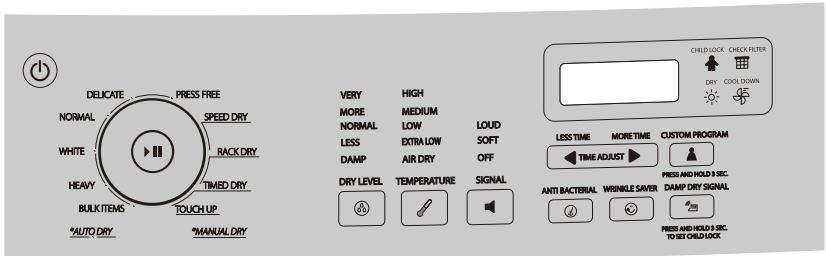
HDE/HDG 5300AW, CHDE5300AW
- Touch power On pad to power on.
- Touch "Manual Dry Cycles" pad and select Timed Dry cycle, Speed Dry or Touch Up cycles.
-
Touch "More Time" and "Less Time" pads to set a suitable time.
-
After setting you can press either of these two pads to increase or decrease drying time as you desire.
4-6. Touch pads "Temperature," "Signal," "Wrinkle Saver," to define your desired program.
NOTE: For "Manual" program, use of pads "Temperature," "Signal," "Wrinkle Saver," is the same as for auto-programs. "Anti-Bacterial", "Damp Dry" and "Dry Level" are inactive, and 2 beeps will sound if touched.
- Touch "Start/Pause" pad to activate cycle.
MANUAL DRY CYCLE
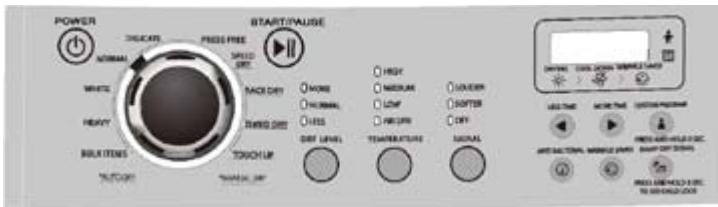
HDE/HDG 5000AW, CHDE5000AW
- Press power ON button to power on. The control panel will beep once and the dryer will change from "OFF" to the operating status. If Start/Pause button is not pressed in five minutes after powering on, the dryer will automatically return to OFF status.
- Set the cycle select dial to Manual Dry Cycle.
- Press "More or Less Time" button to set the required drying time.
4-6. Press "Temperature," "Signal," "Wrinkle Saver," to define the required programs.
NOTE: For "Manual Dry" program use of "Temperature," "Signal," "Wrinkle Saver," is the same as for auto-programs. "Anti-Bacterial," "Damp Dry Signal" and "Dry Level" are inactive, and 2 beeps will sound if pressed.
- Touch "Start/Pause" button to activate cycle.
RACK DRY CYCLE
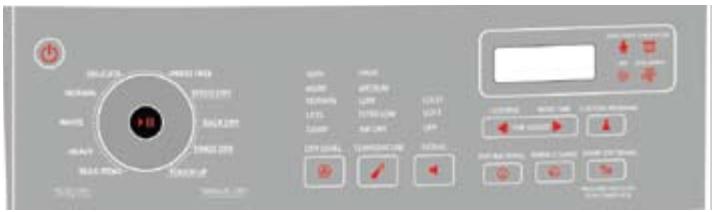
HDE/HDG 5300AW, CHDE5300AW
- Touch power On pad to power on.
- Touch "Manual Dry Cycles" pad and select Rack Dry.
- Touch "Temperature" pad to a suitable temperature.
- Touch "More Time" and "Less Time" pads to set a suitable time.
- Touch "Start/Pause" pad to activate.
RACK DRY CYCLE
HDE/HDG 5000AW, CHDE5000AW
- Press power On button to power on.
- Turn the cycle dial to Manual Dry cycle and select Rack Dry.
- Press "Temperature" button to select suitable temperature.
- Press "More Time" and "Less Time" buttons to set a suitable time.
- Press "Start/Pause" button to activate.
Other Features
Your dryer also has the following features for your convenience:
Lint Filter:
- All dryers come with a lint filter that needs to be cleaned before or after every use (read "Care and Cleaning Guide" Section).
Leveling Legs:
- Your dryer has four leveling legs which are located in the front and rear corners of your dryer. After installing your dryer in its final position, you can level your dryer.
- Leveling legs can be adjusted by turning them clockwise to raise your dryer or by turning them counterclockwise to lower your dryer.
Pausing or Restarting:
- To pause the dryer at any time open the door or touch or press the start/pause button once. To restart, close door and touch or press start/pause button once. NOTE: Dryer will continue from where the cycle was interrupted, when door is closed within 5 minutes. If the cycle is interrupted for more than 5 minutes the dryer will shut off. New cycle settings must be selected before restarting the dryer.
The following sounds are normal during the operation of the dryer.
- Tumbling sound: this is normal as the heavy wet clothes in the dryer are continuously being tossed around.
- Air rushing noise: this happens as the dryer drum spins at very high RPM and the air is rushing through the dryer drum.
Tips
- For best drying results, clean the lint filter before or after every use.
- Do not overload the dryer. The appropriate load should be 1/3'' to 1/2'' of the drum volume.
- Balance the dryer load evenly throughout the dryer for the best result.
- Drying time depends on many variables: load size, type of fabric and moisture in it, heat and moisture in the room, electric voltage, length of the exhaust duct, etc.
- To eliminate guessing and to conserve energy, it is recommend for certain clothes to dry on an auto-drying setting.
- Always follow the fabric care instructions supplied by the garment manufacturer.
CARE AND CLEANING GUIDE
- Lint filter needs to be cleaned before or after each use for your unit to operate at optimum efficiency. The filter can be removed by pulling on the tabs located on the inside of the dryer door. The filter may be washed or vacuumed. Remove the excess water from the filter by gently shaking the filter. This will remove dust and particles trapped in the filter. Lint built up in screen will restrict airflows, which causes longer drying times. After cleaning, slide the filter back in place. Do not use your dryer without the lint filter.
- Do not use any type of spray cleaner when cleaning the interior.
- Hazardous fumes or electric shock could occur. If dryer drum becomes stained, clean the drum with damp cloth. Remove any residue before drying next load.
- Clean the cabinet with mild soap and water. Do not use harsh or abrasive cleaners, as this could damage the dryer.
- Clean the duct and the vent on a regular basis to avoid clogging which could affect the efficiency of the dryer.
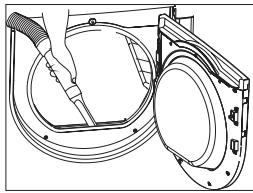

WARNING!
Over time, the lint from the drying process collects around the lint filter shield, and the lint can be easily removed using your vacuum cleaner, at least once a month.
TROUBLESHOOTING
Dryer does not operate:
- Check if unit is plugged in. The plug may have come loose.
- Check if the electrical wall receptacle is of proper voltage.
- Check if the circuit breaker needs to be reset, or if the fuse needs to be replaced.
- Check if the unit is in the "off" mode. Press start button again.
- Check if the door is open.
Dryer is working but not drying the clothes:
- Unit may be overloaded. The dryer drum should be at most half full.
- Check exhaust ducts and vents. Vents should be free of obstruction.
- Duct should be dust - and lint - free, and cleaned regularly.
- Dryer load need to be resorted. Heavy clothes may need to be separated from regular clothes.
- Bulk clothes may require repositioning.
- If the clothes dries unevenly a higher dry setting may be required, or clothes in the dryer need to be resorted.
Dryer makes noise when drying:
- Check for coins, loose change, buttons and other heavy objects that could be causing the noise.
- Dryer may need to be leveled.
- Read operating guide for normal operating sounds.
Static:
- Caused by over drying. Adjust for shorter drying time.
- Mixed with synthetics fabric. Sort and separate different fabric.
- Use a fabric softener.
LIMITED WARRANTY
Full ONE Year Warranty
For 12 months from the date of original retail purchase, Haier will repair or replace any part free of charge including labor that fails due to a defect in materials or workmanship.
Second Year to Fifth Year.
After only year from the original retail purchase date Haier shall provide a part at no cost, as indicated above, to replace said part as a result or a defect in materials or workman ship,
Haier is solely responsible for the cost of the part. All other costs such as labor trip charge, etc are the responsibility of the owner.
NOTE: This warranty commences on the date the item was purchased and the original purchase receipt must be presented to the authorized service representative before warranty repairs are rendered.
Exceptions: Commercial or Rental Use warranty.
90 days labor from date of original purchase.
90 days parts from date of original purchase
NO OTHER WARRANTY APPLIES.
For Warranty Service
Contact your nearest authorized service center. All service must be performed by a Haier authorized service center. For the name and telephone number of the nearest authorized service center please call 1-877-337-3639.
Before calling please have available the following information:
Model number and serial number of your appliance( found on the rear of the unit on the upper left hand side).
The name and address of the dealer you purchased the unit from and the date of purchase.
A clear description of the problem.
A proof of purchase (sales receipt).
This warranty covers appliances within the continental united States. Puerto Rico and Canada .
What is not covered by this warranty:
Replacement or repair of household fuses, circuit breakers, wiring or plumbing.
A product whose original serial number has been removed or altered.
Any service charges not specifically identified as normal such as normal service area or hours.
Damage to clothing.
Damage incurred in shipping
Damage caused by improper installation or maintenance.
Damage from misuse, abuse accident, fire, flood, or acts of nature.
Damage from service other than on authorized Haier dealer or service center.
Damage from incorrect electrical current, voltage or supply.
Damage resulting from any product modification, alteration or adjustment not authorized by Haier.
Adjustment of consumer operated controls as identified in the owners manual.
Hoses, knobs, lint trays and all attachments, accessories and disposable parts.
Labor, service transportation, and shipping charges for the removal and replacement of detective parts beyond the initial 12-month period.
Damage from other than normal household use.
Any transportation and shipping charges.
THIS LIMITED WARRANTY IS GIVEN IN LIEU OF ALL OTHER WARRANTYES EXPRESSED OR INCLUDING THE WARRANTYES OF MERCHANTABILITY AND FITNESS FOR A PARTICULAR PURPOSE
The remedy provided in this warranty is exclusive and is granted in lieu of all other remedies.
This warranty does not cover incidental or consequential damages so the above limitations may not apply to you. Some states do not allow limitations on how long on implied warranty lasts, so the above limitations may not
apply to you.
This warranty gives you specific legal rights, and you may have other rights, which vary, from state to state.
Haier America
New York, NY 10018
TABLE DES MATIERES
PAGE
CONSIGNES DE SECURITE IMPORTANTES 2-4
INSTRUCTIONS D'INSTALLATION 5-19
Cycle Select Dial (Cadran de selection de cycle): (2)
Anti Bacterial (Antibacterias): (8)
HDE/HDG5000AW, CHDE5000AW
Anti Bacterial (Antibacterias): [7]
If you have a problem with this product, please contact the "Haier Customer Satisfaction Center" at 1-877-337-3639.
DATED PROOF OF PURCHASE REQUIRED FOR WARRANTY SERVICE