
CCUXM1 - Car radio CLARION - Free user manual and instructions
Find the device manual for free CCUXM1 CLARION in PDF.



| Brand | CLARION |
| Model | CCUXM1 |
| Product Type | Car stereo with XM satellite receiver |
| Dimensions (W x H x D) | 180 x 50 x 160 mm (standard DIN size) |
| Weight | Approximately 0.8 kg |
| Power Supply | 12 V DC (car battery) |
| Power Consumption | Max 10 A |
| Output Power | 4 x 50 W (max) |
| Radio Receiver | FM/AM with digital tuner |
| Satellite Tuner | XM Ready – XM subscription required |
| Interface | Parallel (PIA) for XM Direct adapter |
| Connectors | FM/AM antenna, XM antenna, 34-pin connector, USB (for updates) |
| Main Functions | FM/AM radio, XM satellite radio, artist/title information display, XM preview |
| Additional Functions | LCD screen, key illumination, remote control (optional) |
| Compatibility | Requires XM Direct parallel interface adapter (PIA) to work with compatible car stereos |
| Included Accessories | 34-pin cable, PIA adapter, installation guide |
| Installation | Can be installed in dashboard, removal of front equipment required |
| Maintenance | Clean with a soft, dry cloth; avoid solvents |
| Security | Removable front panel for theft prevention; integrated circuit breaker |
| Spare Parts | Available through CLARION after-sales service or authorized dealers |
| Repairability | Repairability index not provided; professional repair recommended |
| General Information | Made for the North American market; customer service: 1-800-645-4994 |
Frequently Asked Questions - CCUXM1 CLARION
User questions about CCUXM1 CLARION
0 question about this device. Answer the ones you know or ask your own.
Ask a new question about this device
Download the instructions for your Car radio in PDF format for free! Find your manual CCUXM1 - CLARION and take your electronic device back in hand. On this page are published all the documents necessary for the use of your device. CCUXM1 by CLARION.
USER MANUAL CCUXM1 CLARION
Remove the head unit from your dashboard.
Important: Depending on how your head unit was installed you may have to remove part or all of your dash board before the head unit can be pulled out. You may also have to remove screws to complete this step.
Note: Before proceeding, make sure that the PIA has been programmed. Refer to the PIA Installation Manual. Professional installation is recommended.
Step 2:
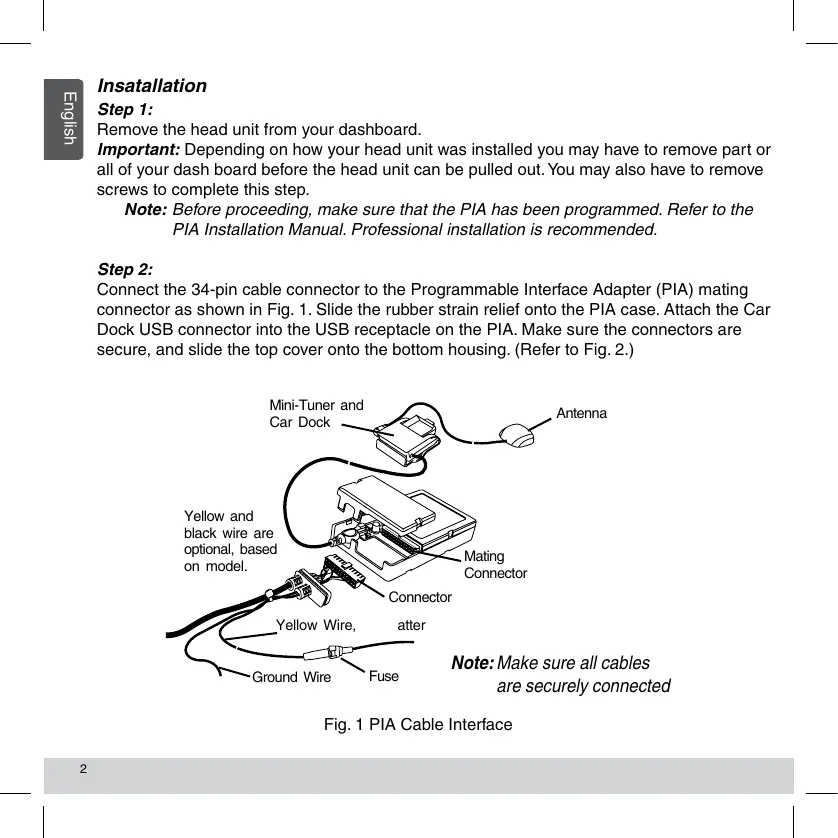
Connect the 34-pin cable connector to the Programmable Interface Adapter (PIA) mating connector as shown in Fig. 1. Slide the rubber strain relief onto the PIA case. Attach the Car Dock USB connector into the USB receptacle on the PIA. Make sure the connectors are secure, and slide the top cover onto the bottom housing. (Refer to Fig. 2.)
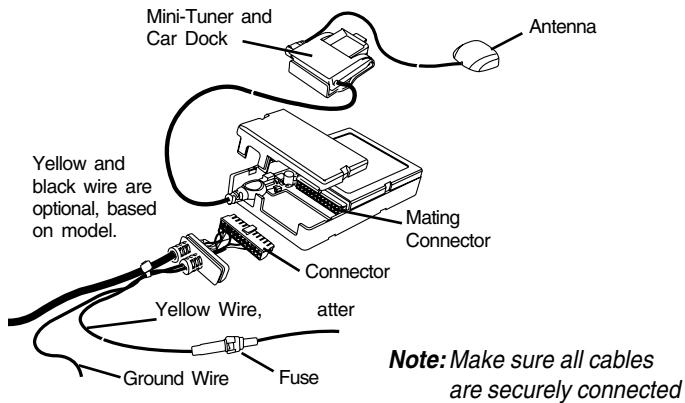
Fig. 1 PIA Cable Interface
Insatllation
Step 3:
Connect the end of the cable with the DIN connector and audio cables to the back of the head unit as shown in Fig. 2. The shorter end of the cable, coming from the PIA, is a pass-through cable that can be used to connect other products to your head unit, i.e., CD changer.
Note: The location of the connections on the head unit may vary depending on the model.
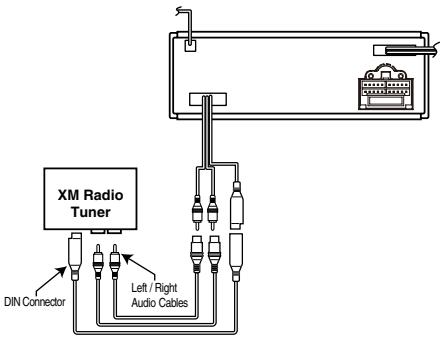
Fig. 2 Head Unit (Rear View) Connections
Step 4:
Start your car and turn on your head unit to confirm that the XM Direct system is properly connected. Please refer to your stereo owners manual on how to access XM mode. When you tune to XM channel 1, you should see "XM Preview" on your head unit LCD, and hear that channel through your car speakers. If not, check to make sure all connections are correct or refer to the troubleshooting section of this installation guide.
Step 5:
Mount and secure the interface cable in a suitable location that will not interfere with the radio and will not vibrate or rattle after installation.
Insatllation
Step 6:
Return the head unit to its original location in the dashboard.
CAUTION: Ensure the cables are not kinked or get disconnected when installing the head unit.
Note: If you had removed screws to pull the car stereo head unit out, please reinstall the screws.
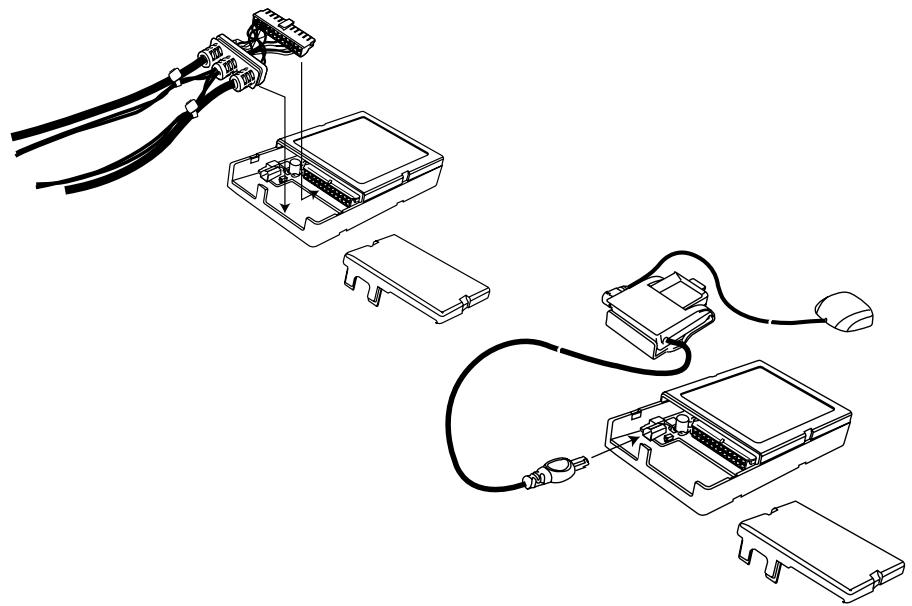
Fig. 3 Smart Digital Adapter
Insatllation
Step 7:
If you had removed the dash board during installation please return it back to its original location. (See Fig. 4)
Fig. 4 Typical Dashboard Installation
Completing Activation:
Now that your XM Direct system has been installed, your XM Universal Tuner will need to be activated. Tune your car stereo head unit to the XM Preview Channel, channel 1 and follow instructions for activation.
You can also go on-line at www.xmradio.com in the U.S. (www.xmradio.ca in Canada) or call the toll free XM activation number at 1-800-852-9696 in the U.S. (1-877-438-9677 in Canada).
Please refer to the XM Radio Operation section of your owners manual.
Troubleshooting
ANTENNA:
The XM antenna is not connected to the XM tuner.
- Check whether the XM antenna cable is attached securely.
UPDATING:
Radio is being updated with latest encryption code.
- Wait until encryption code has updated. Channels 0 and 1 should function normally.
NO SIGNAL:
XM signal is too weak or blocked at the current location.
- Wait until the car reaches a location with a stronger signal
or
- Wait until the car is in an area that has a clear view of the open sky.
LOADING:
Radio is acquiring audio or program information.
- Wait until the radio has received the information.
OFF AIR:
The channel currently selected has stopped broadcasting.
- Select another channel.
"——” or "——"
The user has selected a Channel Number that does not exist or is not subscribed to.
- The unit will revert back to the previously selected channel.
or
There is no artist name/feature, song/program title, or additional information associated with the channel at that time.
- No action needed.
Instalación
Paso 1:
For additional information: call Clarion Technical Support at (310) 327-9100
For more information about XM Satellite Radio service, visit www.xmradio.com or call 1-800-852-9636.
The XM name and related logos are trademarks of XM Satellite Radio Inc.
Clarion Corporation of Ameica
All Rights Reserved. Copyright © 2009: Clarion Corporation of America
Printed in China / Impreso en China / Imprime au Chiné
Brand : CLARION
Model : CCUXM1
Category : Car radio