USER MANUAL 1070S PFAFF
Operation and Safety Notes
DE AT CH
Before reading, unfold the page containing the illustrations and familiarise yourself with all functions of the device.
FR BE
Singer Service Center
VSM Switzerland GmbH
Hauptstr. 91, CH-5070 Frick
Phone: 062-8715665
E-Mail: ursula.moesch@vsmgroup.com
IAN 96742
Congratulations. Page 28
Principle Parts of the Machine . 28
Accessories.. 28
Technical Data Page 29
Important safety instructions.. 30
Machine Basics
Connecting Machine to Power Source.. Page 31
Two Step Presser Foot Lifter Page 31
Threading the Machine
Winding the Bobbin. 32
Inserting the Bobbin . 33
Thread Tension.. 34
Threading the Upper Thread.. Page 35
Automatic Needle Threader Page 36
Raising the Bobbin Thread.. Page 36
Sewing
How to Choose Your Pattern . Page 37
Stitch Width Dial & Stitch Length Dial . Page 38
Sewing Straight Stitch. Page 39
Reverse Sewing/ Removing the Work/ Cutting the Thread.. Page 39
Choosing Stretch Stitch Patterns . Page 40
Blind Hem. Page 41
Sew 1-step Buttonholes Page 42
Sewing On Buttons 43
Installing the Removable Extension Table.. Page 44
Attaching the Presser Foot Shank . Page 44
Needle/Fabric/ThreadChart. Page 45
Darning Plate Page 45
Maintenance and Trouble shooting
Inserting & Changing Needle
Changing the Bulb. 46
Trouble shooting Guide.. 47
Disposal
Warranty.. 48
Service Address
Congratulations
As the owner of a new PFAFF® sewing machine, you are about to begin an exciting adventure in creativity. From the moment you first use your machine, you will know you are sewing on one of the easiest to use sewing machines ever made.
May we recommend that, before you start to use your sewing machine, you discover the many advantages and the ease of operation by going through this instruction book, step by step, seated at your machine.
To ensure that you are always provided with the most modern sewing capabilities, the manufacturer reserves the right to change the appearance, design or accessories of this sewing machine when considered necessary.
Principal Parts of the Machine
- Thread tension dial
- Thread take-up lever
- Thread cutter
- Presser foot
- Needle plate
- Removable extension table/ accessory storage
- Reverse sewing lever
- Bobbin stopper
- Stitch width dial
- Stitch length dial
- Pattern selector dial
- One step buttonhole lever
-
Automatic threads
-
Horizontal spool pin
- Bobbin winding spindle
- Hole for second spool pin
- Handwheel
- Power and light switch
- Main plug socket
- Bobbin thread guide
- Upper thread guide
- Face plate
- Handle
- Presser foot lifter
- Foot speed control
- Power cord
Accessories
a. All purpose foot
b. Zipper foot
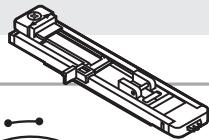
c. Buttonhole foot
d. Button sewing foot
e. Seam ripper/ brush
f. Edge/ quilting guide
g. Pack of needles
h. Spool holder
i. Bobbin (3x)
j. L-screwdriver
k. Darning plate
I. Soft cover
Technical Data
| Rated voltage | 120 V/ 60Hz (North America)230 V/ 50 Hz (Europe) |
| Power rating | - Machine | 70 Watt |
| - Sewing light | 10 Watt (North America)/15 Watt (Europe) |
| - Total | 80 Watt (North America)/85 Watt (Europe) |
| Dimensions | - When handle is folded down | Approx. 375 x 163 x 270 mm (L x W x H) |
| Cable length | - Power cable | Approx. 1,8 m |
| - Foot control cable | Approx. 1,4 m |
| Weight | - Machine | Approx. 5,2kg |
| Material | | Aluminium / plastic |
| Operating elements | - Mains power switch ON/OFF | Available |
| - Foot control for sewing speed | Available |
| Display elements | - Sewing light | Available |
| Looper system | | Oscillating Hook |
| Needle system | | 130/705H |
| Interference-free | | In acc. with EU Directive |
| TÜV approved | | Yes |
| Product guarantees | | 3 years |
| Class | | II |
When using an electrical appliance, basic safety should always be followed, including the following: Read all instructions before using this sewing machine.
DANGER - To reduce the risk of electric shock:
- An appliance should never be left unattended when plugged in.
- Always unplug this appliance from the electric outlet immediately after using, as well as before cleaning and other maintenance.
- Always unplug before re-lamping. Replace bulb with same type rated 10 watts (110-120V area) or 15 watts (220-240V area).
WARNING - To reduce the risk of burns, fire, electric shock, or injury to persons:
- Do not allow to be used as a toy. Close attention is necessary when this appliance is used by or near children.
- Use this appliance only for its intended use as described in this manual. Use only attachments recommended by the manufacturer as contained in this manual.
- Never operate this appliance if it has a damaged cord or plug, if it is not working properly, if it has been dropped or damaged, or dropped into water. Return the appliance to the nearest authorized dealer or service center for examination, repair, electrical or mechanical adjustment.
- Never operate the appliance with any air openings blocked. Keep ventilation openings of the sewing machine and foot controller free from accumulation of lint, dust, and loose cloth.
- Keep fingers away from all moving parts. Special care is required around the sewing machine needle.
- Always use the proper needle plate. The wrong plate can cause the needle to break.
- Do not use bent needles.
- Do not pull or push fabric while stitching. It may deflect the needle causing it to break.
- Switch the sewing machine off ("O") when making any adjustments in the needle area, such as threading needle, changing needle, threading bobbin, or changing presser foot, and the like.
- Always unplug sewing machine from the electrical outlet when removing covers, lubricating, or when making any other user servicing adjustments mentioned in the instruction manual.
- Never drop or insert any object into any opening.
- Do not use outdoors.
- Do not operate where aerosol spray products are being used or where oxygen is being administered.
- To disconnect, turn all controls to the off ("O") position, then remove plug from outlet.
- Do not unplug by pulling on cord. To unplug, grasp the plug, not the cord.
- The sound pressure level under normal operating conditions is 75dB(A).
- Please turn off the machine or unplug when the machine is not operating properly.
- Never place anything on the foot controller.
- If the supply cord that is fixed with foot controller is damaged, it must be replaced by the manufacturer or its service agent or a similar qualified person in order to avoid a hazard.
- This appliance is not intended for use by persons (including children) with reduced physical, sensory or mental capabilities, or lack of experience and knowledge, unless they have been given supervision or instruction concerning use of the appliance by a person responsible for their safety.
- Children should be supervised to ensure that they do not play with the appliance.
SAVE THESE INSTRUCTIONS
This sewing machine is intended for household use only.
Connecting Machine To Power Source
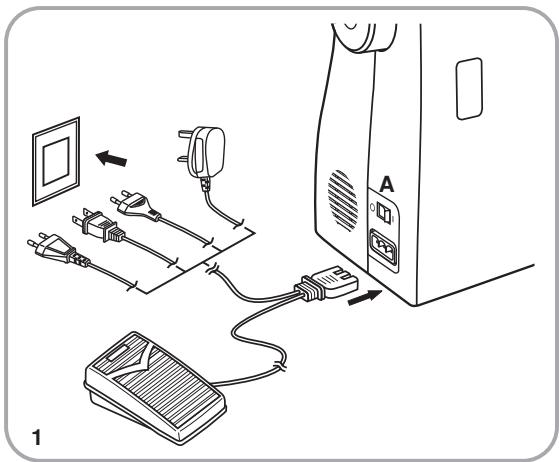
Connect the machine to a power source as illustrated. (1)
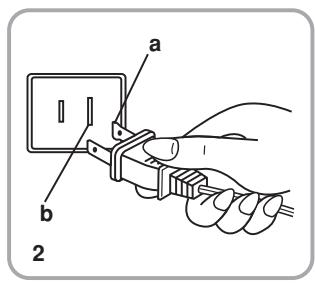
This appliance is equipped with a polarized plug which must be used with the appropriate polarized outlet. (2)
Attention:
Unplug power cord when machine is not in use.
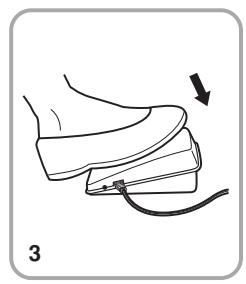
The foot control pedal regulates the sewing speed. (3)
Attention:
Consult a qualified electrician if in doubt of how to connect machine to power source. Unplug power cord when machine is not in use.
The foot control must be used with the appliance by KD-1902, FC-1902 (110-120V area)/KD-2902,FC-2902D (220-240V area)/ 4C-316B (110-125V area)/ 4C-326G (230V area).
Sewing light
Press main switch (A) to "I" for power and light.
a. Polarized attachment plug
b. Conductor intended to be grounded
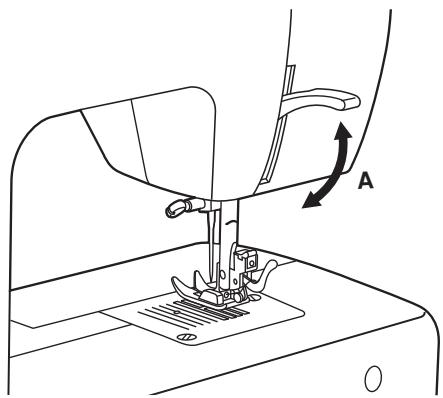
When sewing several layers or thick fabrics, the presser foot can be raised to a higher position for easy positioning of the work. (A)
Winding the Bbobbin
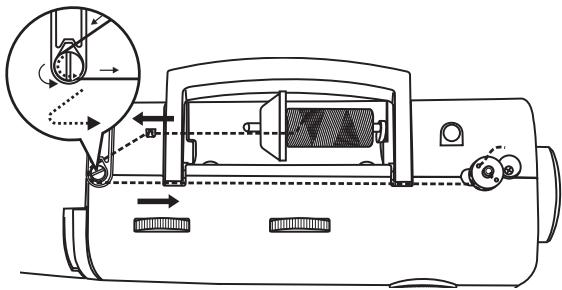
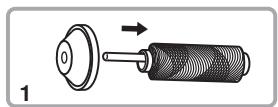
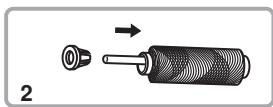
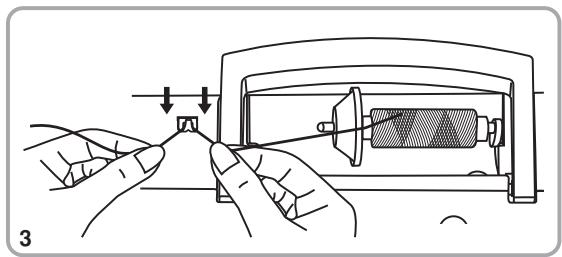
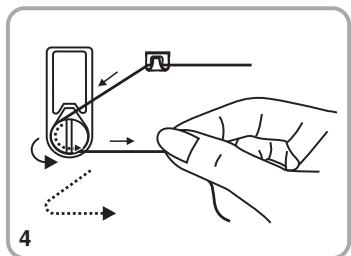
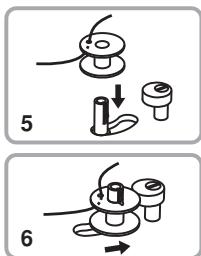
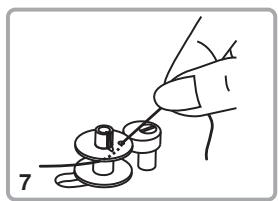
- Place thread and corresponding spool holder on to spool pin. (1/2)
- Snap thread into thread guide. (3)
- Wind thread counterclockwise around bobbin winder tension discs. (4)
- Thread bobbin as illustrated and place on spindle. (5)
- Push bobbin spindle to right. (6)
- Hold thread end. (7)
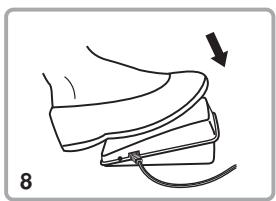
- Step on foot control pedal. (8)
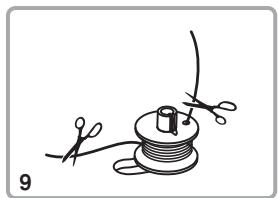
- Cut thread. (9)
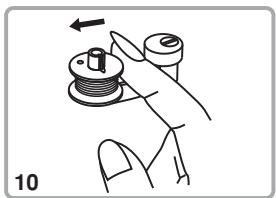
- Push bobbin spindle to left (10) and remove.
Please Note:
When the bobbin winder spindle is in "bobbin winding" position, the machine will not sew and the hand wheel will not turn. To start sewing, push the bobbin winder spindle to the left (sewing position).
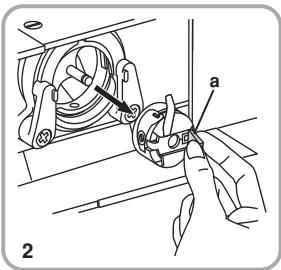
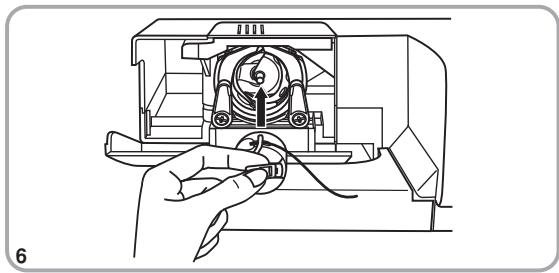
When inserting or removing the bobbin, the needle must be fully raised.
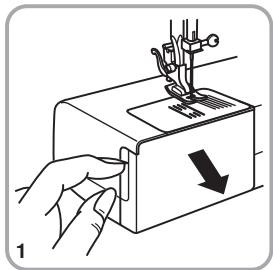
- Remove the extension table, then open the hinged cover. (1)
Pull the bobbin case tab (a) and remove the bobbin case. (2)
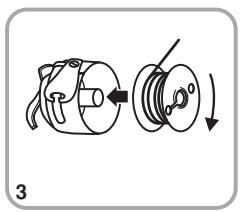
- Hold the bobbin case with one hand. Insert the bobbin so that the thread runs in a clockwise direction (arrow). (3)
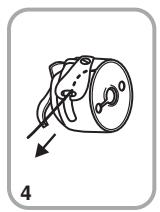
Pull the thread through the slit and under the finger. (4) Leave a 6 inch tail of thread.
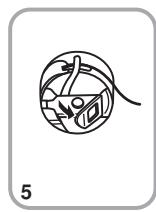
- Hold the bobbin case by the hinged latch. (5)
- Insert it into the shuttle. (6)
Attention:
Turn power switch to off ("O") before inserting or removing the bobbin.
Thread Tension
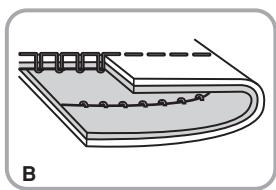
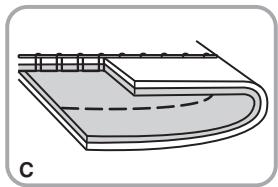
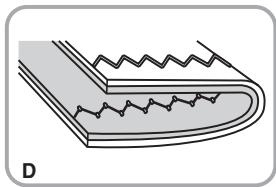
Upper thread tension
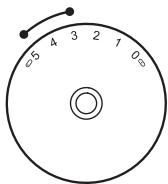
Basic thread tension setting: "4"
To increase the tension, turn the dial to the next number up.
To reduce the tension, turn the dial to the next number down.
A. Normal thread tension for straight stitch sewing.
B. Thread tension too loose for straight stitch sewing. Turn dial to higher number.
C. Thread tension too tight for straight stitch sewing. Turn dial to lower number.
D. Normal thread tension for zig zag and decorative sewing. Correct thread tension is when a small amount of the upper thread appears on the bottom side of fabric.
Lower thread tension
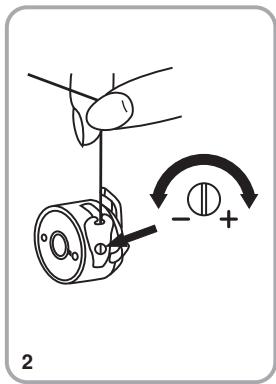
To test the bobbin thread tension, remove the bobbin case and bobbin and hold it by suspending it by the thread. Jerk it once or twice. If the tension is correct, the thread will unwind by about an inch or two. If the tension is too tight, it does not unwind at all. If the tension is too loose, it will drop too much. To adjust, turn the small screw on the side of the bobbin case.
Please note:
- Proper setting of tension is important to good sewing.
- There is no single tension setting appropriate for all stitch functions, thread or fabric.
- A balanced tension (identical stitches both top and bottom) is usually only desirable for straight stitch construction sewing.
- 90% of all sewing will be between "3" and "5".
- For zig zag and decorative sewing stitch functions, thread tension should generally be less than for straight stitch sewing.
- For all decorative sewing you will always obtain a nicer stitch and less fabric puckering when the upper thread appears on the bottom side of your fabric.
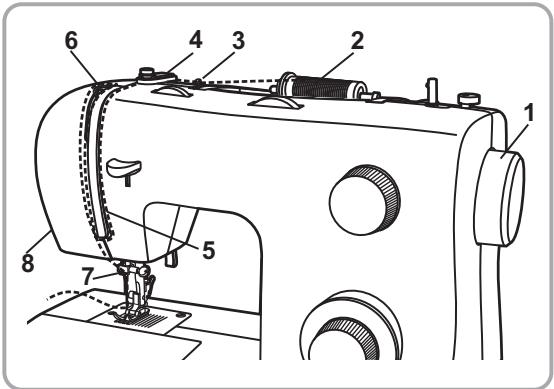
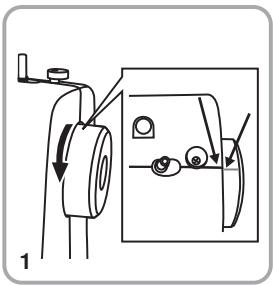
This is a simple operation but it is important to carry out correctly as by not doing so several sewing problems could result.
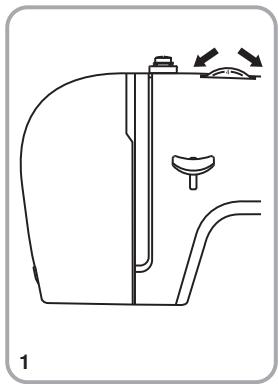
- Start by raising the needle to its highest point (1), and continue turning the handwheel counterclockwise until the needle just slightly begins to descend. Raise the presser foot to release the tension discs.
Note: For safety, it is strongly suggested you turn off the power before threading.
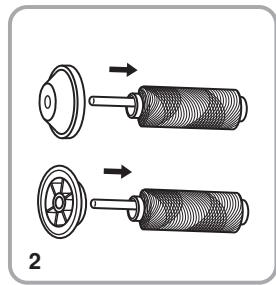
- Lift up the spool pin. Place the spool of thread on the holder with the thread coming off the spool as shown. For small thread spools, place small side of spool holder next to spool. (2)
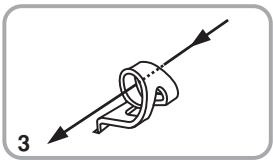
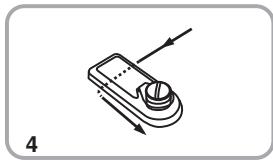
- Draw thread from spool through the upper thread guide (3) and pulling thread through pre-tension spring as illustrated. (4)
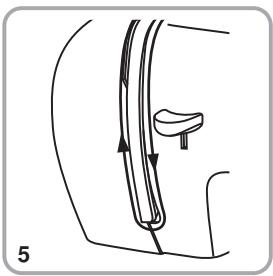
- Thread tension module by leading thread down right channel and up left channel. (5) During this process it is helpful to hold the thread between the spool and thread guide.
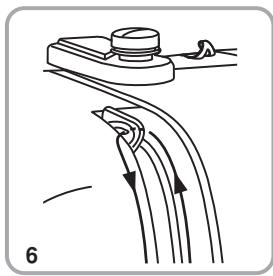
- At the top of this movement pass thread from right to left through the slotted eye of the take-up lever and then downwards again. (6)
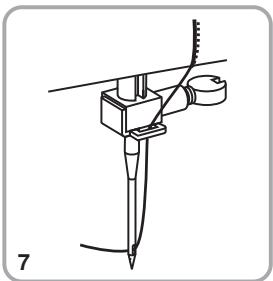
- Now pass thread behind the thin wire needle clamp guide (7) and then down to the needle which should be threaded from front to back.(See page 36 for instructions on how to use the Automatic needle threads.)
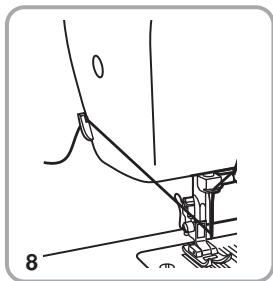
Pull about 6-8 inches of thread to the rear beyond the needle eye. Trim thread to length with built in thread cutter. (8)
Automatic Needle Threader
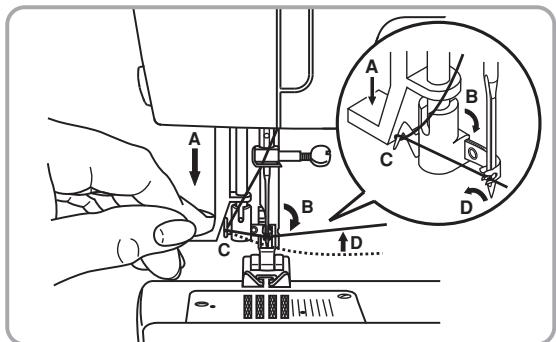
- Raise the needle to its highest position.
- Press lever (A) down as far as it will go.
- The threads automatically swings to the threading position (B).
- Pass thread around thread guide (C).
- Pass the thread in front of the needle around the hook (D) from bottom to top.
- Release lever (A).
- Pull the thread through the needle eye.
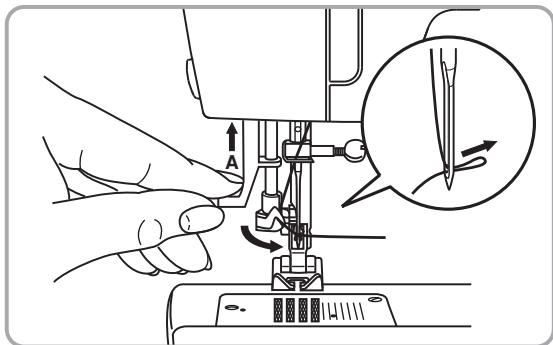
Attention:
Turn power switch to off ("O")!
Raising the Bobbin Thread
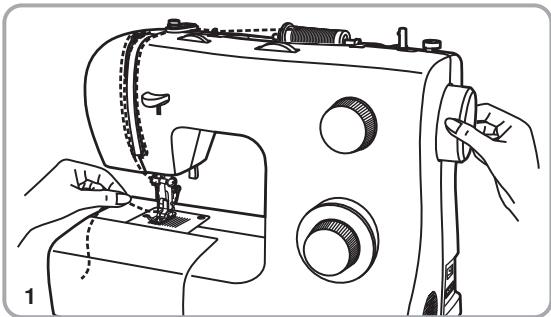
Hold the upper thread with the left hand. Turn the handwheel (1) towards you (counterclockwise) lowering, then raising needle.
Note:
If it is difficult to raise the bobbin thread, check to make sure the thread is not trapped by the hinged cover or the Removable Extension Table.
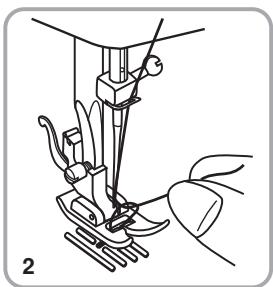
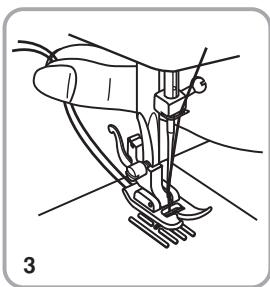
Gently pull on the upper thread to bring the bobbin thread up through the needle plate hole. (2)
Lay both threads to the back under the presser foot. (3)
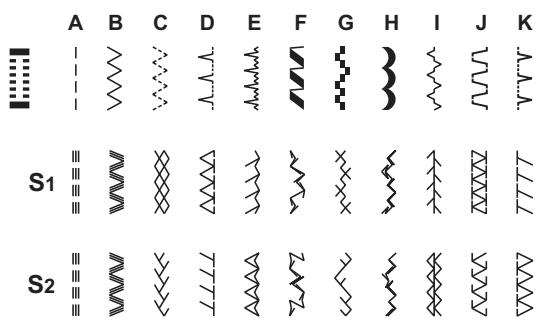
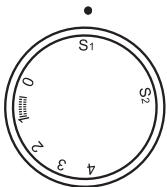
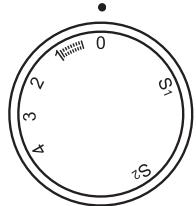
To select a stitch, simply turn the pattern selector dial. The pattern selector dial may be turned in either direction.
For straight stitch, select pattern " with the pattern selector dial. Adjust the stitch length with the stitch length dial.
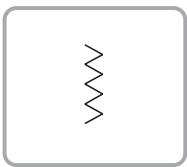
For zigzag stitch, select pattern " 2 " with the pattern selector dial. Adjust the stitch length and stitch width according to the fabric being used.
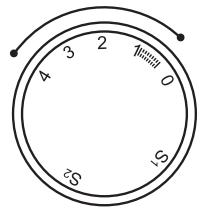
To obtain the other patterns, turn the stitch length dial to "S1" or "S2", select the pattern desired with pattern selector dial, and adjust the stitch width with the stitch width dial.
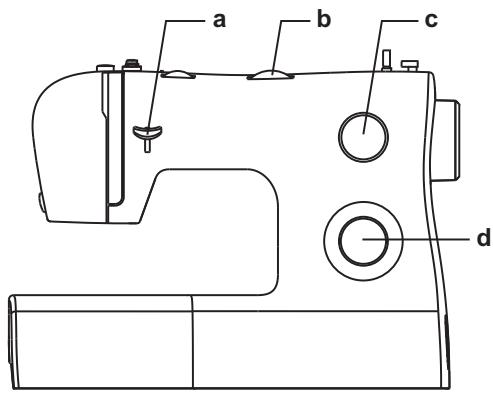
a. Reverse Sewing Lever
b. Stitch Width Dial
c. Stitch Length Dial S1-S2
d. Pattern Selector Dial
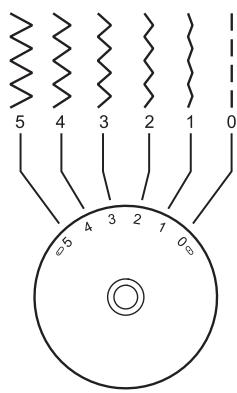
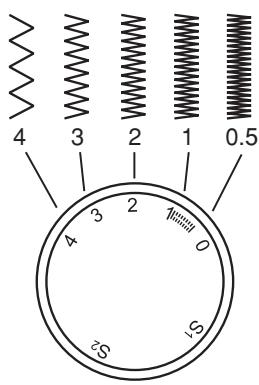
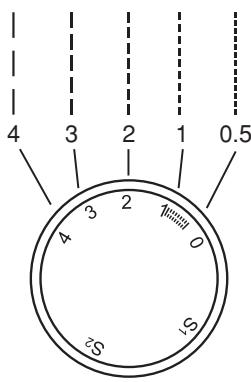
Function of stitch width dial
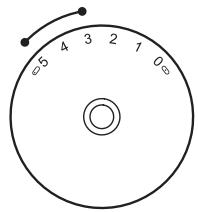
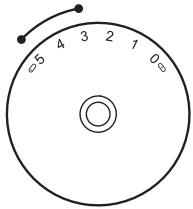
The maximum zigzag stitch width for zigzag stitching is 5mm; however, the width can be reduced on any patterns. The width increases as you move zigzag dial from "0" - "5".
The stitch width dial is also the control for the straight stitch infinite needle position. "0" is center needle position, "5" is full left needle position.
Function of stitch length dial while zig-zag stitching
Set the Pattern Selector Dial to zig-zag.
The density of zig-zag stitches increase as the setting of stitch length dial approaches "0".
Neat zig-zag stitches are usually achieved at "2.5" or below.
Dense zig-zag stitches are called satin stitches.
Function of stitch length dial for when straight stitching
For straight stitch sewing, turn the Pattern Selector Dial to the straight stitch setting. Turn the Stitch Length Dial, and the length of the individual stitches will decrease as the dial approached "0". The length of the individual stitches will increase as the dial approaches "4". Generally speaking, use a longer stitch length when sewing heavier weight fabrics or when using a thicker needle or thread. Use a shorter stitch length when sewing lighter weight fabrics or when using a finer needle or thread.
Sewing Straight Stitch
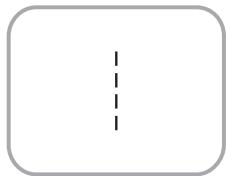
To begin sewing, set the machine for straight stitch.
Place the fabric under the presser foot with the fabric edge lined up with the desired seam guide line on the needle plate. (1)
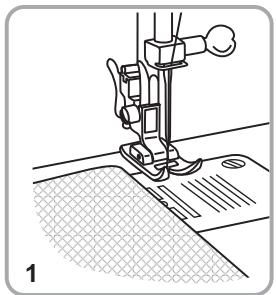
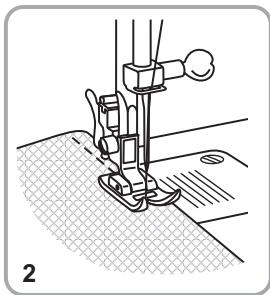
Lower the presser foot lifter, and then step on the foot controller to start sewing. (2)
Reverse Sewing / Removing the Work / Cutting the Thread
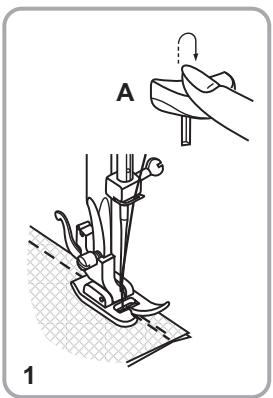
Reverse sewing
To secure the beginning and the end of a seam, press down the reverse sewing lever (A). Sew a few reverse stitches. Release the lever and the machine will sew forwards again. (1)
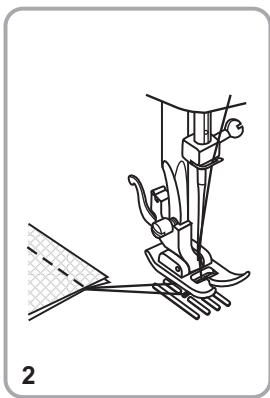
Removing the work
Turn the handwheel toward you (counterclockwise) to bring the thread take up lever to its highest position, raise the presser foot and remove work behind the needle and presser foot. (2)
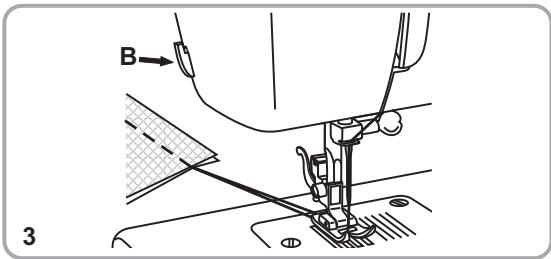
Cutting the thread
Pull the threads under and behind the presser foot. Guide the threads to the side of the face plate and into thread cutter (B). Pull threads down to cut. (3)
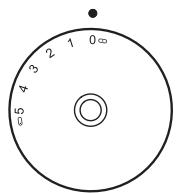
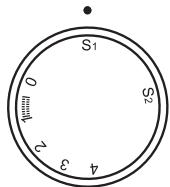
The Stretch Stitch Patterns are indicated with a blue color on the Pattern Selector Dial. To select these stitches, turn the Pattern Selector Dial to the desired pattern. Then, turn the Stitch Length Dial to the indicator marked "S1". Though there are several stretch patterns, here are two examples:
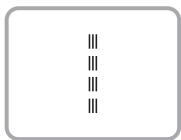
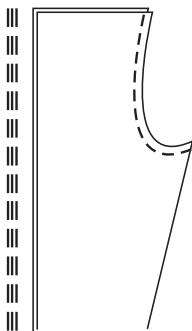
Straight Stretch Stitch
Set the Pattern Selector Dial to " "
Used to add triple reinforcement to stretch and hardwearing seams.
The machine sews two stitches forward and one stitch backwards.
Ric Rac
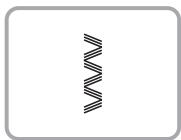
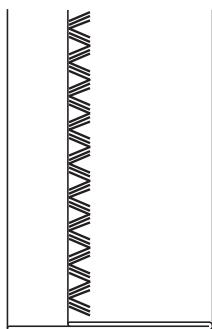
Ric Rac Set the Pattern Selector Dial to " 三
Adjust the Stitch Width Dial to between "3" and "5".
Ric Rac Stitch is suitable for firm fabrics like denim, corduroy, poplin, duck, etc.
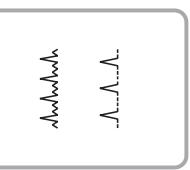
For hems on curtains, trousers, skirts, etc.
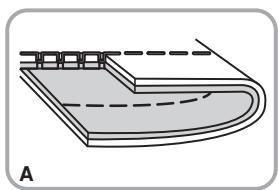
Blind hem for stretch fabrics.
A. A. Blind hem for firm fabrics.
Set the Stitch Length Dial with the range shown on the diagram at the left. Blind hems, however, are normally sewn with a longer stitch length setting. Set the Stitch Width Dial at a setting appropriate for the weight / type of fabric being sewn, within the range shown in the diagram on the left of the page. Generally, a narrower stitch is used for lighter weight fabrics, and a wider stitch is used for heavier weight fabrics. Sew a test first to make sure the machine settings are appropriate for the fabric.
Blind Hem:
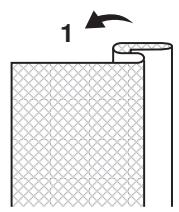
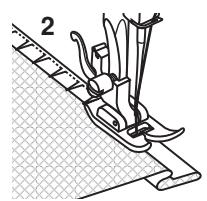
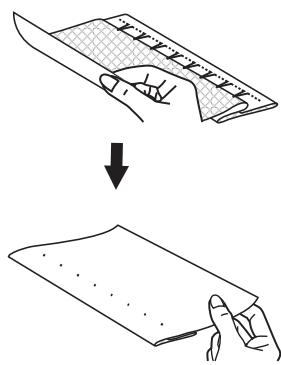
Turn up the hem to the desired width and press. Fold back (as shown in Fig. 1) against the right side of the fabric with the top edge of the hem extending about 7mm (1/4^ ) to the right side of the folded fabric.
Start to sew slowly on the fold, making sure the needle touches slightly the folded top to catch one or two fabric threads. (2)
Unfold the fabric when hemming is completed and press.
A
D
Buttonhole sewing is a simple process that provides reliable results. However, it is strongly suggested to always make a practice buttonhole on a sample of your fabric and stabilizer.
- Using tailor's chalk, mark the position of the buttonhole on the fabric.
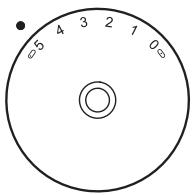
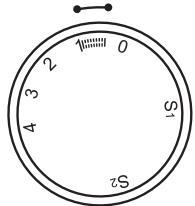
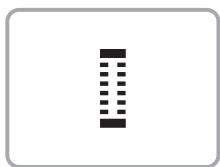
- Attach the buttonhole foot and set the Pattern Selector Dial to " ". Set stitch length dial to " ". Set the stitch width at "5". The width however may need to be adjusted according to the project, Sew a test first to determine this.
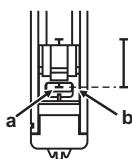
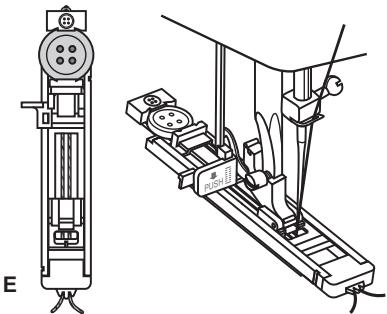
- Lower the presser foot aligning the marks on foot with the marks on the fabric (A). (The front bar tack will be sewn first.) (Align the mark on the fabric (a) with the mark on the foot (b).)
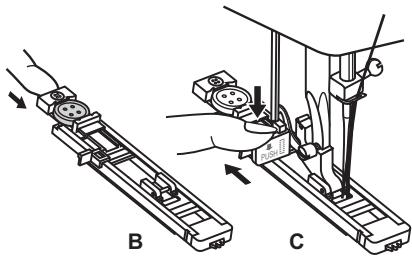
- Open the button plate and insert the button (B).
- Lower the buttonhole lever and gently push it back (C).
- While lightly holding the upper thread, start the machine.
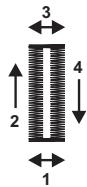
- Buttonhole stitching is done in the order (D).
- Stop the machine when the buttonhole cycle has completed.
When sewing buttonholes on stretch fabric, hook heavy thread or cord under the buttonhole foot. When the buttonhole is sewn the legs will overcast the cord.
- Mark the position of the buttonhole on the fabric with the tailor's chalk, attach the buttonhole foot, and set the pattern selector dial to "". Set stitch length dial to "".
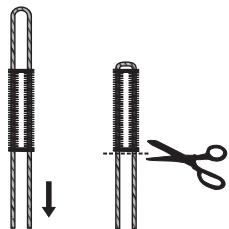
- Hook the heavy thread onto the back end of the buttonhole foot, then bring the two heavy thread ends to the front of the foot, insert them into the grooves and temporarily tie them there.
- Lower the presser foot and start sewing. *Set the stitch width to match the diameter of the gimp thread.
- Once sewing is completed, gently pull the heavy thread to remove any slack, then trim off the excess.
1
2
3
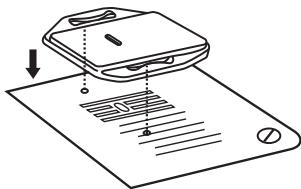
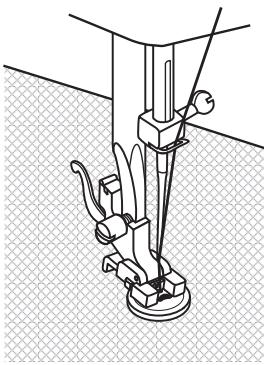
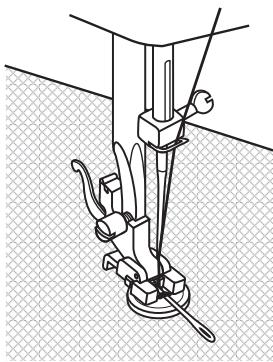
Install the darning plate. (1) Change the all purpose foot to the button sewing foot. Set the stitch length to "0".
To sew a few securing stitches, set the machine for straight stitch, with the stitch width set at "0".
Raise the needle out of the fabric. Set the machine for zig-zag stitch, then set the width to number "3" - "5". Turn the handwheel to check that the needle goes cleanly into the left and right holes of the button. Adjust the stitch width, as needed, according to the distance between the holes of the button. Slowly sew on the button with about 10 stitches.
Raise the needle out of the fabric. Set the machine for straight stitch again, with the width at "0" sew a few securing stitches to finish.
If a shank is required, place a darning needle on top of the button and sew. (3)
For buttons with 4 holes, sew through the front two holes first, push the work forward and then sew through the back two holes.
Installing the Removable Extension Table
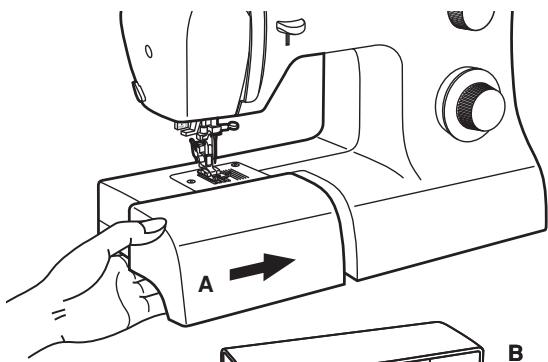
Hold the removable extension table horizontal, and push it in the direction of the arrow. (A)
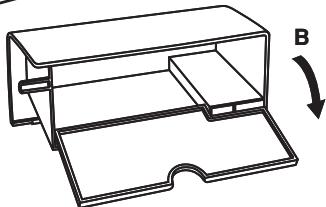
The inside of the removable extension table can be utilized as an accessory box.
To open, flip cover down as shown. (B)
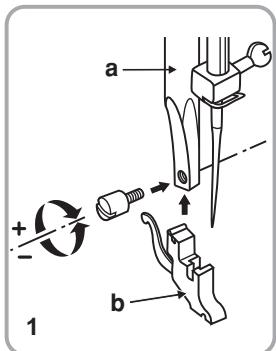
Raise the presser bar (a). Attach the presser foot shank (b) as illustrated. (1)
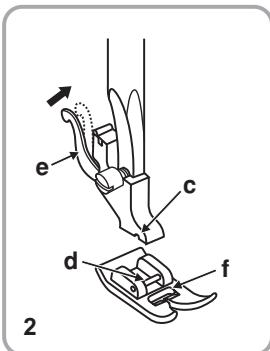
Lower the presser foot shank (b) until the cut-out (c) is directly above the pin (d). (2) Raise the lever (e).
Lower the presser foot shank (b) and the presser foot (f) will engage automatically.
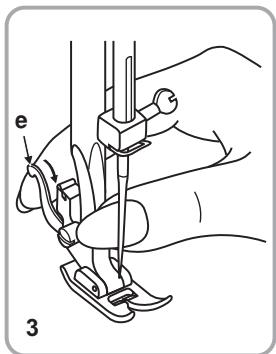
Raise the presser foot. (3)
Raise the lever (e) and the foot disengages.
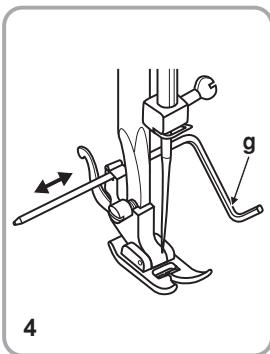
Attaching the edge/ quilting guide
Attach the edge/ quilting guide (g) in the slot as illustrated.
Adjust according to need for hems, pleats, etc. (4)
Attention:
Turn power switch to off ("O") when carrying out any of the above operations!
Needle/ Fabric/ Thread Chart
NEEDLE, FABRIC, THREAD SELECTION GUIDE
| NEEDLE SIZE | FABRICS | THREAD |
| 9-11 (70-80) | Lightweight fabrics-thin cottons, voile, serge, silk, muslin, interlocks, cotton knits, tricots,jerseys, crepes, woven polyester, shirt & blouse fabrics. | Light-duty thread in cotton, nylon, polyester or cotton wrapped polyester. |
| 11-14 (80-90) | Medium weight fabrics-cotton, satin, kettlecloth, sailcloth, double knits, lightweight woolens. | Most threads sold are medium size and suitable for these fabrics and needle sizes. Use polyester threads on synthetic materials and cotton on natural woven fabrics for best results. Always use the same thread on top and bottom. |
| 14 (90) | Medium weight fabrics-cotton duck, woolen, heavier knits, terrycloth, denims. |
| 16 (100) | Heavyweight fabrics-canvas, woolens, outdoor tent and quilted fabrics, denims, upholstery material (light to medium). |
| 18 (110) | Heavy woolen, overcoat fabrics, upholstery fabrics, some leathers and vinyls. | Heavy duty thread, carpet thread. |
IMPORTANT: Match needle size to thread size and weight of fabric.
Note : Replace needle often (approximately every other garment ) and/ or at first thread breakage or skipped stitches.
Darning Plate
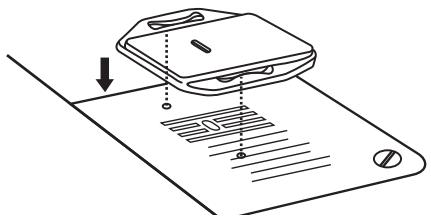
For certain types of work, (e.g. darning or free-hand embroidery), the darning plate must be used.
Install the darning plate as illustrated.
For normal sewing, remove the darning plate.
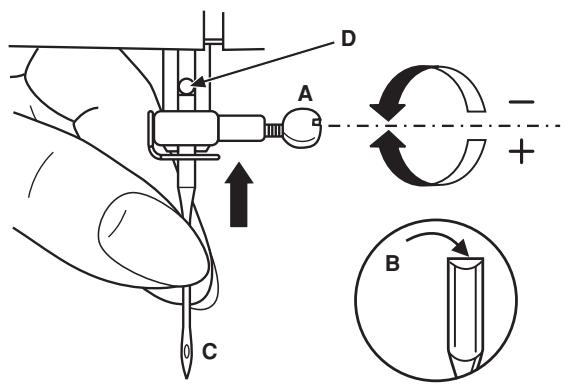
Change the needle regularly, especially if it is showing signs of wear and causing problems.
Insert the needle as illustrated as follows:
A. Loosen the needle clamp screw and tighten again after inserting the new needle.
B. The flat side of the shaft should be towards the back.
C/D.Insert the needle as far up as it will go.
Attention:
Turn power switch to off ("O") before inserting or removing the needle.
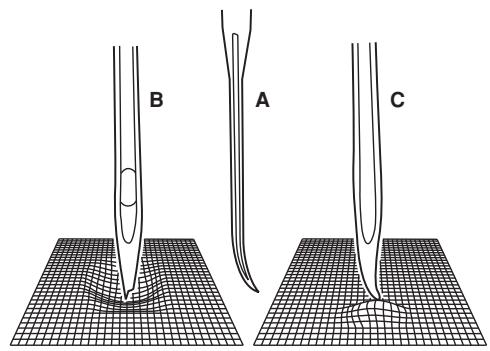
Needles must be in perfect condition.
Problems can occur with:
A. Bent needles
B. Damaged points
C. Blunt needles
Changing the Bulb
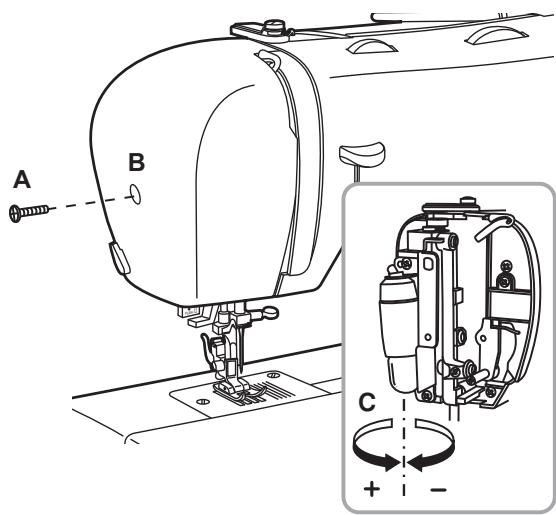
Disconnect the machine from the power supply by removing the plug from the main socket!
Replace bulb with same type rated 10 watts (110-120V area) or 15 watts (220-240V area).
- Loosen screw (A) as illustrated.
- Remove the face plate (B).
- Unscrew the bulb and install a new one (C).
- Replace the face plate and tighten screw.
Trouble Shooting Guide
| Problem | Cause | Correction |
| Upper thread breaks | 1. The machine is not threaded correctly. | 1. Rethread the machine. |
| 2. The thread tension is too tight. | 2. Reduce the thread tension. (lower number) |
| 3. The thread is too thick for the needle. | 3. Select a larger needle. |
| 4. The needle is not inserted correctly. | 4. Remove and reinsert the needle. (flat side towards the back) |
| 5. The thread is wound around the spool holder pin. | 5. Remove the reel and wind thread onto reel. |
| 6. The needle is damaged. | 6. Replace the needle. |
| Lower thread breaks | 1. The bobbin case is not inserted correctly. | 1. Remove and reinsert the bobbin case and pull on the thread. |
| 2. The bobbin case is threaded wrong. | The thread should pull easily. |
| 3. The lower thread tension is too tight. | 2. Check both bobbin and bobbin case. |
| 3. Loosen lower thread tension as described. |
| Skipped stitches | 1. The needle is not inserted correctly. | 1. Remove and reinsert needle. (flat side towards the back) |
| 2. The needle is damaged. | 2. Insert a new needle. |
| 3. The wrong size or type of needle has been used. | 3. Choose a needle to suit the thread and fabric. |
| 4. The foot is not attached correctly. | 4. Check and attach correctly. |
| Needle breaks | 1. The needle is damaged. | 1. Insert a new needle |
| 2. The needle is not correctly inserted. | 2. Insert the needle correctly. (flat side towards the back) |
| 3. Wrong needle size for the fabric. | 3. Choose a needle to suit the thread and fabric. |
| 4. The wrong foot is attached. | 4. Select the correct foot. |
| Loose stitches | 1. The machine is not correctly threaded. | 1. Check the threading. |
| 2. Thread the bobbin case as illustrated. |
| 2. The bobbin case is not correctly threaded. | 3. The needle size must suit the fabric and thread. |
| 3. Needle/ fabric/ thread combination is wrong. | 4. Correct the thread tension. |
| 4. Thread tension wrong. | |
| Seams gather or pucker | 1. The needle is too thick for the fabric. | 1. Select a finer needle. |
| 2. The stitch length is incorrectly adjusted. | 2. Readjust the stitch length. |
| 3. The thread tension is too tight. | 3. Loosen the thread tension. |
| Uneven stitches, uneven feed | 1. Poor quality thread. | 1. Select a better quality thread. |
| 2. The bobbin case is incorrectly threaded. | 2. Remove bobbin case, thread and insert correctly. |
| 3. Fabric has been pulled. | 3. Do not pull on the fabric while sewing, let it be taken up by the machine. |
| The machine is noisy | 1. The machine must be lubricated. | 1. Lubricate as described. |
| 2. Lint or oil have collected on the hook or needle bar. | 2. Clean the hook and feed dog as described. |
| 3. Poor quality oil has been used. | 3. Only use good quality sewing machine oil. |
| 4. The needle is damaged. | 4. Replace the needle. |
| The machine jams | Thread is caught in the hook. | Remove the upper thread and bobbin case, turn the handwheel backwards and forwards by hand and remove the thread. Lubricate as described. |
Disposal
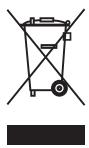
Please note that on disposal, this product must be safely recycled in accordance with relevant National legislation relating to electrical/electronic products. If in doubt please contact your retailer for guidance.
Warranty
You receive a 36 month warranty on this product, valid from the date of purchase. The appliance has been carefully produced under strict quality control. Within the warranty period we shall rectify without charge all material and manufacturing defects. In the event of a defect arising during the warranty period, please send the device to the listed Service Centre address, making reference to the following article number: 1070s. Damage caused by improper handling, non-observance of the operating instructions or unauthorized interference with the appliance are excluded from the warranty. The performance of services under the warranty does not extend or renew the warranty period.
Service Address
Bogod & Company Ltd.
Fortran Road, St Mellons, CF3 0WJ Cardiff, GB
① 0044-29-20774910
IAN 96742
When inquiring about your product, please have your receipt and product number (e.g. IAN 12345) ready as your proof of purchase.
This appliance complies with the requirements of the relevant European and national guidelines. This is confirmed by the CE mark.
The relevant declarations are held by the manufacturer.
Introduction
Maintenance and Trouble shooting
Last Information Update:03/2014
Ident.-No.: 1070s032014-DE/GB/FR
PFAFF is a registered trademark of KSIN Luxembourg II, S.à.r.l.
The trademark is used under license by VSM Group AB. ©2014 KSIN Luxembourg II, S.à.r.l.
All rights reserved.
021K6B0702(DE.GB.FR)