USER MANUAL TIPMATIC 1025 PFAFF
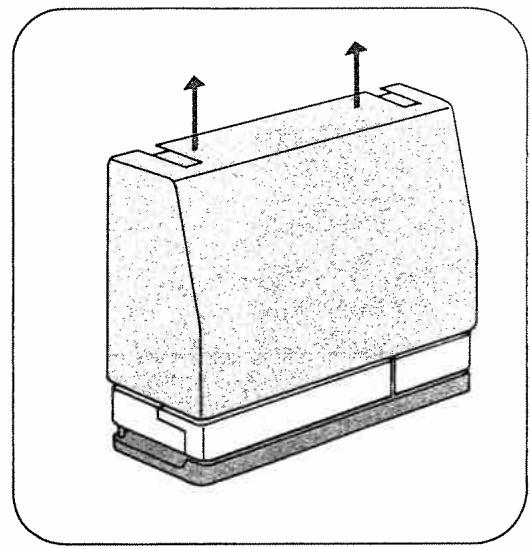
Removing the carrying case cover
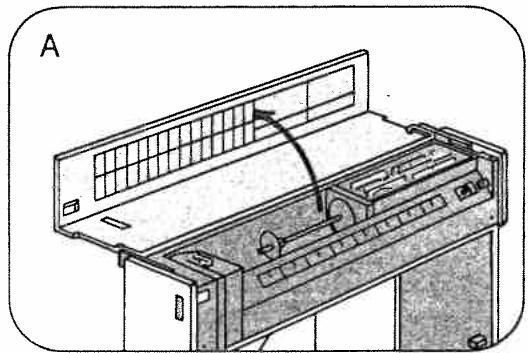
Opening the top cover
Removing and opening the swing-out arms
Accessory box and accessory compartment 2
Electrical connection 3
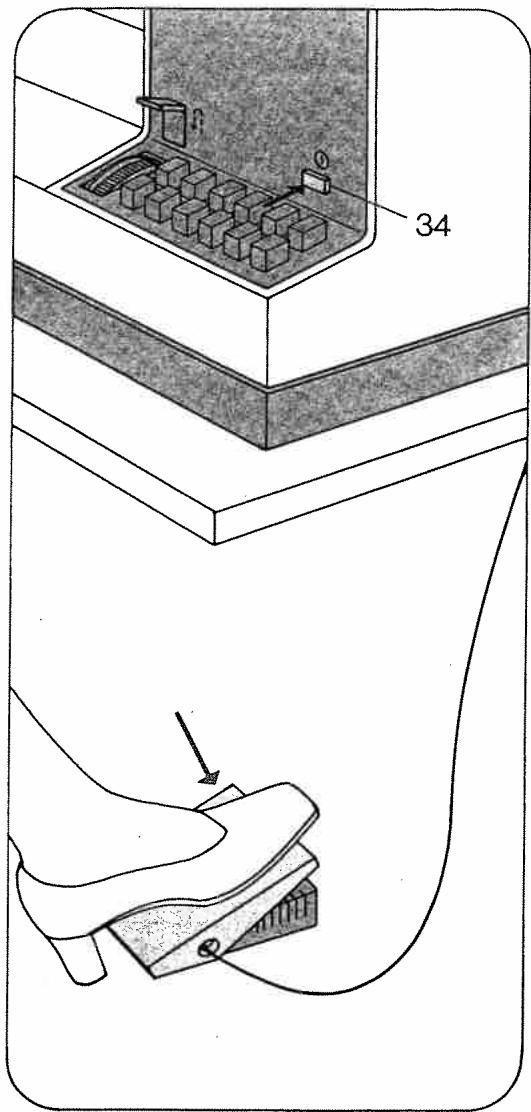
Foot control 3
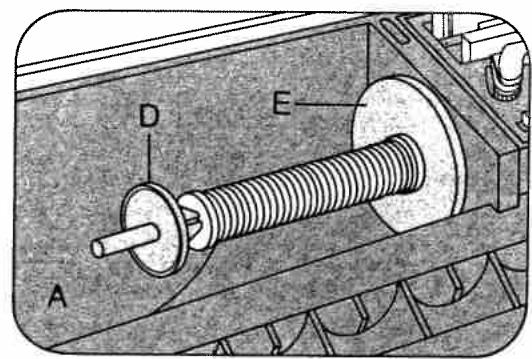
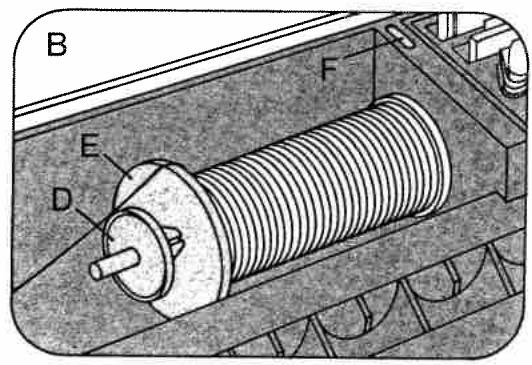
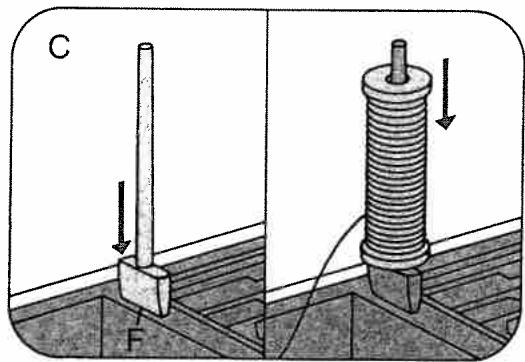
Placing spool of thread on pin 4
Upper threading 4
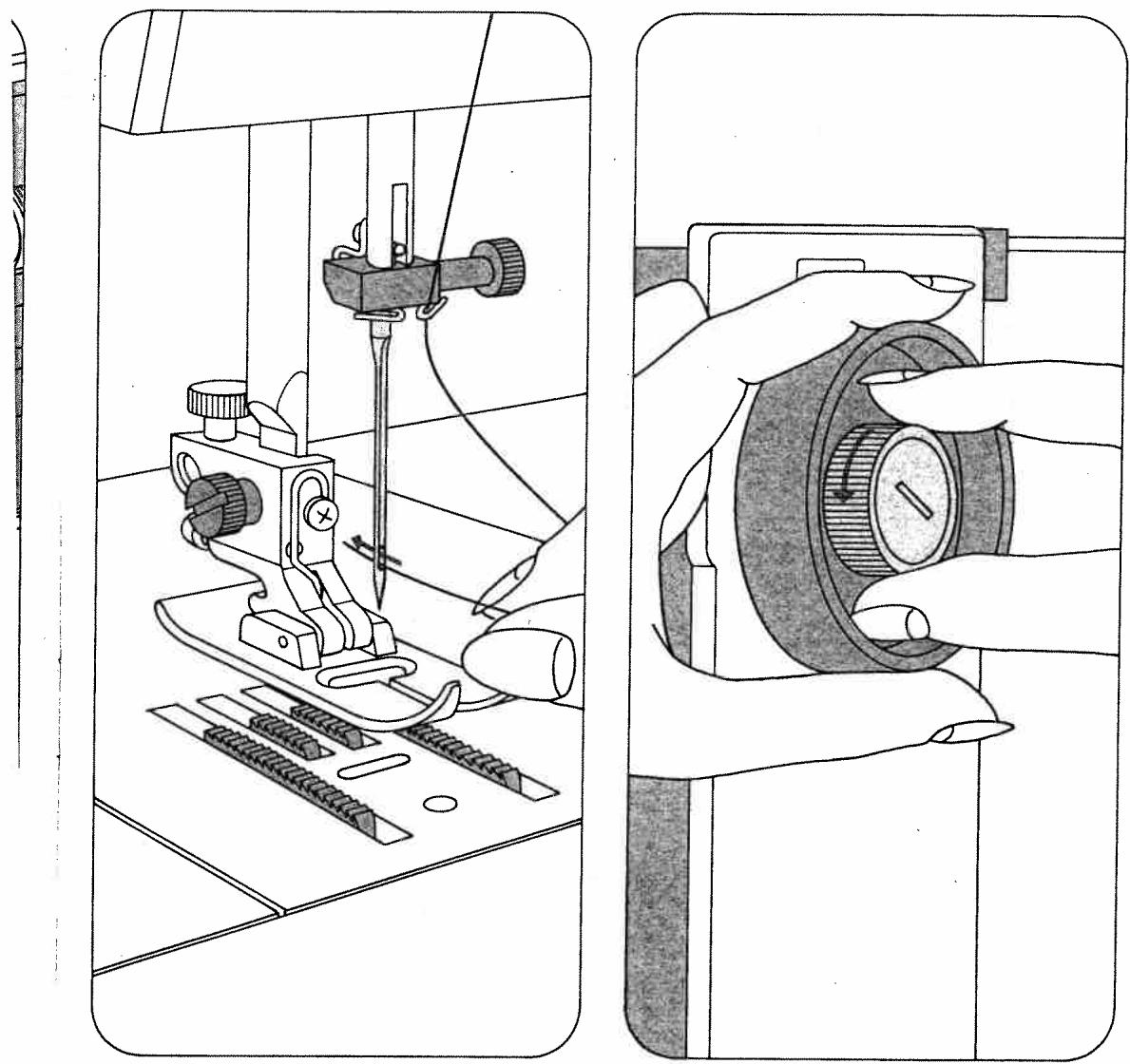
Threading the needle 5
Disengaging the sewing mechanism 5
Bobbin winding 6
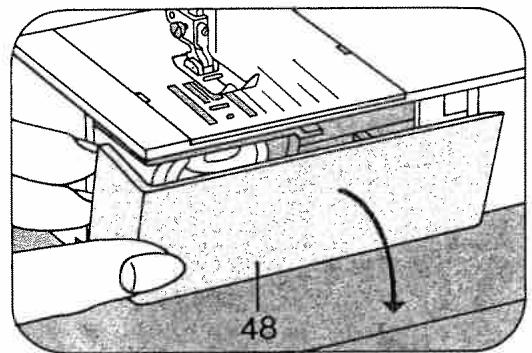
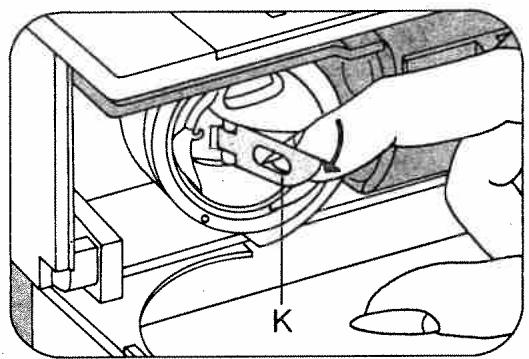
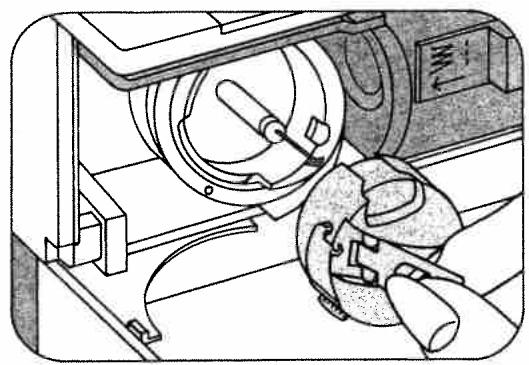
Removing bobbin case and bobbin 7
Inserting the bobbin 71
Inserting the bobbin case 8
Drawing up the bobbin thread 8
Pressbarlifter 9
Thread cutter 9
Thread tensions 10
Regulating the stitch length 11
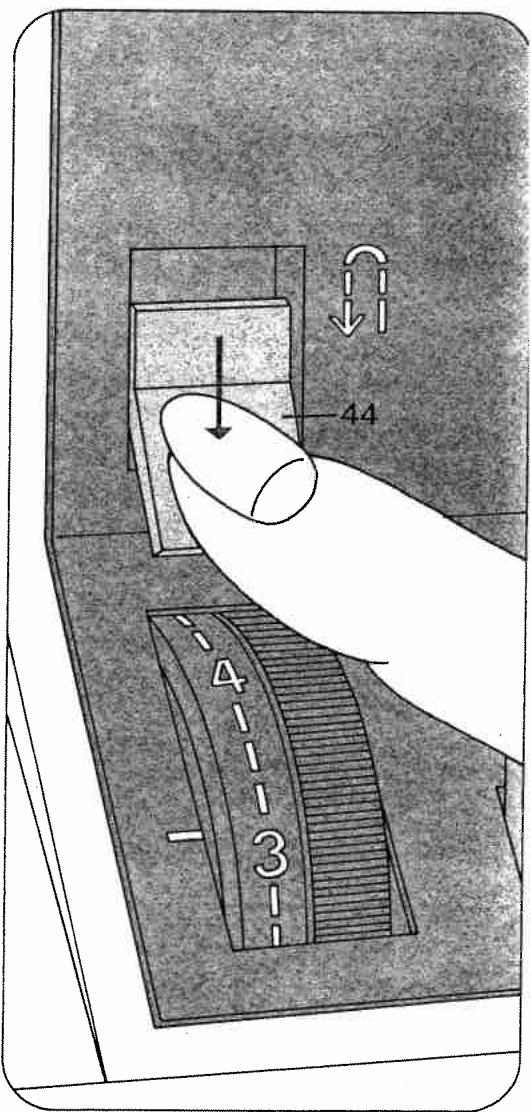
Reverse sewing 11
Finger-tip controls 1027 12
Finger-tip controls 1025 13
Selecting utility stitches 14
Selecting stretch stitches 14
Utility- and stretch-stitch combinations 1027 15
Selecting the needle position 15
or straight stitching.
Dropping the machine feed 16
Changing the needle 16
Changing the sewing foot 17
Special sewing feet 18
Buttonhole settings 18
Sewing buttonholes 19
Sewing feet 20
Changing the light bulb 21
Cleaning and oiling 21
Trouble shooting 22
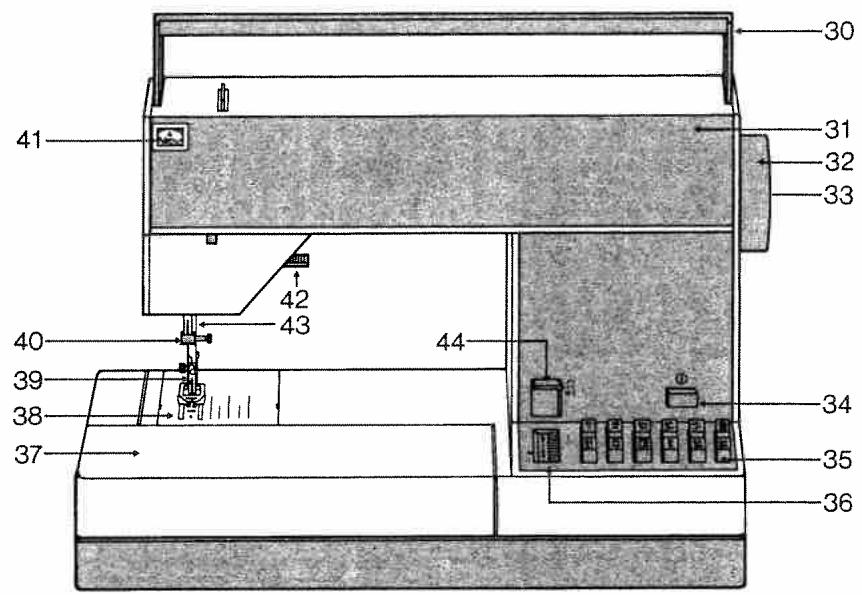
30 Carrying handle
31 Hinged top cover
32 Hand wheel
33 Stop motion knob
34 Master switch
35 Finger-tip controls
36 Stitch length control
37 Swing-out sewing arm with accessory compartment
38 Needle plate
39 Sewing foot holder with sewing foot
40 Needle holder with screw
41 Needle thread tension
42 Presser bar lifter
43 Presser bar with thread cutter
44 Reverse-feed control
45Stitch chart (Model 1027)
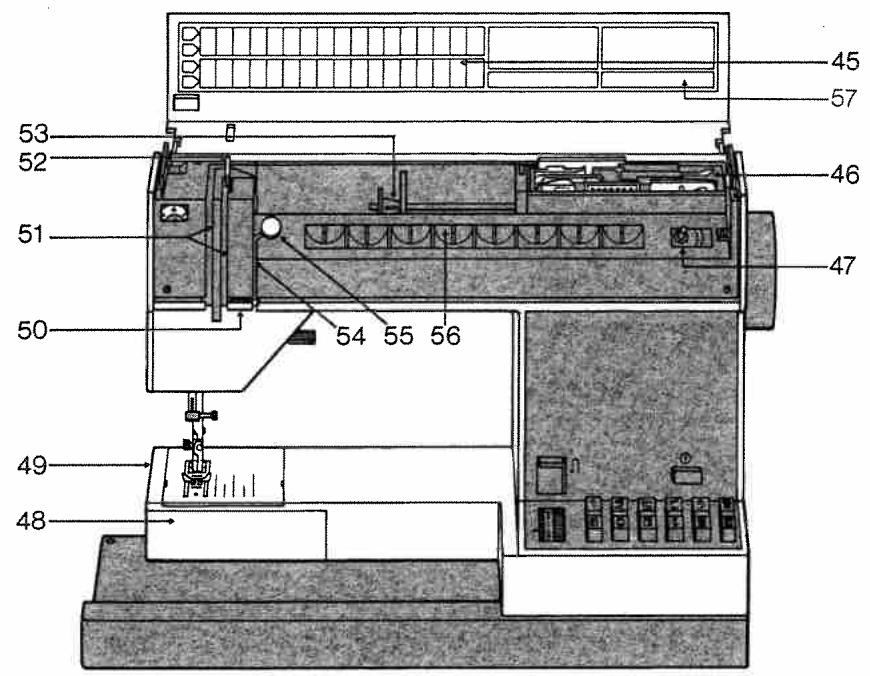
46 Accessory box with accessory compartment underneath
47 Bobbin winder
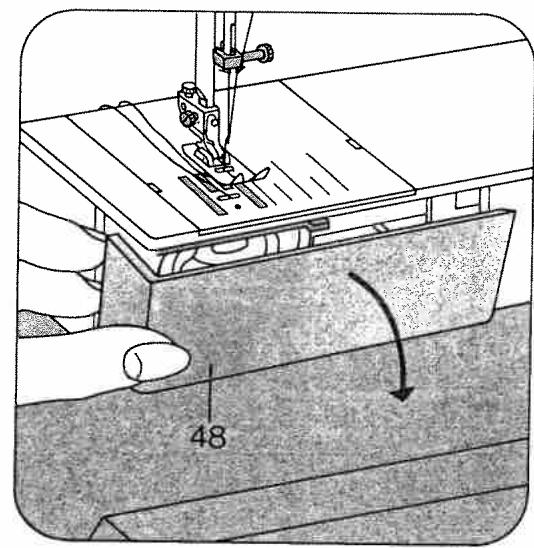
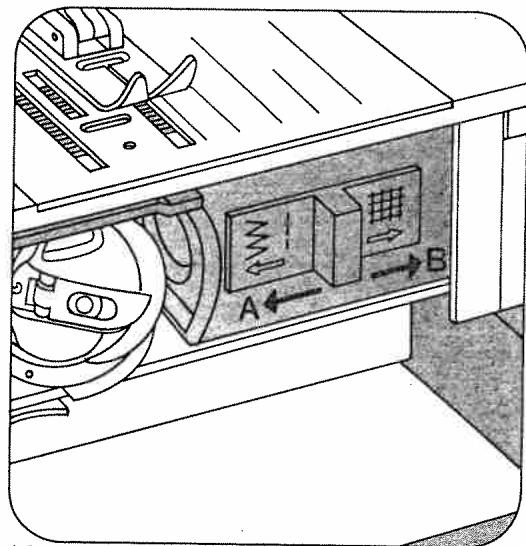
48 Free arm cover (enclosing sewing hook and drop-feed control)
49 Free arm
50 Thread guide
51 Threading slots
52 Take-up lever
53 Spool pin with unreeling discs
54 Threading slot for bobbin winding
55 Bobbin tension stud (bobbin winding)
56 Bobbin rack
57 Space for entering phone number of customer service
a) Be careful to avoid finger injuries by the needle when sewing.
b) Make sure you unplug the power cord whenever you want to change the needle, sewing foot, bobbin or needle plate, when you want to clean and oil the machine or have to interrupt sewing and leave the machine for a while.
c) Be sure to use only a 15-watt light bulb in the sewing lamp.
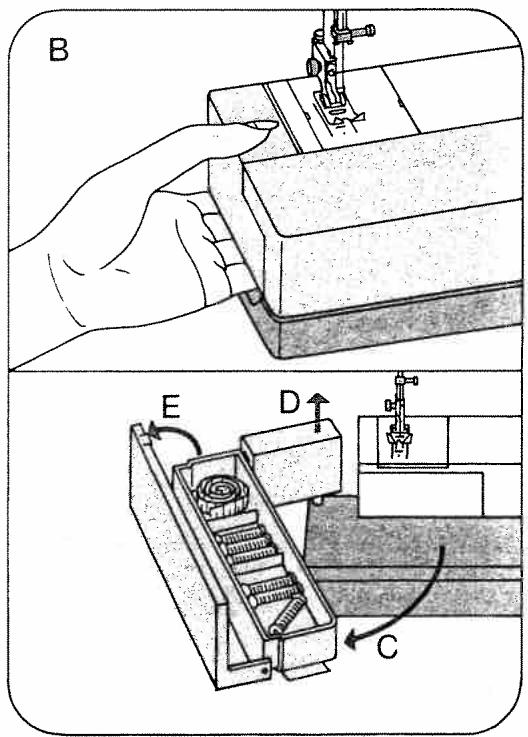
Removing and opening the swing-out arm
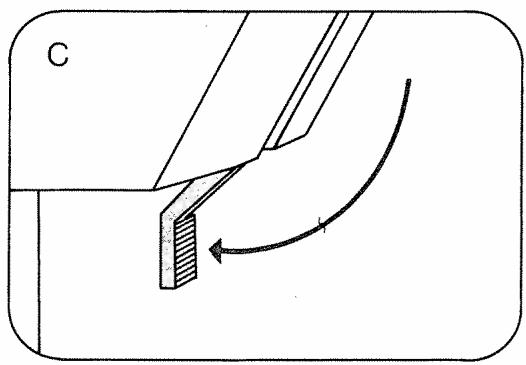
Reach under the swing-out arm with your left hand (B), swing it out toward the left (C) and lift it out (D). Open its lid (E) to accommodate thread and accessories.
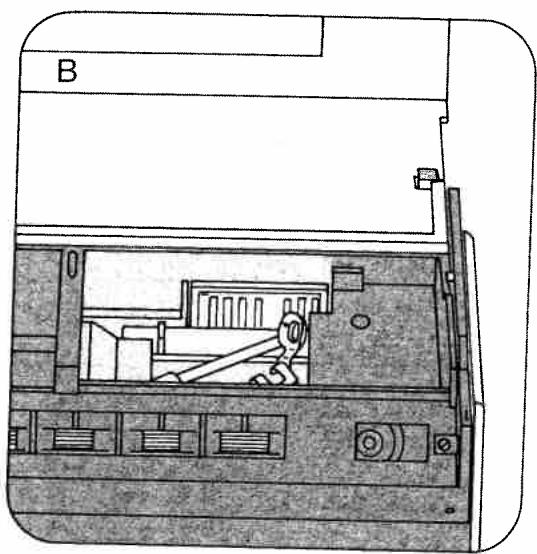
Accessory box and accessory compartment
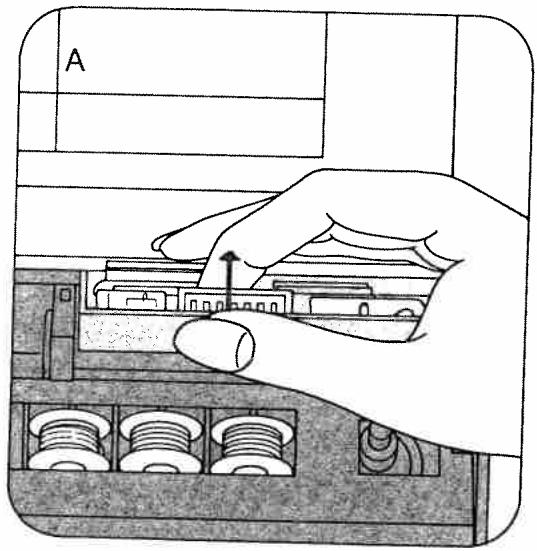
Tilt up the front of accessory box 46 and lift it out (A). There is an additional accessory compartment (B) underneath.
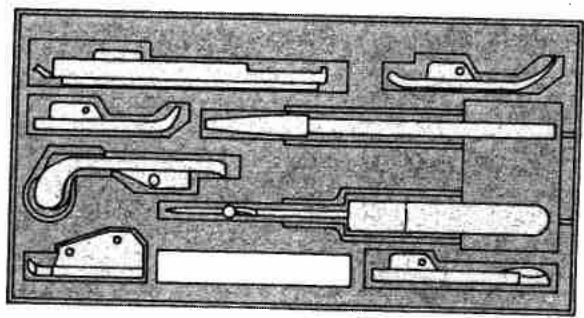
III. C shows how the snap-on sewing feet, the second spool holder and the seam ripper fit into the box.
C
Electrical connection
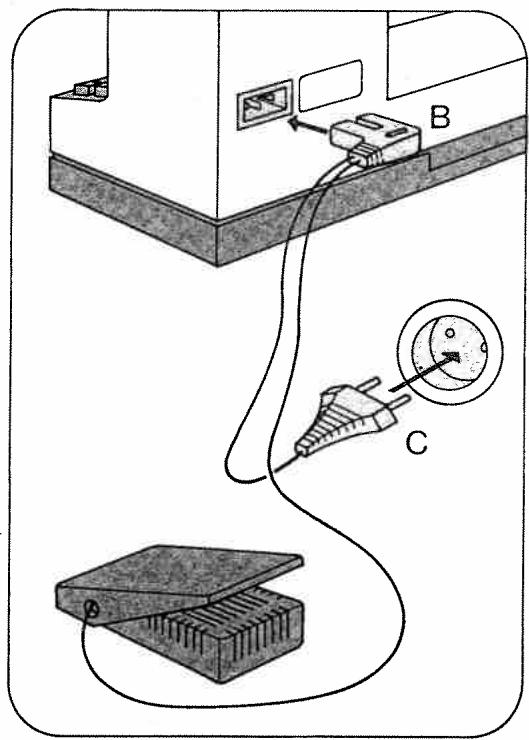
Take the foot control out of the machine. Push plug B into the machine socket and plug C into the wall outlet. Press master switch 34. Your machine is now ready for sewing.
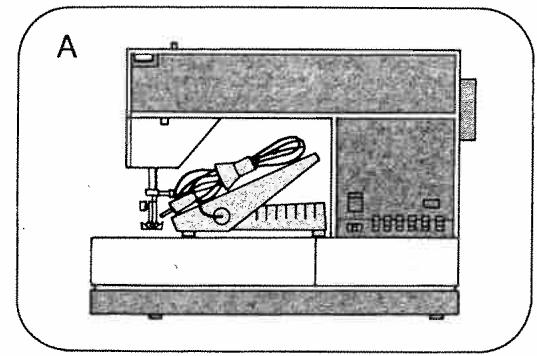
When you put the machine away, the foot control is placed in the machine again as shown in the illustration (A).
Place the foot control under the table. Press down the pedal, and the machine starts sewing. The more the pedal is depressed, the faster the machine runs.
Placing spool of thread on pin
A Small spools of thread: Push unreeling disc D on the spool holder in front of the spool of thread.
B Large spools of thread: Push unreeling discs D and E on the spool holder in front of the spool of thread, as shown in the drawing.
C Second spool holder: This is contained in the accessory box and is used for bobbin winding and twin-needle sewing. Insert the spool holder in hole F and place a spool of thread on it.
Upper threading
Raise the sewing foot.
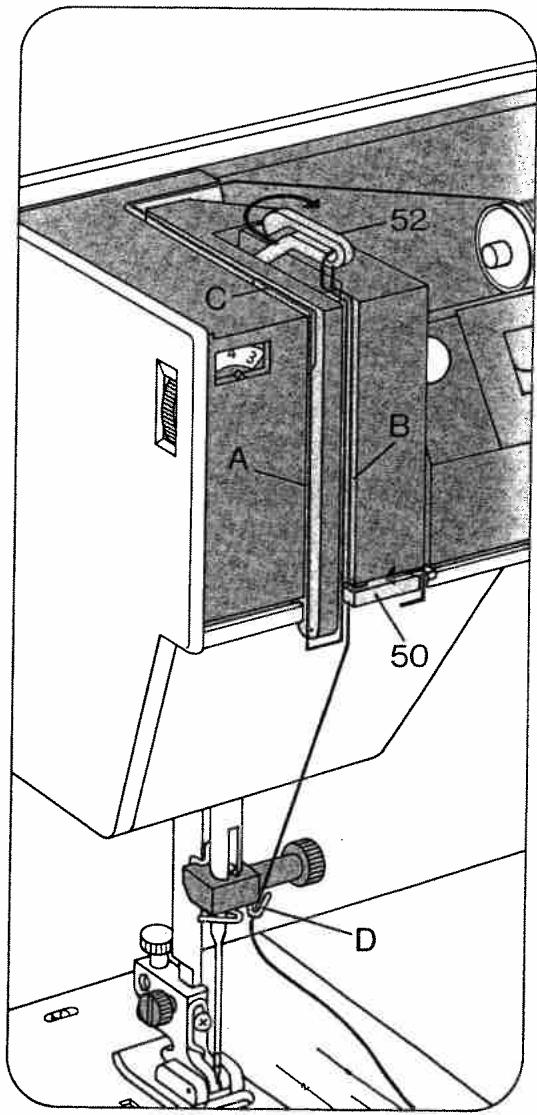
Pull the thread from the spool and draw it into slot A (to the left of guide C), from below into slot B and take-up lever 52. Then draw it back into slot B, into thread guide 50 and into the right thread guide D on the needle holder.
For two-needle sewing, draw one thread into slot A to the left of guide C, and draw the other to the right of guide C. One of the threads is then pulled into the right thread guide, the other into the left.
Winding the bobbin from a second spool (A)
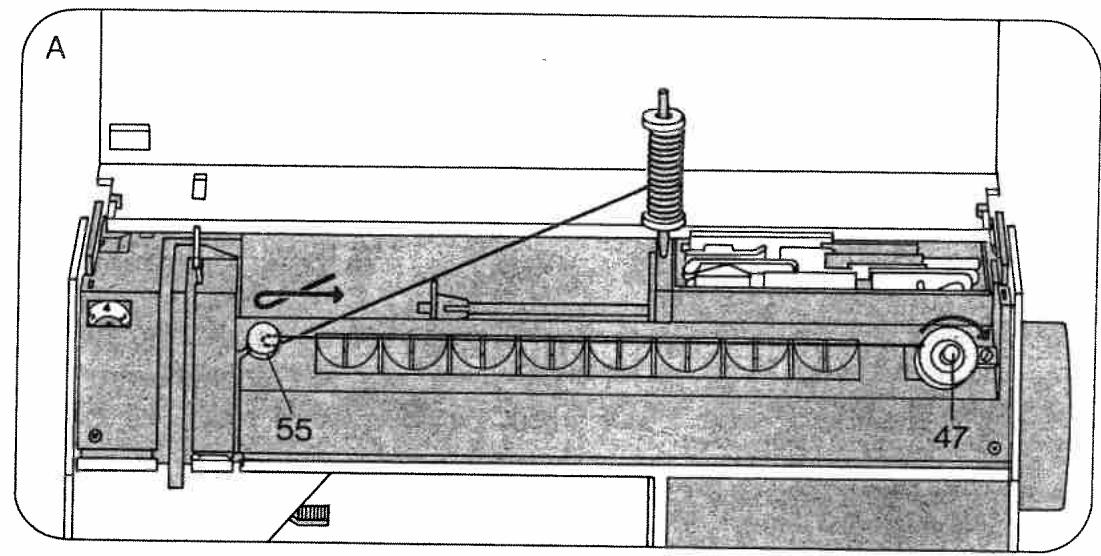
Disengage the sewing mechanism. Insert the spool holder and place a spool of thread on it. Place a bobbin on spindle 47 so that pin C enters slot D. Pull the thread from the spool, lead it around bobbin tension stud 55, wind it around the bobbin a few times and push the bobbin toward the right to start the winder. When the bobbin is full push it toward the left and take it out. Then re-engage the sewing mechanism. Leave the top cover open during bobbin winding.
Winding the bobbin through the needle eye (B)
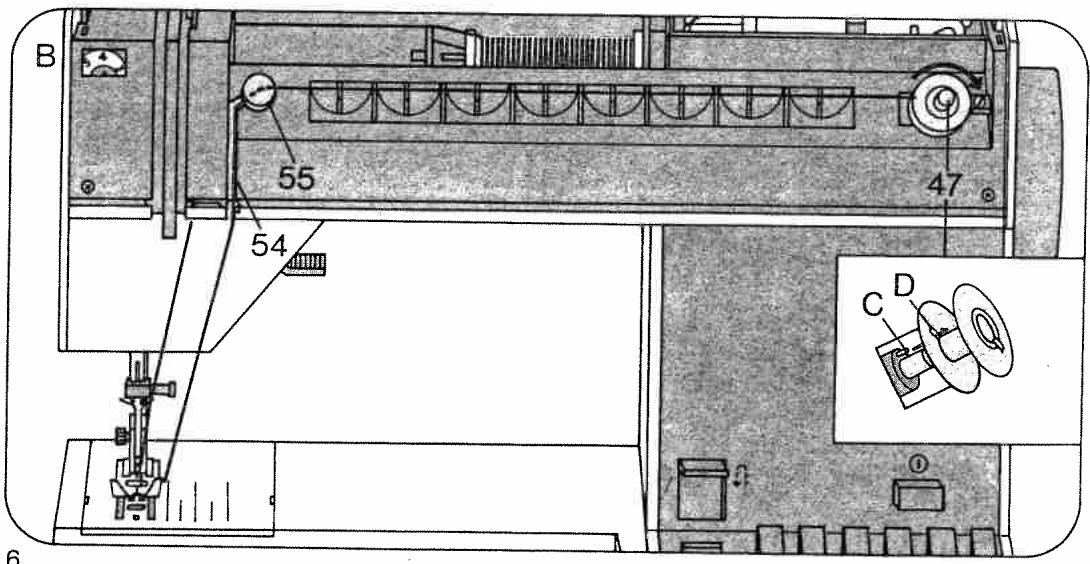
Raise the sewing foot and bring the needle to its highest point. Disengage the sewing mechanism. Place a bobbin on spindle 47 so that pin C enters slot D. Draw the needle thread under the sewing foot, up and into slot 54, and from above around bobbin tension stud 55. Then wind a few turns of thread on the bobbin.
Push the bobbin toward the right to start the bobbin winder. Push the full bobbin toward the left and take it out. Re-engage the sewing mechanism.
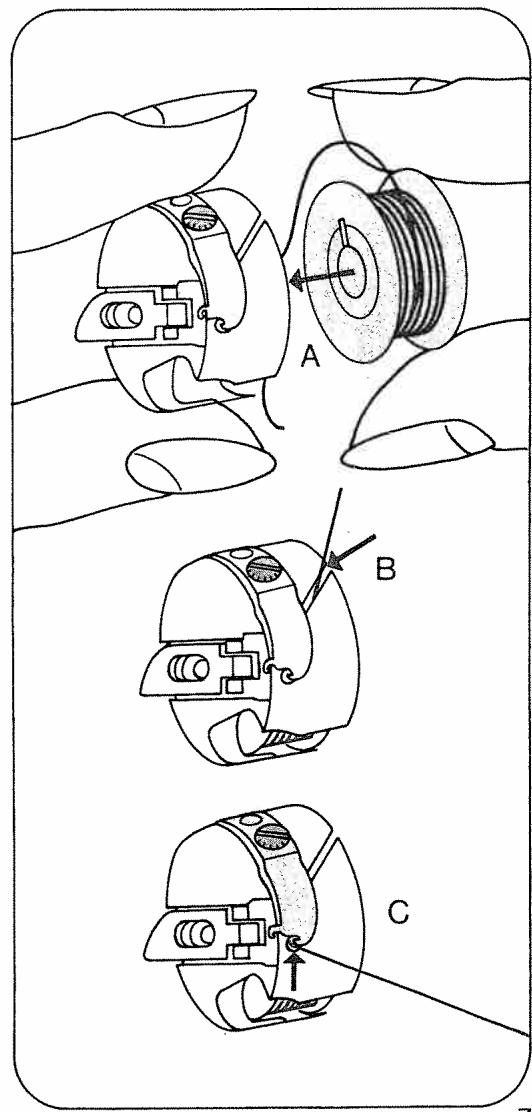
Inserting the bobbin case
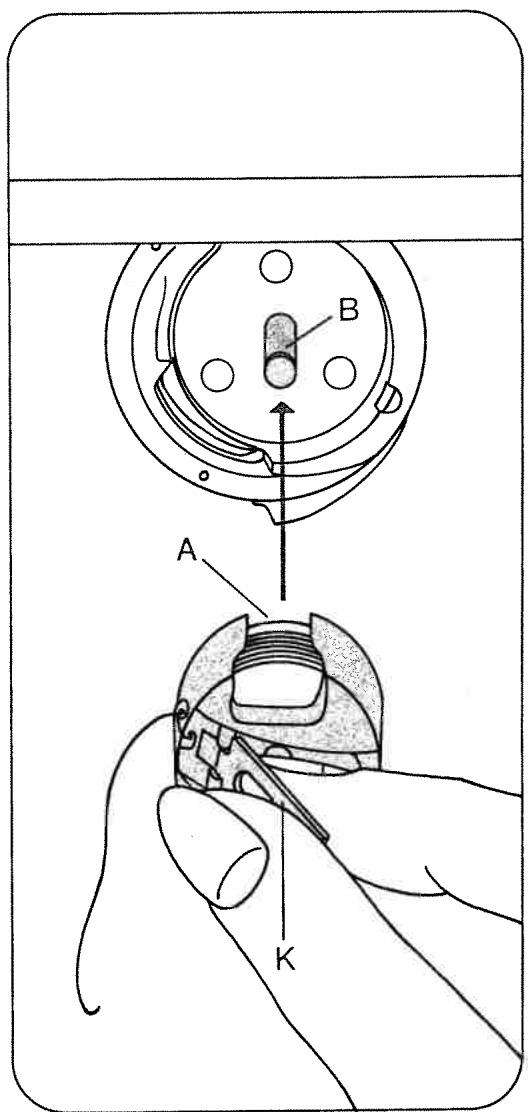
Pull out latch K and push the bobbin case onto stud B, making sure slot A is up. Release the latch and lightly press against the bobbin case to make sure it has snapped into place.
1. Drawing up the bobbin thread
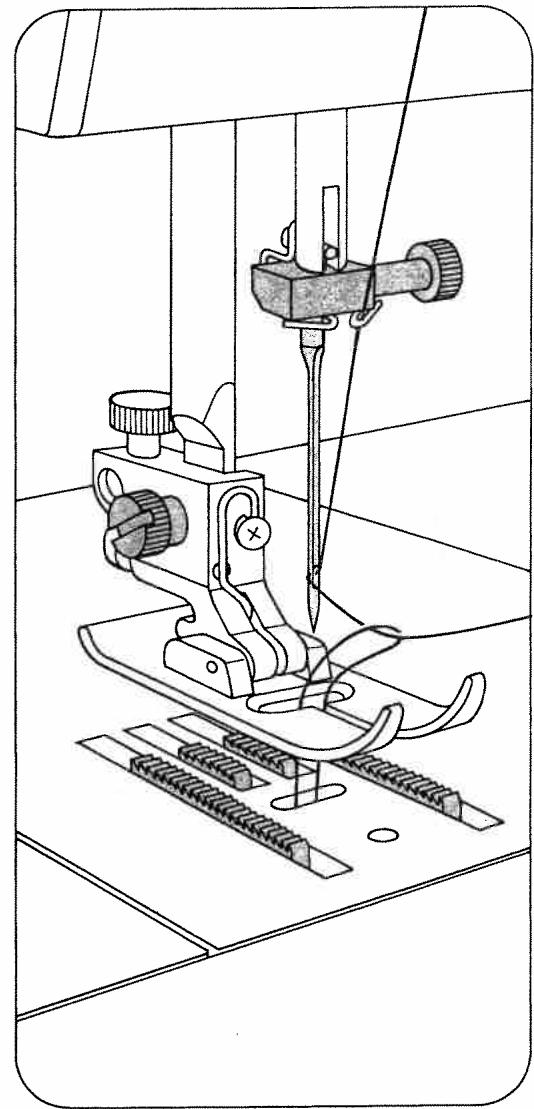
Hold the needle thread a little taut. Turn hand wheel 32 toward you until the needle moves down and up again and the take-up lever is up. Pull the bobbin thread out of the needle hole and lay both threads toward the left and back under the sewing foot.
Pressbarlifter
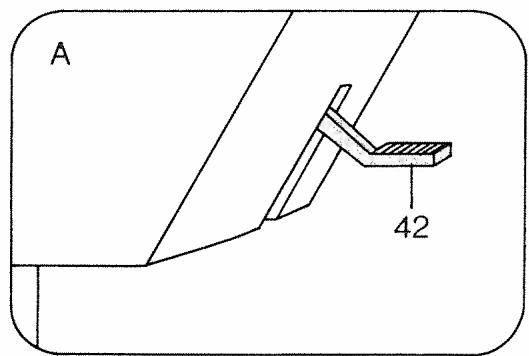
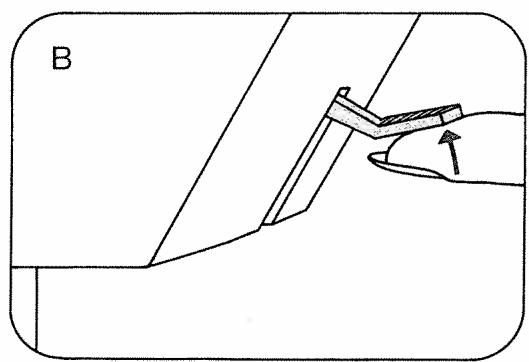
Lever 42 has three positions:
A = The sewing foot is raised. (Before you remove the work, turn the hand wheel toward you to raise the needle and take-up lever 52.)
B = The sewing foot is raised further for inserting extra-thick materials.
C = The sewing foot is lowered for sewing.
Thread cutter
The thread cutter is an oblique slot located at the back of the presser bar. Raise the sewing foot. Pull the work out of the machine toward the back. Draw the threads into the cutter slot and pull them downwards to cut them.
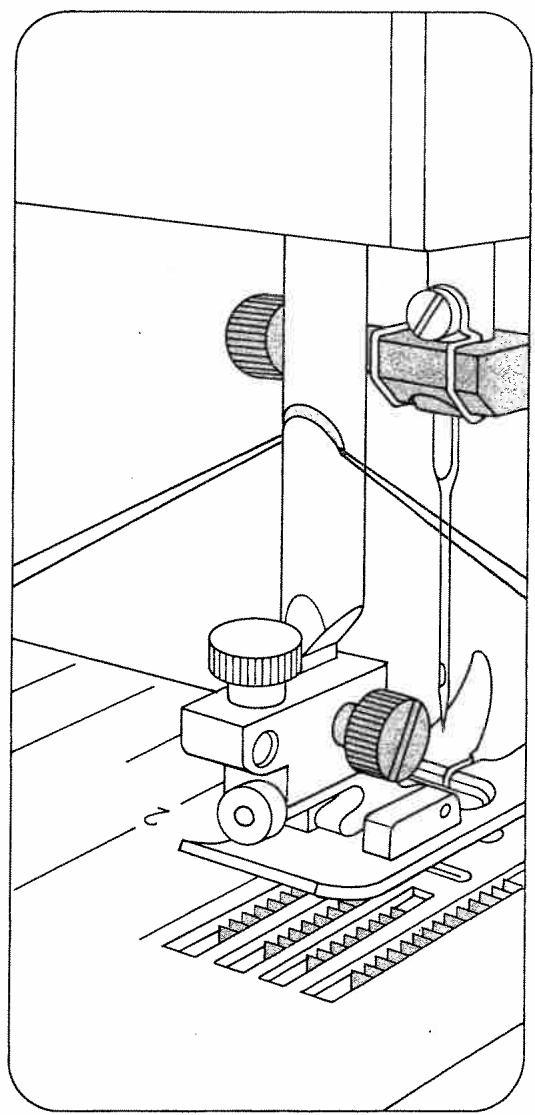
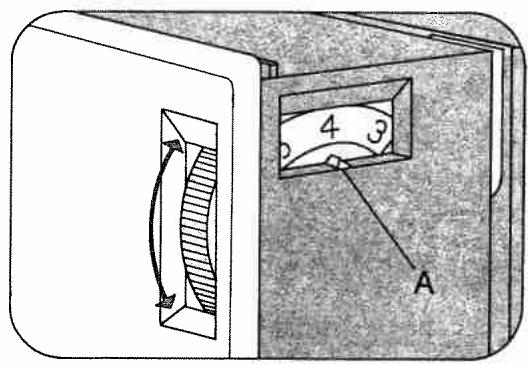
Upper tension (41)
A = Setting mark. The normal tension setting is in the white range between 3 and 5. The higher the number, the tighter the tension.
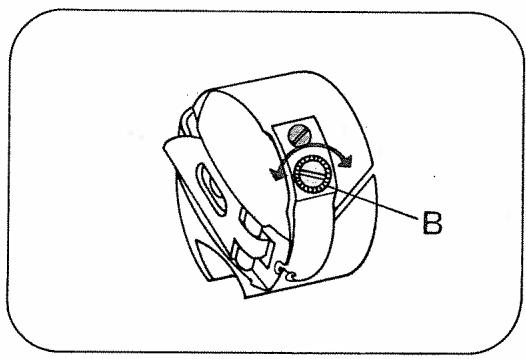
Lower tension
B = Regulating screw.
Turn it left for a looser tension, or right for a tighter tension.
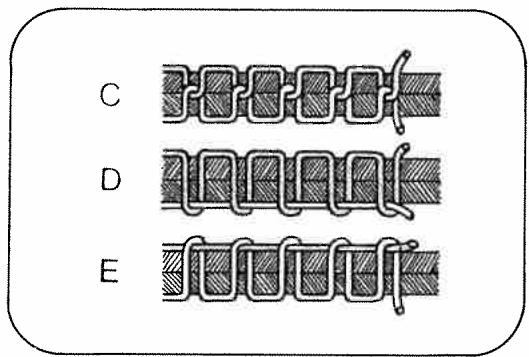
C = Both tensions are correct
D = Upper tension too loose or lower tension too tight.
E = Lower tension too loose or upper tension too tight.
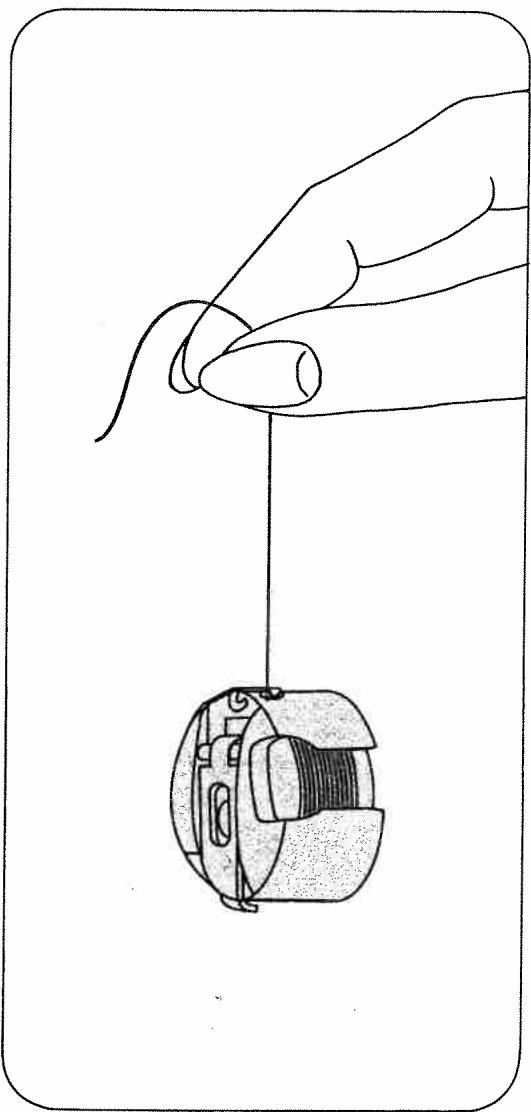
The correct lower tension
Let the bobbin case with a full bobbin hang down freely by the thread. It must not slide down by its own weight, but should gradually move downwards when you jerk your hand upwards lightly.
Regulating the stitch length
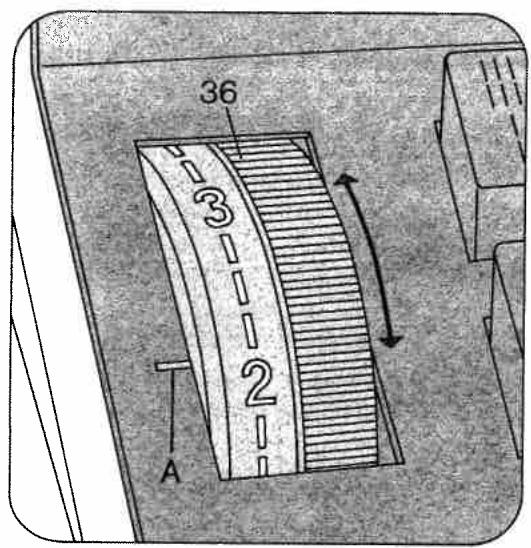
Turn the control so that the number indicating the stitch length chosen is opposite mark A.
Stitch length range:
Model 1025: 0-4
Model 1027: 0-6
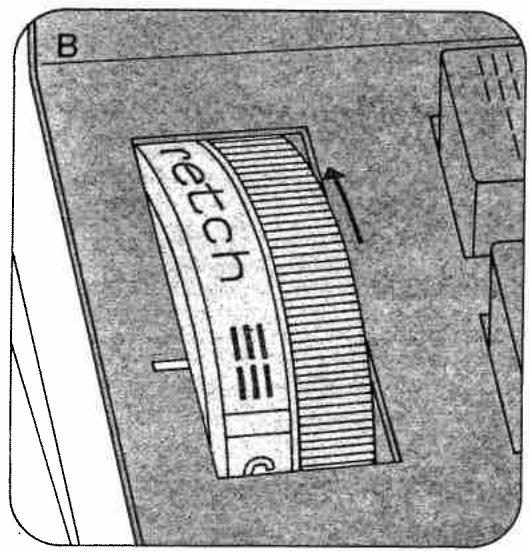
III. B shows how to set the stitch length
control for sewing stretch stitches (red
stitch symbols on push buttons).
Reverse sewing
Push button 44. As long as you keep this
button depressed, the machine sews backwards.
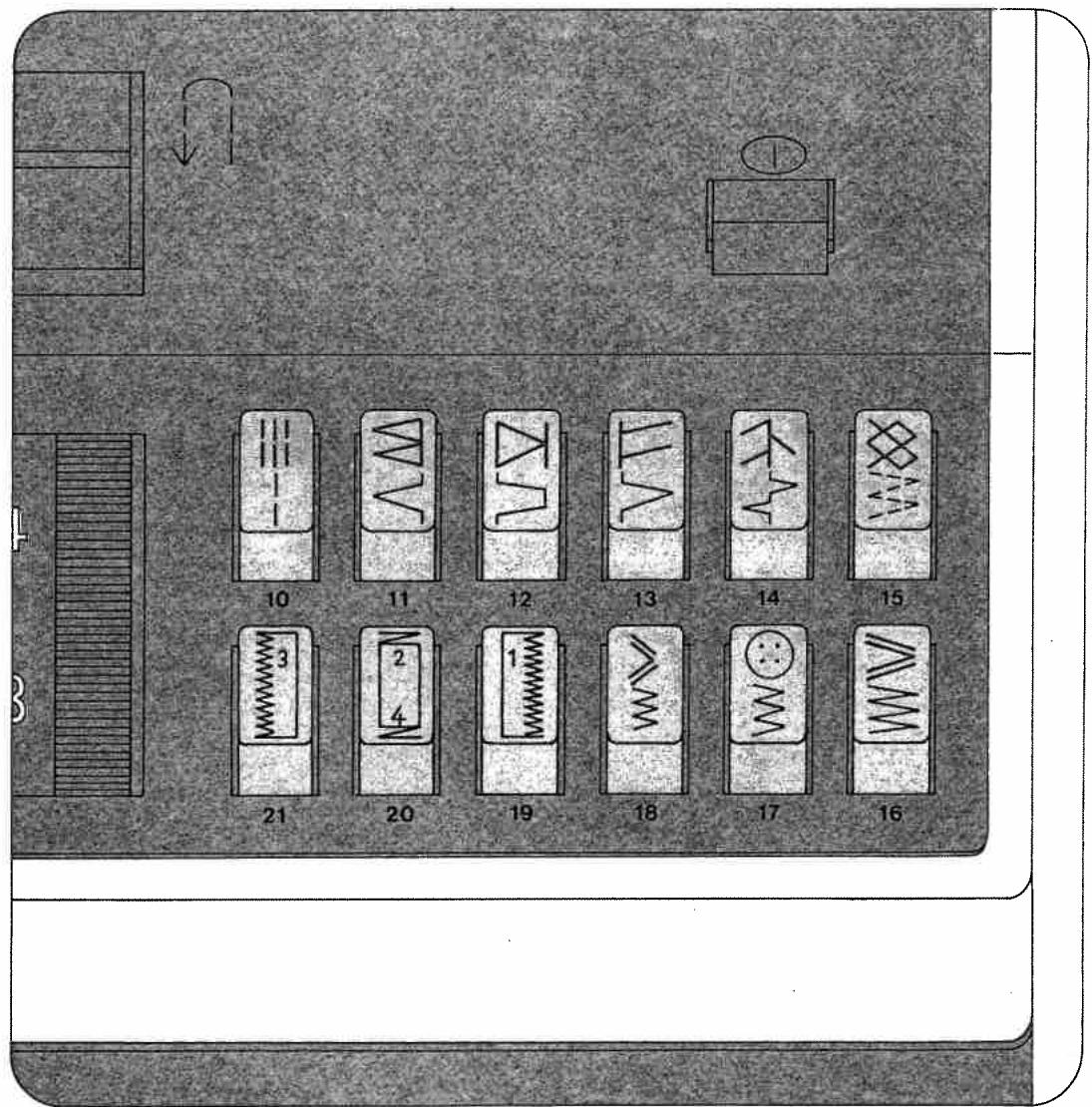
Finger-tip controls of model 1027
10 Elastic triple straight stitch Straight stitch
11 Pullover stitch Blindstitch
12 Closed overlock stitch Joining stitch
13 Overlock stitch Shell-edge stitch
14 Feather stitch Elastic decorative stitch
15 Honeycomb stitch Elastic stitch
16 Elastic triple zigzag stitch, 5 mm
5-mm zigzag stitch
17 Elastic triple zigzag stitch, 3.5 mm 3.5-mm zigzag stitch
18 Elastic triple zigzag stitch, 2 mm 2-mm zigzag stitch
19, 20, 21: Buttons for buttonholing
Button 20 is also used as clearing button for releasing the pushed buttons.
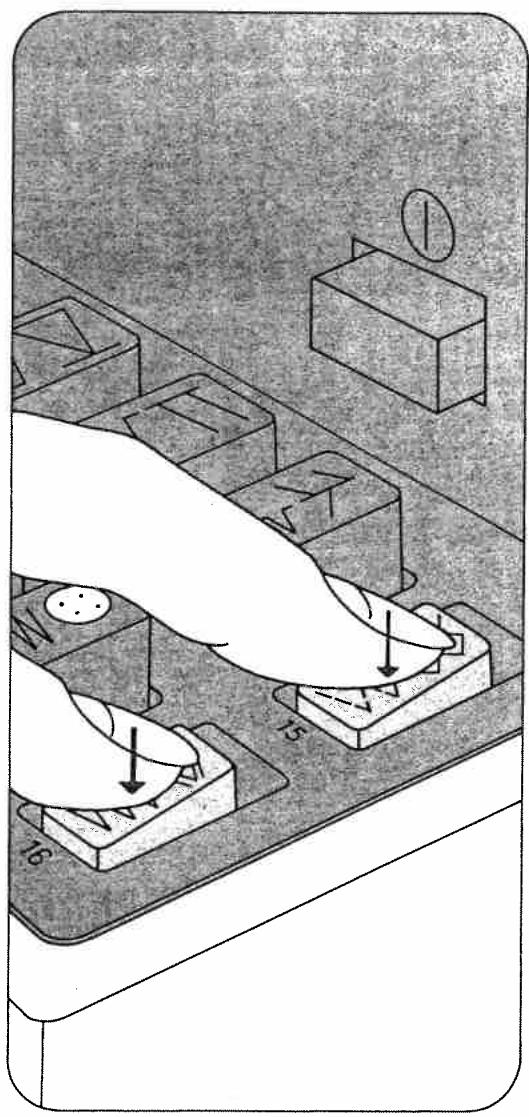
Elastic blindstitch
Push buttons 15 and 16.
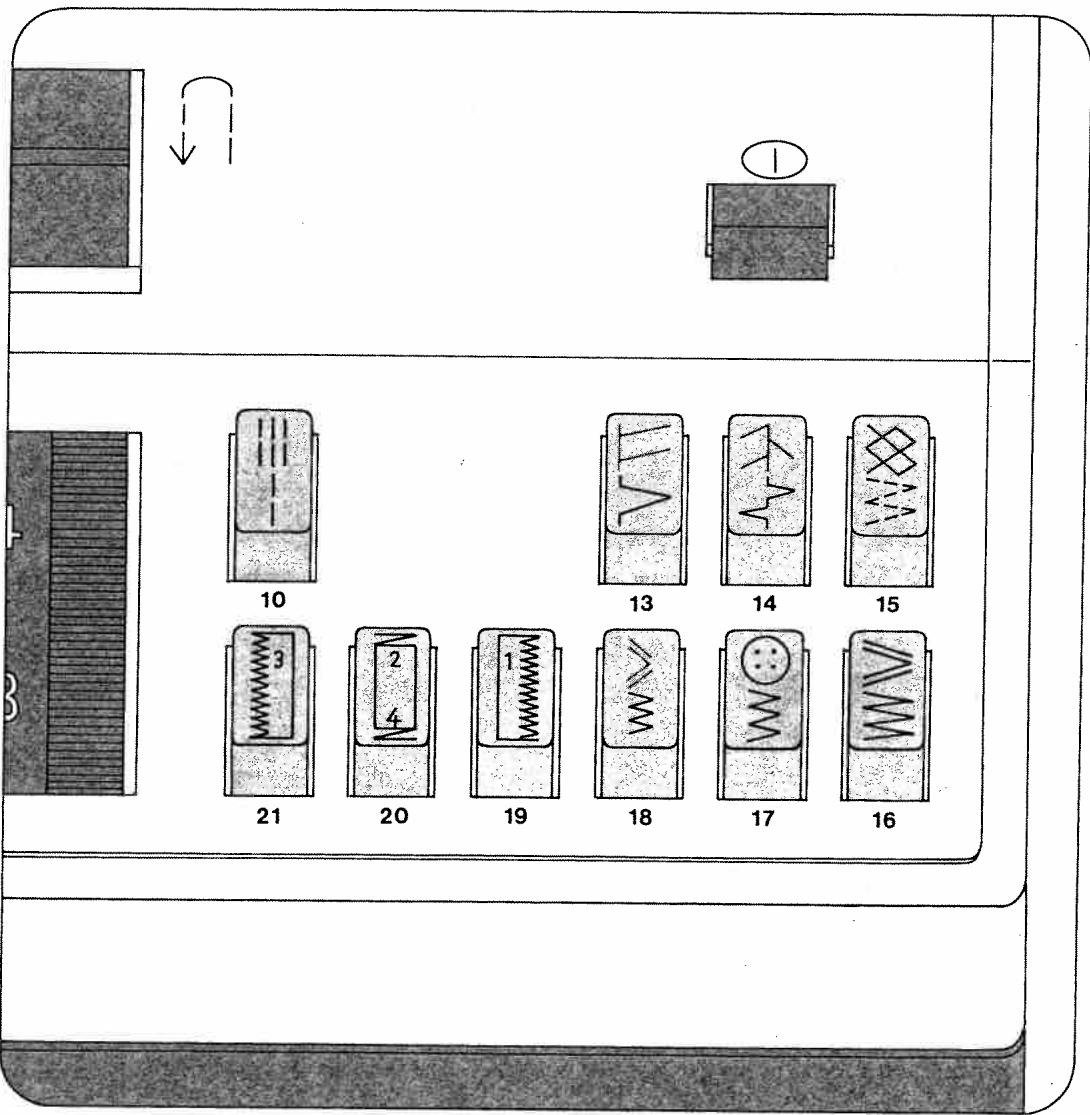
Finger-tip controls of model 1025
10 Elastic triple straight stitch Straight stitch
13 Overlock stitch Shell-edge stitch
14 Feather stitch Elastic decorative stitch
15 Honeycomb stitch Elastic stitch
16 Elastic triple zigzag stitch, 5 mm
5-mm zigzag stitch
17 Elastic triple zigzag stitch, 3.5 mm 3.5-mm zigzag stitch
18 Elastic triple zigzag stitch, 2 mm 2-mm zigzag stitch
19, 20, 21: Buttons for buttonholing
Button 20 is also used as clearing button for releasing the pushed buttons.
Elastic blindstitch
Push buttons 15 and 16.
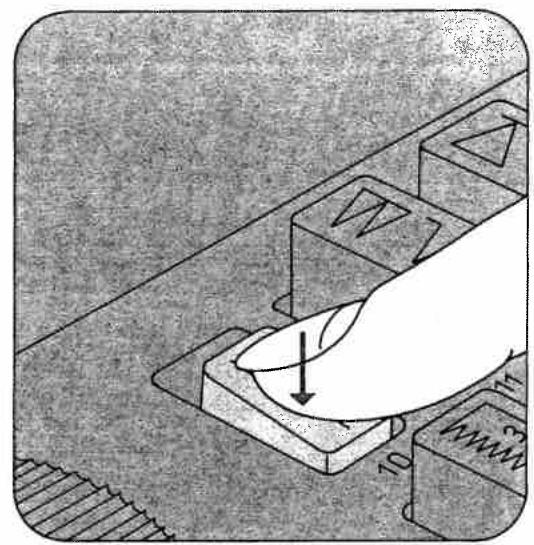
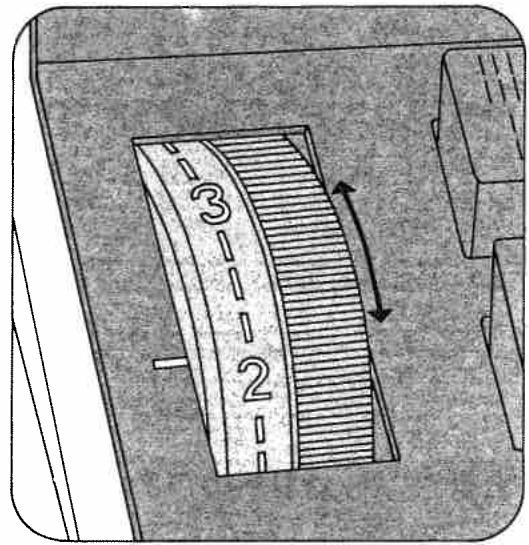
Selecting utility stitches
(white symbols)
Push the desired button and turn the stitch length control to the number indicating the desired stitch length (1-6 on model 1027, or 1-4 on model 1025).
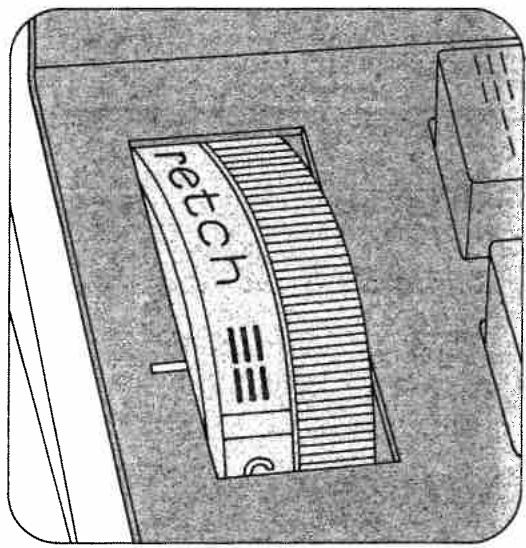
Selecting stretch stitches
(red symbols)
Push the desired button and turn the stitch
length control as far as it will go (red symbol).
Utility-and stretch-stitch combinations, model 1027
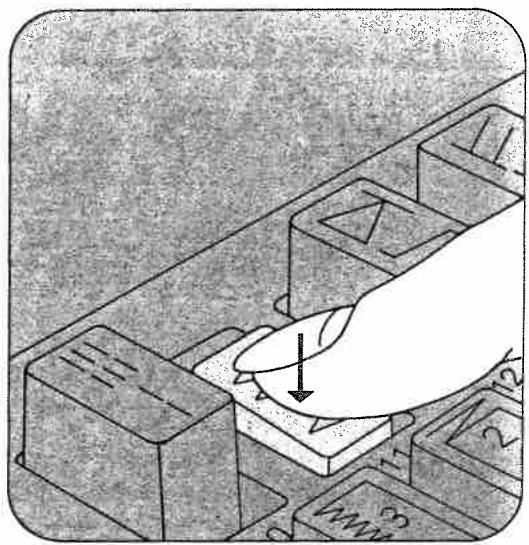
The various stitch combinations are shown in the chart on the inside of the hinged top cover. For example, if you want to sew an elastic blindstitch, push buttons 15 and 16, select a stitch length between 1 and 4. This stitch can also be sewn with model 1025.
Selecting the needle position for straight stitching
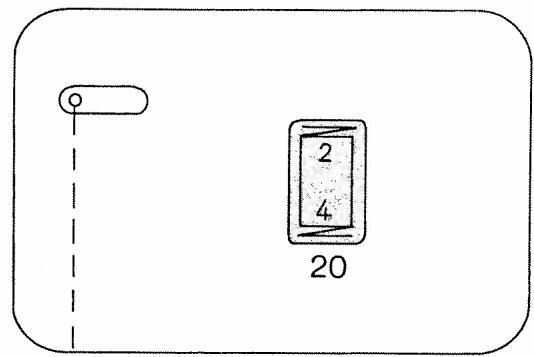
Left needle position: push button 20
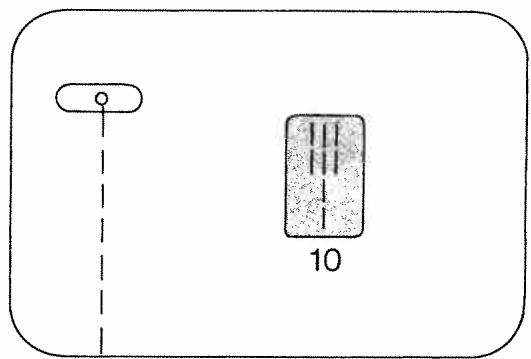
Central needle position: push button 10
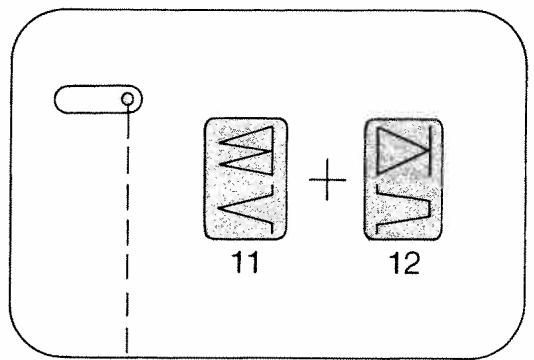
Right needle position (model 1027): push buttons 11 and 12.
Dropping the machine feed
Open free arm cover 48. Push the drop-feed control toward B. The feed dog is dropped (for embroidering, darning, etc.) For sewing, push the drop-feed control toward A.
Changing the needle
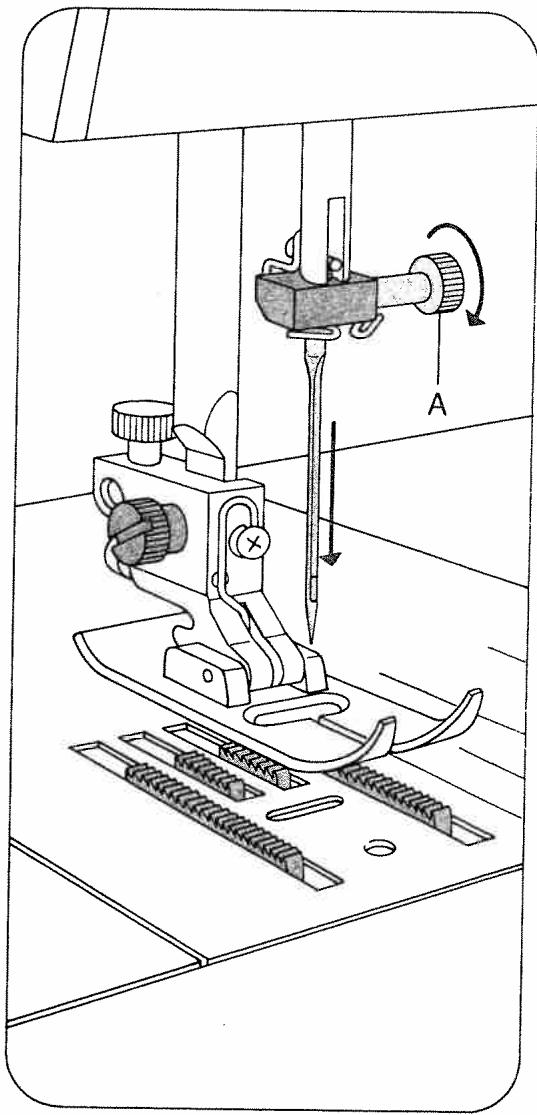
Raise the needle bar. Then hold the needle, loosen screw A and pull the needle out downwards. Insert a new System 130/705 H needle (with the flat side of its shank facing toward the back) and push it up as far as it will go. Then tighten screw A.
Twin needles with a needle distance of 1.4mm may be used for zigzag and utility-stitch sewing.
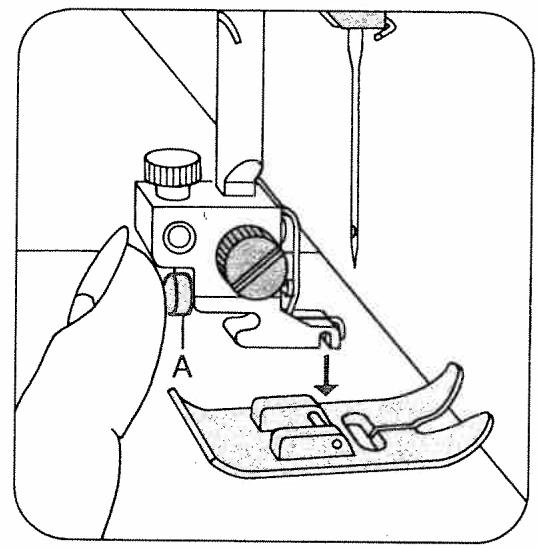
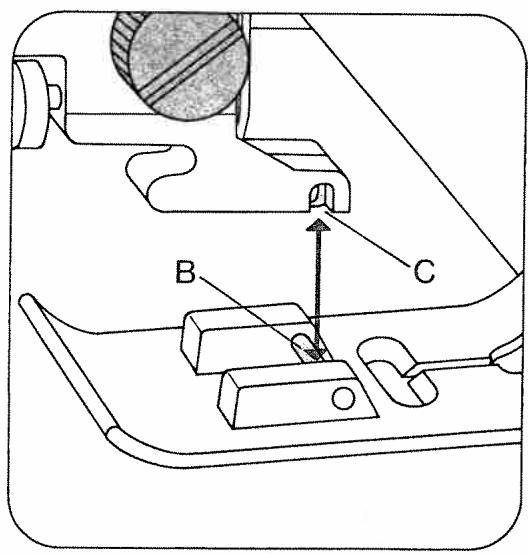
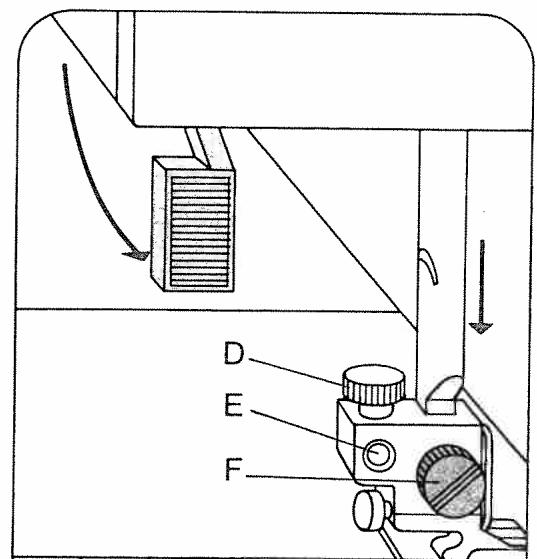
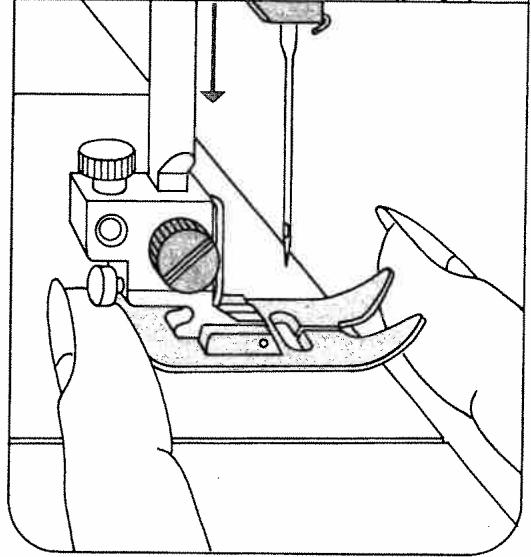
To release the sewing foot push the red button A. When attaching a sewing foot make sure stud B enters slot C. Place the sewing foot under the sewing foot holder and hold it in place with your left hand.
Lower presser bar lifter 42 and at the same time reposition the sewing foot so that stud B fits in slot C. Hole E and screw D are used for attaching an edge guide. Screw F serves to secure the sewing foot holder on the presser bar.
Special sewing feet
A Blindstitch foot
Blindstich guide E is adjusted by turning screw D.
B Zipper foot
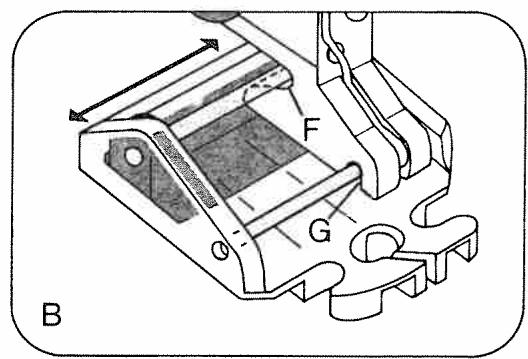
First insert its rear pin into groove F, then push its front pin into groove G. The zipper foot can be adjusted sideways for stitching along the right or left zipper chain.
C Darning foot
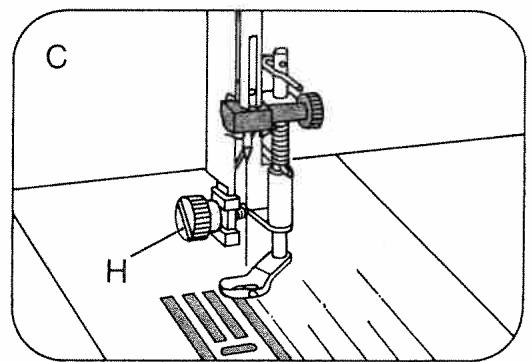
Remove the sewing foot holder and secure the darning foot in position with screw H.
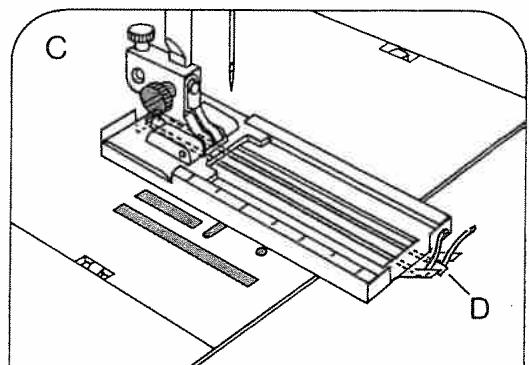
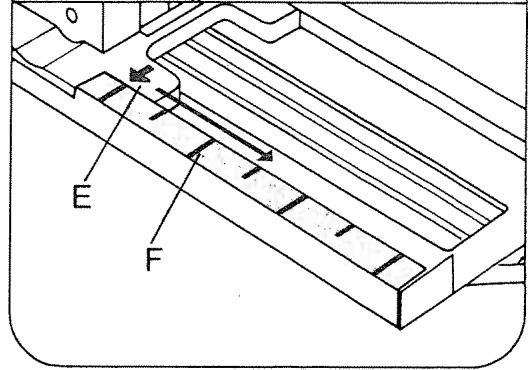
Push button 19 (A). Regulate the stitch density in the buttonhole range of the stitch length control (B). Attach the buttonhole foot. Insert the filler cord as follows (C): Place it over the rear lug of the foot, pull it taut and clamp it in front lug D. As you sew, arrow E moves along scale F. This serves to determine the buttonhole length.
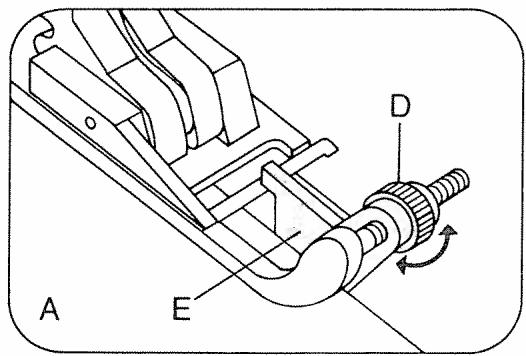
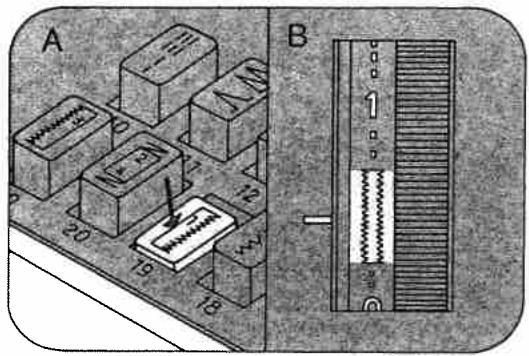
Pull the bottom of the buttonhole foot forward as far as it will go.
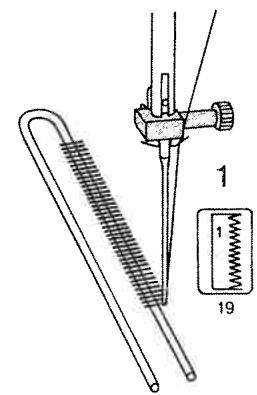
1 Sew first buttonhole seam. Turn hand wheel forward you to raise the needle.
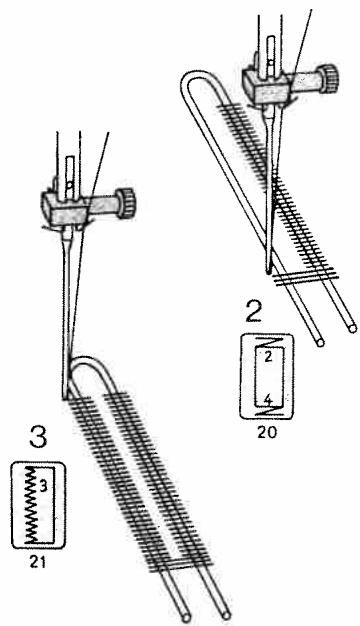
2 Push button 20 and keep it depressed until the machine has sewn 4 to 6 bar-tacking stitches. Raise the needle. Then release the button.
3 Push button 21. Sew the second button-hole seam the same length as the first. Raise the needle.
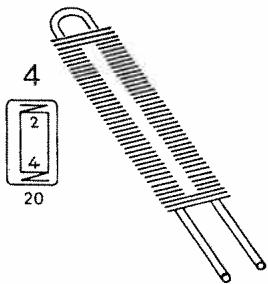
4 Push button 20 and keep it depressed until the machine has sewn 4 to 6 bartacking stitches. Raise the needle. Then release the button.
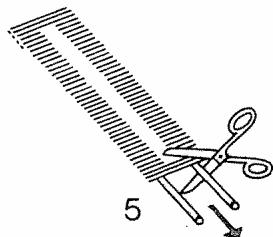
5 Sew a few tying stitches. Turn the hand wheel toward you until the take-up lever is up. Remove the fabric, pull the filler cord taut and trim.
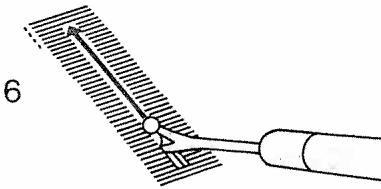
6 Cut the buttonhole open.
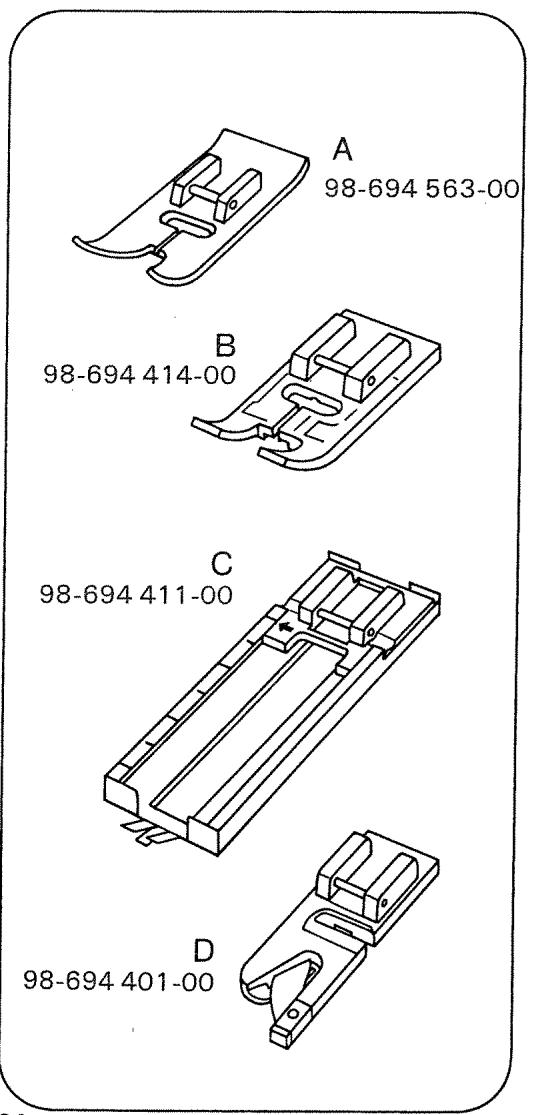
A Normal sewing foot
B Clear-view foot
C Buttonhole foot
D Hemmer foot
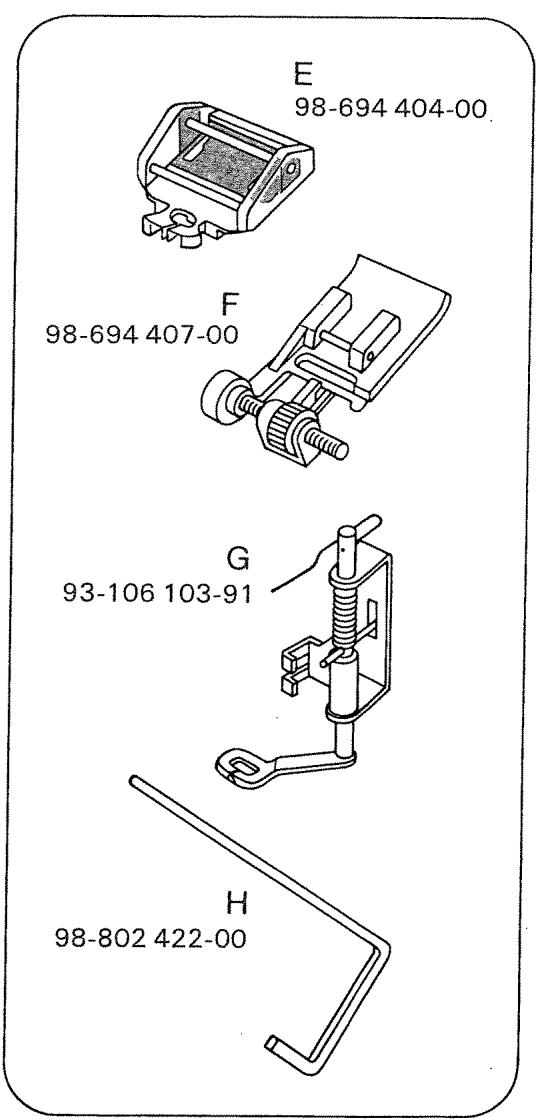
E Zipper foot
F Blindstitch foot
G Darning foot
H Guide
Changing the light bulb
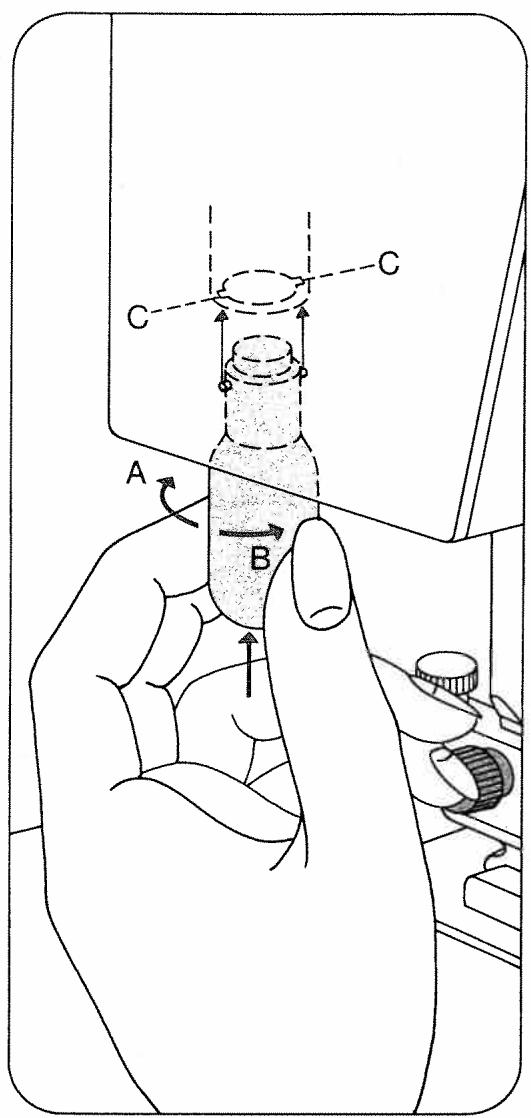
Push the light bulb up, turn it toward A and pull it out. Insert the new bulb so that its pins slide in slots C. Push it up and turn it toward B.
Cleaning and oiling
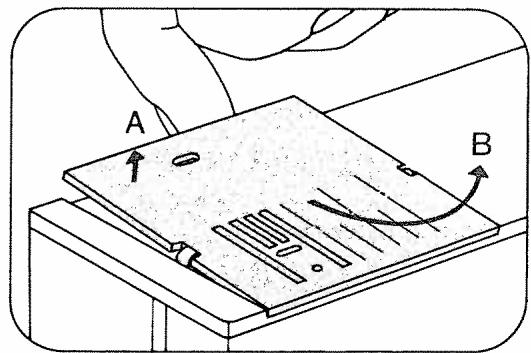
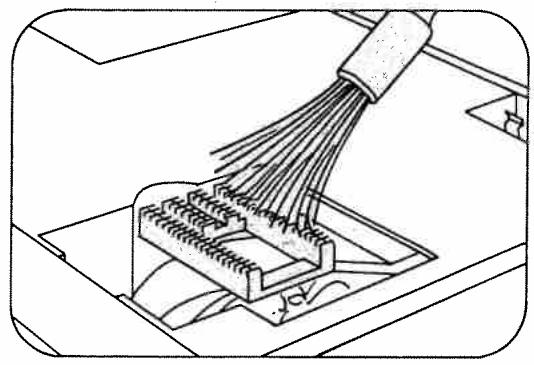
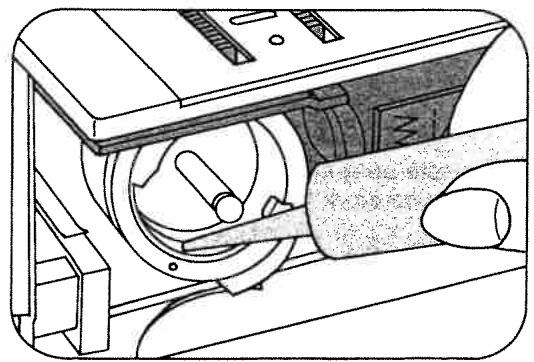
Tilt needle plate 38 up at the back (A) and take it out (B). Clean the machine feed and the parts in the vicinity of the sewing hook with a soft brush. Do not oil the machine because it is maintenance-free. All you have to do is put a drop of oil into the hook raceway now and then.
Cause: Remedy:
1. Machine skips stitches
Needle not inserted correctly. Push needle up as far as it will go, its
Wrong needle used.
Machine threaded improperly.
Needle too thin for thread used.
Insert system 130/705 H needle.
Insert new needle.
Check threading.
Select needle according to Needle and Thread Chart.
For any of the above reasons.
Thread tension too strong.
Poor-quality or knotty thread used, or thread that has become too dry by excessive storage.
See par. 1 above.
Regulate thread tensions.
Use only good-quality thread.
3. Needle breaks
Needle not pushed up as far as it will go.
Needle bent.
Needle too thin or too thick.
Needle bent and strikes needle plate because work is pushed or pulled.
Bobbin case improperly inserted.
Insert new needle and push it up as far as it will go.
Insert new needle.
See Needle and Thread Chart.
Let machine feed the work alone. Only guide the material lightly.
When inserting the bobbin case, press against it until it snaps into place.
Cause:
Remedy:
Tension out of adjustment.
Check upper and lower tensions.
Thread too thick, knotty or hard.
Use first-class thread only.
Bobbin thread wound unevenly.
During bobbin winding, do not hold thread in hand, but pass it through the bobbin tension stud.
Kinks appear on top and bottom of material.
Thread machine properly and check both tensions.
5. Machine feeds irregularly or not at all
Lint has accumulated between tooth rows of feed dog.
Remove needle plate and clean out lint.
Feed dog dropped. (Reverse-feed control is at left.)
Flick reverse-feed control to the right.
6. Machine runs with difficulty
Thread ends in hook raceway.
Remove thread ends and put a drop of oil into hook raceway.