
JG7100 - Tablet LEXIBOOK - Free user manual and instructions
Find the device manual for free JG7100 LEXIBOOK in PDF.



| Product type | Interactive TV fitness console |
| Brand | LEXIBOOK |
| Model | JG7100 |
| Console power supply | 4 LR6/AA 1.5V batteries (not included) |
| Controller power supply | 2 LR03/AAA 1.5V batteries per controller (not included) |
| Box contents | 1 interactive mat, 2 wireless controllers, 1 power cable, 1 instruction manual |
| Number of games | 9 games (aerobic training, field race, hoop, boxing, skiing, goalkeeper, tightrope walker, dance, stepper, 100m race) |
| Main functions | Physical activity games with motion detection via mat and controllers |
| Display | On TV screen via A/V connection (cable included) |
| Epilepsy warning | Yes, suitable for people without epileptic history |
| Minimum age | 36 months (3 years) – choking hazard for children under 3 |
| Warranty | 2 years against defects in materials or workmanship |
| Care and cleaning | Clean with a slightly damp cloth, no detergent |
| Usage precautions | Do not expose to moisture, heat, direct sunlight; do not disassemble; take breaks every hour |
| Used batteries | Remove if not used for extended periods; do not throw into fire |
| Origin | Designed in Europe – Made in China |
| Consumer service | 08 92 23 27 26 (€0.34 incl. VAT/min) |
| Environmental protection | Device recyclable – do not dispose of with household waste |
| Reference | JG7100 |
Frequently Asked Questions - JG7100 LEXIBOOK
User questions about JG7100 LEXIBOOK
0 question about this device. Answer the ones you know or ask your own.
Ask a new question about this device
Download the instructions for your Tablet in PDF format for free! Find your manual JG7100 - LEXIBOOK and take your electronic device back in hand. On this page are published all the documents necessary for the use of your device. JG7100 by LEXIBOOK.
USER MANUAL JG7100 LEXIBOOK
FOOTING - COURSE A PIED
This section explains how to use your TV Fitness Center wireless game. Read the following instructions to discover all its functions. Ask an adult to read and understand the safety instructions.
- Using a screwdriver, open the battery compartment on the console. Install the 4 × LR6/AA type batteries. Close back the battery compartment and tighten the screw.
- Using a screwdriver, open the battery compartments on the wireless controllers. Install the 2 x LR03/AAA type batteries, close the battery compartments and tighten the screws.
- Connect the console cables into the A/V outlets of your television by matching the corresponding colours of the cables and the A/V outlets.
WARNING: Switch off the TV and the console before making all connections. - Switch on the TV and select the AV channel. Press the ON/OFF key to switch on the console. You may need to tune in the AV channel using your TV controls. Refer to your TV manual for how to do this.
- After the start-up screen, press the START key to open the game selection screen. To select a game you can use any of the following keys: the SELECT key on the console, the LEFT and RIGHT footpads, the SELECT key on the left hand controller.
- Then press the START key on the console, or the CONFIRM key on the right hand controller, to confirm and start playing. For more details on the games, please go to the <
> section (p.9).
Contents of the Packaging
1 interactive mat
2 wireless controllers
1 AV cable
1 instruction manual
WARNING: All packaging materials, such as tape, plastic sheets, wire ties and tags are not part of this toy and should be discarded for your child's safety.
Battery Information
The TV Fitness Center console operates with 4 X 1.5 V AA/LR6 —— type batteries and 2 X 1.5 V AAA/LR03 —— type batteries for each wireless controller.
Note: Batteries are not included with this product.
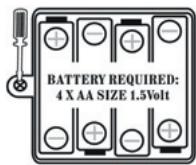
Console:
- Use a screwdriver to open the battery compartment located under the console.
- Install the 4 × LR6/AA type batteries observing carefully the polarity indicated at the bottom of the battery compartment and as per the diagram shown opposite.
- Close the battery compartment and tighten the screw.
Wireless controllers:
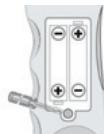
- Use a screwdriver to open the battery compartments on the controllers.
- Install the 2 × LR03/AAA type batteries observing carefully the polarity indicated at the bottom of the battery compartments and as per the diagram shown opposite.
- Close the battery compartments and tighten the screws.
Non rechargeable batteries are not to be charged. Rechargeable batteries are to be removed from the toy before being charged. Rechargeable batteries are only to be charged under adult supervision. Different types of batteries or new and used batteries are not to be mixed. Only batteries of the same or equivalent type as recommended are to be used. Batteries are to be inserted with the correct polarity. Exhausted batteries are to be removed from the toy. The supply terminals are not to be short circuited. Do not throw batteries into a fire. Remove the batteries if you are not going to use the game for a long period of time.
WARNING: Malfunction or loss of memory may be caused by strong frequency interference or electrostatic discharge. Should any abnormal function occur, remove the batteries and insert them again.
Product Features
- LEFT FOOTPAD - selects game, game character or skill level.
- START key - starts or pauses a game; confirms game character or skill level.
- ON/OFF key - switches your console on or off.
- SELECT key - selects game, game character or skill level.
- RIGHT FOOTPAD - selects game, game character or skill level.
- BLUE BUTTON on LEFT CONTROLLER - scrolls through the game options.
- BLUE BUTTON on RIGHT CONTROLLER - confirms selected game option.
Games
To select a game:
- On the game selection screen, use the SELECT key to select the game you want to play and press the START key to confirm.
- Use the SELECT key to choose the boy or girl player and press the START key to confirm.
- Use the SELECT key to choose the skill level and press the START key to confirm: you are now ready to play the game.
Tips:
- To pause a game, press the START key. Press the START key again to resume playing.
- To end a game and go back to the game selection screen, press the START key to pause the game, then press the SELECT key.
AEROBICS
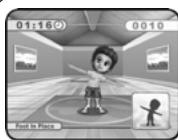
Do a 5-minute aerobic workout.
Hold the wireless controllers, stand on the footpad and follow the demo figure in the bottom right-hand corner of the screen.
FIELD RACE
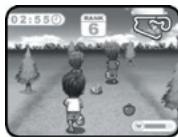
Race through the field and restore your energy with the apples and drinks but watch you don't trip over any obstacles.
- Run on the footpads shaking the controllers and jump over the obstacles.
- Press the BLUE BUTTON on the LEFT or RIGHT CONTROLLER to turn left or right.
HOOP GAME
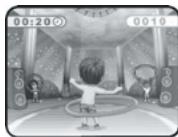
Keep the hoop around your waist and catch the hoops that are thrown towards you.
Move the controllers in a circular motion and lift up your left or right foot to catch the hoops.
BOXING
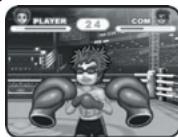
Become a champion by winning 2 out of the 3 boxing matches.
Use your hands and feet to box with your opponent and defend yourself by pressing the BLUE BUTTON on the controllers.
SKIING
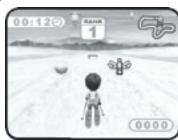
Ski towards the apples and drinks and practice cool jumps to avoid obstacles.
- Shake the controller to start skiing and jump over obstacles.
- Press the BLUE BUTTON and shake the LEFT or RIGHT CONTROLLER to turn left or right.
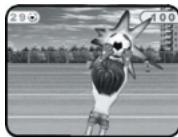
SOCCEER
Practice being a goalie - catch a ball for 10 points and avoid the rubbish or you'll lose 5 points!
Shake the controllers and lift your left or right foot up to catch a ball.
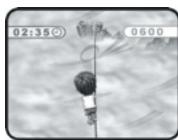
TIGHTROPE WALK
Complete a daring tightrope walk but watch out the wind doesn't make you fall off.
Start walking and if you lose your balance shake the LEFT controller to move left and the RIGHT controller to move right.
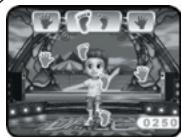
DANCING
Dance the night away and reveal your grooviest moves on the dance floor.
Move your hands and feet in the order that the hand and footprint pictures appear.
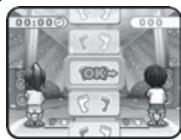
TREAD BOARD
See if you can keep up with all the tread board moves.
Follow the two gym experts and the hints on the screen to complete this tricky exercise.
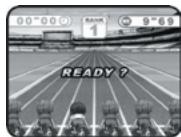
100 METRE RACE
Run like a cheetah to win this 100 metre race!
Run on the footpads and shake the controllers to go faster.
Epilepsy Warning
To be read before attempting to use a video game, either by you or your child. Some people are susceptible to suffer epileptic seizures or to loose consciousness when looking at certain types of flashing lights or elements commonly present in our everyday environment. These people are exposed to seizures when watching certain images on television or when they play some video games. This phenomenon can become apparent even if the person has no previous medical history of such, or has never suffered an epileptic fit. If you or a member of your family has shown in the past any symptom linked to epilepsy (either a seizure or loss of consciousness) when exposed to "luminous" stimulation, please consult with your doctor prior to any attempt to use this game. We warn parents to be vigilant with their children while they play with video games. If you or your child experience any of the following symptoms: dizziness, altered vision, eye or muscle twitches, loss of awareness, disorientation or involuntary movement or convulsions, stop immediately playing the game and consult a doctor.
Precautions to Take in Any Case While Using a Video Game
When you use a video game which can be connected to a TV screen, stand or sit relatively far from the TV screen and as far as the connection cable allows it. Use preferably video games which have a small screen. Avoid playing video games if you are tired or lack some sleep. Make sure to play in room which is well lit. While playing video games, take 10 to 15 minute breaks every hour.
Maintenance and Warranty
Only use a soft, slightly damp cloth to clean the unit. Do not use detergent. Do not to expose the unit to direct sunlight or any other heat source. Do not immerse the unit in water. Do not dismantle or drop the unit. Do not try to twist or bend the unit. If the unit malfunctions, try to change the batteries first. If this proves to be ineffective, read the instruction manual again.
NOTE: please keep this instruction manual, it contains important information. This product is covered by our 2-year warranty. For any claim under the warranty or after sale service, please contact your distributor and present a valid proof of purchase. Our warranty covers any manufacturing material and workmanship defect, with the exception of any deterioration arising from the non-observation of the instruction manual or from any careless action implemented on this item (such as dismantling, exposition to heat and humidity, etc.). It is recommended to keep the packaging for any further reference. Warning! This game is not suitable for children under 36 months. Choking hazard. In a bid to keep improving our services, we could implement modification on the colours and the details of the product shown on the packaging.
Reference: JG7100
Designed and developed in Europe - Made in China ©2010 LEXIBOOK®
United Kingdom & Ireland
For any further information, please call 0808 1003015. www.lexibook.com
Environmental Protection:
Unwanted electrical appliances can be recycled and should not be discarded along with regular household waste! Please actively support the conservation of resources and help protect the environment by returning this appliance to a collection centre (if available).
Guía de inicio
what is your overall impression of the product ? Vouss triavez it
Very satisfactory/Très satisfaisant Satisfactory/Satisfaisant
Disappointing/Decevant Very disappointing/Tres decevant
- FOOTING - COURSE A PIED
- Contents of the Packaging
- Battery Information
- Console:
- Wireless controllers:
- Product Features
- Games
- To select a game:
- Tips:
- AEROBICS
- FIELD RACE
- HOOP GAME
- BOXING
- SKIING
- SOCCEER
- TIGHTROPE WALK
- DANCING
- TREAD BOARD
- METRE RACE
- Epilepsy Warning
- Precautions to Take in Any Case While Using a Video Game
- Maintenance and Warranty
- Environmental Protection:
- Guía de inicio
- what is your overall impression of the product ? Vouss triavez it
- Very satisfactory/Très satisfaisant Satisfactory/Satisfaisant
- Disappointing/Decevant Very disappointing/Tres decevant
Brand : LEXIBOOK
Model : JG7100
Category : Tablet