
JC270SPI1 - Game console LEXIBOOK - Free user manual and instructions
Find the device manual for free JC270SPI1 LEXIBOOK in PDF.


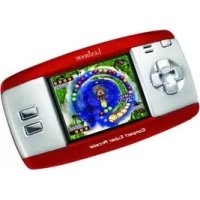
| Product type | Portable educational console |
| Brand | LEXIBOOK |
| Model | JC270SPI1 |
| Category | Educational game console |
| Power supply | 3 AA/LR6 alkaline batteries (provided for demonstration purposes) |
| Battery life | Approximately 3 hours (estimated) |
| Number of activities | 80 bilingual French/English activities |
| Themes | 7 themes (alphabet, spelling, English, math, logic, eyes, music) |
| Languages | French and English |
| Difficulty levels | 3 levels (automatic progression, level 1, level 2) |
| Two-player mode | Yes, for some activities |
| Special features | 3D Spider-Man button, demonstration, automatic shut-off after 3 minutes |
| Screen | LCD (estimated size 7-10 cm) |
| Keyboard | AZERTY with numbers, letters, function keys |
| Weight | Approximately 500 g (estimated) |
| Dimensions | 30 x 25 x 5 cm (estimated) |
| Material | Plastic |
| Safety | Not suitable for children under 36 months (small detachable parts) |
| Maintenance | Clean with a slightly damp cloth, avoid detergents |
| Warranty | 2 years |
| Spare parts | Batteries only (rechargeable not included) |
| General information | Designed and developed in Europe, manufactured in China |
Frequently Asked Questions - JC270SPI1 LEXIBOOK
User questions about JC270SPI1 LEXIBOOK
0 question about this device. Answer the ones you know or ask your own.
Ask a new question about this device
Download the instructions for your Game console in PDF format for free! Find your manual JC270SPI1 - LEXIBOOK and take your electronic device back in hand. On this page are published all the documents necessary for the use of your device. JC270SPI1 by LEXIBOOK.
USER MANUAL JC270SPI1 LEXIBOOK
©2008 Marvel Characters, Inc.
©2008 LEXIBOOK®
Help Spider-Man™ to restore his reputation! Let your favourite superhero guide you throughout 80 learning activities in French and in English for endless hours of fun! Please read the following instructions to make the best use of your new Magic Spider-Man™ learning laptop and ask the help of an adult to replace the batteries and read the safety markings.

To open the computer, press the latch on the front and pull the screen up. The unit is automatically switched on when you open the lid. If the lid is already open, press the ON/OFF key to turn on the laptop.
Your laptop is bilingual and all the activities can be played in French or English. Press the language key at anytime to toggle between the two languages.
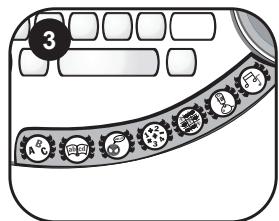
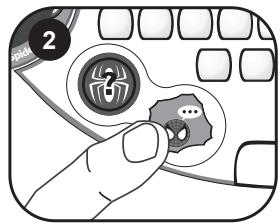
The Magic Spider-Man™ laptop includes 40 activities divided in 7 categories: letters, words, French, mathematics, logic, games and music. To select a category, slide the selector on the desired menu.
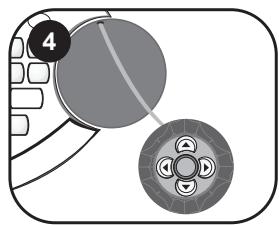
Use the arrow keys on the mouse to select the activity you want to play. Press the OK key to start the activity.
Note: if you don't press on the OK key, the laptop will regularly suggest the next activity of the menu.
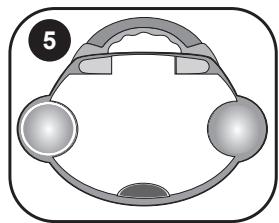
To switch the unit off, press the ON/OFF key (0) or close back the screen.
Note: for more details on how to play the various activities, please refer to the activity section on page 23.
Contents of the packaging
One Magic Spider-Man™ laptop
One instruction manual
WARNING: All packaging materials, such as tape, plastic sheets, wire ties and tags are not part of this toy and should be discarded for your child's safety.
Battery information
Your Magic Spider-Man™ laptop works with 3 x 1,5V --- AA/LR6 type batteries (included).
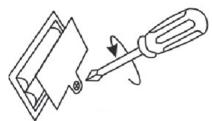
Note: This product is supplied with batteries for demonstration purposes.
They should be replaced with new batteries before use.
- Using a screwdriver, open the battery compartment cover located under the unit.
- Install the 3 AA/LR6 alkaline type batteries (included) observing the polarity indicated at the bottom of the battery compartment, and as per the diagram shown opposite.
- Close the battery compartment and tighten the screw.
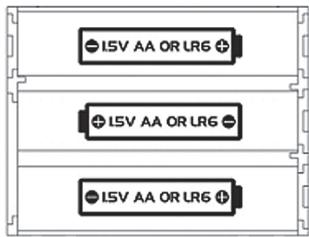
Non-rechargeable batteries are not to be recharged. Rechargeable batteries are to be removed from the toy before being charged. Rechargeable batteries are only to be charged under adult supervision. Different types of batteries or new and used batteries are not to be mixed. Only batteries of the same or equivalent type as recommended are to be used.
Batteries are to be inserted with the correct polarity. Exhausted batteries are to be removed from the toy. The supply terminals are not to be short circuited. Do not throw batteries into a fire. Remove the batteries if you are not going to use the game for a long period of time.
WARNING: If the unit malfunctions or receives an electrostatic shock, turn the unit off and on again. If this proves to be ineffective, remove the batteries and insert them again.
Keyboard description
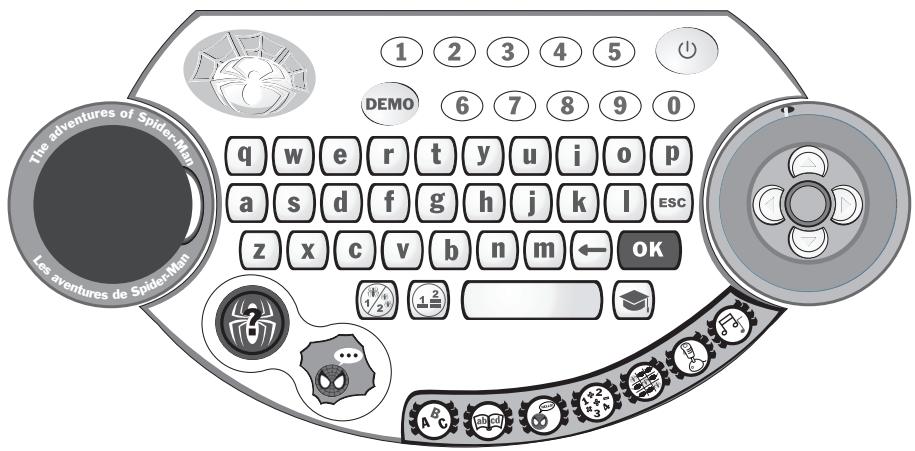

ON/OFF: To turn on or turn off the computer.
Note: the unit automatically turns off after 3 minutes of inactivity.

DEMO: Press the DEMO key at any time to launch a short demonstration of the Magic Spider-Man™ laptop's features.

MODE: Several activities offer the possibility to play in 2-player mode. Press the MODE key to toggle between 1-player and 2-player mode.
Note: to discover which activities can be played in 2-player mode ( / 1 / 2^ icon), please refer to the activity section on page 23.

LEVEL: Several activities offer the possibility to play in different levels. Press this key to select one of the 3 different level options: the automatic level progression (default setting), the level 1 or the level 2. When you select the automatic level progression option, you switch to level 2 when you give 6 correct answers in a row. If you give 4 wrong answers, you will go back to level 1.
Note:
- in 2-player mode, the automatic level progression is disabled: you can only choose the level 1 or the level 2.
- to discover which activities can be played in 3 different levels ( ( 123 123 ) icon), please refer to the activity section on page 23.
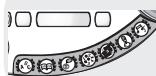
Category selector switch: Slide the selector on the desired category.

SURPRISE: Press the SURPRISE key to play a surprise activity (one you did not play before or one of the less played activities).

LANGUAGE: Press the language key at anytime to toggle between a game play in English or French.

ANSWER: Press this key to display the answer to a question.
OK
Press this key to start an activity, confirm your answers or your selections.
ESC
ESC: Use this key to exit an activity.

BACKSPACE: Use this key to delete the last character entered.
1 2 3 10 numbers (1-0) to enter numbers in the maths activities.
q w e 26 letters (A-L) to enter letters in the words and letters activities, and to play music notes in the musical activities.
Note: To type accented letters, press and hold a letter until the right accent is displayed.
ARROW keys: located on the mouse, these 4 arrow keys help you to browse menus, move the cursor and play the activities (for more details on how to play the various activities, please refer to the activity section on page 23).
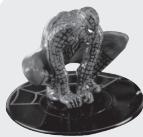
3D Spider-Man™ key: Press the 3D Spider-Man™ character to access exclusive newspaper's articles about your hero. By pressing on this key, you can also check how many rescues you still need to accomplish to restore his reputation!
Playing the activities
Get ready for an amazing adventure! A bridge has tumbled down during a terrible fight and Spider-Man™ has been wrongly accused... Help him to restore his reputation by rescuing people from dangerous situations. Each game round you win will help your favourite superhero to rescue another person in danger. When you have rescued enough people, see Spider-Man™'s reputation improve and discover newspaper cuttings about his daring deeds!
After the welcome animation and message, slide the category selector switch on the desired category. Use the arrows to browse through the activities of the category. When the desired game is displayed, press OK to confirm and start the round. You can press the ESC key at any time to go back to the activity list. To go directly to another category, use the selector switch.
To play a surprise activity, press the SURPRISE key.
The activities are played in 6 questions-rounds. For most of them, you have 2 chances to find the correct answer. Several activities can be played in 2-player mode and include 3 difficulty levels.
Description of the activities
Web spelling

- Learn your letters
Press a letter on your keyboard and the unit will speak out its name.
- Vowels and consonants


Try to recognize if the letter displayed on screen is a vowel or a consonant. Use the keys to select the correct answer and press OK to confirm. If you give the wrong answer, Spider-Man™ will show you the solution and then display a new letter.
- Order of the alphabet


A letter is displayed on screen and the computer asks you to find which letter comes before or after in the alphabet. Type the answer on the keyboard. After two wrong answers, Spider-Man™ will show you the solution and then display a new letter.
Automatic level progression: give 6 correct answers in a row to switch to level 2.
Level 1: Play with uppercase letters.
Level 2: Play with lowercase letters.
4. Rhymes


The laptop displays a word and asks you to find which words rhymes with it. You have two choices. Use the keys to select the correct answer and press OK to confirm. If you give the wrong answer, Spider-Man™ will show you the solution and then display a new word.
Example: the word "actor" is displayed and you must choose between "tractor" and "movie". Use the keys to select "tractor" and press OK.
5. Words out of order


3 words are displayed on screen and you must sort them in alphabetical order. Use the keys to select the word that comes first in the alphabetical order, and then press OK to confirm. Use the keys to select the word that comes second and press OK to confirm. After two wrong answers, Spider-Man™ will show you the solution and then display new words.
Automatic level progression: give 6 correct answers in a row to switch to level 2.
Level 1: 3 words beginning with a different letter.
Level 2: be careful! 2 words begin with the same letter and one word with a different letter!
Power of words

6. Memory word


A word is displayed onscreen for a few seconds. Try to memorize it and type it on your keyboard without any mistake. Press OK to confirm your answer. After two wrong answers, Spider-Man™ will show you the solution and then display a new word.
Automatic level progression: give 6 correct answers in a row to switch to level 2.
Level 1: the screen shows the exact number of letters of the word with dashes.
Level 2: the screen does not show the number of letters, only one flashing dash.
7. Syllable jumble


A word's syllables have been jumbled up. Place them back in the right order. Use the keys to select the first syllable and press OK . Proceed the same way to select the next syllables. To select the last syllable, you only need to press OK . After two wrong answers, Spider-Man™ will show you the solution and then display a new word.
Automatic level progression: give 6 correct answers in a row to switch to level 2.
Level 1: 2 syllables words and the word is displayed first completely before being mixed.
Level 2: 3 syllables words and the syllables are immediately mixed.
Example:
- "der" and "spi" are displayed. You must find the word "spider" (level 1).
- "mi", "ly" and "fa" are displayed. You must find the word "family" (level 2).
8. Missing letter


A word scrolls fast on the screen from right to left or inversely. After the word has disappeared, it will be displayed again but a letter is missing. Type in the missing letter and press OK to confirm your answer. After two wrong answers, Spider-Man™ will show you the solution and then display a new word.
Automatic level progression: give 6 correct answers in a row to switch to level 2.
Level 1: easy words and the word scrolls once completely before appearing with one missing letter.
Level 2: more complicated words and the word scrolls with a missing letter.
9. Word scramble


A word scrolls fast on the screen from right to left or inversely. After the word has disappeared, it will be displayed again but the letters have been jumbled up. Use the keys to select the first letter of the word and press OK to confirm. Use the same method to select the next letters and put them back in the correct order. After two wrong answers, Spider-Man™ will show you the solution and then display a new word.
Automatic level progression: give 6 correct answers in a row to switch to level 2.
Level 1: easy words.
Level 2: more complicated words.


10. Opposites (Antonyms)
Find the opposite of the word displayed on the screen. Use the keys to select the correct answer, and press OK to confirm. If you give the wrong answer, Spider-Man™ will show you the solution and then display a new word.
Automatic level progression: give 6 correct answers in a row to switch to level 2.
Level 1: easy words.
Level 2: more complicated words.
Example: the word "simple" is displayed on screen and you must find its opposite between the words "hard" and "rain". Select "hard" and press OK.


Find the synonym of the word displayed on screen. A synonym is a word which carries the same (or very similar) meaning as another word. Use the keys to select the correct answer, and press OK . If you give the wrong answer, Spider-Man™ will show you the solution and then display a new word.
Automatic level progression: give 6 correct answers in a row to switch to level 2.
Level 1: easy words.
Level 2: more complicated words.
Example: the word "walk" is displayed on screen and you must find its opposite between the words "stroll" and "hop". Select "stroll" and press OK.
12. Proverbs


A wise age-old proverb is displayed on screen but one word is missing. Type in the missing word on your keyboard and press OK to confirm. After two wrong answers, Spider-Man™ will show you the solution and then display a new proverb.
Automatic level progression: give 6 correct answers in a row to switch to level 2.
Level 1: the first letter of the missing word is displayed.
Level 2: the first letter of the missing word is not displayed anymore.
Example: the computer can display the proverb "There's no smoke without _ _. The missing word is "fire".
13. Mystery word

Guess the secret word. Each dash replaces a letter in the word. Type in the letters which you think might be in the word. If a letter belongs to the hidden word, it will replace the corresponding dash. You lose when you type 10 letters which do not belong to the word.
14. Punctuation

The computer displays a sentence and you must recognize if the sentence displayed is a question or an affirmation. Use the keys to select the correct punctuation mark (question mark or full stop) and press OK. If you give the wrong answer, Spider-Man™ will show you the solution and then display a new sentence.
Example: the computer can display the sentence "Spider-Man™ saves the young boy". Select the full stop to complete the sentence: "Spider-Man™ saves the young boy."
French for heroes

15. My first words
A picture of Spider-Man™ illustrating a greeting is displayed on screen and the greeting is spoken in French. After a few seconds, the greeting is displayed in English and in French. Press OK to go back to the picture or use the keys to see the next/previous greeting.
16. My French album
Use the keys to view words in English and French from a gallery of pictures. You can also press the OK key to toggle between the picture and its name in both languages.
17. French challenge


A picture is displayed on screen for a few seconds and then disappeared. Memorize it and use the keys to select the corresponding word in French. Press OK to confirm. After two wrong answers, Spider-Man™ will show you the solution and then display a new picture.
Amazing maths


18. Missing number
A sequence of numbers is displayed with one missing number. Use your keyboard to type in the number that completes the sequence and press OK to confirm your answer. After two wrong answers, Spider-Man™ will show you the solution and then display a new sequence of numbers.
Automatic level progression: give 6 correct answers in a row to switch to level 2.
Level 1: numbers from 0 to 20.
Level 2: numbers from 20 to 99.
19. Tens and ones


A number is displayed on screen and the computer will ask you to type in the ones or the tens. Use the numbers keys to key in your answer and press OK to confirm. After two wrong answers, Spider-Man™ will show you the solution and then display a new number.
20. Sparkling sums


Find the correct answer to the addition displayed onscreen. Type the answer using the number keys and then press OK to confirm your answer. After two wrong answers, Spider-Man™ will show you the solution and then display a new addition.
Automatic level progression: give 6 correct answers in a row to switch to level 2.
Level 1: answers are between 0 and 20. The addition is displayed horizontally.
Level 2: answers are between 0 and 100. The addition is displayed vertically.
Note: at level 2, you must first type in the ones, then the tens. For example, to enter the number “61”, key in “1” then “6”.
21. Take it away


Find the correct answer to the subtraction displayed onscreen. Type the answer using the number keys and then press OK to confirm your answer. After two wrong answers, Spider-Man™ will show you the solution and then display a new subtraction.
Automatic level progression: give 6 correct answers in a row to switch to level 2.
Level 1: answers are between 0 and 20. The subtraction is displayed horizontally.
Level 2: answers are between 0 and 100. The subtraction is displayed vertically.
Note: at level 2, you must first type in the ones, then the tens. For example, to enter the number “92”, key in “2” then “9”.
22. Times tables


Find the correct answer to the multiplication displayed onscreen. Type the answer using the number keys and then press OK to confirm your answer. After two wrong answers, Spider-Man™ will show you the solution and then display a new multiplication.
Automatic level progression: give 6 correct answers in a row to switch to level 2.
Level 1: tables 1 to 5.
Level 2: tables 6 to 10.


23. Number names
A number is displayed in letters. You must type it in numbers. After two wrong answers, Spider-Man™ will show you the solution and then display a new number.
Automatic level progression: give 6 correct answers in a row to switch to level 2.
Level 1: 1-digit numbers and tens.
Level 2: 2-digit numbers.
24. Missing sign


An equation with 2 or 3 operators and one missing sign is displayed. The result will help you to guess the correct sign. Use the keys to select the correct missing sign (+ or -) and press OK to confirm. If you give the wrong answer, Spider-Man™ will show you the solution and then display a new equation.
Automatic level progression: give 6 correct answers in a row to switch to level 2.
Level 1: the equation is with 2 operators.
Level 2: the equation is with 3 operators.


25. Comparison
Compare the 2 numbers displayed on the left and the right of the screen. Determine which number is greater “>”, smaller “<” or if they are equal “=” Use the keys to choose the correct sign (comparator), and press OK to confirm your answer. After two wrong answers, Spider-Man™ will show you the solution and then display a new comparison.
Automatic level progression: give 6 correct answers in a row to switch to level 2.
Level 1: compare numbers below 20.
Level 2: compare numbers below 100.
26. Number series


Find the number which completes the series displayed onscreen. Type the missing number and press OK to confirm your answer. After two wrong answers,
Spider-Man™ will show you the solution and then display a new series.
Automatic level progression: give 6 correct answers in a row to switch to level 2.
Level 1: numbers' series increase by 5 and 10.
Level 2: numbers' series increase or decrease by 2, 5 and 10.
Spider logic

27. Shapes in a row


A sequence of objects is displayed in a row. Use the keys to select the object that completes the sequence. Press OK to confirm your answer. After two wrong answers, Spider-Man™ will show you the solution and then display a new sequence.
28. Odd one out


Three pictures are displayed. Find the odd one out (the picture that is different from the others). Use the keys to select the odd one out, and press OK to confirm. After two wrong answers, Spider-Man™ will show you the solution and then display new pictures.
29. Web puzzle


A picture is displayed on the right side of the screen. A part of the picture is missing and 3 puzzle pieces are displayed on the left part of the screen. Use the keys to select the missing part of the picture and press OK to confirm. After two wrong answers, Spider-Man™ will show you the solution and then display a new picture.
30. Matching image


A picture is displayed on the right side of the screen. To select the matching piece that is part of the picture, use the keys then press OK to confirm. After two wrong answers, Spider-Man™ will show you the solution and then display a new picture.
Super hero games

31. Catch the spider

Use the keys to move your web and catch all the falling spiders before they reach the bottom of the screen. You lose if you miss 3 spiders.
Automatic level progression: give 6 correct answers in a row to switch to level 2.
Level 1: the spiders are falling slowly. You must catch 15 spiders in a row.
Level 2: the speed of the falling spiders is increased. You must catch 15 spiders in a row.
32. Follow me

The laptop plays a sequence note by note. Use the arrow keys (▲▶▲▼) to play each note after the computer.
Automatic level progression: give 6 correct answers in a row to switch to level 2.
Level 1: 5-note sequence.
Level 2: 10-note sequence.
33. Memory
10 cards are displayed face down on screen for a few seconds. Try to memorize the objects drawn on the card then use the arrow keys (▲▶▲▼) to select a card and press OK to flip it over. Do the same to flip the second card and find the pair.
34. Air Strike

Use the arrow keys ( ) to move Spider-Man™ and dodge all the missiles.
You lose the game if you are hit 3 times.
Automatic level progression: give 6 correct answers in a row to switch to level 2.
Level 1: the missiles are moving forward slowly. You must dodge 15 missiles.
Level 2: the speed of the missiles is increased. You must dodge 15 missiles.
35. 4 in a row

Use the keys to move the disk over the grid then press OK to let the disk fall in the selected column. Try to get 4 disks in a horizontal, vertical or diagonal line before your opponent to win the game. The game is over after 6 game rounds.
Music of legend

36. Juke box
Listen to your favourite melody. Press the keys to browse through the 9 melodies, and press OK to listen to it. To stop the melody and select another one, press OK once again or the ESC key.
37. Follow the notes
Learn to play your first melodies. Type in on your keyboard the letters lighting up under the piano keys. Follow the musical note as it is played on the screen. After you have played the last note then the laptop will repeat the complete melody.
38. Maestro
Use the letters' keys to compose your own melody or play the melodies you have learnt. Use the keys to select the recording icon and press OK to start the recording. The recording icon blinks. A new recording overwrites the old one. To stop the recording, press the OK key. To listen to your melody, use the keys to select the play icon and press OK.
Note: you can record up to 50 music notes.


3D Spider-Man key

39. The Adventures of Spider-Man™
You can press at any time on the 3D Spider-Man™ character to access this special activity. Use the keys and press OK to read 5 newspaper articles about your favourite super hero.
But don't forget that you need to do well in the different activities of categories 1 to 5 to unlock the articles! You can also press this key to check how many missions you need to complete to unlock the articles. The "Reset the adventure" option allows you to start over your big adventure.
SURPRISE key
40. Surprise game
Press the SURPRISE key at any time to play a surprise game (an activity you haven't played yet or one of the less played activities).

Maintenance and warranty
Only use a soft, slightly damp cloth to clean the unit. Do not use detergent. Do not to expose the unit to direct sunlight or any other heat source. Do not immerse the unit in water. Do not dismantle or drop the unit. Do not try to twist or bend the unit.
NOTE: please keep this instruction manual, it contains important information.
This product is covered by our 2-year warranty.
For any claim under the warranty or after sale service, please contact your distributor and present a valid proof of purchase. Our warranty covers any manufacturing material and workmanship defect, with the exception of any deterioration arising from the non-observation of the instruction manual or from any careless action implemented on this item (such as dismantling, exposition to heat and humidity, etc.). It is recommended to keep the packaging for any further reference. Not suitable for children under 36 months old, as it contains small detachable elements which could be swallowed.
In a bid to keep improving our services, we could implement modification on the colours and the details of the product shown on the packaging.
Reference: JC270SPi1
©2008 Marvel Characters, Inc.
©2008 LEXIBOOK®
Designed and developed in Europe – Made in China
Lexibook UK Ltd,
Unit 10 Petersfield Industrial Estate,
Bedford Road, Petersfield,
Hampshire, GU32 3QA,
United Kingdom.
Helpline: 0808 1003015.
www.lexibook.com
www.lexibookjunior.com
Environmental Protection:
Unwanted electrical appliances can be recycled and should not be discarded along with regular household waste! Please actively support the conservation of resources and help protect the environment by returning this appliance to a collection centre (if available).

CE
JC270i1IM0228

YOUR OPINION MATTERS / VOTRE AVIS COMPTE
First name/Plenom .
Address/Adresse :
Zip code/Code Postal: Country
Phone/Téléphone :

- Contents of the packaging
- Battery information
- Keyboard description
- Note:
- OK
- ESC
- Playing the activities
- Description of the activities
- Web spelling
- Rhymes
- Words out of order
- Power of words
- Memory word
- Syllable jumble
- Example:
- Missing letter
- Word scramble
- Opposites (Antonyms)
- Proverbs
- Mystery word
- Punctuation
- French for heroes
- My first words
- My French album
- French challenge
- Amazing maths
- Missing number
- Tens and ones
- Sparkling sums
- Take it away
- Times tables
- Number names
- Missing sign
- Comparison
- Number series
- Spider logic
- Shapes in a row
- Odd one out
- Web puzzle
- Matching image
- Super hero games
- Catch the spider
- Follow me
- Memory
- Air Strike
- 4 in a row
- Music of legend
- Juke box
- Follow the notes
- Maestro
- 3D Spider-Man key
- The Adventures of Spider-Man™
- SURPRISE key
- Surprise game
- Maintenance and warranty
- YOUR OPINION MATTERS / VOTRE AVIS COMPTE
Brand : LEXIBOOK
Model : JC270SPI1
Category : Game console