
PLA-402 V2 - Powerline Adapter ZYXEL - Free user manual and instructions
Find the device manual for free PLA-402 V2 ZYXEL in PDF.



User questions about PLA-402 V2 ZYXEL
0 question about this device. Answer the ones you know or ask your own.
Ask a new question about this device
Download the instructions for your Powerline Adapter in PDF format for free! Find your manual PLA-402 V2 - ZYXEL and take your electronic device back in hand. On this page are published all the documents necessary for the use of your device. PLA-402 V2 by ZYXEL.
USER MANUAL PLA-402 V2 ZYXEL
You can use your PLA402 v2s to connect networking products on a home network using the standard electrical wiring in your house. The PLA402 v2 also allows you to be more flexible in expanding your network by adding coaxial cable capability. This expands your HomePlug AV network across the coaxial cables in your building.
To create a secure HomePlug AV network you can use the ENCRYPT button on the rear panel of the PLA402 v2.
As an example, this Quick Start Guide shows you how to use two PLA402 v2s (B and C) to connect your computer (A) to a modem (D) on your home network for Internet access. You can connect other networking products, such as a router or switch, the same way. This example uses both a powerline connection and coaxial connection.
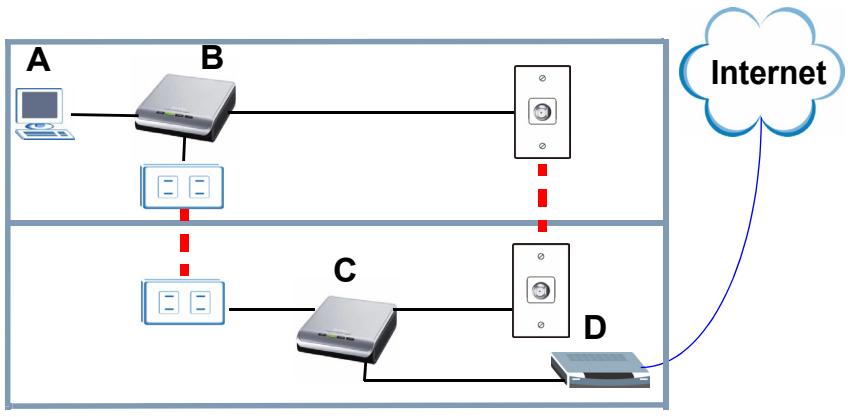
The coaxial connection offers a greater range than a powerline connection. This makes it suitable for setting up networks in large areas such as apartment buildings, communities, hotels and ships.
This Quick Start Guide shows you how to complete the following:
1 Connect a PLA402 v2 to a Cable/DSL modem.
2 Connect a PLA402 v2 to a computer in your home.
3 Use the PLA402 v2's ENCRYPT button to set up a HomePlug AV secure home network.
See the User's Guide on the included CD for details on all of the PLA402 v2's features. If a screen does not pop-up when you insert the included CD, use Windows Explorer (My Computer) to go to the CD-ROM (commonly drive D) and browse for the User's Guide.

Your PLA402 v2 is only compatible with HomePlug AV products with the latest firmware. You can upgrade your other ZyXEL HomePlug AV products by downloading the latest firmware from the ZyXEL website (www.zyxel.com).
1 Connecting the PLA402 v2 to a Modem
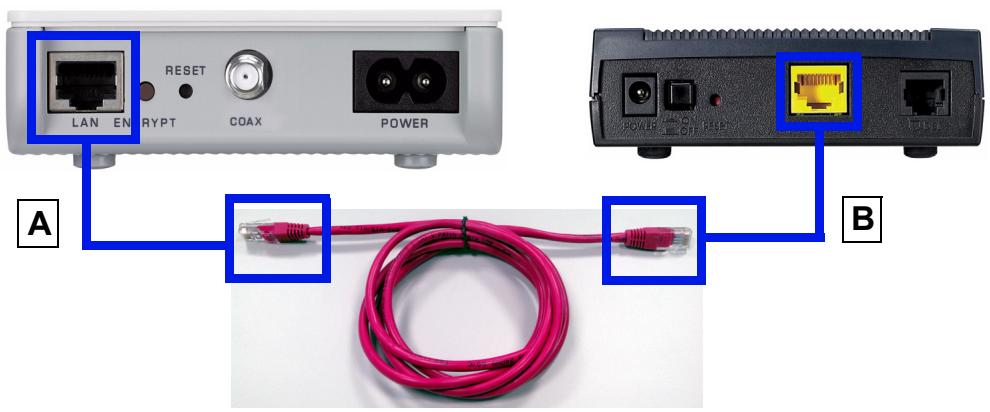
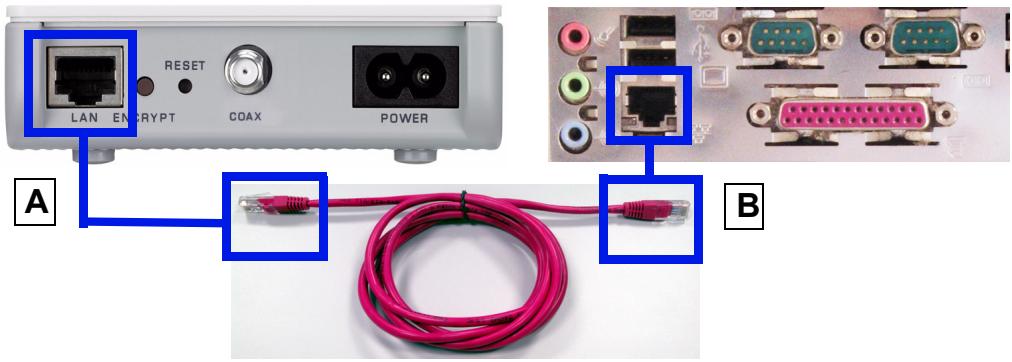
1 Use an Ethernet cable to connect the LAN port (A) on the PLA402 v2 to an available Ethernet LAN port (B) of your modem.
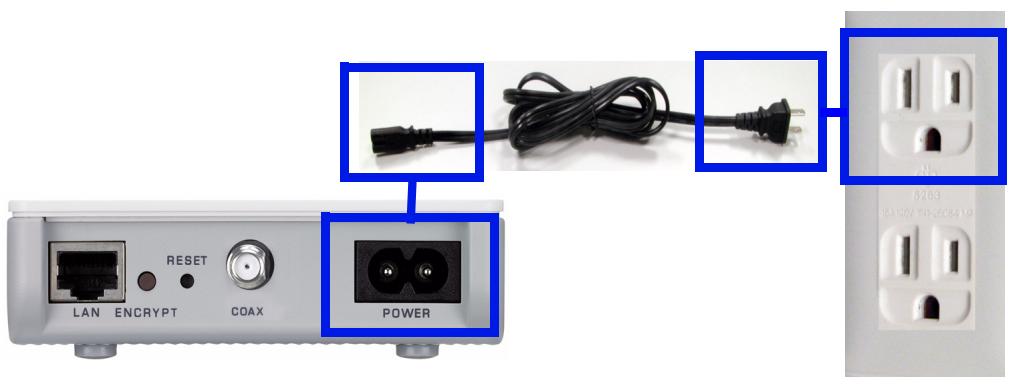
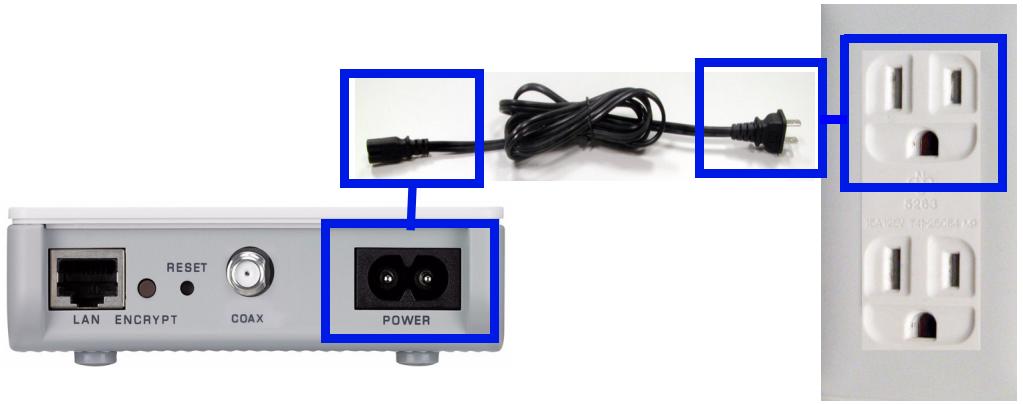
2 Connect the PLA402 v2 to a power outlet. Your power cable and outlet may look different.
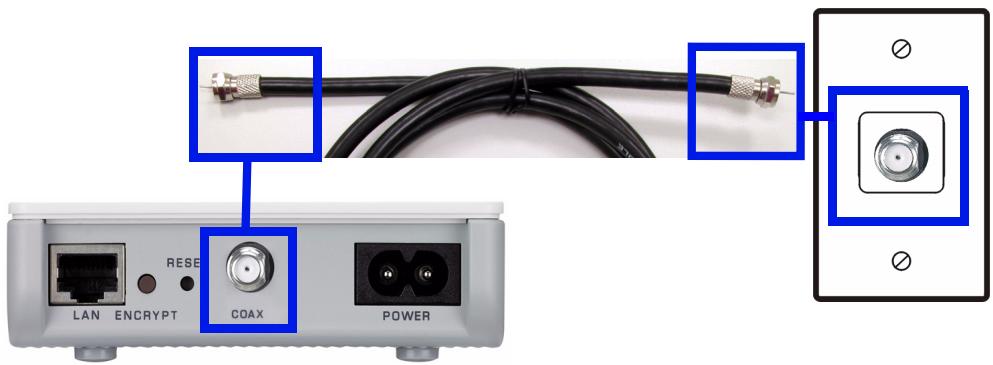
- You can also connect a coaxial cable to a coaxial outlet.
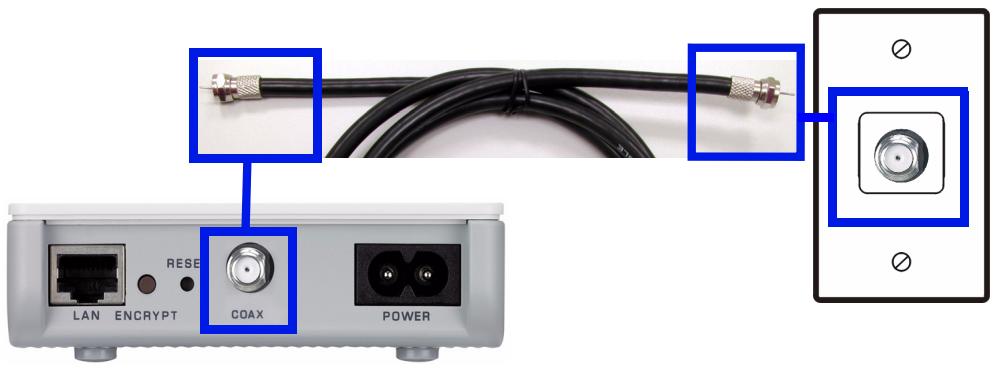
Ensure the coaxial cable connector is properly connected to the coaxial port. You may have to screw it in. The coaxial connection will extend beyond your house so use the ENCRYPT button to secure your network after completing the connection.
The power () light should be on and the Ethernet (量) light should be on or blinking.

If none of the lights are on, unplug your device and recheck your hardware connections.
2 Connecting the PLA402 v2 to a Computer
1 Use an Ethernet cable to connect the LAN port (A) on the PLA402 v2 to the Ethernet port (B) on your computer.
2 Connect the PLA402 v2 to a power outlet. Your power cable and outlet may look different.
- You can also connect a coaxial cable to a coaxial outlet.
The power (S) light should be on and the Ethernet (M) light should be on or blinking. If these lights are not on, unplug your device and recheck your hardware connections.
- If the HomePlug (灯) lights turn on the first time you set up your PLA402 v2s, your HomePlug AV network is ready for use. However, the PLA402 v2s may both be using the default network name HomePlugAV. This well-known network name allows access to your HomePlug AV network. You can make your network name more secure by going to the next section to set up a HomePlug AV network with ENCRYPT.
- If the HomePlug (灯) lights do not turn on, go to the next section to set up a HomePlug AV network with ENCRYPT.

If you are having trouble setting up your connections, make sure:
- Your outlets are working properly. Unplug the PLA402 v2 and plug in another electrical appliance that you know works.
- The Ethernet cables you are using are Category 5 or higher. Most cables are labeled with their specifications.
- All Ethernet and power cables are securely connected.
3 Set Up a HomePlug AV Network with ENCRYPT
Use the ENCRYPT button to set up a secure connection between your PLA402 v2 and another ENCRYPT-enabled device (The PLA-400 v2 is shown as an example).

Use the ENCRYPT feature on two devices at a time.
1 Place the powerline devices close to each other, as you only have two minutes to press the ENCRYPT buttons on both devices. You can disconnect the devices from your computer or modem (or other networking equipment) if you need to, but the powerline devices need to be plugged into power outlets.
2 Press the ENCRYPT button at the rear of both of your devices for 10~15 seconds. This sets up a random network name.
3 Press the ENCRYPT buttons at the rear of your powerline devices for 1~2 seconds
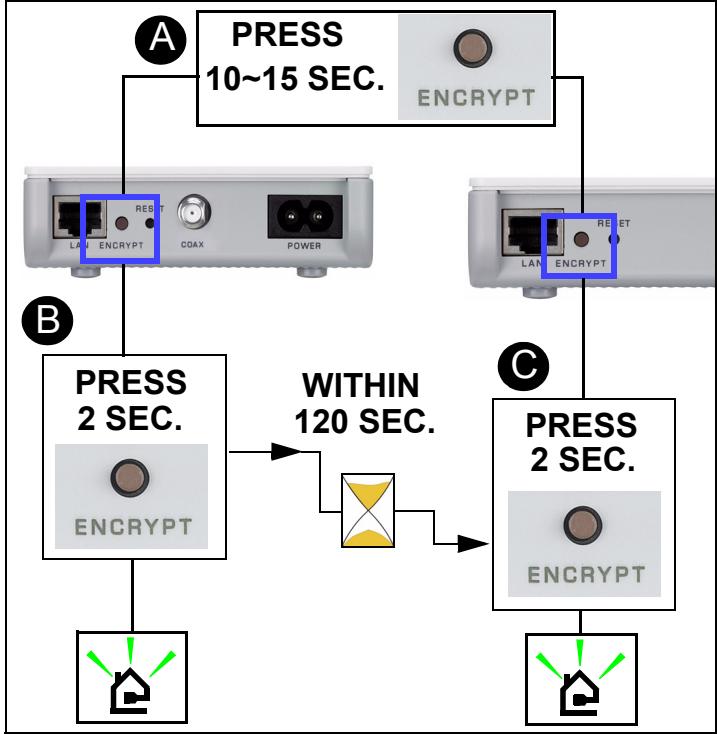
4 While the devices are connecting, the power (U) and HomePlug (L) lights blink. Also several times all lights blink at the same time and the HomePlug (L) light shows red.
5 Wait for about one minute while your powerline devices connect. The power (U) light is steady when the ENCRYPT process times out, the HomePlug (L) light is steady if you have a successful connection.

If the power (O) light does not blink, you have probably pressed the ENCRYPT button for too long. Try again, pressing the ENCRYPT button for 1~2 seconds.

If the HomePlug ( ) lights on both powerline devices do not light up, the powerline devices are not connected. Repeat steps 2 and 3 in this section. If that doesn't work, see the User's Guide for more suggestions.
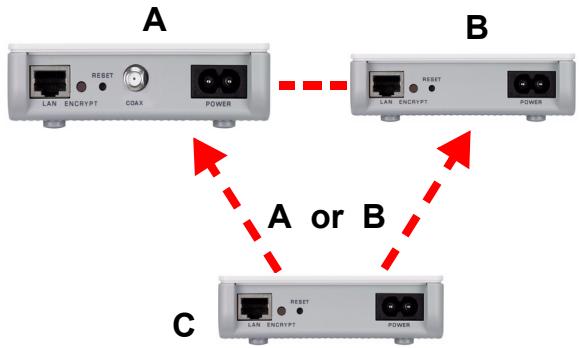
6 To add another powerline device (C) to your network, connect it with one of the powerline devices (A or B) already connected to your powerline network (See steps 2 and 3 in this section).
7 If you disconnected your powerline devices from your computer or modem (or any other networking product connected to your powerline device) in step 1 of this section, you can now reconnect them.

If the HomePlug ( ) light is off, use the PLA-4xx configuration utility (see the User's Guide for details) to detect all other HomePlug AV devices on your power line network. Try plugging a second HomePlug AV device into an adjacent socket (to your PLA402 v2) and see if the HomePlug ( ) light comes on.
Procedure to View a Product's Certification(s)
1 Go to www.zyxel.com.
2 Select your product from the drop-down list box on the ZyXEL home page to go to that product's page.
3 Select the certification you wish to view from this page.
Brand : ZYXEL
Model : PLA-402 V2
Category : Powerline Adapter