VERSO Hi-PoE IPM - Surveillance Camera Videotec - Free user manual and instructions
Find the device manual for free VERSO Hi-PoE IPM Videotec in PDF.


Pick your language and provide your email: we'll send you a specifically translated version.
| Product Type | IP Surveillance Camera |
| Brand | Videotec |
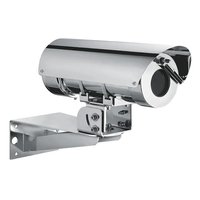
| Model | VERSO Hi-PoE IPM |
| Max Resolution | 1920 x 1080 pixels (Full HD) |
| Sensor Type | 1/2.8" progressive CMOS |
| Night Vision | Yes, up to 30 meters |
| PTZ Functions | Pan, Tilt, Motorized Zoom |
| Video Compression | H.265, H.264, MJPEG |
| Power Supply | PoE+ (Hi-PoE, IEEE 802.3at) |
| Power Consumption | Max. 30 W |
| Dimensions (L x H x D) | 200 x 180 x 150 mm |
| Weight | 2.1 kg |
| Protection Rating | IP66 (weather-resistant) |
| Operating Temperature | -40°C to +60°C |
| Motion Detection | Yes, with masking zones |
| Two-way Audio | Yes, line in/out |
| Storage | MicroSD up to 256 GB, NAS |
| Connectivity | Ethernet 10/100/1000 Base-T |
| Supported Protocols | IPv4, IPv6, HTTP, HTTPS, RTSP, ONVIF |
| Security | Password authentication, AES encryption |
| Maintenance and Cleaning | Clean with a soft dry cloth. Do not use solvents. |
| Spare Parts and Repairability | Available through Videotec after-sales service. Repair possible by authorized center. |
| Warranty | 2 years |
Frequently Asked Questions - VERSO Hi-PoE IPM Videotec
How to install the Videotec VERSO Hi-PoE IPM camera?
Mount the camera on a wall or pole using the provided bracket. Connect the Ethernet cable to a PoE+ (Hi-PoE) switch for power and data. Use the configuration tool or web interface to set the IP address and settings.
What is the maximum resolution of this camera?
The camera offers a maximum resolution of 1920 x 1080 pixels (Full HD) with a frame rate of up to 30 frames per second.
How to reset the camera to factory settings?
Press and hold the Reset button on the back of the camera for about 10 seconds until the lights flash. The network and configuration settings will be restored to default values.
Can I use a standard Ethernet cable for power?
Yes, but the cable must be Category 5e or higher and the switch must support PoE+ (IEEE 802.3at) to provide up to 30 W. A cable that is too long or of poor quality may cause power loss.
How to view images remotely?
Access the camera's web interface via a browser by entering its IP address, or use a compatible viewing application (e.g., Videotec Viewer, iSpy, or a VMS software). Make sure the necessary port (80 or 554) is forwarded on your router.
Is the camera weather-resistant?
Yes, the IP66 rating ensures dust-tightness and protection against water jets, allowing outdoor use in all weather conditions.
How to enable motion detection?
In the web interface, go to event settings, enable motion detection, and define sensitive zones. You can configure actions such as recording or sending emails upon detection.
What types of storage are compatible?
The camera accepts MicroSD cards up to 256 GB (Class 10 recommended) and allows recording to a NAS server via FTP or SMB. Continuous or event-based recording is configurable.
How to update the firmware?
Download the latest firmware from the Videotec website. Log in to the camera's web interface, go to the Maintenance/Update section, select the downloaded file, and start the update. Do not turn off the power during the process.
What to do if the camera stops responding?
First check the power and network connection. If the Power light is off, the problem is with the power supply. Try restarting the camera by unplugging and reconnecting the Ethernet cable. If that doesn't work, perform a factory reset.
User questions about VERSO Hi-PoE IPM Videotec
0 question about this device. Answer the ones you know or ask your own.
Ask a new question about this device
No questions yet. Be the first to ask one.
Download the instructions for your Surveillance Camera in PDF format for free! Find your manual VERSO Hi-PoE IPM - Videotec and take your electronic device back in hand. On this page are published all the documents necessary for the use of your device. VERSO Hi-PoE IPM by Videotec.
USER MANUAL VERSO Hi-PoE IPM Videotec
Manual assistant
Powered by Anthropic
Waiting for your message
Product information
Brand : Videotec
Model : VERSO Hi-PoE IPM
Category : Surveillance Camera