304465 - Weather Station Brandson - Free user manual and instructions
Find the device manual for free 304465 Brandson in PDF.


Pick your language and provide your email: we'll send you a specifically translated version.
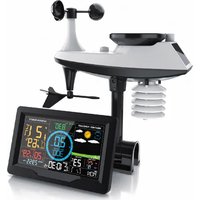
| Product Type | Wireless Weather Station |
| Brand | Brandson |
| Model | 304465 |
| Dimensions (Main Unit) | Approx. 15 x 10 x 5 cm |
| Weight (Main Unit) | Approx. 300 g |
| Power Supply (Main Unit) | 3 x AAA batteries (not included) or USB-C |
| Power Supply (Outdoor Sensor) | 2 x AAA batteries (not included) |
| Indoor Temperature Range | 0°C to 50°C |
| Indoor Humidity Range | 20% to 95% RH |
| Outdoor Temperature Range | -20°C to 60°C |
| Outdoor Humidity Range | 20% to 99% RH |
| Barometric Pressure Range | 600 to 1100 hPa |
| Time Display | 12/24 hour with alarm |
| Forecast Icons | Sunny, cloudy, rainy, storm, snow |
| Wireless Range | Up to 100 meters (open field) |
| Radio Controlled Clock | DCF-77 (Europe) or WWVB (US) - selectable |
| Display Type | LCD with backlight |
| Mounting Options | Table stand or wall mount |
| Care & Cleaning | Wipe with dry cloth; avoid water ingress |
| Battery Safety | Insert batteries correctly; remove if not used for long periods |
| Spare Parts | Outdoor sensor, AC adapter, batteries (standard) |
| Repairability | Battery compartment accessible; fuse replacement possible |
| General Information | Indoor/outdoor use; automatic weather forecast |
Frequently Asked Questions - 304465 Brandson
How do I set up my Brandson 304465 weather station?
Insert batteries into the main unit and outdoor sensor. Place the sensor within 100m range. The units will sync automatically within a few minutes. Adjust time and date via the settings menu.
Why is my outdoor sensor not connecting?
Check batteries are fresh and inserted correctly. Ensure the sensor is within range (max 100m line-of-sight). Press and hold the CHANNEL button on the main unit to rescan.
How accurate is the barometric pressure reading?
The barometric sensor is factory calibrated with an accuracy of ±3 hPa. You can manually calibrate it using the PRESSURE setting if you have a local reference.
Can I use the weather station without the outdoor sensor?
Yes, the main unit will display indoor temperature and humidity. However, outdoor readings and weather forecast will not be available.
How do I set the alarm?
Press the ALARM button once to enter alarm mode. Use the +/- buttons to set hours and minutes. Press ALARM again to confirm. A bell icon will appear when active.
What does the weather forecast icon mean?
Icons predict next 12-24 hours: sunny (sun), partly cloudy (sun/cloud), cloudy (cloud), rainy (rain drops), storm (lightning), snow (snowflake). Accuracy is about 70% based on barometric trend.
How do I change the temperature units?
Press and hold the TEMP button for 3 seconds to toggle between °C and °F. The setting applies to both indoor and outdoor readings.
My display is dim. Can I adjust the brightness?
Yes, press the LIGHT button to cycle through brightness levels: high, low, off (backlight stays on in dim light for a few seconds). For continuous backlight, use the AC adapter.
How often does the outdoor sensor transmit data?
The sensor transmits every 48 seconds. The main unit updates the display accordingly. If no signal is received for 30 minutes, dashes will appear.
Can I reset the weather station to factory defaults?
Press and hold the RESET button located in the battery compartment with a pin for 5 seconds. All settings will be cleared.
User questions about 304465 Brandson
0 question about this device. Answer the ones you know or ask your own.
Ask a new question about this device
No questions yet. Be the first to ask one.
Download the instructions for your Weather Station in PDF format for free! Find your manual 304465 - Brandson and take your electronic device back in hand. On this page are published all the documents necessary for the use of your device. 304465 by Brandson.
USER MANUAL 304465 Brandson

Manual assistant
Powered by Anthropic
Waiting for your message
Product information
Brand : Brandson
Model : 304465
Category : Weather Station