
MECABLITZ 34 AF-3 N - Camera Flash METZ - Free user manual and instructions
Find the device manual for free MECABLITZ 34 AF-3 N METZ in PDF.


| Product type | Electronic flash for Nikon AF SLR cameras with TTL control |
| Brand | METZ |
| Model | MECABLITZ 34 AF-3 N |
| Dimensions (L x H x D) | 61 x 102 x 35 mm |
| Weight | Approx. 160 g (without batteries) |
| Power supply | 2 CR2 lithium batteries |
| Guide number (ISO 100/21°) | 34 (with tele attachment), 28 (without attachment), 20 (with wide-angle diffuser) |
| Coverage (24x36 format) | Focal length > 35 mm; with wide-angle diffuser: > 24 mm; with tele attachment: > 85 mm |
| Color temperature | Approx. 5600 K |
| Number of flashes | Approx. 100 (at full power) |
| Recycle time | Approx. 6 s (fresh batteries) |
| Synchronization | Low-voltage IGBT, automatic at X-sync speed (1/30 s to 1/300 s depending on camera body) |
| Synchronization modes | Normal, slow speed, rear curtain (REAR) depending on camera body |
| AF illuminator | Built-in, vertical red bands, range ~6–10 m with f/1.8 50 mm lens |
| Automatic fill-in | Yes, depending on camera body |
| TTL exposure compensation | ±3 EV in half-step increments (depending on camera body) |
| Auto bracketing | Yes, sequence of 3 frames (depending on camera body) |
| Auto power off | After 8 minutes of inactivity |
| Maintenance | Clean with a soft, dry cloth; reform capacitor every 3 months if not used |
| Safety | Do not trigger near eyes; remove used batteries; do not disassemble (high voltage) |
| Supplied accessories | Flash, wide-angle diffuser (W), tele attachment (T), instruction manual, 2 CR2 batteries |
Frequently Asked Questions - MECABLITZ 34 AF-3 N METZ
User questions about MECABLITZ 34 AF-3 N METZ
0 question about this device. Answer the ones you know or ask your own.
Ask a new question about this device
Download the instructions for your Camera Flash in PDF format for free! Find your manual MECABLITZ 34 AF-3 N - METZ and take your electronic device back in hand. On this page are published all the documents necessary for the use of your device. MECABLITZ 34 AF-3 N by METZ.
USER MANUAL MECABLITZ 34 AF-3 N METZ
Operating instructions
Norme per l'uso
We thank you for your confidence in our mecablitz MB 34 AF-3N.

The MB 34 AF-3N flashgun has been especially designed for Nikon AF system cameras. IMPORTANT: Never mount the flashgun in the accessory shoe of any other system camera, otherwise the flashgun's foot or the camera's accessory shoe can be destroyed! The dedicated contacts in the foot of the MB 34 AF-3N only support the controlling commands of Nikon AF system cameras.
The following pages give details for the correct operation of the mecablitz flashgun and summarize its fields of application.
Please read these operating instructions carefully, even if, at first sight, some points may not appear to be of interest. Our design work placed particular value on ensuring that operation of the mecablitz is as simple as possible, but it should be noted that the system cameras for which the flashgun is intended offer a great diversity of capabilities.
We wish you much pleasure with your new Metz flashgun in conjunction with a Nikon AF system camera to light up the darkest points, and for creative flash lighting.
Disposal of batteries
Do not dispose of spent batteries with domestic rubbish.
Please return spent batteries to collecting points should they exist in your country!
Contents
- Safety instructions 24
2.Preparing the mecablitz for use .25
2.1 Power supply 25
2.2 Loading and replacing the batteries . . . . . . 25
2.3 Automatic flashgun cut-out circuit 26
2.4 Mounting/Removing the mecablitz 26 - Setting the mecablitz into operation .27
3.1 Preconditions 27
3.2 Switching the flashgun on and off 27 - Flashgun instructions to the camera . .28
4.1 Flash-ready indication 28
4.2 Automatic flash sync speed control . 28
4.3 Correct-exposure indication 28
4.4 Information displayed in the camera's viewfinder 29 - TTL flash control 30
- Flash synchronisation 31
6.1 Normal synchronisation 31
6.2 Slow-synchronisation 31
6.3 Second curtain synchronisation 32 -
Flash in the individual camera modes .33
-
Autofocus measuring flash 34
- Flash techniques and flash functions .36
9.1 Automatic fill-in flash 36
9.2 Exposure correction 36
9.3 Flash exposure sequences 36 - Lighting and wide-angle/telephoto attachment .37
- Care and maintenance - Manual firing button Troubleshooting 38
- Technical data 39
Lightning distances 40
1. Safety instructions
- NEVER fire a flash in the immediate vicinity of the eyes! Flash fired directly in front of the eyes of a person or animal can damage the retina and lead to severe visual disorders - even blindness!
- Spent batteries should be immediately removed. Chemicals leaking out of spent batteries will damage the flashgun.
- Do not short-circuit batteries! DANGER OF EXPLOSION!
- Batteries should not be exposed to excessive heat, for instance sunshine, fire and the like!
- NEVER throw spent batteries in a fire!
- Do not expose the flashgun to dripping or splashing water!
-
Protect the flashgun against excessive heat and high humidity levels! Do not keep the flashgun in the glove compartment of a car!
-
In the event of flash shots with full light output observe an interval of at least 3 minutes after a series of 20 flashes. This will protect the flashgun against overload.
- NEVER place material that is impervious to light in front of, or directly on, the reflector screen. The reflector screen must be perfectly clean when a flash is fired. The high energy of the flash light will burn the material or damage the screen if this is not observed!
- NEVER dismantle the flashgun! DANGER: HIGH VOLTAGE! There are no components inside the flashgun that can be repaired by a layperson.
2. Preparing the mecablitz for use
2.1 Power supply
The flashgun can only be operated with 2 CR2-type lithium batteries. This type of battery can be stored for many years with practically no loss of energy, thus making it ideal for occasional amateur flash photography.

Batteries have become discharged or spent when recycling takes more than 60 seconds. The batteries should be removed from the mecablitz if the flashgun is not going to be used for a prolonged period.
2.2 Loading and exchanging batteries
- Turn off the flashgun with the main switch.
- Press the unlocking catch, slide the battery compartment lid to the right and fold open (see fig. 1).
- Insert the batteries according to the indicated battery symbols.
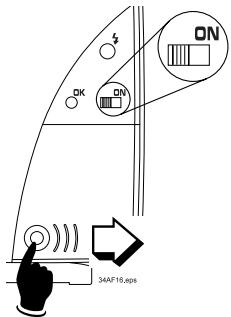
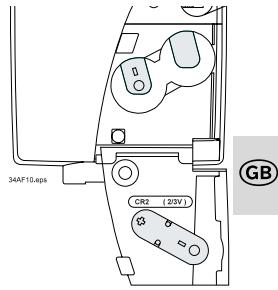
Fig. 1: Unlocking and exchanging batteries
The supplied lithium batteries are expendables and, as such, are not subject to our warranty provisions.
After the batteries have been inserted, fold down the battery compartment lid, and push to the left until it engages audible with the unlocking catch.
2. Preparing the mecablitz for use

When loading the batteries ensure correct polarity. Incorrectly loaded batteries can destroy the flashgun! All batteries must be of the same make and have the same charge level. Exhausted batteries must not be thrown into the dustbin! Contribute to the protection of the environment and discard exhausted batteries at the appropriate disposal points.
2.3 Automatic flashgun switch-off
To avoid accidental battery discharge the flashgun automatically switches itself off to save power approximately 8 minutes after
- the flashlight was switched on
- the last flash was fired
- tripping the camera release, or
- switching on the camera light metering system. The green flash-ready indicator is turned off.
To turn on the mecablitz again switch the main switch OFF and then ON. The flashlight should always be turned off if it is not being used.
2.4 Mounting/Removing the flashgun
- Turn off the mecablitz.
- Press the unlocking catch at the back of the mecablitz (see fig. 2).
- Slide the mounting foot into the camera's mounting shoe.
- Always turn off the flashlight before it is removed.
- Press the unlocking catch at the back of the mecablitz (fig. 2) and withdraw from the camera.
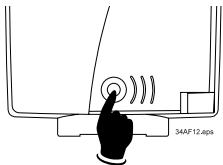
Fig. 2: Unlocking catch
3. Setting the mecablitz into operation
3.1 Preconditions
The mecablitz must only be used with TTL flash controlled cameras!
i
The sensor of TTL flash controlled cameras measures the light reaching the film through the camera lens and instantly cuts out the flash when the film has been correctly exposed. Please refer to the camera's operating instructions to find out whether your camera features this function.
A full-power flash is fired if the camera does not feature TTL flash control!
In other words: Without TTL flash control, the mecablitz fires an unmeasured flash at maximum output.
If there is a flashgun integrated in the camera it must be switched off or completely folded down when the mecablitz is used.
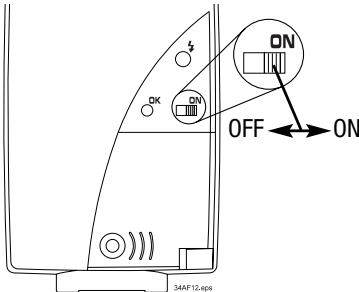
Fig. 3: Switching the flashlight on and off
GB
3.2 Switching the flashlight on and off
Set the main switch in the ON position to turn on the flashgun. The green flash-ready indicator lights up to indicate flash readiness.
Set the main switch in the OFF position to turn off the flashgun.
4. Flashgun instructions to the camera
The mecablitz transmits different signals and messages to the camera when it is connected to the camera and is switched on.

4.1 Flash-ready indication
The green light on the mecablitz illuminates when the flash capacitor is fully primed, thereby indicating flash readiness. This means that flash can be used for the next exposure. The flash readiness signal is transmitted to the camera where it is indicated by a corresponding display in the camera's viewfinder. On some cameras (depending on the model) the shutter is automatically changed to flash sync speed when flash readiness is reached. The flash will not be fired if the shutter is released before the flash ready light illuminates with the result that the exposure may be incorrect if the camera control circuit has already changed over to flash sync speed. Please refer to the camera's operating instructions for further details.
4.2 Automatic flash sync speed control
Most system cameras automatically change to flash sync speed when flash readiness is reached. The flash sync shutter speeds may vary between 1/30th and 1/300th second, depending on the camera model. Please refer to the camera's operating instructions for further details.
4.3 Correct-exposure indication (see fig. 4)
The red correct exposure light briefly illuminates when flash exposure was correct. At the same time the mecablitz sends an o.k. signal to the camera for display in the viewfinder. Please refer to the camera's operating instructions for further details.
4. Flashgun instructions to the camera
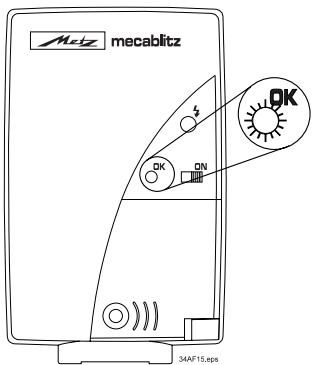
Fig. 4: Exposure o.k.
4.4 Information displayed in the camera's viewer
The following table only gives a general survey. Camera-specific deviations are possible (please refer to the camera's operating instructions.
| • Green arrow ↓ | Indicates that flash-gun should be used or switched on. |
| • Red arrow ↓ | Flash readiness indication. |
| • Red arrow ↓ is permanently illuminated after exposure, or disappears briefly | The shot was correctly exposed. |
| • Red arrow ↓ blinks after exposure | The shot was underexposed. |
5. TTL flash control
i The mecablitz receives its information exclusively from the connected TTL-controlled camera.
Exposure measurement in TTL mode (TTL = through-the-lens) is completed by the camera's sensor. This sensor measures the light reaching the film through the camera lens. An electronic control circuit within the camera transmits a stop signal to the flashgun as soon as the film has been exposed by the correct amount of light; the flash is then instantly cut out. The advantage of the TTL mode is that all factors influencing the exposure of the film (such as filters, change of aperture or variable aperture zooms) are taken into account. You need not worry about adjustment of the light output. The camera's electronic system automatically defines the required amount of light. You can also utilize various metering facilities (e.g. spot, matrix or centre-weighted overall readings) offered by some cameras.
The Table on page 39 gives the maximum range for the selected aperture. The minimum lighting distance is approx. 15% of the maximum threshold range.
If the actual distance is shorter than the minimum lighting distance, then this may result in overexposure.
A strip of film must be loaded in the camera if tests are to be conducted in TTL flash mode.
The effective flash range can only be checked by the correct-exposure display (o.k.) if the flash is triggered by the camera and not with the manual release on the flashgun!
6. Flash synchronisation
Different modes of flash synchronisation are possible, depending on the camera model. Please refer to the camera's operating instructions to find out how the individual modes of synchronisation are set on the camera.
6.1 Normal synchronisation
This mode is available with all TTL cameras, and it is suitable for most flash shots. With normal synchronisation, switching to the camera's flash sync shutter speed is automatic. The shutter speed may vary from 1/30th and 1/300th seconds, depending on the camera model. Please refer to the camera's operating instructions for further details.
6.2 Slow-synchronisation
Some cameras feature specific exposure programs for slow-synchronisation.
Flash shots at low lighting levels and fast shutter speeds (normal flash sync speed) can often result in overexposed subjects in front of a very dark back-ground. The slow-sync function allows the use of slow shutter speeds right up to 30 seconds, to significantly enhance the background as a result of the extra ambient light. Such shots require a tripod to prevent camera shake. Please refer to the camera's operating instructions for further details.
6. Flash synchronisation

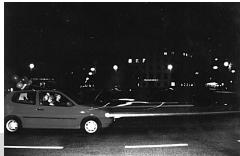
First curtain
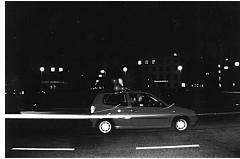
Second curtain
6.3 Second curtain synchronisation (REAR)
Some cameras offer the facility of second shutter curtain synchronisation.
With normal synchronisation, the flash is fired precisely after the opening of the first shutter curtain. When using slow shutter speeds, and with moving objects, this would result in an unnatural rendition of light traces.
With second curtain or rear curtain synchronisation, the flash is fired as the exposure is ending, just before the second curtain covers the film again.
This makes the light trail behind the moving objects instead of appearing in front of them, and renders a more natural looking picture.
7. Flash in the individual camera modes
Use of flash in the program modes
TTL-controlled flash shots can be made in all exposure and auto program modes. Once the mecablitz is attached to the camera and switched on, it automatically operates with TTL flash control in auto program (P), aperture priority (A), shutter priority (S) and manual (M) modes. For details please refer to the camera's operating instructions.
Special functions not supported by flash:
Red-eye reduction function.
multi-sensor fill-in flash
8. Autofocus measuring flash

The integrated AF red-light beam of the mecablitz supports the automatic focusing of autofocus TTL cameras. When the prevailing light is insufficient for automatic focusing, the mecablitz will project a pattern of red vertical stripes onto the subject as soon as the camera's release is lightly touched. The camera's autofocus system then focuses the picture by this striped pattern.
Notes:
- When the camera's autofocus system is on, the electronic circuit will automatically activate the autofocus measuring flash whenever the prevailing light is insufficient for the exposure.
- The autofocus measuring flash cannot be activated in every exposure mode or AF mode of the camera. In most cases, it will only support the SINGLE-AF function (see camera's operating instructions) without follow-up focusing.
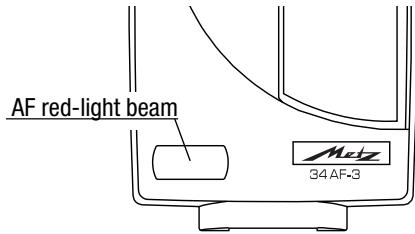
Fig. 5: AF red-light beam
- The range of the autofocus measuring flash depends on the speed of the lens (maximum aperture)! With an f/1.8 standard lens of 50mm focal length, the range is approx. 6-10 m (depending on the sensitivity of the camera's AF sensor).
Low-speed lenses, e.g. with an aperture of f/5.6 or f/8 (such as zoom lenses), significantly restrict the range of the autofocus measuring flash!
8. Autofocus measuring flash
AF operating modes
Two operating modes are available with AF cameras (depending on the camera model):
- Focusing priority (SINGLE AF):
The shutter can only be released when the subject has been sharply focused by the AF system. If the camera's AF system is unable to focus sharply, then the shutter cannot be released and the flash cannot be fired.
- Shutter release priority (CONTINUOUS AF)
The shutter can always be tripped, irrespective of sharp focusing.

Shots may be blurred if the release is actuated before focusing has been completed by the camera.

The AF measuring flash is deactivated in this operating mode!
Please refer to the camera's operating instructions for further details about the AF modes and their activation.
9. Flash techniques and flash functions

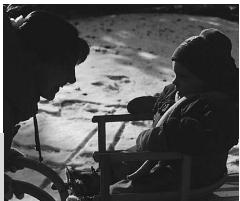
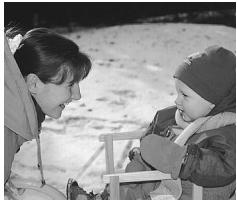
Fig. 6: Fill-in flash in daylight (left without, right with fill-in flash
9.1 Automatic fill-in flash
Some cameras offer the facility of activating automatic fill-in flash control or automatically trigger a fill-in flash.
Fill-in flash will soften harsh shadows and diminish the contrast, thereby producing a more balanced exposure when shooting against the light. The camera's computer-controlled measuring system automatically selects the shutter speed, working aperture and light output in such a manner that both the main subject in the foreground as well as the background are uniformly exposed.
9.2 Exposure correction
Various cameras enable the user to influence the TTL exposure control. Accordingly, the camera's exposure settings can be corrected by up to ± 3 apertures (in one-third or half f-stop settings).
PLEASE NOTE: Do not forget to switch off this function when it is no longer required!
Please refer to the camera's operating instructions for further details.
9.3 Flash exposure sequences
Some cameras permit a sequence of shots to be taken of the same subject with different exposure parameters.
When this function is activated, three pictures - as an example - can be taken in succession: The first shot is made with a negative flash exposure correction (less light output), the second is normally exposed, and the third is taken with a positive flash exposure correction (more light output). For further details on this function and the settings to be made please refer to the camera's operating instructions.
10. Lighting and attachments
Your mecablitz provides full and even illumination of normal 24 × 36 mm negatives when using lenses of 35 mm focal length and longer.
A wide-angle diffuser is supplied with the flashgun to increase the coverage if you wish to use a 28 mm wide-angle lens.
A telephoto attachment (identified with a "T") is included for telephoto lenses of 85mm focal length.

PLEASE NOTE: The use of the wide-angle diffuser diminishes the effective range of the flash!
Mounting and removing the attachments
The attachment is swivelled into the bayonet mount (see fig. 7). Turn the attachment clockwise and insert the guiding edge into the case gap.
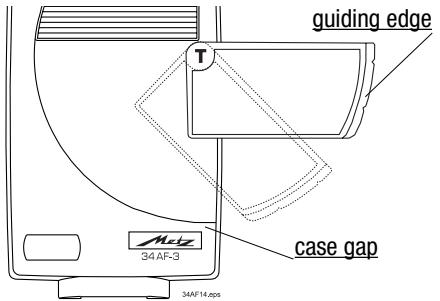
Fig. 7: Mounting and removing the attachments
GB
To remove turn the attachment beyond the retaining spring (see fig.) and withdraw the attachment.
11. Care and maintenance - Troubleshooting
Remove grime and dust with a soft, dry cloth. Do not use cleaning agents as these could damage the plastic parts.
Forming the flash capacitor

The flash capacitor incorporated in the flashgun undergoes a physical change when the flashgun is not switched on for prolonged periods. For this reason it is necessary to switch on the flashgun for approx. 10 minutes every 3 months and to fire a few flashes. The batteries must supply sufficient power to light up the flash-ready light within one minute after the flashgun was switched on.
Manual firing button
An uncontrolled flash can be fired with the manual firing button (see fig. 8).
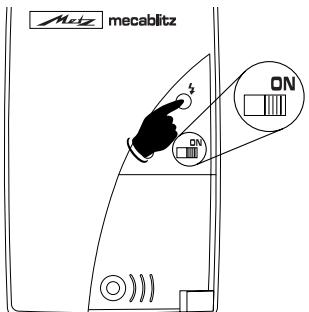
Fig. 8: Manually firing button
Troubleshooting:
If the flashgun does not work as it should in the individual modes, then proceed as follows:
- Switch off the flashgun with the main switch.
- Remove the rechargeable or dry-cell batteries for a brief period, and then load them again.
12. Technical data
Guide number ISO 100/21°: 34 (with telephoto attachment)
28 (without attachment)
20 (with wide-angle diffuser)
Lighting for 35mm camera from 35mm focal length onwards, with wide-angle attachment from 24mm , and with telephoto attachment from 85mm focal length onwards.
Colour temperature: approx. 5600°K
Synchronization: Low-voltage IGBT firing
Flash duration: 1/250 s ...1/45000 s
Number of flashes: Flash recycling time:
ca. 100
ca. 6 s at full light output
Lighting: Rectangular
Without attachment: horiz. approx. 56° , vertical approx. 40°
With W-diffuser: horiz. approx. 75° , vertical approx. 55°
With T-attachment: horiz. approx. 25° , vertical approx. 18°
Weight: approx. 160 g
Dimensions: 61 mm x 102 mm x 35 mm
Items delivered:
Flashgun, attachments (W-diffuser/T = telephoto attachment), Operating Instructions, 2 batteries CR2.
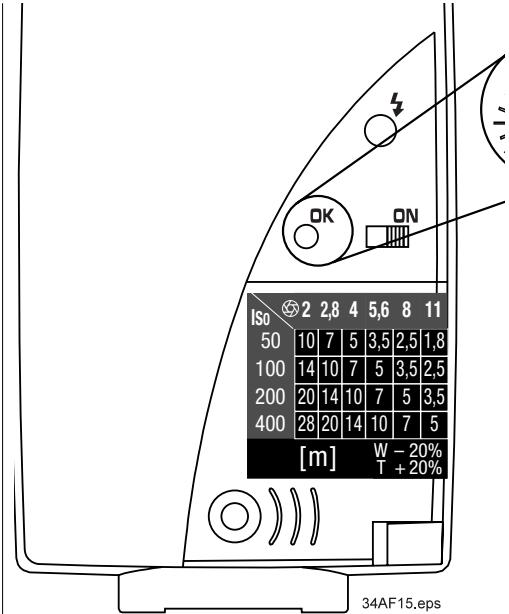
This table indicates a section of the most important maximum lighting distances in different ISO/aperture combinations.
The sticker can be applied to the back of the flashgun.
Premessa
Caro CLIENTE,
- DISPOSAL OF BATTERIES
- CONTENTS
- SAFETY INSTRUCTIONS
- PREPARING THE MECABLITZ FOR USE
- 2.1 POWER SUPPLY
- 2.2 LOADING AND EXCHANGING BATTERIES
- 2.3 AUTOMATIC FLASHGUN SWITCH-OFF
- 2.4 MOUNTING/REMOVING THE FLASHGUN
- SETTING THE MECABLITZ INTO OPERATION
- 3.1 PRECONDITIONS
- A FULL-POWER FLASH IS FIRED IF THE CAMERA DOES NOT FEATURE TTL FLASH CONTROL
- 3.2 SWITCHING THE FLASHLIGHT ON AND OFF
- FLASHGUN INSTRUCTIONS TO THE CAMERA
- 4.1 FLASH-READY INDICATION
- 4.2 AUTOMATIC FLASH SYNC SPEED CONTROL
- 4.3 CORRECT-EXPOSURE INDICATION (SEE FIG. 4)
- 4.4 INFORMATION DISPLAYED IN THE CAMERA'S VIEWER
- TTL FLASH CONTROL
- FLASH SYNCHRONISATION
- 6.1 NORMAL SYNCHRONISATION
- 6.2 SLOW-SYNCHRONISATION
- 6.3 SECOND CURTAIN SYNCHRONISATION (REAR)
- FLASH IN THE INDIVIDUAL CAMERA MODES
- USE OF FLASH IN THE PROGRAM MODES
- SPECIAL FUNCTIONS NOT SUPPORTED BY FLASH
- AUTOFOCUS MEASURING FLASH
- NOTES
- AF OPERATING MODES
- FOCUSING PRIORITY (SINGLE AF)
- SHUTTER RELEASE PRIORITY (CONTINUOUS AF)
- FLASH TECHNIQUES AND FLASH FUNCTIONS
- 9.1 AUTOMATIC FILL-IN FLASH
- 9.2 EXPOSURE CORRECTION
- PLEASE NOTE: DO NOT FORGET TO SWITCH OFF THIS FUNCTION WHEN IT IS NO LONGER REQUIRED
- 9.3 FLASH EXPOSURE SEQUENCES
- LIGHTING AND ATTACHMENTS
- MOUNTING AND REMOVING THE ATTACHMENTS
- CARE AND MAINTENANCE - TROUBLESHOOTING
- FORMING THE FLASH CAPACITOR
- MANUAL FIRING BUTTON
- TROUBLESHOOTING
- TECHNICAL DATA
- PREMESSA
- CARO CLIENTE
Brand : METZ
Model : MECABLITZ 34 AF-3 N
Category : Camera Flash