DV660 4K - Camera Prixton - Free user manual and instructions
Find the device manual for free DV660 4K Prixton in PDF.


Pick your language and provide your email: we'll send you a specifically translated version.
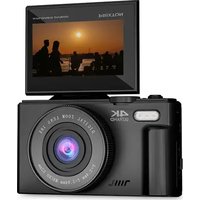
| Product Type | Digital Camera |
| Brand | Prixton |
| Model | DV660 4K |
| Video Resolution | 4K (3840 x 2160 pixels) |
| Photo Resolution | Up to 20 megapixels |
| Screen | 2-inch LCD screen |
| Image Stabilization | Yes, electronic |
| Viewing Angle | 170° wide angle |
| Storage | microSD card up to 64 GB (not included) |
| Power Supply | Rechargeable lithium-ion battery 1050 mAh |
| Battery Life | Approximately 90 minutes in 4K |
| Connectivity | USB-C, mini HDMI, built-in Wi-Fi |
| Dimensions | 95 x 60 x 28 mm |
| Weight | 110 g (with battery) |
| Main Features | 4K video recording, burst photo, time-lapse, loop recording, motion detection |
| Included Accessories | USB cable, adhesive mount, carrying case |
| Care and Cleaning | Clean with a soft, dry cloth. Do NOT use abrasive products. |
| Safety | Avoid shocks and moisture. Use in a temperate environment. |
| Spare Parts and Repairability | Battery and cables available. Professional repair recommended. |
Frequently Asked Questions - DV660 4K Prixton
How to turn on and off the Prixton DV660 4K device?
To turn on, press and hold the Power button located on the top. To turn off, press and hold again until the screen turns off.
What type of memory card to use?
Use a microSD or microSDHC card up to 64 GB. Format the card in the device before first use (Menu > Format).
How to record a 4K video?
From Video mode, press the Menu button, select Resolution and choose 4K (3840x2160). Press the shutter to start recording.
The battery drains quickly, what to do?
Make sure the battery is fully charged. Avoid extreme temperatures. If the problem persists, replace the battery with a compatible Prixton DV660 model.
How to transfer files to a computer?
Connect the device to the computer using the USB-C cable provided. The device will appear as a removable drive. You can then copy the files.
The screen stays black, what to do?
Make sure the battery is charged and inserted correctly. If the screen remains black, reset the device by removing the battery and reinserting it after 30 seconds.
Can I use the device as a webcam?
Yes, the device can be used as a webcam by connecting it via USB in PC Camera mode. Select this mode in the connection menu.
How to activate Wi-Fi?
In the menu, enable the Wi-Fi option. On your smartphone, connect to the device's network (name: DV660_XXXX) and open the Prixton Camera app.
The lens is dirty, how to clean it?
Use a soft, dry microfiber cloth. If necessary, slightly dampen the cloth with a lens cleaning solution. Do not rub too hard.
How to reset to factory settings?
Go to Menu, select Settings, then Reset and confirm. All settings will be restored to factory defaults.
User questions about DV660 4K Prixton
0 question about this device. Answer the ones you know or ask your own.
Ask a new question about this device
No questions yet. Be the first to ask one.
Download the instructions for your Camera in PDF format for free! Find your manual DV660 4K - Prixton and take your electronic device back in hand. On this page are published all the documents necessary for the use of your device. DV660 4K by Prixton.
USER MANUAL DV660 4K Prixton
Manual assistant
Powered by Anthropic
Waiting for your message
Product information
Brand : Prixton
Model : DV660 4K
Category : Camera