Run Fit RF150 - Treadmills Prixton - Free user manual and instructions
Find the device manual for free Run Fit RF150 Prixton in PDF.


Pick your language and provide your email: we'll send you a specifically translated version.
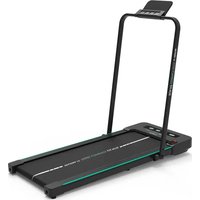
| Product Type | Folding Treadmill |
| Brand | Prixton |
| Model | Run Fit RF150 |
| Motor | 1.5 HP (continuous) |
| Speed | 0.8 - 12 km/h |
| Incline | 3 manual levels |
| Running Surface | 120 x 40 cm |
| Screen | LCD with backlight |
| Display | Time, distance, calories, speed, pulse |
| Heart Rate Sensor | Hand grips |
| Programs | 12 preset |
| Folding | Yes, Soft Drop system |
| Dimensions (unfolded) | 160 x 70 x 120 cm |
| Dimensions (folded) | 140 x 70 x 30 cm |
| Net Weight | 40 kg |
| Maximum User Weight | 100 kg |
| Power Supply | 220-240 V, 50 Hz |
| Rated Power | 800 W |
| Safety | Magnetic safety key |
| Warranty | 2 years |
| Maintenance and Cleaning | Belt lubrication, frame cleaning |
| Spare Parts | Belt, motor, electronic board available |
| Repairability | Repairable by authorized technician |
Frequently Asked Questions - Run Fit RF150 Prixton
How to assemble the Run Fit RF150 treadmill?
Assemble the main frame, attach the upright posts with the provided screws, then connect the display cables. Refer to the manual for detailed steps.
How often should I lubricate the belt?
Lubricate the belt every 3 months or after 50 hours of use with appropriate silicone lubricant. Apply under the belt while walking at low speed.
What to do if the belt drifts left or right?
Use the adjustment screws located at the rear of the treadmill. Turn the screw on the opposite side of the drift a quarter turn until centered.
How to use the safety key?
Insert the magnetic key into the console and attach the clip to your clothing. In case of a fall, the key detaches and immediately stops the treadmill.
The treadmill makes an abnormal noise, what should I do?
Check that the belt is properly lubricated and the screws are tight. If the noise persists, contact customer service.
How to fold the treadmill?
Lift the running deck until it locks vertically. Lower the folding handle to secure it. Ensure the area is clear.
Can I use the treadmill without the safety key?
No, the safety key is mandatory to start the treadmill. Without it, the console displays an error message and the motor does not activate.
How to calibrate the heart rate sensor?
Place your hands on the metal grips for 10 seconds. The sensor calibrates automatically. For optimal accuracy, use a chest strap.
What does error code E1 mean?
Code E1 indicates a communication problem between the console and the motor. Unplug the treadmill for 2 minutes then plug it back in. If the error persists, contact support.
How to clean the treadmill?
Unplug the unit. Clean the deck and belt with a damp cloth and mild detergent. Never use abrasive products or solvents.
User questions about Run Fit RF150 Prixton
0 question about this device. Answer the ones you know or ask your own.
Ask a new question about this device
No questions yet. Be the first to ask one.
Download the instructions for your Treadmills in PDF format for free! Find your manual Run Fit RF150 - Prixton and take your electronic device back in hand. On this page are published all the documents necessary for the use of your device. Run Fit RF150 by Prixton.
USER MANUAL Run Fit RF150 Prixton

Manual assistant
Powered by Anthropic
Waiting for your message
Product information
Brand : Prixton
Model : Run Fit RF150
Category : Treadmills