AD 8092 - Fridge ADLER - Free user manual and instructions
Find the device manual for free AD 8092 ADLER in PDF.


Pick your language and provide your email: we'll send you a specifically translated version.
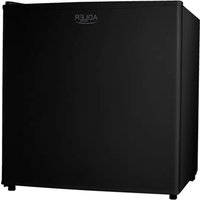
| Product type | Refrigerator |
| Brand | Adler |
| Model | AD 8092 |
| Energy class | F |
| Total net volume | 100 L |
| Refrigerator volume | 85 L |
| Freezer volume | 15 L |
| Dimensions (H x W x D) | 85 x 50 x 55 cm |
| Weight | 25 kg |
| Power supply | 220-240 V, 50 Hz |
| Rated power | 100 W |
| Adjustable thermostat | Yes |
| Interior lighting | Yes, LED |
| Defrost type | Manual |
| Door reversibility | Yes |
| Shelf material | Tempered glass |
| Refrigerant gas type | R600a |
| Noise level | 40 dB |
| Storage function | Vegetable drawer |
| Maintenance | Clean with a soft cloth and soapy water, avoid abrasive products |
| Spare parts available | Yes (shelves, seals, thermostat) |
| Country of manufacture | China |
| Warranty | 2 years |
Frequently Asked Questions - AD 8092 ADLER
How to adjust the temperature of the refrigerator AD 8092?
Turn the thermostat knob located inside the refrigerator. The numbers 1 to 7 indicate the cold level, 1 being the least cold and 7 the coldest. The recommended position is 3 or 4 for optimal food preservation. Avoid placing hot food inside and do not block the air outlets.
How to defrost the refrigerator?
Unplug the appliance, remove all food and shelves. Leave the door open to let the ice melt naturally. Place towels to absorb water. Never use sharp objects to scrape ice. Once defrosted, wipe the interior and plug the appliance back in.
What to do if the refrigerator does not cool enough?
Check that the outlet works and that the thermostat is set to a sufficient position. Make sure the door closes properly and the seals are clean. Clean the condenser at the back if dusty. If the problem persists, contact after-sales service.
How to reverse the door opening direction?
Unscrew the door hinges, remove the door and reposition the hinges on the opposite side. Follow the instructions in the manual. Be careful with screws and parts: keep them for assembly. It is recommended to have assistance.
Does the refrigerator make noise? Is it normal?
A slight hum or liquid noise is normal, due to the compressor and refrigerant. If the noise is loud or irregular, check that the appliance is level and not touching a wall or furniture. If the noise persists, contact technical service.
How to clean the interior of the refrigerator?
Unplug the appliance, remove food and shelves. Clean interior surfaces with a soft cloth soaked in warm water and mild soap. Rinse and dry thoroughly. Do not use solvents or abrasive products. Also clean the door seals with a soft brush.
What is the power consumption of the refrigerator?
Consumption depends on usage, but on average, a class F refrigerator consumes about 200 kWh per year. To reduce consumption, place the appliance away from heat sources, do not leave the door open too long, and set the thermostat to a moderate temperature.
How long does it take for the refrigerator to reach the ideal temperature after installation?
After plugging in, wait about 4 to 6 hours before placing food. The temperature stabilizes after 24 hours. During this time, avoid opening the door frequently.
Can I use extension cords?
No, it is not recommended to use extension cords as they may overheat and cause a fire hazard. Always plug the refrigerator directly into a grounded wall outlet.
Where to find spare parts for model AD 8092?
Spare parts are available from Adler customer service or specialized spare parts websites. You can order shelves, door seals, thermostats, and bulbs. Always use original parts to ensure safety and performance.
User questions about AD 8092 ADLER
0 question about this device. Answer the ones you know or ask your own.
Ask a new question about this device
No questions yet. Be the first to ask one.
Download the instructions for your Fridge in PDF format for free! Find your manual AD 8092 - ADLER and take your electronic device back in hand. On this page are published all the documents necessary for the use of your device. AD 8092 by ADLER.
USER MANUAL AD 8092 ADLER
Manual assistant
Powered by Anthropic
Waiting for your message
Product information
Brand : ADLER
Model : AD 8092
Category : Fridge