 ManualGo.com
BHP450 - Cordless drill MAKITA - Free user manual and instructions
Find the device manual for free BHP450 MAKITA in PDF.



Download the instructions for your Cordless drill in PDF format for free! Find your manual BHP450 - MAKITA and take your electronic device back in hand. On this page are published all the documents necessary for the use of your device. BHP450 by MAKITA.
USER MANUAL BHP450 MAKITA
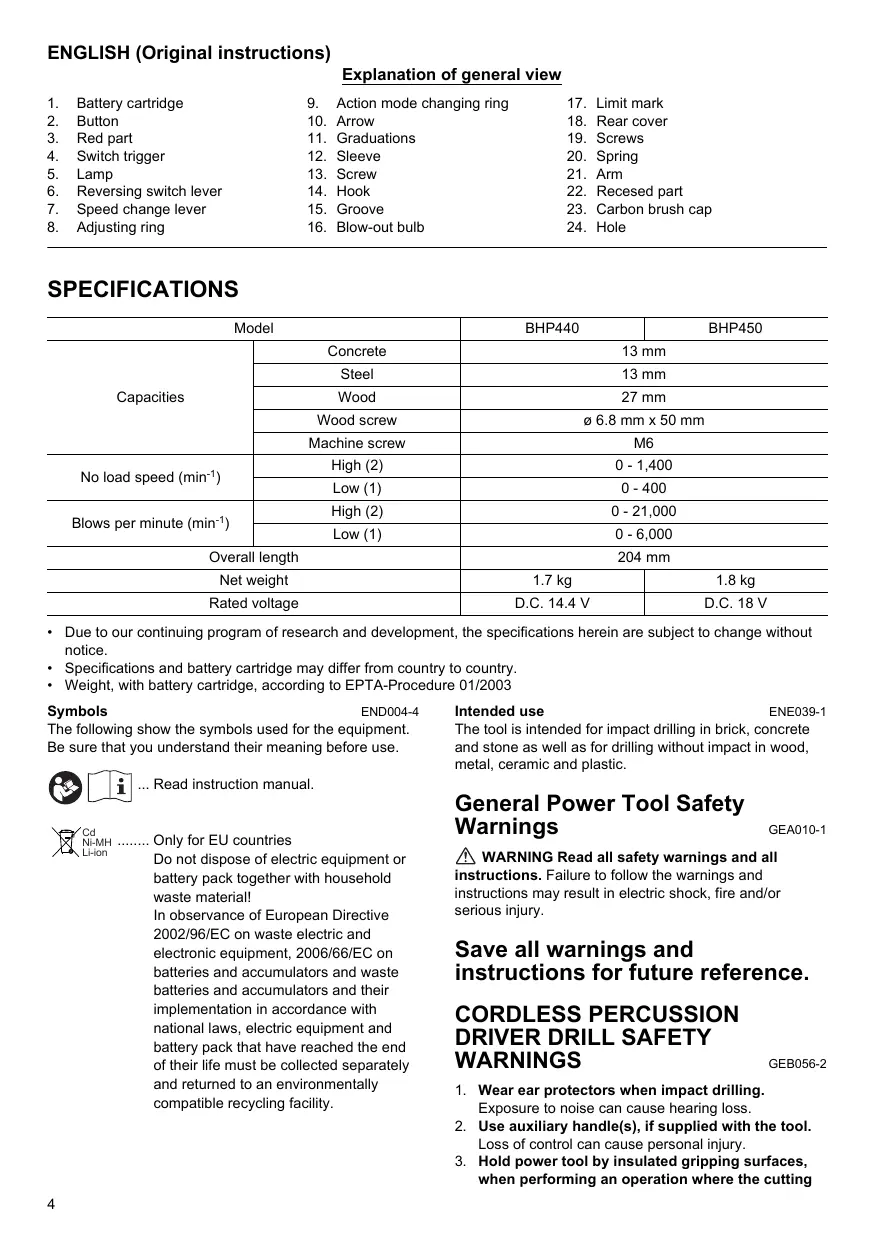
Explanation of general view
1. Battery cartridge 9. Action mode changing ring 17. Limit mark
2. Button 10. Arrow 18. Rear cover
SPECIFICATIONS Model BHP440 BHP450 Concrete 13 mm Steel 13 mm Capacities Wood 27 mm Wood screw 6 6.8 mm x 50 mm Machine screw M6 High (2) 0-1,400 No load speed (min!) Low (1) 0-400 High (2) 0-21,000 Blows per minute (min) Low (1) 0-6,000 Overall length 204 mm Net weight 17kg 1.8kg Rated voltage D.C.144V DC.18V + Due to our continuing program of research and development, the specifications herein are subject to change without notice. + Specifications and battery cartridge may differ from country to country. + Weight, with battery cartridge, according to EPTA-Procedure 01/2003 Symbols ENDO044 intended use ENE039-1 The following show the symbols used for the equipment. Be sure that you understand their meaning before use. @ [TA] Read instruction manual. Only for EU countries Do not dispose of electric equipment or battery pack together with household waste material! In observance of European Directive 2002/96/EC on waste electric and electronic equipment, 2006/66/EC on batteries and accumulators and waste batteries and accumulators and their implementation in accordance with national laws, electric equipment and battery pack that have reached the end of their life must be collected separately and returned to an environmentally compatible recycling facility. The tool is intended for impact drilling in brick, concrete and stone as well as for drilling without impact in wood, metal, ceramic and plastic. General Power Tool Safety Warnings À\ WARNING Read all safety warnings and all instructions. Failure to follow the warnings and instructions may result in electric shock, fire and/or serious injury. GEA010-1 Save all warnings and instructions for future reference. CORDLESS PERCUSSION
1. Wear ear protectors when impact drilling.
Exposure to noise can cause hearing loss.
2. Use auxiliary handle(s), if supplied with the tool.
Loss of control can cause personal injury.
3. Hold power tool by insulated gripping surfaces,
when performing an operation where the cutting GEBO56-2
accessory may contact hidden wiring. Cutting accessory contacting a “live” wire may make exposed metal parts of the power tool “live” and could give the operator an electric shock.
4. Always be sure you have a firm footing.
Be sure no one is below when using the tool in high locations.
5. Hold the tool firmly.
6. Keep hands away from rotating parts.
7. Do not leave the tool running. Operate the tool
only when hand-held.
8. Do not touch the bit or the workpiece immediately
after operation: they may be extremely hot and could burn your skin.
9. Some material contains chemicals which may be
toxic. Take caution to prevent dust inhalation and skin contact. Follow material supplier safety data. SAVE THESE INSTRUCTIONS.
DO NOT let comfort or familiarity with product (gained from repeated use) replace strict adherence to safety rules for the subject product. MISUSE or failure to follow the safety rules stated in this instruction manual may cause serious personal injury. IMPORTANT SAFETY INSTRUCTIONS
FOR BATTERY CARTRIDGE
1. Before using battery cartridge, read all
instructions and cautionary markings on (1) battery charger, (2) battery, and (3) product using battery. Do not disassemble battery cartridge. If operating time has become excessively shorter, stop operating immediately. It may result in a risk of overheating, possible burns and even an explosion.
4. Ifelectrolyte gets into your eyes, rinse them out
with clear water and seek medical attention right away. lt may result in loss of your eyesight.
5. Do not short the battery cartridge:
(1) Do not touch the terminals with any conductive material. (2) Avoid storing battery cartridge in a container with other metal objects such as nails, coins, etc. (8) Do not expose battery cartridge to water or rain. A battery short can cause a large current flow, overheating, possible burns and even a breakdown.
6. Do not store the tool and battery cartridge in
locations where the temperature may reach or exceed 50°C (122°F).
7. Do not incinerate the battery cartridge even if it is
severely damaged or is completely worn out. The battery cartridge can explode in a fire. Be careful not to drop or strike battery.
9. Do not use dropped or struck battery.
SAVE THESE INSTRUCTIONS. Tips for maintaining maximum battery life
1. Charge the battery cartridge before completely
discharged. Always stop tool operation and charge the battery cartridge when you notice less tool power.
2. Never recharge a fully charged battery cartridge.
Overcharging shortens the battery service life.
3. Charge the battery cartridge with room
temperature at 10°C - 40°C (50°F - 104°F). Let a hot battery cartridge cool down before charging it. FUNCTIONAL DESCRIPTION CAUTION: + Always be sure that the tool is switched off and the battery cartridge is removed before adjusting or checking function on the tool. Installing or remo: (Fig. 1) +_ Always switch off the tool before insertion or removal of the battery cartridge. To remove the battery cartridge, withdraw it from the tool while sliding the button on the side of the cartridge. To insert the battery cartridge, align the tongue on the battery cartridge with the groove in the housing and slip it into place. Always insert it all the way until it locks in place with a litle click. If you can see the red part on the upper side of the button, it is not locked completely. Insert it fully until the red part cannot be seen. If not, it may accidentally fall out of the tool, causing injury to you or someone around you. Do not use force when inserting the battery cartridge. If the cartridge does not slide in easily, it is not being inserted correctly. Switch action (Fig. 2) CAUTION: +_ Before inserting the battery cartridge into the tool, always check to see that the switch trigger actuates properly and retums to the “OFF” position when released To start the tool, simply pull the switch trigger. Tool speed is increased by increasing pressure on the switch trigger. Release the switch trigger to stop. g battery cartridge ighting up the front lamp (Fig. 3) CAUTION: + Do not look in the light or see the source of light directly. Pull the switch trigger to light up the lamp. The lamp keeps on lighting while the switch trigger is being pulled. The lamp goes out 10 -15 seconds after releasing the trigger. NOTE: + Use a dry cloth to wipe the dirt off the lens of lamp. Be careful not to scratch the lens of lamp, or it may lower the illumination.
Reversing switch action (Fig. 4) This tool has a reversing switch to change the direction of rotation. Depress the reversing switch lever from the À side for clockwise rotation or from the B side for counterclockwise rotation. When the reversing switch lever is in the neutral position, the switch trigger cannot be pulled CAUTION: Use the reversing switch only after the tool comes to a complete stop. Changing the direction of rotation before the tool stops may damage the tool. When not operating the tool, always set the reversing Switch lever to the neutral position. Speed change (Fig. 5) To change the speed, first switch off the tool and then slide the speed change lever to the “2” side for high speed or “1” side for low speed. Be sure that the speed change lever is set to the correct position before operation. Use the right speed for your job CAUTION: + Always set the speed change lever fully to the correct position. If you operate the tool with the speed change lever positioned halfway between the “1” side and “2” side, the tool may be damaged. + Do not use the speed change lever while the tool is running. The tool may be damaged. Selecting the action mode (Fig. 6) This tool employs an action mode changing ring. Select one ofthe three modes suitable for your work needs by using this ring. For rotation only, turn the ring so that the arrow on the tool body points toward the & mark on the ring For rotation with hammering, turn the ring so that the arrow points toward the 7} mark on the ring. For rotation with clutch, turn the ring so that the arrow points toward the {| mark on the ring. CAUTION: + Always set the ring correclly to your desired mode mark. If you operate the tool with the ring positioned halfway between the mode marks, the tool may be damaged. Adjusting the fastening torque (Fig. 7) The fastening torque can be adjusted in 16 steps by tuning the adjusting ring so that its graduations are aligned with the arrow on the tool body. The fastening torque is minimum when the number 1 is aligned with the arrow, and maximum when the number 16 is aligned with the arrow. Before actual operation, drive a trial screw into your material or a piece of duplicate material to determine which torque level is required for a particular application ASSEMBLY CAUTION: + Always be sure that the tool is switched off and the battery cartridge is removed before carrying out any work on the too. Always check the direction of rotation before operation. Installing or remo "er bit or drill bit (Fig. 8) Turn the sleeve counterclockwise to open the chuck jaws. Place the bit in the chuck as far as it will go. Turn the sleeve clockwise to tighten the chuck To remove the bit, turn the sleeve counterclockwise. Hook (Fig. 9) The hook is convenient for temporarilÿ hanging the too. This can be installed on either side of the tool. To install the hook, insert i into a groove in the tool housing on either side and then secure it with a screw. To remove, loosen the screw and then take it out OPERATION Hammer drilling operation CAUTION: + _ There is a tremendous and sudden twisting force exerted on the tool/bit at the time of hole break- through, when the hole becomes clogged with chips: and particles, or when striking reinforcing rods embedded in the concrete. First, tum the action mode changing ring so that the arrow on the tool body points to the marking. The adjusting ring can be aligned in any torque levels for this operation. Be sure to use a tungsten-carbide tipped bit. Position the bit at the desired location for the hole, then pull the switch trigger. Do not force the tool. Light pressure gives best results. Keep the tool in position and prevent it from slipping away from the hole. Do not apply more pressure when the hole becomes clogged with chips or particles. Instead, run the tool at an idle, then remove the bit partially from the hole. By repeating this several times, the hole will be cleaned out and normal drilling may be resumed. g di Blow-out bulb (optional accessory) (Fig. 10) After driling the hole, use the blow-out bulb to clean the dust out of the hole. Screwdriving operation (Fig. 11) First, tum the action mode changing ring so that the arrow on the tool body points to the f marking. Adjust the adjusting ring to the proper torque level for your work. Then proceed as follows. Place the point of the driver bit in the screw head and apply pressure to the tool. Start the tool slowly and then increase the speed gradually. Release the switch trigger as soon as the clutch cuts in. CAUTION: + Make sure that the driver bit is inserted straïght in the screw head, or the screw and/or bit may be damaged NOTE: + When driving wood screws, predrill pilot holes to make driving easier and to prevent splitting of the workpiece. See the chart.
Nominal diameter of wood | Recommended size of pilot screw (mm) hole (mm) 31 20-22 35 22-25 38 25-28 45 29-32 48 81-34 51 33-36 55 37-39 58 40-42 61 42-44 Drilling operation First, turn the adjusting ring so that the pointer points to the 3 marking. Then proceed as follows. CAUTION: Pressing excessively on the tool will not speed up the drilling. In fact, this excessive pressure will only serve t0 damage the tip of your bit, decrease the tool performance and shorten the service life of the tool. There is a tremendous force exerted on the tool/bit at the time of hole break through. Hold the tool firmly and exert care when the bit begins to break through the workpiece. À stuck bit can be removed simply by setting the reversing switch to reverse rotation in order to back out. However, the tool may back out abruptly if you do not hold it firm. Always secure small workpieces in a vise or Similar hold-down device. If the tool is operated continuously until the battery cartridge has discharged, allow the tool to rest for 15 minutes before proceeding with a fresh battery, Drilling in wood When diling in wood, the best results are obtained with wood dhills equipped with a guide screw. The guide screw makes driling easier by pulling the bit into the workpiece. Drilling in metal To prevent the bit from slipping when starting a hole, make an indentation with a center-punch and hammer at the point to be drilled. Place the point of the bit in the indentation and start drilling. Use a cutting lubricant when drilling metals. The exceptions are iron and brass which should be drilled dry. MAINTENANCE CAUTION: + Always be sure that the tool is switched off and the battery cartridge is removed before attempting to perform inspection or maintenance. + Never use gasoline, benzine, thinner, alcohol or the like. Discoloration, deformation or cracks may result Replacing carbon brushes Replace when they wear down to the limit mark. Keep the carbon brushes clean and free to slip in the holders. Both carbon brushes should be replaced at the same time. Use only identical carbon brushes. (Fig. 12) Use a screwdriver to remove two screws then remove the rear cover. (Fig. 13) Raise the arm part of the spring and then place it in the recessed part of the housing with a slotted bit screwdriver of slender shaft or the like. (Fig. 14) Use pliers to remove the carbon brush caps of the carbon brushes. Take out the worn carbon brushes, insert the new ones and replace the carbon brush caps in reverse. (Fig. 15) Make sure that the carbon brush caps have fit into the holes in brush holders securely. (Fig. 16) Reinstall the rear cover and tighten two screws securely. To maintain product SAFETY and RELIABILITY, repairs, any other maintenance or adjustment should be performed by Makita Authorized Service Centers, always using Makita replacement parts. ACCESSORIES CAUTION: +_ These accessories or attachments are recommended for use with your Makita tool specified in this manual The use of any other accessories or attachments might present a risk of injury to persons. Only use accessory or attachment for its stated purpose. If you need any assistance for more details regarding these accessories, ask your local Makita service center. + Drill bits Tungsten-carbide tipped hammer bit Philips bit Slotted bit Socket bit Blow-out bulb Safety goggles Various type of Makita genuine batteries and chargers Hook Rubber pad assembly Wool bonnet Foam polishing pad For Model BHP440 Noise ENG102-3 The typical A-weighted noise level determined according to EN60745 Sound pressure level (La): 81 dB (A) Sound power level (Lwa): 92 dB (A) Uncertainty (K): 3 dB (A) Wear ear protection. Vibration ENG203-2 The vibration total value (tri-axial vector sum) determined according to EN60745: Work mode: impact driling into concrete Vibration emission (a; 0): 8.0 m/s? Uncertainty (K): 1.5 m/s? ENG302-2 Work mode: drilling into metal Vibration emission (a;, 9): 2.5 m/s? or less Uncertainty (K): 1.5 m/s?
For Model BHP450 Noise ENG102-3 The typical A-weighted noise level determined according to EN60745: Sound pressure level (La): 82 dB (A) Sound power level (Lyg): 93 dB (A) Uncertainty (K): 3 dB (A) Wear ear protection. Vibration ENG203-2 The vibration total value (tri-axial vector sum) determined according to EN60745: Work mode: impact driling into concrete Vibration emission (ap): 8.5 m/s? Uncertainty (K): 1.5 m/s? ENG3022 Work mode: drilling into metal Vibration emission (a,,0): 2.5 m/s? or less Uncertainty (K): 1.5 m/s? ENG901-1 The declared vibration emission value has been measured in accordance with the standard test method and may be used for comparing one tool with another. The declared vibration emission value may also be used in a preliminary assessment of exposure. À\ WARNING: The vibration emission during actual use of the power tool can differ from the declared emission value depending on the ways in which the tool is used. Be sure to identify safety measures to protect the operator that are based on an estimation of exposure in the actual conditions of use (taking account of all parts of the operating cycle such as the times when the tool is switched off and when it is running idle in addition to the trigger time). For European countries only ENH101-14 EC Declaration of Conformity We Makita Corporation as the responsible manufacturer declare that the following Makita machine(s): Designation of Machine: Cordless Percussion-Driver Drill Model No./ Type: BHP440, BHP450 are of series production and Conforms to the following European Directives: 2006/42/EC And are manufactured in accordance with the following Standards or standardised documents: EN60745 The technical documentation is kept by our authorised representative in Europe who is: Makita International Europe Ltd., Michigan, Drive, Tongwell, Milton Keynes, MK15 8JD, England 30th January 2009
VEILIGHEIDSWAARSCHUWINGEN