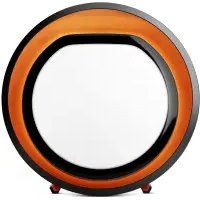
Halo - Lighting LUMIE - Free user manual and instructions
Find the device manual for free Halo LUMIE in PDF.


| Product type | LED desk lamp |
| Brand | Lumie |
| Model | Halo |
| Category | Lighting |
| Dimensions (L x W x H) | 45 x 15 x 10 cm |
| Weight | 1.2 kg |
| Power supply | USB-C power adapter 5V/2A |
| Power consumption | 10 W |
| Luminous flux | 800 lumens |
| Color temperature | 3000 K - 6500 K adjustable |
| Color rendering index (CRI) | > 80 |
| Functions | Continuous dimming, 3 lighting levels, memory setting, sleep mode |
| LED lifespan | 50,000 hours |
| Material | Aluminum and ABS plastic |
| Care and cleaning | Wipe with a soft, dry cloth. Do not use abrasive cleaners. |
| Safety | Overvoltage protection, automatic shut-off after 8 hours |
| Spare parts and repairability | Non-replaceable LEDs. Power adapter available separately. |
| General information | Indoor use only. Operating temperature: 0°C to 40°C. 2-year warranty. |
Frequently Asked Questions - Halo LUMIE
User questions about Halo LUMIE
0 question about this device. Answer the ones you know or ask your own.
Ask a new question about this device
Download the instructions for your Lighting in PDF format for free! Find your manual Halo - LUMIE and take your electronic device back in hand. On this page are published all the documents necessary for the use of your device. Halo by LUMIE.
USER MANUAL Halo LUMIE
Read instructions for use.

If the unit is damaged, contact Lumie before use.
Keep away from water and damp.
For indoor use only.


The unit gets warm when the light is on, so make sure that it is not covered.
Use only the mains power adaptor supplied.
Keep the mains power adaptor and cable away from heated surfaces. If either are damaged, they should be replaced with an approved Lumie product.
To power down or reset, remove the mains power adaptor from the wall socket. You should therefore ensure the socket is easily accessible.
Only to be used by adults and children over 7 years old. Children using the light, or playing near it, should be supervised.
Caution – do not attempt to service or modify any part of the unit.

If the unit has been stored outside the recommended operating temperature range (5 °C to 35 °C), allow it to stand for at least 1 hour before applying power to avoid condensation or overheating.
The light source contained in this luminaire shall only be replaced by Lumie or an authorised Lumie distributor.
Electromagnetic compatibility
Electrostatic discharge may affect the working of this product. If this occurs, simply switch off for at least 10 seconds and the unit will reset.
Halo uses a touch sensor as the main user interface to control the lights. In rare situations, external conditions may trigger the touch sensor. This occasionally leads to the lights varying in intensity or turning on or off, as if the user is activating the on/off button. If this happens, simply touch the slider or the on/off button to set the lights to the previous level. Halo will continue to operate normally and remains safe to use.
Disposal
Do not throw out the mains power adaptor or the unit with normal domestic waste. Take them to an official recycling point to be disposed of responsibly.

WARNING!
Check with your doctor before using this product if any of the following apply:
You have a major eye problem or have had eye surgery;
You have been advised to avoid bright light or are taking medication that may cause photosensitivity;
You have been diagnosed with depression or other mood/sleep disorders. This is especially important if you are also taking medication for this, since light therapy can affect your mood.
Introduction
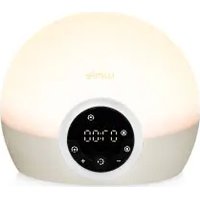
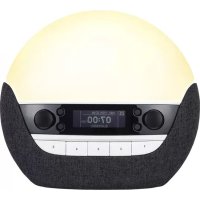
Halo is a multifunctional light therapy solution, designed to look good and optimise your wellbeing am-to-pm, all year round.
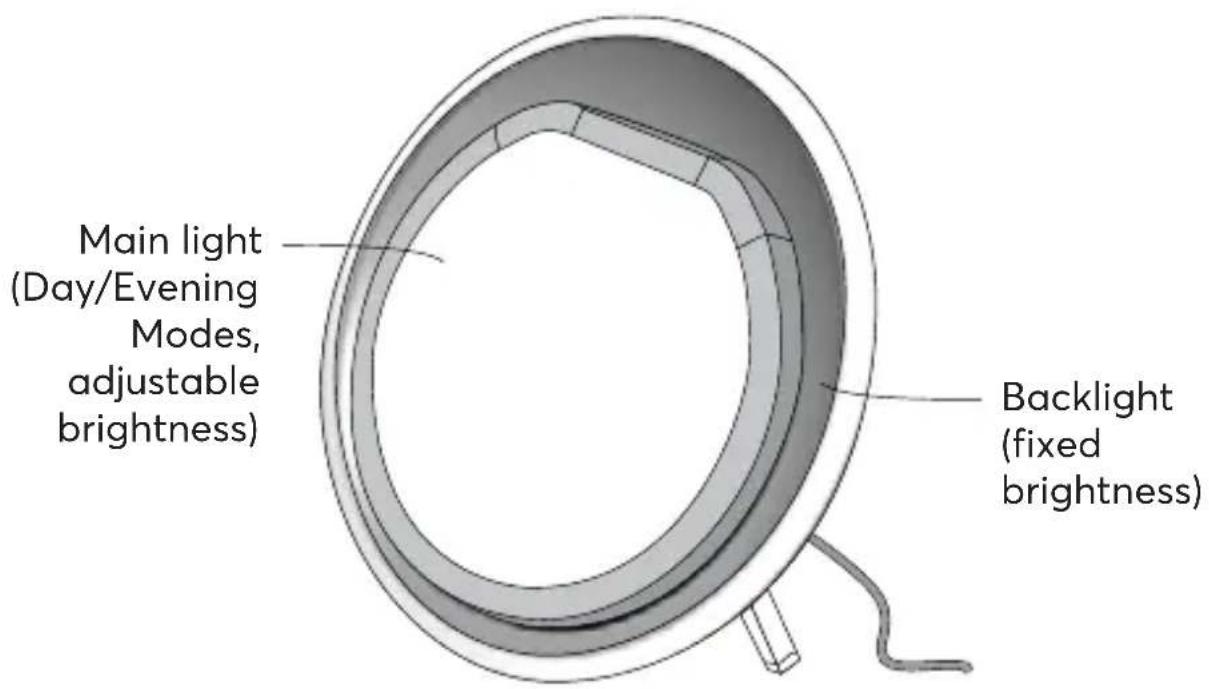
The main light has adjustable brightness and colour temperature, from bright white to help with daytime focus through to warmer tones for evening relaxation.
The backlight replicates the natural glow of dusk and dawn and allows you to create the perfect ambient lighting.
Main light in Day Mode
Day Mode utilises both the warm-white and cool-white LEDs, allowing you to vary the colour temperature and brightness to suit your needs. At maximum brightness, Halo delivers 10 000 lux at 20 cm, simulating the natural light of the spring sun. Choose Day Mode to feel more energised, boost your mood, performance, alertness and productivity or to help treat the symptoms of winter blues.
Adjustable brightness
Adjustable colour temperature: approx. 3000 K to 5000 K
Main light in Evening Mode
Evening Mode uses only warm-white LEDs with a lower colour temperature, creating a more natural home setting after sundown. Even at full brightness, the reduced blue-light content of Halo in Evening Mode makes it ideal for reading, socialising or simply relaxing before bedtime.
Adjustable brightness
Fixed colour temperature: approx. 3000 K
Backlight
The backlight provides further options for ambient lighting and can be used on its own or in addition to the main light. Warmer LEDs shine onto the copper-
coloured reflector to produce a soft glow around the main light.
Fixed brightness
Fixed colour temperature: approx. 2700 K
Please read these instructions carefully to get the most out of Halo.
Out of the box
Halo is supplied with two copper-coloured legs.
- Slide the legs onto the two posts at the back of the unit.
The legs attach magnetically and allow for some movement to naturally support the unit as you set it down.
Take care not to lose the legs when lifting the assembled unit.
To remove the legs, simply pull firmly.
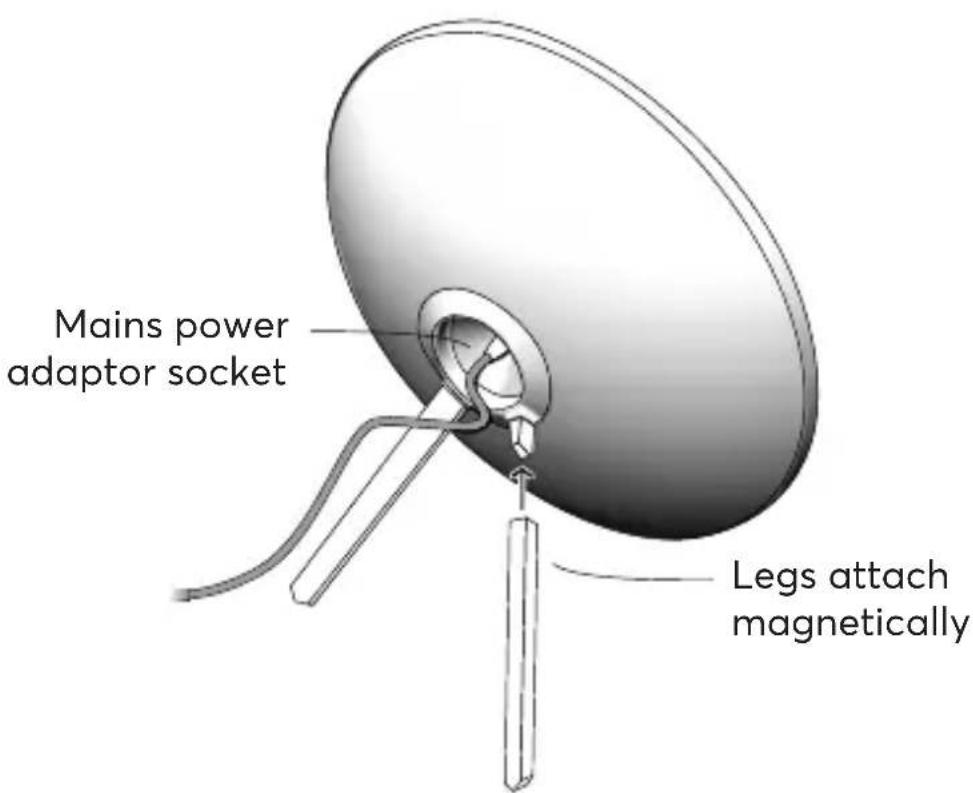
- Connect the mains power adaptor to the socket at the back of the unit.
- Position Halo on a flat surface.
- Plug in at the mains.
The Lumie touch interface briefly illuminates whilst the touch sensor is calibrating.
Halo is now ready to use.
Note: If you are using Halo and the touch interface doesn't seem to be working properly, repeat the last steps and make sure you don't press the touch interface whilst the touch sensor is calibrating.
Lighting controls
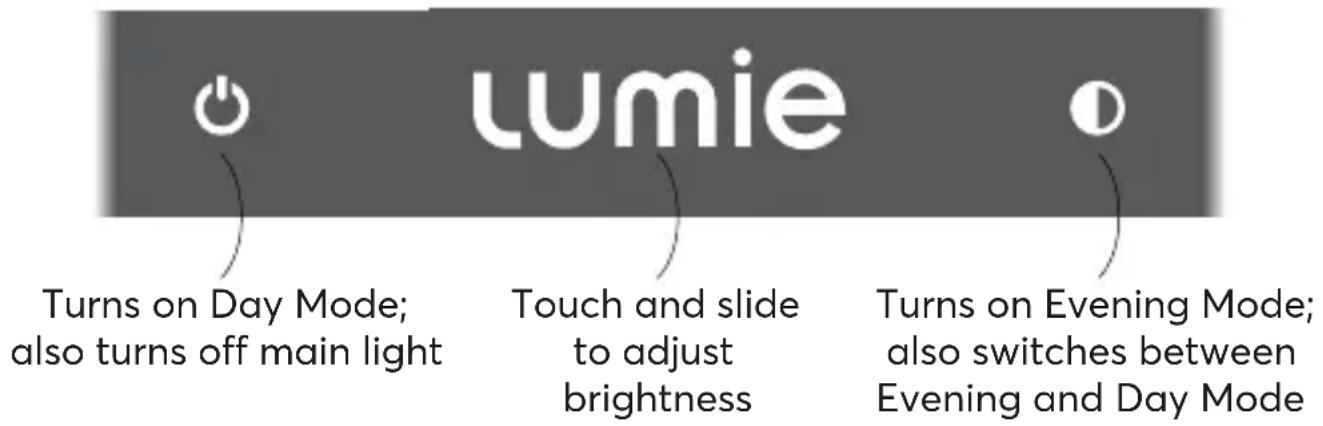
The main light Day and Evening Modes are controlled by the touch interface:
Using Day Mode
- Touch

This turns on the main light in Day Mode and also the backlight.
Day Mode offers variable colour temperature and brightness to suit your needs throughout the day. At maximum brightness, the cool-white light is ideal for bright light therapy.
- Touch ⏻ to turn off both lights.
See also Using the backlight.
Using Evening Mode
- Touch
This turns on the main light in Evening Mode and also the backlight.
The reduced blue-light content of Evening Mode is warmer and ideal for use later in the day or close to bedtime. The maximum brightness is also reduced.
- Touch ⏻ to turn off both lights.
See also Using the backlight.
Switching between Evening and Day Mode
- Touch
- is illuminated when in Evening Mode and you'll see that the light is more yellow.
Adjusting the brightness
- Touch and slide across lumie
The letters illuminate from left to right to indicate increasing brightness.
In Day Mode this also adjusts the colour temperature.
Using the backlight
- Touch and at the same time to turn off the backlight only.
The backlight is a fixed brightness light for ambient illumination. You can have the backlight on with or without the main light.
- Touch ⏻ and Ⓑ at the same time to turn on the backlight only.
Day Mode for bright light therapy
Sunlight is a natural mood-booster, influencing body chemistry (e.g. melatonin and serotonin levels), making you feel more awake and positive. If you're not getting enough exposure to daylight, Halo is the next best thing and is available all year round.
- Make sure the main light is in Day Mode and at maximum brightness.
- Position Halo at arm's length (about 50 cm) with the light shining towards your face.
Although you don't need to stare at it, the light must reach your eyes to have any effect. This means you can use Halo whilst working on your laptop, eating lunch, watching TV, reading, etc.
How often?
For wellbeing support
When you're indoors, use Halo in Day Mode to simulate sunlight. A bright light session works quickly and naturally to improve mood, energy, focus and performance whilst daily use can encourage a more regular sleep-wake pattern.
For winter blues
Look out for early signs of winter blues in Sept/Oct and if you start feeling more tired, anxious or irritable, start using Halo in Day Mode. As spring comes around, you can cut back on your bright light sessions. If symptoms return, simply use Halo again for a few days.
When?
If you're using Halo in Day Mode to help with the winter blues, bright light in the morning is most effective so try that first. For some people, early evening light exposure is beneficial.
I find it difficult to get going in the morning
Switch on Halo in Day Mode as soon as you can. If you don't have much time in the morning, then you should aim for a top-up or full session in the afternoon.
I feel sleepy or fall asleep too early
Use Halo in Day Mode in the late afternoon/early evening. It's best to avoid bright light too close to bedtime – within about three hours – as you may find it difficult to get to sleep.
How long?
In Day Mode, with the light at full brightness, you're getting the maximum benefit so position Halo at arm's length (approx. 50 cm) and start with 30 minutes a day (3 000 lux).
You may find this is enough but if you don't notice much of an effect, increase your exposure each day until you find something that works for you.
If you're more comfortable with Halo positioned further away, then less light will reach your eyes and you'll need to use it for longer.
Similarly, if you're using Day Mode at reduced brightness, then less light will reach your eyes and you'll need to use it for longer.
There's no harm in using the light for longer than suggested. You can get your bright light therapy all in one go or use Halo on-and-off throughout the day for a cumulative effect.
Avoid using Day Mode at full brightness close to bedtime. Reduce the brightness or, better still, switch to Evening Mode with its less stimulating light tones.
If you find your eyes ache slightly, try using it further away, reduce the brightness or switch off for a while.
Whether you're using Halo for winter blues, or for general wellbeing, once you've found a pattern that's right for you try to use it around the same time every day.
Maintenance
Clean only with a dry or lightly moistened cloth.
Always unplug the unit first and let it cool if necessary.
Replacement mains power adaptors are available from Lumie.
LED lifetime
The LEDs in this product will typically last for many years, even with several hours use a day.
Warranty
This unit is covered under warranty against any manufacturing defect for 3 years from the date of purchase. This is in addition to your statutory rights. If you need to return the product for servicing, use the original packaging (including internal packing) if possible. Make sure the mains power adaptor is prevented from moving in transit and damaging the unit. If the unit is received damaged, through misuse or accidental damage, then we may have to charge to repair it; we will contact you first. Please contact Lumie for further advice.

Serial number (see back of unit)

Importer
Technical description
Subject to change without notice.
Lumie Halo
Detachable accessory: Mains power adaptor (supplied) Input: 100–240 V AC, 50/60 Hz, 0.85 A max.; Output: 19 V == 1.6 A (30.4 W)
Operating conditions:
Temperature: 5 °C to 35 °C
Relative humidity: 15% to 93% (non-condensing)
Atmospheric pressure: 70 kPa to 106 kPa
Storage/transport conditions:
Temperature: -25 °C to +70 °C
Relative humidity: 15% to 93% (non-condensing)
Atmospheric pressure: 25 kPa to 106 kPa
This product contains a light source of energy efficiency class E.

European Declaration of Conformity

UK Conformity Assessed
Contact us
If you have any questions or problems regarding this product, or have suggestions that you feel could help us improve our products or service please email info@lumie.com.

Outside In (Cambridge) Limited, 3 The Links,
Trafalgar Way, Bar Hill, Cambridge, CB23 8UD, UK.
Lumie is a registered trademark of:
Outside In (Cambridge) Limited, incorporated in England and Wales.
Registered Number: 2647359.
VAT No:
GB 880 9837 71 (UK)
NL 826301381B01 (EU)
lumie®
halo ^TM
Sécurité
Description technique
Outside In (Cambridge) Limited, 3 The Links,
Trafalgar Way, Bar Hill, Cambridge, CB23 8UD, UK.
Outside In (Cambridge) Limited, 3 The Links,
Trafalgar Way, Bar Hill, Cambridge, CB23 8UD, UK.
Outside In (Cambridge) Limited, 3 The Links, Trafalgar Way, Bar Hill, Cambridge, CB23 8UD, UK.
Outside In (Cambridge) Limited, 3 The Links,
Trafalgar Way, Bar Hill, Cambridge, CB23 8UD, UK.
Outside In (Cambridge) Limited, 3 The Links,
Trafalgar Way, Bar Hill, Cambridge, CB23 8UD, UK.
Outside In (Cambridge) Limited, 3 The Links, Trafalgar Way, Bar Hill, Cambridge, CB23 8UD, UK.
Outside In (Cambridge) Limited, 3 The Links,
Trafalgar Way, Bar Hill, Cambridge, CB23 8UD, UK.
Outside In (Cambridge) Limited, 3 The Links,
Trafalgar Way, Bar Hill, Cambridge, CB23 8UD, UK.
Lumie er et registret varemerke for:
Outside In (Cambridge) Limited, 3 The Links,
Trafalgar Way, Bar Hill, Cambridge, CB23 8UD, UK.
Outside In (Cambridge) Limited, 3 The Links,
Trafalgar Way, Bar Hill, Cambridge, CB23 8UD, UK.
Lumie is a registered trademark of:
Outside In (Cambridge) Ltd
3 The Links, Trafalgar Way
Bar Hill
Cambridge CB23 8UD
UK
© Lumie 2022
Hi2210

- Electromagnetic compatibility
- Disposal
- WARNING!
- Introduction
- Main light in Day Mode
- Main light in Evening Mode
- Backlight
- Out of the box
- Lighting controls
- Using Day Mode
- Using Evening Mode
- - Touch
- Switching between Evening and Day Mode
- Adjusting the brightness
- Using the backlight
- Day Mode for bright light therapy
- How often?
- For wellbeing support
- For winter blues
- When?
- I find it difficult to get going in the morning
- I feel sleepy or fall asleep too early
- How long?
- Maintenance
- LED lifetime
- Warranty
- Technical description
- Lumie Halo
- Contact us
- lumie®
- halo TM
- Sécurité
- Description technique
Brand : LUMIE
Model : Halo
Category : Lighting