
CX2120 - Heating PHILIPS - Free user manual and instructions
Find the device manual for free CX2120 PHILIPS in PDF.


 FR
FR
 BG
BG
 CS
CS
 DA
DA
 DE
DE
 EL
EL
 EN
EN
 ES
ES
 ET
ET
 FI
FI
 HU
HU
 IT
IT
 KO
KO
 LT
LT
 LV
LV
 MK
MK
 NL
NL
 NO
NO
 PL
PL
 PT
PT
 RO
RO
 SK
SK
 SL
SL
 SQ
SQ
 SV
SV
 TR
TR
 UK
UK
 ZH
ZH
| Product type | Electric fan heater |
| Brand | Philips |
| Model | CX2120 |
| Dimensions (W x H x D) | 30 x 25 x 15 cm |
| Weight | 2,2 kg |
| Power supply | 220-240 V, 50/60 Hz |
| Maximum power | 2000 W |
| Power settings | 3 levels (low, medium, high) |
| Thermostat | Electronic, adjustable |
| Timer | Yes, 1 to 8 hours |
| Oscillation function | Yes, horizontal rotation |
| Silent mode | Yes (night) |
| Anti-tilt safety | Yes, automatic shut-off |
| Overheat protection | Yes, with thermal cut-off |
| Air filter | Washable, removable |
| Maintenance | Clean filter every month |
| Noise level | 45 dB (max) |
| Spare parts | Available at Philips |
| Warranty | 2 years |
Frequently Asked Questions - CX2120 PHILIPS
User questions about CX2120 PHILIPS
0 question about this device. Answer the ones you know or ask your own.
Ask a new question about this device
Download the instructions for your Heating in PDF format for free! Find your manual CX2120 - PHILIPS and take your electronic device back in hand. On this page are published all the documents necessary for the use of your device. CX2120 by PHILIPS.
USER MANUAL CX2120 PHILIPS
English 4
Czech 12
Danish 20
German 28
Estonian 37
Spanish 45
French 53
Croatian 61
Italian 69
Latvian 78
Lithuanian 86
Hungarian 94
Dutch 102
Norwegian 110
Polish 118
Portuguese 127
Romanian 135
Albanian 143
Slovenian 151
Slovak 159
Serbian 167
Finnish 175
Swedish 183
Turkish 191
Greek 199
Bulgarian 208
Macedonian 216
Ukrainian 224
Traditional Chinese 232
Korean 239
Arabic 247
4 English
Important
Read this important information booklet carefully before you use the appliance, and save it for future reference.
Danger
- Do not let any liquid or flammable detergent enter the appliance, to avoid electric shock and/or a fire hazard.

- In order to avoid overheating and fire, do not cover the device.
Warning
- Some parts of this product can become very hot and cause burns. Continuous supervision has to be given where children and vulnerable people are present.
- This appliance can be used by children aged from 8 years and above and persons with reduced physical, sensory or mental capabilities or lack of experience and knowledge if they have been given supervision or instruction concerning use of the appliance in a safe way and understand the hazards involved.
- Children aged from 3 years and less than 8 years shall only switch on/off the appliance provided that it has been placed or installed in its intended normal operating position and they have been given supervision or instruction concerning use of the appliance in a safe way and understand the hazards involved.
- Children aged from 3 years and less than 8 years shall not plug in, regulate and clean the appliance or perform user maintenance.
- Children of less than 3 years should be kept away unless continuously supervised.
- Children shall not play with the appliance.
- Cleaning and maintenance shall not be made by children without supervision.
- Do not use this heater in small rooms when they are occupied by persons not capable of leaving the room on their own, unless constant supervision is provided.
- When device working in heating mode, the surface temperature will gradually increase. Do not touch the air outlet to avoid being burn.
- To reduce the risk of fire, keep textiles, curtains, beddings or any other flammable material a minimum distance of 1 m from the air outlet. Do not block the air inlet and outlet, e.g. by placing items on the air outlet or in front of the air inlet.
- Do not insert fingers, sticks or other objects into the machine, in order to avoid electric shocks, physical injury or fire.
- Device has heating component. Do not use the appliance near gas appliances, fireplaces.
- Do not spray any flammable materials such as insecticides or fragrance around the appliance.
- Do not use if there are visible signs of damage to the device, the plug, the power cord.
- Do not use this device if it has been dropped.
- If the power cord is damaged, you must have it replaced by Philips, a service center authorized by Philips, or similarly qualified persons in order to avoid a hazard.
- Ensure the appliance plug is tightly inserted into the electrical outlet to keep your appliance in perfect condition. A loose fit between the AC outlet and the plug could cause overheating and distortion of the plug. Contact a certified electrician to replace a loose or worn outlet.
Caution
- In order to avoid a hazard due to inadvertent resetting of the thermal cut-out, this appliance must not be supplied through an external switching device, such as a timer, or connected to a circuit that is regularly switched on and off by the utility.
- The device must not be located immediately below a socket outlet.
- Only plug into a wall socket; do not use an extension cord.
- Always place and use the appliance on a dry, stable, and horizontal surface.
- Do not use the appliance in surroundings with high humidity such as the bathroom, toilet, kitchen, swimming pool, or any outdoor environment.
- Do not sit or stand on the appliance. Do not knock against the appliance. Do not place anything on top of the appliance.
- Always unplug the appliance when you want to move, clean, or carry out other maintenance on it.
- The appliance is only intended for household use under normal operating conditions.
Electromagnetic fields (EMF)
This appliance complies with the applicable standards and regulations regarding exposure to electromagnetic fields.
Recycling

This symbol means that this product shall not be disposed of with normal household waste (2012/19/EU).
Follow your country's rules for the separate collection of electrical and electronic products. Correct disposal helps prevent negative consequences for the environment and human health.
Your heater
Product overview

A Control panel B Air outlets
Controls overview

Power on/off button Mode switch button
Low mode High mode
Auto low mode Auto medium mode
Auto high mode
Using your heater
Turning on and off

1 Put the plug in the power socket.

2 Press the button to switch on the heater. The appliance beeps once. - The power indicator is on.

3 Press the button again to switch off the heater. - The power indicator is off.
Switching the mode
Press the mode switch button to choose between Low mode, High mode, or Auto mode.

Avoid touching the air outlet as it may be hot.
Low mode: When in low mode, your device provides you with a slight, comfortable heated breeze.


High mode: High speed, quick results. When your device is in high speed mode, it operates at the highest speed for powerful, rapid heating of the air in your room.
Auto low mode: The heater automatically adjusts the heating power to maintain the ambient temperature around 18-20°C. It turns on and off by itself based on room conditions.
Auto medium mode: The heater automatically adjusts the heating power to maintain the ambient temperature around 21-23°C. It turns on and off by itself based on room conditions.
Auto high mode: The heater automatically adjusts the heating power to maintain the ambient temperature around 24-26°C. It turns on and off by itself based on room conditions.
Cleaning and maintenance
Always unplug the appliance before cleaning it.
Never immerse the appliance in water or any other liquid.
Never use abrasive, aggressive, or flammable cleaning agents such as bleach or alcohol to clean any part of the appliance.

Regularly clean the outside of the heater to prevent dust from collecting.
- Use a soft, dry cloth to clean both the exterior of the appliance and the air outlet.
Storage
1 Turn off the appliance and unplug from the power socket. 2 Clean the appliance. 3 Store the appliance in a cool, dry location. 4 Always thoroughly wash hands after cleaning.
Troubleshooting
This chapter summarizes the most common problems you could encounter with the appliance. If you are unable to solve the problem with the information below, contact the Consumer Care Center in your country.
Problem Possible solution
| My heater fails to turn on or off. If the appliance can't be turned on, please ensure the power plug is plugged in properly or try another power socket. |
| If the appliance still doesn't work, contact the Consumer Care Center in your country. |
| Ensure all the air inlet and outlet grilles are unobstructed. |
| The heater produces a strange/burnt smell. The first few times you use the appliance, it may produce a plastic smell. This is normal on new appliance. However, if the appliance produces a burnt smell, turn off the appliance and unplug immediately, then contact the Consumer Care Center in your country. |
| My heater is too loud. The higher the fan speed setting of the appliance, the louder the noise will be. Set to lower fan speed, the noise will be reduced. |
| If there is abnormal sound, contact the Consumer Care Center in your country. |
| The heater base is wobbly or vibrating. Check if the appliance is placed on the flat floor or surface. |
Warranty and support
Versuni offers a two-year warranty after purchase on this product. This warranty is not valid if a defect is due to incorrect use or poor maintenance. Our warranty
does not affect your rights under law as a consumer. For more information or for invoking the warranty, please visit our website www.philips.com/support.
2 Press the button to turn on the heater. The device will beep once.

2 Press the button to turn on the heater. The device will beep once. - The power indicator is on.

High mode: High speed, quick results. When the device is in high speed mode, it operates at maximum speed for powerful, rapid heating of the air in the room.
Automatic low mode: The heater automatically adjusts the heating power to maintain the ambient temperature at approximately 18-20 °C. It turns on and off based on the conditions in the room.
Automatic medium mode: The heater automatically adjusts the heating power to maintain the ambient temperature at approximately 21-23°C. It turns on and off based on the conditions in the room.
Automatic high mode: The heater automatically adjusts the heating power to maintain the ambient temperature at approximately 24-26°C. It turns on and off based on the conditions in the room.
Regularly clean the exterior of the heater to prevent dust accumulation.
- Use a soft, dry cloth to clean the exterior of the appliance and the air outlet.
Storage
1 Unplug the appliance from the power outlet.
82 Latvian

| Maitinimo jjungimo / išjungimo mygtukas | Režimo perjungimo mygtukas | |
| Silpno veikimo režimas Stipraus veikimo režimas | ||
| Automatinis silpno veikimo režimas Automatinis vidutinio veikimo režimas | ||
| Automatinis stipraus veikimo režimas | ||
| Av/på-knapp Bytte modus-knapp | ||
| Lavt modus Høyt modus | ||
| Automatisk lavt modus Automatisk middelgmodus | ||
| Automatisk høyt modus | ||
Using the heater
Turning on and off

2 Press the button to turn on the heater. The appliance beeps continuously. - The power indicator is on.

Power button Mode selection button
1 Plug the plug into an electrical outlet.

2 Press the power button to turn on the heater. The appliance beeps once.
- The power indicator lights up.

3 To turn off the heater, press the button again.
- The power indicator is off.
Mode switching
Regularly clean the outside of the heater to prevent dust from accumulating.
Power button Mode button
2 Press the button to turn on the heater. The appliance will emit one beep. - The power indicator is on.

3 Press the button again to turn off the heater. - If the power indicator is off.
Changing modes
Powerful mode: High speed, quick results. When the device is in high-speed mode, it operates at maximum speed for powerful, rapid heating of the air in the room.
Automatic low mode: The heater automatically adjusts the heating power to maintain an ambient temperature of around 18–20 °C. It automatically turns on and off according to the conditions in the room.
Automatic medium mode: The heater automatically adjusts the heating power to maintain an ambient temperature of around 21–23 °C. It automatically turns on and off according to the conditions in the room.
Automatic high mode: The heater automatically adjusts the heating power to maintain an ambient temperature of around 24–26 °C. It automatically turns on and off according to the conditions in the room.
Regularly clean the outside of the heater to prevent dust from accumulating.
- Clean the outside of the appliance and the air outlet with a soft, dry cloth.
Storage
1 Turn off the appliance and unplug it from the wall outlet. 2 Clean the appliance. 3 Store the appliance in a cool, dry place. 4 Always wash your hands thoroughly after cleaning.
Troubleshooting
This chapter briefly lists the most common problems that may occur with the appliance. If you cannot solve the problem with the help of the list of possible problems below, contact the customer support center in your country.
1 Insert the plug into the socket.
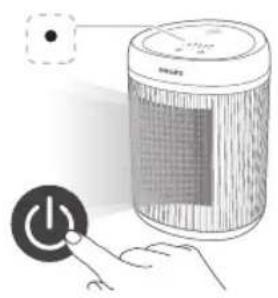
1 Insert the plug into the power socket.

3 Press the button again to turn off the fan heater.
- The power indicator will turn off.
Switch modes
Since the exhaust outlet may become very hot, avoid touching it.

PHILIPS and the Philips Shield Emblem are registered trademarks of Koninklijke Philips N.V. and are used under license.
This product has been manufactured by and is sold under the responsibility of Versuni Holding B.V., and Versuni Holding B.V. is the warrantor in relation to this product.
2024 © Versuni Holding B.V.

- ENGLISH
- IMPORTANT
- DANGER
- WARNING
- CAUTION
- ELECTROMAGNETIC FIELDS (EMF)
- RECYCLING
- YOUR HEATER
- PRODUCT OVERVIEW
- CONTROLS OVERVIEW
- USING YOUR HEATER
- TURNING ON AND OFF
- SWITCHING THE MODE
- CLEANING AND MAINTENANCE
- STORAGE
- TROUBLESHOOTING
- WARRANTY AND SUPPORT
- LATVIAN
- USING THE HEATER
- MODE SWITCHING
- CHANGING MODES
- SWITCH MODES
Brand : PHILIPS
Model : CX2120
Category : Heating