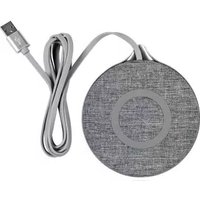
SQWC A2 - Phone charger SILVERCREST - Free user manual and instructions
Find the device manual for free SQWC A2 SILVERCREST in PDF.


| Product Type | Wireless Phone Charger |
| Model | SQWC A2 |
| Brand | SilverCrest |
| Input Voltage | 5V / 2A or 9V / 2A |
| Output Power | Up to 10W (compatible with 5W, 7.5W, 10W Qi devices) |
| Charging Standard | Qi-compatible |
| Dimensions (approx.) | 100 x 100 x 15 mm |
| Weight | Approx. 90 g |
| Material | ABS plastic with silicone anti-slip ring |
| Color | Black |
| LED Indicator | Blue LED: charging status (on when charging, off when full or no device) |
| Protection Features | Overcharge protection, foreign object detection, temperature control |
| Compatible Devices | All Qi-enabled smartphones (iPhone, Samsung, Huawei, etc.) |
| Cable Included | Yes, USB-A to USB-C cable (approx. 1 m) |
| Power Adapter | Not included (recommended: 5V/2A or 9V/2A adapter) |
| Maintenance | Clean with a soft, dry cloth; avoid liquids and abrasive cleaners |
| Safety Instructions | Keep away from liquids; do not cover with metal objects; ensure proper ventilation |
| Spare Parts / Repairability | Not designed for user repair; no spare parts available; dispose of according to local e-waste regulations |
| Certifications | CE, Qi certified |
Frequently Asked Questions - SQWC A2 SILVERCREST
User questions about SQWC A2 SILVERCREST
0 question about this device. Answer the ones you know or ask your own.
Ask a new question about this device
Download the instructions for your Phone charger in PDF format for free! Find your manual SQWC A2 - SILVERCREST and take your electronic device back in hand. On this page are published all the documents necessary for the use of your device. SQWC A2 by SILVERCREST.
USER MANUAL SQWC A2 SILVERCREST
Operation and Safety Notes
FI
Operation and Safety Notes Page 5
FI
Warnings and symbols used .... Page 6
Introduction Page 8
Intended use...... Page 8
Trademark notices...... Page 9
Safety notes...... Page 9
Description of parts ...... Page 12
Technical data ...... Page 13
Scope of delivery ...... Page 14
Before use ...... Page 14
Operation Page 15
Troubleshooting Page 18
Storage when not in use ...... Page 19
Cleaning Page 20
Disposal Page 20
Simplified EU declaration of conformity...... Page 21
Warrenty and service...... Page 22
Warranty Page 22
Warranty claim procedure...... Page 23
Service Page 23
| Warnings and symbols usedThese instructions for use contain the following symbols and warnings: | |
 | DANGER! This symbol with the signal word “DANGER” indicates a hazard with a high level of risk which, if not avoided, will result in serious injury or death. |
 | WARNING! This symbol with the signal word “WARNING” indicates a hazard with a medium level of risk which, if not avoided, could result in serious injury. |
 | CAUTION! This symbol with the signal word “CAUTION” indicates a hazard with a low level of risk which, if not avoided, could result in minor or moderate injury. |
 | ATTENTION! This symbol with the signal word" ATTENTION" indicates a potential property damage, if not avoided, could result in property damage. |
 | NOTE: This symbol with the signal word "NOTE" provides additional useful information. |
 | Direct current / voltage |
 | "Qi" and the Qi logo mark are trademark of the Wireless Power Consortium (WPC). |
 | This symbol means that the operating instructions must be observed before using the product. |
WIRELESS QI CHARGER
●Introduction
We congratulate you on the purchase of your new product. You have chosen a high quality product. The instructions for use are part of the product. They contain important information concerning safety, use and disposal. Before using the product, please familiarise yourself with all of the safety information and instructions for use. Only use the product as described and for the specified applications. If you pass the product on to anyone else, please ensure that you also pass on all the documentation with it.
Intendeduse
The WIRELESS QI CHARGER (hereinafter referred to as the „Product“) is an information electronics device. This product is only for charging mobile devices that use Qi technology. Other devices cannot be charged with the product. The product is intended for private use only and not for commercial use. The manufacturer accepts no liability for damage resulting from unauthorised modifications or improper use.
●Trademark notices
■ ® is USB Registered trademark of USB Implementers Forum, Inc.
■ "Qi" and the Qi logo mark are trademark of the Wireless Power Consortium (WPC).
The SilverCrest trademark and trade name is property of their respective owners.
■ Any other names and products are trademark or registered trademarks of their respective owners.

Safetynotes
Before using the product, please familiarize yourself with all of the safety instructions and instructions for use! When passing this product on to others, please also include all the documents!
WARNING! DANGER TO LIFE AND RISK OF ACCIDENT FOR INFANTS AND CHILDREN!
⚠️ DANGER! RISK OF SUFFOCATION!
Never leave children unsupervised with the packaging material. The packaging material poses a suffocation hazard. Children frequently underestimate the dangers. The packaging material is not a toy.
This appliance can be used by children aged from 8 years and above and persons with reduced physical, sensory or mental capabilities or lack of experience and knowledge if they have been given supervision or instruction concerning use of the appliance in a safe way and understand the hazards involved. Children shall not play with the appliance. Cleaning and user maintenance shall not be made by children without supervision. The product is not a toy.
ATTENTION! Damage to property
- Check the product before every use! Discontinue use if any damage to the product or the connection cable is detected!
This product does not contain any parts which can be serviced by the user.
- Keep the product away from moisture, dripping and splash water!
- Do not place burning candles or other open fire on or next to the product.
If you notice smoke or unusual noise or odour, immediately disconnect the USB connection.
■ Sudden temperature changes may cause condensation inside the product. In this case, allow the product to acclimate for some time before using it again to prevent short circuits!
- Do not operate the product near heat sources e.g. radiators or other devices emitting heat!
- Do not throw the product into fire and do not expose to high temperatures.
- Never open the product. It has no internal part requiring maintenance.
The product must not be covered during operation, no foreign objects may be introduced into the product, no foreign objects may lie on the Qi charging surface during operation.
The product must not be charged at a PC or notebook due to the high power consumption.

ATTENTION! Radio interference
- Do not use the product on aeroplanes, in hospitals, service rooms, or near medical electronic systems. The wireless signals transmitted could impact the functionality of sensitive electronics.
- Keep the product at least 20 cm from pacemakers or implantable cardioverter defibrillators, as the electromagnetic radiation may impair the functionality of pacemakers.
■ The radio waves transmitted could cause interference in hearing aids.
■ Never use the product near flammable gases or potentially explosives areas (e.g. paint shops), as the radio waves emitted can cause explosions and fire.
The OWIM GmbH & Co KG is not responsible for interference with radios or televisions due to unauthorised modification of the product. The OWIM GmbH & Co KG further assumes no liability for using or replacing cables and products not distributed by OWIM.
The user of the product is solely responsible for rectifying malfunctions caused by unauthorized changes to the product and the replacement of such modified products.
●Description of parts
Please refer to the fold out page.
1 Qi Charging area 1
2 LED indicator 1
3 LED indicator 2
4 Qi Charging area 2
5 USB type C input socket
6 USB type A plug
7 USB charging cable
8 USB type C plug
9 Instructions for use
●Technical data
Dimensions: approx.
180 × 85 × 8 mm
Weight: approx. 130 g
Operating temperature: 5 - 35 °C
Storage temperature: 0 - 45 °C
Humidity(no condensation): 10 - 70 %
USB charging cable length: approx. 1 m
Input: 5 V —— 3 A
Output: 2 x 5 W max.
OR
| Input: 9 V | 3 A / |
| 12 V | 2.25 A / |
| 15 V | 2 A |
Output: 2 x 10 W Max.
Total power: 20 W max.*
Frequency band: 111-128 kHz
Transmitted maximum radio
frequency power (H-field): -0.66 dBuA/m at 10m distance
Maximum distance between charger and mobile device: ≤ 5 mm
* i NOTE: Please use a USB charging cable type C to type C and a charger with 30 W output for 20 W output power. Both accessories are not included. (Only USB charging cable type A to type C is included.)
The specification and design may be changed without notification.
- Scope of delivery
1 Wireless Qi charger
1 USB charging cable
1 Instructions for use
●Before use

NOTE:
Before use, verify the package contents are complete and undamaged!
All parts have to be unpacked and the packaging material has to be removed completely.
If you notice any damage or missing parts, contact the dealer who sold this product.
Operation
⚠️ ATTENTION! The product must not be charged at a PC or notebook due to the high power consumption.
i NOTE:
The product only supports devices with Qi wireless technology.
Charge your device
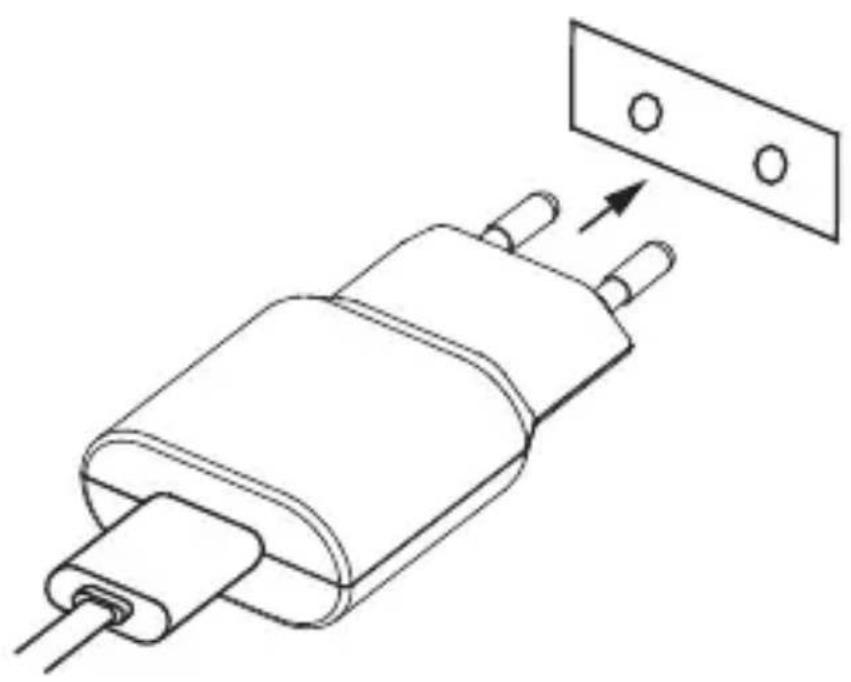
- Plug the USB type A plug 6 of the USB charging cable 7 into the USB port on a suitable USB adapter (not included) and plug the USB type C plug 8 into USB type C input socket 5 of the product.

- Plug the USB adapter (not included) into an easily accessible mains socket.
-
LED indicator 1 2 and 2 3 will light up white when the product is under standby mode and there no mobile device on the Qi charging surface 1 or 2 4.
-
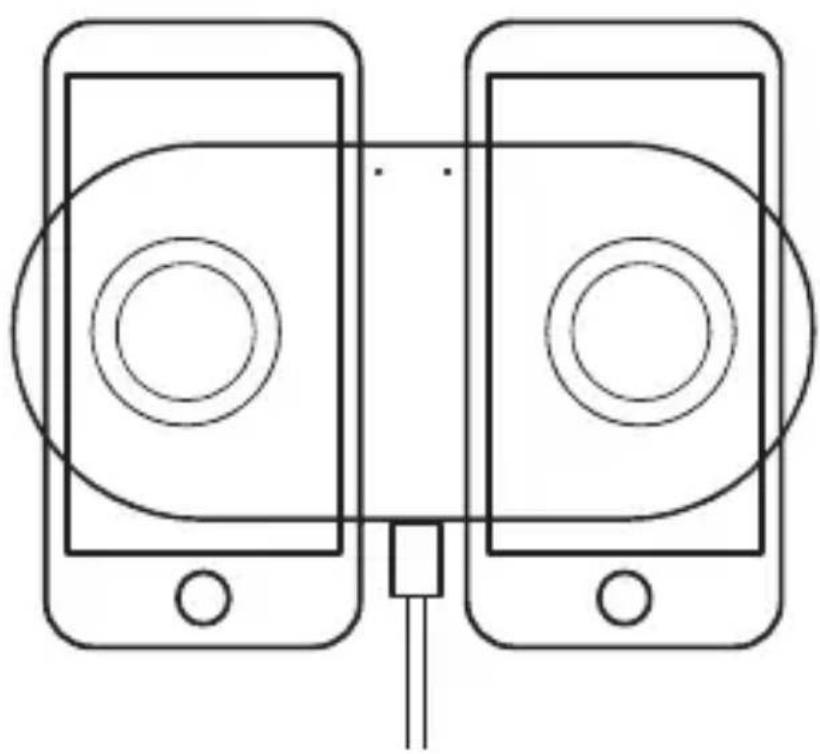
Place the mobile device on the Qi charging surface 1 or 2. Make sure the center of the device is aligned over the center of the Qi charging surface. Charging will begin on contact. The LED indicator 1 lights up blue when charging is active on Qi charging surface 1. The LED indicator 2 lights up blue
when charging is active on Qi charging surface 2 4.
You can charge up to two Qi enabled mobile devices at the same time. Place your mobile devices on the Qi charging surfaces as shown in the sketch, the maximum wireless charging power is 10 W* each.
Protective covers that protect the mobile device may interfere with the charging process. In this case, the mobile device must be removed from the protective cover.
* i NOTE: The charging power is up to 10 W, depending on the power adapter used.
LED indicators 2 / 3 status
The product has two LEDs that indicates its operational status:
| LED indicator Status | |
| White light Starting process | (Boot phase) / Standby |
| LED off Off | |
| Blue light Charging | |
| Blue light flashing Fault condition | |
| Green light Full Charge |
●Troubleshooting
What should I do if the LED indicator of the product is not lit during starting process (Boot phase)?
- Check the USB cable connection between USB adapter (not included) and the product. The USB cable must be firmly connected.
- Check the connection between the mains socket and the USB adapter (not included).
■ Alternatively, the user must try another mains socket.
What should I do if the mobile device does not get charging?
- Check that the mobile device have Qi wireless charging technology.
- Check the mobile device is placed horizontally on the center position of the charging pad.
- Check that no foreign object blocking the charging.
- Check whether the mobile device is removed from the protective cover.
What should I do if the LED indicator flashes blue?
This indicates a fault condition occurred.
■ Disconnect the USB connection immediately.
- Check that no foreign object blocking the charging.
- Let the product cool down for a while and try use it again.
●Storage when not in use
Store the product in a dry interior, away from direct sunlight, preferably in its original packaging.
●Cleaning
This product has no internal parts requiring maintenance. Moisture entering the product may result in damage.
■ Ensure no moisture enters the product during cleaning to prevent damaging the product beyond repair.
- Do not use abrasive, solvent-based or aggressive cleaners. These can damage the surface of the product.
■ Only clean the product with a slightly damp cloth and mild washing-up liquid.
●Disposal
Packaging:
The packaging is made of environmentally friendly materials, which may be disposed of through your local recycling facilities.
Product:
Contact your municipality for information on how to dispose of your worn-out product.

The adjacent symbol of a crossed out dustbin on wheels indicates this product is subject to Directive 2012/19/EU. This
directive states at the end of the life this product must not be disposed of through regular household refuse but must be returned to special collection sites, recycling depots or waste management companies.
This disposal is free of charge to you.
Protect the environment and dispose of properly.
The product is recyclable, subject to extended manufacturer responsibility, and collected separately. an be obtained from your local authority.
●Simplified EU declaration of conformity
Hereby, OWIM GmbH & Co. KG, Stiftsbergstraße 1, 74167 Neckarsulm, GERMANY, declares that the product WIRELESS QI CHARGER HG06618A / HG06618B, is in compliance with Directives 2014/53/EU and 2011/65/EU.
The full text of the EU declaration of conformity is available at the following internet address:
www.owim.com
●Warranty and service
Warranty
The product has been manufactured to strict quality guidelines and meticulously examined before delivery. In the event of product defects you have legal rights against the retailer of this product. Your legal rights are not limited in any way by our warranty detailed below.
The warranty for this product is 3 years from the date of purchase. Should this product show any fault in materials or manufacture within 3 years from the date of purchase, we will repair or replace it – at our choice – free of charge to you.
The warranty period begins on the date of purchase. Please keep the original sales receipt in a safe location. This document is required as your proof of purchase. This warranty becomes void if the product has been damaged, or used or maintained improperly.
The warranty applies to defects in material or manufacture. This warranty does not cover product parts subject to normal wear, thus possibly considered consumables (e.g. batteries) or for damage to fragile parts, e.g. switches, rechargeable batteries or glass parts.
●Warranty claim procedure
To ensure quick processing of your case, please observe the following instructions:
Please have the till receipt and the item number (e.g. IAN 123456_7890) available as proof of purchase.
You will find the item number on the rating plate, an engraving, on the front page of the instructions for use (bottom left), or as a sticker on the rear or bottom of the product.
If functional or other defects occur, please contact the service department listed either by telephone or by e-mail.
You can return a defective product to us free of charge to the service address that will be provided to you. Ensure that you enclose the proof of purchase (till receipt) and information about what the defect is and when it occurred.
Service

Service Great Britain
Tel.: 08000569216
E-Mail: owim@lidl.co.uk

⚠️ WARNING! FARA FÖR LIV OCH RISK FÖR OLYCKOR FÖR SMÅBARN OCH BARN!

- FI
- WARNINGS AND SYMBOLS USED .... PAGE 6
- INTRODUCTION PAGE 8
- INTENDED USE...... PAGE 8
- TRADEMARK NOTICES...... PAGE 9
- SAFETY NOTES...... PAGE 9
- DESCRIPTION OF PARTS ...... PAGE 12
- TECHNICAL DATA ...... PAGE 13
- SCOPE OF DELIVERY ...... PAGE 14
- BEFORE USE ...... PAGE 14
- OPERATION PAGE 15
- TROUBLESHOOTING PAGE 18
- STORAGE WHEN NOT IN USE ...... PAGE 19
- CLEANING PAGE 20
- DISPOSAL PAGE 20
- SIMPLIFIED EU DECLARATION OF CONFORMITY...... PAGE 21
- WARRENTY AND SERVICE...... PAGE 22
- WIRELESS QI CHARGER
- ●INTRODUCTION
- INTENDEDUSE
- ●TRADEMARK NOTICES
- SAFETYNOTES
- WARNING! DANGER TO LIFE AND RISK OF ACCIDENT FOR INFANTS AND CHILDREN
- ⚠️ DANGER! RISK OF SUFFOCATION
- ATTENTION! DAMAGE TO PROPERTY
- ATTENTION! RADIO INTERFERENCE
- ●DESCRIPTION OF PARTS
- ●TECHNICAL DATA
- SCOPE OF DELIVERY
- ●BEFORE USE
- NOTE
- OPERATION
- I NOTE
- CHARGE YOUR DEVICE
- LED INDICATORS 2 / 3 STATUS
- ●TROUBLESHOOTING
- WHAT SHOULD I DO IF THE LED INDICATOR OF THE PRODUCT IS NOT LIT DURING STARTING PROCESS (BOOT PHASE)
- WHAT SHOULD I DO IF THE MOBILE DEVICE DOES NOT GET CHARGING
- WHAT SHOULD I DO IF THE LED INDICATOR FLASHES BLUE
- ●STORAGE WHEN NOT IN USE
- ●CLEANING
- ●DISPOSAL
- PACKAGING
- PRODUCT
- THIS DISPOSAL IS FREE OF CHARGE TO YOU
- ●SIMPLIFIED EU DECLARATION OF CONFORMITY
- ●WARRANTY AND SERVICE
- WARRANTY
- ●WARRANTY CLAIM PROCEDURE
- SERVICE
- SERVICE GREAT BRITAIN
- ⚠️ WARNING! FARA FÖR LIV OCH RISK FÖR OLYCKOR FÖR SMÅBARN OCH BARN
Brand : SILVERCREST
Model : SQWC A2
Category : Phone charger