
HCB-300 - Bluetooth hands-free kit SONY ERICSSON - Free user manual and instructions
Find the device manual for free HCB-300 SONY ERICSSON in PDF.



| Product Type | Bluetooth Hands-free Kit for Vehicle |
| Brand | Sony Ericsson |
| Model | HCB-300 |
| Power Supply | 12 V DC (vehicle battery) |
| Wireless Technology | Bluetooth (headset and hands-free profiles) |
| Number of supported phones | Up to 5 phones |
| Color Identification | 5 distinct colors to identify each phone |
| Main functions | Answer/reject calls, voice dialing, redial, volume adjustment, microphone mute |
| Bluetooth range | Approximately 10 meters (without obstacles) |
| Automatic answer | Possible depending on phone |
| Compatible accessories | Advanced mute switch HCE-16, gooseneck microphone HCE-14, vehicle mount HCH-38, cigarette lighter adapter CLA-11 |
| Installation | Professional required (certified technician) |
| Maintenance and cleaning | Soft damp cloth; do not expose to liquids; avoid dust and extreme temperatures |
| Safety | Road safety instructions; do not use if conditions require; avoid explosion risk areas; do not disassemble |
| Warranty | 1 year from purchase date (excluding installation, normal wear, misuse) |
| Reset | Possible by holding specific keys (see manual) |
Frequently Asked Questions - HCB-300 SONY ERICSSON
User questions about HCB-300 SONY ERICSSON
0 question about this device. Answer the ones you know or ask your own.
Ask a new question about this device
Download the instructions for your Bluetooth hands-free kit in PDF format for free! Find your manual HCB-300 - SONY ERICSSON and take your electronic device back in hand. On this page are published all the documents necessary for the use of your device. HCB-300 by SONY ERICSSON.
USER MANUAL HCB-300 SONY ERICSSON
Additional information 13
Declaration of conformity 113
Sony Ericsson HCB-300
Second edition (July 2004)
This user guide is published by Sony Ericsson Mobile Communications AB, without any warranty.
Improvements and changes to this user guide necessitated by typographical errors, inaccuracies of current information, or improvements to programs and/or equipment, may be made by Sony Ericsson Mobile Communications AB at any time and without notice. Such changes will, however, be incorporated into new editions of this user guide.
All rights reserved.
©Sony Ericsson Mobile Communications AB, 2004
Publication number: LZT 108 6827/1 R3A
Some of the services in this user guide are not supported by all networks. This also applies to the GSM International Emergency Number 112.
Contact your network operator or service provider if you are in doubt whether you can use a particular service or not.
The Bluetooth word mark and logos are owned by the Bluetooth SIG, Inc. and any use of such marks by Sony Ericsson is under license.
Introduction
The Bluetooth™ Car Handsfree
HCB-300 is designed for in-car use
and provides a safe and convenient way to make and receive calls while driving. Please read the Safe and efficient use and Limited Warranty sections of this user guide before using your car handsfree.

How can I use my car handsfree?
When you turn the ignition key, the car handsfree recognizes your mobile phone and they automatically connect. The devices are ready to make and answer calls. You can use your car handsfree with up to five phones.

Please note that the car handsfree should be installed by authorized personnel. Check with your car dealer for recommended installation engineers. See "Installing" on page 11.
What phones can I use with my car handsfree?
You can use any Bluetooth-enabled phone.
Your car handsfree is compatible with
Bluetooth-enabled phones from Sony Ericsson, as well as from, for example, Nokia, Motorola and Siemens.
Accessories
Your car handsfree supports a range of accessories to enhance your user experience:
- Advanced Music Mute HCE-16 – to connect the audio from your phone to your car stereo speakers.
- Goosenck Microphone HCE-14 – to bring the microphone closer to your mouth.
If you use a Sony Ericsson phone with your car handsfree, the following accessories are available:
- A dedicated Car Holder, for example, HCH-38 for K700, together with Antenna Cable Connector HCE-12 for better network reception.
Cigarette Lighter Adapter CLA-11 - to charge the phone.
Instructions
Instructions in this user guide are based on car handsfree buttons and phone keys. For example, you can use the button on the car handsfree or the keys on the phone to answer a call.
Control panel overview
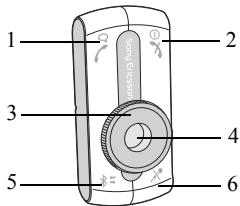
1 C_Q Make and answer calls.
2 ① Turn On/Off. End and reject calls.
3 Volume control dial.
4 Color ID, five colours each representing an added phone.
5 Select a phone. Add the car handsfree to a phone. Select a colour.
6 Mute/unmute the microphone.
First-time use
Before you use the car handsfree with a phone for the first time, you need to make sure that:
- The car handsfree kit is properly installed and turned on.
- Bluetooth is turned on in your phone.
- The car handsfree is added to the list of devices in the phone.
Adding the car handsfree
Once the car handsfree is added to the list of devices in the phone, they automatically recognize each other when, for example, the ignition is turned on.
You can select a specific Color ID for each phone you use with the car handsfree. You can also replace a phone with another phone for a specific Color ID. A free colour is indicated by the Color ID flashing slowly. A colour already in use is indicated by the Color ID flashing quickly.
To add the car handsfree to a phone
1 Turn on the car handsfree.
2 Press and hold 5 until the Color ID flashes.
3 Press repeatedly to select a colour.
4 Prepare your phone according to the phone's user guide. The car handsfree passkey is 0000.
To fine-tune a Color ID
1 Press and hold 5 until the Color ID flashes.
2 Press 5 repeatedly to select a colour.
3 Rotate the volume control to fine-tune the colour.
4 Press and hold 5 to save the colour.
Turning on or off
You can turn the car handsfree on or off either with the ignition or with the button, independently of each other.
- If the ignition is turned off during an ongoing call, the car handsfree will automatically turn off after the call has ended.
-
If ignition is off and the car handsfree is turned on with the button, the car handsfree automatically turns off one minute after the last activity.
-
If the car handsfree is turned off with the button, an ongoing call will be transferred to the phone.
To turn the car handsfree on or off
Turn the ignition key or press and hold
Everyday use
Once you have added the car handsfree to your phone, you can make and receive calls using the control panel of the car handsfree, as long as it is turned on and within range of the phone, with no solid objects in between.

When using a Bluetooth accessory, make sure to always have the Bluetooth function turned on in your phone.
Selecting a phone
You can use your car handsfree with up to five phones, each represented by a colour.
When turned on, the car handsfree automatically searches for phones, starting with the last phone used.
To manually select a phone
Press 串 repeatedly until the Color ID shows the colour representing your phone.
Making calls
You can make a call using the control panel of the car handsfree, using voice dialling or using the phone keys.
Before voice dialling, you must turn on the voice dialling function and record voice commands in your phone. Please refer to the phone's user guide.
To make a call using the phone
1 Use the phone's keypad or phone book.
2 End the call by pressing .
To make a call using voice dialling
1 Press
2 After the tone, voice dial as you normally would.
3 End the call by pressing .
To redial a number using the button
1 To redial a number, press and hold ±bc until you hear a tone.
2 End the call by pressing .
Answering calls
When you receive a call, the car stereo is muted automatically. You can answer the call using the control panel or using automatic answering mode. Please refer to the phone's user guide regarding automatic answering mode.
To answer a call
When the car handsfree rings, press
To reject a call
When the car handsfree rings, press .
To mute the microphone
1 During a call, press to mute the microphone. You hear a tone when the microphone has been turned off.
2 Press × again to resume the conversation.
Adjusting the volume
You can both adjust the car handsfree speaker volume and the ring volume. You hear a tone when you reach the maximum and minimum volume levels.
To adjust the speaker volume
During a call, rotate the volume control to increase or decrease the speaker volume.
To adjust the ring volume
When you are not engaged in a call, rotate the volume control dial to increase or decrease the ring volume.
Transferring sound
Depending on the type of phone, you can transfer the sound from the phone to the car handsfree during a call.
To transfer the sound to the car handsfree
During a call, press on the car handsfree.
To transfer the sound from the car handsfree to the phone, please refer to the phone's user guide.
Troubleshooting
This section lists some problems that you might encounter while using your car handsfree.
Cannot add the car handsfree to the list of devices in the phone
The Bluetooth function in your phone must be turned on. Your phone should be inside the car during the procedure and the car handsfree must be on. Make sure that no solid object is between the phone and the car handsfree.
Phone and car handsfree do not connect
The car handsfree may be connected to another Bluetooth device. Manually select your Color ID, see "Selecting a phone" on page 8.
Your phone may be connected to another Bluetooth device, such as a headset. Disconnect the other Bluetooth device.
You may have added another handsfree device to the list of devices in your phone. Some phones can only have one handsfree device in the list at a time. Please refer to the phone's user guide.
Connection interrupted
You hear a short sound if the connection between the phone and the car handsfree is interrupted. Try connecting them again by pressing c .
Using headset and car handsfree
Please refer to the phone's user guide on how to use your phone with several Bluetooth devices.
Resetting the car handsfree
You may want to reset the car handsfree to default settings.
To reset the car handsfree
1 Turn on the car handsfree.
2 Press and hold × 3 until the Color ID flashes and you hear a long high tone.
3 Press and hold until you hear a long high tone.
4 The car handsfree is now reset.
Some car handsfree functions do not work
If you notice that you cannot make use of all the features in your car handsfree, please check in the phone's user guide whether your phone supports the function. You can also check with a Sony Ericsson service partner. For information about support and for user guides for Ericsson and Sony Ericsson mobile phones, see www.SonyEricsson.com/support.
Installing
The Bluetooth Car Handsfree HCB-300 kit includes:
- electronic box with velcro (1.)
external loudspeaker (2.)
control panel with adhesive tape (3.) - microphone (4.)
- cables (power cables, ignition sense, music mute)
- user guide.
1
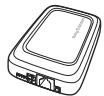
2

3

4

Please make sure that all equipment of the car handsfree is installed in a safe location. If your car is equipped with an air bag, check that the handsfree equipment does not interfere with its function.

The car handsfree should be installed by authorized personnel.
To install the car handsfree
1 Disconnect the car battery.
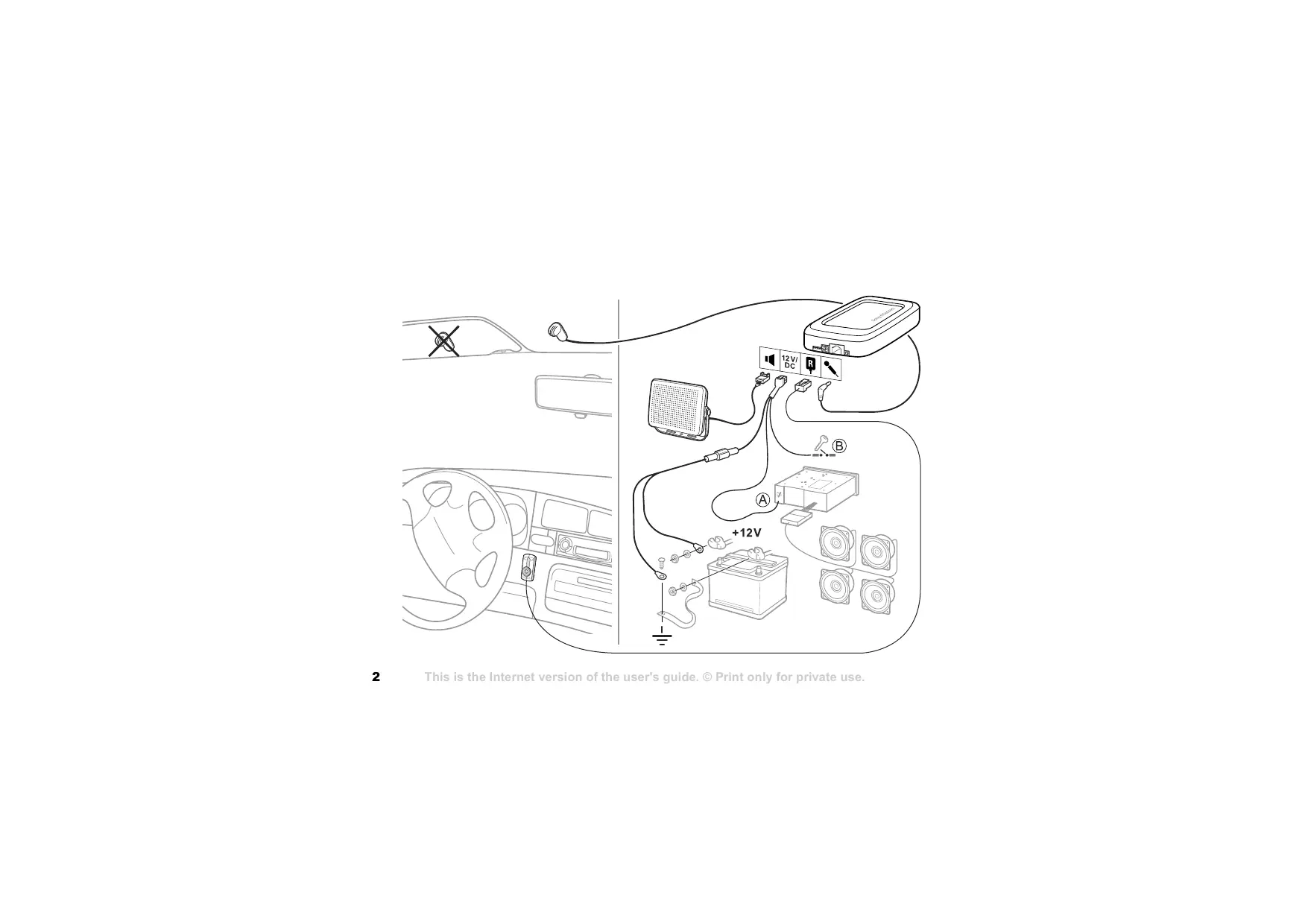
2 Place the electronic box under the dashboard of the car. See also installation chart on page 2. It is recommended that the upper side of the electronic box faces the driver with no metallic barrier between the box and the driver. Use the velcro enclosed in the kit to fasten the electronic box.
Connect the bundle of power cables (red and black), music mute cable (yellow) and ignition sense cable (blue) to the electronic box 12V/DC.
3 Connect the black power cable to negative ground. Connect the red power cable, with the integrated fuse, to the positive pole on the car battery. Please note that supply voltages other than 12 volts may cause damage to the equipment.
4 Connect the yellow music mute cable to the car stereo. See A in installation chart on page 2.
5 Connect the blue ignition sense cable to the ignition of the car. See B in installation chart on page 2.
6 Place the microphone on a fixed part of the car interior, preferably in the middle above the wind screen. Place it directed towards the driver and away from the loudspeaker(s). Place it away from air flows such as windows and ventilation. Make sure that the cable is long enough to reach the electronic box. Connect the microphone to the electronic box .
7 Place the loudspeaker at least 50~cm (20 inches) from the microphone. Make sure that the cable is long enough to reach the electronic box. Connect the external loudspeaker to the electronic box
8 Choose a suitable location on the dashboard of the car for the control panel. The driver must be able to reach the keys of the control panel from the normal driving position. Make sure that the cable is long enough to reach the electronic box. Remove the adhesive tape from the control panel. Place the control panel in the location you have chosen. Connect the control panel to the electronic box.
9 Connect the car battery.
To install an advanced music mute with the car handsfree

You can buy an advanced music mute separately.
1 Disconnect the car battery.
2 See installation chart on page 3. Proceed as in steps 2-4 in the instructions "To install the car handsfree" on page 12.
3 Cut the yellow music mute cable since it is not needed when you have an advanced music mute. See A in installation chart on page 3.
4 Connect the blue ignition sense cable to the ignition of the car. See B in installation chart on page 3.
5 Connect the brown end of the advanced music mute cable to the car stereo loudspeakers.
6 Connect the black and yellow ends of the advanced music mute cable to the car stereo.
7 Proceed as in steps 8-9 in "To install the car handsfree" on page 12.
Additional information
Safe and efficient use

Read this information before using your Bluetooth car handsfree.
Changes or modifications to this Bluetooth car handsfree not expressly approved by Sony Ericsson may render void the user's authority to operate the equipment. Please check for exceptions, due to national requirements or limitations, in usage of Bluetooth equipment before using this product.
Product care
- Do not expose your product to liquid, moisture or humidity.
- Do not expose your product to extreme high or low temperatures.
- Do not expose your product to lit candles, cigarettes, or cigars, or to open flames.
- Do not drop, throw or try to bend the product as rough treatment could damage it.
- Do not use any other accessory than Sony Ericsson or Ericsson originals intended for use with this product. Use of non-original accessories may result in loss of performance, damage to the product, fire, electric shock or injury. The warranty does not cover product failures which have been caused by use of non-original accessories.
- Do not attempt to disassemble your product. The product does not contain consumer serviceable or replaceable components. Only Sony Ericsson service partners should perform this service.
- Do not keep the product in an area prone to dust and dirt. Use a soft damp cloth to clean your product.
English
- If you will not be using the product for a while, store it in a place that is dry, and dust free; and avoid extreme temperatures.
- To reduce risk of electric shock, unplug the unit from any power source before attempting to clean it.
Installation
Please note that only authorised personnel should install the Bluetooth car handsfree. Please check with your car dealer for recommendations on professional installation engineers. It is recommended that the Bluetooth car handsfree be installed under the dashboard of the car. The control panel of the Bluetooth car handsfree should be installed on the dashboard of the car, so that you can reach the keys from your normal driving position. Some car manufacturers require that you use an external antenna for your phone. Check with your car manufacturer's representative to be sure that all equipment for the Bluetooth car handsfree, including additional accessories, are placed in a safe location. If your car is equipped with an air bag, check that the handsfree equipment does not interfere with its function. The Bluetooth car handsfree equipment is made for use in cars with a 12 volt electrical system. Other supply voltages may cause damage to the equipment.
Radio frequency exposure
Your Bluetooth car handsfree is a radio transmitter and receiver. When in operation, it communicates with a Bluetooth equipped mobile device by receiving and transmitting radio frequency (RF) electromagnetic fields (microwaves) in the frequency range 2400 to 2500 MHz. The output power of the radio transmitter is low, 0.001 watt. Your Bluetooth car handsfree is designed to operate in compliance with the RF exposure guidelines and limits set by national authorities and
international health agencies when used with any compatible Sony Ericsson or Ericsson mobile phone.
Driving
Check the laws and regulations on the use of mobile phones and handsfree equipment in the areas where you drive. Always give full attention to driving and pull off the road and park before making or answering a call if driving conditions so require. RF energy may affect some electronic systems in motor vehicles such as car stereo, and safety equipment. Check with your vehicle manufacturer's representative to be sure that your mobile phone or Bluetooth car handsfree will not affect the electronic systems in your vehicle.
Electronic equipment
Most modern electronic equipment is shielded from RF energy. However, certain electronic equipment is not, therefore:
Do not use your Bluetooth car handsfree near medical equipment without permission. If you are using any personal medical device, such as a pacemaker or a hearing aid, please check in your mobile phone's User's Guide for related information.
Blasting areas
Turn off all your electronic devices when in a blasting area or in areas posted turn off two-way radio to avoid interfering with blasting operations. Construction crews often use remote control RF devices to set off explosives.
Potentially explosive atmospheres
Turn off your electronic device when in any area with a potentially explosive atmosphere. It is rare, but your electronic device could generate sparks. Sparks in such areas could cause an explosion or fire resulting in bodily injury or even death. Areas with a potentially explosive atmosphere are often, but not always, clearly marked.
Children
Do not allow children to play with your Bluetooth car handsfree since it contains small parts that could become detached and create a choking hazard.
Emergency calls

IMPORTANT!
This Bluetooth car handfree and the electronic device connected to the handsfree operate using radio signals, cellular, and landline networks as well as user-programmed functions, which cannot guarantee connection under all conditions. Therefore do not rely solely upon any electronic device for essential communications (such as medical emergencies). Remember, in order to make or receive calls, the handsfree and the electronic device connected to the handsfree must be switched on in a service area with adequate cellular signal strength. Emergency calls may not be possible on all cellular phone networks or when certain network services and/or phone features are in use. Check with your local service provider.
Limited Warranty
Subject to the conditions of this Limited Warranty, Sony Ericsson Mobile Communications AB (Sony Ericsson), S-221 88 Lund, Sweden warrants this product to be free from defects in design, material, and workmanship at the time of its original purchase by a consumer, and for a subsequent period of one (1) year. Should your Product need warranty service, please return it to the dealer from whom it was purchased or contact your local Sony Ericsson Customer Care Center to get further information.
What we will do
If, during the warranty period, this Product fails to operate under normal use and service, due to defects in materials or workmanship, the Sony Ericsson authorized distributors or service partners will, at their option, either repair or replace the Product in accordance with the conditions stipulated herein.
Conditions
1 The warranty is valid only if the original receipt issued to the original purchaser by the dealer, specifying the date of purchase and serial number, is presented with the Product to be repaired or replaced. Sony Ericsson reserves the right to refuse warranty service if this information has been removed or changed after the original purchase of the Product from the dealer.
2 If Sony Ericsson repairs or replaces the Product, the repaired or replaced Product shall be warranted for the remaining time of the original warranty period or for ninety (90) days from the date of repair, whichever is longer. Repair or replacement may involve the use of functionally equivalent reconditioned units. Replaced parts or components will become the property of Sony Ericsson.
3 This warranty does not cover any failure of the Product due to normal wear and tear, or due to misuse, including but not limited to use in other than the normal and customary manner, in accordance with instructions for use and maintenance of the Product. Nor does this warranty cover any failure of the product due to accident, modification or adjustment, acts of God or damage resulting from liquid.
4 This warranty does not cover Product failures due to improper repair installations, modifications or service performed by a non-Sony Ericsson authorized person.
5 This warranty does not cover the car installation of the product.
6 Tampering with any of the seals on the Product will render void the warranty.
7 THERE ARE NO EXPRESS WARRANTYES, WHETHER WRITTEN OR ORAL, OTHER THAN THIS PRINTED LIMITED WARRANTY. ALL IMPLIED WARRANTYES, INCLUDING WITHOUT LIMITATION THE IMPLIED WARRANTYES OF MERCHANTABILITY OR FITNESS FOR A PARTICULAR PURPOSE, ARE LIMITED TO THE DURATION OF THIS LIMITED WARRANTY. IN NO EVENT SHALL SONY ERICSSON OR ITS VENDORS BE LIABLE FOR INCIDENTAL OR CONSEQUENTIAL DAMAGES OF ANY NATURE WHATSOEVER, INCLUDING BUT NOT LIMITED TO LOST PROFITS OR COMMERCIAL LOSS, TO THE FULL EXTENT THOSE DAMAGES CAN BE DISCLAIMED BY LAW.
Some countries/states do not allow the exclusion or limitation of incidental or consequential damages, or limitation of the duration of implied warranties, so the preceding limitations or exclusions may not apply to you. The warranty provided does not affect the consumer's statutory rights under applicable national legislation in force, nor the consumer's rights against the dealer arising from their sales/ purchase contract.
Supported Bluetooth functions
This product supports the headset profile and the handsfree profile.
Deutsch
Einführung 18
Erstbenutzung 20
Declaration of conformity 113
Sony Ericsson HCB-300
©Sony Ericsson Mobile Communications AB, 2004
Declaration of conformity 113
Sony Ericsson HCB-300
Declaration of conformity 113
Sony Ericsson HCB-300
Declaration of conformity 113
Sony Ericsson HCB-300
Declaration of conformity 113
Sony Ericsson HCB-300
Declaration of conformity 113
索尼爱立信 HCB-300
第二版(2004年7月)
Declaration of conformity 113
Sony Ericsson HCA-300
第二版(2004年7月)
© Sony Ericsson Mobile Communications AB, 2004
This device complies with Part 15 of the FCC rules. Operation is subject to the following two conditions:
(1) This device may not cause harmful interference, and
(2) This device must accept any interference received, including interference that may cause undesired operation.
Declaration of conformity
We, Sony Ericsson
Mobile Communications AB of
Nya Vattentornet
221 88 Lund, Sweden
declare under our sole responsibility that our product
Sony Ericsson type DEA-0001001
to which this declaration relates is in conformity with the appropriate standards EN 60 950, EN 300 328, EN 301 489-7 and EN 301 489-17 following the provisions of Radio Equipment and
Telecommunication Equipment directive 1999/5/EC with requirements covering EMC directive
89/336/EEC and Low Voltage directive 73/23/EEC.
Lund, February 2004
Ulf Persson, Head of Product Business Unit Accessories

- Sony Ericsson HCB-300
- Introduction
- How can I use my car handsfree?
- What phones can I use with my car handsfree?
- Accessories
- Instructions
- Control panel overview
- First-time use
- Adding the car handsfree
- To add the car handsfree to a phone
- To fine-tune a Color ID
- Turning on or off
- To turn the car handsfree on or off
- Everyday use
- Selecting a phone
- To manually select a phone
- Making calls
- To make a call using the phone
- To make a call using voice dialling
- To redial a number using the C button
- Answering calls
- To answer a call
- To reject a call
- To mute the microphone
- Adjusting the volume
- To adjust the speaker volume
- To adjust the ring volume
- Transferring sound
- To transfer the sound to the car handsfree
- Troubleshooting
- Cannot add the car handsfree to the list of devices in the phone
- Phone and car handsfree do not connect
- Connection interrupted
- Using headset and car handsfree
- Resetting the car handsfree
- To reset the car handsfree
- Some car handsfree functions do not work
- Installing
- To install the car handsfree
- To install an advanced music mute with the car handsfree
- Additional information
- Safe and efficient use
- Product care
- English
- Installation
- Radio frequency exposure
- Driving
- Electronic equipment
- Blasting areas
- Potentially explosive atmospheres
- Children
- Emergency calls
- IMPORTANT!
- Limited Warranty
- What we will do
- Conditions
- Supported Bluetooth functions
- Deutsch
- Declaration of conformity 113
- Sony Ericsson HCA-300
- Declaration of conformity
- Sony Ericsson type DEA-0001001
Brand : SONY ERICSSON
Model : HCB-300
Category : Bluetooth hands-free kit