KC-880 - Numeric keypad ROLAND - Free user manual and instructions
Find the device manual for free KC-880 ROLAND in PDF.


| Product Type | Digital Keyboard |
| Brand | Roland |
| Model | KC-880 |
| Dimensions (W x D x H) | 1400 x 400 x 150 mm (estimated) |
| Weight | Approximately 20 kg (estimated) |
| Power Supply | AC adapter |
| Polyphony | 64 voices (estimated) |
| Number of Sounds | Over 500 (estimated) |
| Effects | Reverb, chorus, EQ (estimated) |
| Keyboard | 88 touch-sensitive keys (estimated) |
| Connectivity | USB MIDI, audio output, headphone (estimated) |
| Maintenance and Cleaning | Clean with a soft dry cloth. Do not use solvents. |
| Safety Instructions | Do not expose to humidity or extreme temperatures. Use the supplied adapter. |
| Spare Parts and Repairability | Contact Roland after-sales service. |
| General Information | Class B digital device compliant with Canadian standards. |
Frequently Asked Questions - KC-880 ROLAND
User questions about KC-880 ROLAND
0 question about this device. Answer the ones you know or ask your own.
Ask a new question about this device
Download the instructions for your Numeric keypad in PDF format for free! Find your manual KC-880 - ROLAND and take your electronic device back in hand. On this page are published all the documents necessary for the use of your device. KC-880 by ROLAND.
USER MANUAL KC-880 ROLAND
Thank you, and congratulations on your choice of the Roland Stereo Keyboard Amplifier KC-880.
These sections provide important information concerning the proper operation of the unit. Additionally, in order to feel assured that you have gained a good grasp of every feature provided by your new unit, owner's manual should be read in its entirety. The manual should be saved and kept on hand as a convenient reference.
Before using this unit, carefully read the sections entitled:
- IMPORTANT SAFETY INSTRUCTIONS (p. 3)
USING THE UNIT SAFELY (p. 4-5) - IMPORTANT NOTES (p.6)
Main Features
- A monitor-speaker amplifier for keyboards featuring high-power, completely stereo specifications
This amp can deliver 320 watts of output (160 W + 160 W), and is equipped with two 12-inch (30-cm) speakers and two tweeters.
- Features a total of five channels of stereo input
In addition to four-channel input, the amp is equipped with an AUX input jack, enabling you to connect such devices as a rhythm machine, a CD or MP3 player, or an external mixer. The unit is provided with an exclusive volume control for AUX input that lets you fine-tune the volume level (p. 11).
- Easy-to-use stereo effect unit
An effect unit that takes advantage of the stereo specifications to make sounds seem broader and thicker is built in.
You can easily enjoy chorus, tremolo, and rotary effects familiar to keyboard players. A built-in reverb also expands the range of possible applications using a microphone. Control using a footswitch pedal is also possible.
Monitor feature
A convenient monitor-input feature for using guide clicks (such as synchronizing signals for a sequencer or a rhythm machine) is built in.
Built-in Stereo Link feature
A Stereo Link feature for applications that need even higher power is built in (p. 14).
- A full range of output jacks for stereo headphones, line out, and more
The amp is equipped with outputs for headphones, line out, and more, providing high expandability that can accommodate a variety of applications.
For the USA
FEDERAL COMMUNICATIONS COMMISSION RADIO FREQUENCY INTERFERENCE STATEMENT
This equipment has been tested and found to comply with the limits for a Class B digital device, pursuant to Part 15 of the FCC Rules. These limits are designed to provide reasonable protection against harmful interference in a residential installation. This equipment generates, uses, and can radiate radio frequency energy and, if not installed and used in accordance with the instructions, may cause harmful interference to radio communications. However, there is no guarantee that interference will not occur in a particular installation. If this equipment does cause harmful interference to radio or television reception, which can be determined by turning the equipment off and on, the user is encouraged to try to correct the interference by one or more of the following measures:
- Reorient or relocate the receiving antenna.
- Increase the separation between the equipment and receiver.
- Connect the equipment into an outlet on a circuit different from that to which the receiver is connected.
- Consult the dealer or an experienced radio/TV technician for help.
This device complies with Part 15 of the FCC Rules. Operation is subject to the following two conditions:
(1) this device may not cause harmful interference, and
(2) this device must accept any interference received, including interference that may cause undesired operation.
Unauthorized changes or modification to this system can void the users authority to operate this equipment.
This equipment requires shielded interface cables in order to meet FCC class B Limit.
For Canada
NOTICE
This Class B digital apparatus meets all requirements of the Canadian Interference-Caising Equipment Regulations.
AVIS
This product contains chemicals known to cause cancer, birth defects and other reproductive harm, including lead.

CAUTION
RISK OF ELECTRIC SHOCK DO NOT OPEN

ATTENTION
RISQUE DE CHOC ELECTRIQUE NE PAS OUVRIR
CAUTION: TO REDUCE THE RISK OF ELECTRIC SHOCK,
DO NOT REMOVE COVER (OR BACK).
NO USER-SERVICEABLE PARTS INSIDE.
REFER SERVICING TO QUALIFIED SERVICE PERSONNEL.

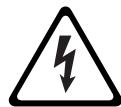
The lightning flash with arrowhead symbol, within an equilateral triangle, is intended to alert the user to the presence of uninsulated "dangerous voltage" within the product's enclosure that may be of sufficient magnitude to constitute a risk of electric shock to persons.

The exclamation point within an equilateral triangle is intended to alert the user to the presence of important operating and maintenance (servicing) instructions in the literature accompanying the product.
INSTRUCTIONS PERTAINING TO A RISK OF FIRE, ELECTRIC SHOCK, OR INJURY TO PERSONS.
IMPORTANT SAFETY INSTRUCTIONS SAVE THESE INSTRUCTIONS
WARNING - When using electric products, basic precautions should always be followed, including the following:
- Read these instructions.
- Keep these instructions.
- Heed all warnings.
- Follow all instructions.
- Do not use this apparatus near water.
- Clean only with a dry cloth.
- Do not block any of the ventilation openings. Install in accordance with the manufacturers instructions.
- Do not install near any heat sources such as radiators, heat registers, stoves, or other apparatus (including amplifiers) that produce heat.
-
Do not defeat the safety purpose of the polarized or grounding-type plug. A polarized plug has two blades with one wider than the other. A grounding type plug has two blades and a third grounding prong. The wide blade or the third prong are provided for your safety. If the provided plug does not fit into your outlet, consult an electrician for replacement of the obsolete outlet.
-
Protect the power cord from being walked on or pinched particularly at plugs, convenience receptacles, and the point where they exit from the apparatus.
- Only use attachments/accessories specified by the manufacturer.
- Unplug this apparatus during lightning storms or when unused for long periods of time.
- Refer all servicing to qualified service personnel. Servicing is required when the apparatus has been damaged in any way, such as power-supply cord or plug is damaged, liquid has been spilled or objects have fallen into the apparatus, the apparatus has been exposed to rain or moisture, does not operate normally, or has been dropped.
For the U.K.
WARNING: THIS APPARATUS MUST BE EARTHED
IMPORTANT: THE WIRES IN THIS MAINS LEAD ARE COLOURED IN ACCORDANCE WITH THE FOLLOWING CODE.
GREEN-AND-YELLOW: EARTH, BLUE: NEUTRAL, BROWN: LIVE
As the colours of the wires in the mains lead of this apparatus may not correspond with the coloured markings identifying the terminals in your plug, proceed as follows:
The wire which is coloured GREEN-AND-YELLOW must be connected to the terminal in the plug which is marked by the letter E or by the safety earth symbol or coloured GREEN or GREEN-AND-YELLOW.
The wire which is coloured BLUE must be connected to the terminal which is marked with the letter N or coloured BLACK.
The wire which is coloured BROWN must be connected to the terminal which is marked with the letter L or coloured RED.
INSTRUCTIONS FOR THE PREVENTION OF FIRE, ELECTRIC SHOCK, OR INJURY TO PERSONS
About WARNING and CAUTION Notices
| WARNING | Used for instructions intended to alert the user to the risk of death or severe injury should the unit be used improperly. |
| CAUTION | Used for instructions intended to alert the user to the risk of injury or material damage should the unit be used improperly. * Material damage refers to damage or other adverse effects caused with respect to the home and all its furnishings, as well to domestic animals or pets. |
About the Symbols
| ! | The △symbol alerts the user to important instructions or warnings. The specific meaning of the symbol is determined by the design contained within the triangle. In the case of the symbol at left, it is used for general cautions, warnings, or alerts to danger. |
| ◎ | The ⊙symbol alerts the user to items that must never be carried out (are forbidden). The specific thing that must not be done is indicated by the design contained within the circle. In the case of the symbol at left, it means that the unit must never be disassembled. |
| ◎ | The ●symbol alerts the user to things that must be carried out. The specific thing that must be done is indicated by the design contained within the circle. In the case of the symbol at left, it means that the power-cord plug must be unplugged from the outlet. |
ALWAYS OBSERVE THE FOLLOWING
WARNING
- Connect mains plug of this model to a mains socket outlet with a protective earthing connection.

- Do not open or perform any internal modifications on the unit.

- Do not attempt to repair the unit, or replace parts within it (except when this manual provides specific instructions directing you to do so). Refer all servicing to your retailer, the nearest Roland Service Center, or an authorized Roland distributor, as listed on the "Information" page.

-
Never install the unit in any of the following locations.
-
Subject to temperature extremes (e.g., direct sunlight in an enclosed vehicle, near a heating duct, on top of heat-generating equipment); or are
- Damp (e.g., baths, washrooms, on wet floors); or are
- Exposed to steam or smoke; or are
- Subject to salt exposure; or are
- Humid; or are
- Exposed to rain; or are
- Dusty or sandy; or are
- Subject to high levels of vibration and shakiness.

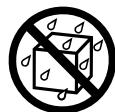
WARNING
Make sure you always have the unit placed so it is level and sure to remain stable. Never place it on stands that could wobble, or on inclined surfaces.

- The unit should be connected to a power supply only of the type described in the operating instructions, or as marked on the rear side of unit.

- Do not excessively twist or bend the power cord, nor place heavy objects on it. Doing so can damage the cord, producing severed elements and short circuits. Damaged cords are fire and shock hazards!

- This unit, either alone or in combination with an amplifier and headphones or speakers, may be capable of producing sound levels that could cause permanent hearing loss. Do not operate for a long period of time at a high volume level, or at a level that is uncomfortable. If you experience any hearing loss or ringing in the ears, you should immediately stop using the unit, and consult an audiologist.

- Do not allow any objects (e.g., flammable material, coins, pins); or liquids of any kind (water, soft drinks, etc.) to penetrate the unit.



WARNING
-
Immediately turn the power off, remove the power cord from the outlet, and request servicing by your retailer, the nearest Roland Service Center, or an authorized Roland distributor, as listed on the "Information" page when:
-
The power-supply cord or the plug has been damaged; or
- If smoke or unusual odor occurs
- Objects have fallen into, or liquid has been spilled onto the unit; or
- The unit has been exposed to rain (or otherwise has become wet); or
- The unit does not appear to operate normally or exhibits a marked change in performance.

- In households with small children, an adult should provide supervision until the child is capable of following all the rules essential for the safe operation of the unit.

- Protect the unit from strong impact. (Do not drop it!)

- Do not force the unit's power-supply cord to share an outlet with an unreasonable number of other devices. Be especially careful when using extension cords—the total power used by all devices you have connected to the extension cord's outlet must never exceed the power rating (watts/amperes) for the extension cord. Excessive loads can cause the insulation on the cord to heat up and eventually melt through.

- Before using the unit in a foreign country, consult with your retailer, the nearest Roland Service Center, or an authorized Roland distributor, as listed on the "Information" page.

- Do not put anything that contains water (e.g., flower vases) on this unit. Also, avoid the use of insecticides, perfumes, alcohol, nail polish, spray cans, etc., near the unit. Swiftly wipe away any liquid that spills on the unit using a dry, soft cloth.


CAUTION
- The unit should be located so that its location or position does not interfere with its proper ventilation.


CAUTION
Always grasp only the plug on the power-supply cord when plugging into, or unplugging from an outlet.
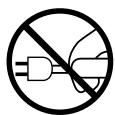
- At regular intervals, you should unplug the power plug and clean it by using a dry cloth to wipe all dust and other accumulations away from its prongs. Also, disconnect the power plug from the power outlet whenever the unit is to remain unused for an extended period of time. Any accumulation of dust between the power plug and the power outlet can result in poor insulation and lead to fire.
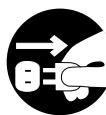
Try to prevent cords and cables from becoming entangled. Also, all cords and cables should be placed so they are out of the reach of children.

- If the unit could become a hazard if it moves, all caster wheels should be removed once the unit has been placed at the place of installation, or has been loaded onto a vehicle.

- Never climb on top of, nor place heavy objects on the unit.

- Never handle the power cord or its plug with wet hands when plugging into, or unplugging from, an outlet.

- Before moving the unit, disconnect the power plug from the outlet, and pull out all cords from external devices.
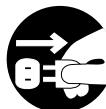
- Before cleaning the unit, turn off the power and unplug the power cord from the outlet.
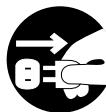
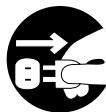
- Whenever you suspect the possibility of lightning in your area, pull the plug on the power cord out of the outlet.
- Do not remove the speaker grille and speaker by any means. Speaker not user replaceable. Shock hazardous voltages and currents are present inside the enclosure.
Power Supply
- Do not connect this unit to same electrical outlet that is being used by an electrical appliance that is controlled by an inverter (such as a refrigerator, washing machine, microwave oven, or air conditioner), or that contains a motor. Depending on the way in which the electrical appliance is used, power supply noise may cause this unit to malfunction or may produce audible noise. If it is not practical to use a separate electrical outlet, connect a power supply noise filter between this unit and the electrical outlet.
- Before connecting this unit to other devices, turn off the power to all units. This will help prevent malfunctions and/or damage to speakers or other devices.
- Although the LEDs are switched off when the POWER switch is switched off, this does not mean that the unit has been completely disconnected from the source of power. If you need to turn off the power completely, first turn off the POWER switch, then unplug the power cord from the power outlet. For this reason, the outlet into which you choose to connect the power cord's plug should be one that is within easy reach and readily accessible.
Placement
- Using the unit near power amplifiers (or other equipment containing large power transformers) may induce hum. To alleviate the problem, change the orientation of this unit; or move it farther away from the source of interference.
This device may interfere with radio and television reception. Do not use this device in the vicinity of such receivers. - Noise may be produced if wireless communications devices, such as cell phones, are operated in the vicinity of this unit. Such noise could occur when receiving or initiating a call, or while conversing. Should you experience such problems, you should relocate such wireless devices so they are at a greater distance from this unit, or switch them off.
- Do not expose the unit to direct sunlight, place it near devices that radiate heat, leave it inside an enclosed vehicle, or otherwise subject it to temperature extremes. Also, do not allow lighting devices that normally are used while their light source is very close to the unit (such as a piano light), or powerful spotlights to shine upon the same area of the unit for extended periods of time. Excessive heat can deform or discolor the unit.
- When moved from one location to another where the temperature and/or humidity is very different, water droplets (condensation) may form inside the unit. Damage or malfunction may result if you attempt to use the unit in this condition. Therefore, before using the unit, you must allow it to stand for several hours, until the condensation has completely evaporated.
-
Do not allow rubber, vinyl, or similar materials to remain on the unit for long periods of time. Such objects can discolor or otherwise harmfully affect the finish.
-
Do not paste stickers, decals, or the like to this instrument. Peeling such matter off the instrument may damage the exterior finish.
Depending on the material and temperature of the surface on which you place the unit, its rubber feet may discolor or mar the surface.
You can place a piece of felt or cloth under the rubber feet to prevent this from happening. If you do so, please make sure that the unit will not slip or move accidentally.
Maintenance
- To clean the unit, use a dry, soft cloth; or one that is slightly dampened. Try to wipe the entire surface using an equal amount of strength, moving the cloth along with the grain of the wood. Rubbing too hard in the same area can damage the finish.
- Never use benzine, thinners, alcohol or solvents of any kind, to avoid the possibility of discoloration and/or deformation.
Additional Precautions
- Use a reasonable amount of care when using the unit's buttons, sliders, or other controls; and when using its jacks and connectors. Rough handling can lead to malfunctions.
- When connecting / disconnecting all cables, grasp the connector itself—never pull on the cable. This way you will avoid causing shorts, or damage to the cable's internal elements.
- A small amount of heat will radiate from the unit during normal operation.
- To avoid disturbing your neighbors, try to keep the unit's volume at reasonable levels. You may prefer to use headphones, so you do not need to be concerned about those around you (especially when it is late at night).
- When you need to transport the unit, package it in the box (including padding) that it came in, if possible. Otherwise, you will need to use equivalent packaging materials.
- Some connection cables contain resistors. Do not use cables that incorporate resistors for connecting to this unit. The use of such cables can cause the sound level to be extremely low, or impossible to hear. For information on cable specifications, contact the manufacturer of the cable.
- Wrap the power cord around the cord hook when transporting or storing the unit.
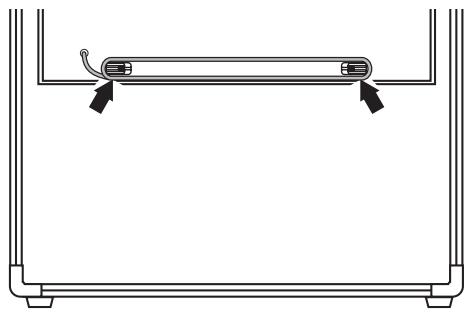
This equipment is heavy (weighing 44 kilograms), so to prevent injury and other safety hazards due to accidental toppling, drops, or falls, at least two persons should work together to carry the unit when moving it.
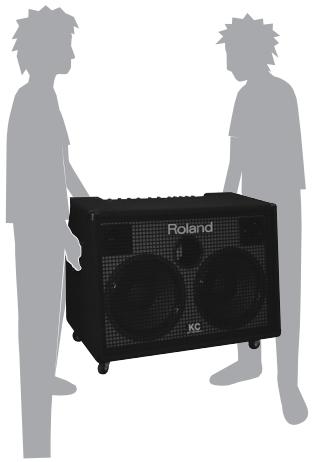
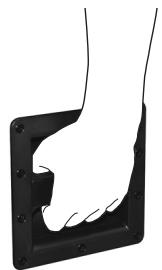
When moving this equipment, carry it while securely gripping the left and right handles as shown in the figure.
Using the included casters can be convenient on level surfaces.
Turning the Power On and Off
- Once the connections have been completed, turn on power to your various devices in the order specified. By turning on devices in the wrong order, you risk causing malfunction and/or damage to speakers and other devices.
-
Before switching off the power, lower the volume on each of the devices in your system and then TURN OFF the devices in the reverse order to which they were switched on.
-
Make sure that all volume controls on the KC-880 and connected devices are set to 0.
- Turn on all the devices connected to the KC-880's input jacks (CH 1 through CH 4 and AUX IN/MONITOR IN).
- Turn on the KC-880.
Use and Handling of the Casters
The KC-880 comes with casters, which can be useful when moving the unit.
Attaching and Removing the Casters
When attaching or removing the casters, give attention to the following points.
- Carry out the operation at a location that is level and stable.
- To ensure safety, at least two persons should work together to carry out the operation.
Exercise care to keep fingers or feet from being pinched or pinned. - When attaching or removing the casters, to avoid damaging the unit or the floor surface, place stacked newspapers or the like under the unit.
- When placing the unit on the floor on its side, handle with care to avoid dropping it, or allowing it to fall or tip over.
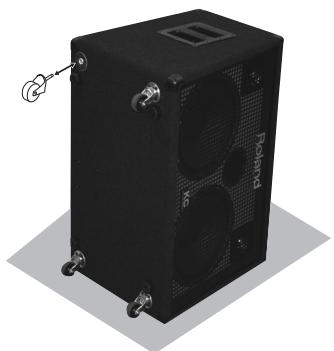
- Place the KC-880 on the floor on its side as shown in the figure.
- Attach the casters to the unit (or detach the casters).
- Return the unit to its upright position.
4. Switch on any equipment connected to the KC-880's LINE OUT jacks.
5. Adjust the volume levels for the devices.
- This unit is equipped with a protection circuit. A brief interval (a few seconds) after power up is required before the unit will operate normally. For protection from sudden big sound, always make sure to have the volume level turned down before switching on power. Even with the volume all the way down, you may still hear some sound when the power is switched on, but this is normal, and does not indicate a malfunction.
- If you need to turn off the power completely, first turn off the [POWER] switch, then unplug the power cord from the power outlet. Refer to "Power Supply" (p. 6).
The Quick Guide describes required settings and basic operations.
Getting Ready
Making the Connections
For more information about making the connections, refer to "Connect your KC-880" (p. 9).
- Make sure all devices are turned off.
- Connect the external devices.
- Turn down all volume controls on the KC-880 to zero.

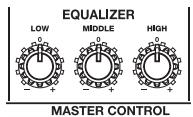
- Place the EQUALIZER controls at the center position (0).
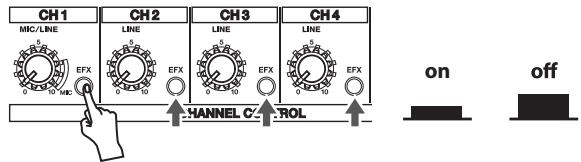
- Switch off all [EFX] buttons.
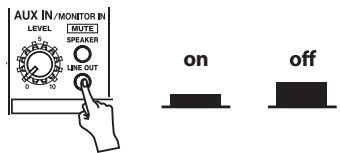
- Switch off the AUX IN/MONITOR IN [MUTE] button.
Switch on the Power
-
Once the connections have been completed, turn on power to your various devices in the order specified. By turning on devices in the wrong order, you risk causing malfunction and/or damage to speakers and other devices.
-
Turn on the devices connected to the input jacks.
- Turn on the KC-880.
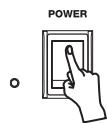
- Turn on the devices connected to the output jacks.
Turn off the power in the reverse order.
Try Playing Sound from the Built-in Speakers
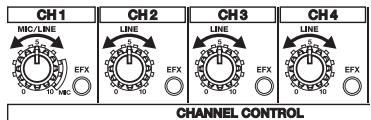
- Adjust each channel's volume knob to its center setting (5).
If you're using a microphone, turn the CH1 volume knob to the "MIC" range.
Lower the volume levels for channels you're not using.
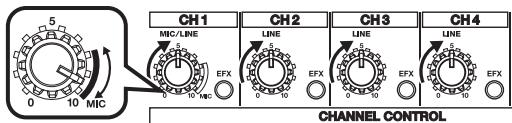
When using a mic
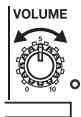
- While playing sound on the connected devices, slowly turn the [VOLUME] knob to adjust the overall volume level.
- Use the volume knobs for the respective channels to adjust the volume balance for the connected devices.
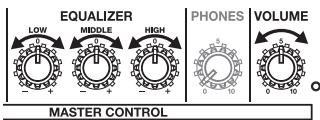
- Use the [VOLUME] knob and the EQUALIZER controls to adjust the overall volume level and sound quality.
Try Applying Built-in Effects
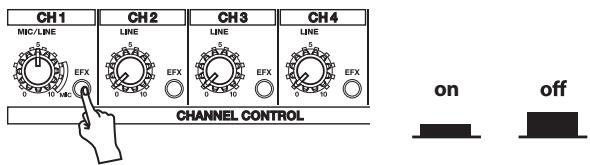
- Press the [EFX] button for the channel to which you want to apply the effect.
- Use the [EFX] knob to adjust the effect and its depth.
Refer to the following diagram and connect the KC-880 to the external equipment you are using.
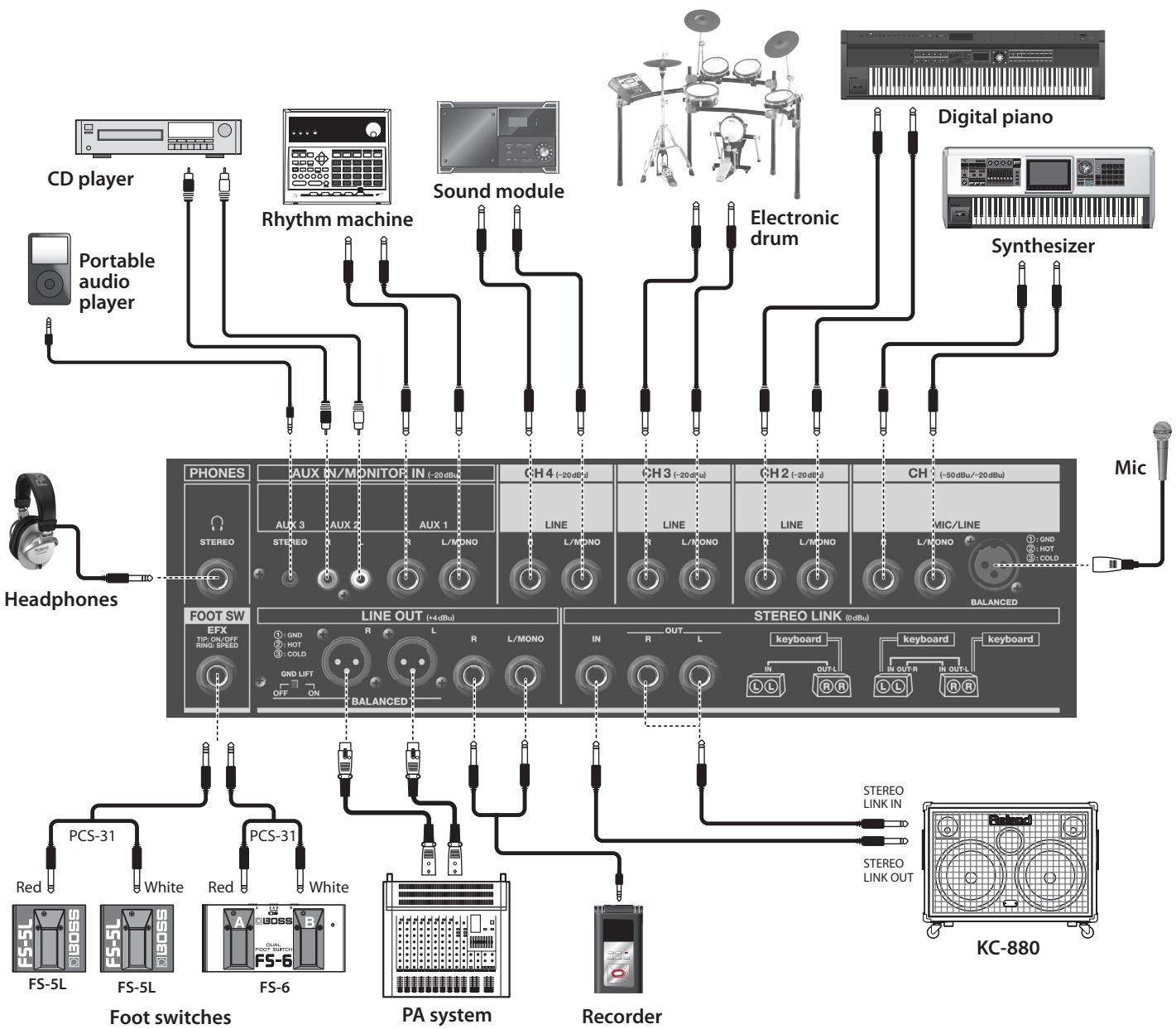
* For information on the switch settings, refer to page 12.
- To prevent malfunction and/or damage to speakers or other devices, always turn down the volume, and turn off the power on all devices before making any connections.
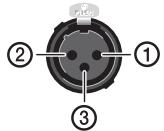
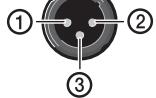
Set all of the KC-880's channel volume knobs (CH 1, CH 2, CH 3 and CH 4) and AUX IN/MONITOR IN [LEVEL] knob as well as the [VOLUME] knob to zero. - The pin assignment for the XLR type connectors is as shown below. Before making any connections, make sure that this pin assignment is compatible with that of all your other devices.

- When connection cables with resistors are used, the volume level of equipment connected to the inputs (CH 1 through CH 4, AUX IN/MONITOR IN and STEREO LINK IN) may be low. If this happens, use connection cables that do not contain resistors.
-
Howling could be produced depending on the location of microphones relative to speakers. This can be remedied by:
-
Changing the orientation of the microphone.
- Relocating microphone at a greater distance from speakers.
- Lowering volume levels.
Control Panel
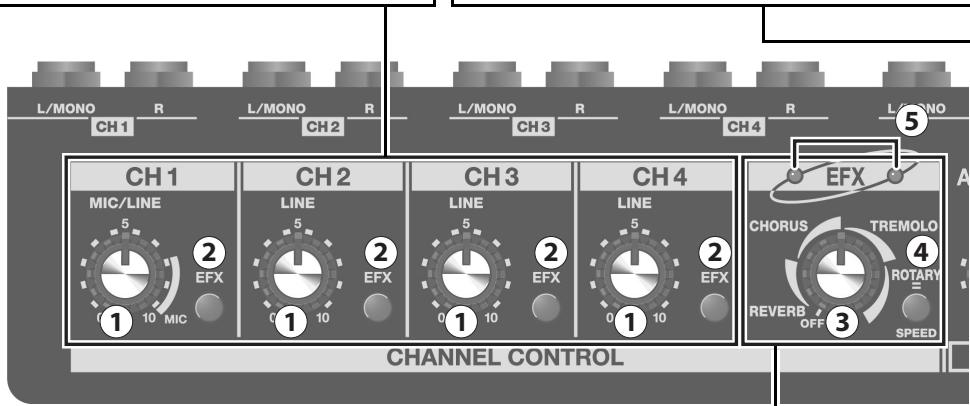
CH1-CH4
These adjust the volume levels and switch the internal effect unit on or off for devices connected to the respective channels (CH).
Volume knob
This adjusts the volume level for the device connected to the respective channel.
Turning the knob clockwise increases the volume.
Channel 1 (CH1) supports a microphone connection.
When you're using a microphone, set the knob at the range labeled "MIC."
- Leave the volume knobs for unused channels set at 0 (zero).
[EFX] Button
This lets you switch the internal effect units (EFX) on or off for each individual channel. When on (pressed in), the effect is applied to the device connected to the corresponding channel.
- When the [EFX] knob is set at the OFF position, no effects are applied, regardless of the settings of any [EFX] buttons.
EQUALIZER
This adjusts the tone of speaker and headphones output. These controls are normally left set at 0 (zero).
Turning clockwise makes the corresponding frequency range more prominent.
Turning counterclockwise reduces the intensity of the frequency range.
[LOW] Knob
This adjusts the tone of the bass range.
[MITTLE] Knob
This adjusts the tone of the middle range.
[HIGH] Knob
This adjusts the tone of the treble range.
Switching Buttons On and Off
Lower position

On
Upper position

Off
EFX
You can apply the built-in effects to devices connected to channels 1 through 4 (CH1-CH4).
You can select any one from among a total of four types.
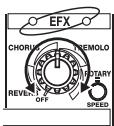
[EFX] Knob
You can switch among the four types of effects and adjust the intensity of the effect by changing the position of the knob.
REVERB:
This effect imparts lingering reverberations for a sound like a performance in a concert hall.
This is a stereo reverb that adds breadth.
The positioning of the knob adjusts the volume of the reverb.
It's also ideal for a microphone connected to channel 1 (CH1).
CHORUS:
This effect makes the sound fuller and broader.
It's optimal for the tones of instruments such as strings.
The positioning of the knob adjusts the depth of the effect.
TREMODO:
This effect produces cyclical changes in the volume level.
This is optimal for the tones of instruments such as electric pianos. The positioning of the knob adjusts the depth and speed of the tremolo volume changes.
ROTARY:
This effect imparts undulations and a unique sense of rotation to the sound.
It's optimal for the tones of instruments such as organs.
The positioning of the knob adjusts the depth of the effect.
- This effect is applied to devices connected to channels whose [EFX] buttons are switched on.
- The scale indications for REVERB, CHORUS, TREMOLO, and ROTARY are merely a general guide. Adjust while checking the effect with your own ear.
[SPED] Button (ROTARY)
This changes the speed of the ROTARY effect.
Pressing the button in makes the undulations faster.
- When this is switched, the speed of rotation changes smoothly.
- The [SPEED] button affects only the ROTARY effect.
⑤ EFX Indicators
The left and right indicators flash in alternately in time with the speed of the effect.
- When REVERB or CHORUS is selected, both indicators light up.
- When the effect is turned off using a footswitch pedal, both indicators go out.
VOLUME
[12] [VOLUME] Knob
This adjusts the volume level of speaker output.
PHONES
11 [PHONES] Knob
This adjusts the volume level of headphones output.
![ROLAND KC-880 - [PHONES] Knob - 1](/content/2025/01/130860/images/8d6343734938a4828e6175d6379084d6b78186dd225cc9cb0c07fe7e8b768087.jpg)
Roland STEBEO KEY LOABD AMPL EIER
![ROLAND KC-880 - [PHONES] Knob - 2](/content/2025/01/130860/images/b9ea31ada3c309c85af465e60cc182305a944f4197e128becec7bdba352748f0.jpg)
EQUALIZER
LOW
M
ODLE
0
0
1
D.
(1)
D
)+
HIGH
0
D
10+
PHONES
:
.
C
01
NES
VOLUME
5
010
KC-880

14

MASTERCONTROL
AUX IN/MONITOR IN
This adjusts the volume level and other settings of a device connected to the AUX IN/MONITOR IN.
You can also use this to input guide clicks from a drum machine, metronome, or other such device (monitor feature).
[LEVEL] Knob
This adjusts the volume level of a device connected to AUX IN/MONITOR IN.
Turning the knob clockwise increases the volume.
- Leave the [LEVEL] knob set at 0 (zero) when you're not using AUX IN/MONITOR IN.
[MITE] Buttons
These make the setting for using AUX IN as MONITOR IN.
Switching on the [MUTE] buttons stops output from the unit's speakers or LINE OUT of the sound from the device connected to AUX IN.
This can be useful when you're using clicks or other guide sounds from a metronome or other equipment.
SPEAKER:
Switching this on mutes output from the unit's speakers of the device connected to AUX IN.
LINE OUT:
Switching this on mutes output from the LINE OUT of the device connected to AUX IN.
- Sound is always output to headphones, regardless of the settings of the [MUTE] buttons.
POWER
[13] [POWER] Switch
This switches the unit's power on and off.
When it's on, the POWER indicator lights up.
14 POWER Indicator
What's the Monitor Feature?
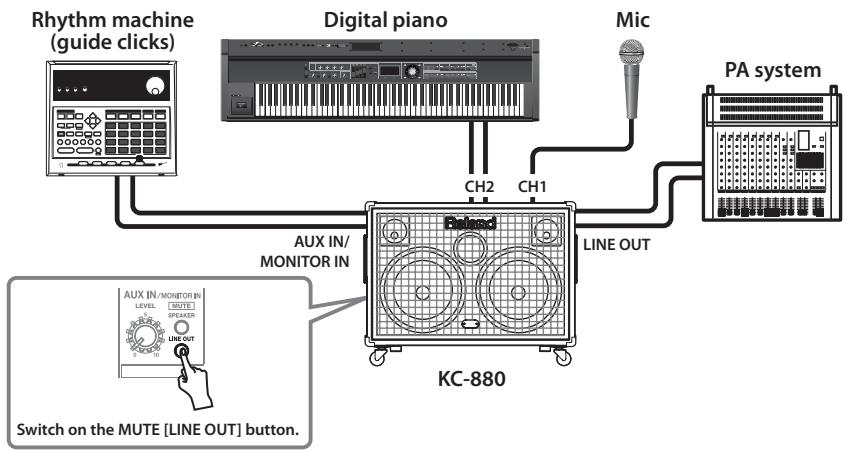
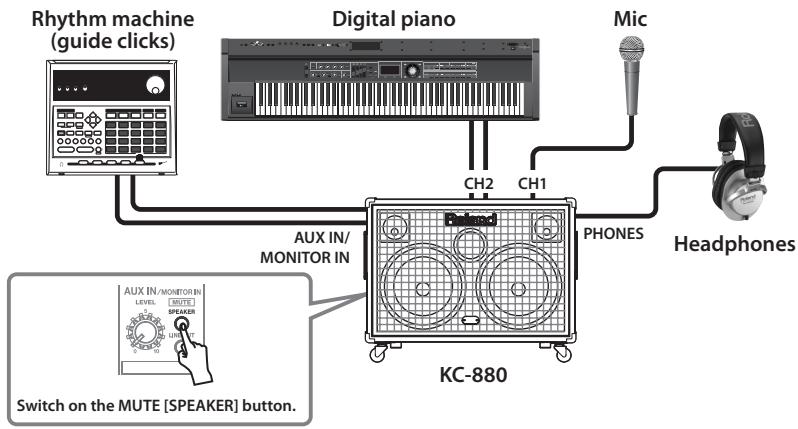
During stage performances, this feature lets the performer input guide clicks needed for playing in sync with a sequencer or other sounds that people other than the performer are not meant to hear, and play them so that only the performer can monitor them.
The KC-880 uses a mute feature that lets you select and mute out the output of audio signals input to AUX IN/MONITOR IN.
Usage Example 1: Using the KC-880 as a dedicated monitor-speaker amplifier in a public address (PA) system (p. 15)
Input the guide clicks or the like to AUX IN/MONITOR IN and switch on the MUTE [LINE OUT] button.
The guide clicks are output from the built-in speakers and headphones, but not from the LINE OUT jack.
- The performer monitors the sound using the built-in speakers.
Usage Example 2: Using the KC-880 as the main PA device (p. 15)
Input the guide clicks or the like to AUX IN/MONITOR IN on the unit and switch on the MUTE [SPEAKER] button.
The guide clicks are output from the LINE OUT jack and headphones, but not from the built-in speakers.
- The performer monitors the sound using headphones.
Jack Panel
PHONES

PHONES Jack
Accepts connection of stereo headphones. This not only enables use for practice at night or other situations where quiet is required, but also lets you monitor guide clicks.
- Connecting headphones doesn't cut off the sound from the speaker.
- Always be sure to lower the [PHONES] knob to 0 (zero) whenever connecting headphones.
AUX IN/MONITOR IN
Here is where you can connect a CD or MP3 player, an external mixer, or other line equipment.
You can also use this as MONITOR IN for connecting a drum machine, metronome, or other device for producing guide clicks.
② AUXIN/MONITOR IN (AUX 1-3) Jacks
Here is where you can connect a CD or MP3 player, an external mixer, or other line equipment (-20 dBu).
Three types of jacks are provided (1/4" phone, RCA phono, and stereo mini), and mixing is carried out internally.
Simultaneous connections are possible, but the volume level will be lower compared to single use.
FOOT SW
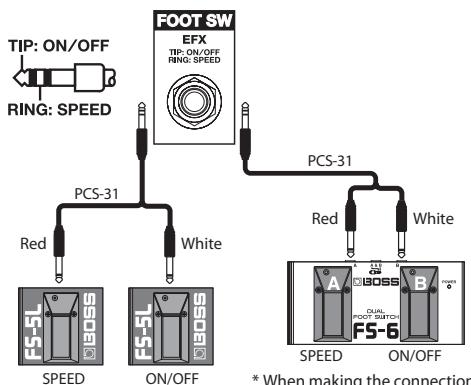
- Set the FS-5L's polarity switch as shown below.
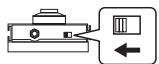
- When making the connection using the FS-6, set the POLARITY and MODE switches as shown below.
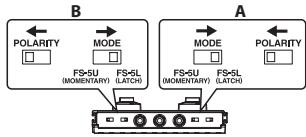
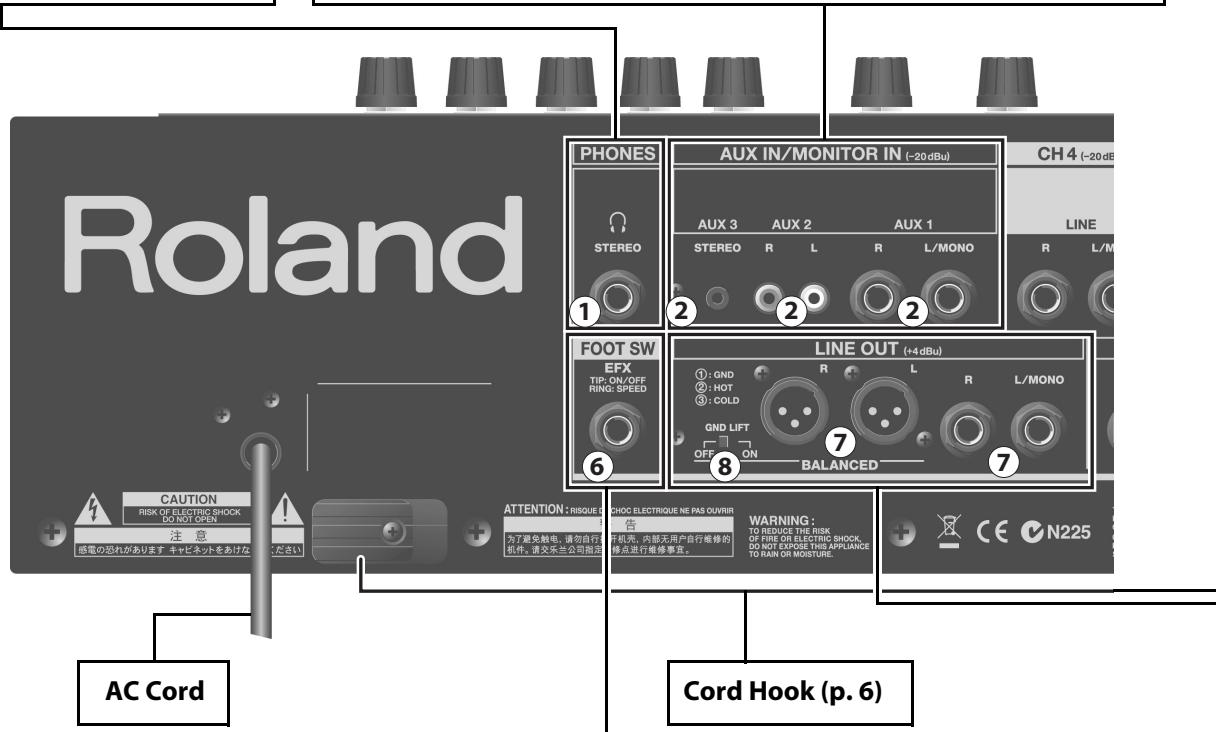
⑥ FOOT SW Jack
Connecting a footswitch pedal enables you to switch the internal effects (EFX) on and off and adjust the speed of the rotary effect using your foot.
An optionally available latch-type footswitch pedal (BOSS FS-5L or FS-6, available separately) and cable (Roland PCS-31, available separately) are required.
EFX ON/OFF:
Each press of the footswitch pedal switches the internal effects on or off. SPEED (SLOW/FAST):
Switching on the footswitch pedal sets the rotary at high speed (FAST).
- When a monaural cable is connected, EFX is switched on and off using the footswitch pedal. The SPEED setting is changed using the control panel.
- When EFX has been switched off using the footswitch pedal, effects remain off even if the [EFX] knob on the control panel is operated.
- Varying the setting of the [SPEED] button on the control panel changes the speed of the rotary effect, regardless of any SPEED setting made using the footswitch pedal. This may result in the footswitch pedal and the [SPEED] button being at different settings, but this isn't a malfunction. Depressing the footswitch pedal once clears this state (but this doesn't change the speed of the rotary effect).
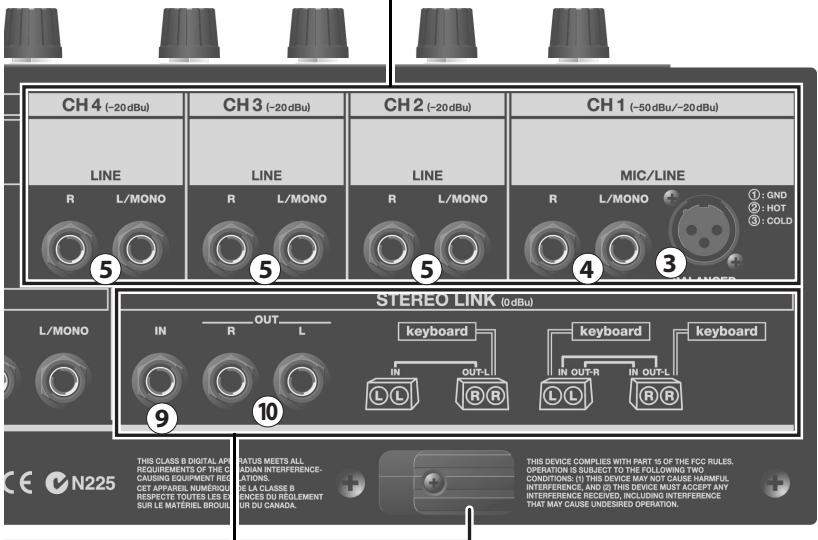
CH1-CH4 Input
You can connect up to four devices, including keyboards or other electronic instruments, or line devices such as a CD player, or a microphone (CH1 only).
CH1BALANCED(XLR)InputConnector
Here is where you can connect a microphone. This supports XLR-type balanced input.
- No phantom power feature is provided.
CH1 Input Jacks
Here you can connect a keyboard or other electronic instrument, a line device such as a CD player (-20 dBu), or a microphone (-50 dBu). Equipment with monaural output or microphone is connected to L/MONO.
- Switching between a line device and a microphone is accomplished using the CH1 volume knob on the control panel.
- You can connect two microphones to the L/MONO and R jacks at the same time, but the volume level may drop.
CH2-4InputJacks
Here you can connect keyboards or other electronic instruments, or line devices such as a CD player (-20 dBu). Equipment with monaural output is connected to L/MONO.
LINE OUT
Here you can connect PA systems, recording decks, and other such equipment.
LINE OUT Connectors and Jacks
You can connect mixers, recorders, and other such equipment here.
XLR connectors supporting balanced output and 1 / 4'' phone jacks are provided. For monaural output, you should use the use 1 / 4'' phone jack.
You can use the XLR connectors and 1 / 4'' phone jacks at the same time.
- The EQUALIZER controls and the [VOLUME] knobs have no effect on LINE OUT.
GND LIFT Switch
Connecting an external device to an XLR-type LINE OUT connector may produce loop hum.
If this happens, changing the setting of this switch may alleviate the problem.
This is normally left set to OFF.
ON: This isolates the first connector from the unit's ground.
OFF: This connects the first connector to the unit's ground.
STEREO LINK
You can use this when you're using two KC-880 units to form a stereo system that has even higher output (p. 14).
You connect each other's LINK IN and LINK OUT jacks using one or two 1/4'' phone cables.
Using two 1/4'' phone cables enables you to use all inputs on the KC-880 units, for a total of eight channel inputs and two AUX IN systems.
LINK IN Jack
Connect this to the LINK OUT L or LINK OUT R jack on the other KC-880.
When the LINK OUT L jack is connected: The left-channel signal is output from the unit's speakers. (On the other KC-880, the right-channel signal is output.)
When the LINK OUT R jack is connected: The right-channel signal is output from the unit's speakers. (On the other KC-880, the left-channel signal is output.)
⑩ LINK OUT L/R Jacks
Connect either one of the jacks to the LINK IN jack on the other KC-880.
Whether the unit handles the left or right channel is determined by the jack you use.
When connected to the LINK OUT L jack: The right-channel signal is output from the unit. (On the other KC-880, the left-channel signal is output.)
When connected to the LINK OUT R jack: The left-channel signal is output from the unit. (On the other KC-880, the right-channel signal is output.)
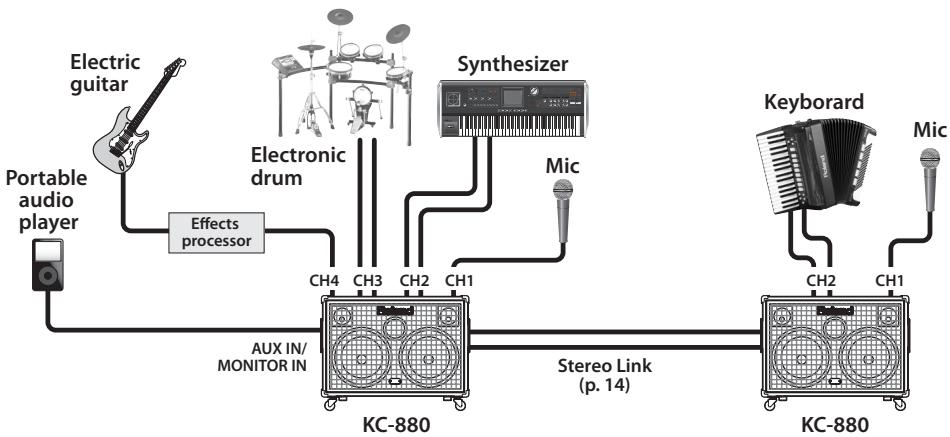
What's Stereo Link?
This lets you use two KC-880 units to form a stereo PA system having a high output of 320 + 320 watts.
This feature is called "Stereo Link."
Two different connection methods are available for Stereo Link: basic connection using one 1/4'' phone cable, and advanced connection using two 1/4'' phone cables.
Making the connections using two 1/4'' phone cables enables you to take full advantage of the mixing features of the two KC-880 units.
Examples of Connections
1. Basic Stereo Link
If you want to connect input sources to the KC-880 (L)
Up to five input devices can be connected.
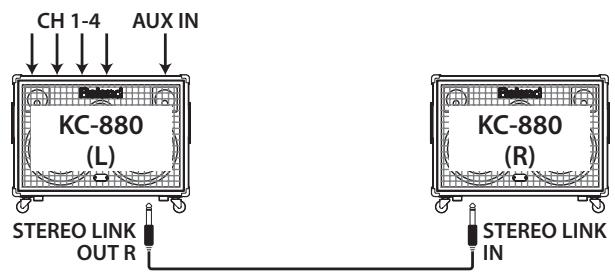
- Connect the devices to the KC-880 (L).
- Connect the STEREO LINK OUT R jack on the KC-880 (L) and the STEREO LINK IN jack on the KC-880 (R).
- Turn on both KC-880 (L) and KC-880 (R).
- Adjust the volume levels on all devices.
- Adjust the KC-880 (L) and KC-880 (R) volume levels separately using their [VOLUME] knobs.
If you want to connect input sources to the KC-880 (R)
As described in step 2 of example 1, connect the R side's STEREOLINK OUT L jack to the L side's STEREOLINK IN jack.
2. Advanced Stereo Link
This arrangement lets you play in stereo, making maximum use of the two KC-880s' mixer functions (with ten inputs).
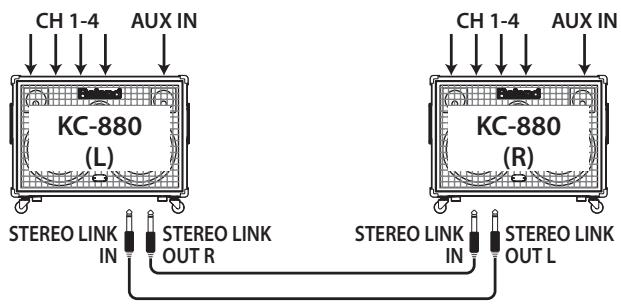
- Connect the devices to the KC-880 (L) and KC-880 (R).
- Connect the STEREO LINK OUT R jack on the KC-880 (L) and the STEREO LINK IN jack on the KC-880 (R).
- Connect the STEREO LINK OUT L jack on the KC-880 (R) and the STEREO LINK IN jack on the KC-880 (L).
- Turn on both KC-880 (L) and KC-880 (R).
- Adjust the volume levels on all devices.
- Adjust the KC-880 (L) and KC-880 (R) volume levels separately using their [VOLUME] knobs.
About the Volume and Tone Settings
Adjust the R and L volume levels separately using their [VOLUME] knobs.
You can adjust the EQUALIZER ([LOW]/[MIDDLE]/[HIGH] knobs) independently for the L and R sides.
Basically, they should be set to the same positions, but you can adjust each one as necessary to suit the needs of a particular setup.
Connection Example 1—Use as a Monitor
Here is an example of a setup for live performances using a PA system. It lets you monitor guide clicks by using the KC-880's monitor feature to play the guide sound from the unit's speakers without outputting the clicks to the PA system.
Connection Example 2—Use as a Main Speaker
Here is an example of a setup for live performances that uses the KC-880 as the main speaker.
It lets you monitor guide clicks by using the KC-880's monitor feature to play the guide sound from headphones connected to the unit without outputting the clicks from the built-in speakers.
Connection Example 3—Use as a Simple PA System
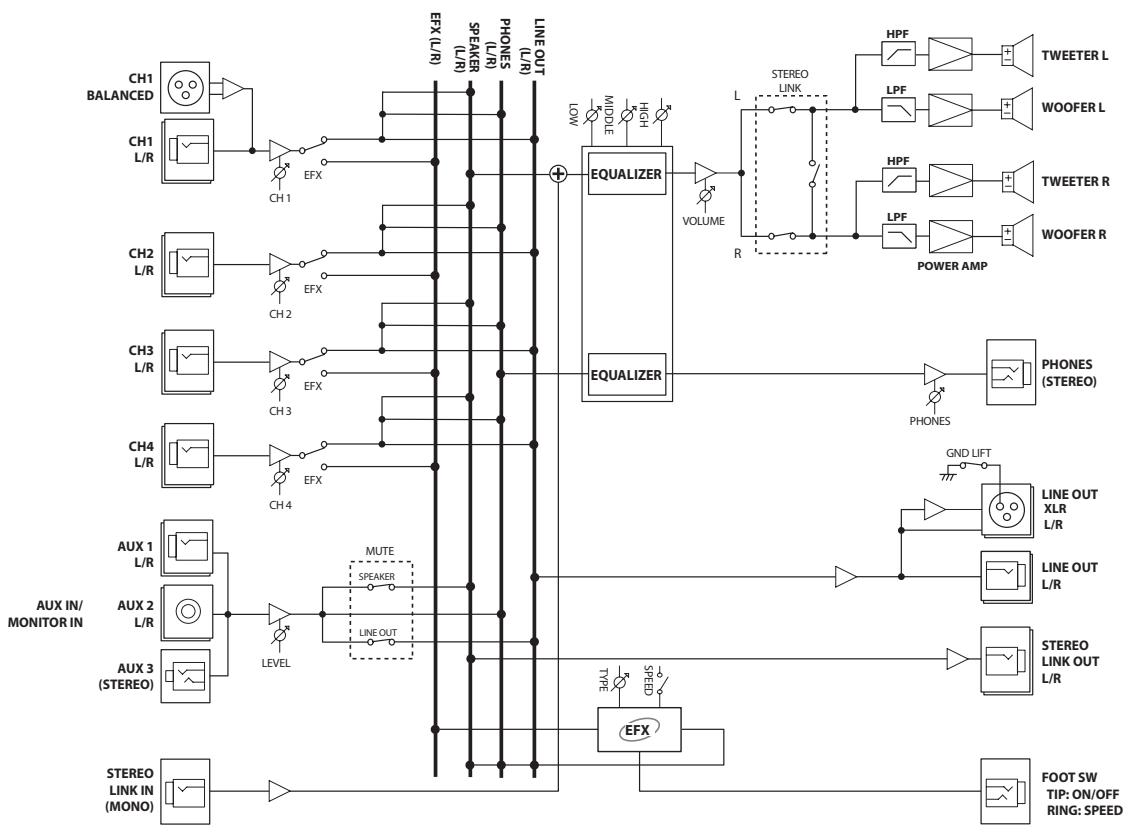
This is an example of a setup that connects two KC-880 units via Stereo Link for use as a simple PA system.
Troubleshooting
If the unit doesn't work the way you think it should, then before you do anything else, first check the following points. If these checks fail to determine the cause, consult your retailer or the nearest Roland Service Center.
| Problem | Cause |
| No power. | Is the power cord correctly plugged in to a power outlet? |
| No sound. | Is the external equipment connected correctly? |
| Are the [VOLUME] knob and the volume knobs for the respective channels adjusted correctly? | |
| Are the AUX IN/MONITOR IN [MUTE] buttons switched on? | |
| If the problem of no sound persists, contact your retailer or the nearest Roland Service Center. | |
| Sound is distorted or noisy. | Are the [VOLUME] knob and the volume knobs for the respective channels turned up too high? |
| Is the input signal from the device connected to the mixer at an appropriate level? |
| Problem | Cause |
| Low sound. | Are the [VOLUME] knob and the volume knobs for the respective channels adjusted correctly? |
| Are connections made to both the XLR-type and 1/4” phone connectors for channel 1 (CH1)?Use only one of the two connectors. | |
| Is the input signal from the device connected to the mixer at an appropriate level? | |
| Are two or more devices connected to AUX IN? | |
| Effects are not applied. | Are the [EFX] buttons for the respective channels switched on? |
| Is the [EFX] knob adjusted correctly? | |
| Have effects been turned off using the footswitch pedal? |
KC-880:STEREO KEYBOARD AMPLIFIER
| Rated Power Output | 320W (160W +160W) |
| Nominal Input Level (@1 kHz) | CH1 (MIC/LINE): -50--20 dBU CH2-4 (LINE): -20 dBU AUX IN/MONITOR IN: -20 dBU STEREO LINK IN: 0 dBu |
| NominalOutput Level (@1 kHz) | LINE OUT (XLR type, Phone type): +4 dBU STEREO LINK OUT: 0 dBU * 0 dBu = 0.775 Vrms |
| Speakers | 30 cm (12 inches) Woofer x 2 Horn Tweeter x 2 |
| Controls | <CHANNEL CONTROL> CH1 Volume Knob EFX Button CH2 Volume Knob EFX Button CH3 Volume Knob EFX Button CH4 Volume Knob EFX Button EFX Knob SPEED Button <MASTER CONTROL> AUX IN/MONITOR IN LEVEL Knob MUTE SPEAKER Button LINE OUT Button EQUALIZER LOW Knob MIDDLE Knob HIGH Knob PHONES VOLUME Knob VOLUME Knob POWER Switch GND LIFT Switch |
| Indicators | EFX x 2 POWER |
| Connectors | CH1 Input Connector (XLR type) CH1-4 Input (L/MONO, R) Jacks (1/4" phone type) AUX IN/MONITOR IN: AUX 1 Input (L/MONO, R) Jacks (1/4" phone type) AUX 2 Input (L, R) Jacks (RCA phono type) AUX 3 Input Jacks (Stereo miniature phone type) PHONES Jack (Stereo 1/4" phone type) STEREO LINK OUT (L, R) Jacks (1/4" phone type) STEREO LINK IN Jack (1/4" phone type) LINE OUT (L/MONO, R) Jacks (1/4" phone type) LINE OUT (L, R) Jacks (XLR type) FOOT SW Jack (TRS phone type) |
| Power Supply | AC 117 V, AC 220 V, AC 230 V, AC 240 V (50/60 Hz) |
| Power Consumption | 98 W |
| Dimensions | 759 (W) x 470 (D) x 585 (H) mm 29-15/16 (W) x 18-9/16 (D) x 23-1/16 (H) inches (including casters) |
| 759 (W) x 470 (D) x 534 (H) mm 29-15/16 (W) x 18-9/16 (D) x 21-1/16 (H) inches (excluding casters) | |
| Weight | 44 kg 97 lbs 1 oz |
| Accessory | Owner's Manual Caster x 4 |
- In the interest of product improvement, the specifications and/or appearance of this unit are subject to change without prior notice.
For EU Countries

This symbol indicates that in EU countries, this product must be collected separately from household waste, as defined in each region. Products bearing this symbol must not be discarded together with household waste.
DE Dieses Symbol beweet, dass这点symbol in EU-Landern getrennt vom Hausmull gesammelt werden muss gemäß den regionalen Bestimmungen. Mit这点symbol gekennzeichnete Produkte dürfen nicht zusammen mit den Hausmull entsorgt werden.
FR Ce symbole indique que dans les pays de l'Union europeenne, ce produit doit etre collecte séparation des ordures menagères selon les directives en vigueur dans chacun de ces pays. Les produits portant ce symbole ne doivent pas etre mis au rebut avec les ordures menagères.
Questo significato indica che nei paesi della Comunità europea questo prodotto deve essere smaltito separatamente dai normali rifiuti domestici, secondo la legalazione in vigore in ciascun paese. I prodotti che riportano questo significato non devono essere smaltiti insieme ai rifiuti domestici. Ai sensi dell'art. 13 del D.Lgs. 25 luglio 2005 n. 151.
ES Este symbolo indica que en los País de la Unión Europea this producto debe recogerse aparte de los residuos domesticos, tal como este regulado en cada zona. Los productos con este symbolo no se deben depositar con los residuos domesticos.
Estésymboloindiqua que nospáiesdaUE,a recolhaeste produits devarés feita separadamente do lixo domestico,deacdoto com os regulamentoscdada região.Os produits queapursemestesímbolo nãodeferào sereliminadosjuntamentecomolixo domestico.
NL Dit symbool geeft aan dat in landen van de EU dit product geschieren van huishoudelijk afval moet worden aangeboden, zoals bepaald per gemeente of regio. Producten die van dit symbol zichoorzien, mogen Niet samen met huishoudelijk afval worden verwijderd.
DK Dette symbol angiver, at i EU-lande skal dette produit opsames adskilt fra husholdningsaffald, som defineret i haver enkelt region. Produktker med dette symbol ma ikke smides udammen med husholdningsaffald.
Dette symbolet indikerer at produit mag behandles som spesialavfall i EU-land, iht. til retninglinjer for den enkelte regionen, og ici kastes sammen med vanlig husholdningsavfall. Produktor som er merket med dette symbolet, mag ici kastes sammen med vanlig husholdningsavfall.
SE Symbolen anger att i EU-länder måste den harprodukten kasseras separat frän hushällsaftfall, i enliget med varje regions bestämmelser. Produktker med den har symbolen fär inte kasseras tillsammans med hushällsaftfall.
Fi Täm merkinta ilmaisee,että tuote on EU-maisa kerattävā erillänn kottitalousjatteista kunkin alueen voimassa olevien märäysten mukaisesti. Tallä merkinnällar varustettuja tuotteita ei saa havittäkottitalousjatteiden mukana.
Ez a szimbólum azt jalenti, hogy az Europai Unioban EZT a termekat a hazartasi hulladektól elkūnítve, az adto regioban érvényes szabályozás zerint kell gyüjteni. Az ezzel a szimbolummal ellátott termeketakem nizabad a hazartasi hulladék KOZ dobni.
PL Symbol oznacza, ze zgodnie z regulacjami w owdpowednim regionie, w krajach UE produktu nie nalezy wyrzucac z odpadami domowymi. Produktow opatrzonych tym symbolem nie mayna utlylizowac razem z odpadami domowymi.
Tento symbol udáva, zé v zemich EU muisy byt tento vyrobek shbrán oddělené od domácho opodau, jak je urçeno pro kázdý region. Vyrobky nesouci tento symbol se nésmi vyhazovat spolu s domácim opadem.
SK Tento symbol vyjadruje, ze v krajinach EU sa musi zber tohto produktu vykonavat oddelene od modoveho oppadu, podla nariadeni platnych v konkrenej krajine. Produktys tymto symbolom sa nesmuy vyhadzovat spolu s domovym opadom.
See sūmbol nāṭab, et EL-ia maides tuleb see toode olemprügist eraldi koguda, nii nagu on igas piirkonnas māraratletud. Selle sūmboliga margritud totoed ei tohi āra visata koos olmeprugica.
LT Sis simbolis rodo, kad ES salyse sis produktas turi buti surenkamas atskirai nuo buitiniu atieku, kaip nustatyta kiekviename regione. Siuo simboliu pazenklinti Produktai neturi buti ismetami kartu su buitinémis atiekomis.
Sis symbols norada, ka ES valstis ko produktj jaevac atseviski no majsaimniecbas atkritiumi, ko noteiktis katra regiona. Produktus ar so simulbu nedrkrst izmest kopar majsaimniecbas atkritiumi.
Ta symbol označuje, da je treba provizd v državh EU zbirati ločeno od gospodinjskih odpadkov, tot kot je dolovćeno v vsaki regiji. Proizvoda s tem znakom ni dovoljeno odlagat i skupaj z gospodinjskimi odpadki.
To oujfo ao auto vOnodnloe otouc xogoe ts E.E. to ouyexqevno ooiov nei a vo uoyetyata oto ta vOnouta onua ana atogmuata, oouvova oe ooa oboletovra oabe npoyoi. Ta ooiovta nov govov to ouyexqevno oujfo dove noe iaoatooqitovt aouz e me oniaoxa anotogmuata.
For China
有关产品中所含有害物质的说明
AI Fanny Trading Office
9, EBN Hagar Al Askalany Street,
ARD E1 Golf, Heliopolis,
Cairo 11341,EGYPT
TEL: (022)-418-5531
REUNION
Royal Cape Park, Unit 24
Londonderry Road, Ottery 7800
Cape Town, SOUTH AFRICA
TEL: (021) 7994900
ASIA
CHINA
Roland Shanghai Electronics
Co., Ltd.
5F.No.1500 Pingliang Road
Shanghai 200090, CHINA
TEL: (021) 5580-0800
Roland Shanghai Electronics
Co., Ltd.
(BEIJING OFFICE)
10F. No.18 3 Section Anhuaxili
Chaoyang District Beijing 100011
CHINA
TEL: (010) 6426-5050
HONG KONG
Tom Lee Music Co., Ltd. Service
Division
22-32 Pun Shan Street, Tsuen
Wan, New Territories,
HONG KONG
TEL:2415091
Parsons Music Ltd.
8th Floor, Railway Plaza, 39
Chatham Road South, T.S.T.
Kowloon, HONG KONG
TEL: 2333 1863
INDIA
Rivera Digitec (India) Pvt. Ltd.
411, Nirman Kendra Mahalaxmi
Flats Compound Off. Dr. Edwin
Moses Road, Mumbai-400011, INDIA
TEL: (022) 2493 9051
INDONESIA
PT Citra IntiRama
JI. Cideng Timur No. 15J-150
Jakarta Pusat
INDONESIA
TEL: (021) 6324170
KOREA
Cosmos Corporation
1461-9, Seocho-Dong,
Seocho Ku, Seoul, KOREA
TEL: (02) 3486-8855
MALAYSIA
Roland Asia Pacific Sdn. Bhd.
45-1, Block C2, Jalan PJU 1/39
Dataran Prima, 47301 Petaling
Jaya, Selangor, MALAYSIA
TEL: (03) 7805-3263
VIET NAM
Suoi Nhac Company, Ltd
370 Cach Mang Thang Tam St.
Dist.3, Ho Chi Minh City,
VIET NAM
TEL: 9316540
PHILIPPINES
G.A. Yupangco & Co. Inc.
339 Gil J. Puyat Avenue
Makati, Metro Manila 1200,
PHILIPPINES
TEL: (02) 899 9801
SINGAPORE
Theera Music Co., Ltd.
100-108 Soi Verng Nakornkasem,
New Road,Sumpantawongse
Bangkok 10100 THAILAND
TEL: (02) 224-8821
AUSTRALIA/ NEW ZEALAND
AUSTRALIA/
NEW ZEALAND
Roland Corporation
Australia Pty.,Ltd.
38 Campbell Avenue
Dee Why West. NSW 2099
AUSTRALIA
For Australia
Tel: (02) 9982 8266
For New Zealand
Tel: (09) 3098 715
CENTRAL/LATIN AMERICA
ARGENTINA
Instrumentos Musicales S.A.
Av.Santa Fe 2055
(1123) Buenos Aires
ARGENTINA
TEL: (011) 4508-2700
BARBADOS
A&B Music Supplies LTD
12 Webster Industrial Park
Wildey, St.Michael, Barbados
TEL: (246)430-1100
BRAZIL
Roland Brasil Ltda.
Rua San Jose, 780 Sala B
Parque Industrial San Jose
Cotia - Sao Paulo - SP, BRAZIL
TEL: (011) 4615 5666
CHILE
Comercial Fancy II S.A.
Rut.: 96.919.420-
Nataniel Cox #739, 4th Floor
Santiago - Centro, CHILE
TEL: (02) 688-9540
COLOMBIA
Centro Musical Ltda.
Cra 43 B No 25 A 41 Bododega 9
Medellin, Colombia
TEL: (574)3812529
COSTA RICA
JUAN Bansbach Instrumentos
Musicales
Boulevard Andrews, Albrook,
Panama City, REP. DE PANAMA
TEL: 315-0101
PARAGUAY
Houtstra 3, B-2260, Oevel
(Westerlo) BELGIUM
TEL: (014) 575811
CROATIA
ART-CENTAR
Degenova 3
HR-10000Zagreb
TEL: (1) 4668493
CZECH REP.
CZECH REPUBLIC DISTRIBUTOR
s.r.o
Voctarova 247/16
CZ-180 00 PRAHA 8,
CZECH REP.
TEL: (2) 830 20270
DENMARK
Roland Scandinavia A/S
Nordhavnsvej 7, Postbox 880,
DK-2100 Copenhagen
DENMARK
TEL:39166200
FINLAND
Roland Scandinavia As, Filial
Finland
Elannontie 5
FIN-01510 Vantaa, FINLAND
TEL: (0)9 68 24 020
GERMANY
155, New National Road
Patras 26442, GREECE
TEL:2610435400
HUNGARY
Roland East Europe Ltd.
Warehouse Area DEPO'Pf.83
H-2046 Torokbalint. HUN
TEL: (23) 511011
IRELAND
Roland Ireland
G2 Calmount Park, Calmount
Avenue, Dublin 12
Republic of IRELAND
TEL: (01) 4294444
ITALY
Roland Italy S. p. A.
Danvik Center 28, 2 tr.
S-131 30 Nacka SWEDEN
TEL: (0)87020020
SWITZERLAND
Roland (Switzerland) AG
Atlantic Close, Swansea
Atlantic Close,SWANSEA Enterprise Park, SWANSEA
SA7 9FJ.
UNITED KINGDOM
TEL: (01792) 702701
MIDDLE EAST
BAHRAIN
Moon Stores
No.1231&1249 Rumaytha
Building Road 3931, Manama 339
BAHRAIN
TEL:17813942
IRAN
MOCO INC.
No.41 Nike St., Dr.Shariyati Ave.,
Roberoye Cerahe Mirdamad
Tehran IRAN
TEL: (021) 2285-4169
ISRAEL
Halilit P. Greenspoon & Sons Ltd.
8 Retzif Ha'alia Hashnia St.
Tel-Ayiv-Yafo ISRAEL
TEL: (03) 6823666
JORDAN
Al-Yousifi Service Center
P.O.Box 126 (Safat) 13002 KUWAIT
TEL: 00 965 802929
LEBANON
Chahine S.A.L.
George Zeidan St., Chahine Bldg.
Achrafieh, P.O.Box: 16-5857
Beirut,LEBANON
TEL: (01) 20-1441
OMAN
TALENTZ CENTRE L.L.C.
Malatan House No.1
Al Noor Street, Ruwi
SULTANATE OF OMAN
TEL:24783443
QATAR
Al Emadi Co. (Badie Studio &
Stores)
P.O.Box 62,Doha,QATAR
TEL:4423-554
SAUDI ARABIA
aDawliah Universal Electronics
APL
Behind Pizza Inn
Prince Turkey Street
aDawliah Building,
POBOX2154
Alkhobar 31952
SAUDI ARABIA
TEL: (03) 8643601
SYRIA
Technical Light & Sound Center
Rawda, Abdul Qader Jazairi St.
Bldg. No. 21, P.O.BOX 13520,
Damascus, SYRIA
TEL: (011) 223-5384
TURKEY
ZUHAL DIS TICARET A.S.
Galip Dede Cad. No.37
Beyoglu - Istanbul / TURKEY
TEL: (0212) 24985
U.A.E.
Zak Electronics & Musical
Instruments Co. L.L.C.
Zabeel Road, Al Sheroog Bldg.,
No.14,Ground Floor,Dubai
U.A.E.
TEL: (04) 3360715
NORTH AMERICA
CANADA
Roland Canada Ltd.
(Head Office)
5480 Parkwood Way Richmond B.
C.V6V2M4 CANADA
TEL: (604) 270 6626
Roland Canada Ltd.
(Toronto Office)
170 Admiral Boulevard
Mississauga On L5T 2N6 CANADA
TEL: (905) 362 9707
U.S.A.
Roland Corporation U.S.
5100 S. Eastern Avenue
Los Angeles, CA 90040-2938
U.S.A.
TEL: (323) 890 3700