
Beat GPS - Smartwatch SBS - Free user manual and instructions
Find the device manual for free Beat GPS SBS in PDF.


| Product type | GPS smartwatch |
| Brand | SBS |
| Model | Beat GPS |
| Dimensions | 45 x 38 x 12 mm |
| Weight | 55 g |
| Screen | Color touch screen, 1.3 inches |
| Power | Rechargeable lithium-ion battery, 220 mAh |
| Battery life | Up to 7 days in normal use |
| Main functions | Built-in GPS, pedometer, heart rate monitor, smartphone notifications, IP68 waterproof |
| Connectivity | Bluetooth 4.0, compatible with iOS and Android |
| Care and cleaning | Clean with a soft, dry cloth, avoid chemicals |
| Safety | Avoid exposure to extreme temperatures, do not immerse in salt water |
| Spare parts and repairability | Non-user-replaceable battery, repair by SBS authorized service |
| Warranty | 2 years |
Frequently Asked Questions - Beat GPS SBS
User questions about Beat GPS SBS
0 question about this device. Answer the ones you know or ask your own.
Ask a new question about this device
Download the instructions for your Smartwatch in PDF format for free! Find your manual Beat GPS - SBS and take your electronic device back in hand. On this page are published all the documents necessary for the use of your device. Beat GPS by SBS.
USER MANUAL Beat GPS SBS
info@sbsmobile.com to receive your specific user manual.
UK
Introduction 4
Charging the battery in Watch 6
Viewing Pedometer Data 7
Paring Heart Rate Belt 8
Measuring Exercise 9
Signing in 10
Count up Stopwatch 11
Setting the Watch 12
Setting Planning Steps 13
Safety Information 14
INTRODUCTION
Thank you to your choosing SBS running sport watch.
The watch contains a GPS receiver, a heart rate meter, and a pedometer inside. It can measure exercise distance, pace, speed, duration, real-time heart rate, and steps etc. You can also review the exercise track and sign-in points in the Go Life App alter finishing exercise.
Please buy the bluetooth heart rate belt (transmitter and elastic belt) separately. If you have not the heart rate belt, please ignore the chapters on heart rate belt in the manual. about heart rate belt in the manual.
When the battery in the watch has run down, please charge it in time. (See chapter 5) The performance will degrade the battery has no electricity for a long time.
FUNCTION

GPS

Exercise Distance

Exercise Pace

Heart Rate Meter

Pedometer

Stopwatch

Exercise Record

Calories Burned

Backlight

Call Reminder

Sedentary Reminder

Exercise Reminder

Alarm

Heart Rate Remind

Bluetooth Link
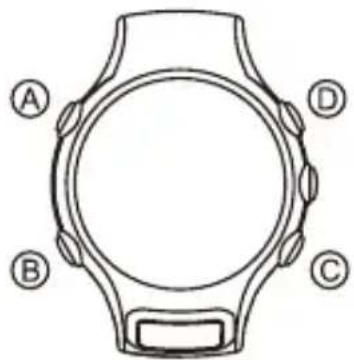
INDICATOR BUTTON
Thank you for choosing the Bluetooth® headset SBS. This manual will help you get the most out of your headset.


GPS Signal Strength Indicator Flash: Week Signal

Bluetooth on Flash: Transmitting Data

Heart Rate Meter on Flash: Searching the Heart Rate Signal

Battery Level Indicator
BUTTON FUNCTION
In the time mode:
- Press down A button to receive the GPS signal when GPS is deactivated.
- Press button B to scroll through the view.
-
Press Down button B to enter the setting menu when GPS is deactive.
-
Press button C to enter the record mode.
- Press button D to enter the stopwatch mode.
- Press button E to enter the pedomenter mode when the GPS is deactivated, or the GPS mode when the GPS is activated.
- Press down button E to turn on or off the Bluetooth® when the GPS is deactivated.
In the pedometer mode:
- Press down A button to receive the GPS signal.
- Press button B to return to the time mode.
- Press Down button B to enter the setting menu.
- Press button C to enter the record mode.
- Press button D to enter the stopwatch mode.
- Press button E to display the steps and percentage complete of the day.
- Press down button E to turn on or off the Bluetooth® when the GPS is deactivated.
In the stopwatch mode:
- Press button B to return to the time mode or exit from the data inquiry.
- Press button C to display stopwatch record when the stopwatch stops or to display the previous the record interface.
- Press button D to make a lap when stopwatch is running, or to display the next lap data in the record interface.
- Press down button D to rest the stopwatch when the stopwatch stops.
- Press button E to start or stop the stopwatch.
In the record mode:
- Press button B to return to the time mode or exit from the data inquiry.
- Press button C to select the previous record or data.
- Press button D to select the next recordor data.
- Press button E to display the record detail.
In the setting mode:
- Press button B to return to the time mode or ethe previous item.
- Press button C to select setting item or change setup. Press down button C to minus the value quickly.
- Press button D to select tsetting item or change setup. Press down button D to plus the value quickly.
- Press button E to confirm setup and enter the next item.
In the GPS mode:
- Press down button A twince to sign in with the GPS, if automatic sign is set as off.
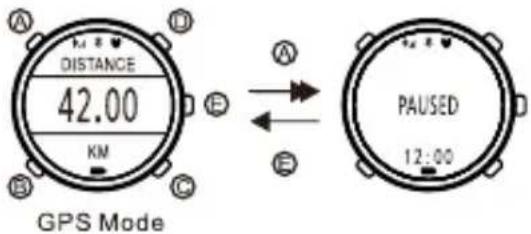
- Press down button A to stop the GPS measure, or to deactivate the GPS when GPS stops..
- Press button B to return the time mode.
- Press button C to display the measure data.
- Press button D to display the measure data.
- Press button E to active the GPS on the GPS READY interface
or when the GPS stops, or to change the display format.
- Press down button A B C D together to enter or remove the sleeping status. Whenever except in the sleeping status, press button A to turn blacklight on.
SLEEPING STATUS
The watch factory setting is the sleeping status (nothing display on the screen). Press down button A B C D together for 2 seconds to remove the sleeping status and display the time. If the watch still displays notigh, it may bebeacuase the battery voltage is too low. Please charge the battery with the USB cable.
Int he displaying status, when the GPS is deactivated, press down button A B C D to enter or remove the sleeping status.
CHARGING THE BATTERY IN WATCH
Clamp the watch with the clip of the USB cabla. To ensure their electrodes are contacted, the convex in the clip must be plugged inialhe concave onlhe back of the watch. Plug another side of the USB cable inia a power source. The charging icon isflashing on the walch screen whenlhe battery is being charged. The icon stops flashing when the charge is completed. It will ake 2-3 hours o make a full charging.

GO LIFE APP
Downloading Go Life App:
Please visit Play Store to download the Android version.
Please visit Apple Store to download the iOS version.
Device compatibility: Apple's device and android device with Bluetooth® 4.0.
System compatibility: iOS 7.0 and newer, android operating systems 4.3 and newer.
SIGN UP AND LOG IN GO LIFE
After downloading Go Life App,fill in personal information in
the my profile page.
Turn on the Bluetooth ® in the mobile device and watch, then click bind and the watch to the Go Life App according the prompt.
SETTING AND SYNCHRONIZING THE DATA
You cans et the watch in the GoLife app except pairing the heart rate belt. After finishing excersing, login the Go Life App and trasfer the exercise data to the App. You can review your exercise data and show them to your friends in the App.
In the processing of setting, linking, synchronizing the data and adding devices, please ensure that the Bluetooth® in the watch and the mobile device have been activated.
VIEWING TIME AND DATE
In the time mode, press button B to scroll through the interface: time, week and date, second and battery level.
![graph LR A["TUESDAY\n12:34\n12-30\nTime Mode"] -->|Date| B["TUESDAY\n12:34\n30\nSecond"] B -->|Battery Level 50%| C["TUESDAY\n12:34\nBattery Level"]](/content/2026/06/1302877/images/c48eff1a2090224759870450105028abf4a4293c9e063aa1e14ef30f7a126e0b.jpg)
VIEWING PEDOMETER DATA
In the time mode, when the GPS is deactivated, press button E to scroll through the interface: the steps and the percentage complete of the day. Press button B to return to the time mode.
![graph LR A["Time Mode"] --> B["Steps"] B --> C["percentage complete"] style A fill:#f9f,stroke:#333 style B fill:#ccf,stroke:#333 style C fill:#cfc,stroke:#333](/content/2026/06/1302877/images/607d6dc929f5c8b5f3ab51ac9a56fe60b0722ea25f06d356237043e6c0c1aad6.jpg)
The watch resets the pedometer automatically at midnight every day.
The watch can not enter the pedometer mode when the GPS is activated.
READY TO EXERCISE
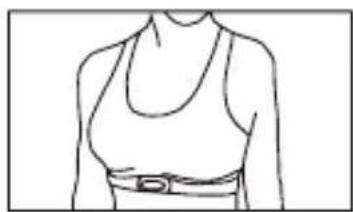
Wearing Heart Rate Belt:
Take out the heart rate belt accessories, transmitter and elastic belt from the package.
Wet the black electrodes on the elastic belt with clean water.

Fasten the transmitter to the elastic belt.

Wear well the heart rate belt.
Please ensure the letter on the transmitter to be forward and the electrode to be contacts with your skin. Adjust the length of the elastic belt to make you feel comfortable.


PAIRING HEART RATE BELT
After wearing well the heart rate belt, in the time mode, press down button to enter the setting menu, press button C or D to select PAIR thenpress button E to confirm, and the watch and the heart rate belt begin to pair, and the watch will display if the watch is paired with the heart rate belt.
![graph LR A["TUESDAY\n12:34\n12-30"] --> B["Setting Menu\nSETTING\nDATE\n•PAIR\nUSER"] B --> C["PAIR\nPAIRING"] D["Paired\nSUCCESS"] --> E["Unpaired\nPAIR\nFAIL"]](/content/2026/06/1302877/images/a3ecb83fa36ee205b1923e3e8db53414d69645cf5a67a5cb97c76285b852e8b3.jpg)
You'd better wear the heart rate belt next to the skin. If the skin has irritation, please wear the heart rate belt outside the underclothes, and wet the clothes under the black electrodes. (It may be difficult to measure the heart rate when you wear the belt outside the underclothes). The transmitter may interrare with the medical device which you are using.
Before using the heart rate belt, please consult a doctor.
RECEIVING GPS SIGNAL
GPS is Global Position System the watch has a GPS receiver which can measure your exercise distance, speed and so on alter receiving the GPS signal.

Please place the watch outdoors where you can see the sky, and take the antenna toward the sky to search for the GPS signal. You had better not move the watch at the time.
In the time mode or the pedometer mode, presa down button A for 2 seconds to search for the GPS signal. The watch will return to the time mode automatically if it can not receive GPS signal within 5 minutes.
If the watch does not receive the heart rate signal, wear and pair the belt again referring to chapter 9.1 and 9.2, otherwise, the watch can not measure the heart rate.
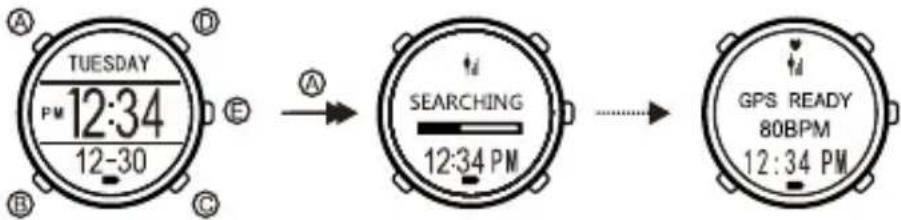
It will take 1-2 minutes to receive the GPS signal usually. It may take a long time to receive signal if you use the GPS for the first time or after a long interval in an area.
The watch can not succeed in receiving the GPS signal because the signal is weak, please change a piace or time to receive. The signal will get weak on cloud days, rainy days, in foresta, and at places round buildings. The error will get large because of weak signal. Because the GPS signal cannot penetrate solid buildings and water, please do not use the GPS in a room, in a car or under the water.
MEASURING EXERCISE
GPS Mode:
After receiving the GPS signal, when GPS READY appears, presa button E to activate the GPS and enter the GPS mode, the watch begins to measure the exercise duration, distance and track, etc.
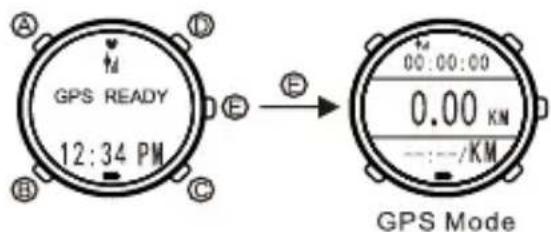
VIEWING REAL-TIME EXERCISE DATE
In the GPS mode, presa button C or D to display circularly exercise distance, current pace, current heart rate, current speed, this steps, exercise duration and so on. Press button E to change the display format.
![graph TD A["Exercise Distance"] --> B["Distance: 42.00 KM"] B --> C["PACE: 05:00 /KM"] C --> D["MAX160: 150 SPM /ks140"] D --> E["Current Pace: 42.00 KM /150 BPM"] E --> F["Current Heart Rate: 05:00/KM /12.0 KMR/H"] F --> G["Steps: 12.0 KM/H /45678"] G --> H["Current Speed: 150 BPM /12.0 KM/H /45687…](/content/2026/06/1302877/images/ab0ce41a72e1936f19489bd3b8d9285c2717967c8b6464f441e243a15d0e885b.jpg)
SIGNING IN
If automatic sign is set as OFF, in the GPS mode, press button A twice to sign in and save the exercise data at the time.
If automatic sign is set as some kilometers, the watch will sign in automatically when the exercise distance is equal to the set distance. You can not sign in manually in the meanwhile.
After signing in, the watch will display the lap data for about 5 seconds, then return to the GPS mode automatically.

STOPPING THE GPS MEASURE
In the GPS mode, press down button A to stop the GPS measure, then press button E to restart.
ENDING THE GPS MEASURE
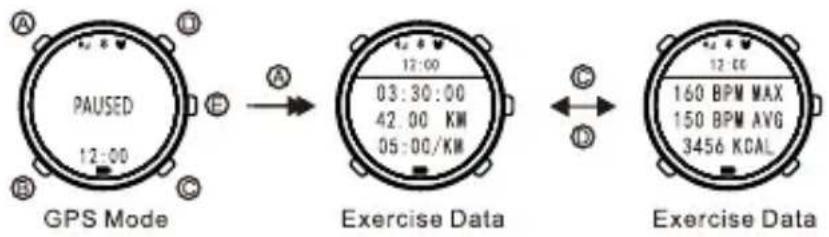
When the GPS stops measure, press down button A to end the measure,
then the watch displays the exercise data, press button C or D to view: the exercise duration, distance, the average pace, the maximum heart rate, the average heart rate, calorie burned. Press button E to return to the time mode.
VIEWING EXERCISE RECORDS
In the time mode or the pedometer mode press button C to the record mode. The watch will display the mode icon for 2 seconds, then display the histogram of calories burned which a bar indicates an exercise record.
When the histogram of calories appears, press button C or D to select a record, then press button E to confirm.
Press button C or D to display the record detail: exercise time and date, total distance, total duration, average pace, average speed, maximal heart rate, average heart rate, this steps, sum of laps.
STOPWATCH
The maximum of stopwatch measurement is 99 hours 59 minutes and 59 seconds.
Stopwatch Mode:
In the time mode or the pedometer mode, press button D to enter the stopwatch mode the watch will display the mode icon for 2 seconds, then enter the stopwatch mode.
In the stopwatch mode, press button B to return to the time mode.

COUNT UP STOPWATCH
Count up stopwatch can be used to measure the running time of one athlete. The way is as follows:
In the stopwatch mode, start, stop and restart the stopwatch with button E.
When the stopwatch stops, press down button D to reset.
LAP STOPWATCH
While running or racing on the track, you can use lap stopwatch to measure each lap duration and total duration.
In the stopwatch mode, press button E to start the stopwatch. When you finish a lap, press button D, the watch will display the lap data (lap duration and total duration). After about 5 seconds, the watch will return to the stopwatch running interface. At the end press button E to stop the stopwatch. When the stopwatch stops, press down button D to reset.

VIEWING LAP STOPWATCH RECORD
When the lap stopwatch stops, in the stopwatch mode, press button C to display the lap record, then press button C or D to scroll through to display each lap data.
Press button B to return to the stopwatch mode.
REMIND FUNCTION
In the Go Life App, you can set the functions as follows: call reminder, sedentary reminder, exercise reminder, alarm reminder. The watch will display the reminder interface and shake. The interface will keep 5 minutes, press any button to exit from the interface.
Only when the bluetooth in the watch and the mobile device have been activated, the function of call reminder can be available. When the GPS is activated, the function of call reminder can not be available.
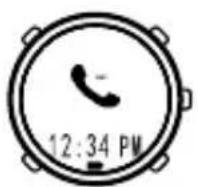
Call Reminder

Sedentary Reminder
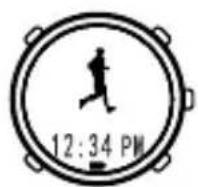
Exercise Reminder
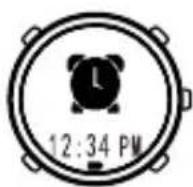
Alarm Reminder
SETTING IN THE WATCH
You can set the watch in the Go Life App, you also can do simple set in the watch.
In the time mode or the pedometer mode, press down button B to enter the setting menu. The setting menu include:
TIME: Setting the time.
DATE: Setting the date.
PAIR: Pairing the heart rate belt.(See chapters 9.2)
UESR: Setting the user information.
TARGET: Setting the planning steps.
DISPLAY: Switching the display mode.
In the setting menu, press button B to return to the time mode.
The setup of the watch is based on the last set. You can not set the watch when the GPS is activated.
SETTING DISPLAY MODE
In the setting menu, press button C/D to select DISPLAY then press button E to confirm.
SETTING TIME
1) In the setting menu, press buttonC/D to select TIME then press button E to confirm. The setting items include: hour, minute, second, 12/24 hour format.
2) Press button C/D to change the setup or value, or press down button C/D to change the value quickly. Press button E to confirm and enter the next setting item, or press button B to confirm and return to the previous setting item.
![graph TD A["SETTING DISPLAY TIME DATE"] -->|A B| B["HOUR 12:34 PM 30"] B -->|B C| C["MINUTE 12:34 PM 30"] C -->|C D| D["SECOND 12:34 PM 30"] D -->|D E| A style A fill:#f9f,stroke:#333 style B fill:#ccf,stroke:#333 style C fill:#cfc,stroke:#333 style D fill:#fcc,stroke:#333](/content/2026/06/1302877/images/f94b06e6573bb90ad9c8fa915bffc3cad96bc661b3225cd5c61a18f2f50e1a6e.jpg)
SETTING DATE
1) In the setting menu, press button C/D to select DATE, then press button E to confirm. The setting items include: year, month, day.
2) Press button C/D to change the setup or value, or press down button C/D to change the value quickly. Press button E to confirm and enter the next setting item, or press button B to confirm and return to the previous setting item.

SETTING PLANNING STEPS
1) In the setting menu, press button C/D to select TARGET, then press button E to confirm.
2) Press button C/D to change the value, or press down button C/D to change the value quickly, then press button E to confirm and return to the setting menu.
SETTING USER INFORMATION
1) In the setting menu, press button C/D to select USER press button E to confirm. The setting items include: sex, age, weight and height.
2) Press button C/D to change setup or value, press down button C/D to change value quickly. Press button E to confirm and enter the next setting item, or press button B to confirm and return to the previous setting item.
![graph TD A["Setting Menu"] --> B["Setting"] B --> C["Gender"] C --> D["Age"] D --> E["Height"] E --> F["Weight"] F --> G["Height"] style A fill:#f9f,stroke:#333 style B fill:#ccf,stroke:#333 style C fill:#cfc,stroke:#333 style D fill:#fcc,stroke:#333 style E fill:#cff,stroke:#333 style F fill:#ffc,s…](/content/2026/06/1302877/images/f2914aed0acb427adc9970e6d37a7c91317511516bf6baf7e3ffc71416cf74d2.jpg)
WATER RESISTANT
This watch is water resistant to 3 ATM. It is no problem to wear the watch
while washing hands. Do not wear the watch to have shower, swim, dive, sauna,
and so on.
In order to maintain the waterproof function:
1) Replacing the rubber ring regularly (generally 1-2 years). If not, the watch may be damp due to the aging of rubber ring.
2) Do not press any button under the water.
SAFETY INFORMATION
If your health is not good, it is best to consulta doctor before exercise.
The watch complies with industrial standards. If there is any allergic reaction or irritation, please stop wearing it and consult a doctor.
The watch consists of precision parts, please do not dismantle by yourself or use roughly.
Please do not wear the watch in the environment of extremely cold, extremely hot and temperature changing rapidly.
Please do not wear the watch in the environment with strong magnetic or strong electric.
Please make sure to keep the sensor surface clean.
When cleaning the watch, please use soft cloth and clean water without detergent, solvents, pesticide.
If the watch has abnormal function or water mist, please take the watch to a qualified service center to repair.
PRODUCT SPECIFICATION
Time precision: +/-1s /day (+/-30s /month)
Heart rate meter range: 40bpm — 220bpm
Heart rate meter resolution: 1bpm
Operating temperature: -10°C — 60°C
Storage temperature: -20°C — 60°C
Battery: Rechargeable polymer battery
Battery lite with the GPS function off: About 2 weeks
Battery lite with the GPS function on: About 8 hours
Water Resistance: 3 ATM (Living waterproof)
IT
Introduzione 4
Carica Batteria 6
Pedometro 7
Frequenza cardiaca 8

ASSOCIARE LA FASCIA CARDIACA
SETTING IN THE WATCH
Batteria: Rechargeable polymer battery
Count up Stoppuhr 34
ANZEIGE TASTE
TASTE FUNKTION
In der Zeit-Modus:
DAS AUFLADEN DES AKKUS IN WATCH
Fasten the transmitter to the elastic belt.
PAIRING HERZFREQUENZ -GÜRTEL
ERINNERN SIE FUNKTION
GPS Signal Strength Indicator Flash: Week Signal

Bluetooth on Flash: Transmitting Data

Heart Rate Meter on Flash: Searching the Heart Rate Signal

Battery Level Indicator
BOUTON FONCTION
CHARGE DE LA BATTERIE À WATCH

COUPLAGE CEINTURE DE FRÉQUENCE CARDIAQUE
COUNT JUSQU'À CHRONOMÈTRE
CARGA DE LA BATERÍA EN WATCH

If automatic sign is set as OFF, in the GPS mode, press button A twice to sign in and save the exercise data at the time.
If automatic sign is set as some kilometers, the watch will sign in automatically when the exercise distance is equal to the set distance. You can not sign in manually in the meanwhile.
After signing in, the watch will display the lap data for about 5 seconds, then return to the GPS mode automatically.
STOPPING THE GPS MEASURE
GPS Signal Strength Indicator Flash: Week Signal

Bluetooth on Flash: Transmitting Data

Heart Rate Meter on Flash: Searching the Heart Rate Signal

Battery Level Indicator
BOTÃO FUNÇÃO
No modo de tempo:

PARANDO A MEDIDA GPS


- UK
- INTRODUCTION
- FUNCTION
- INDICATOR BUTTON
- BUTTON FUNCTION
- IN THE PEDOMETER MODE
- IN THE STOPWATCH MODE
- IN THE RECORD MODE
- IN THE SETTING MODE
- IN THE GPS MODE
- SLEEPING STATUS
- CHARGING THE BATTERY IN WATCH
- GO LIFE APP
- SIGN UP AND LOG IN GO LIFE
- SETTING AND SYNCHRONIZING THE DATA
- VIEWING TIME AND DATE
- VIEWING PEDOMETER DATA
- READY TO EXERCISE
- PAIRING HEART RATE BELT
- RECEIVING GPS SIGNAL
- MEASURING EXERCISE
- VIEWING REAL-TIME EXERCISE DATE
- SIGNING IN
- STOPPING THE GPS MEASURE
- ENDING THE GPS MEASURE
- VIEWING EXERCISE RECORDS
- STOPWATCH
- COUNT UP STOPWATCH
- LAP STOPWATCH
- VIEWING LAP STOPWATCH RECORD
- REMIND FUNCTION
- SETTING IN THE WATCH
- SETTING DISPLAY MODE
- SETTING TIME
- SETTING DATE
- SETTING PLANNING STEPS
- SETTING USER INFORMATION
- WATER RESISTANT
- SAFETY INFORMATION
- PRODUCT SPECIFICATION
- IT
- ASSOCIARE LA FASCIA CARDIACA
- ANZEIGE TASTE
- TASTE FUNKTION
- DAS AUFLADEN DES AKKUS IN WATCH
- PAIRING HERZFREQUENZ -GÜRTEL
- ERINNERN SIE FUNKTION
- BOUTON FONCTION
- CHARGE DE LA BATTERIE À WATCH
- COUPLAGE CEINTURE DE FRÉQUENCE CARDIAQUE
- COUNT JUSQU'À CHRONOMÈTRE
- CARGA DE LA BATERÍA EN WATCH
- BOTÃO FUNÇÃO
- PARANDO A MEDIDA GPS
Brand : SBS
Model : Beat GPS
Category : Smartwatch