
FAS 3612X - Cooking appliance FAGOR - Free user manual and instructions
Find the device manual for free FAS 3612X FAGOR in PDF.



| Product Type | Washer-dryer (washing machine with dryer) |
| Brand | FAGOR |
| Model | FAS 3612X |
| Dimensions (W x H x D) | 59 x 85 x 59 cm (approximate) |
| Power supply | 220-230 V, 50 Hz |
| Power | 2200 W (estimated) |
| Maximum washing capacity | 5.9 kg (13 lbs) for normal programs; 3.2 kg (7 lbs) for delicates |
| Maximum drying capacity | 4.1 kg (9 lbs) for normal drying; 3.2 kg (7 lbs) for delicate drying |
| Maximum spin speed | 1100 rpm |
| Number of programs | 16 programs (washing and drying) |
| Main functions | Delayed start (24h), Easy iron, Extra rinse, Intensive wash, Anti-crease (Flot) |
| Safety | Child lock, door lock safety, imbalance stop |
| Water connection | Pressure 0.05-1 MPa (0.5-10 kg/cm²), cold water (hot water possible on some models) |
| Drum material | Stainless steel |
| Maintenance | Regular cleaning of filter and detergent drawer; periodic descaling |
| Warranty | 1 year parts and labor (USA/Canada) |
| Provided accessories | Supply hose, drain hose, transport brackets |
Frequently Asked Questions - FAS 3612X FAGOR
User questions about FAS 3612X FAGOR
0 question about this device. Answer the ones you know or ask your own.
Ask a new question about this device
Download the instructions for your Cooking appliance in PDF format for free! Find your manual FAS 3612X - FAGOR and take your electronic device back in hand. On this page are published all the documents necessary for the use of your device. FAS 3612X by FAGOR.
USER MANUAL FAS 3612X FAGOR
natural_image
Line drawing of a front-loading washing machine with front panel and side door (no text or symbols)contents
WARNINGS 4
SPECIFICATIONS 5
INSTALLATION AND ASSEMBLY 6
USING THE APPLIANCE. PRACTICAL TIPS 10
MAINTENANCE AND CLEANING 20
SAFETY AND TROUBLESHOOTING 22
ENVIRONMENTAL 25 WARNINGS
índice
ADVERTENCIAS 27
ESPECIFICACIONES 28
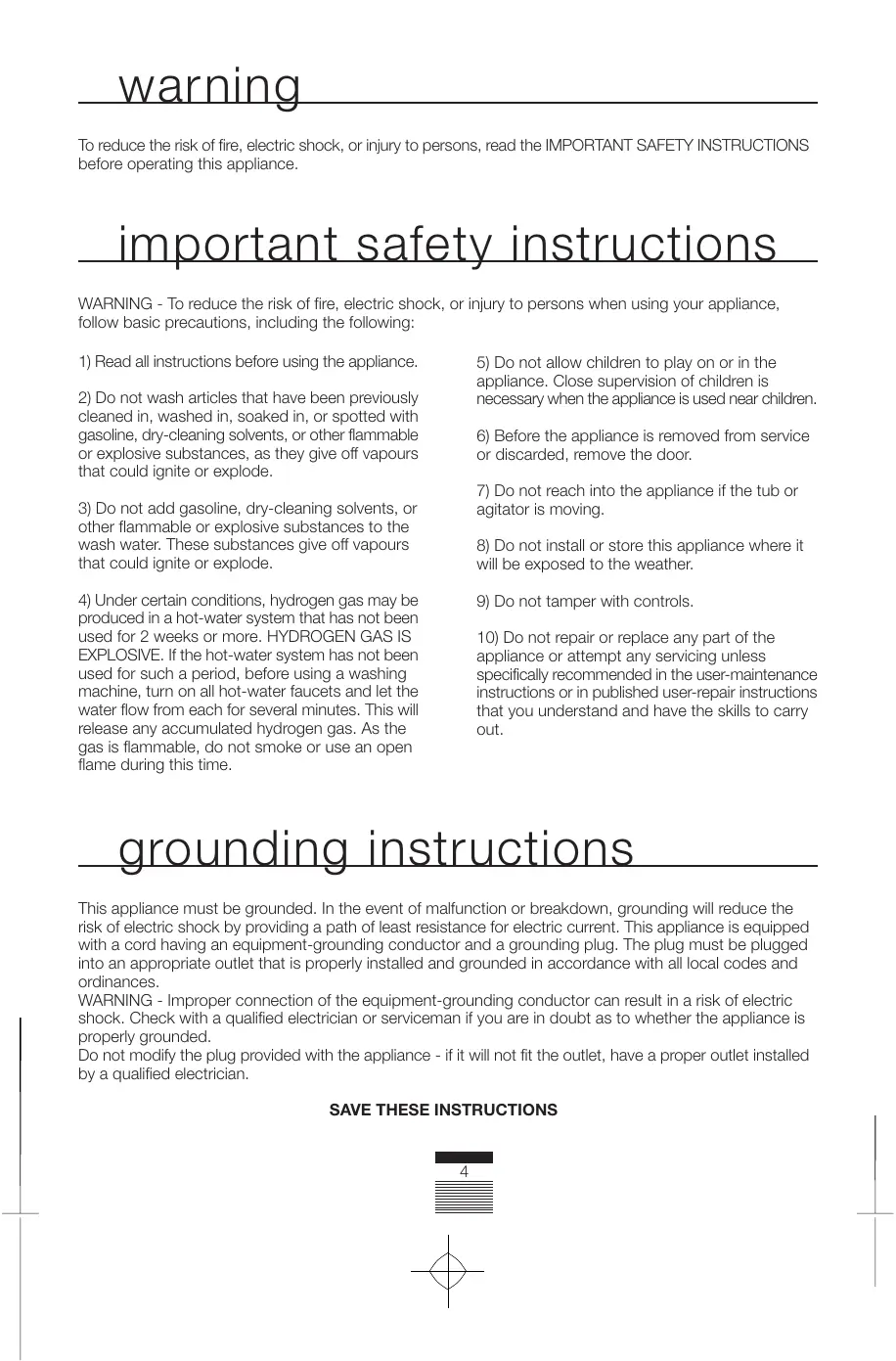
To reduce the risk of fire, electric shock, or injury to persons, read the IMPORTANT SAFETY INSTRUCTIONS before operating this appliance.
important safety instructions
WARNING - To reduce the risk of fire, electric shock, or injury to persons when using your appliance, follow basic precautions, including the following:
1) Read all instructions before using the appliance.
2) Do not wash articles that have been previously cleaned in, washed in, soaked in, or spotted with gasoline, dry-cleaning solvents, or other flammable or explosive substances, as they give off vapours that could ignite or explode.
3) Do not add gasoline, dry-cleaning solvents, or other flammable or explosive substances to the wash water. These substances give off vapours that could ignite or explode.
4) Under certain conditions, hydrogen gas may be produced in a hot-water system that has not been used for 2 weeks or more. HYDROGEN GAS IS EXPLOSIVE. If the hot-water system has not been used for such a period, before using a washing machine, turn on all hot-water faucets and let the water flow from each for several minutes. This will release any accumulated hydrogen gas. As the gas is flammable, do not smoke or use an open flame during this time.
5) Do not allow children to play on or in the appliance. Close supervision of children is necessary when the appliance is used near children.
6) Before the appliance is removed from service or discarded, remove the door.
7) Do not reach into the appliance if the tub or agitator is moving.
8) Do not install or store this appliance where it will be exposed to the weather.
9) Do not tamper with controls.
10) Do not repair or replace any part of the appliance or attempt any servicing unless specifically recommended in the user-maintenance instructions or in published user-repair instructions that you understand and have the skills to carry out.
grounding instructions
This appliance must be grounded. In the event of malfunction or breakdown, grounding will reduce the risk of electric shock by providing a path of least resistance for electric current. This appliance is equipped with a cord having an equipment-grounding conductor and a grounding plug. The plug must be plugged into an appropriate outlet that is properly installed and grounded in accordance with all local codes and ordinances.
WARNING - Improper connection of the equipment-grounding conductor can result in a risk of electric shock. Check with a qualified electrician or serviceman if you are in doubt as to whether the appliance is properly grounded.
Do not modify the plug provided with the appliance - if it will not fit the outlet, have a proper outlet installed by a qualified electrician.
SAVE THESE INSTRUCTIONS
washing machine specifications
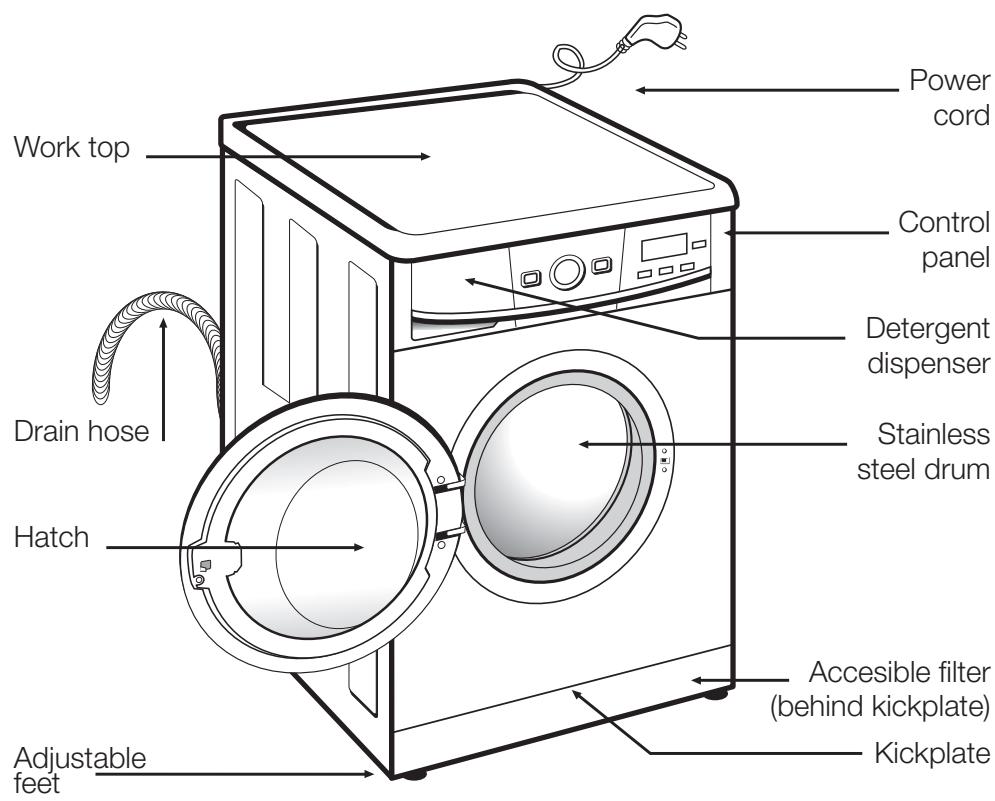
ACCESSORIES
natural_image
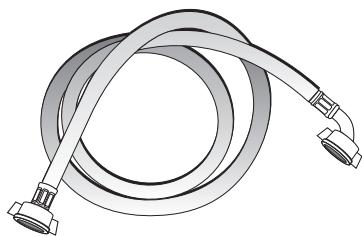
Illustration of a coiled cable with two connectors (no text or symbols)Water inlet hose.
washing machine installation and assembly
1 UNPACKING AND UNBLOCKING THE WASHING MACHINE
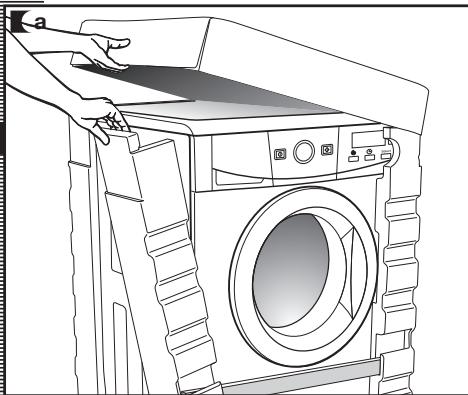
UNPACKING
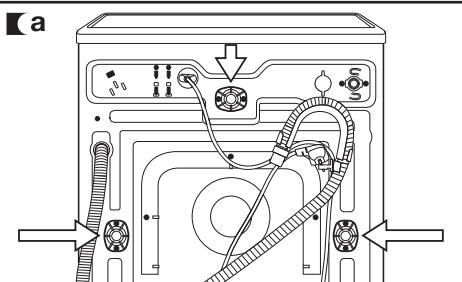
a Remove the base, corner protectors and top cover.
natural_image
Line drawing of a hand opening a washing machine with a door panel (no text or symbols)UNBLOCKING
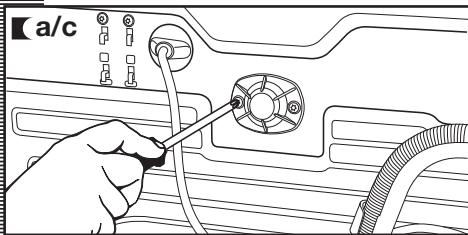
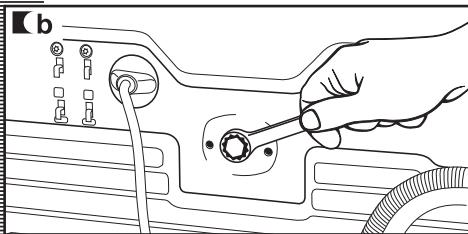
a Remove the screws holding the plastic covers to the back of the washing machine.
b Loosen and remove the 3 blocking screws.
c Cover the holes with the plastic covers you have just removed.
Important
Keep all the blocking screws: You will need them again if the machine needs to be moved again to another location.
natural_image
Illustration of a hand using a tool to connect components on a mechanical component (no text or symbols visible)2 WATER AND DRAINAGE CONNECTION
installation and assembly
WATER
CONNECTION
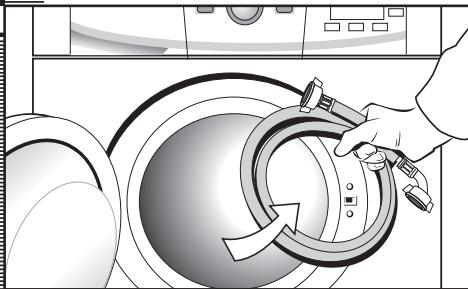
The water supply hose is inside the drum:
a Connect the bent end of the hose to the threaded inlet located on the back of the washing machine.
b Connect the other end of the hose to the water intake. Then securely tighten the connection nut.
It is important that the drain hose is correctly fastened to the outlet, to prevent any risk of it becoming detached and causing flooding.
If your washing machine has a hot water intake, connect the hose with the red threaded end to the hot water tap, and to the electrovalve with the red filter.
The machine must be connected to the mains water supply, using the new hoses supplied with the appliance. Do not use water supply hoses that have been used before. For your washing machine to work properly, the water pressure-must be between 0.05 and 1MPa (0.05 and 10 Kgr/cm ^2 ).
natural_image
Illustration of a hand washing a large washing machine with a handle (no text or symbols)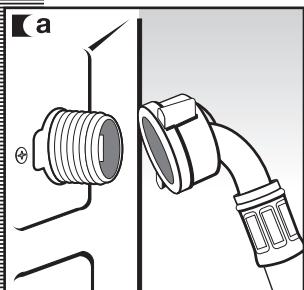
natural_image
Technical diagram showing a threaded connector attached to a pipe, with no visible text or symbols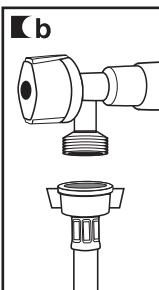
natural_image
Technical line drawing of a mechanical connector assembly (no text or symbols)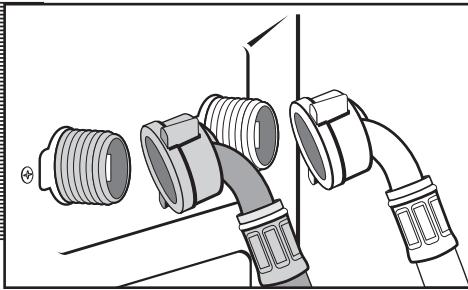
natural_image
Diagram of a pipe fitting with multiple connectors and fittings (no text or symbols)DRAINAGE
CONNECTION
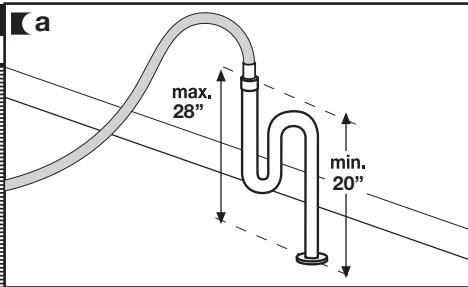
a It is recommended that you have a fixed drainage outlet 20-28 inches from the floor.
Make sure there are no kinks or bends in the hose.
3 LEVELLING AND ELECTRICAL CONNECTION
installation and assembly
LEVELLING
Important
Use the adjustable feet to level the washing machine. Levelling your appliance correctly will provide it with stability and prevent unnecessary noise, vibrations and shifting during operation.
If the floor is not perfectly level, compensate for the unevenness by tightening or loosenig the adjustable feet.
You will need to use a wrench for the models that have a nut.

natural_image
Line drawing of a hand holding a spiral-shaped object, possibly a tool or device (no text or symbols present)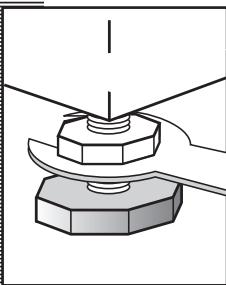
natural_image
Mechanical assembly diagram showing a bolt and nut assembly (no text or labels)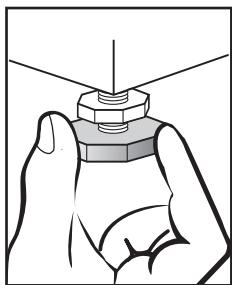
natural_image
Illustration of a hand holding a hexagonal nut with a pointed tip, no text or symbols presentELECTRICAL CONNECTION
Consult the specification plate located on the hatch door of the washing machine before making electrical connections.
The specifications plate contains important reference information, therefore it is not recommended to be removed from the appliance.
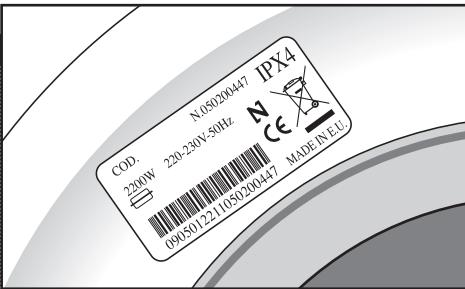
Important
It is very important to correctly ground the washing machine. The socket must be able to sustain the appliances maximum power load indicated on the specification plate.
Do not plug the washing machine in with wet or damp hands.
To disconnect, pull on the body of the plug.
Be sure not to unplug the unit by pulling on the cord or you may cause damage the wiring.
If the power cord is damaged, it must be replaced by an approved technical service person.
If you intend to build this unit in, ensure that, the plug is accessible after installation.
Connect to individual branch circuit.
DIMENSIONS
Your washing machine may be fitted underneath a kitchen countertop by first removing the machine's worktop.
APPLIANCES DIMENSIONS
- Wide: 23 ^1/4 "
• High: 33 ^1/2 " - Depth: 23 ^1/4 "
MINIMUM CLEARANCE
- Wide: 23 ^5/8 "
• High: 32 ^5/16 " - 35 ^3/8 " - Depth: 23 ^5/8 "
PRE-CLEANING
After your washing machine has been installed, we recommend that you pre-clean it.
This is to check that the installation, the connections and the drainage are all correct, and to thoroughly clean the inside of the washing machine before any wash programs are run (see the operating instructions on the following pages).
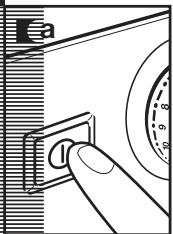
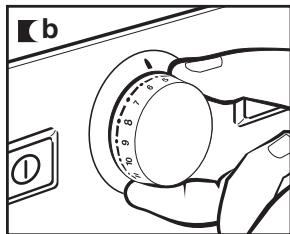
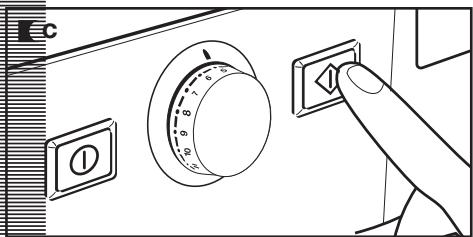
a Press ON/OFF button.
b Select the normal program at 140°F.
c Press the start/pause button.
using the appliance and practical tips
1 PREPARING GARMENTS FOR LAUNDERING
PREPARATION
Important
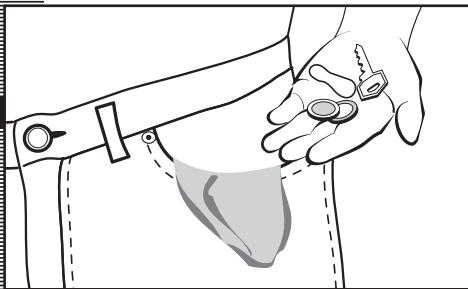
Before placing the clothes in the drum, make sure all pockets are empty.
Any small objects may block the drain pump.
natural_image
Line drawing of a person holding a small object near their torso, with no visible text or symbolsSORTING LAUNDRY
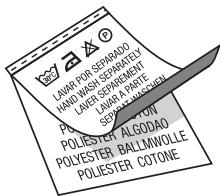
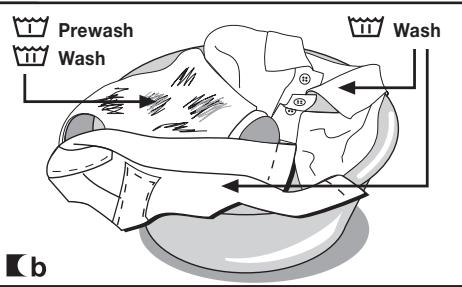
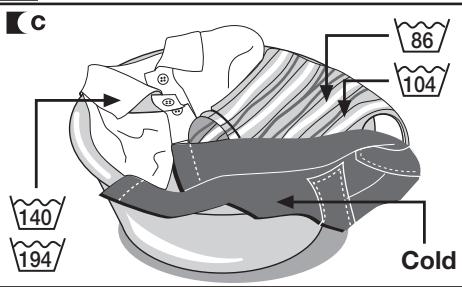
a Sort laundry by garment label instructions.
We recommend using delicate programs for sensitive fabrics. There is a special wool program for woollens.
b Sort laundry according to soil level:
- Wash lightly soiled garments using a short program.
- Use a program without prewash for medium-soiled garments.
- Wash heavily soiled garments using a long program with prewash.
a Sort your clothes according to color.
Wash whites and colors separately.
Important
We recommend loading the washing machine to its full capacity. This means savings on water and energy.
Whenever possible, we recommend that you wash garments of different sizes within the same wash program. This improves the washing action and also aids the correct distribution of the garments in the drum when spin-drying.
It is a good idea to put small garments in a wash bag.
[a
Important

Make sure beforehand that your woollens are machine washable.
Before using the drying program, first check the label on the garment to make sure it can be tumble dried.
2 USING DETERGENT AND ADDITIVES
using the appliance and practical tips
DETERGENT AND ADDITIVES
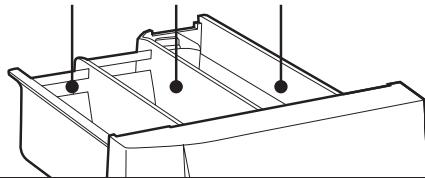
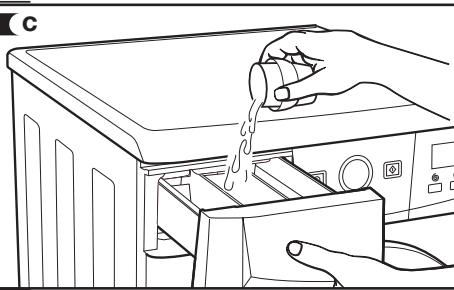
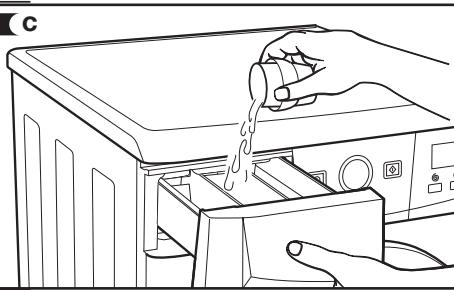
a Your washing machine's detergent dispenser has three compartments.
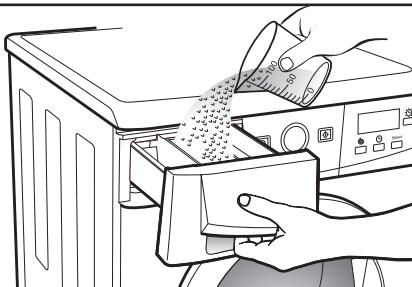
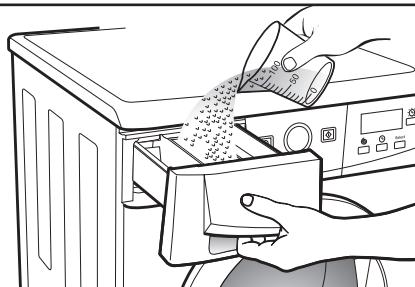
b Add detergent and softener to the dispenser before starting the wash program.
c Liquid detergents may be used in this washing machine. An optional detergent dispenser is to be used for this, which can be obtained from the Technical Service Network.
Place this optional dispenser inside the wash compartment.
Important
The level of liquid must never be higher than the MAX mark printed on the dispenser wall.
Remember that the amount of detergent to be used will always depend on:
■ The amount of clothes to be washed.
■ How heavily the clothes are soiled.
■ The hardness of the water (Information on water hardness in your area can be obtained from your local authorities).
Important
We recommend the use of a decalcifying product if the water hardness is high in your area.
a

Prewash

Wash

Fabric softener
natural_image
Technical line drawing of a mechanical component with mounting holes and internal channels (no text or symbols)b
natural_image
Illustration of hands cleaning a washing machine with a cloth (no text or symbols visible)c
natural_image
Line drawing of a hand pouring liquid into a washing machine (no text or symbols)eco-note
Remember that concentrated detergents exist which are more environment- and nature-friendly.
The use of more detergent than necessary will not improve washing results, and apart from costing

you money it will have a negative effect on the preservation of the environment.
We therefore recommend you follow the detergent manufacturer's instructions.
3 SELECTING THE WASH AND DRY PROGRAM
using the appliance and practical tips
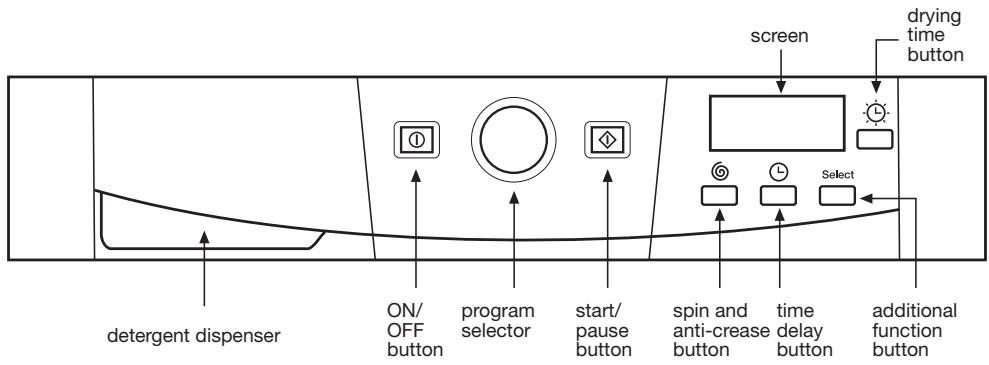
The procedure for selecting the wash and dry program is as follows:
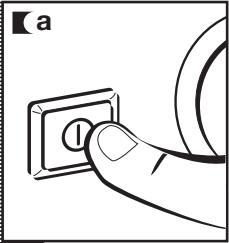
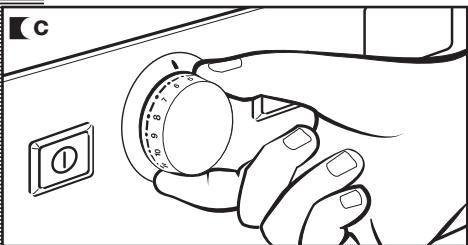
a Switch the washing machine on by pressing ON / OFF.
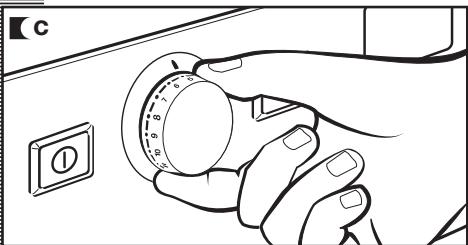
■b Activate the program selector by pressing it to release it.
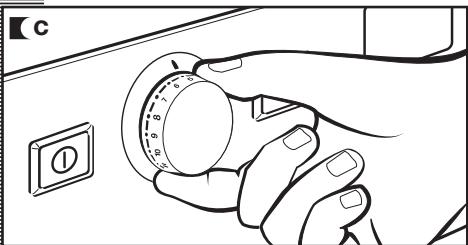
c Select the wash program by turning the program selector dial (see program table).
The procedure for selecting the drying time is as follows:
■ a Select the drying time by pressing the drying time button.
The time will appear on the display, increasing each time the drying time button is pressed.
Important
If you select a wash + dry option, the load must not be over 9 lbs. (3,5 lbs. for delicate wash programmes).
natural_image
Hand pressing a button on an electrical outlet (no text or symbols visible)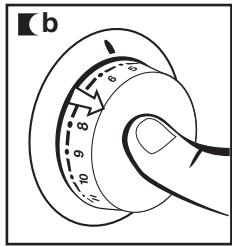
natural_image
Line drawing of a hand holding a circular dial with numbered fingers, next to an electrical switch (no text or symbols)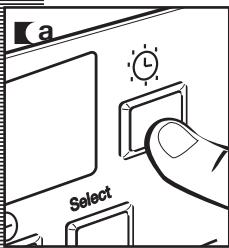
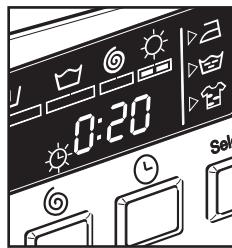
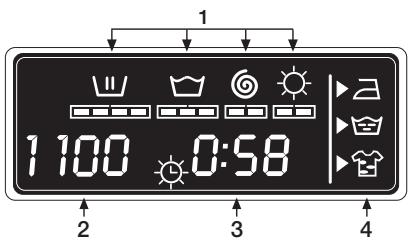
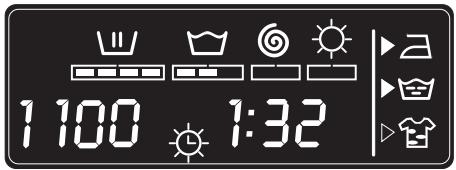
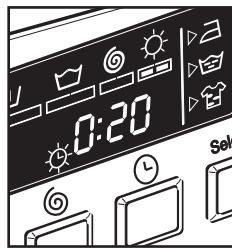
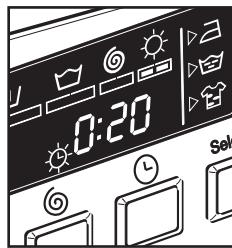
When you select the desired program, the following information will be displayed:
1 Wash and dry program status:
Wash
Rinse
Spin-drying
Dry
2 Spin speed
3 Number Program (for a few seconds) and then program duration.
4 Additional functions
Easy iron
Extra rinse
Intensive wash
There are four types of programs:
Normal program Delicate program Auxiliary program Drying program
| PROGRAMS | |||
| Normal | Delicate | Auxiliary | Drying |
| 1 Normal Wash-Cold | 8 Cold Wash | 12 Rinse | 14 Normal Dry |
| 2 Quick Wash | 9 Light Soil | 13 Spin | 15 Delicate Dry |
| 3 Normal Wash-Light Soil | 10 Medium Soil | 16 Drain | |
| 4 Normal Wash-Warm | 11 Wool | ||
| 5 Normal Wash-Medium Soil | |||
| 6 Hygenizer | |||
| 7 Pre-Wash | |||
eco-note
We recommend you choose a wash program without prewash whenever possible. This will save you money and help protect the environment.

natural_image
Abstract black-and-white line art with two overlapping leaf-like shapes inside a circular frame (no text or symbols)| Program | Temperature | Fabric type | Possible option buttons | |||||||
| Extra rinse | Intensive wash | Easy-ion | Spin speed selection | No spin | Anti-rease | |||||
| Normal prog. | 1 | Normal Wash-Cold | Cold | Cotton/Linen delicate colours very light soil | YES | |||||
| 2 | Quick Wash |  | Cotton/Linen whites/colours very light soil | YES | NO | YES | ||||
| 3 | Normal Wash-Light Soil |  | Cotton/Linen delicate colours light soil | YES | ||||||
| 4 | Normal Wash-Warm |  | Cotton/Linen fast colours light soil | YES | ||||||
| 5 (*) | Normal Wash-Medium Soil |  | Cotton/Linen fast colour medium soil | YES | ||||||
| 6 | Hygenizer |  | Cotton/Linen whites heavy soil | YES | ||||||
| 7 | Pre-Wash |  | Cotton/Linen whites/fast colours heavy soil | YES | ||||||
| Delicate prog. | 8 | Cold Wash | Cold | Synthetic/mix cotton delicate colours very light soil | YES | |||||
| 9 | Light Soil | 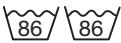 | Synthetic/mix cotton delicate colours light soil | YES | ||||||
| 10 | Medium Soil |  | Synthetic/mix cotton delicate colours medium soil | YES | ||||||
| 11 | Wool | Wool 95 | Wool/wool mix whites/colours light soil | YES | NO | YES | ||||
| Aux. prog. | 12 | Rinse | — | Cotton/cotton mix Synthetic/Delicate Wool/wool mix | YES | NO | YES | |||
| 13 | Spin | — | Cotton/cotton mix Synthetic/Delicate Wool/wool mix | NO | YES | |||||
| Drying Programmes | 14 | Normal Dry | — | Cotton/Linen | — | |||||
| 15 | Delicate Dry | — | Synthetic/mixed fabrics | — | ||||||
| 16 | Drain | — | Cotton/cotton mix Synthetic/Delicate Wool/wool mix | NO | ||||||
(*) Programme for wash and energy consumption assessment in accordance with standard EN60456, press intensive wash button.
| Max load of clothes (Lbs.) | Wash product compartment | Programme description | TURBO TIME | |
| Total consumption KWh/Litres | Approx. duration (minutes) | |||
| 13 |  | Normal wash, rinses, automatic additive absorption if desired and long final spin | 0,15/49 | 60 |
| 3 | Short wash, rinses, automatic additive absorption if desired and long final spin | 0,20/30 | 30 | |
| 13 | Normal wash, rinses, automatic additive absorption if desired and long final spin | 0,40/49 | 82 | |
| 13 | 0,65/49 | 87 | ||
| 13 | 1,02/49 | 91 | ||
| 13 | 1,90/55 | 110 | ||
| 13 |  | Prewash, normal wash, rinses, automatic additive absorption if desired and long final spin | 1,45/60 | 105 |
| 7 |  | Delicate wash, rinses, automatic additive absorption if desired and gentle final spin | 0,15/55 | 50 |
| 7 | 0,35/55 | 50 | ||
| 7 | 0,60/55 | 55 | ||
| 2 | Wool wash, rinses automatic additive absorption if desired and gentle final spin | 0,50/60 | 40 | |
| 13 |  | Rinses, automatic additive absorption if desired and long final spin | 0,05/30 | 23 |
| 13 | — | Drain and long final spin | 0,05/0 | 10 |
| 9 | — | Normal dry | 2,8/48 | 160 |
| 7 | 1,8/27 | 100 | ||
| 3 | — | Delicate dry | 1,2/26 | 95 |
| 13 | — | Drain and end of programme. | 0,00/0 | 2 |
4 SPIN SPEED SELECTION
using the appliance and practical tips
SPIN-DRYING
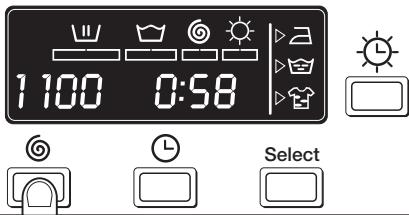
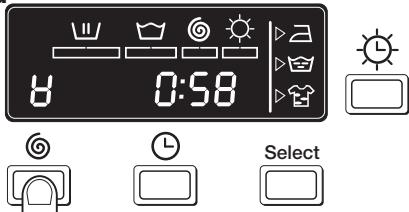
Additional wash options must be selected after choosing the wash program. Any program change during selection cancels the previously selected options.
a Spin speed selection and anti-crease button
The selected program has its own particular spin speed.
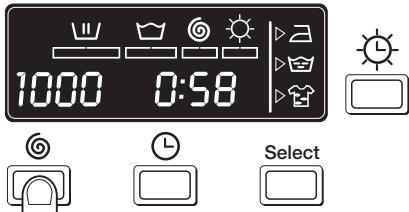
b You can change it by repeatedly pressing the spin button. The spin speed will gradually be reduced at 100 r.p.m. intervals to 400 r.p.m. for display models. On non-display models the LED will light up.
c No spin

Press the spin button again to get to the no spin option. This program disables the final spin process to prevent creasing when washing special fabrics.
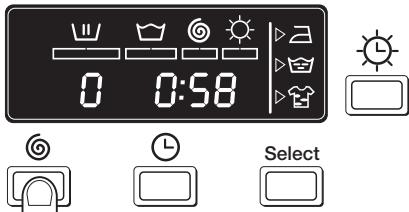
d Anti-crease option

The wash program stops on the last rinse, leaving garments to soak in water. When the function is deactivated, the washing machine continues the program, draining and spin-drying. It is used, for example, when you are not at home and want to delay the spin-drying until you get home, to prevent clothes from being left in the drum and becoming wrinkled.
a
b
C
d
TIME DELAY
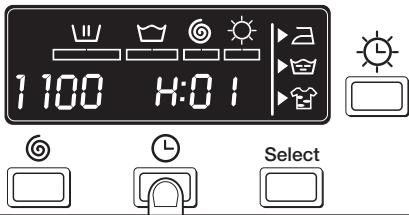
Time delay selection button
A delay of up to 24 hours can be selected. The delay must be selected after choosing the wash program.
To set the time delay, press the clock button. Each time the button is pressed the wash program will be delayed by 1 hour.
Cancelling the delay
To cancel the delay you must press the clock button successively. The delay will be cancelled when 24 hours have been reached and the button is pressed once more. If the program is changed the delay will also be cancelled.
ADDITIONAL FUNCTIONS
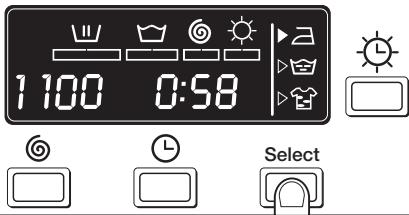
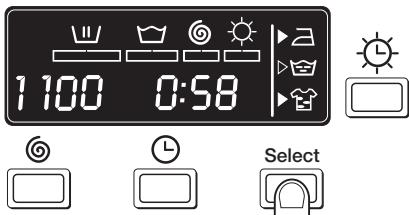
Additional function selection button depending on program.
a There are 3 options: easy iron, extra rinse and intensive wash.
Press the button and the desired option will be displayed.
b By pressing the button several times you can choose between several combinations of one, two or three additional functions at the same time depending on the program selected.
Button: Easy-iron (☐)
This option prevents garments from wrinkling by means of unique drum rotations that help to fluff out garments after spin-drying and make them easier to iron.
Button: Extra rinse (💡)
Increases the final rinse; suitable for large loads or for garments belonging to people with sensitive skin. Increases water consumption!
Button: Intensive wash ( 📋 )
This option, is recommended for heavily soiled, stained clothes. Achieves better results by extending the normal wash cycle.
[a
b
Important
If during the additional function selection, the program is changed or the ON/OFF button is pressed, the functions selected will be cancelled.
STARTING UP
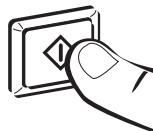
Start/pause button
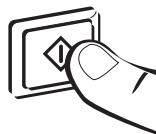
Ka To start up the washing machine you must press the start/pause button. The minutes remaining until the end of washing and drying will appear on the display at all times.
a
natural_image
Hand holding a button with an exclamation mark (no text or symbols present)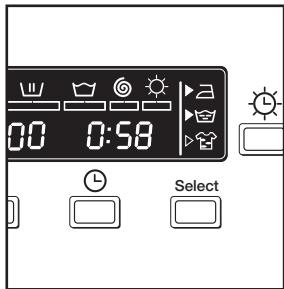
CHLD SAFETY LOCK FUNCTION
Lock function selection
The lock function ensures that the program will not be interrupted if any buttons are pressed.
The block function should be activated after the wash program and additional options have been selected.
Activating the lock function

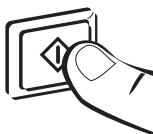
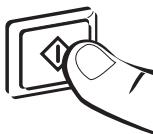
a The lock function can be activated by pressing the start/pause button and holding it down for at least 3 seconds. The display will show if it is activated.
Deactivating the lock function
Kb The lock function is cancelled when the wash programme comes to an end. If you want to deactivate the block function before the end of the programme, you have to hold the start button down again for at least 3 seconds. After 3 seconds, the block function indicator will disappear from the display, and it will go into pause status.
The ON/OFF button does not cancel the block function.
a
natural_image
Hand holding a button with an exclamation mark symbol (no text or numbers present)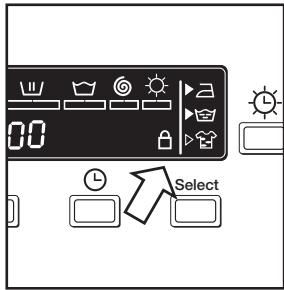
b
natural_image
Hand pressing a button on a square panel with an exclamation mark (no text or symbols present)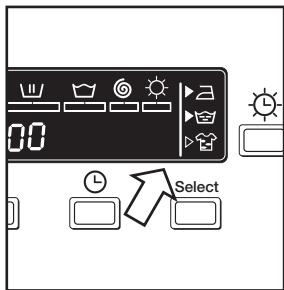
PROGRAM PHASES
When the program is running, the program phase and the time remaining for it to end will appear on the display.
The active phases will appear successively at the top of the display as the program progresses. The time remaining until the end of the program will also appear on the display. Please Note: the display will update itself at regular intervals, but not minute by minute.
Any option button can be selected provided the wash phase in which it takes effect has not been passed and when the programme allows for the option.
Pressing the delay button during washing will have no effect on the washer-dryer.
Pressing the start/pause button during the wash activates the PAUSE function.
Important
If the program is changed on the selector dial during the washing and drying process, the washer-dryer will switch itself to PAUSE status and the original program will be cancelled.
If you need to add or remove a garment during a program, press the start/pause button and wait for the door to unlock itself that the temperature inside is not high. Press the start/pause button again to restart the wash from the same cycle phase it had stopped at.
POWER OUTAGES
If there is a power outage, the washing machine will continue to run from where it left off after power is restored. The same will happen if the ON/OFF button is pressed.
warnings
■ Level the washing machine by adjusting the feet to reduce the noise level produced during the spin cycle.
■ Try and wash clothes of different sizes in the same wash program to even out the distribution of the clothes inside the drum during spin-drying.
This model is equipped with a safety system for spin-drying that prevents spin-drying from being carried out if the distribution of the clothes inside the drum is too concentrated. This prevents the appliance from vibrating too much.
If you find that the clothes are still excessively wet after the spin cycle, try re-starting the spin cycle after distributing the clothes more evenly in the drum.
washing machine maintenance and cleaning
MAINTENANCE
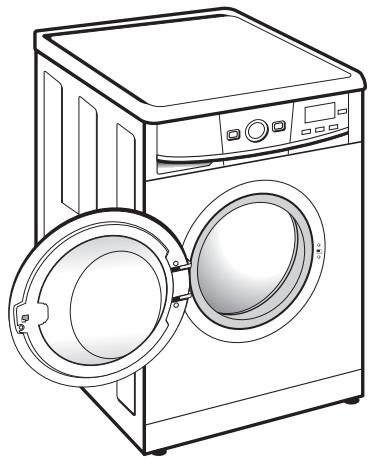
After each wash, we recommend leaving the door open for a while to allow air to circulate freely inside the machine.
From time to time, depending on the hardness of your water, it is recommended to run a full wash cycle using a decalcifying product. This will extend the life of your washing machine.
Important
The washing machine should be disconnected from the main electricity supply before any cleaning or maintenance is carried out.
natural_image
Line drawing of a front-loading washing machine with two doors open, showing front panel and side control panel (no text or symbols)1 CLEANING THE DETERGENT DISPENSER
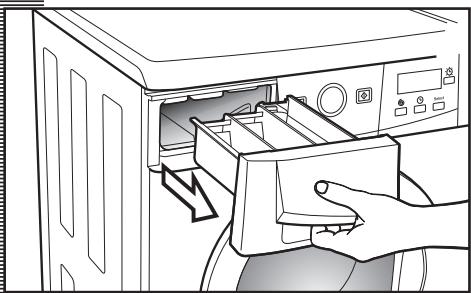
Clean the detergent dispenser whenever there is any detergent residue left inside.
a Pull the detergent dispenser outwards to remove it completely.
b Use warm water and a brush to clean the compartments.
c Also clean the fabric softener compartment siphons, having removed them first. Once they have been cleaned, put them back making sure that they fit right in to the back.
Put the dispenser back into the washing machine.
Important
A dirty or incorrectly fitted siphon will prevent the additives from being taken in and leave water inside the compartment at the end of the wash.
natural_image
Line drawing of a hand inserting a drawer into a washing machine (no text or symbols)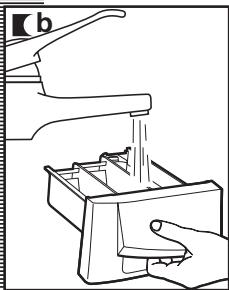
natural_image
Line drawing of a hand using a tool to clean or wash a machine (no text or symbols present)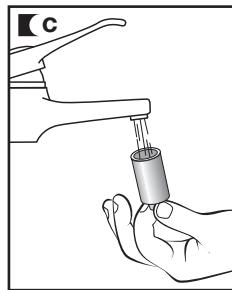
natural_image
Illustration of a hand washing a faucet with a water level sensor (no text or symbols)CLEANING THE FILTER
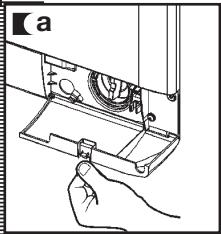
Clean the accessible filter if the drain pump is blocked by any foreign objects.
a Open the plinth cover, by pressing the lug and pulling gently on it.
b Place a container under the drain pump filter in order to collect any water that comes out of it.
c Half turn the filter to the left. Water will begin to come out.
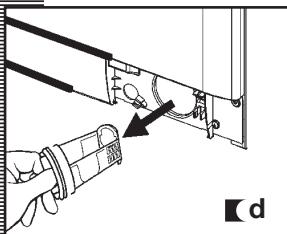
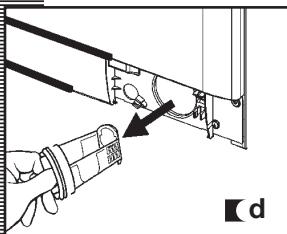
d When all the water has drained out of the washing machine, turn the filter several times until it can be completely removed by gently pulling on it.
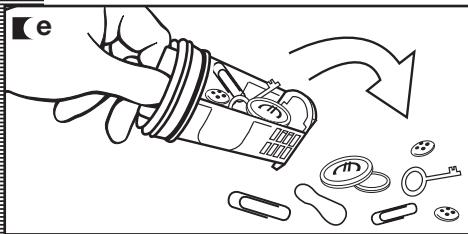
e Remove the objects or fluff caught in the filter or the drain pump.
f Put the filter and kickplate back in place again.
Important
To avoid burns, do not carry out this operation when the wash water is at a temperature of over 86^ F.
natural_image
Hand holding a small mechanical component with a circular component, no visible text or symbols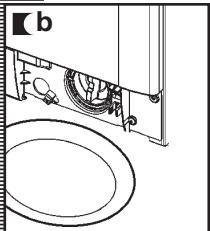
natural_image
Technical line drawing of a mechanical assembly with rollers and housing (no text or symbols)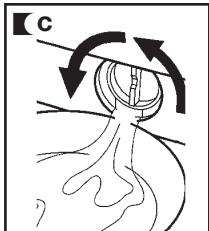
natural_image
Diagram of a hand inserting a cable into a device component, showing mechanical parts and wiring (no text or symbols)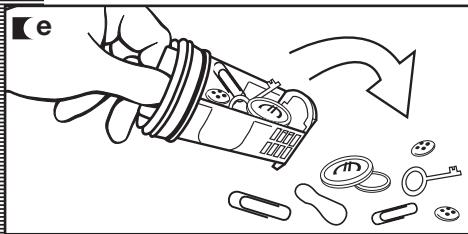
natural_image
Illustration of a hand pouring liquid into a container with scattered items and a downward arrow (no text or symbols)CLEANING THE OUTSIDE
The outside of the washing machine should be cleaned with warm soapy water or a gentle cleaning agent. Do not use abrasive cleaning products or solvents.
After washing, be sure to dry thoroughly with a soft cloth.
Important
Do not allow detergent spills to settle on the washing machine cabinet as they can be corrosive to the finish.
safety and troubleshooting
If you detect any problems with your washing machine, you will probably be able to rectify them yourself by consulting the following instructions.
If this is not the case, unplug the appliance and contact TECHNICAL SERVICE.
Important
Never attempt to make technical repairs to your appliance. There is no fuse or similar component inside that can be replaced by the user.
| CODE | Definition |
| FO1 | No water coming in |
| FO2 | Does not drain or spin-dry |
| CO3 | Does not spin-dry |
| FO4 | Does not start |
| FO5 F10 | Call Technical Service |
PROBLEMS
Why won't the washing machine start?
Why is the washing machine vibrating or making too much noise?
This may be due to the following:
- Check the door is properly shut.
■ The washing machine is not plugged in or there is no voltage in the supply.
■ The Start/Pause button has not been pressed.
If the washing machine door is not properly shut, F04 will appear on the display.
This may be due to the following:
■ The blocking and transport screws have not been removed.
■ The washing machine has not been correctly levelled.
Why doesn't the washing machine take in water?
■ Indicator F01, no water coming in, this may be due to a cut in the water supply, a tap turned off or a blocked water inlet filter.
The possible solutions are as follows: wait for the water supply to be reconnected, turn on the tap, or remove the water inlet hose and clean the filter. If this failure is detected, F01 will appear on the display.
Why doesn't the washing machine drain or spin-dry?
The reasons for the F02 indicator may be the following: washing machine drain pump blocked, building drainage pipes blocked, or incorrect pump connection.
■ Solution: if the pump is blocked, gain access to it as described in section 2, maintaining and cleaning the appliance. If this failure is detected, F02 will appear on the display.
Why doesn't the washing machine spin-dry?
This may be due to an uneven distribution of garments in the drum and may cause an excessive level of vibration.
■ The solution is to select a spin-drying program. If this failure is detected, C3 will appear on the display.
Why can't I see any water in the drum during the wash?
This is due to the fact that the washing machine is provided with a system which is able to adapt to the load and type of fabrics, adjusting the levels of water and energy used, in order to aid in environmental preservation.
So, although the water level you can see through the hatch may look low, there is no cause for concern as washing and rinsing efficiency will still be optimum.
Why is there water in the detergent dispenser?
This may be because the dispenser needs cleaning. This simple operation is described in Maintaining and cleaning the appliance.
1- Cleaning the detergent dispenser.
Why can't I open the hatch immediately after the wash has finished?
This washing machine is equipped with a safety system that locks the hatch for two minutes after the wash cycle is complete. This allows the unit to drain properly.
Why doesn't the remaining time shown on the clock coincide with the real time left until the selected cycle finishes?
This time is for guidance purposes only and may be affected by the conditions under which the selected program is being run. For example: initial water temperature, size of load or, an unbalance caused by garments during spin drying.
Additional Codes
The washing machine may display other codes that indicate operational issues. When other indicators appear on the display such as: F05, F06..., F10.
Please call Technical Service.
environmental warnings
eco-note
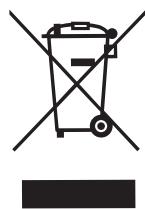
INFORMATION FOR THE CORRECT DISPOSAL OF WASTE ELECTRICAL AND ELECTRONIC APPLIANCES
When your appliance is of no further use, it should not be disposed of together with general domestic waste.
It can be taken, free of charge, to a specific waste collection center, run by your local authority, or dealers who provide this service.
Disposing of waste domestic appliances separately means avoiding possible negative consequences for the environment and health, derived from incorrect disposal. This will enable the materials in them to be treated and recycled, obtaining important savings in energy and resources.
To highlight the obligation of collaborating with selective waste collection, the product is marked with a symbol to warn against using traditional waste disposal methods for of the appliance.
natural_image
Symbol of a trash bin crossed with a diagonal line, no text or numbers presentFor further information, contact your local authority or the dealer where you purchased the product.

natural_image
Abstract black-and-white line art design featuring two overlapping leaf-like shapes within a circular frame (no text or symbols)PRODUCT WARRANTY
ONE-YEAR LIMITED WARRANTY
For one year from the date of purchase, provided this product is operated and maintained in accordance with the instructions attached to or furnished with the product, Fagor America Inc. will replace parts and provide labor to correct defects in materials or workmanship. Service must be provided by a Fagor America Inc. designated service company.
THIS LIMITED WARRANTY DOES NOT COVER
- Repairs when the product is used for any purpose other than normal, single family household use.
- Damage resulting from accident, alteration, misuse, abuse, fire, acts of God, improper installation, installation not in accordance with local electrical and plumbing codes, or use not approved by Fagor America.
- Replacement parts or repair labor costs if the product is operated outside of the United States/Canada.
- Pick up/delivery. This product is designated to be repaired in the home.
FAGOR AMERICA WILL NOT BE LIABLE FOR INCIDENTAL OR CONSEQUENTIAL DAMAGES
Some states do not allow the exclusion or limitation of incidental or consequential damages so this exclusion or limitation may not apply to you. This warranty gives you specific legal rights and you may also have other rights which vary from state to state.
IF YOU NEED SERVICE
UNITED STATES OF AMERICA: Please contact ADCO Customer Care at 1.877.743.2467, or by email at: fagor@adcoservice.com
EASTERN CANADA: Ontario, Quebec. Please contact A.G.I Service Inc: Telephone: 450-963-1303 or by email at: nruel@agintl.qc.ca.
WESTERN CANADA: Manitoba, British Columbia, Alberta, Saskatchewan. Please contact PSB Service: Telephone: 1-877-430-5253 x 130 or by email at: tmciver@pacificspecialtybrands.com
CUSTOMER SERVICE
Write the model and serial number on the lines below, you'll need them in the event of a service call. The model and serial number are located inside the door at the bottom
Model:
Serial:
Date Purchased: ____
Store:
PLEASE REGISTER YOUR PRODUCT WARRANTY ONLINE AT WWW.FAGORAMERICA.COM
FAGOR

IMPORTANT NOTICE: PLEASE COMPLETE AND MAIL THIS WARRANTY REGISTRATION CARD IMMEDIATELY TO PROTECT YOUR WARRANTY SERVICE
Mr./Mrs./Ms.:
Address
City ____ State ____ Zip Code ____
Phone: ____ E-mail: ____
Date of purchase:
Name of Dealer:
Model number**: Serial Number**:
Comments:
natural_image
Illustration of a coiled cable with two connectors (no text or symbols)natural_image
Line drawing of a hand opening a large washing machine with a door panel (no text or symbols)DESBLOQUEO
natural_image
Illustration of a hand using a screwdriver to adjust or install a component on a circuit board (no text or symbols visible)CONEXIÓN
A LA RED DE AGUA
natural_image
Illustration of a hand washing a large washing machine with a hose, no text or symbols present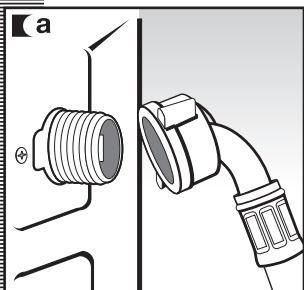
natural_image
Technical diagram showing a threaded connector and a coiled hose assembly (no text or symbols)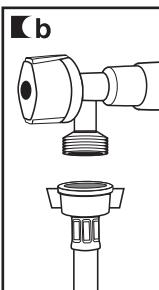
natural_image
Technical line drawing of a mechanical connector assembly (no text or symbols)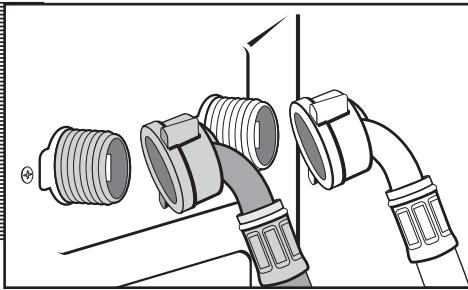
natural_image
Diagram of a pipe fitting with multiple connectors and fittings (no text or symbols)CONEXIÓN
A LA RED DE DESAGÜE
natural_image
Line drawing of a hand holding a spiral-shaped object near a mechanical component (no text or symbols)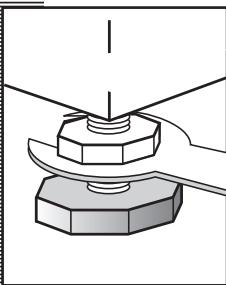
natural_image
Mechanical assembly diagram showing a bolt and nut assembly (no text or labels)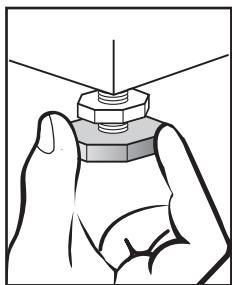
natural_image
Illustration of a hand holding a hexagonal nut with a pointed tip, no text or symbols presentCONEXIÓN ELÉCTRICA
natural_image
Line drawing of a person holding a small object near their torso, with no visible text or symbolsCLASIFICACIÓN ROPA
natural_image
Illustration of hands using a washing machine to press or spread material from a door (no text or symbols visible)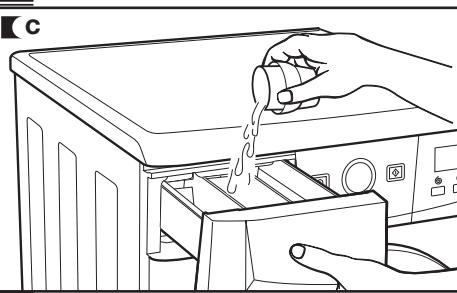
natural_image
Line drawing of a hand pouring liquid into a washing machine (no text or symbols)nota ecológica
natural_image
Hand pressing a button on an electrical outlet (no text or symbols visible)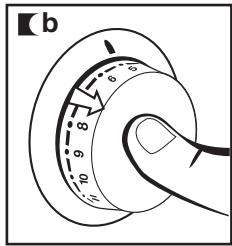
natural_image
Line drawing of a hand holding a circular dial with numbered fingers, next to an electrical switch (no text or symbols)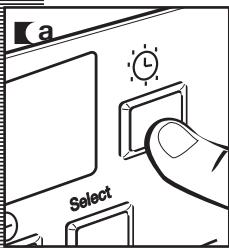
natural_image
Abstract black-and-white logo featuring two interlocking leaf-like shapes within a circular frame (no text or symbols)natural_image
Hand holding a button with an exclamation mark (no text or symbols present)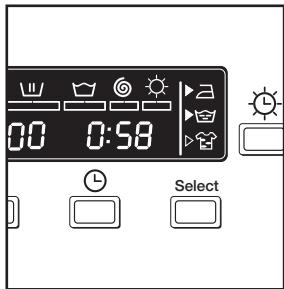
BLOQUEO
natural_image
Hand pressing a button on a square panel with an exclamation mark (no text or symbols present)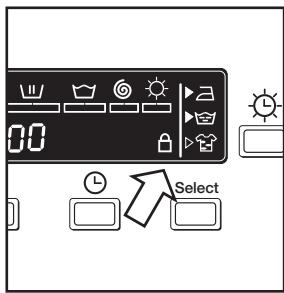
b
natural_image
Hand pressing a button on a square panel with an exclamation mark (no text or symbols present)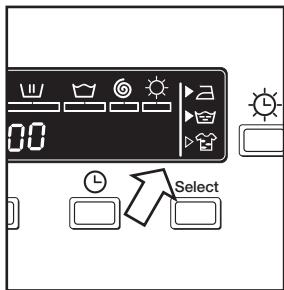

natural_image
Line drawing of a front-loading washing machine with two doors open, showing front panel and side control panel (no text or symbols)1 LIMPIEZA DE LA CUBETA DE DETERGENTE
natural_image
Line drawing of a hand inserting a drawer into a washing machine (no text or symbols)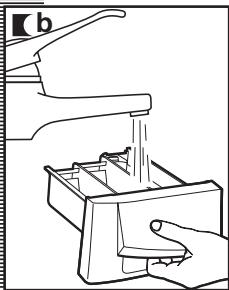
natural_image
Line drawing of a hand using a tool to clean or wash a small container (no text or symbols present)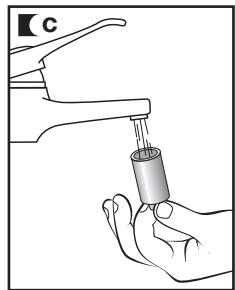
natural_image
Illustration of a hand holding a water dispenser with a handle, no text or symbols presentLIMPIEZA FILTRO
natural_image
Hand holding a mechanical component with a circular component and a handle (no text or symbols visible)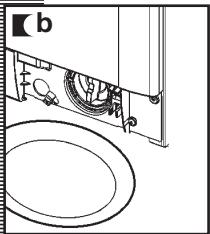
natural_image
Technical line drawing of a mechanical assembly with no visible text or symbols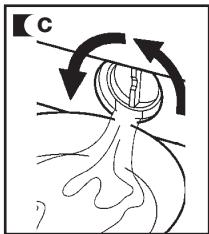
natural_image
Diagram of a biological structure with arrows indicating rotational direction (no text or labels)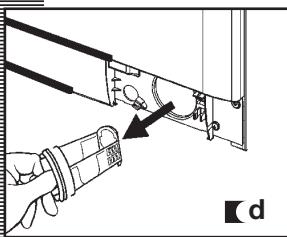
natural_image
Technical diagram showing a hand holding a pipe fitting with a valve mechanism (no text or symbols)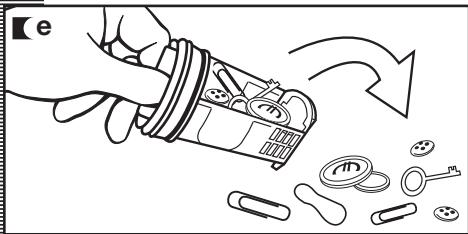
natural_image
Illustration of a hand pouring liquid into a container with scattered items (no text or symbols)LIMPIEZA EXTERIOR
natural_image
Symbol of a trash bin crossed with a diagonal line and a horizontal bar below (no text or labels)natural_image
Abstract black-and-white graphic of two overlapping leaves within a circular frame (no text or symbols)
natural_image
Illustration of a coiled cable with two connectors (no text or symbols)natural_image
Line drawing of a hand opening a washing machine with a door panel (no text or symbols)DÉBRIDAGE
natural_image
Illustration of a hand using a tool to adjust or install a component with pins and cables (no text or symbols visible)2
RACCORDEMENT À LA CANALISATION D'EAU ET D'ÉVACUATION
natural_image
Illustration of a hand washing a large washing machine with a hose, no text or symbols present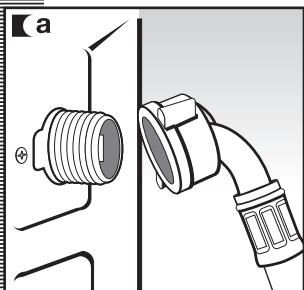
natural_image
Technical diagram showing a threaded connector attached to a pipe, with no visible text or symbols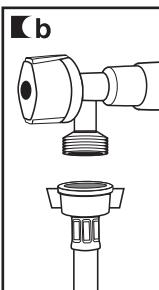
natural_image
Technical line drawing of a mechanical connector assembly (no text or symbols)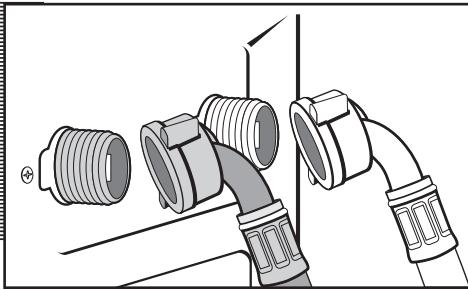
natural_image
Diagram of a pipe fitting with multiple connectors and fittings (no text or symbols)RACCORDEMENT À LA CANALISATION D'ÉVACUATION
natural_image
Line drawing of a hand holding a spiral-shaped object near a camera (no text or symbols)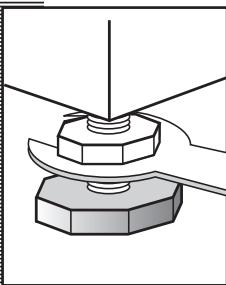
natural_image
Diagram of a mechanical assembly with a hexagonal base and threaded component (no text or symbols)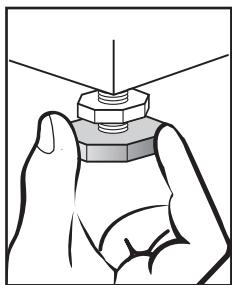
natural_image
Illustration of a hand holding a hexagonal nut with a pointed tip, no text or symbols presentRACCORDEMENT ÉLECTRIQUE
natural_image
Line drawing of a hand holding a circular dial with a knob, no text or symbols present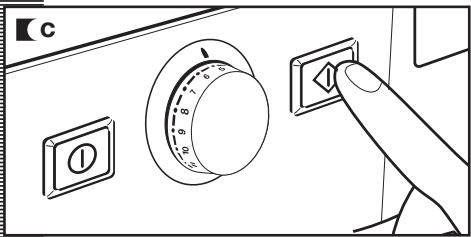
1 PRÉPARATION DU LINGE AVANT LE LAVAGE
PRÉPARATION
Important
natural_image
Line drawing of a person holding a small object near their torso, with no visible text or symbolsTRI DU LINGE
natural_image
Technical line drawing of a mechanical component with mounting holes and internal channels (no text or symbols)b
natural_image
Illustration of hands using a washing machine to press or spread material from a door (no text or symbols visible)c
natural_image
Line drawing of a hand pouring liquid into a microwave oven (no text or symbols)note écologique
natural_image
Abstract logo design with two interlocking leaf-like shapes inside a circle, no text or symbols present.natural_image
Hand pressing a button on an electrical outlet (no text or symbols visible)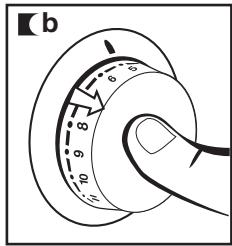
natural_image
Line drawing of a hand holding a circular dial with numbered fingers, next to an electrical switch (no text or symbols)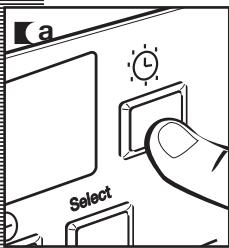
natural_image
Abstract black-and-white line art design resembling two interlocking leaves within a circular frame (no text or symbols)natural_image
Hand holding a button with an exclamation mark (no text or symbols present)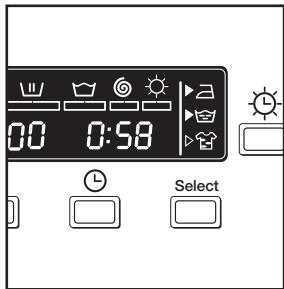
VERROUILLAGE
natural_image
Hand pressing a button on an electrical outlet (no text or symbols visible)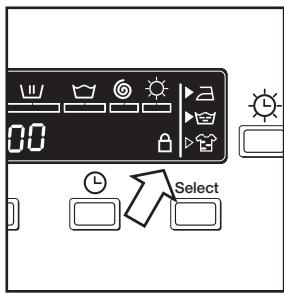
b
natural_image
Hand pressing a button on a square panel with an exclamation mark (no text or symbols present)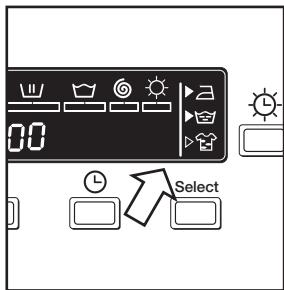
DÉROULEMENT
DU PROGRAMME
natural_image
Line drawing of a front-loading washing machine with two doors open, showing front and side views (no text or symbols)1 NETTOYAGE DE LA CUVETTE À PRODUITS
natural_image
Illustration of a hand inserting a drawer into a washing machine (no text or symbols visible)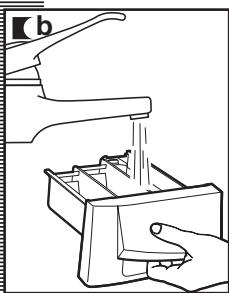
natural_image
Line drawing of a kitchen sink and hand washing machine (no text or symbols)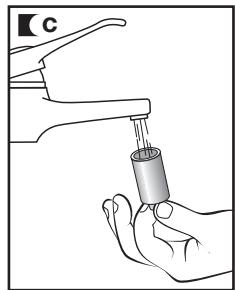
natural_image
Illustration of a hand holding a faucet with a pipette inserted (no text or symbols)Important
2
NETTOYAGE DU FILTRE ACCESSIBLE ET NETTOYAGE EXTÉRIEUR DE L'APPAREIL
natural_image
Hand inserting a component into a device housing (no text or symbols visible)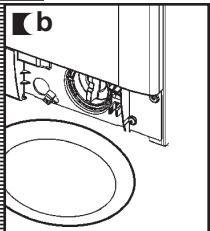
natural_image
Technical line drawing of a mechanical assembly with rollers and housing (no text or symbols)
natural_image
Illustration of a hand pouring liquid into a container with scattered items (no text or symbols)NETTOYAGE EXTÉRIEUR
natural_image
Symbol of a trash bin crossed with a diagonal line and a horizontal bar below (no text or labels)natural_image
Abstract black-and-white line art of two interlocking leaves within a circular frame (no text or symbols)
GARANTIE DU PRODUIT
GARANTIE LIMITÉE PENDANT UN AN
- contents
- índice
- important safety instructions
- grounding instructions
- SAVE THESE INSTRUCTIONS
- washing machine specifications
- washing machine installation and assembly
- UNPACKING AND UNBLOCKING THE WASHING MACHINE
- UNPACKING
- UNBLOCKING
- Important
- WATER AND DRAINAGE CONNECTION
- installation and assembly
- WATER
- CONNECTION
- The water supply hose is inside the drum:
- DRAINAGE
- LEVELLING AND ELECTRICAL CONNECTION
- LEVELLING
- ELECTRICAL CONNECTION
- DIMENSIONS
- APPLIANCES DIMENSIONS
- MINIMUM CLEARANCE
- PRE-CLEANING
- using the appliance and practical tips
- PREPARING GARMENTS FOR LAUNDERING
- PREPARATION
- SORTING LAUNDRY
- a Sort laundry by garment label instructions.
- b Sort laundry according to soil level:
- a Sort your clothes according to color.
- USING DETERGENT AND ADDITIVES
- DETERGENT AND ADDITIVES
- eco-note
- SELECTING THE WASH AND DRY PROGRAM
- SPIN SPEED SELECTION
- SPIN-DRYING
- a Spin speed selection and anti-crease button
- b You can change it by repeatedly pressing the spin button. The spin speed will gradually be reduced at 100 r.p.m. intervals to 400 r.p.m. for display models. On non-display models the LED will light up.
- c No spin
- d Anti-crease option
- TIME DELAY
- Time delay selection button
- Cancelling the delay
- ADDITIONAL FUNCTIONS
- Additional function selection button depending on program.
- Button: Easy-iron (☐)
- Button: Extra rinse (💡)
- Button: Intensive wash ( 📋 )
- STARTING UP
- Start/pause button
- CHLD SAFETY LOCK FUNCTION
- Lock function selection
- Activating the lock function
- Deactivating the lock function
- PROGRAM PHASES
- POWER OUTAGES
- warnings
- washing machine maintenance and cleaning
- MAINTENANCE
- CLEANING THE DETERGENT DISPENSER
- CLEANING THE FILTER
- CLEANING THE OUTSIDE
- safety and troubleshooting
- PROBLEMS
- environmental warnings
- INFORMATION FOR THE CORRECT DISPOSAL OF WASTE ELECTRICAL AND ELECTRONIC APPLIANCES
- PRODUCT WARRANTY
- ONE-YEAR LIMITED WARRANTY
- THIS LIMITED WARRANTY DOES NOT COVER
- FAGOR AMERICA WILL NOT BE LIABLE FOR INCIDENTAL OR CONSEQUENTIAL DAMAGES
- IF YOU NEED SERVICE
- CUSTOMER SERVICE
- FAGOR
- DESBLOQUEO
- CONEXIÓN
- A LA RED DE AGUA
- A LA RED DE DESAGÜE
- CONEXIÓN ELÉCTRICA
- CLASIFICACIÓN ROPA
- nota ecológica
- BLOQUEO
- LIMPIEZA DE LA CUBETA DE DETERGENTE
- LIMPIEZA FILTRO
- LIMPIEZA EXTERIOR
- DÉBRIDAGE
- 2
- RACCORDEMENT À LA CANALISATION D'EAU ET D'ÉVACUATION
- RACCORDEMENT À LA CANALISATION D'ÉVACUATION
- RACCORDEMENT ÉLECTRIQUE
- PRÉPARATION DU LINGE AVANT LE LAVAGE
- PRÉPARATION
- TRI DU LINGE
- note écologique
- VERROUILLAGE
- DÉROULEMENT
- DU PROGRAMME
- NETTOYAGE DE LA CUVETTE À PRODUITS
- NETTOYAGE DU FILTRE ACCESSIBLE ET NETTOYAGE EXTÉRIEUR DE L'APPAREIL
- NETTOYAGE EXTÉRIEUR
- GARANTIE DU PRODUIT
- GARANTIE LIMITÉE PENDANT UN AN
Brand : FAGOR
Model : FAS 3612X
Category : Cooking appliance