
HD4818 - Toaster PHILIPS - Free user manual and instructions
Find the device manual for free HD4818 PHILIPS in PDF.


| Product Type | Toaster |
| Brand | Philips |
| Model | HD4818 |
| Number of Slots | 2 |
| Dimensions (L x W x H) | 30.0 x 18.0 x 22.0 cm |
| Weight | 1.5 kg |
| Power Supply | 220-240 V, 50-60 Hz |
| Power Consumption | 900 W |
| Browning Control | 7 settings |
| Functions | Cancel, Defrost, Reheat, Lift & Look |
| Auto Shut-off | Yes |
| Cool-Touch Exterior | Yes |
| Removable Crumb Tray | Yes |
| Cleaning | Wipe exterior with damp cloth; empty crumb tray regularly |
| Safety Features | Auto shut-off, non-slip feet, cool-touch housing |
| Spare Parts | Not available separately |
| Repairability Index | 6.5 / 10 |
| Warranty | 2 years |
| Package Contents | Toaster, user manual |
Frequently Asked Questions - HD4818 PHILIPS
User questions about HD4818 PHILIPS
0 question about this device. Answer the ones you know or ask your own.
Ask a new question about this device
Download the instructions for your Toaster in PDF format for free! Find your manual HD4818 - PHILIPS and take your electronic device back in hand. On this page are published all the documents necessary for the use of your device. HD4818 by PHILIPS.
USER MANUAL HD4818 PHILIPS

natural_image
Simple line drawing of an open book with a grid on the left and a closed page on the right (no text or symbols)
ENGLISH 6
БЪЛГАРСКИ 9
ČEŠTINA 12
EESTI 15
HRVATSKI 18
MAGYAR 21
КАЗАКША 24
LIETUVIŠKAI 27
LATVIEŠU 30
POLSKI 33
ROMÂNĂ 36
РУССКИЙ 39
SLOVENSKY 42
SLOVENŠČINA 45
SRPSKI 48
УКРАЇНСЬКА 51
Introduction
Congratulations on your purchase and welcome to Philips! To fully benefit from the support that Philips offers, register your product at www.philips.com/welcome.
Important
Read this user manual carefully before you use the appliance and save it for future reference.
Danger
- Never immerse the appliance in water.
- Do not insert oversized foods and metal foil packages into the toaster, as this may cause fire or electric shock.
Warning
- Check if the voltage indicated on the bottom of the appliance corresponds to the local mains voltage before you connect the appliance.
- Do not use the appliance if the cord, the mains plug or the appliance itself is damaged.
- If the mains cord is damaged, you must have it replaced by Philips, a service centre authorised by Philips or similarly qualified persons in order to avoid a hazard.
- Only connect the appliance to an earthed wall socket.
- Keep the mains cord away from hot surfaces.
- Do not let the mains cord hang over the edge of the table or worktop on which the appliance stands.
- This appliance is not intended for use by persons (including children) with reduced physical, sensory or mental capabilities, or lack of experience and knowledge, unless they have been given supervision or instruction concerning use of the appliance by a person responsible for their safety.
- Children should be supervised to ensure that they do not play with the appliance.
- Do not let the appliance operate unattended.
- Never connect this appliance to an external timer switch in order to avoid a hazardous situation.
- Do not operate the appliance under or near curtains or other flammable materials or under wall cabinets, as this may cause fire.
- Do not place anything on top of the toaster when the toaster is switched on or when it is still hot, as this can cause damage or fire.
- To avoid the risk of fire, frequently remove crumbs from the appliance.
- Immediately unplug the toaster if fire or smoke is observed.
- This appliance is only intended for toasting bread. Do not put any other ingredients in the appliance, as this may lead to a hazardous situation.
Caution
- Avoid touching the metal parts of the toaster, as they become very hot during toasting. Only touch the controls.
- Do not place the toaster on a hot surface.
- Always unplug the appliance after use.
- The toaster is intended for household use only and may only be used indoors. It is not intended for commercial or industrial use.
- If a slice of bread gets stuck inside the toaster, unplug the appliance and let it cool down before you try to remove the bread. Do not use a knife or a sharp tool, as these may cause damage to the heating elements.
Electromagnetic fields (EMF)
This Philips appliance complies with all standards regarding electromagnetic fields (EMF). If handled properly and according to the instructions in this user manual, the appliance is safe to use based on scientific evidence available today.
Before first use
1 Remove any stickers and wipe the body of the toaster with a damp cloth.
2 Let the appliance complete a few toasting cycles without slices of bread on the highest browning setting in a properly ventilated room. This burns off any dust that may have accumulated on the heating elements and prevents unpleasant smells during toasting.
Using the appliance
Never let the toaster operate unattended.
The metal parts of the toaster become hot during toasting. Do not touch them.
1 Put the appliance on a stable and flat surface, away from curtains and other combustible materials.
2 Put the plug in an earthed wall socket.
Toasting bread
1 Put the bread in the toaster.
- HD4818/HD4816/HD4815: The toaster is suitable for one or two slices of bread (Fig. 1).
- HD4845: The toaster is suitable for one to four slices of bread (Fig. 2).
Tip: For the best toasting results, always put the slices in the centre of the slots.
2 Set the desired browning setting. (Fig. 3)
Select a low setting (1-2) for lightly toasted bread and a high setting (5-7) for darkly toasted or frozen bread.
3 Push down the toasting lever to switch on the appliance. (Fig. 4)
Note: The toasting lever only stays down if the appliance is connected to the mains.
Note: To adjust the browning setting during toasting, turn the browning control to the desired setting.
Note: You can stop the toasting process and pop up the bread at any time by moving up the toasting lever manually (Fig. 5).
4 When the toast is ready, it pops up and the toaster switches off (Fig. 6).
- If bread gets stuck inside the toaster, remove the plug from the wall socket, let the appliance cool down completely and carefully remove the bread from the toaster.
Do not use a knife or another sharp metal tool to remove bread from the toaster and do not touch the metal internal parts of the toaster.
Warming up rolls or croissants (HD4818 only)
1 Place the warming rack on top of the toaster (Fig. 7).
Note: To prevent overheating, do not put more than two items on the rack at the same time.
2 Place the rolls or croissants in the centre of the rack (Fig. 8).
3 Set the browning control to the rolls setting. (Fig. 9)
Note: Do not set the browning control to a setting higher than 3.
4 Push down the toasting lever to switch on the appliance. (Fig. 4)
Note: The toasting lever only stays down if the appliance is connected to the mains.
5 If you want to heat up rolls on both sides, simply turn them upside down after the toaster has switched off and push down the toasting lever again.
Cleaning
Never immerse the appliance in water.
Never use scouring pads, abrasive cleaning agents or aggressive liquids such as petrol or acetone to clean the appliance.
1 Unplug the appliance and let it cool down.
2 Clean the appliance with a damp cloth.
3 To remove crumbs from the appliance, open the panel in the bottom of the appliance with a screwdriver. (Fig. 10)
4 Shake out the crumbs. (Fig. 11)
5 After cleaning, close the panel in the bottom of the appliance with a screwdriver.
Environment
- Do not throw away the appliance with the normal household waste at the end of its life, but hand it in at an official collection point for recycling. By doing this, you help to preserve the environment (Fig. 12).
Guarantee and service
If you need service or information or if you have a problem, please visit the Philips website at www.philips.com or contact the Philips Consumer Care Centre in your country (you find its phone number in the worldwide guarantee leaflet). If there is no Consumer Care Centre in your country, go to your local Philips dealer.
Въведение
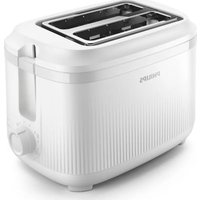

Brand : PHILIPS
Model : HD4818
Category : Toaster