
Kis Pro - Smartphone ZTE - Free user manual and instructions
Find the device manual for free Kis Pro ZTE in PDF.


| Product type | Smartphone |
| Brand | ZTE |
| Model | Kis Pro |
| Approximate Dimensions | 115 x 62 x 10 mm |
| Weight | Approx. 110 g |
| Display | 4 inches, 480 x 800 pixels resolution, capacitive touchscreen |
| Operating system | Android 4.1 Jelly Bean |
| Processor | 1 GHz single-core |
| RAM | 512 MB |
| Internal storage | 4 GB, expandable via microSD card (up to 32 GB) |
| Rear camera | 3 megapixels, LED flash |
| Front camera | VGA |
| Battery | Lithium-ion 1500 mAh, removable |
| Connectivity | Wi-Fi 802.11 b/g/n, Bluetooth 4.0, GPS, micro-USB 2.0 |
| Network | GSM / 3G (HSPA) |
| Sensors | Accelerometer, proximity |
| Main functions | Calls, SMS, MMS, Internet browsing, camera, video, audio/video player, FM radio, voice recorder |
| Maintenance and cleaning | Use a soft, dry cloth; avoid moisture and abrasive products |
| Security | Lock with PIN code, password, unlock pattern |
| Spare parts and repairability | Removable battery; screen and back cover replaceable by a professional |
| General information | Entry-level smartphone from ZTE, launched in 2013 |
Frequently Asked Questions - Kis Pro ZTE
User questions about Kis Pro ZTE
0 question about this device. Answer the ones you know or ask your own.
Ask a new question about this device
Download the instructions for your Smartphone in PDF format for free! Find your manual Kis Pro - ZTE and take your electronic device back in hand. On this page are published all the documents necessary for the use of your device. Kis Pro by ZTE.
USER MANUAL Kis Pro ZTE
ZTE Kis Pro Quick Start Guide......2
Copyright © 2013 ZTE CORPORATION.
All rights reserved.
No part of this publication may be quoted, reproduced, translated or used in any form or by any means, electronic or mechanical, including photocopying and microfilm, without the prior written permission of ZTE Corporation.
ZTE Corporation reserves the right to make modifications on print errors or update specifications in this guide without prior notice.
Version No.: R1.0
Edition Time : 2013.3.28
We offer self-service for our smart terminal device users. Please visit ZTE official website (at www.zte.com.cn) for more information on self-service and supported product models. Information subject to the website.
Visit http://www.ztedevice.com to download the user manual. Just click Support > Manuals from the home page and then select your location, product type, and name to search for related support information.
Disclaimer
ZTE Corporation expressly disclaims any liability for faults and damages caused by unauthorized modifications of the software.
Product Safety Information
 | Do not use while re-fuelling. |
 | Do not use hand-held while driving. |
 | This device may produce a bright or flashing light. |
 | For body-worn operation maintain a separation of 15 mm. |
 | Do not dispose of it in a fire. |
 | Small parts may cause a choking hazard. |
 | Avoid contact with magnetic media. |
 | This device may produce a loud sound. |
 | To prevent possible hearing damage, do not listen at high volume levels for long periods. |
 | Avoid Extreme Temperatures. |
 | Keep away from pacemakers and other personal medical devices. |
 | Avoid any contact with liquid, keep it dry. |
 | Switch off when instructed in hospitals and medical facilities. |
 | Do not attempt to disassemble. |
 | Switch off when instructed in aircrafts and airports. |
 | Do not rely on this device for emergency communications. |
 | Switch off in explosive environments. |
 | Only use approved accessories. |
Getting to Know Your Phone
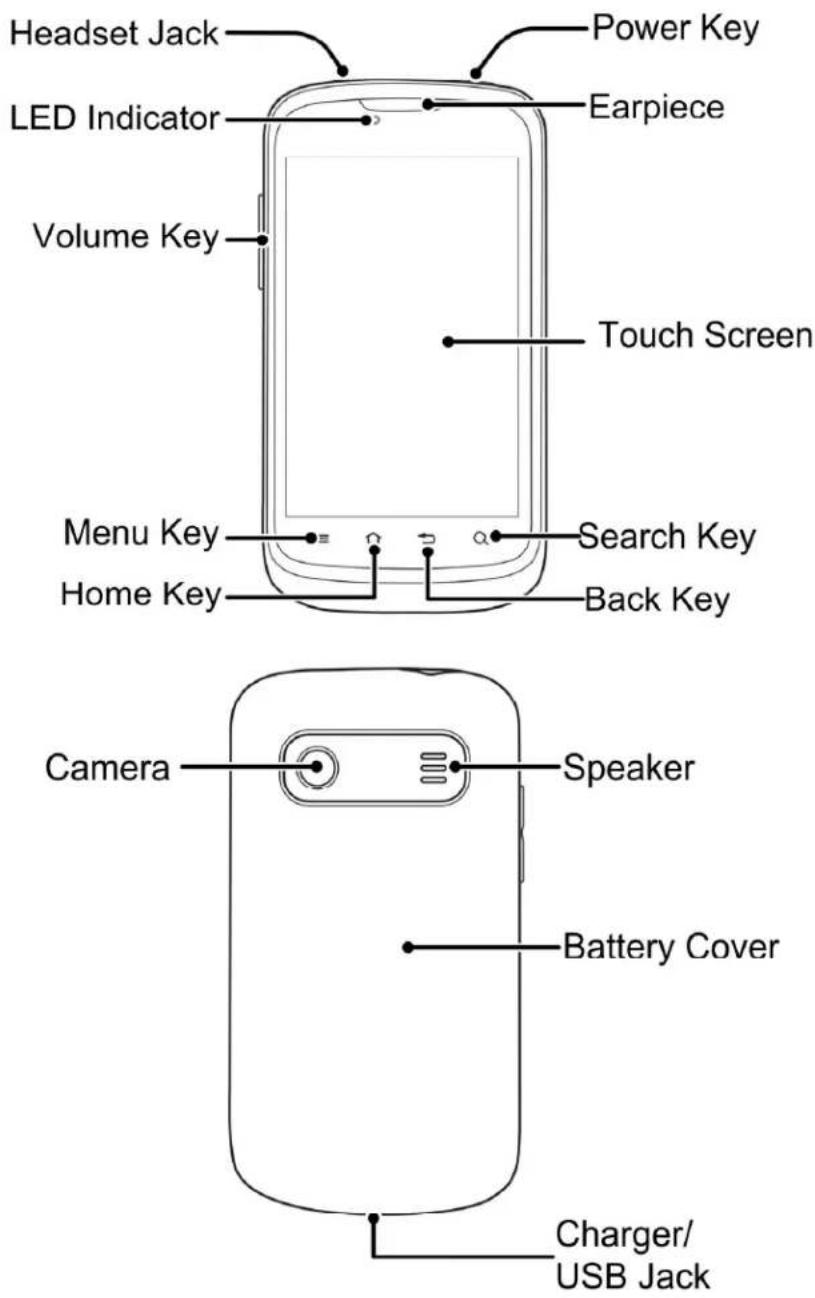
Power Key
- Hold to select phone modes or to power off.
- Press to switch your phone to Sleep mode.
- Press to wake up your phone.
Home Key
- Touch to return to the Home Screen from any application or screen.
- Hold to see recently used applications.
Menu Key
Touch to get the options for the current screen.
Back Key
Touch to go to the previous screen.
Search Key
Touch to open the Search box.
Volume Key
Press or hold either end of the key to turn the volume up or down.
Before Getting Started
Removing the Back Cover

natural_image
Illustration of a smartphone case with a scroll wheel and a gray arrow indicating the side panel (no text or symbols present)Installing the SIM Card

natural_image
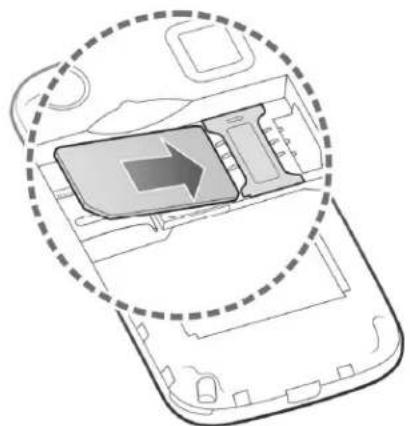
Diagram of a smartphone interior showing internal components and a highlighted area with an arrow (no text or symbols)Installing the microSD Card
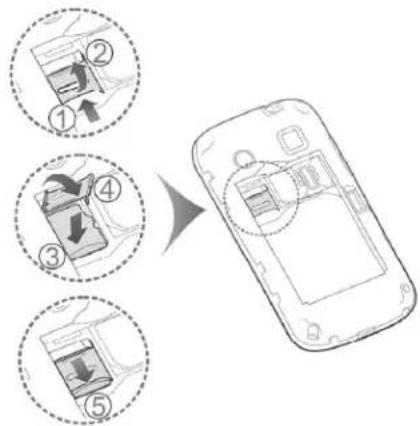
flowchart
graph TD
    A["Step ①: Battery Input"] --> B["Step ②: Display"]
    B --> C["Step ③: Downward Battery"]
    C --> D["Step ④: Discharge"]
    D --> E["Step ⑤: Downward Battery"]
NOTE: microSD logo is a trademark of the SD Card Association.
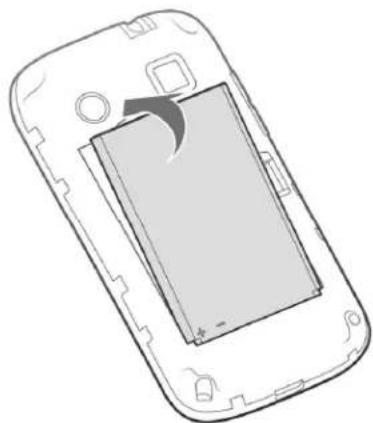
Installing the Battery

natural_image
Diagram of a smartphone showing the internal structure and battery compartment (no text or symbols)Charging the Battery

natural_image
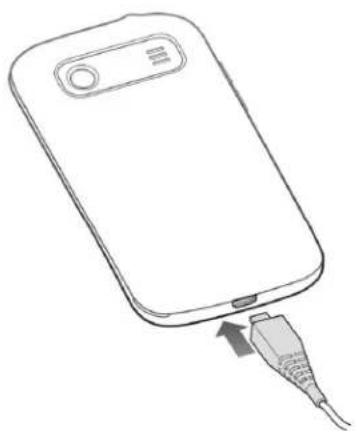
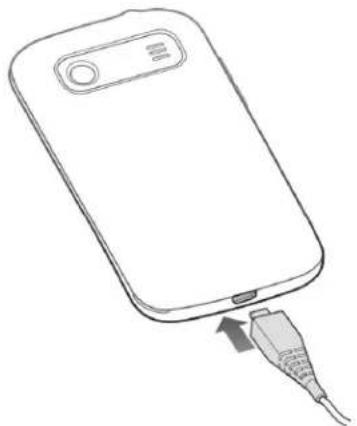
Line drawing of a smartphone with an attached USB cable (no text or symbols)When you first get your new phone you'll need to charge the battery like this:
- Connect the adapter to the charger jack.
- Connect the charger to a standard AC wall outlet.
- Disconnect the charger when the battery is fully charged.
Powering On/Off Your Phone
Make sure the SIM card is in your device and the battery is charged.
- Hold the Power Key to switch on your phone.
- To switch it off, hold the Power Key to get the phone options. Touch Power off, and then touch OK.
Switching to Sleep Mode
To save battery power, Sleep Mode suspends your device to a low-power-consumption state while the display is off. Your device also goes into Sleep Mode automatically when the display is automatically turned off after a certain period of time, which you can set in Screen timeout of the display settings.
Press the Power Key to switch to Sleep Mode.
Waking Up Your Phone
-
Press the Power Key to activate your screen display.
-
Touch and hold at the center of the screen.
NOTE:
If you have set an ‘unlock pattern’, or a PIN/password for your phone, you’ll need to draw the pattern or enter the PIN/password to unlock your screen.
EC DECLARATION OF CONFORMITY
C € 1588
It is hereby declared that following designated product:
Product Type: WCDMA/GSM (GPRS)
Dual-Mode Digital Mobile Phone
Model No: ZTE Kis Pro
Product Description: WCDMA/GSM Mobile Phone
Complies with the essential protection requirements of Directives on Radio and Telecommunication Terminal Equipment (Directive 1999/5/EC), Restriction of the Certain Hazardous Substances in electrical and electronic equipment (Directive 2011/65/EU), Eco-design Requirements for Energy-Related Products (Directive 2009/125/EC) and their amendments.
This declaration applies to all specimens manufactured identical to the samples submitted for testing/evaluation.
Assessment of compliance of the product with the requirements relating to Directive 1999/5/EC was performed by American TCB (Notified Body No.1588) and assessment of compliance of the product with the requirements relating to Directive 2011/65/EU was performed by Centre Testing International Corporation SHANGHAI LAB. The assessments were based on the following regulations and standards:
Requirement: Health and safety
Standard:
EN 50360:2001; EN62311:2008;
EN 62209-1:2006; EN 62209-2:2010;
EN 50332-1:2000; EN 50332-2:2003
EN 60950-1:2006+A11:2009+A12:2011
Requirement: EMC
Standard:
EN 301 489-1 V1.8.1; EN 301 489-3 V1.4.1;
EN 301 489-7 V1.3.1; EN 301 489-17 V2.1.1;
EN 301 489-24 V1.5.1; EN 55013:2001+A2:2006;
EN 55020:2007
Requirement: Radio Spectrum
Standard:
EN 301 511 V9.0.2; EN 301 908-1 V5.2.1;
EN 301 908-2 V5.2.1; EN 300 328 V1.7.1;
EN 301 440-1 V1.6.1; EN 301 440-2 V1.4.1
Requirement: RoHS
Standard:
IEC 62321:2008
This declaration is the responsibility of the manufacturer:
ZTE Corporation
ZTE Plaza, Keji Road South, Hi-Tech, Industrial Park, Nanshan District, Shenzhen, Guangdong, 518057, P.R.China
Authorised person signing for the company:
Xu Feng Quality Director Of ZTE Corporation
Name in block letters & position in the company
Shenzhen, 28 February 2013
Place & date
徐锋.
Legally valid signature
| This equipment may be operated in: | AT | BE | |||
| CY | CZ | DK | EE | FI | |
| DE | GR | HU | IE | IT | |
| LT | LU | MT | NL | PL PT | |
| SK | SI | ES | SE | GB IS | |
| LI | NO | CH | BG | RO | TR |
ZTE Kis Pro
Copyright © 2013 ZTE CORPORATION.
natural_image
Line drawing of a mobile phone casing with a scroll wheel and a circular button (no text or symbols)natural_image
Diagram of a smartphone internal component with an arrow indicating direction, enclosed in a dashed circular boundary (no text or symbols)natural_image
Diagram of a smartphone showing the internal screen and battery casing (no text or symbols)natural_image
Line drawing of a smartphone with an attached USB cable (no text or symbols)Requirement: Spectre radio
Standard :
EN 301 511 V9.0.2; EN 301 908-1 V5.2.1;
EN 301 908-2 V5.2.1; EN 300 328 V1.7.1;
EN 301 440-1 V1.6.1; EN 301 440-2 V1.4.1
Requirement: RoHS
Standard :
IEC 62321:2008
ZTE Plaza, Keji Road South, Hi-Tech, Industrial Park, Nanshan District, Shenzhen, Guangdong, 518057, République Populaire de Chine
Copyright © 2013 ZTE CORPORATION.
natural_image
Line drawing of a smartphone rear panel with a circular button and a curved arrow indicating the side portion (no text or symbols present)natural_image
Diagram of a smartphone interior showing internal components and a highlighted area with an arrow (no text or symbols present)Card Association. Micro
Einsetzen des Akkus

natural_image
Diagram of a smartphone showing the internal structure and battery compartment (no text or symbols)Laden des Akkus

natural_image
Line drawing of a smartphone with an attached USB cable (no text or symbols)ZTE Plaza, Keji Road South, Hi-Tech, Industrial Park, Nanshan District, Shenzhen, Guangdong, 518057, P.R.China
Xu Feng Quality Director der ZTE Corporation
Telif Hakkı © 2013 ZTE CORPORATION.
natural_image
Line drawing of a smartphone case with a handle and scroll, showing front panel and side panels (no text or symbols)natural_image
Diagram of a smartphone interior showing internal components and a highlighted area with an arrow (no text or symbols present)natural_image
Diagram of a smartphone showing the internal structure and an arrow indicating a specific portion (no text or symbols present)Pilin Şarj Edilmesi

natural_image
Line drawing of a smartphone with an attached USB cable (no text or symbols)ZTE Plaza, Keji Road South, Hi-Tech, Industrial
Park, Nanshan District, Shenzhen, Guangdong,
518057, P.R.China
Copyright © 2013 ZTE CORPORATION.
natural_image
Line drawing of a mobile phone casing with a handle and scroll (no text or symbols)natural_image
Diagram of an open smartphone showing internal components and a highlighted area with an arrow (no text or symbols present)natural_image
Diagram of a smartphone showing the internal structure and battery compartment (no text or symbols)De batterij opladen

natural_image
Line drawing of a smartphone with an attached USB cable (no text or symbols)ZTE Plaza, Keji Road South, Hi-Tech, Industrial Park, Nanshan District, Shenzhen, Guangdong, 518057, P.R. China
Xu Feng Quality Director van ZTE Corporation
Copyright © 2013 ZTE CORPORATION.
natural_image
Line drawing of a smartphone rear panel with a circular button and an arrow indicating the side panel (no text or symbols present)natural_image
Diagram of a smartphone interior showing internal components and a highlighted area with an arrow (no text or symbols)natural_image
Diagram of a smartphone showing the internal structure and battery compartment (no text or symbols)natural_image
Line drawing of a smartphone with an attached USB cable (no text or symbols)ZTE Plaza, Keji Road South, Hi-Tech, Industrial Park, Nanshan District, Shenzhen, Guangdong, 518057, P.R.China
Copyright © 2013 ZTE CORPORATION.
Med ensamrätt.
natural_image
Line drawing of a smartphone case with a handle and logo (no text or symbols)Installera SIM-kortet

natural_image
Diagram of a smartphone interior showing internal components and a highlighted area with an arrow (no text or symbols present)Installera microSD-kortet

natural_image
Diagram of a smartphone showing the internal structure and battery compartment (no text or symbols)Ladda batteriet
natural_image
Line drawing of a smartphone with an attached USB cable (no text or symbols)ZTE Plaza, Keji Road South, Hi-Tech, Industrial Park, Nanshan District, Shenzhen, Guangdong, 518057, P.R.China
Copyright © 2013 ZTE CORPORATION.
natural_image
Illustration of a smartphone with a scroll wheel and a curved arrow indicating rotation (no text or symbols)Wkładanie karty

natural_image
Diagram of an open smartphone showing internal components and a highlighted area with an arrow (no text or symbols present)natural_image
Diagram of a smartphone showing internal components and a curved arrow indicating rotation (no text or symbols)Ładowanie baterii

natural_image
Line drawing of a smartphone with an attached USB cable (no text or symbols)ZTE Corporation ZTE Plaza, Keji Road South, Hi-Tech, Industrial Park, Nanshan District, Shenzhen, Guangdong, 518057, Chiny
Copyright © 2013 ZTE CORPORATION.
Minden jog fenntartva.
natural_image
Line drawing of a mobile phone casing with a scroll wheel and a curved arrow indicating a change (no text or symbols)natural_image
Diagram of a smartphone interior showing internal components and a highlighted area with an arrow (no text or symbols present)natural_image
Diagram of a smartphone showing the internal structure and an arrow indicating a specific portion (no text or symbols present)natural_image
Line drawing of a smartphone with an attached USB cable (no text or symbols)ZTE Plaza, Keji Road South, Hi-Tech, Industrial Park, Nanshan District, Shenzhen, Guangdong, 518057, P.R.China (Kína)
Copyright © 2013 ZTE CORPORATION.
Sva prava zadržana.
Nijedan deo ove publikacije ne sme da se citira, reprodukuje, prevodi niti koristi ni u kom obliku i ni na koji način, elektronski ili mehanički, što obuhvata fotokopiranje i mikrofilmovanje, bez prethodne pismene dozvole od korporacije ZTE Corporation.
ZTE Corporation zadržava prava da izmeni štamparske greške ili da ažurira specifikacije u ovom priručniku bez prethodne najave.
Verzija br.: R1.0
Vreme uređivanja:28.3.2013.
Nudimo samousluživanje našim korisnicima inteligentnih terminalnih uređaja. Posetite zvaničnu veb-lokaciju kompanije ZTE (www.zte.com.cn) da biste dobili više informacija o samousluživanju i podržanim modelima. Informacije u vezi sa veb-lokacijom.
Posetite http://www.ztedevice.com da biste preuzeli uputstva za korisnike. Jednostavno kliknite Support (Podrška) > Manuals (Uputstva) na matičnoj stranici, a zatim izaberite svoju lokaciju, tip i ime proizvoda da biste pronašli odgovarajuće informacije o podršci.
Odricanje odgovornosti
ZTE Corporation se izričito odriče svake odgovornosti za greške i oštećenja izazvane neovlašćenim menjanje softvera.
natural_image
Line drawing of a mobile phone casing with a scroll wheel and a circular button (no text or symbols)Postavljanje SIM kartice
natural_image
Diagram of a smartphone showing the internal structure and an arrow indicating a specific portion (no text or symbols present)Postavljanje microSD kartice

Napomena: Logotip microSD predstavlja zaštitni znak organizacije SD Card Association.
Postavljanje baterije

natural_image
Line drawing of a smartphone showing the internal battery compartment with an arrow indicating rotation (no text or symbols)Punjenje baterije

natural_image
Line drawing of a smartphone with an attached USB cable (no text or symbols)ZTE Plaza, Keji Road South, Hi-Tech, Industrial Park, Nanshan District, Shenzhen, Guangdong, 518057, P.R.China
Osoba ovlašćena da potpisuje u ime kompanije:
Xu Feng Direktor kvaliteta kompanije ZTE Corporation
Copyright © 2013 ZTE CORPORATION.
natural_image
Illustration of a mobile phone casing with a scroll wheel and a curved arrow indicating a change (no text or symbols)Instalace karty SIM
natural_image
Diagram of a smartphone interior showing internal components and a dashed circular outline (no text or symbols)natural_image
Diagram of a smartphone showing the internal screen and casing (no text or symbols)Nabíjení baterie

natural_image
Line drawing of a smartphone with an attached USB cable (no text or symbols)Copyright © 2013 ZTE CORPORATION.
natural_image
Line drawing of a mobile phone casing with a handle and scroll wheel (no text or symbols)Instalarea cartelei SIM

natural_image
Diagram of a smartphone interior showing internal components and a highlighted area with an arrow (no text or symbols)Instalarea cartelei microSD

natural_image
Diagram of a smartphone showing the internal screen and casing (no text or symbols)Încărcarea bateriei
natural_image
Line drawing of a smartphone with an attached USB cable (no text or symbols)ZTE Plaza, Keji Road South, Hi-Tech, Industrial Park, Nanshan District, Shenzhen, Guangdong, 518057, Republica Populară Chineză
Xu Feng Director de calitate al ZTE Corporation
© 2013 ZTE CORPORATION.
natural_image
Line drawing of a smartphone case with a handle and logo (no text or symbols)natural_image
Diagram of an open smartphone showing internal components and a highlighted area with an arrow (no text or symbols present)natural_image
Diagram of a smartphone showing the internal structure and battery compartment (no text or symbols)natural_image
Line drawing of a smartphone with an attached USB cable (no text or symbols)ZTE Plaza, Keji Road South, Hi-Tech, Industrial Park, Nanshan District, Shenzhen, Guangdong, 518057, КНДР
natural_image
Illustration of a smartphone with a scroll wheel and a curved arrow indicating a change or motion (no text or symbols present)natural_image
Diagram of a smartphone internal structure showing internal components and an arrow indicating direction (no text or symbols)natural_image
Diagram of a smartphone showing internal components and a curved arrow indicating rotation (no text or symbols)Nabíjanie batérie

natural_image
Line drawing of a smartphone with an attached USB cable (no text or symbols)ZTE Plaza, Keji Road South, Hi-Tech, Industrial
Park, Nanshan District, Shenzhen, Guangdong,
518057, P.R.China
Autorska prava © 2013 ZTE CORPORATION.
Sva prava pridržana.
Nijedan bio ove brošure ne smije se citirati, reproducirati, prevoditi ili koristiti u bilo kojem obliku ni na bilo koji način, elektronički ili mehanički, uključujući fotokopiranje i snimanje na mikrofilm, bez prethodne pisane dozvole tvrtke ZTE Corporation.
natural_image
Line drawing of a smartphone case with a scroll wheel and a curved arrow indicating a change or motion (no text or symbols)Umetanje SIM kartice

natural_image
Diagram of a smartphone interior showing internal components and a highlighted area with an arrow (no text or symbols present)Umetanje microSD kartice

Napomena: microSD logotip zastini je znak tvrtke SD Card Association.
Umetanje baterije

natural_image
Diagram of a smartphone showing the internal structure and battery compartment (no text or symbols)Punjenje baterije

natural_image
Line drawing of a smartphone with an attached USB cable (no text or symbols)Prije prvog korištenja novog telefona trebate napuniti bateriju na sljedeći način...
-
Priključite adapter u utičnicu za punjač.
-
Ukopčajte punjač u standardnu zidnu utičnicu za izmjeničnu struju.
-
Iskopčajte punjač kada se baterija napuni dokraja.
ZTE Plaza, Keji Road South, Hi-Tech, Industrial Park, Nanshan District, Shenzhen, Guangdong, 518057, P.R.China
© ZTE CORPORATION, 2013 r.
natural_image
Line drawing of a smartphone case with a scroll wheel and a curved arrow indicating a change or motion (no text or symbols)Установка SIM-карты

natural_image
Diagram of a smartphone interior showing internal components and a highlighted area with an arrow (no text or symbols present)natural_image
Diagram of a smartphone showing internal components and an arrow indicating a specific area (no text or symbols present)natural_image
Line drawing of a smartphone with an attached USB cable (no text or symbols)ZTE Plaza, Keji Road South, Hi-Tech, Industrial Park, Nanshan District, Shenzhen, Guangdong, 518057, P.R.China
- Copyright © 2013 ZTE CORPORATION.
- All rights reserved.
- Disclaimer
- Power Key
- Home Key
- Menu Key
- Back Key
- Search Key
- Volume Key
- Before Getting Started
- Removing the Back Cover
- Installing the SIM Card
- Installing the microSD Card
- Installing the Battery
- Charging the Battery
- Powering On/Off Your Phone
- Switching to Sleep Mode
- Waking Up Your Phone
- NOTE:
- EC DECLARATION OF CONFORMITY
- C € 1588
- Requirement: Health and safety
- Standard:
- Requirement: EMC
- Requirement: Radio Spectrum
- Requirement: RoHS
- ZTE Kis Pro
- Requirement: Spectre radio
- Standard :
- Einsetzen des Akkus
- Laden des Akkus
- Pilin Şarj Edilmesi
- De batterij opladen
- Med ensamrätt.
- Installera SIM-kortet
- Installera microSD-kortet
- Ladda batteriet
- Wkładanie karty
- Ładowanie baterii
- Minden jog fenntartva.
- Sva prava zadržana.
- Odricanje odgovornosti
- Postavljanje SIM kartice
- Postavljanje microSD kartice
- Postavljanje baterije
- Punjenje baterije
- Instalace karty SIM
- Nabíjení baterie
- Instalarea cartelei SIM
- Instalarea cartelei microSD
- Încărcarea bateriei
- Nabíjanie batérie
- Sva prava pridržana.
- Umetanje SIM kartice
- Umetanje microSD kartice
- Umetanje baterije
- Установка SIM-карты
Brand : ZTE
Model : Kis Pro
Category : Smartphone