
ME 3120 RC - Weather Station Trevi - Free user manual and instructions
Find the device manual for free ME 3120 RC Trevi in PDF.


| Product Type | Weather Station |
| Brand | Trevi |
| Model | ME 3120 RC |
| Dimensions (outdoor unit) | 100 x 75 x 25 mm |
| Weight (outdoor unit) | 150 g |
| Power Supply | 2 AA batteries (transmitter) + mains adapter (station) |
| Display | Backlit LCD screen |
| Sensors | Temperature, humidity, atmospheric pressure |
| Main Functions | Display of indoor/outdoor temperature, humidity, weather forecast, moon phase, alarm, calendar |
| Radio Range | 30 m in open field |
| Transmission Frequency | 433 MHz |
| Number of Supported Sensors | Up to 3 outdoor sensors |
| Maintenance and Cleaning | Clean with a soft, dry cloth. Do not use solvents. |
| Safety | Do not expose to water or excessive humidity. Keep out of reach of children. |
| Spare Parts and Repairability | Standard batteries and mains adapter. Outdoor sensors available separately. |
| General Information | Indoor use for the station, outdoor for the sensors. Operates from -10°C to +50°C. |
Frequently Asked Questions - ME 3120 RC Trevi
User questions about ME 3120 RC Trevi
0 question about this device. Answer the ones you know or ask your own.
Ask a new question about this device
Download the instructions for your Weather Station in PDF format for free! Find your manual ME 3120 RC - Trevi and take your electronic device back in hand. On this page are published all the documents necessary for the use of your device. ME 3120 RC by Trevi.
USER MANUAL ME 3120 RC Trevi

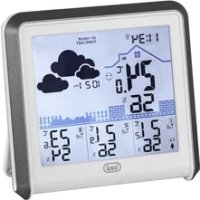
DESCRIZIONE COMANDI
- Clock
- Icons weather symbols
- Channel external sensor
- Indoor temperature / humidity
- Outdoor temperature / humidity
- Moon phases
- Date
- Trend of the indoor temperature
- Trend of the outdoor temperature
- SNOOZE key, temporarily silence the alarm
- CH key, select external sensor channel
- SET key, set clock and date
- ALARM key, set and ON/OFF alarm
- UP key, set clock 12/24
- DOWN key, set °C/°F degrees / ON/OFF radio controlled signal
- Wallbracket
- Battery compartment 2xAA
- Outdoor temperature
- Outdoor humidity
- CH key, selection of channel external sensor
- °C/°F key, set °C/°F degrees
- Battery compartment 2xAAA
- weather forecast for 4 states: sunny, semi-sunny, cloudy, rainy
- RCC receiving format: DCF
- seven languages to show the day: English, Germany, French, Italian, Spanish, Dutch, Danish
- indoor temperature range: 0°C--50°C
- indoor humidity range: 20%----90%
- outdoor temperature/ humidity with RF: up to 3 channels
- in/out trend indication of temperature
- indication of the comfort index
- the function of Alarm/ Snooze
- 12/24 hour selectable
- moon phase
2 Power-On and reset
- When Power-On and reset, LCD full display for 3 seconds à enter the normal state after "Beep" à check temperature and humidity à enter into RCC receiving mode automatically à exit after 7 minutes or after receiving the signal
- The calendar defaults 0:00 January 1, 2000
- Alarm defaults 0:00
- The weather icon defaults semi-sunny
- Temperature scales defaults Celsius degree °C. Time system defaults 24Hr. Channel defaults CH1
3. Instruction of operating the KEYS
3.1 Key functions
Six functional keys: Set, Alarm, Up, Down, Snooze, CH
Function
Operation Set Alarm Up Down Snooze CH
| standard mode | Click | ---- | Alarm on/off | 12hr/24hr switchable | °C/°F switchable | enter into snooze state | Switchable between CH1, 2, 3 | |
| Hold | Enter into clock setting | enter into alarm setting | ---- | Enter into RCC receiving | ---- | clear current registered ch | ||
| Time set | Click | Confirm the setting | ---- | one step forward | one step backward | ---- | ---- | |
| Hold | ---- | ---- | 8steps/second forward | 8steps/second backward | ---- | ---- | ||
| Alarm set | Click | ---- | confirm the setting | one step forward | One step backward | ---- | ---- | |
| Hold | ---- | ---- | 8steps/second forward | 8steps/second backward | ---- | ---- | ||
3.2 Normal states
- hold "Set" for 2 seconds to enter into time setting
- click "Alarm" to switch the alarm on/off
- hold "Alarm" for 2 seconds to enter into Alarm setting
- click "Up" to switch between 12hr/24hr
-
press "Down" to switch between irc C / ircF
-
Hold "Down" to enter into RCC receiving mode
- Under RCC receiving status, click "Down" to exit the RCC receiving state
- when ALARM rings, click "snooze" to enter into the snooze state every 5 minutes
- press "CH" to switch RF channel, CH1 àCH2àCH3
- hold "CH" key for 2 seconds to clear out all data of current "Channel"
3.3 Time set
- hold "Set" key for 2 seconds to enter into time setting
- the sequence of time setting: Year(2000-2099) àMonthà Date à Language à Hour à Minute à Time zone àExit
- there will have 1Hz flashing during setting
- press "Set" to confirm the setting, and enter the next setting state
- press "Up" one time, the setting will go ahead for one step; hold the key for 2 seconds, it will run forward by 8 steps/second.
- press "Down" one time, the setting will backward for one step; hold for 2 seconds, it will run back by 8 steps/second.
- moon phase is changed accordingly
- the system will exit automatically if no key is operated in 8 seconds.
3.4 Alarm set
- hold "Alarm" key for 2 second to enter into alarm setting
- the sequence of alarm setting: Hour à Minute à exit
- there will have 1Hz flashing during setting
- press "Alarm" to confirm the setting, and enter the next setting state
- press "Up" one time, the setting will go ahead for one step; hold the keys for 2 seconds, it will run forward by 8 steps/seconds.
- press "Down" one time, the setting will backward for one step; hold for 2 seconds, it will run back by 8 steps/second.
- the system will exit automatically if no key is operated in 8 seconds.
- at normal status, press "Alarm" to turn on/off alarm function.
4 Function and effect
4.1 The receiving function of RF
- after installing the battery and checking temperature/humidity, it will enter RF receiving state automatically for 3 minutes.
- under normal display mode, hold the "CH" key for 2 seconds to clear out the channel information
- if there is no effective signal with same ID code received for the current channel in 35 minutes, the temperature of that CH will shows “--.-”.
- the temperature display will resume back when the correct signal is received again.
4.2 The function of RCC receiving
- Conditions of entering RCC receiving status:
a. Power on or reset to enter RCC receiving status
b. Entering RCC receiving status at 2:00,3:00,4:00,5:00 automatically
c. Press "DOWN" for 2 seconds to enter RCC receiving status forcedly
- The time for RCC receiving is 7 minutes
- The displaying of icons during receiving:
a. When it enters RCC receiving status, the tower-shaped part of RCC symbol on the LCD will flash in the frequency of 1 Hz.
b. When it is receiving the signal, the tower-shaped part of RCC symbol will be still, while thesymbol of RCC will flash in the frequency of 1 Hz.
- When it receives the signal successfully, the whole RCC icons will be ON, and exit the receiving status.
- When it is receiving signals, press "Down" or "UP" key, it will exit RCC receiving status, pressing any other key will have no effect.
-
During the 4 times of auto receiving everyday, if it received signal once, it will not enter the receiving status automatically until 2:00 next day.
-
When it fails to receive the signals 4 times in a day, it will receive the signal at 2:00 next day.
- During receiving RCC, if the alarm rings, it will exit RCC receiving status first and change into alarm ringing status, and will enter the RCC receiving again after the ring stops.
- When DST is able and is receiving the signal, it will display the symbol of DST, showing that it enters the DST system, and the time will be 1 hour faster.
- When the RCC symbol is displaying, the relative RCC icon will be OFF if the present time is changed.
4.3 The function of alarm
- the BUZZER will ring for 2 seconds as below:
a. 0 – 10 sec.: one "beep" per second
b. 10 – 20 sec.: two "beep" per second
c. 20 – 30 sec.: four "beep" per second
d. after 30 sec.: "beep" continuously
- when ringing, click "Snooze" key once to enter into 5 minutes snooze states, exit if any other key is clicked.
4.4 Trend indicator
The trend pointer displayed on the LCD indicates the trend of the indoor temperature :
- The difference between current temperature and recorded temperature is more than +1°C, the trend shows C.
- The difference between current temperature and recorded temperature is less than -1°C, the trend shows A
- When the change of temperature is within +/- 1°C, the trend shows B

.A .B .C


4.5 The function of weather forecast
COMFORT +20 °C to +28 °C 40% to 70%
WET -5°C to +50 °C Over 70%
NO INDICATION - Less than 20 °C or more Less than 40% or more than 28 °C than 70%

Precautions for correct disposal of the product.
The symbol shown on the equipment indicates that waste must be disposed of in “separate collection” and so the product must not be disposed of together with urban waste.
The user must take the product to special “separate waste collection centres” provided by local government, or deliver it to the retailer against the purchase of a new product.
Separate collection of waste and subsequent treatment, recycling and disposal operations promotes the production of equipment with recycled materials and limits negative effects on the environment and on health caused by improper handling of waste.
Illegal disposal of the product leads to the enforcement of administrative penalties.
WARRANTY
- This unit is guaranteed for a period of 24 months from the date of production printed on the product itself or on label on product.
- The warranty is valid only if the unit has not been tampered with. The warranty is valid only at authorized TREVI assistance centres, that will repair manufacturing defects, excluded replacement of labels and removable parts.
- TREVI is not liable for damage to people or things caused by the use of this unit or by the interruption in the use of this unit.

DESCRIPTION DES COMMANDES
Transmission : 30m, RF 434 MHz


- DESCRIZIONE COMANDI
- Power-On and reset
- Instruction of operating the KEYS
- Key functions
- Normal states
- Time set
- Alarm set
- Function and effect
- The receiving function of RF
- The function of RCC receiving
- The function of alarm
- Trend indicator
- The function of weather forecast
- Precautions for correct disposal of the product.
- WARRANTY
- DESCRIPTION DES COMMANDES
Brand : Trevi
Model : ME 3120 RC
Category : Weather Station