
HAMGSMGPS - Security System VELLEMAN - Free user manual and instructions
Find the device manual for free HAMGSMGPS VELLEMAN in PDF.


| Product type | GSM/GPS security system |
| Brand | Velleman |
| Model | HAMGSMGPS |
| Dimensions (approx.) | 150 x 100 x 30 mm |
| Weight (approx.) | 300 g |
| Power supply | 12 V DC (mains adapter) or built-in backup battery |
| Main functions | GPS monitoring, GSM communication, intrusion alarm, telephone notification |
| Compatible sensors | Motion detectors, door opening, smoke (optional) |
| Communication | Quad-band GSM (850/900/1800/1900 MHz) |
| GPS | Built-in GPS receiver for location tracking |
| Number of inputs/outputs | 4 wired inputs, 1 relay output |
| Operating temperature | -10 °C to +50 °C |
| Maintenance and cleaning | Clean with a soft dry cloth. Do not use abrasive products. |
| Safety | Installation recommended by a professional. Use a SIM card with PIN code disabled. |
| Spare parts and repairability | Replacement battery, GSM/GPS antenna available. Repair possible by a qualified technician. |
| General information | User manual available for download at notice-facile.com |
Frequently Asked Questions - HAMGSMGPS VELLEMAN
User questions about HAMGSMGPS VELLEMAN
0 question about this device. Answer the ones you know or ask your own.
Ask a new question about this device
Download the instructions for your Security System in PDF format for free! Find your manual HAMGSMGPS - VELLEMAN and take your electronic device back in hand. On this page are published all the documents necessary for the use of your device. HAMGSMGPS by VELLEMAN.
USER MANUAL HAMGSMGPS VELLEMAN
GSM/GPS vehicle protection
AMA2/AMA3
HANDLEIDING
MODE D'EMPLOI
MANUAL
ANLEITUNG
MANUAL DEL USUARIO
NL - HANDLEIDING
Beste gebruiker,
0 = AAN en UIT schakelen via SMS (ONxxxx: alarmuitgang is +12V, OFFxxxx: alarmuitgang is 0V).
3. HOE WERKT AMA2/3?
3.1. AANSCHAKELEN
Draai de contactsleutel in de OFF-stand.
DATE:010707: la date.
AMA2/3 REV 4.30 OUTPUT ON
DESACTIVATION
AMA2/3 REV 4.30 OUTPUT OFF
3.6. ENTRETIEN DU VEHICULE
AMA2/3 REV 4.30 SERVICE ON
AMA2/3 REV 4.30 SERVICE OFF
Thank you for purchasing the AMA2 or AMA3.

Please read the safety instructions before using your AMA2/3:
- Use other than that described in this manual will lead to damage to the product. In addition, this may lead to hazards such as short circuits or fire. The product as a whole may not be opened, modified or reconstructed.
- This device left the factory in perfect condition in terms of safety engineering. To maintain this condition and ensure safe operation, you, as the user, must comply with the safety instructions and warnings contained in these instructions.
- In commercial institutions, the accident prevention regulations of the Employer's Liability Insurance Association for Electrical Systems and Operating Materials are to be observed.
- In case of arbitrary mechanical deformation or modifications of the electronic components, the warranty will be void.
- DISPOSAL: old electronic devices are special waste and may not be disposed of in the household waste. When the device has become unusable, dispose of it at the community collection point in accordance with the statutory regulations in force.
The AMA2/3 works automatically and is very easy to use.
The AMA2/3 will warn you by SMS in case of unauthorised access of your vehicle. The AMA3 with GPS module offers the location coordinates.
When removing the SIM-card from the AMA2/3, please ensure to remove the battery and wiring loom fuse first. After replacement of the SIM-card, you need to plug in the battery and the fuse again.
Have fun driving your vehicle.
The AMA -team
1. INSTALLATION
Attention! Only use a SIM-card with a removed password (to initialize through a GSM-cell phone). Place the SIM-card into the right position (see pic. 1).
To activate the SIM-card = check if you can make a phone call with the SIM-card.
When removing the SIM-card from the AMA2/3, please ensure to remove the battery and the wiring loom fuse first. After replacement of the SIM-card, you need to plug in the battery and the wiring loom fuse again.
2. CONNECTIONS
Red: + 12 Volt
Black: - Ground
Blue: + 15 (+ 12 V after ignition)
White: + 12 V OUT (output for buzzer or external apparatus, plug in via connector max 0,5 A)
Green: Auxiliary input. Negative or Positive triggered according to the programming
Yellow: no application
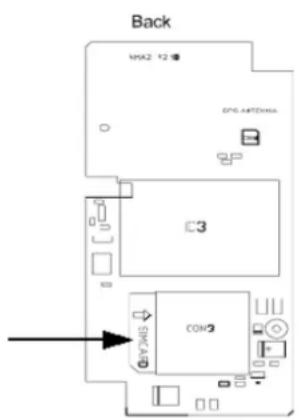
pic. 1
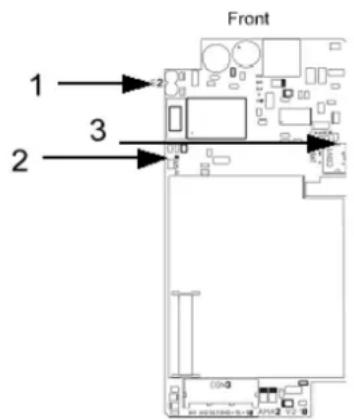
pic. 2

pic. 3 push button
Plug the buzzer into the connector.
Plug the push button (see pic. 3) into the connector.
Connect the red wire to the + 12 V (battery).
Connect the black wire to a good ground (battery).
Connect the blue wire to the + 12 V after ignition (+15V).
Plug in the internal battery after connecting the power supply. The AMA2/3 needs the battery power to be able to connect to the GSM-network. The charge led (3 - pic.2) will burn when the back-up battery is loading.
Attention: 1) The initial operation of the proposed procedure can last about 2 minutes to control all the functions and connect to the GSM-network.
The status led (2 - pic. 2) on the PCB will blink every 5 seconds if the AMA2/3 is connected to the network. If the status led blinks every second, it means that no GSM-network connection has been made.
2) The AMA2/3 will indicate the signal strength through the buzzer and the external push button led each time the ignition is switched off. Example: signal 3 = 3 x blinks and 3 buzzer signals (0 buzzer signals = no signal, 5 buzzer signals = best signal)
SMS MESSAGES SENDING AND RECEIVING
The LED on the push button will blink 3 times as soon as the AMA2/3 receives the message.
After about 45 seconds the LED on the push button will power on and off twice, followed by a steady burning during 5 seconds to indicate the message has been sent. If not, please check your SMS, SIM-card or password and try again.
2.1. WHICH CELL PHONE WILL RECEIVE THE SMS MESSAGE?
After receiving the GSM-network signal, please program your cell phone number in the AMA2/3. The cell phone number of the user is f.e.: 0123/456789
Send the following message to the AMA2/3: A1111+xx123456789.
A = stands for ALARM
1111 = stands for default password
+xx = stands for the international dialing code
123456789 = stands for the cell phone number of the receiver
Do not enter any spaces before or in your message. After about 45 seconds the AMA2/3 will send an SMS message to the input dialing numbers to confirm:
AMA2/3 REV 4.30
PW= 1111
TEL=+xx123456789
2.2. PERSONAL PASSWORD
Desired personal password f.e.: 1234
Send the following message to the AMA2/3 (this could be digits or characters) : P11111234
P = stands for PASSWORD
1111 = stands for default password
1234 = stands for a new password
Do not enter any spaces before or in your message. After about 45 seconds the AMA2/3 will send a SMS message to the input dialing numbers to confirm:
AMA2/3 REV 4.30
PW= 1234
TEL=+xx123456789
2.3. FUNCTIONS AND DEFAULT VALUES
Send the following message depending on the programming: Fxxxxy=z
F = stands for FUNCTION
xxxx = stands for default password
y = stands for desired function from 1 to 5
z = stands for value 0 to z depending on the function
Do not enter any spaces before or in your message. After about 45 seconds the AMA2/3 will send a SMS message to confirm:
AMA2/3 REV 4.30
PROG=0,2,7,2,3
(function 1,2,3,4 en 5)
2.3.1 FUNCTION 1: LINE TEST
If activated, the AMA2/3 will generate a line test according to the programmed time interval. Send the following message to the AMA2/3: Fxxxx1=z
F = stands for FUNCTION
xxxx = stands for the password
1 = stands for the function type
z = stands for the line test status
(0 = switched off (default value), 1 = every day, 2 = every week, 3 = every month).
Do not enter any spaces before or in your message. After about 45 seconds the AMA2/3 will send a SMS message to confirm.
2.3.2 FUNCTION 2: AUX INPUT (AUX ALARM)
Immediate or delayed alarm (NO or NC) – switched to ground. Programmation against key theft (3.3.) Send the following message to the AMA2/3: Fxxxx2=z
F = stands for FUNCTION
xxxx = stands for the password
2 = stands for the function type
z = stands for the status
0 = AUX Input: direct alarm and NO-input
1 = AUX Input: direct alarm and NC-input
2 = AUX Input: delayed alarm (15 seconds) and NO-input - default value
3 = AUX Input: delayed alarm (15 seconds) and NC-input
4 = AUX Input: delayed alarm (15 seconds) and NO-input with recognition through push button
5 = AUX Input: delayed alarm (15 seconds) and NC-input with recognition through push button
Do not enter any spaces before or in your message. After about 45 seconds the AMA2/3 will send a SMS message to confirm.
The modification of a value will be active after receiving a confirmation message by SMS.
The AMA2/3 will send a message with the following information to your cell phone:
AMA2/3 REV 4.30
AUX ALARM
CONTACT: OFF
BAT=OK SIG=4
GPS=0/1 AMA3
TIME:201446 AMA3
DATE:010707 AMA3
50:55:34 N AMA3
005:26:31 E AMA3
SPEED:0.00 AMA3
OUTPUT OFF/ON
2.3.3 FUNCTION 3: DETECTOR SENSITIVITY
Send the following message to the AMA2/3: Fxxxx3=z
F = stands for FUNCTION
xxxx = stands for the password
3 = stands for the function type
z = stands for the status 0=switched off, 1=lowest sensitivity, 2 to z = decreasing sensitivity to value 9. (7=default value)
Do not enter any spaces before or in your message. After about 45 seconds the AMA2/3 will send a SMS message to confirm.
2.3.4. FUNCTION 4: OUTPUT (white cable for buzzer or external device)
Send the following message to the AMA2/3: Fxxxx4=z
F = stands for FUNCTION
xxxx = stands for the password
4 = stands for the function type
z = stands for the status
0 = on/off via SMS (ONxxxx : alarm output is high (+12V), OFFxxxx : alarm output is low (0V))
1 = output follows the bell signal, the AMA2/3 will act as a remote control with no range limits. Call the AMA2/3 to activate a relay or to open a gate. The output will switch to +12 V for 1 second. The communication is free of charge.
2 = buzzer activated (default value). The output is now enabled to activate all the buzzer functionalities such as pre-alarm, reproduction of the GSM signal strength, the GPS check function. Attention: The buzzer functions are deactivated with status 0 and 1.
2.3.5. FUNCTION 5: SMS COUNTER
Maximum number of SMS-messages.
In order to limit the communication costs, a SMS-counter is available. It is possible to limit the number of SMS-messages of an alarm. The SMS-counter will RESET each time the ignition key (+15) is turned ON.
Send the following message to the AMA2/3: Fxxxx5=z
F = stands for FUNCTION
xxxx = stands for the password
5 = stands for the function type
z = stands for the status (0 = unlimited number, 1 = 1 SMS, 2 = 2 SMS, 3 = 3 SMS (default value) up to 9 SMS)
2.4. HOW TO RESET THE DEFAULT VALUES?
Pull out the 2 A fuse of the fuse holder and disconnect the emergency battery from the AMA2/3.
Place the jumper S2 (1 - pic. 2).
Replace the 2 A fuse. Reconnect the emergency battery to the AMA2/3. The device is under tension.
Wait for about 10 seconds until the LED on the push button starts to blink.
The device is in test mode now. You can control and observe all connections and the moving sensor by the buzzer.
Remove the jumper S2 again.
The AMA2/3 will reload the default values into its memory now.
2.5. POSITIVE TRIGGERED AUX INPUT
For positive triggering, be sure to use programming values 1,3 or 5 for function 2 (NC contact).

pic. 4
3. HOW DOES THE AMA2/3 WORK?
3.1. SWITCHING ON
Turn the ignition key in "OFF" position.
The AMA2/3 will alert immediately if he can reach you. The red led on the push button will flash and you will hear an audible signal every time you switch OFF the ignition key.
As soon as you turn off the ignition, the AMA2/3 will indicate the signal strength through the buzzer and the LED on the push button. 0-1 x blink/buzz = bad signal, 2-5 x blink/buzz = good signal. If the signal is bad, please park your vehicle elsewhere to avoid communication failure with your AMA2/3. 60 seconds after removing the ignition key, the AMA2/3 will automatic be armed. The LED on the push button will blink every 3 seconds.
3.2. SWITCHING OFF
If your vehicle is moved (lifted or replaced) the buzzer will sound and the LED on the push button will flash. The AMA2/3 will give you 15 seconds (pre-alarm) to switch your ignition key into the "ON" position. Now the AMA2/3 is switched OFF.
If the pre-alarm state is not canceled, the AMA2/3 will send a message with the following information to your cell phone:
AMA2/3 REV 4.30
MOVING ALARM
CONTACT: OFF
BAT=OK SIG=4
GPS=0/1 AMA3
TIME:201446 AMA3
DATE:010707 AMA3
50:55:34 N AMA3
005:26:31 E AMA3
SPEED:0.00 AMA3
OUTPUT OFF/ON
3.3. PROTECTION AGAINST KEY THEFT
The AMA2/3 offers also protection against key theft. You need to press the push button every time you switch "ON" the ignition. If not, the AMA2/3 will send a SMS message. This function is not activated, for activation see 2.3.2. and choose value 4 (Fxxxx2=4).
If the pre-alarm state is not canceled the AMA2/3 will send a message with the following information to your cell phone :
AMA2/3 REV 4.30
KEY ALARM
CONTACT: OFF
BAT=OK SIG=4
GPS=0/1 AMA3
TIME:201446 AMA3
DATE:010707 AMA3
50:55:34 N AMA3
005:26:31 E AMA3
SPEED:0.00 AMA3
OUTPUT OFF/ON
3.4. VERIFYING THE AMA2/3'S STATUS
You can ask your AMA2/3 for information anytime and anywhere.
Send the following message to the AMA2/3: STATUS
The AMA2/3 will send you the following SMS:
AMA2/3 REV 4.30
PROG=0,2,7,2,3
CONTACT: OFF
BAT=OK SIG=4
GPS=0/1 AMA3
TIME:201446 AMA3
DATE:010707 AMA3
50:55:34 N AMA3
005:26:31 E AMA3
SPEED:0.00 AMA3
OUTPUT OFF/ON
AMA2/3: device type
REV 4.30: software revision
PROG= 0,2,7,2,3: programming values (Function 1,2,3,4,5)
CONTACT: ON: position of the ignition key
BAT= OK: charge level of the vehicle battery (< 10,6 V = LOW)
SIG= 5: strength of the GSM signal
GPS=0/1: GPS signal (fix) (1 = AMA3 has GPS signal, 0 = AMA3 has no signal)
TIME:201446: time indication of the most recent GPS-coordinates (universal time)
DATE:010707: date indication of the most recent GPS-coordinates
50:55:34 N: GPS coordinates
005:26:31 E: GPS coordinates (please enter the coordinates on www.amasystems.be)
SPEED:0.00: speed of the vehicle expressed in "knots". (1 knot = 1,85 km/h)
SERVICE OFF: service indicates the garage/service mode
OUTPUT ON: Programmed output state (if enabled!)
3.5. BATTERY FAULT (VEHICLE BATTERY)
The AMA2/3 will warn you if battery voltage is too low (< 10,6 V), if there is a disconnection of the battery or the interruption of the power supply caused by, for example, a burned out fuse.
The AMA2/3 will send you the following SMS:
AMA2/3 REV 4.30
BATTERY FAULT
3.6. CONNECTING AN EXTRA DEVICE TO THE AMA2/3
SWITCHING ON
This option is not activated. If you want to activate this option, you can't use the buzzer function!!! For activation see 2.3.4. and choose value 0. (Fxxxx4=0)
Send the following message to the AMA2/3: ONxxxx
xxxx is the password. If you have changed your password please use your new one.
Do not enter any spaces before or in your message. After about 45 seconds the AMA2/3 will send an SMS message as confirmation:
AMA2/3 REV 4.30
OUTPUT ON
SWITCHING OFF
Send the following message to the AMA2/3: OFFxxxx
After about 45 seconds the AMA2/3 will send a SMS message to confirm:
AMA2/3 REV 4.30
OUTPUT OFF
3.7. VEHICLE MAINTENANCE
To avoid AMA2/3 sending alarm messages to your cell phone number during a maintenance service of your vehicle, you can switch ON and OFF the service mode by sending the following message to the AMA2/3: Sxxxx
S = stands for SERVICE
xxxx = stands for the password
Do not enter any spaces before or in your message. After about 45 seconds the AMA2/3 will send a SMS message to confirm:
AMA2/3 REV 4.30 (service on = led on the push button blinks fast)
SERVICE ON
or
AMA2/3 REV 4.30 (service off = led on the push button burns continuously)
SERVICE OFF
3.8. TEMPORARY ACTIVATION OF THE SERVICE MODE
Press the push button while switching "OFF" the contact. The moment you hear a long audible signal, release the push button. From this moment the service mode is activated until you switch "ON" the contact again. This function permits you to get fuel or wash your vehicle.
3.9. FOLLOWING THE VEHICLE ON THE INTERNET (only for AMA3)
You can activate the "TRACKING"-mode. The AMA3 will send you a status message every minute for a maximum of 1 hour.
The tracking function can be switched ON or OFF any time by sending a SMS with the following message: TRACK
After about 45 seconds the AMA3 will send a SMS message to confirm:
AMA3 REV 4.30
TRACK ON (or) OFF
CONTACT: OFF
BAT=OK SIG=4
GPS=0/1
TIME:201446
DATE:010707
50:55:34 N
005:26:31 E
SPEED:0.00
OUTPUT OFF/ON
If you fill in the coordinates on our website www.amasystems.be, choose your language and go to "Standard Format", push the "OK"-button. Now the location of your vehicle will be visualized.
4. GPS-CHECK FUNCTION
Attention: The first time after installing the AMA3, it can take about 10 minutes before AMA3 has got sufficient satellite information to operate properly.
Each time the ignition key is turned on, the GPS-receiver starts collecting satellite data. This can take up to 2 minutes to collect the satellite information it needs. You can check if you have GPS signal.
Activating the GPS check-function
Turn on the ignition key and hold the LED push button (this can last for 10 seconds) until you hear two buzzer signals. The test can be done while driving the vehicle. Each time AMA3 receives a valid GPS-signal you'll hear 2 short buzzer signals. When the GPS-signal is OK, you will hear them every 3 seconds.
Deactivating the GPS check-function
There are 2 different ways to do it:
1) Turn OFF the ignition key.
2) Hold the LED push button (this can last for 10 seconds), until you hear 1 long buzzer signal.
DE - ANLEITUNG

F = representa FUNCTION

- GSM/GPS vehicle protection
- AMA2/AMA3
- NL - HANDLEIDING
- HOE WERKT AMA2/3?
- AANSCHAKELEN
- DESACTIVATION
- ENTRETIEN DU VEHICULE
- INSTALLATION
- CONNECTIONS
- SMS MESSAGES SENDING AND RECEIVING
- WHICH CELL PHONE WILL RECEIVE THE SMS MESSAGE?
- PERSONAL PASSWORD
- FUNCTIONS AND DEFAULT VALUES
- FUNCTION 1: LINE TEST
- FUNCTION 2: AUX INPUT (AUX ALARM)
- FUNCTION 3: DETECTOR SENSITIVITY
- FUNCTION 4: OUTPUT (white cable for buzzer or external device)
- FUNCTION 5: SMS COUNTER
- HOW TO RESET THE DEFAULT VALUES?
- POSITIVE TRIGGERED AUX INPUT
- HOW DOES THE AMA2/3 WORK?
- SWITCHING ON
- SWITCHING OFF
- PROTECTION AGAINST KEY THEFT
- VERIFYING THE AMA2/3'S STATUS
- BATTERY FAULT (VEHICLE BATTERY)
- CONNECTING AN EXTRA DEVICE TO THE AMA2/3
- SWITCHING ON
- SWITCHING OFF
- VEHICLE MAINTENANCE
- TEMPORARY ACTIVATION OF THE SERVICE MODE
- FOLLOWING THE VEHICLE ON THE INTERNET (only for AMA3)
- GPS-CHECK FUNCTION
- Activating the GPS check-function
- Deactivating the GPS check-function
- DE - ANLEITUNG
Brand : VELLEMAN
Model : HAMGSMGPS
Category : Security System