
APPUPS7 - Inverter Approx - Free user manual and instructions
Find the device manual for free APPUPS7 Approx in PDF.


| Product Type | Desktop UPS (Uninterruptible Power Supply) |
| Brand | Approx |
| Model | APPUPS7 |
| Apparent Power | 700 VA |
| Active Power | 420 W |
| Input Voltage | 230 V AC (single phase) |
| Output Voltage | 230 V AC (regulated, approximated sine wave) |
| Battery Type | Sealed lead-acid, maintenance-free |
| Number of Batteries | 2 x 12 V, 7 Ah |
| Typical Autonomy | About 10 minutes at full load |
| Number of Output Sockets | 4 Schuko sockets (with surge protection) |
| Integrated Protection | Surge protector, noise filter, low battery shutdown |
| User Interface | LED indicators (power, battery, alarm) |
| Communication | USB port (software monitoring) |
| Dimensions (W x D x H) | 310 x 145 x 200 mm |
| Weight | 5.2 kg |
| Operating Temperature | 0 °C to 40 °C |
| Noise Level | < 40 dB (fan only on charge) |
| Maintenance and Cleaning | Dust with a dry cloth; do not open; battery replaceable by a professional |
| Spare Parts and Repairability | Replacement battery available; repairability score: 6/10 |
| General Information | Compliant with CE standards; 2-year warranty |
Frequently Asked Questions - APPUPS7 Approx
User questions about APPUPS7 Approx
0 question about this device. Answer the ones you know or ask your own.
Ask a new question about this device
Download the instructions for your Inverter in PDF format for free! Find your manual APPUPS7 - Approx and take your electronic device back in hand. On this page are published all the documents necessary for the use of your device. APPUPS7 by Approx.
USER MANUAL APPUPS7 Approx
Uninterruptible Power Supply
VERSION1.1
Guía de usuario User guide Guide de l'utilisateur Gebrauchsanweisung Guida per l'utente Manual do utilizador

natural_image
Six grayscale circular icons representing basic human and audio-related symbols (no text or labels)INTRODUCCIÓN
A. Function: This Uninterruptible Power Supply (UPS) provides clean, reliable, AC power to your computer and peripherals and protects them from power blackouts, brownouts, sags, surges and interference.
B. Functional Description: Normally, the UPS operates on Mains, supplying power to the load from the utility input. The battery charger uses the Mains power to keep the battery an optimal level. When the power fails, the UPS transfer the load to the battery. The UPS converts the battery's DC power to AC power. The load operate normally until shutdown or until the battery is exhausted. The load is automatically transferred back to the utility when the normal Mains restores. The UPS also provides surge protection and RFI filtering as well as output voltage regulation which increases undervoltage and reduces over voltage conditions. The optional software allows UPS to communicate with computer for auto shutdown.
PRECAUTIONS FOR USE
A. Always connect the UPS to a two-pole, three-wire grounding Mains socket. The socket must be connected to appropriately protected branch of Mains (fuse/ circuit breaker). Connection to any other type of socket may result in a shock hazard.
B. This UPS has got battery inside which acts as an energy source and output may be available even when the unit is not connected to a Mains supply.
C. To Switch off the UPS output in an emergency, use the switch on front to switch the UPS off. And disconnect the power cord from the Mains.
D. Avoid installing the UPS where there is water or excessive humidity. The unit should be kept away from heat-emitting appliances such as a heater, blower, oven, etc. Exposure to direct sun should be avoided. The place of installation should be well-ventilated and easily accessible fro servicing.
E. Water or foreign objects should not get inside the UPS. Do not put objects containing liquid on or near the unit.
PACK CONTENT
1 x UPS
1 x Power cable UPS-PC
SPECIFICATIONS
| INPUT | Voltage Range 140V AC to 290V AC | ||
| Frequency | 50Hz | ||
| OUTPUT | Power (APPUPS7/ APPUPS9) 700VA 900VA | ||
| Voltage (Battery Mode) 220V AC Nominal | |||
| Frecuency (Battery Mode) 50Hz ±1% | |||
| Voltage (Mains AVR Mode) 198V AC to 256V AC | |||
| Transfer Time (Typical a.s.) 3 m.s. | |||
| BATTERY | Type | Sealed Lead Acid Maintenance Free | |
| Number (APPUPS7/ APPUPS9) One 12V 7AH One 12V 9AH | |||
| Typical Recharge Time 4 Hours (Upto 90% full capacity) | |||
| Protection Deep Discharge Protection | |||
| PHYSICAL | Net Weight (kg.) (APPUPS7/ APPUPS9) | 4.5 | 6.0 |
| GrossWeight (kg.) (APPUPS7/ APPUPS9) | 4.9 | 6.4 | |
| Dimensions (LxWxD) (mm) 280 x 95 x 140 315 x 95 x 146 | |||
| LED COLOR INDICATION | Mains Normal (Switch On) Green (constant) | ||
| Mains Normal (Switch Off) Green (Blinks) | |||
| On Battery Mode | Orange | ||
| Low Battery Pre-alarm | Orange (Blinks) | ||
| Over load/ Battery low/ Battery Mode Short-Circuit Trip | Red for 10 sec. | ||
| No Load Shut Down | Red blinks for 10 sec. | ||
| ALARMS | On Battery Mode | Beeps every 30 sec. | |
| Low Battery Pre-alarm | Beeps twice every 3 sec. | ||
| Over load/ Battery low/ Battery Mode Short-Circuit Trip | Continuous beeping for 10 sec. | ||
| ENVIRONMENTAL | Operating Temperature | 0-40°C (32–104 °F) | |
| Storage Temperature | 0-40°C (32–104 °F) | ||
| Humidity | 0-95% RH non-condensing | ||
Due to continuous product improvement, the specifications are subject to change without notice.
PHYSICAL DESCRIPTION
A. THE FRONT PANEL
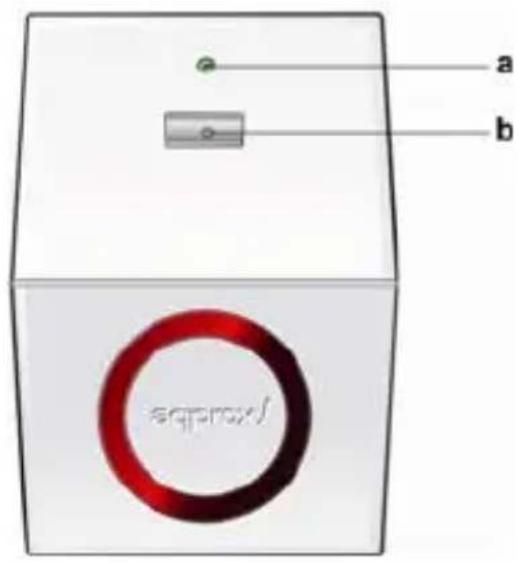
a. LED: See under Alarms & LED indications Section for details.
b. UPS ON SWITCH:
To turn ON/OFF the UPS, press the switch for two seconds to acknowledge. If Mains is available and switch is OFF, no output would be available to the loads but charging would continue. This switch also works as a reset in case of Battery Shut Down.
B. THE BACK PANEL

APPUPS7

APPUPS9
a. INPUT 3 CORE LEAD: Connects to commercial Mains (single phase).
CAUTION: Neutral shall be on left. Phase shall be on right and hand side of wall socket.
b. INPUT FUSE: Connects the commercial Mains to UPS.
c. OUTPUT SOCKETS: UPS output is available at these sockets.
On receiving the UPS, inspect it and inform the carrier and dealer if you find any transit damage. The packaging can be saved for future use.
B. Placement
UPS shall be kept at a place which is protected from dust, water, temperature and humidity should be within specified limits.
C. Installation
Input can be connected to a 3 pin wall socket which is having low impedance earth. Neutral shall be on left and phase shall be on right hand side of the socket.
CAUTION: Do not connect any Voltage correction device like a Ferro Resonant Transformer or AVR or loads such as fluorescent lamps etc. to the output of the UPS.
D. Battery Charging
The UPS charges the battery whenever it is connected to normal Mains power. For normal backup, charge the battery for 4 hours before use. UPS can be used even without charging the battery, but on battery, run time may be reduced until the battery has recharged.
E. Load Connection
Connect the load to the output socket on the rear panel (cables not included).
F. Turning ON the UPS
To supply to the loads, switch On the UPS switch, on front panel. Wait for 2-3 seconds and then switch On the loads.
ALARMS & LED INDICATIONS
| PARAMETER | DESCRIPTION | INDICATION | ALARM |
| ON BATTERY LED | Glows whenever output is in battery | ORANGE | Beep for every 30 sec. |
| BATTERY PRE-ALARM | This alarm starts a few minutes before low battery trip is going to occur. It stops when low trip occurs or normal Mains restores. Low battery warning interval may change with the load & battery Condition | ORANGE (BLINKS) | Two Beeps for every 3 sec. |
| BATTERY LOW TRIP | Glows whenever Battery has exhausted | RED for 10 sec. | Continuous beep for 10 sec. |
| ON MAINS LEDa) Constant indicationb) Blinking indication | Glows whenever output is in Mains mode and when the input voltage available from commercial Mains is within normal limits (140V-290V) underUPS Switch on conditionUPS Switch off condition | GREEN | No |
| OVER LOAD TRIP | Glows whenever UPS is overloaded in battery mode | RED for 10 sec. | Continuous beep for 10 sec. |
| NO LOAD SHUT DOWN | Glows whenever output of battery mode less than or equal to 60W and occur after 2 minutes | RED blinks for 10 sec. | No Alarm |
| ON BATTERY MODE SHORT CIRCUIT TRIP | Glows whenever output of the UPS in Battery mode is short circuited | RED for 10 sec. | Continuous beep for 10 sec. |
TROUBLE SHOOTING
| PROBLEM POSSIBLE CAUSE(S) ACTION RECOMMENDED | ||
| The Mains supply is present butA) The Green indication is off. The UPS is working on battery (UPS on, Orange is glowing).B) No output is availableC) UPS some times transfers to battery Computer equipment operates normally and normal Mains is supposed to be present. | a1 Line plug is loose.a2 Dead wall socket.a3 Input fuse blown off.a4 Mains is out of range (140V-290V)b1 Loose connection at output socket.b2 Battery has exhausted.b3 Short Circuit Trip in Battery mode.C UPS is briefly transferring your equipment to battery because of short duration undervoltage and overvoltage conditions. | a1 Fit the line cord plug properlya2 Check the socket with any lamp etc.a3 Replace the fuse.a4 Wait for normal Mains to restore.b1 Tighten the connection.b2 Reset the UPS On switch after restoration of normal Mains.b3 Check the Computer or Contact authorised dealer.C This is normal, UPS is protecting your equipment from abnormal voltages. |
| UPS does not provide expected backup time and low battery warning is sounded prematurely | 1 Excessive loads connected at output sockets of the UPS.2 Loading much less than full rated capacity will increase low battery warning interval. | 1 Remove excessive load or charge battery as required.2 Recharge the battery by leaving the UPS plugged in for 4 hrs. Don't discharge battery during this period. If UPS still sounds low battery warning prematurely when retested, replace battery or contact authorised dealer. |
| Low battery warning interval changes during different power outages. | 1 Excessive loads connected to UPS or low battery capacity due to consecutive utility outages will reduce low battery warning interval2 Loading much less than full rated capacity will increase low battery warning interval. | 1 Remove excessive load or charge battery as required.2 There is nothing abnormal about it. |
INTRODUCTION
ALARMS & LED INDICATIONS
ALARMS & LED INDIKATIONEN
ALARMES & INDICAÇÕES LED
Brand : Approx
Model : APPUPS7
Category : Inverter