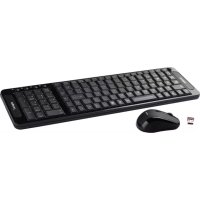
appMX330 - Keyboard Approx - Free user manual and instructions
Find the device manual for free appMX330 Approx in PDF.


Pick your language and provide your email: we'll send you a specifically translated version.
| Product Type | Keyboard |
| Brand | Approx |
| Model | appMX330 |
| Connectivity | Wired USB |
| Interface | USB 2.0 |
| Keyboard Layout | QWERTY (US) |
| Number of Keys | 104 keys |
| Multimedia Keys | Accessible via Fn combination |
| Dimensions (W x D x H) | 45 x 15 x 3 cm |
| Cable Length | 1.5 m |
| Weight | 550 g |
| Compatibility | Windows, macOS, Linux |
| Power Source | USB powered, no batteries required |
| Material | ABS plastic |
| Color | Black |
| Adjustable Tilt | Foldable tilt stands |
| Cleaning Method | Use a soft, dry cloth; avoid liquids |
| Safety Instructions | Do not disassemble or expose to moisture |
| Spare Parts & Repairability | Replacement keycaps available on request |
| Package Contents | Keyboard, user manual |
| Warranty | 1-year limited warranty |
| Operating Temperature | 0°C to 40°C |
| Storage Humidity | 10% to 90% non-condensing |
Frequently Asked Questions - appMX330 Approx
How do I connect the keyboard to my computer?
Connect the USB cable to an available USB port on your computer. The keyboard is plug-and-play and requires no additional drivers.
Is the keyboard compatible with macOS?
Yes, the keyboard works with Windows, macOS, and Linux. Simply connect via USB and it will be recognized automatically.
How can I clean the keyboard?
Unplug the keyboard, then use a soft, dry cloth to wipe the surfaces. Do not use water, solvents, or abrasive cleaners.
What should I do if some keys stop responding?
First, check the USB connection and try a different port. If the issue persists, restart your computer. If keys still fail, the keyboard may need servicing.
Is the keyboard spill-resistant?
No, the keyboard is not water-resistant. Avoid any liquid contact. If spills occur, unplug immediately and allow to dry completely before reconnecting.
Can I replace individual keycaps?
Yes, keycaps can be removed and replaced. Contact customer support to order replacement keycaps if needed.
Does the keyboard have multimedia keys?
Yes, media functions are available via the Fn key combined with F1-F12 keys for volume, play/pause, and more.
How long is the USB cable?
The cable length is approximately 1.5 meters, which provides flexibility for most desktop setups.
Can I use this keyboard with a tablet or smartphone?
If your device supports USB On-The-Go (OTG), you can connect the keyboard using a compatible OTG adapter.
What does the warranty cover?
The keyboard includes a 1-year limited warranty covering manufacturing defects. It does not cover accidental damage or misuse.
User questions about appMX330 Approx
0 question about this device. Answer the ones you know or ask your own.
Ask a new question about this device
No questions yet. Be the first to ask one.
Download the instructions for your Keyboard in PDF format for free! Find your manual appMX330 - Approx and take your electronic device back in hand. On this page are published all the documents necessary for the use of your device. appMX330 by Approx.
USER MANUAL appMX330 Approx


Manual assistant
Powered by Anthropic
Waiting for your message
Product information
Brand : Approx
Model : appMX330
Category : Keyboard