
appKBWSHOME2 - Keyboard Approx - Free user manual and instructions
Find the device manual for free appKBWSHOME2 Approx in PDF.


| Product Type | Wireless Keyboard |
| Model | appKBWSHOME2 |
| Brand | Approx |
| Connection Type | RF 2.4 GHz Wireless |
| Compatible Systems | Windows, macOS, Linux, Android |
| Dimensions (L x W x H) | 445 x 130 x 20 mm |
| Weight | 0.5 kg (including batteries) |
| Power Source | 2 x AAA batteries (not included) |
| Battery Life | Up to 12 months (typical usage) |
| Wireless Range | Up to 10 m |
| Key Layout | Full-size (104 keys) with numeric keypad |
| Additional Keys | Multimedia hotkeys (F1-F12) |
| Material | ABS plastic |
| Color | Black |
| Power Indicator | LED battery status |
| Cleaning Instructions | Wipe with a soft, dry cloth; avoid liquids |
| Safety Warnings | Do not expose to moisture or extreme temperatures |
| Spare Parts Availability | Contact support for battery compartment or keycap replacements |
| Repairability | Battery replacement possible; other repairs by service center |
| Package Contents | Keyboard, USB receiver, user manual |
Frequently Asked Questions - appKBWSHOME2 Approx
User questions about appKBWSHOME2 Approx
0 question about this device. Answer the ones you know or ask your own.
Ask a new question about this device
Download the instructions for your Keyboard in PDF format for free! Find your manual appKBWSHOME2 - Approx and take your electronic device back in hand. On this page are published all the documents necessary for the use of your device. appKBWSHOME2 by Approx.
USER MANUAL appKBWSHOME2 Approx
AEE REI-RAEE 5548 In this manual, the container (bin) symbol indicates that the product is subject to the European directive 2002/96 / EC, electrical and electronic products, batteries, and batteries and other accessories must necessarily be subject to a selective collection.
At the end of the life of the device, make use of the recycling bins. This gesture will help reduce the health risks and preserve the environment.
Municipalities and distributors, will provide essential details on recycling your old device. If this device carries an internal battery, it must be removed and deposited separately for proper management.
Recyclage
Gelves (Sevilla), Spain.
Website: www.approx.es

appkbwshome2
USER'S GUIDE GUIA DE USUARIO GUIDE DE L, UTILISATEUR
ACCESSORIES

approx
V1.0
keybooro set
Wireless Multimedia
aqprox

Soporte técnico: soporte@approx.es
Technical support: soporte@approx.es
Support technique: soporte@approx.es
MADE IN PRC
THE CONTENT OF THIS USER'S GUIDE IS UNDER TIPOGRAPHYCAL ERRORS
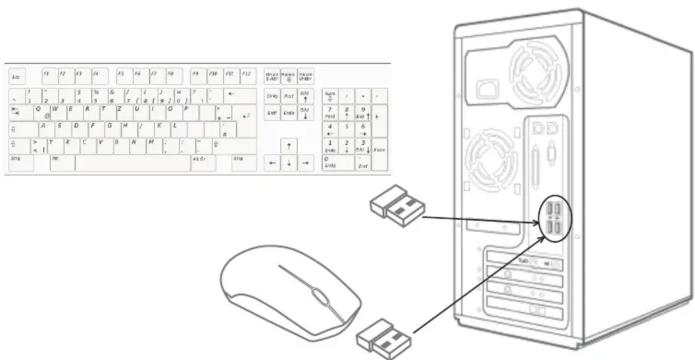
INSTRUCCIONES DE SEGURIDAD, MANTENIMIENTO Y RECICLADO
SAFETY, MAINTENANCE AND RECYCLING INSTRUCTIONS
-
Caution: Never open the device, the internal parts are danger, electrical shock.
-
Do not install this unit near water, for example, in a wet basement, in an unprotected outdoor installation or in any area classified as a wet
-
Do not insert objects of any kind into this unit through openings as they may touch voltage points and short out parts that could result in fire or electric shock. Do not spill any liquid on the unit.
-
This product uses batteries, please use the recommended by the manufacturer and check the polarization of these. Explosion hazard.
-
Do not point the eye with the optical sensor on the bottom of the mouse.
-
Clean the product with a soft and dry cloth.
-
Follow local regulations for disposing of the product.
SECURITE, ENTRETIEN ET INSTRUCTIONS DE RECYCLAGE


Brand : Approx
Model : appKBWSHOME2
Category : Keyboard