
APPKBM - Keyboard Approx - Free user manual and instructions
Find the device manual for free APPKBM Approx in PDF.


| Product Type | Keyboard |
| Brand | Approx |
| Model | APPKBM |
| Connectivity | Wired USB |
| Layout | QWERTY (US or UK) |
| Key Type | Membrane |
| Number of Keys | 104 (full-size) |
| Dimensions (L x W x H) | 450 x 150 x 25 mm |
| Weight | 500 g |
| Cable Length | 1.5 m |
| Power Source | USB bus powered |
| Operating System Compatibility | Windows, macOS, Linux |
| Special Features | Multimedia keys, numeric keypad |
| Cleaning and Maintenance | Wipe with a soft, dry cloth; avoid liquids |
| Safety Precautions | Keep away from water and small children |
| Spare Parts Availability | Contact manufacturer for replacements |
Frequently Asked Questions - APPKBM Approx
User questions about APPKBM Approx
0 question about this device. Answer the ones you know or ask your own.
Ask a new question about this device
Download the instructions for your Keyboard in PDF format for free! Find your manual APPKBM - Approx and take your electronic device back in hand. On this page are published all the documents necessary for the use of your device. APPKBM by Approx.
USER MANUAL APPKBM Approx
Before using this products, read the instruction manual for important safety information. Please retain this manual for future reference and warranty information.
Moisture and heat sources
Do not use this apparatus near water (for example, sinks, baths, pools) or expose it to rain, moisture, or dripping or splashing liquids. Do not expose the unit to high temperatures, high humidity or direct sunlight.
Cleaning
When cleaning the device, please use a soft, dry cloth. Never use benzene, paint thinner or other chemicals on the device.
Intended use
- The product may only be used with the original parts intended for it.
• The product may only be used in closed and dry rooms. - The intended use includes adherence to the specified installation instructions. The manufacturer accepts no liability for damage arising due to improper use.
System requirements
• Windows 2000/ME/XP/VISTA
- USB port
Note: Please note that USB operation is not supported by Windows 95/NT.
Connecting to the PC
Plug the USB connector into one of the USB ports on your computer. The operating system will automatically detect that a new device has been connected.
In some cases, the operating system might ask you to insert the Windows installation CD. If so, simply follow the on-screen instructions.
Technical Information
• 1.4m shielded USB cable
- Operating voltage: 5V DC
Workspace ergonomics
Incorrect use of a keyboard, or using it for extended periods of time, can lead to physical injury. You can minimize this by following a few simple steps. An ergonomically laid out workspace can help minimize injury and even increase your productivity.


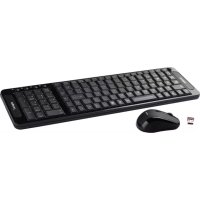
Brand : Approx
Model : APPKBM
Category : Keyboard