
APPKBWSLITE - Keyboard Approx - Free user manual and instructions
Find the device manual for free APPKBWSLITE Approx in PDF.


| Product Type | Keyboard |
| Brand | Approx |
| Model | APPKBWSLITE |
| Dimensions (L x W x H) | 440 x 130 x 25 mm |
| Weight | 500 g |
| Power Supply | USB 5V |
| Interface | USB wired |
| Number of Keys | 104 |
| Multimedia Keys | Yes (limited) |
| Compatibility | Windows, Mac OS, Linux |
| Layout | QWERTY |
| Key Rollover | 2-key rollover |
| Backlight | No |
| Wireless | No |
| Maintenance | Clean with a soft dry cloth |
| Safety | None |
| Spare Parts | Not available |
| Repairability | Not user-serviceable |
| Warranty | 1 year |
Frequently Asked Questions - APPKBWSLITE Approx
User questions about APPKBWSLITE Approx
0 question about this device. Answer the ones you know or ask your own.
Ask a new question about this device
Download the instructions for your Keyboard in PDF format for free! Find your manual APPKBWSLITE - Approx and take your electronic device back in hand. On this page are published all the documents necessary for the use of your device. APPKBWSLITE by Approx.
USER MANUAL APPKBWSLITE Approx
natural_image
Simple icon of a white hand inside a gray circular shape (no text or symbols)Español 01
English 02
Introducción
natural_image
Line drawing of a blood glucose meter with a hand inserting a plug into the chamber (no text or symbols)Soporte Técnico
Thank you for choosing the wireless keyboard APPKBWSLITE.
Product Description
The wireless keyboard and mouse set APPKBWSLITE offers you a high-tech design with low profile keys, advanced wireless and multimedia access through its 8 additional multimedia keys.
Designed to make your work more convenient and comfortable.
Cut the cords with your nano receiver connected to a USB port. Its new TPS technology will provide a lasting autonomy.
Package contents
Keyboard, Mouse, Nano Receiver APPKBWSLITE
4 AAA batteries
Quick Installation guide
Note: Make sure that your package contains the items described above. If you find any items are missing or damaged, please contact your dealer.
System Requirements
USB 2.0 port
Operative system: Windows.
Installation and configuration.
Procedure installing the battery in the mouse
Step 1: Open the battery cover.
Step 2: Insert two AAA batteries into the compartment as shown in the
picture.
Step 3: Close the battery cover.

flowchart
graph LR
    A["Internal Component"] --> B["External Component"]
    B --> C["External Component"]
Step 4: Change the position of the mouse switch back to the ON position.
Installation Procedure keyboard battery
Step 1: Open the battery compartment cover on the bottom of the keyboard.
Step 2: Insert two AAA batteries into the battery compartment.
Step 3: Close the battery cover.
Installing nano receiver
Place the nano receiver into a free USB port on your PC.
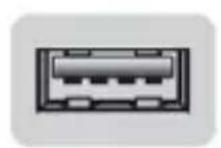
USB Port

Nano receiver
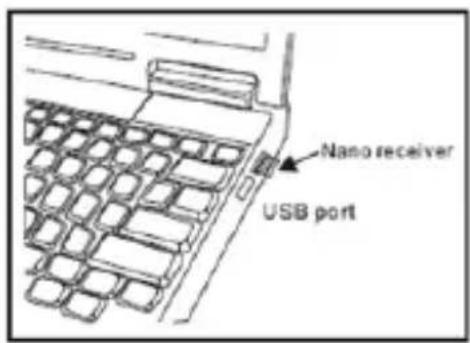
The nano receiver can be stored in the housing in the rear side of the mouse.

natural_image
Line drawing of a blood glucose meter with a hand inserting a plug into the socket (no text or symbols)Technical Support
For more information about installing and configuring this product, please visit our website www.approx.es or send an e-mail to: soporte@approx.es.
aqprox
EC DECLARATION OF CONFORMITY
We declare under our sole responsibility that the product:
Brand name: APPROX IBERIA S.L.
Model no: APPKBWSLITE
Product description: Wireless Multimedia Keyboard Set
The measurements shown in this test report were made in accordance with the procedures given in the:
- EMC DIRECTIVE: 2004/108/EC
- RTTE DIRECTIVE: 1999/5/EC
- RoHS DIRECTIVE: 2011/65/EU
To which this declaration is based on with full conformance to the following European norms and standards:
- EN 60950-1:2006+A11:2009+A1:2010+A12:2011
- EN 55022:2010
- EN 55024:2010
- EN 61000-3-2: 2006+A2: 2009
- EN 61000-3-3: 2008
- IEC 62321:2008:EN 14372:2004
- US EPA 3540C: 1996 and US EPA 8270D: 2007
- ETSI EN301 489-1 V1.9.2
- ETSI EN301 489-3 V1.4.1
- ETSI EN300 440-1 V1.5.1
- ETSI EN300 440-2 V1.3.1
Signed Jun 25, 2014
natural_image
Simple line drawing of a curved line with a triangular extension (no text or symbols)Jose Luis Ruiz Gómez
Managing Director
APPROX IBERIA SL.
ADD: Polígono Industrial Guadalquivir
Gelves (Sevilla), Spain.
Website: www.approx.es

Importado por / Imported by:
APPROX IBERIA S. L.
CIF: B-91202499
Soporte técnico / Technical support:
soporte@approx.es
MADE IN CHINA
The content of this guide is subject to typographical errors
aqprox
www.approx.es


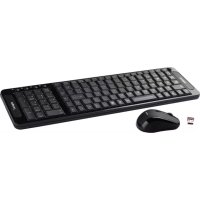
Brand : Approx
Model : APPKBWSLITE
Category : Keyboard