
CP77SG1 /HA - Oven HOTPOINT - Free user manual and instructions
Find the device manual for free CP77SG1 /HA HOTPOINT in PDF.



| Product type | Gas cooker with oven |
| Brand | Hotpoint |
| Model | CP77SG1 /HA |
| Oven dimensions (H x W x D) | 31 x 43.5 x 43.5 cm |
| Oven volume | 58 L |
| Power supply | 230 V / 50 Hz (see rating plate) |
| Gas type | Natural gas (G20) or liquid gas (G30/G31) - adaptable |
| Hob burners | 4 burners: Rapid (3.00 kW), Semi-rapid (1.65 kW), Auxiliary (1.00 kW), Triple Crown (3.25 kW) |
| Oven burner | Gas, power 2.6 kW |
| Grill | Electric, with rotisserie |
| Oven functions | Gas cooking, electric grill, rotisserie, interior light, timer |
| Oven temperature range | 150 °C to 275 °C (8 positions) |
| Ignition | Integrated electronic ignition for all burners |
| Safety | Flame safety device on each burner, oven safety thermocouple |
| Surface material | Enamel (oven exterior and interior) |
| Cleaning and maintenance | Manual cleaning with sponge and mild detergent; do not use steam cleaner |
| Oven lighting | 25 W bulb, E14 base, replaceable |
| Supplied accessories | Grid, drip tray, rotisserie, cradle, adjustable feet |
| Installation | Freestanding or built-in (class 2, subclass 1); requires ventilation |
| Standards | CE (Low Voltage, EMC, Gas, WEEE) |
Frequently Asked Questions - CP77SG1 /HA HOTPOINT
User questions about CP77SG1 /HA HOTPOINT
0 question about this device. Answer the ones you know or ask your own.
Ask a new question about this device
Download the instructions for your Oven in PDF format for free! Find your manual CP77SG1 /HA - HOTPOINT and take your electronic device back in hand. On this page are published all the documents necessary for the use of your device. CP77SG1 /HA by HOTPOINT.
USER MANUAL CP77SG1 /HA HOTPOINT
Positioning and levelling
Electrical connection
Gas connection
Adapting to different types of gas
Technical data
Table of burner and nozzle specifications
Description of the appliance, 20
Overall view
Control panel
Start-up and use, 21-23
Using the hob
Using the oven
Oven cooking advice table
Precautions and tips, 24
General safety
Disposal
Respecting and conserving the environment
Care and maintenance, 25
Switching the appliance off
Cleaning the appliance
Gas tap maintenance
Replacing the oven light bulb
Assistance

Hotpoint
ARISTON
! Before operating your new appliance please read this instruction booklet carefully. It contains important information concerning the safe installation and operation of the appliance.
! Please keep these operating instructions for future reference. Pass them on to possible new owners of the appliance.
! The appliance must be installed by a qualified professional in accordance with the instructions provided.
! Any necessary adjustment or maintenance must be performed after the cooker has been disconnected from the electricity supply.
Room ventilation
The appliance may only be installed in permanently ventilated rooms, in accordance with current national legislation and any subsequent amendments in force. The room in which the appliance is installed must be ventilated adequately in order to provide as much air as is needed by the normal gas combustion process (the flow of air must not be lower than 2 m3/h per kW of installed power).
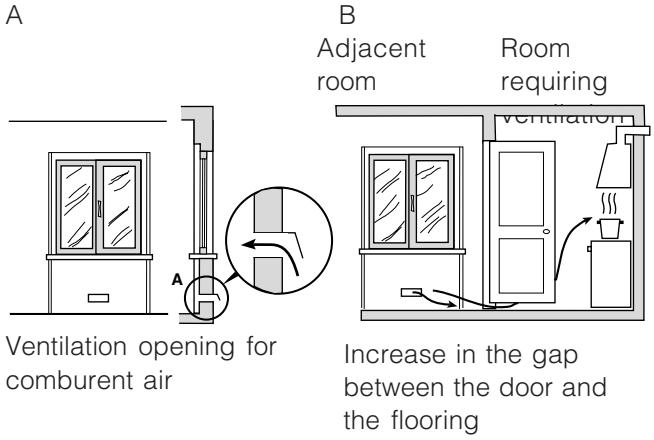
The air inlets, protected by grilles, should have a duct with an inner cross section of at least 100 cm2 and should be positioned so that they are not liable to even partial obstruction (see figure A).
These inlets should be enlarged by 100% - with a minimum of 200 cm2 - whenever the surface of the hob is not equipped with a flame failure safety device. When the flow of air is provided in an indirect manner from adjacent rooms (see figure B), provided that these are not communal parts of a building, areas with increased fire hazards or bedrooms, the inlets should be fitted with a ventilation duct leading outside as described above.
! After prolonged use of the appliance, it is advisable to open a window or increase the speed of any fans used.
Disposing of combustion fumes
The efficient disposal of combustion fumes should be guaranteed using a hood which is connected to a safe and efficient natural suction chimney, or using an electric fan which begins to operate automatically every time the appliance is switched on (see figure).
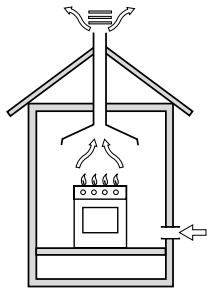
Fumes channelled straight outside
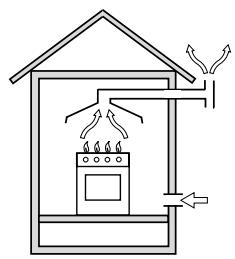
Fumes channelled through a chimney or a branched flue system (reserved for cooking appliances)
! The liquefied petroleum gases are heavier than air and collect by the floor, therefore all rooms containing LPG cylinders must have openings leading outside so that any leaked gas can escape easily.
LPG cylinders, therefore, whether partially or completely full, must not be installed or stored in rooms or storage areas which are below ground level (cellars, etc.). Only the cylinder being used should be stored in the room; this should also be kept well away from sources of heat (ovens, chimneys, stoves) which may cause the temperature of the cylinder to rise above 50° C.
Positioning and levelling
! The appliance may be installed alongside any cupboards whose height does not exceed that of the hob surface.
! Make sure that the wall which is in contact with the back of the appliance is made from a non-flammable, heat-resistant material (T 90°C).
To install the appliance correctly:
- Place it in the kitchen, the dining room or the studio flat (not in the bathroom).
- If the top of the hob is higher than the cupboards, the appliance must be installed at least 600 mm away from them.
- If the cooker is installed underneath a wall cabinet, there must be a minimum distance of 420 mm between this cabinet and the top of the hob.
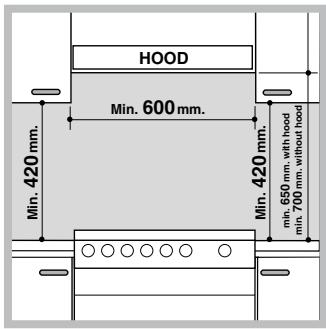
This distance should be increased to 700 mm if the wall cabinets are flammable (see figure).
- Do not position blinds behind the cooker or less than 200 mm away from its sides.
- Any hoods must be
installed in accordance with the instructions listed in the relevant operating manual.
Levelling
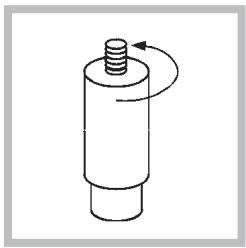
If it is necessary to level the appliance, screw the adjustable feet into the places provided on each corner of the base of the cooker (see figure).
Electrical connection
Install a standardised plug corresponding to the load indicated on the appliance data plate (see Technical data table).
The appliance must be directly connected to the mains using an omnipolar switch with a minimum contact opening of 3 mm installed between the appliance and the mains. The switch must be suitable for the charge indicated and must comply with current electrical regulations (the earthing wire must not be interrupted by the switch). The supply cable must be positioned so that it does not come into contact with temperatures higher than 50°C at any point.
Before connecting the appliance to the power supply, make sure that:
- The appliance is earthed and the plug is compliant with the law.
- The socket can withstand the maximum power of the appliance, which is indicated by the data plate.
- The voltage is in the range between the values indicated on the data plate.
- The socket is compatible with the plug of the appliance. If the socket is incompatible with the plug, ask an authorised technician to replace it. Do not use extension cords or multiple sockets.
* Only available in certain models
! Once the appliance has been installed, the power supply cable and the electrical socket must be easily accessible.
! The cable must not be bent or compressed.
! The cable must be checked regularly and replaced by authorised technicians only.
! The manufacturer declines any liability should these safety measures not be observed.
Gas connection
Connection to the gas network or to the gas cylinder may be carried out using a flexible rubber or steel hose, in accordance with current national legislation and after making sure that the appliance is suited to the type of gas with which it will be supplied (see the rating sticker on the cover: if this is not the case see below). When using liquid gas from a cylinder, install a pressure regulator which complies with current national regulations. To make connection easier, the gas supply may be turned sideways*: reverse the position of the hose holder with that of the cap and replace the gasket supplied with the appliance.
! Make sure that the gas supply pressure is consistent with the values indicated in the Table of burner and nozzle specifications (see below). This will ensure the safe operation and durability of your appliance while maintaining efficient energy consumption.
Gas connection using a flexible rubber hose
Make sure that the hose complies with ccurrent national legislation. The internal diameter of the hose must measure: 8 mm for a liquid gas supply; 13 mm for a methane gas supply.
Once the connection has been performed, make sure that the hose:
- Does not come into contact with any parts which reach temperatures of over 50° C.
- Is not subject to any pulling or twisting forces and that it is not kinked or bent.
- Does not come into contact with blades, sharp corners or moving parts and that it is not compressed.
- Is easy to inspect along its whole length so that its condition may be checked.
• Is shorter than 1500 mm. - Fits firmly into place at both ends, where it will be fixed using clamps which comply with current national legislation.
! If one or more of these conditions is not fulfilled or if the cooker must be installed according to the conditions listed for class 2 - subclass 1 appliances (installed between two cupboards), the flexible steel
hose must be used instead (see below).
Connecting a flexible jointless stainless steel pipe to a threaded attachment
Make sure that the hose and gaskets comply with current national legislation.
To begin using the hose, remove the hose holder on the appliance (the gas supply inlet on the appliance is a cylindrical threaded 1/2 gas male attachment).
! Perform the connection in such a way that the hose length does not exceed a maximum of 2 metres, making sure that the hose is not compressed and does not come into contact with moving parts.
Checking the tightness of the connection
When the installation process is complete, check the hose fittings for leaks using a soapy solution. Never use a flame.
Adapting to different types of gas
It is possible to adapt the appliance to a type of gas other than the default type (this is indicated on the rating label on the cover).
Adapting the hob
Replacing the nozzles for the hob burners:
- Remove the hob grids and slide the burners off their seats.
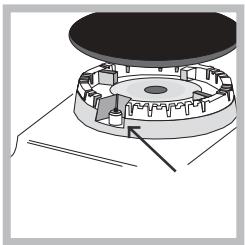
- Unscrew the nozzles using a 7 mm socket spanner (see figure), and replace them with
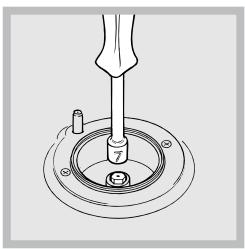
nozzles suited to the new type of gas (see Burner and nozzle specifications table).
3. Replace all the components by following the above instructions in reverse.
Adjusting the hob burners' minimum setting:
- Turn the tap to the minimum position.
- Remove the knob and adjust the regulatory screw, which is positioned inside or next to the tap pin, until the flame is small but steady.
! If the appliance is connected to natural gas, the adjustment screw must be loosened in an anticlockwise direction. - While the burner is alight, quickly change the position of the knob from minimum to maximum and vice versa several times, checking that the flame is not extinguished.
! The hob burners do not require primary air adjustment.
Adapting the oven
Replacing the oven burner nozzle:
- Open the oven door fully.
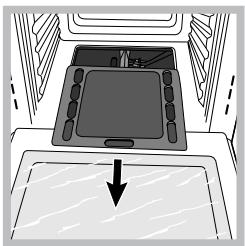
- Remove the sliding oven base (see figure).
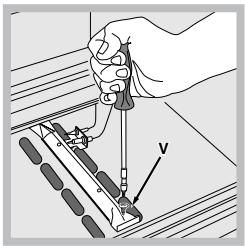
- Loosen the burner fixing screws and take out the oven burner after removing the screw V.
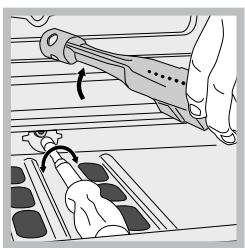
- Unscrew the nozzle using a special nozzle socket spanner (see figure) or with a 7 mm socket spanner, and replace it with a new nozzle that is suited to the new type of gas (see Burner and nozzle specifications table).
Adjusting the gas oven burner's minimum setting:
- Light the burner (see Start-up and Use).
- Turn the knob to the minimum position (MIN) after it has been in the maximum position (MAX) for approximately 10 minutes.
- Remove the knob.
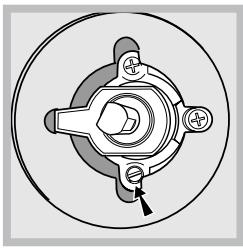
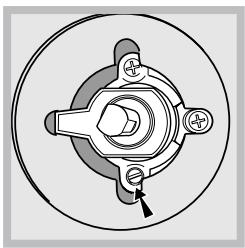
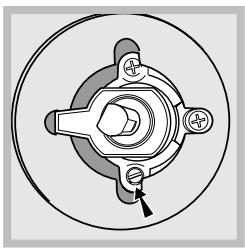
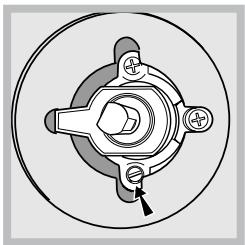
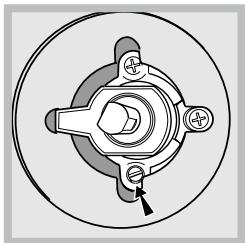
- Tighten or loosen the adjustment screws on the outside of the thermostat pin (see figure) until the flame is small but steady.
! If the appliance is connected to natural gas, the adjustment screw must be loosened in an anticlockwise direction.
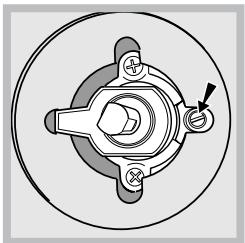
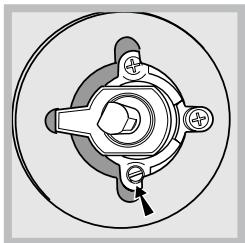
- Turn the knob from the MAX position to the MIN position quickly or open and shut the oven door, making sure that the burner is not extinguished.
! Be careful of the spark plug wires and the thermocouple tubes.
! The oven burner does not require primary air adjustment.
! After adjusting the appliance so it may be used with a different type of gas, replace the old rating label with a new one which corresponds to the new type of gas (these labels are available from Authorised Technical Assistance Centres).
! Should the gas pressure used be different (or vary slightly) from the recommended pressure, a suitable pressure regulator must be fitted to the inlet hose in accordance with current national regulations relating to “regulators for channelled gas”.
| TECHNICAL DATA | |
| Oven dimensions (HxWxD) | 31x43.5x43.5 cm |
| Volume | 58 l |
| Power supply voltage and frequency | see data plate |
| Burners | may be adapted for use with any type of gas shown on the data plate |
 | EC Directives: 2006/95/EEC dated 12.12.06 (Low Voltage) and subsequent amendments - 89/336/EEC dated 03/05/89 (Electromagnetic Compatibility) and subsequent amendments - 90/369/EEC dated 29/06/90 (Gas) and subsequent amendments - 93/68/EEC dated 22/07/93 and subsequent amendments - 2002/96/EC. |
Table of burner and nozzle specifications
| Table 1 | Liquid gas | Natural gas | |||||||
| Burner | Diameter (mm) | Heating power kW (H.s.*) | By-pass 1/100 mm) | Nozzle 1/100 mm) | Flow rate * g/h | Nozzle 1/100 (mm) | Flow rate * l/h G20 | ||
| Nomin. | Red. | G30 | G31 | ||||||
| C. Rapid | 100 | 3.00 | 0.7 | 40 | 86 | 218 | 214 | 116 | 286 |
| B. Semi-rapid | 75 | 1.65 | 0.4 | 30 | 64 | 120 | 118 | 96 | 157 |
| A. Auxiliary | 55 | 1.0 | 0.3 | 27 | 50 | 73 | 71 | 71 | 95 |
| D. Triple ring | 130 | 3.25 | 1.3 | 57 | 91 | 236 | 232 | 124 | 309 |
| Gas oven | 2.6 | 0.7 | 49 | 78 | 186 | 186 | 113 | 248 | |
| Supply pressure | Nominal (mbar) Minimal (mbar) Maximised (mbar) | 28-30 20 35 | 37 25 45 | 20 17 25 | |||||
* At 15°C and 1013 mbar - dry gas
** Propane P.C.S. = 50.37 MJ/kg
*** Butane P.C.S. = 49.47 MJ/kg
Natural P.C.S. = 37.78 MJ/m 3
Overall view
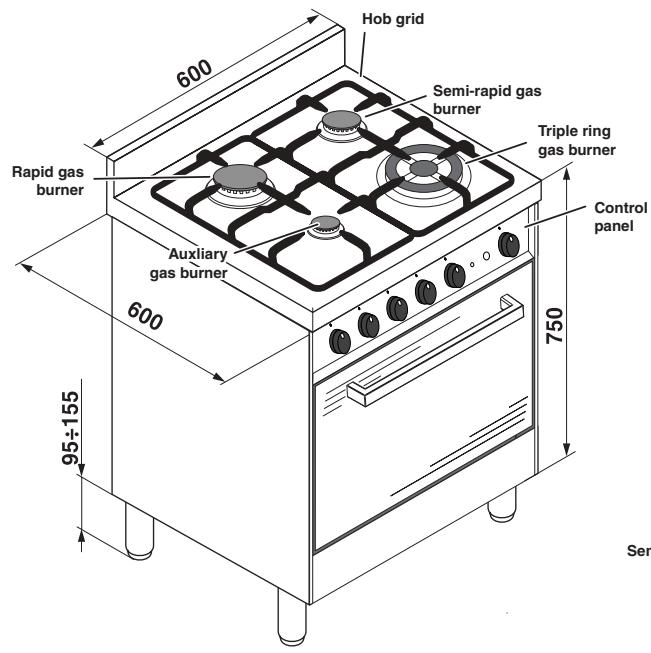
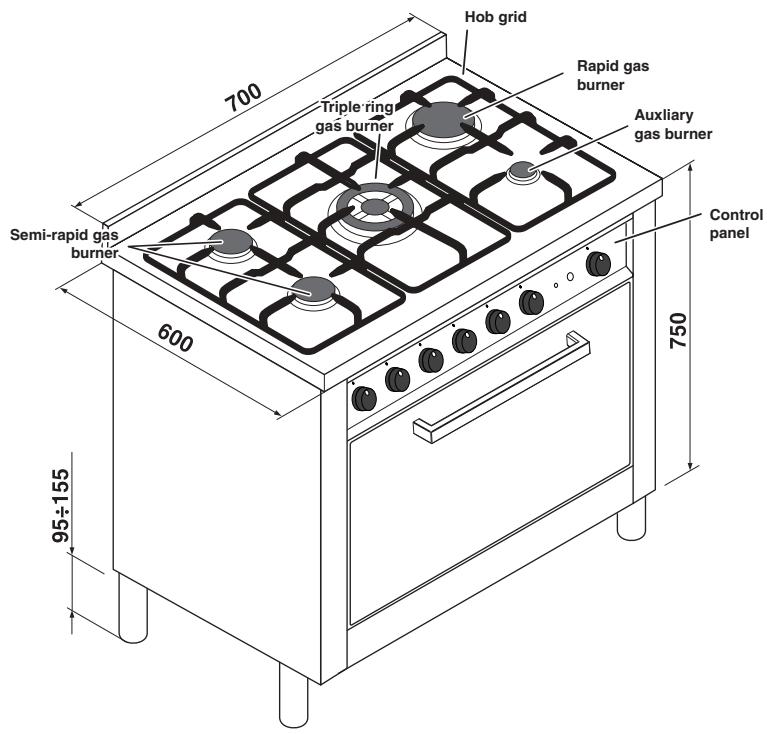
Control panel
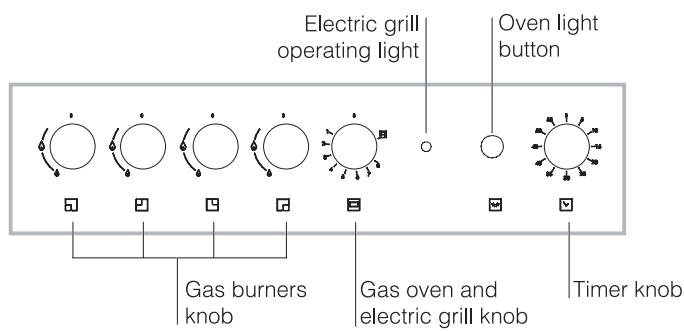
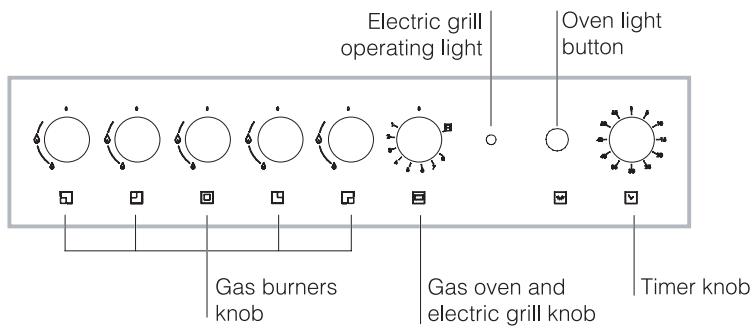
Using the hob
Lighting the burners
For each BURNER knob there is a complete ring showing the strength of the flame for the relevant burner.
To light one of the burners on the hob:
- Bring a flame or gas lighter close to the burner.
- Press the BURNER knob and turn it in an anticlockwise direction so that it is pointing to the
maximum flame setting 🏠.
- Adjust the intensity of the flame to the desired level by turning the BURNER knob in an anticlockwise direction. This may be the minimum
setting ⚠, the maximum setting ⚡, or any position in between the two.
The appliance is fitted with an electronic lighting device which is integrated into the knob. Simply light the desired burner by turning the corresponding knob in an anti-clockwise direction, until it is aligned with the large flame symbol, press
it all the way in to activate the electronic ignition and hold it in that position until the burner is lit. The burner might be extinguished when the knob is released. If this occurs, repeat the process, holding the knob down for a longer period of time.
! If the flame is accidentally extinguished, switch off the burner and wait for at least 1 minute before attempting to relight it.
The appliance is equipped with a flame failure safety device; press and hold the BURNER knob for approximately 2-3 seconds to keep the flame alight and to activate the device.
To switch the burner off, turn the knob until it reaches the stop position ●.
Practical advice on using the burners
For the burners to work in the most efficient way possible and in order to save on the amount of gas consumed, it is recommended that only pans which have a lid and a flat base are used. They should also be suited to the size of the burner.
To identify the type of burner, please refer to the diagrams contained in the “Burner and nozzle specifications”.
| Burner | ø Cookware Diameter (cm) |
| Rapid (R) | 24 - 26 |
| Semi-rapid (S) | 16 - 22 |
| Auxiliary (A) | 10 - 14 |
| Triple.ring (TC) | 24 - 26 |
! Make sure the pans do not overlap the edges of the hob while it is being used.
! For models equipped with a reducer grid, the latter must be used only for the auxiliary burner, when pans with a diameter of less than 12 cm are used.
Using the oven
! The first time you use your appliance, heat the empty oven with its door closed at its maximum temperature for at least half an hour. Ensure that the room is well ventilated before switching the oven off and opening the oven door. The appliance may emit a slightly unpleasant odour caused by protective substances used during the manufacturing process burning away.
! Never put objects directly on the bottom of the oven; this will prevent the enamel coating from being damaged.
The oven knob
This is the device which is used to select the various oven functions and the most suitable cooking temperature for the foods (temperatures between 150° C and 275° C are also indicated on the knob). The electronic oven ignition device is built into the control knob. To light the burner, press the knob in fully and turn it in an anticlockwise direction until it reaches position 8. Given that the oven is fitted with a safety device, after the burner has been lit the oven knob should be held in that position for approximately 6 seconds, in order to allow the gas to pass through until the safety thermocouple heats up. The electronic oven burner ignition device should not be activated for more than 15 seconds. If after 15 seconds the burner has not been ignited, release the oven knob, open the oven door and wait for at least one minute before attempting to ignite the burner again.
The cooking temperature is selected by aligning the value indication with the reference mark on the control panel; the complete range of temperatures which are available for selection is displayed below.
The oven will automatically reach the set temperature, which is kept constant by the corresponding monitoring device (the thermostat) controlled by the knob.
| Position 1(minimum) | Position 2 | Position 3 | Position 4 |
| 150° - 155°C | 155°C | 175°C | 195°C |
| Position 5 | Position 6 | Position 7 | Position 8 |
| 215°C | 235°C | 260°C | 275°C |
Switching the oven on manually
In the event of a momentary lapse in the electricity supply, the oven burner may be ignited manually:
a) Open the oven door.
b) Bring a match or lighter close to the opening, press the oven knob and turn it in an anticlockwise direction until it reaches position 8.
c) When the burner has been lit successfully, close the oven door.
! If the burner flame is accidentally extinguished, shut off the oven knob, open the oven door and wait for at least one minute before attempting to light the burner again.
The grill knob
Your oven is fitted with an electric grill. The extremely high and direct temperature of the grill makes it possible to brown the surface of meats and roasts while locking in the juices to keep them tender. The grill is also highly recommended for dishes that require a high surface temperature: such as beef steaks, veal, rib steak, fillets, hamburgers etc...
The grill is controlled by a thermostat which adjusts its operation.
By turning the oven knob until it reaches the position, the rotisserie spit motor is activated as well as the infrared grill. This motor will remain active as long as the grill is operating.
The rotisserie spit
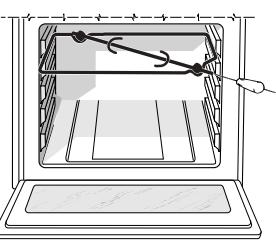
To activate the rotisserie spit, proceed as follows:
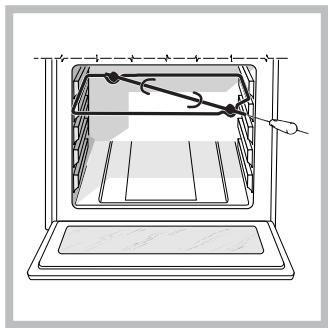
a) Place the dripping pan on the 1st rack.
b) Position the rotisserie support on the 3rd rack and insert the spit towards the rear, threading it through the hole provided.
c) Start the rotisserie by turning the oven
knob to the position.
! The GRILL indicator light shows when the grill is operating.
! Always use the grill with the oven door shut; this achieves better cooking results and saves energy (approximately 10%).
Oven light
The light may be switched on at any moment by pressing the OVEN LIGHT button.
Timer
To activate the Timer proceed as follows:
- Turn the TIMER knob in a clockwise direction ⬇ for almost one complete revolution to set the buzzer.
- Turn the TIMER knob in an anticlockwise direction
○ to set the desired length of time.
Oven cooking advice table
| Food to be cooked | Wt. (wt) | Cooking position of shelves from bottom | Temperature (°C) | Pre-heat time (min.) | Cooking time (min.) |
| Paste | |||||
| Lasagne | 2,5 | 3 | 210 | - | 75-80 |
| Cannelloni | 2,5 | 3 | 210 | - | 75-80 |
| Oven-baked noodles | 2,5 | 3 | 210 | - | 75-80 |
| Meat | |||||
| Veal | 1,7 | 3 | 230 | - | 85-90 |
| Chicken | 1,5 | 3 | 220 | - | 110-115 |
| Turkey | 3,0 | 3 | Max | - | 95-100 |
| Duck | 1,8 | 3 | 230 | - | 120-125 |
| Rabbit | 2,0 | 3 | 230 | - | 105-110 |
| Pork | 2,1 | 3 | 230 | - | 100-110 |
| Lamb | 1,8 | 3 | 230 | - | 90-95 |
| Fish | |||||
| Mackerel | 1,1 | 3 | 210-230 | - | 55-60 |
| Dentex | 1,5 | 3 | 210-230 | - | 60-65 |
| Trout baked in paper | 1,0 | 3 | 210-230 | - | 40-45 |
| Pizze | |||||
| Napolitan | 1,0 | 3 | Max | 15 | 30-35 |
| Cake | |||||
| Biscuits | 0,5 | 3 | 180 | 15 | 30-35 |
| Tarts | 1,1 | 3 | 180 | 15 | 30-35 |
| Chocolate cake | 1,0 | 3 | 200 | 15 | 45-50 |
| Yeast cakes | 1,0 | 3 | 200 | 15 | 50-55 |
| Grill cooking | |||||
| Toast | n.4 | 4 | 10 | ||
| Pork chops | 1,5 | 4 | 30 | ||
| Mackerel | 1,1 | 4 | 35 |
NB: cooking times are approximate and may vary according to personal taste. When cooking using the grill, the dripping pan must always be placed on the 1st oven rack from the bottom.
! This appliance has been designed and manufactured in compliance with international safety standards. The following warnings are provided for safety reasons and must be read carefully.
General safety
- The appliance was designed for domestic use inside the home and is not intended for commercial or industrial use.
- The appliance must not be installed outdoors, even in covered areas. It is extremely dangerous to leave the appliance exposed to rain and storms.
- Do not touch the appliance with bare feet or with wet or damp hands and feet.
- The appliance must be used by adults only for the preparation of food, in accordance with the instructions provided in this booklet (the instructions apply to all countries listed at the beginning of the booklet).
- The instruction booklet accompanies a class 1 (insulated) or class 2 - subclass 1 (recessed between 2 cupboards) appliance.
- Keep children away from the oven.
- Make sure that the power supply cables of other electrical appliances do not come into contact with the hot parts of the oven.
- The openings used for the ventilation and dispersion of heat must never be covered.
- Always use oven gloves when placing cookware in the oven or when removing it.
- Do not use flammable liquids (alcohol, petrol, etc...) near the appliance while it is in use.
- Do not place flammable material in the lower storage compartment or in the oven itself. If the appliance is switched on accidentally, the materials could catch fire.
- Always make sure the knobs are in the ● position and that the gas tap is closed when the appliance is not in use.
- When unplugging the appliance, always pull the plug from the mains socket; do not pull on the cable.
- Never perform any cleaning or maintenance work without having disconnected the appliance from the electricity mains.
-
If the appliance breaks down, under no circumstances should you attempt to perform the repairs yourself. Repairs carried out by inexperienced persons may cause injury or further malfunctioning of the appliance. Contact Assistance.
-
Do not rest heavy objects on the open oven door.
- If the cooker is placed on a pedestal, take all necessary precautions to ensure that the appliance does not slide off this pedestal.
- The appliance should not be operated by people (including children) with reduced physical, sensory or mental capacities, by inexperienced individuals or by anyone who is not familiar with the product. These individuals should, at the very least, be supervised by someone who assumes responsibility for their safety or receive preliminary instructions relating to the operation of the appliance.
- Do not let children play with the appliance.
Disposal
- When disposing of packaging material: observe local legislation so that the packaging may be reused.
- The European Directive 2002/96/EC relating to Waste Electrical and Electronic Equipment (WEEE) states that household appliances should not be disposed of using the normal solid urban waste cycle. Exhausted appliances should be collected separately in order to optimise the cost of re-using and recycling the materials inside the machine, while preventing potential damage to the atmosphere and to public health. The crossed-out dustbin is marked on all products to remind the owner of their obligations regarding separated waste collection.
Exhausted appliances may be collected by the public waste collection service, taken to suitable collection areas in the area or, if permitted by current national legislation, they may be returned to the dealers as part of an exchange deal for a new equivalent product.
All major manufacturers of household appliances participate in the creation and organisation of systems for the collection and disposal of old and disused appliances.
Respecting and conserving the environment
- Always keep the oven door closed when using the GRILL mode: this will achieve improved results while saving energy (approximately 10%).
- Check the door seals regularly and wipe them clean to ensure they are free of debris so that they adhere properly to the door, thus avoiding heat dispersion.
Switching the appliance off
Disconnect your appliance from the electricity supply before carrying out any work on it.
Cleaning the appliance
! Never use steam cleaners or pressure cleaners on the appliance.
- The stainless steel or enamel-coated external parts and the rubber seals may be cleaned using a sponge which has been soaked in lukewarm water and neutral soap. Use specialised products for the removal of stubborn stains. After cleaning, rinse well and dry thoroughly. Do not use abrasive powders or corrosive substances.
- The hob grids, burner caps, flame spreader rings and burners may be removed to make cleaning easier; wash them in hot water and non-abrasive detergent, making sure all burnt-on residue is removed before drying them thoroughly.
- Clean the terminal part of the flame failure safety devices* frequently.
- The inside of the oven should ideally be cleaned after each use, while it is still lukewarm. Use hot water and detergent, then rinse well and dry with a soft cloth. Do not use abrasive products.
- Clean the glass part of the oven door using a sponge and a non-abrasive cleaning product, then dry thoroughly with a soft cloth. Do not use rough abrasive material or sharp metal scrapers as these could scratch the surface and cause the glass to crack.
- The accessories can be washed like everyday crockery, and are even dishwasher safe.
! Do not close the cover when the burners are alight or when they are still hot.
Inspecting the oven seals
Check the door seals around the oven regularly. If the seals are damaged, please contact your nearest Authorised After-sales Service Centre. We recommend that the oven is not used until the seals have been replaced.
Gas tap maintenance
Over time, the tap may become jammed or difficult to turn. If this occurs, the tap must be replaced.
! This procedure must be performed by a qualified technician who has been authorised by the manufacturer.
Replacing the oven light bulb
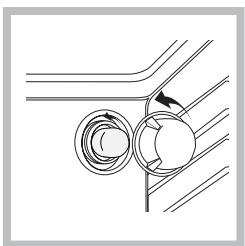
- After disconnecting the oven from the electricity mains, remove the glass lid covering the lamp socket (see figure).
- Unscrew the light bulb and replace it with a similar one: voltage 230 V, wattage 25 W,
cap E 14.
- Replace the lid and reconnect the oven to the electricity supply.
Assistance
! Never use the services of an unauthorised technician.
Please have the following information to hand:
- The type of problem encountered.
- The appliance model (Mod.).
• The serial number (S/N).
The latter two pieces of information can be found on the data plate located on the appliance.

Italiano, 1

English,14

Français, 26

Espanol, 38

Portuges, 50

Türkçe, 62
CP65SG1/HA
CP77SG1/HA
Sommaire
Installation, 27-31
çalıştırın.
- DESCRIPTION OF THE APPLIANCE, 20
- START-UP AND USE, 21-23
- PRECAUTIONS AND TIPS, 24
- CARE AND MAINTENANCE, 25
- ROOM VENTILATION
- DISPOSING OF COMBUSTION FUMES
- POSITIONING AND LEVELLING
- LEVELLING
- ELECTRICAL CONNECTION
- GAS CONNECTION
- GAS CONNECTION USING A FLEXIBLE RUBBER HOSE
- CONNECTING A FLEXIBLE JOINTLESS STAINLESS STEEL PIPE TO A THREADED ATTACHMENT
- CHECKING THE TIGHTNESS OF THE CONNECTION
- ADAPTING TO DIFFERENT TYPES OF GAS
- ADAPTING THE HOB
- ADAPTING THE OVEN
- ADJUSTING THE GAS OVEN BURNER'S MINIMUM SETTING
- USING THE HOB
- LIGHTING THE BURNERS
- PRACTICAL ADVICE ON USING THE BURNERS
- USING THE OVEN
- THE OVEN KNOB
- SWITCHING THE OVEN ON MANUALLY
- THE GRILL KNOB
- THE ROTISSERIE SPIT
- OVEN LIGHT
- TIMER
- GENERAL SAFETY
- DISPOSAL
- RESPECTING AND CONSERVING THE ENVIRONMENT
- SWITCHING THE APPLIANCE OFF
- CLEANING THE APPLIANCE
- INSPECTING THE OVEN SEALS
- GAS TAP MAINTENANCE
- REPLACING THE OVEN LIGHT BULB
- ASSISTANCE
- PLEASE HAVE THE FOLLOWING INFORMATION TO HAND
- SOMMAIRE
- INSTALLATION, 27-31
Brand : HOTPOINT
Model : CP77SG1 /HA
Category : Oven