
OTT2000B - Hi-Fi System PHILIPS - Free user manual and instructions
Find the device manual for free OTT2000B PHILIPS in PDF.
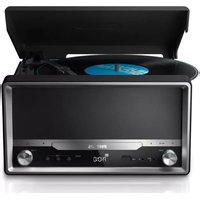


User questions about OTT2000B PHILIPS
0 question about this device. Answer the ones you know or ask your own.
Ask a new question about this device
Download the instructions for your Hi-Fi System in PDF format for free! Find your manual OTT2000B - PHILIPS and take your electronic device back in hand. On this page are published all the documents necessary for the use of your device. OTT2000B by PHILIPS.
USER MANUAL OTT2000B PHILIPS
Always there to help you
Register your product and get support at
www.philips.com/support

OTT2000

EN Short User Manual


②



SOURCESTANDBY

![graph TD A["BT"] -->|Wireless Signal| B["Bluetooth"] B -->|Wireless Signal| C["Philips OTT2000"] C -->|Wireless Signal| D["Smartphone"] D -->|Wireless Signal| E["Smartphone"] style A fill:#f9f,stroke:#333 style B fill:#ccf,stroke:#333 style C fill:#cfc,stroke:#333 style D fill:#fcc,stroke:#333 style…](/content/2026/06/1280140/images/63780b0b4b4466a19eecc063d394e6b470583b5c8b4f323d4475f82b76e09a33.jpg)
EN
1 Turn the SOURCE knob to select Bluetooth source.
→ The Bluetooth indicator flashes blue.
2 Enable Bluetooth function on your Bluetooth device and search for Bluetooth devices that can be paired.
3 In the device list, select "PHILIPS OTT2000".
4 After successful connection, the Bluetooth turns to solid blue.
5 Start music play on your Bluetooth device.
CS


EN Select an album or folder.
EN Press to skip to a track;
Press and hold to fast-forward or fast-reverse the track during playback, then release to resume play.


EN Start or pause play.
EN Stop play or erase the program.
EN During playback, press repeatedly to select repeat play or shuffle play.
EN Press to display current track information.
EN Display the time in any source mode.
EN
1 Press SOURCE repeatedly to select PHONO/AUX source.
2 Select the correct speed with the speed selector.(33/45)
3 Place the vinyl record on the turntable platter.
4 Lift the tone arm carefully and move it towards the record.
→ The turntable platter starts rotating automatically.
5 Gently lower the tone arm onto the edge of the record to begin playback from the beginning.
→ Playback starts.
6 Adjust the volume to the desired level.
7 Put the tone arm securely back on the arm rest.
CS
EN If AUTO STOP is set to ON, the platter stops rotating automatically after playback finishes.


EN Increase or decrease volume.
EN 1 Plug the USB device into the socket.
2 Prepare the source (Disc, Radio, Aux in, Phono, or Bluetooth source) to record from.
3 Press REC to start recording.
• To stop recording, press ■
EN 1 In standby mode, press and hold CLOCK/PROG on the remote control to activate the clock setting mode.
2 Press | to select hour format.
3 Press CLOCK/PROG to confirm.
4 Repeat the above steps to set hour and minute.
EN Press to select the sleep timer period.
When [OFF] is displayed, the sleep timer is deactivated.
EN Make sure that you have set the clock correctly.
1 In standby mode, press and hold SLEEP/TIMER.
2 Press SOURCE repeatedly to select an alarm source.
3 Press SLEEP/TIMER to confirm.
4 Press ◀◀ to set the hour.
5 Press SLEEP/TIMER to confirm.
6 Repeat the above steps to set minute.
Program radio stations automatically
1 Press CLOCK/PROG for more than 2 seconds to activate automatic program mode.
2 Press ▲ to select preset radio stations.
CS
Program radio stations manually
1 Press ◀◀ to ▶▶ to a radio station.
2 Press CLOCK/PROG to activate the programming.
3 Press ▲ t▼select allocate a number to this radio station.
4 Press CLOCK/PROG to confirm.
5 Repeat steps 1-4 to program more radio stations.
CS
EN Press FM/ST/MO to select stereo broadcast or mono broadcast.
EN To download the full user manual, visit www.philips.com/support.




EN
Specifications
| AC Power Rating 220 - 240 V~, 60 Hz | |
| Operation Power Consumption | 16 W |
| Standby power consumption < 1 W | |
| Dimensions- Main Unit (W x H x D) | 335 x 311 x 169 mm |
| Weight (Main Unit) 2.5 kg | |
Tuner
Tuning Range FM: 87.50 - 108.00 MHz;
Tuning grid 50 kHz
Total Harmonic Distortion < 2%
Signal to Noise Ratio > 50 dB
Number of preset radio stations 20
Vinyl
Supported vinyl size 7 inch / 12inch
Speed 33/45
Amplifier
| Rated Output Power 1.5 W x 2 RMS | |
| Frequency Response | 60 Hz - 16 kHz, ±3 dB |
| Signal to Noise Ratio | >65 dB |
| Aux Input | 0.5 V RMS 20 kohm |
Speakers
| Speaker Impedance | 4 ohm |
| Speaker Driver | 2 × 3" full range |
| Sensitivity | 84 dB/m/W |
Bluetooth
| Communication system | Bluetooth Standard version 2.1 |
| Output | Bluetooth Standard Power Class 2 |
| Maximum communication range | Line of sight approx. 10m (30 feet) |
| Frequency band | 2.4 GHz band (2.4000 GHz - 2.4835 GHz) |
| Compatible Bluetooth profiles | Advanced Audio Distribution Profile (A2DP) |
| Supported codecs | |
| - Receive | SBC (Sub Band Codec) |
| - Transmit | Not supported |
CS
Specifikace
Frequenzgang 60 Hz – 16 kHz, ± 3 dB
| - Unidade principal (L × A × P) |


Specifications are subject to change without notice
2014 © WOOX Innovations Limited. All rights reserved.
This product was brought to the market by WOOX Innovations Limited or one of its affiliates, further referred to in this document as WOOX Innovations, and is the manufacturer of the product. WOOX Innovations is the warrantor in relation to the product with which this booklet was packaged. Philips and the Philips Shield Emblem are registered trademarks of Koninklijke Philips N.V.
OTT2000_12_UM_V2.0

Brand : PHILIPS
Model : OTT2000B
Category : Hi-Fi System