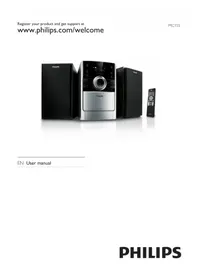
MC 155 - Hi-Fi System PHILIPS - Free user manual and instructions
Find the device manual for free MC 155 PHILIPS in PDF.


Pick your language and provide your email: we'll send you a specifically translated version.
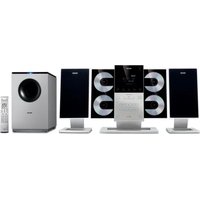
| Product Type | Mini Hi-Fi System |
| Brand | Philips |
| Model | MC 155 |
| Color | Black and silver |
| Main Functions | CD player, FM/MW tuner, dual cassette deck |
| Power Output | 2 x 10W RMS |
| Speaker Configuration | 2-way bass reflex speakers |
| Number of CDs | 1-disc tray |
| Tuner Bands | FM, MW |
| Cassette Deck | Double tape deck with dubbing |
| Playback Sources | CD, radio, cassette, auxiliary input |
| Additional Features | Clock, timer, 40 station presets |
| Dimensions (W x H x D) | 180 x 260 x 310 mm |
| Weight | 4.2 kg |
| Power Supply | AC 220-240V, 50Hz |
| Power Consumption | 30W (max), <1W standby |
| Cleaning & Maintenance | Wipe with a soft dry cloth; do not use solvents |
| Safety Precautions | Do not expose to water; keep ventilation slots unobstructed |
| Spare Parts & Repairability | Use Philips authorized spare parts for replacement |
| General Information | Intended for household use only |
Frequently Asked Questions - MC 155 PHILIPS
How do I set the clock on the Philips MC155?
To set the clock, press and hold the CLOCK button on the remote or the unit until the hour digits blink. Use the HOUR/MINUTE jog dial or +/- buttons to adjust the hours and minutes. Press CLOCK again to confirm.
How do I tune in and store radio stations?
Press the SOURCE or TUNER button to switch to radio. Select the waveband (FM or MW) using the BAND button. Use TUNING +/TUNING to search for a station. To store it, press the PROG button, then select a preset number with PRESET +/. Press PROG again to save.
How do I connect an external audio device via AUX?
Use a 3.5mm stereo cable or RCA cable to connect your device to the AUX IN jack on the rear panel. Press SOURCE repeatedly until AUX appears on the display. Adjust the volume on both the external device and the system.
How do I play a CD?
Press SOURCE to select CD. Open the disc tray by pressing OPEN/CLOSE, place the CD with the label facing up, and close the tray. Press PLAY/PAUSE to start playback. Use SKIP or REV/FWD to control tracks.
How do I use the cassette deck?
Insert a cassette with the open edge up into one of the cassette slots. Make sure the tape is taut. Press EJECT to open the deck, insert the tape, then press PLAY. For high-speed dubbing, press DUBBING to copy from deck A to deck B.
How do I clean the Philips MC155?
Disconnect the power supply before cleaning. Use a soft, dry, lint-free cloth to wipe the exterior. Do not use abrasive or liquid cleaners. To clean the CD player lens, use a specialized CD lens cleaner or consult a technician.
What should I do if there is no sound?
Check the speaker connections and ensure they are properly inserted. Verify that the mute function is not activated. Adjust the volume level. If using a source device, ensure it is playing. Also test with headphones to determine if the issue is with the amplifier or speakers.
How do I replace the remote control battery?
Turn the remote control over. Press the small tab and slide the battery compartment open. Remove the old battery and insert a new CR2032 coin cell battery with the correct polarity (+/-). Slide the compartment closed until it clicks.
How do I connect the FM antenna?
For FM, connect the supplied wire antenna to the FM ANTENNA terminal. Stretch the wire as high as possible, ideally near a window. For MW, the system uses an internal loop antenna. Rotate the system if reception is poor.
How do I dispose of this product properly?
Check local regulations for disposal of electronic waste. At the end of its life cycle, this product should not be disposed of with household waste. Use official collection points or take it to a recycling center. The batteries and accumulators must also be disposed of separately.
User questions about MC 155 PHILIPS
0 question about this device. Answer the ones you know or ask your own.
Ask a new question about this device
No questions yet. Be the first to ask one.
Download the instructions for your Hi-Fi System in PDF format for free! Find your manual MC 155 - PHILIPS and take your electronic device back in hand. On this page are published all the documents necessary for the use of your device. MC 155 by PHILIPS.
USER MANUAL MC 155 PHILIPS

Manual assistant
Powered by Anthropic
Waiting for your message
Product information
Brand : PHILIPS
Model : MC 155
Category : Hi-Fi System