PC 800 - Bike computer SIGMA SPORT - Free user manual and instructions
Find the device manual for free PC 800 SIGMA SPORT in PDF.


User questions about PC 800 SIGMA SPORT
0 question about this device. Answer the ones you know or ask your own.
Ask a new question about this device
Download the instructions for your Bike computer in PDF format for free! Find your manual PC 800 - SIGMA SPORT and take your electronic device back in hand. On this page are published all the documents necessary for the use of your device. PC 800 by SIGMA SPORT.
USER MANUAL PC 800 SIGMA SPORT
Taipei County, Taiwan, ROC
Tel. ++886-2-2205 2668
Tel. ++886-2-2206 3855
Fax ++886-2-2206 2324
10:29:17
10:29:18
10:29:19
10:29:20
DaeB
DgC
m:029:23
Data
m03925
pulse computer
Deutsch
I Allgemeines
I.1 Kit contents
I.2 Wearing the heart rate monitor / Attachment on the bike
I.3 Functions Page 14
I.4 Functions of the operating keys Page 15
I.5 Basic settings Page 16
II Explaining and setting the training functions
II.1 Max Heart rate (Hr max) - the maximum test Page 17
II.2 The right heart rate for training Page 18
II.3 Setting of upper and lower limit of heart rate Page 19
II.4 Training times in and outside the limits
III Notes
III.1 Warning Page 20
III.2 Malfunction Page 20
III.3 Changing the battery
III.4 Warranty Page 21
I. In general
We recommend consulting a doctor before setting up your personal training-schedule
1. Kit contents
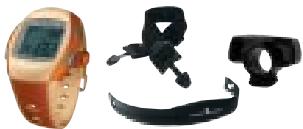
1 Heart rate monitor PC 800
1 Elastic strap
1 Transmitter belt
1 Bicycle mounting bracket
- Wearing the heart rate monitor/mounting the bicycle bar bracket
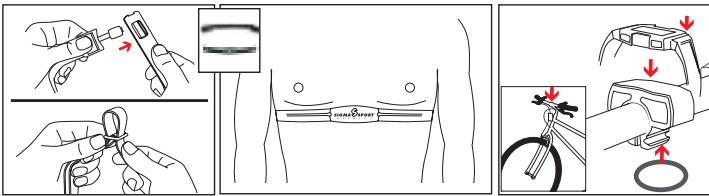
A. You can wear the heart rate monitor as a wristwatch or you can mount it on the handlebar of your bike
B. Positioning the transmitter belt
- Connect the transmitter belt with the elastic strap (via eyelet)
- The elastic band should be adjusted snugly, yet not too tight to hinder your breathing.
- Men should place the transmitter at the base of the chest muscle, women at the base of the breast. The SIGMA SPORT logo must be visible in front and not upside down.
C. Lift the belt slightly from the skin and wet the rear surface of the conductive ribbed rubber pads with ECG conductive gel or moisten the pads with saliva.
3. Functions
- Heart rate display
- 12 / 24 h clock
- Date
- Alarm clock
- Stopwatch
- Setting of lower (30-179) and upper (100-240) limit
- Alarm if you pass the upper and lower limit
- Training times in and outside the limits
4. Functions of the operating keys
SET: Setting the clock, date, alarm, upper/ lower limit, Start/Stop function, reset stopwatch
MENU: Changes between stopwatch, clock, Training times in and outside the limits
SUBMENU: Date and alarm
ALARM: On/off alarm
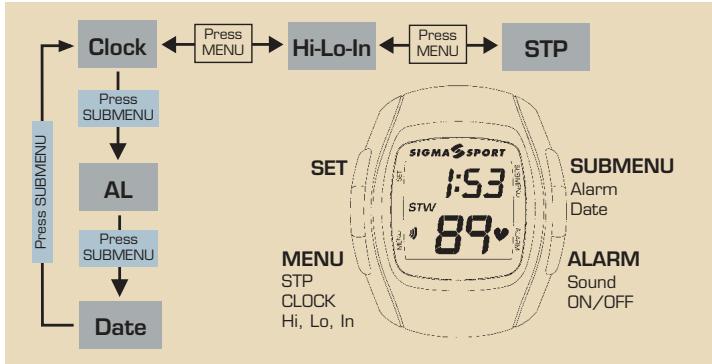
5. Basic settings
Set Clock
- Press MENU key until clock appears at top of display
- Hold SET key for 2 seconds until the word "hold" disappears and you get the blinking clock format
- Press SET key to select 12/24 h display and confirm with MENU.
- Press MENU to select hours and minutes, set flashing section with SET key.
- To complete and quit the setting press MENU key
Set Date
- Press MENU key until clock appears at top of display
- Press SUBMENU key until date appears in the display
- Press and hold SET key for 2 seconds until the word "hold" disappears and you get the blinking year format
- Press MENU to select year, month and day, set flashing section with SET key.
- To quit the setting press MENU key
Stopwatch
- Press MENU to enter STP display
- Press SET to start and Stop
- Press SET 2 Sec for RESET
Alarm
- Press ALARM key for sound on/off
Set Alarm Clock
- Press MENU key until CLK appears at top of display
- Press SUBMENU until AL appears.
- Press SET key until HOLD disappears.
- Press SET to turn ON alarm. (bell icon will appear)
- Press MENU to make hour flash.
-
Press SET key to select hour.
-
Press MENU to switch to minutes.
- Press SET key to select minutes.
- Press MENU to finish.
- Press any key to silence alarm.
- Repeat steps 1-3 to turn alarm to off. (bell icon will disappear)
II. Explaining and setting the trainings functions
The heart rate (Hr) is displayed in beats per minute.
1. Maximum Heart rate- Maximum test
The maximum heart rate Hr MAX is your present maximum heart rate if you go to the limits of your capability. The individual Hr max depends on your age, your sex and your fitness level. The best way to determine the individual Hr max is a stress test.
We recommend you to see a doctor to do this test and to repeat it regularly
The Hr max may also be estimated by means of the following mathematical equation.
Men: 210 - half age - (0.11 x personal weight +4)
Women: 210 - half age - [0.11 x personal weight]
2. The right heart rate for training
The training zone is the variation of the heart rate you want to train in for an effective training.
An indication is:
65 % of the Hr max is your lower limit for training and 80 % of the Hr max should be your top limit. You can find out your estimated heart rate zone looking at the chart in accordance with your goals.
Zone: General Health 50-70 % of the Hr max
Alignment: Fitness for beginners
| Hr max | 150 | 160 | 170 | 180 | 190 | 200 | 210 | |
| Upper limit | 70 % | 105 | 112 | 119 | 126 | 133 | 140 | 147 |
| Lower limit | 50 % | 75 | 80 | 85 | 90 | 95 | 100 | 105 |
Zone: Fitness 70-80 % of Hr max
Alignment: Fitness for advanced users
| Hr max | 150 | 160 | 170 | 180 | 190 | 200 | 210 | |
| Upper limit | 80 % | 120 | 128 | 136 | 144 | 152 | 160 | 168 |
| Lower limit | 70 % | 105 | 112 | 119 | 126 | 133 | 140 | 147 |
Zone: Competitive performance 80-100% Hr max
| Alignment: Competition Training for performance athletes. | ||||||
| Hr max | 150 | 160 | 170 | 180 | 190 200 210 | |
| Upper limit | 100 % | 150 | 160 | 170 | 180 | 190 200 210 |
| Lower limit | 80 % | 120 | 128 | 136 | 144 | 152 160 168 |
Please be aware that common training schedules never match the individual needs of a person. A perfect training schedule can only be set up by a well-educated trainer, who knows you personally.
3. Set upper / lower limit
- Press MENU key to select Hi-Lo-In format
The display changes automatically between HI, Lo and In. - Press SET key until the word "hold" disappears and the flashing upper limit with 100 is displayed
- Press SET key to set upper limit, the figures run downwards
- Confirm upper limit by pressing MENU key and select flashing lower limit (30) and press SET key to set it.
- To leave and confirm the setting push MENU key
If you exceed the upper or lower limit you will get an audible (if turned on) and visual alarm.
4. Training times in and outside the limits
Hi-Lo-In only works, if stopwatch is switched on. Your upper and lower limit are already saved. Now the following alternating information are displayed:
Hi Time in minutes above the adjusted upper heart rate limit
Lo Time in minutes under the adjusted lower heart rate limit
In Time in minutes within the adjusted upper and lower heart rate limits
Resetting the stopwatch will also zero the lap time function.
III. Notes
1. Warning
- Before you start to train, contact your doctor to analyze your personal heart rate.
- People using a pacemaker or other such device should consult a physician prior to starting any exercise program
Before wearing transmitter belt pre-set upper and lower limit
2. Trouble Shooting
No heart rate display:
- The inside surface of the conductive ribbed rubber pads are not clean or not moist
- Sources of interference e.g. power lines
- Check battery of the transmitter
LCD display is sluggish or black:
Possible at temperatures under 34^ or above 131^
Display fades:
- Battery (Number CR 2025 or DL 2025) weak, change as soon as possible
Watertightness:
The SIGMA SPORT heart rate monitors and transmitter unit are water resistant to a 3m depth. The use in sea (salt water) should be avoided and can cause malfunctions
3. Battery change
Battery in heart rate monitor CR 2025 or DL 2025. Battery in transmitter belt CR 2032 or DL 2032 The SIGMA SPORT heart rate monitor is a very sensitive and technical measuring instrument. To guarantee the function and the water resistance, the battery
change has to be done only by an authorized dealer. Its warranty is void if the watch has been tampered with, taken apart or ill treated.
4. Warranty
24 months from date of purchase
The warranty is limited to material and workmanship.
Batteries are not included in the warranty
The warranty is only valid if
- The heart rate monitor has not been opened
- The receipt comes with it
Please read the instructions carefully before sending off the heart rate monitor for a warranty claim. If the equipment still seems faulty, contact the dealer where you bought it or send it together with the receipt and all its fittings and with sufficient postage to:
EUROPE:
SIGMA Elektro GmbH
Where warranty claims are covered by our guarantee, replacement equipment will be returned to you free of charge.
Only current models are used. Specifications are subject to change without notice.
www.sigmasport.com
I Généralités
Lo Tempo in minuti除去 the limits of time