
Fusion 3100L - Laminating machine GBC - Free user manual and instructions
Find the device manual for free Fusion 3100L GBC in PDF.


| Product type | Laminating machine |
| Brand | GBC |
| Model | Fusion 3100L |
| Usage | Office / professional |
| Lamination technology | Thermal (pouch) |
| Maximum lamination format | 310 mm (A3) |
| Maximum pouch thickness | 250 microns (2 x 125) |
| Adjustable temperature | 80 - 140 °C |
| Lamination speed | 30 cm/min |
| Warm-up time | 3 minutes |
| Number of rollers | 2 |
| Reverse function | Yes (jam release) |
| Cold lamination | Yes |
| Automatic shut-off | Yes (overheat/jam) |
| Indicator lights | Ready, Power |
| Dimensions (W x D x H) | 500 x 200 x 100 mm |
| Weight | 5 kg |
| Power supply | 220-240 V, 50 Hz, 1.5 A |
| Power consumption | 300 W |
| Noise level | < 65 dB |
| Included accessories | Quick start guide, power cable, cleaning sheet |
| Maintenance | Clean rollers with a soft cloth or cleaning sheet |
| Safety | Automatic shut-off in case of overheating, jam protection |
| Warranty | 2 years |
| Certifications | CE, RoHS |
Frequently Asked Questions - Fusion 3100L GBC
User questions about Fusion 3100L GBC
0 question about this device. Answer the ones you know or ask your own.
Ask a new question about this device
Download the instructions for your Laminating machine in PDF format for free! Find your manual Fusion 3100L - GBC and take your electronic device back in hand. On this page are published all the documents necessary for the use of your device. Fusion 3100L by GBC.
USER MANUAL Fusion 3100L GBC
natural_image
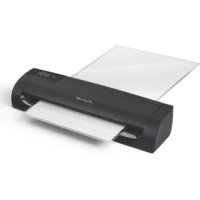
Illustration of a Fusion™ 3100L device with control buttons and ports (no text or symbols on the device itself)FUSION™3100L
12" LAMINATORS
instruction manual 4
faster to the finish!
Welcome to the new Swingline GBC Fusion 3100L laminators which allows lamination to be completed quickly and simply with Swingline GBC quality lamination.
For best lamination results and performance, use only Swingline GBC branded pouches.
Please take a little time to study these instructions to ensure you get the best results out of your machine.
safety instructions

Your safety as well as the safety of others is important to ACCO® Brands. In this instruction manual and on the product are important safety messages. Read these messages carefully.

The safety alert symbol precedes each safety message in this instruction manual. This symbol indicates a potential personal safety hazard that could hurt you or others, as well as cause product damage or property damage.
points to note

- Use this unit only for its intended use of laminating documents
- Do not laminate an empty pouch

- The unit must be connected to a supply voltage corresponding to the electrical rating shown on the unit

- The socket-outlet shall be installed near the equipment and shall be easily accessible.
- Do not use a carrier with this machine
- Ensure the machine is clear of pouches prior to starting the next pouch
- Clean the lamination rollers on a regular basis
- Maximum 12" document pouch11 12 " x 17 12 " on 12" Swingline GBC Fusion 3100L laminators
• Active anti jam feature may not detect issue on smaller items

- Failure to comply will result in damage and invalidate guarantee

service
Do not attempt to service or repair the pouch laminator yourself. Unplug the unit and contact an authorized Swingline GBC service representative for any required repairs.
technical specifications
| Electrical 120V AC / 60Hz / | 12.4 A / 1480W |
| Machine Dimensions 19.72x5.91x4.17 inch(501x150x106mm) | |
| Machine Weight 5.44lbs (2.47kg) | |
| Maximum Pouch Width 12.0 inch (303mm) | |
| Maximum Pouch Thickness | 7 mil (175 mic) |
| Maximum Thru-put Thickness | 1.0mm |
| Warm-Up Time Approximately 1 minute | |
| Speed Variable | (max. 32 inches (800mm) per minute) |
English
getting ready to laminate
Easy Set Up
1 Remove the plastic exit tray from the box and place into the two holes on the back of the laminator and extend to use. Ensure that there is sufficient space behind the laminator for the item to be removed.
2 Take the electrical plug and place in an appropriate power source, which is near the table you intend to use.
3 The laminator will respond with a single beep and a sequence of brief flashes across the control panel.
Touch Control
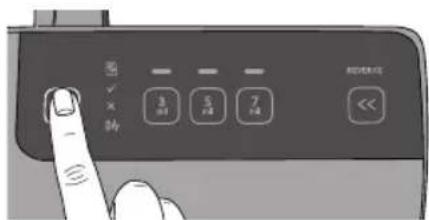
4 To use the laminator gently tap the 'power on' button.
NOTE: Your new laminator may emit a slight odour during the initial operation. Its is normal and will diminish after a few hours of operation.

5 An orange 'X' will flash indicating that the laminator is warming up to the setting which is indicated by a white light on the control panel.

NOTE: Following "power on" it will automatically set to the 75mic.
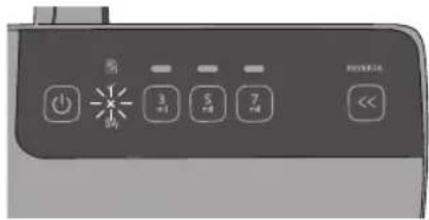
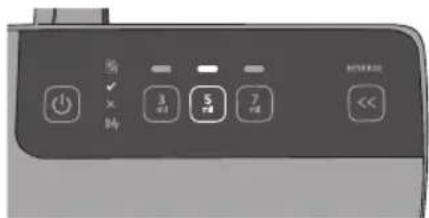
6 If setting indicated by white light on the control panel is not appropriate for your pouch thickness, select the appropriate pouch setting by tapping the micron setting which is indicated on pouch packaging. Your new selection will be indicated by a white light on control panel.
English
Visual & Audible Ready Alerts
7 When the laminator is ready to use the green light next to the 'tick' is illuminated (shown in figure) and a series of 2 beeps are heard.

NOTE: During warm up, the orange light next to the 'X mark will be flashing until the machine is ready to use. With Fusion 3100L you cannot feed a pouch into the laminator until green 'tick' is illuminated.
loading the pouch
1 Take your item to be laminated and place in to the appropriate sized laminating pouch, ensuring it is firmly located along the sealed edge. This is to help ensure that you get optimal quality output.

letter, menu, photo Irregular shaped item
NOTE: Do not cut pouches prior to lamination.


Before laminating important or unique documents, always run a test pouch through the laminator using a similar type document.
English
laminating
1 On the front of the laminator there are adjustable guides to help you feed your pouch accurately. Move the guides to appropriate line which matches your pouch/ item to be laminated.

2 Feed the sealed edge of the pouch, into the laminator between the guides. The laminator will grip the pouch and guide it through to the exit tray.
NOTE: Do not force guides against pouch

3 Upon exiting remove your laminated item immediately to ensure optimal quality.
4 Do not force guides tightly against pouch. Move guides to an appropriate setting to allow pouch to be fed in without touching guides.
5 When you are finished laminating tap the 'power' button and if required remove the tray, unplug and store accordingly.

Remove your laminated item immediately to ensure the best quality and finish
additional features
Intelligent Status Alert
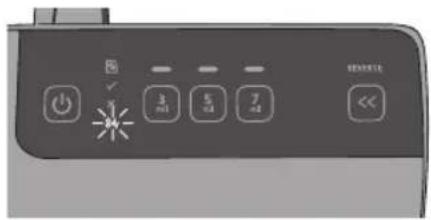
If pouch misfeeds or a jam starts to occur a series of beeps will be heard to alert the user to take action along with a red flashing light with 'jam icon 8V
Manual Reverse
Press and hold reverse button (indicated by reverse ◀ until the pouch completely reverses out of the laminator.


Intelligent Power Off
For added safety and environmental reasons the laminator will automatically go into sleep mode after 30 minutes of inactivity. You will hear a single beep before this occurs
cleaning

WARNING: UNPLUG THIS PRODUCT BEFORE CLEANING THE EXTERIOR. WIPE EXTERIOR ONLY WITH A DAMP CLOTH AND DO NOT USE DETERGENTS OR SOLVENTS.
Regularly feed a cleaning card or sheet of paper through the laminator to clean the rollers.
English
Limited Three (3) Year Warranty
ACCO Brands USA, Four Corporate Drive, Lake Zurich, IL 60047-8997 (in Canada, 7381 Bramalea Road, Mississauga, ON, L5S 1C4; and in Mexico, ACCO Mexicana, S.A. de C.V. Av. Circuito Industrial Norte #6 Parque Industrial Lerma 52000, Lerma Edo. de México) (each, respectively, "ACCO Brands") warrants to the original purchaser that this ACCO Brands product is free from defects in workmanship and material under normal use and service for a period of 3 years after purchase.
ACCO Brands' obligation under this warranty is limited to replacement or repair, at ACCO Brands' option, of any warranted part found defective by ACCO Brands without charge for material or labor. Any replacement, at ACCO Brands' option, may be the same product or a substantially similar product that may contain remanufactured or refurbished parts. This warranty shall be void in the following circumstances:
(i) if the product has been misused,
(ii) if the product has been damaged by negligence or accident, or
(iii) if the product has been altered by anyone other than ACCO Brands or ACCO Brands' authorized agents.
For warranty execution, please call 1-800-541-0094 in the USA/1-800-268-3447 in Canada/1-800-759-6825 in Mexico or go to HYPERLINK "http://www.gbc.com" www.gbc.com.
TO THE EXTENT ALLOWED BY APPLICABLE LAW, THIS WARRANTY IS IN LIEU OF ALL OTHER EXPRESSED WARRANTIES. REPRESENTATIONS OR PROMISES INCONSISTENT WITH OR IN ADDITION TO THIS WARRANTY ARE UNAUTHORIZED AND SHALL NOT BE BINDING ON ACCO BRANDS. TO THE EXTENT PERMITTED BY APPLICABLE LAWS, ANY IMPLIED WARRANTIES (IF APPLICABLE) ARE LIMITED IN DURATION TO THE DURATION OF THIS WARRANTY. SOME STATES AND JURISDICTIONS DO NOT ALLOW LIMITATIONS ON HOW LONG AN IMPLIED WARRANTY LASTS, SO THE ABOVE LIMITATION MAY NOT APPLY TO YOU. TO THE EXTENT PERMITTED BY APPLICABLE LAW, IN NO EVENT SHALL ACCO BRANDS BE LIABLE FOR ANY SPECIAL, INCIDENTAL, PUNITIVE, EXEMPLARY, CONSEQUENTIAL OR SIMILAR DAMAGES, WHETHER OR NOT FORSEEABLE. SOME STATES AND JURISDICTIONS DO NOT ALLOW THE EXCLUSION OR LIMITATION OF SPECIAL, INCIDENTAL, PUNITIVE, EXEMPLARY, CONSEQUENTIAL, OR SIMILAR DAMAGES, SO THE ABOVE EXCLUSION OR LIMITAITON MAY NOT APPLY TO YOU.
FOR CONSUMERS WHO HAVE THE BENEFIT OF CONSUMER PROTECTION LAWS OR REGULATIONS IN THEIR JURISDICTION OF PURCHASE OR, IF DIFFERENT, IN THEIR JURISDICTION OF RESIDENCE, THE BENEFITS CONFERRED BY THIS WARRANTY ARE IN ADDITION TO ALL RIGHTS AND REMEDIES CONVEYED BY SUCH CONSUMER PROTECTION LAWS AND REGULATIONS.
To the extent permitted by law, this warranty is not transferable and will automatically terminate if the original product purchaser sells or otherwise disposes of the product.
This warranty gives you specific legal rights. Other rights, which vary from jurisdiction to jurisdiction, may exist. In addition some jurisdictions do not allow (i) the exclusion of certain warranties, (ii) limitations on how long an implied warranty lasts and/or (iii) the exclusion or limitation of certain types of costs and/or damages, so the above limitations may not apply.
FCC CLASS B NOTICE
Note: This equipment has been tested and found to comply with the limits for a Class B digital device, pursuant to part 15 of the FCC Rules. These limits are designed to provide reasonable protection against harmful interference in a residential installation. This equipment generates, uses and can radiate radio frequency energy and, if not installed and used in accordance with the instructions, may cause harmful interference to radio communications. However, there is no guarantee that interference will not occur in a particular installation. If this equipment does cause harmful interference to radio or television reception, which can be determined by turning the equipment off and on, the user is encouraged to try to If this equipment does cause harmful interference to radio or television reception, which can be determined by turning the equipment off and on, the user is encouraged to try to correct the interference by one or more of the following measures:
Reorient or relocate the receiving antenna.
Increase the separation between the equipment and receiver.
Connect the equipment into an outlet on a circuit different from that to which the receiver is connected.
Consult the dealer or an experienced radio/TV technician for help.
CANADA CLASS B NOTICE
This Class B digital apparatus complies with Canadian ICES-003
MODIFICATIONS
Any modifications made to this device may void the authority granted to the user by the FCC and/or by Industry Canada to operate this equipment.
ACCO is a registered trademark of ACCO Brands.
Copyright © 2017 ACCO Brands. All rights reserved.
Issue May 2017
Fusion is a registered trademark of ACCO Brands.
service address
ACCO Brands Inc.
101 Bolton Ave 9E
Booneville, MS
38829
USA
Tel. 800-541-0094
www.acco.com
ACCO Brands Canada Inc.
7381 Bramalea Road
Mississauga, ON
L5S1C4
Canada
Tel. 800-268-3447
www.acco.ca
Français
Français

ACCO Brands Canada Inc.
7381 Bramalea Road
Mississauga, ON
L5S1C4
Canada
Tel. 800-268-3447
www.acco.ca
Español

natural_image
Simple line drawing of a printer or printer with no text or symbolsLaminating / Plastifieuses / Plastificadoras

natural_image
Simple line drawing of a printer with red buttons and a white body (no text or symbols)Shredding / Destructeurs / Destructoras

natural_image
Simple line drawing of a piano keyboard on a red background (no text or symbols)Binding / Perforelieuses / Encuadernadoras
natural_image
Line drawing of a stapler on a red background (no text or symbols)Stapling / Agrafage / Grapado
www.acco.com
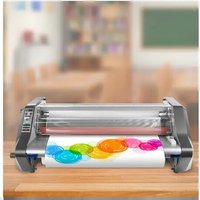
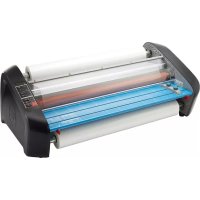
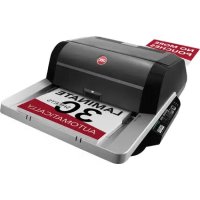
- FUSION™3100L
- 12" LAMINATORS
- faster to the finish!
- safety instructions
- points to note
- service
- technical specifications
- English
- getting ready to laminate
- Easy Set Up
- Touch Control
- Visual & Audible Ready Alerts
- loading the pouch
- laminating
- additional features
- Intelligent Status Alert
- Manual Reverse
- Intelligent Power Off
- cleaning
- Limited Three (3) Year Warranty
- FCC CLASS B NOTICE
- service address
- Français
- Español
Brand : GBC
Model : Fusion 3100L
Category : Laminating machine