
DEH-8450BT - Receiver PIONEER - Free user manual and instructions
Find the device manual for free DEH-8450BT PIONEER in PDF.


| Product Type | Car Stereo Receiver |
| Brand | Pioneer |
| Model | DEH-8450BT |
| Dimensions (W x H x D) | 178 x 50 x 160 mm (1-DIN) |
| Weight | 1.2 kg |
| Power Source | 12 V DC (car battery) |
| Maximum Power Output | 50 W x 4 channels |
| Continuous Power Output (RMS) | 22 W x 4 channels (at 4 ohms, 1% THD) |
| Bluetooth | Built-in Bluetooth for hands-free calling and audio streaming |
| USB Port | Front USB input for iPod/iPhone and USB storage devices |
| AUX Input | Front 3.5 mm auxiliary input |
| CD Playback | CD, CD-R, CD-RW playback |
| FM/AM Tuner | 18 FM + 12 AM presets, RDS support |
| Display | Multi-line LCD with customizable color illumination |
| Remote Control | Included wired remote control (optional wireless) |
| Audio Features | 3-band equalizer, high-pass filter, low-pass filter, loudness |
| Supported Audio Formats | MP3, WMA, AAC, WAV (via USB/CD) |
| Detachable Faceplate | Yes, for theft prevention |
| Rear Audio Outputs | Front, rear, subwoofer preamp outputs (2V) |
| Cleaning Instructions | Clean faceplate with soft dry cloth; avoid solvents |
| Security Code | Programmable security code to deter theft |
Frequently Asked Questions - DEH-8450BT PIONEER
User questions about DEH-8450BT PIONEER
0 question about this device. Answer the ones you know or ask your own.
Ask a new question about this device
Download the instructions for your Receiver in PDF format for free! Find your manual DEH-8450BT - PIONEER and take your electronic device back in hand. On this page are published all the documents necessary for the use of your device. DEH-8450BT by PIONEER.
USER MANUAL DEH-8450BT PIONEER
REPRODUCTOR DE CD CON RECEPTOR RDS
CD PLAYER COM RDS
CD RDS 接收機
Use and care of theremole control 5
Menuoperationsidenticalforfunction
settings/audioadjustments/init a
settings/lists6
Tuner6
CD/CD-R/CD-RWandexternal storage
devices(USB,SD)7
Pod9
Audioadjustments10
UsingBluetoothwirelestechnology11
Initial settings13
Otherfunctions15
03 Installation
Connections16
Installation17
Installing themicrophone19
Additionalinformation
Troubleshooting20
Errormessages20
Handlingguidelines22
Compressedaudiocompatibility(d sc,USB,
SD123
Podcompatibility24
Sequenceofaudiofiles24
Bluetoothprofiles25
Copyrightandtrademark25
Specifications26
Beforeyoustart
ThankyouforpurchasingthisPIONEER product
Toensure proper use, pleasereadthrough this manual before using this product. It is especially important that your read and observe WARN-
INGsandCAUTIONsinthismanual.Please keepthemanualinasafeandaccessibleplacefor futurereference.
Aboutthisunit
CAUTION:
USEOFCONTROLORADJUSTMENTOR PERFORMANCE OF PROCEDURES OTHER THAN THOSE SPECIFIED HEREIN MAY RESULTIN HAZARDOUS RADIATION EXPOSURE.
CAUTION:
THEUSEOFOPTICALINSTRUMENTS WITHTHISPRODUCTWILLINCREASE EYEHAZARD.

CAUTION
- Donotallowthisunittocomeintocontact with liquids. Electricalsrockcouldresult. Also, damagetothisunit, smoke, and overheatingcouldresultfromcontactwith liquids.
•Always keep the volume of when ought to hear outside sounds.
• Avoidexposureto moisture. - If the battery is disconnected, discharged, any preset memory will be erased.
CAUTION
This product is a class1 laser product class ifound the Safety of laser products, IEC 60825-1:2007, and contains a class1 Laser module. To ensure continued safety done more can cover or attempt to gain access to their inspection product. Refer all servicing to qualified personnel.
CLASS 1 LASER PRODUCT
CAUTION—CLASS 1M INVISIBLE LASER RADIATION WHEN OPEN, DO NOT VIEW DIRECTLY WITH OPTICAL INSTRUMENTS
Note
Function setting operations are completed even if themenuis cancelled before the operations are confirmed.
Incaseoftrouble
Should this unit fail too operate properly, please contact your dealer or onearest authorized PIONEER Service Station.
Demomode
Important
- Failure to connect thered lead (ACC) of this unilto terminal coupled with ignition switch on/off operations may feed battery drain.
- Remember that the featured democontinu- usoperating when the care engine isistumed off, it may drain battery power.

En
Beforeyoustart
The demostartsautomaticallyifyoudonctoperstethisun twh about30secondssincell waslastoperatedorfeignitionswitchset toACCorONwhiletistumedoff.Tocancelthe demomode pressandhole (DISP).Press enchold (DISP)againtostart.Youcana so deactivatedemomodeinthe nit a settings.SelectDemonstration(demodisplaysetting)and lumofiredemo Israel.Fordetails,referolinitialsettingspage13.
Aboutthismanual
• In the following instructions, USB memories, USB portable audio players and SD memory carosare collectively referred to "external storagedvices (USB, SD)". It only USB memories and USB portable audio players are indicated, they are collectively referred to as "USB storagedvices".
- In this manual, iPod and iPhone will be referred to as "iPod".
Operatingthisunit
Headunit

(DEH-7450SD)

| PartPart | |||
| 1 | phone/on hook) | 8 | /DISPOFF |
| 2 | LEVER @ BAND/ | ( iPod) | |
| 3 | > DISP | 16 | SRC/OFF |
| 4 | 0 (1st) | 10 | MULTI-CON-TROL(M.C.) |
| 5 | Operoultion | @Discloadings/ol | |
| 6 | AUXinput/jack(3.5mm/stereo jack) | 19 ▲(eject) | |
| 7 | 0 / 0 | 14 | SDmemory cardslotRenovatne frontpancltoac cesstheSD memorycard slot. |
| PartPart | |||
| 1 | ∅(color) | 8 | ∅/DISP OFF |
| 2 | LEVER9BAND/ | ∅(iPod) | |
| 3 | ⊃DISP | 10 | SRC/OFF |
| 4 | ∅(list) | 11 | MULTI-CON-TROL(M.C.) |
| 5 | Open button | 12 | Disclosing slot |
| 6 | AUXinputjack(3.6mmsterec jack) | 13 | ▲(eject) |
| 7 | ∅/∅ | 14 | SDmemory cardslot.Removethe frontpan to accessineSD memorycaros lot. |
Operatingthisunit

CAUTION
UseaPioneer/USBcablewhenconnectingthe USBaudioplayer/USBmemorydevicasdevi-cesconnected,theunitidirectlywillprolude out,whichisdangerous.
Donotuseunauthorizedproducts.
Remotecontrol
Remote controler buttons markeow th the samenumbersasontheunitoperateinthe samewayasthecorrespondingunitbuttonregardlessofbuttonname.
(DEH-8450BT)
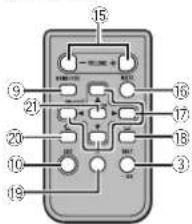
PartOperation
| 15VOLUME | Pressoincrease/decrease volume. |
| 16MUTE | Pressomute, Pressageinto unmute. |
| 17▲/▼/▲ | Pressoperformmanualsook tuning,fashtoward,reverse and racksearchcontrols. Alsousedforcontrolling functions. |
| 18 | Whileoperatingthephone, presscoensacalone,ectar incomingcall. |
PartOperation
| 1011 | Presstopauseorasumeplayback. | |
| 20 | < | Presstostandlarkingonthe phonewhileoperatinga phons. |
| 30 | LIST/ ENTER | Presstodisolaythediscottle, track the folder,oflie istapend ngorthesource. Whileinth eoperating menu presstocontrolfunctions. |
(DEH-7450SD)

PartOperation
| 15VOLUME | Presstoincreaseordecrease volume. |
| 16MUTE | Presstomuto-Prassaga into unmute. |
| 17▲/▼/▲▲ | Presstoperformmanualseek tuning fastforward,reverse andtracksearch controls. Also use for controlling functions. |
| 18AUDIO | Presstoselectanaudiofunction. |
Operatingthisunit
PartOperation
| 24 | Pressstopauseorassumeplay-back. | |
| 25 | FUNC-TION | Pressloselectfunctions.Pressandno storecelltheini-t aisctingmonuwhenthe sourcesareoff. |
| 26 | LIST/ENTER | Pressdoisplaychecksthe,trackit e holder,orti elstdepend ngonthesource.Whileintheoperating menu, presstocontrolfunctions. |
Setupmenu
When you turn the ignition switch to ON after installation, setup menu appears on the display. You can set up them menu options below.
1Afterinstallationofthisunit,turnthe ignitionswitchtoON.
SETUPappears.
2TurnM.C.toswitchtoYES.
■ If you donot operate or 30 seconds, the setup menu will not be displayed.
■ If you prefer not to set up at this time, turn M.C. to switch to NO.
If you select NO, you cannot set up in the setup menu.
3PressM.C.toselect.
4Performthefollowingprocedurestoset themenu.
Topproceedtothenextmenuoption,youneceto confirmyourselection.
Languageselect(mu ti-language)
| 1 | TurnM.C.loselectthedesiredlanguage. |
| English—Español—Português | |
| 2 | PressM.C.toconfirmtheselection. |
Calendar(settingthadete)
| 1 | TumM.C.tochangetheyear. |
| 2 | PressM.C. toselectday. |
| 3 | TumM.C.tochangatheday. |
| 4 | PressM.C. toselectmonth. |
| 5 | TumM.C.tochangathemonth. |
| 6 | PressM.C. toconfirm the selection. |
Clock(sellingtheclock)
| 1 | TumM.C.toadjusthour. |
| 2 | PressM.C.toselectminute. |
| 3 | TurnM.C.loadustminute. |
| 4 | PressM.C.toconfirmtheselection. |
FMstep(FMtuningstep)
| 1 | TumM.C.toselecttheFMtuningstep.50kHz(50kHz)—100kHz(100kHz)2 | PressM.C.toconfirmtheselection. |
AMstep(AMtuningstep)
| 1 | TurnM.C.closelecttheAMtuningsep.9kHz(9kHz)—10kHz(10kHz) |
| 2 | PressM.C.loconfirmtheselection. |
Contrast(displaycontrastsetting)
| 1 | TurnM.C. toad ust the con crast level. |
| 0 to 15 is displayed as the level is increased or decreased. | |
| 2 | Press M.C. to confirm these selection. |
Demonstration(demonodisplaysetting)
| 1 | TurnM.C.loselthedemod splaylooff |
| 2 | PressM.C.toconfirmtheselection, |
| Quitapocars. |
Operatingthisunit
5Tofinishyoursettings,turnM.C.toselect
YES.
■If you prefer change your setting again, turn
M.C.toswitchtoNO
6PressM.C.toselect.
Notes
- Because demonstration models the function for displaying at stores, do not set this function while driving.
- You can selupthemenuoptions the initial settings. For details about these settings, refer to initial settings on page 13.
- You can cancel setup menu, bypassing SRC/OFF.
Basicoperations
Important
- Handlegently when removing or attaching the front panel.
- Avoidsubjectingthefrontpaneltoexcessive shock.
- Keep the front panel out of direct sunlight and high temperatures.
• To avoid damaging the device corvicle interior, remove any cables and devices attached to the front panel before detaching it.
Removing the front panel to protect your unit from the left
Thefront panel can be delached to deliver theft.
TPresstheopenbuttontoopentnofrontpanel.
2 Griplthe'sideof'theironpanelandouilligent youlward.
Takocaronottogripittoctightlyortodropt
frontpanelandprotectifromcontactwith
waterorotherfluidsopreventpermanerdamage.
3 Alwayskocothadetachedfrontpanelinaprotectiondevcesuchasaprotectioncase.
Re-attaching the front panel
①Reattachthefrontopane byholdingitupright totheunitandclippingitsecurelyintothemountinghooks.

Turningtheuniton
1 Press SRC/OFF to turn the unit on.
Turningtheunitoff
1 Press and hold SRC/OFF until the unit turns off.
Selectingasource
Press SRC/OFF to cycle between:
TUNER (tuner)—CD (CD player)—USB1
(USB1)/iPod1 (iPod1)—USB2 (USB2)/iPod2
(iPod2)—SD (SD memory card)—AUX (AUX)
— BTAudio(BTaudio)
Adjusting the volume
TurnM.C.toacjustthevolume.

CAUTION
For safety reasons, park your vehicle when removing the front panel.
Operatingthisunit
Notes
- When this unit's blue/write lead is connected to the vehicle's auto-antennarelay control terminal, the vehicle's antenna extends when this unit is turned on. Toretract the antenna, turn the source off.
• BTAudio(BTaudio)isd sprayedonlyfor DEH 8450BT. - When there are two USB storage devices connected to the unit and you want to switch between them for playback, disconnect communications for the USB storage device first before proceeding.
- IfconnectingbothUSB1(USBstoragedevice1),iPod1(iPodconnectedusingUSBinput1)andUSB2(USBstoragedevice2)/iPod2(iPodconnecteusingUSBinput2)atthesamelime.useaPioneerUSBcable(CD-U50E)inadd lionlotheregularPioneerUSBcable.
Useandcareoftheremote control
Using there remote control
1 Pointtheremolecontrolthedirectionofthe frontpanellooperate.
Whenusingforthefirstime,pulloutthefilm protrudingfromtheory.
Replacingthebattery
①Sl uethel ayou on the back of the remote control.
② Inser the battery with the plus(−) and minus (−) poles aligned properly.


WARNING
- Keep the battery out of the each of children. Should the battery beswallowed, consult a doctor immediately.
- Balteries(batterypackorbatteriesinstalled) must not be exposed to excessive heats such as sunshine, fireorthelike.

CAUTION
• UseoneCR2025(3V)lithiumbattery.
- Remove the battery if there mole control is not used for a month longer.
• Thorcisa dangerofexplosionithobatteryis incorrectlyreplaced. Replaceonlywiththe samecorequivalenttype.
• Donothandlethebatterywithmetallictools.
- Donotstorelhebatterywithmetallic objects.
- If the battery leaks, wipe the remote control completely clean and install anew battery
- Whenecisposingofusedbatteries,comply withgovernmentalregulationsorenvironmentalpublicinstitutions'rulesthatapplyin yourcountry/area.
5
Important
- Donotstoretheremotecontrolinhighttemperaturerecordrectsunlight.
• Theramote control may not function properly indirect sunlight. - Donotlettheremotecontro fallonto the floor whereit maybecome jammed under the brakeoraccelerator pedal.
Section
Operatingthisunit
Menuoperationsidentical forfunctionsettings/audio adjustments/initialsettings/lists
Returning gtothe previous display Returning gtothe previous list/category.(thefolder/ categoryonelevelhigher.)
Turingthecemodisplayonoroff
1Pressanchold →DISP
Returning the ordinary display
Canceling their initial setting menu
TPressBAND/
Returning to the ordinary display from the list/cat-
eacy
1PressBAND/
Selectinga functionorlist
1 Tum M.C. or LEVER
• In this manual, "Tum M.C." is used to describe
theoperationused:oselectafunctionorlist
Tuner
Basicoperations
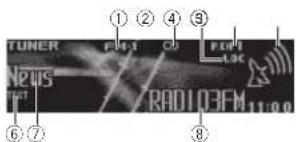
RDS

Non-RDSorAM
①Band indicator
②(sterec)indicator
③LOCindicator
Appearswhen ocalseektuning son.
④Presetnumberindicator
⑤Signallevelindicator
⑥TEXT indicator
Showswhentheradictextisreceived.
⑦PTYlabelindicator
⑧Programservicename
⑨Frequencyindicator
Selectingaband
TPressBAND/ untilthedesiredband(FM-1)
FM-2 FM-3tor-MorAM) is displayed.
Manualtuning(stepbystep)
1 Turn LEVER.
Seeking
T Turnandho cdownLEVER
• WhiturningandholdingdownLEVER
youcanskipstations.Seektuningstarts
assoonasyoureleaseLEVER
UsingPISeek
If the true cannot find suitable station, other reception status deteriorates the unilautomatically searches for different stations with the same programming. During the search, Pliseek is displayed and the sound is muted.
Operatingthisunit
UsingAutoPISeekforpreset stations
When presetstations cannot be recalled, the unit can be set to perform P/Seekouring preset recall.
- TredefaultsellingforAutoPISeekisoff. RofortoAutoPI(autoPIseek)onpage14
Storingandrecallingstations foreachband
1 Press(list).
Thepresetscreen is displayed.
2 UseM.C.tostoretheselectedfrequency inthememory.
Turntochangethepresetnumber.Prossano holdloslore.
3 UseM.C.toselectthedesiredstation.
Turntochangelhestal on. Presstose ect.
■All stations stored for FM band scan be recalled from each independent FM band.
- You cantunethe channel up down manually by pressing 🔒 or Ⓧ
- PressBAND/ or (list)toreturn totheoretical display.
SwitchingtheRDSdisplay
RDS(radiodatasystem)containsdigitalinformationthathelpsearchfortheradiostations.
-Press ⊃/DISP.
PTYinformationandfrequencyorprogramservicename—songtitcandartistname
■ P1Y information and the frequency appears on the display for eight seconds.
PTYlist
News&Inf
News (News), Affairs (Current affairs), Info (Information), Sport (Sports), Weather (Weather), Finance(Finance)
Popular
PopMus(Popularmusic), RockMus(Rock
music).EasyMus(Easylistening).OthMus
(Othermusic), Jazz(Jazz), Country(Country
music). NatMus(Nationalmusic). Oldies(Oldies music). Folkmus(Folkmusic)
Classics
L.Class(Lightclassica) Classic(Classica)
Others
Educate(Education).Drama(Drama).Culture
(Culture), Science (Science), Varied (Varies), Chil-
dren (Children's). Social (Social affairs). Religion
(Religion), Phone In (Phone In), Touring (Travel),
Leisure(Leisure),Document(Documentaries)
Operatingthisunit
Usingradiotext
Displayingradiotext
You can display the currently received radiotext.
andthethreemostrecentrad otexts.
1 Pressandholddown a disf to display radio
text.
•Youcanturnoftradietextdisplaycypress
ing →/DISP, SRC/OFF or BAND
•When noradiated disreceived,NOTEXT
apcearsinthedisplay.
2 Turn LEVER left or right forecall the three
most recentraniotexts.
3Press ortocrol.
Storingandrecallingrad otext
You can store a data from up to six radiotext trans-
missionstoftheRTMemo1toRTMemo6keys.
1 D splavtheradiotextyouwanttostoreinthe
memory.
2Press a list.
Thepresetscreen is displayed.
3 Use LEVER to store these selected radiotext.
Tumttochangethecresetnumber.Pressand
holddownM.C.tostore
4 Use LEVER to select the desired radio text
Tum ttochangetheradiotext. Press M.C.to
select
• Toreturattheordinarydisplay,press
BAND/or(Pst)
•Thelunerautomatically stores the three at
estradiotextbroadcastsreceived,replacing
theoldesttextwiththenewesttext.
Functionsettings
1PressM.C.todisplaythemainmenu.
2TurnM.C.tochangethemenuoption andpresstoselectFUNCTION.
3TurnM.C.toselectthefunction.
Afterselecting,performthefollowingproce-
durestosetthefunction.
• IF AM band is selected, only BSM, Local and
TuningModeareavailable.
BSM(beststation or memory)
BSM/beststationsmemoryiautomaticallystores
thesis: ronges, stations, pheargleroftheisio-
pelstrength
1PressM.CotumPSMon.
Tocancel.pressM.C.again.
Regional(regional)
When AlternativeFREQisused, theregional
function limitstheselectionofstationstothose
broadcast ingregionalprograms.
1PressM.C.olumtheregionalfunctiononor
off
Local(localseektuning)
Localseektunirpletsycutuneintoonlythose
radiationswithsuff clientlystrone signalsfor
good reception
1 PressM.C.totum location.
•Tocancel.pressM.C.again
2 TurnLEVERleftorrighttoselectthedesired
setting
FIV: Level 1—Level 2—Level 3—Level 4
AM:Level1 Level2
Then chestlevelsettingal ows recept or of
only the strongest stations while lower levels
a lowthereceptionofweakerstations
PTYsearch(program type selection)
Operatingthisunit
Youcantune ntoastationusing ^2 IY(program
typeinformation
1TurnLEVERlefORight;select:If desired
setting
News&Inf Popular Classics Others
2PressM.C.toegin.hesearch
The unit search of orchestration broadcasting
that type of program, When as a prior is found.
ilsprogramservicena reisdisplayed
PTYiprogramtypeCode:informationis
listocinthofollowingsection.ReferioPTYlist
ontheoreviouspage
Tocancelthesearch.pressM.C.again.
The program of some estat or smaydiffer from
that indicated by the transmitted PTY.
Ifnostationisbroadcastingthetypeofore
gramyousearchedor,Notfoundisdisplayed
forabouttwosecondsandthentheturere-
turnstothecoriginalstation
TrafficAnnounce(trafficannouncementstandoy)
1PressM.C.totumtrafficannouncement
standbyonoroff.
AlternativeFREQ(alternativefrequenciessearch)
Whenthetur can not get agood reception, the
unitautomaticallysearchesforadifferentstation
inthesamenetwork.
T PressM.C.totumthealternativefrequencies
searchorandoff.
Newsinterrupt(newsprogram interruption)
1PressM.C.totumtheNEWSfunctionor
off
TuningMode(LEVERtuningsetting)
YoucanassignafunctiontotheLEVERonthe
unit
SelectManual(manual tuning)totuneupon
down manuallyorselectPreset(presetchannel)
toswitchbetweenprasetchannels
1 Press M.C. to select Manual or Preset
CD/CD-R/CD-RWandexternal
storagedevices(USB,SD)
Basicoperations
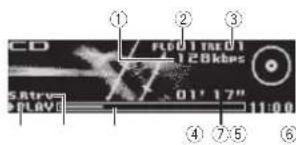
(1) B trate/sampling frequency indicator
Snowsthebitratesamplingfrequency
thecurrenttrack/filewhenthecompressed
audioisplaying.
- When playing back vBR(variab'ebit
rate)-recordedAACfiles.theaveragebit
ratevalueisisolaved. However, denen
inconthesoftwareusedtodecodeAAC
file: VRR-mycbodies/aved
(2) Foldernumberindicator
Snowsteholdernumbercurrentlyplaying
when the compressed audio displaying.
③ Tracknumberindicator
④ PLAY/PAUSE indicator
⑤ S.Rtrvindicalor
AppearswhenSoundRel everfunctionis
on
⑥ Songlime(progressbar)
⑦ Playtime indicator
Openthefrontpanel
1 Presstheopenbutton.
Discloacingslotappears
PlayincaCD/CD-R/CD-RW
- Laserthediscinteltradisc padingslotwith
theabelsideup
EjecingaCD/CD-R/CD-RW
1 Press ▲(eject).
Operatingthisunit
| PlayingsongsonaUSBstoragedevice1)UseaPioneerUSBcableloconnecttheUSBstoragedevicelotheunit.·FuginthcUSBstoragedevicusingtheUSB cable. |
| StoppingplaybackofffilesonaUSBstoragedevice·YourmaydisconnecttheUSBstoragedevicest anytime. |
| PlayingsongsonanSDmemorycard1)Removelthefront-panel.2)InsortanSDmemorycardintetheSDcard slot. Insert twilthecortactsurfacefacingdown, andpressonthacaroundlitclicksandcom- plotoylocksintoplacc.3)Re-attachthefront-panel.4)Press SRC/OFF to select SD as the source. Playbackwillstart. |
| StoppingplaybackofffilesonanSDmemorycard1)Removelthefrontpanel.2)PressontheSDmemorycarduntilclicks. TheSDmemorycardisjected.3)PulkoultheSDmemorycard.4)No attachthefrontpanel. |
| Selectinga'older1)Press 0 or 7 |
| Selectinga'rack1)TurnLEVER |
| Fastforwardingomeversing1)Turnamcholddowr LEVERtotherightoreft. |
| ReturningterootfoldorT)PressancholdBAND/ 0. |
Switchingbetweencompressedaudio and CD-DA 1 PressBAND/
Switchingbetween playbackmemorydevices Youcanswitchbetweenplaybackmemorydevices onUSBstoragedevceswithmorethanoneMass StorageDevice-compatiblememorydevice.
1 PressBAND/
- Youcanswitchbetweenupto32different memorydevices.
Notes
- When playing compressed audio, there is no sound during fast forward or reverse.
- DisconnectUSBstoragedevicesfromthe unitwhennolinuse.
- If there are two USB storage devices connected to this unit, the device connected to the input of these selected sources is the one that is operated.
- Disconnect communications for the USB storage device before switching to operation of the other device.
Displayingtextinformation
Selectingthedesiredtext nformation
1Press →/DISP
Notes
- Depending on the version of Tunes used to write MP3 filestoadiscormediafiletypes, incompatible text stored within an audio file may be displayed incorrectly.
- Textinformationitemsthatcanbechanged dependentthemedia.
Selectingandplayingfiles/ tracksfromthenamelist
If there are externals or aged devices (USB, SD) connected to the unit, this function is only available when Music browse is set to OFF. Refer to Musicbrowse(musicbrowse) or page 14.
Operatingthisunit
1Press(list)toswitchtothefile/track namelistmode.
2UsebothLEVERandM.C.toselectthedesiredfilename(orfoldername).
| Changingthefileorfoloername |
| □urLEVER |
| Playing |
| □Whenaf loortrackisselected,pressM.C. |
| Viewingalis(othef lesforolders) nthesa-lectedfolder |
| □Whenafolderisselected,pressM.C. |
| Playingasongintheselectedfolder |
| □Whenafolderisselected,prassanchoklM.C. |
Browsingforasong
- This function is only available when a file on an external storage device (USB, SD) or a songonaniPod is being played.
- If there are external storage devices (USB, SD) connected to the unit, this function is only available when Musicbrowse is set to USB memory1, USB memory2 or SD card Refer to Musicbrowse (music browse) on page 14.
1Press 🔒 (list)toswitchtothetopmenu ofthelistsearch.
2UseM.C.toselectacategory/song.
| Changingthenameofthesongsprcategory |
| TlurM.C.Artists (artists)—Albums (albums)—Songs (songs)—Genres(genres) |
| Playing |
| LWhenasongisselected,pressM.C. |
| Viewingalisto'songsintheselectedcategory |
| TWhenacategorysselected,pressM.C. |
| Playingasongirtheselectedcategory1Whenacategoryisselected.pressandholdM.C. |
| Searchingtheistbyalphaet1Whenalistfortheselectedcategory scis-played,press α, toswitchtoalphabetsaarch mode.2TumM.C.toselectaletter.3PressM.C.tod splaythealphabeticalist. |
Notes
- This unit must create an index in order to facilitate Artists, Albums, Songs, and Genres searches. Typically, it will take approximately 70 seconds to create an index for 1000 songs, and words recommend that up to 3000 songs be used. Pleasenole that certain types off ilemaylakelongerloindex than others.
- DependingonthenumberoffilosintheUSB sloragedevice,theremaybeadelaywhen displayingalist.
- Keysmaynothaveanyeffectduringthecreationofanindexorlist.
- Listsarerecreatedeachtimetheunitis turnedon.
Functionsettings
1PressM.C.todisplaythemainmenu.
2TurnM.C.tochangethemenuoption andpresstoselectFUNCTION.
3TurnM.C.toselectthefunction.
Afterselecting, perform the following procedure to set the function.
Operating thisunit
Playmode(repeatplay)
1 Press M.C. lose select one repeat play range.
CD/CD-R/CD-RW
• Discrepeat Repeatal tracks
- Track repeat – Repeat the current track - Folder repeat – Repeat the current folder
Externalstoragedevice(USB,SD)
• Allrepeat-Repeat all files
- Track repeat - Repeat the current file
- Folder repeat – Repeat the current folder
Randommode(randomplay)
1PressM.C.toturnrandomplayonoroff.
Linkplay(linker ay)
PressM.C. to display the setting mode.
2TurnM.C.locangelhemode;press loselect
- Artist – Plays an album of the artist currently being played.
- Album – Plays a song from the album currently being played.
- Genre – Plays an album from the genre currently being played.
The selected song/album will be played after the currently playingsong.
- This function is only available for external storage devices (USB, SD).
Pause(pause)
1 PressM.C.topause/resume:
SoundRetriever(soundretriever)
Automatically enhances compressed audio and restores riscound.
1 PressM.C.toselectthedesiredsetting.
1—2—OFF(off)
- iseffective for low compression rates, and 2. iseffective for high compression rates.
iPod
Basicoperations

①Repeatindicator
②Songnumberindicator
③Shuffleindicator
④PLAY/PAUSEindicator
⑤S.Rtrvindicator
AppearswhenSoundRetrieverfunctionis
on.
⑥Songtime(progressbar)
⑦Playtimeindicator
PlayingsongsonaniPod
ConnectaniPoctotheUSBcableusingan
iPodDockConnector
Selectingatrack(chapter)
TumLEVER.
Fastforwardingorreversing
1 umancholdownLEVERtotherightorder.
Selectinganalbum
Press ④ or ⑦
Notes
•The PodcannotBeturnedonoroffwhenthe controlmodeissettoAUDIO.
• Disconnectheadphones from the iPod before reconnecting it to this unit.
• The Podwill turn off about two minutes after the ignition switch is set to OFF.
Operating thisunit
Displayingtextinformation
Selecting the desired text information
1Press DISP
Browsingforasong
1Press(list)toswitchtothetopmenu ofthelistsearch.
2UseM.C.toselectacategory/song.
Changing the name of the song or category
1TumM.C.
Playlists (play ists)—Artists (artists)—Albums
(albums)—Songs (songs)—Podcasts (pod-
casts) Genres (genres) Composers (com-
posers)—Audiobooks(aud ebooks
Playing
When asongisselected press M.C.
Viewingallstofsongsintheselectedcategory
When acategorysis selected, press M.C.
Playingasongintheselectedcategory
1) Whentacategoryisselected,pressandhold
M.C.
Searchingtheistbyalphabet
1When all staff these selected category is dis-
played, press 🔒 to switch to alphabet search
mode.
2 TumM.C. to select a letter.
3 PressM.C.tod splaythealphabetical ist.
Notes
- You can play playlists created with the PC application (MusicSphere). The application will be available on our website.
- PlayliststnaryoucreatedwiththePCapplication(Mus cSphere)aredisolayedinabreviatedform,
Playingsongsrelatedtothe
currentlyplayingsong
You can plays songs from the following lists.
• Album list of the currently playing artist
• Sonolistofthecurrentvplayingalbum
• Album list of the currently playing genre
1PressandholdM.C.toswitchtolinkplay mode.
2TurnM.C.tochangethemode;pressto
select.
- Artist – Plays an album of the artist currently being played.
- Album – Plays a song from the album currently being played.
- Genre – Plays an album from the genre currently being played.
Theselected song/album will be played after the currently playings song.
Notes
- Thoselctedsong/albummaybocancelidityuoperzlefunctionsotherthanlinksearch(e.g. fastforwardandreverse).
- Dependingonthesongselectoctoplay.the endofthecurrentlyplayingsongandthebeginningoftheselectedsong/albummaybe cutoff.
Operatingthisunit'siPod functionfromyouriPod
You canistentothesoundfromyouriPodappli cal onsusingyourcar'sspeakers whenAPP is selected.
This function is not compatible with the following iPod models.
iPodwithvideo
iPodnano1stgeneration
APPModelscompatiblewiththefollowingPod models.
- iPodtouch4thgeneration(softwareversion 4.1 or later)
Operatingthisunit
- iPodtouch3rdgeneration(softwareversion 3.0orlater)
- iPodtouch2ndgeneration(softwareversion 3.0orlater)
- iPodtouch1stgeneration(softwareversion 3.0orlater)
- iPod nano6th generation (software version 1.0 or later)
- iPodnano5th generation(softwareversion 1.0.2orlated)
• iPhone4(softwareversion/. orlater)
• iPhone3GS(softwareversion3.0orlater) - iPhone3G(softwareversion3.0orlater)
• iPhone(softwareversion3.0orlater)
[1]PressBAND; toswitchthecontrolmode.
- iPod – This unit's iPod function can be
operatedfromtheconnectediPod.
- APP-Playbacknesoundfromyour iPod applications.
- AUDIO – This unit's iPod function can be operated from this unit.
Functionsettings
1PressM.C.todisplaythemainmenu.
2TurnM.C.tochangethemenuoption andpresstoselectFUNCTION.
3TurnM.C.toselectthefunction.
Afterselecting, perform the following procedure destosetthefunction.
Playmode(repeatplay)
1 PressM.C. to select repeat n ayrange.
- Repeat One - Repeat the current song
- Repeat All – Repeat all songs in the selected list
Shufflemode(shuffle)
1 PressM.C. loselect your favoritesetting.
- Shuffle Songs – Play back songs in the selected istinrandemorder.
- Shuffle Albums – Play back songs from a random vselectedalbumin order.
- ShuffleOFF-Cancelrandomplay
Shuffleall(shuff ball)
1 PressM.C.tolu-nshufflea lan.
lotumor setShufflemodeintheFUNC-
TIONmenutopff.
Linkplay(linkplay)
1PressM.C.todisplaythesettingmode.
- Turn M.C. to charge the mode; press to select Fordetail about these settings, refer to Playing songs related to the currently playing song on the previous page.
Pause(pause)
TPressM.C.topauscorresuma
Audiobooks(audiobookspeed)
TPressM.C.toselectyourfavoritasetting.
- Faster – Playback at a speed faster than normal
• Normal-Playbackatnormalspeed
- Slower - Playback at a speed slower than normal
SoundRetriever(soundretriever)
1 Press M.C. lose elect lines are setting 1—2—OFF(off)
1 seltactivatorlowcompression rates, and 2 iseffective for high compress or rates.
Notes
- SwitchingthecontrolmodeloiPodpauses song playback. OperatetheiPodtoresume playback.
Operatingthisunit
- The following functions are still accessible from the unileven if the control mode is set to iPod APP.
—Palsing
—Fastforward/reverse
-Trackup/down
- When the control mode is set to iPod/APP, onlyPauseorSoundRetrieverisavailable.
- The browse function cannot be operated from this unit.
Audioadjustments
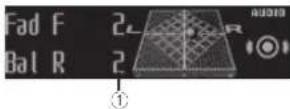
①Audiodisplay
Showstheaudioadjustmentstatus.
1PressM.C.todisplaythemainmenu.
2TurnM.C.tochangethemenuoption andpresstoselectAUDIO.
3TurnM.C.toselecttheaudiofunction.
Afterselect ing,performthetollowingproce- dureslosel.theaudiofunction.
Fader/Balance(fader/balanceadjustment)
1PressM.C.1xd splavthesettingmode.
2) PressM.C.tocyclebetweenfader(front/rear) and balance(left/right).
3 TurnM.C.load usl thefront/rearspeakeral-ance.
- Thefront/rearspeakerbalancecannot be adjusted when therear output selling:gis
RearSP:S/W. RefertoS/Wcontrol/rear
outputandsubwoofersetting/or page 4
4 TumM.C. load just the left/rightspeaker balance.
PresetEQ(equal zerrecall)
1 PressM.C.tod splaythesettingmode.
2 TumM.C.toselectanecu alizer curve.
Powerful—Natural—Vocal—Custom1—Cus-
tom2—Flat—Superbass
G.EQ(equalizeradjustment)
You can adjust the currently selected equalizer curvesetting as desired. Adjusted equalizer curve settings are stored in Custom1 or Custom2.
• AseparateCustom1 curve can be created for each source. If you make adjustments when a curve other than Custom2 is selected the equalizer curves settings will be stored in Custom1.
- A Custom2 curve that is common for all sources can be created. If your make adjustments when the Custom2 curve is selected, the Custom2 curve will be updated
1Recall the equalizer survey your want to adjust.
2PressM.C.1d splaytheset ingmode
3) Press M.C. to cycle between equalizer band and level.
4 TurnM.C.loselecttheequal/zenandload-just
100Hz 315Hz 1.25kHz 3.15kHz 8kHz
TurnM.C. oadjusltheequal zercurve.
+6 to -6 is also played as the equalizer curve is increased or decreased.
Operatingthisunit
Loudness(oudress)
Loudnesscompensatesfordeficienciesinthelow-frequencyandhigh frequencyrangesatlowvolume.
1 PressM.C. display these setting mode. 2 PressM.C. to turn loudness on off.
3 Turn M.C. to select nodes red setting. Low (low)—Mid (mid)—High (high)
Subwoofer1(subwooferon/offsetting)
This unit is equipped with subwoofer output which can be determined off.
1 PressM.C. to display the setting mode. 2 PressM.C. to turn subwoofer output on or off.
3 Turn M.C. lose electnephase for the sub-woofer our p.t.
TumM.C.toth elefttoselectreversephase, and Reverseappearsinthedisplay.TurmM.C. totherighttoselectnormalphase,and Normalappearsinthedisplay.
Subwoofer2(subwooferadjustment)
The cut-off frequency and output level can be adjusted when the subwooferoul tuition.
Only frequencieslowesthan nosein theselected range outputectromthasubwocter.
1PressM.C. display these setting mode.
2 Press M.C. locyc between recut-off frequency and the output level for the subwoofer.
3 Turn M.C. lose ecll recul-off frequency. 50Hz—63Hz—80Hz—100Hz—125
4 TurnM.C. toad just the output level for the sub woofer.
These subwoofer level increases or decreases each time you turn M.C. +6 to -24 is displayed asthelevel sin orased or decreased.
BassBooster(bassboost)
1 PressM.C. to display the setting mode.
2TurnM.C.loseectadesiredlevel
0 to +6 is displayed as the level is increased or decreased.
HPF(highpassfilteradjustment)
When you can want owsounds from the subwoofer output frequency range to play from the frontorrearspeakers, turn the HPF (highpass filter). Only frequencies higher than rose in the selected range output from the frontorrearspeakers.
1 Press M.C. odsplaythesettingmode. 2 Press M.C. to turn high pass filter on or off.
3 TumM.C. to select the cut-off frequency.
50Hz—63Hz—80Hz—100Hz—125Hz
SLA(sourceleveladjustment)
SLA(Sourceleveladjustment)letsyouadjustthe volumelevelofeachsourceopreventradical changesinvolumewhenswitchingbetweensources.
- When selecting FMastresource, you cannot switch to SLA.
- Settingsarebaseonthe-Mvolumelevel, whichremainsunchanged.
- The AMvolumelevelcan also be adjusted with this function.
1 PressM.C. od splaythesell numode.
2TurnM.C. load adjusted source volume. Adjustment range: +4 to -4
UsingBluetoothwireless technology
• Only for DEH-8459BT
UsingBluetoothtelephone
Important
- Sincethisunitisonstandbytoconnectwith yourcellularphone via 3uelocthwireless technology, using it without the engine running candrainlheballerypower.
• Operations may vary depending on the kind of cellular phone.
Operatingthisunit
- Advancedoperationsthatrequireattention suchasdialingnumbersonthemonitor, usingthephonebook,etc.,areprohibited whiledriving.Parkyourvehicleinasafe placewhenusingtheseadvancedoperations.
Settingupforhands-freephoning
Before you can use the hands-free phoning function you must setup the unit for us with your cellular phone.
TConnection
OperatetheBluetoothtelephoneconnection menu.RefertoConnectionmenuoperationon thispage.
2Functionsettings
Operate the Bluetooth telephone nonfunction menu. Refer to Phoneme operation on page 13.
Basicoperations
Making non-call
• Refer to Phenomenoperationpage13.
Answering an incoming call
1 When a call is received, press M.C.
Endngacall
1Press
Rejectinganincomingcall
When a call is received, press
Answeringaca Iwaiting
TWhenacallisrocc voc, press M.C.
Switching:netweencallersonhold
TPressM.C.
Cancelingcallwaiting
1Press
Adjusting the other party slistering volume 1. Turn LEVER while talking on the phone. • When private modelson, the function is not available.
Turningprivalemodeonoroff □PressBAND/ □whilatalkingonthephone
Switchingtheinformation display 1Press →DISPwhile talking on the phone.
Notes
- If privater models select econecellular phone, hands-free phoning may not be available.
- The estimated call time appears in the display(this may differ slightly from the actual call time).
Connectionmenuoperation
Important
- Besureloparkyourvehicleinasafeplace andapplytheparkingbrakewenperformingthisoperation.
- Connecteddevicesmaynotoperateproperly ifmorethanoneBluetoothdeviceisconnectedatatime(e.g.aphoneandaseparate audiop ayerareconnectedsimultaneously
1Pressandhold 🔒 todisplaytheconnectionmenu.
■Youcanoloperatel niss lepouringacall
2TurnM.C.toselectthefunction.
Afterselecting, perform the following procedure:
Section
Operatingthisunit
Devicelist(connectingorisconnectingadevice from theevicelist)
- Whenno device is selected in the device list, this function is not available.
1PressM.C.1cd splaythesettingmode.
2) I umM.C. to select then name of advice you want to connect/disconnect.
- PressanoholdM.C.loswilchthe Bluetoothdeviceaddressanddevico name.
3 PressM.C. to connect/disconnect these selected devices.
Oncothecorrectionisestab ished. Con- nectedisd splayed.
Deleted device (perating device from the device list)
- Whennocavice is selected in the device list, this function is not available.
1PressM.C.todisplaythesettingmode.
2 TumM.C. to select the name of a device you want to delete.
- PressancholdM.C. to switch the Bluetooth device address and device name.
3) Press M.C. to display Delete YES
4 Press M.C. Iodeleleadevice information from theopecicelist.
- While this function is in use, don't turn off the engine.
Adddevice(connectinganewdevice)
1 PressM.C. to start searching.
•Tocancel.pressM.C.whilesearching.
- If this uniffal stofincanyavailable cellular phones Notfound is displayed.
2 Turn M.C. to select a device from the device list.
- PressandholdM.C. to switch the Bluetooth device address and device name.
3 PressM.C.toconnectthaselecteddevice.
• To complete the connection check the device name (PioneerBTUnit). Enter the PINcode your device if necessary.
• PINcodeissetto0000asthedefault.You canchangethiscode.
- 6-digit numberappearsonthed splayof thisunit. On the connection is staolished, this number disappears.
- If you are unable to complete the connection using this unit, use the device connection to be until.
- If three devices are already paired, Device Full is displayed and it is not possible to perform this operation. In this case, delete a pair of device first.
Specialdevice setting as special device
Operatingthisunit
Bluetoothdevicesthataredifficulttocestablsha connectionwithnarecaleospecialdevices.Ifyour Bluetoothdevicelsistedasaspectaldevice,selectthoappropriatcono.
1 PressM.C. to display the setting mode.
- If three devices are already paired, Device Full is displayed that is not possible to perform this operation. In this case, delete a red device first.
2 Turn M.C. to display a special device. Press to select.
3 Turn M.C. to display U's unit's device name, Bluetooth device access and P/Ncode.
4 Useadev cotoconnectto this unit.
• To complete the connection check the device name(PioneerBTUnit) and to the PINcode on your device.
• PINcodeissetto0000astnedefault.You canchangeth scode.
Autoconnect(connectingtoaBluetoothdevice automaticly)
T PressM.C.totumautomaticconnectioner or off.
Visibility(settingthevisialityoth sun t)
To check the availability of this unit from other devices, Bluetooth visib lycfthis unit can be turned on.
T PressM.C.totumthevis bilitycfthisuniton oroff.
• WhiesettingSpecialdevice, Bluetooth visibility of this unit is turned temporarily.
Pincodeinput(P Neocainput)
loconnectyourdevicatoth sun'tviaBluetooth wirelesstechnology,yourneedlcenter.PINcode onyourdevicetoxenfytheconnection. Thedefault codeis0000 but you can change it with the function.
1PressM.C.tod splaythesettingmode.
2lumM.C.toselectanumber.
3PressM.C. to move the cursor to then ex position,
4) After inputting PINcode, covering hold M.C. • After inputting, crossing M.C. returns you to the PINcode in put display, any you can change the PINcode.
DeviceINFO(Bluetooth deviceaddressdisplay)
1 PressM.C.tcd splaythesettingmode.
2 TumM.C.lefttoswitchotneBluetoothdevice address.
Turning M.C.rightreturnstothedevicename
BluetoothAudio
• Only for DEH-8450BT

Important
- Depending on the Bluetooth audioplayer connected to this unit, the available operations will be limited to the following two levels:
—A2DPprofile(Advanced/AudioDistribution Profile):Youcanonlyplaybacksongsonyour audioplayer.
—AVRCPprofile(Audio/Video/RemoteControl Profile):You can perform playback, pause playback, select songs etc.
- Sincet nereareanumberof Bluetooth audio playersavailablethe market,availableoperationswill varyextensively.Whenoperating yourplayerwiththisunit,refertotheinstructionmanua thatcamewithyourBluetooth audioplayerswallasthismanual.
Operatingthisunit
• Information related to asong (such as the elapsed playing time, song title, song index, etc.) cannot be displayed on this unit.
• Astresignalfromyourcellularphonemay causenoise, avoid usingitwhenyouarelis- teningtosongsonyourBluetoothaudio player.
- When acallis nprogresson the cellular phone connected to this unit via Bluetooth wireless technology, the sound of the Bluetooth audio player connected to this unit is muted.
- When the Bluetooth audioplayer is in use, you cannot connect to a Bluetooth telephone automatically.
- Playbackcontinuesevenifyouswitchfrom yourBluetoothaudioplayertoanother sourcewhilelisteningteasong.
SettingupforBluetoothaudio
Before you can set the Bluetooth audio function you must setup the unit for use with your Bluetooth audiopayer. This entails establishing a Bluetooth wireless connection between this unit and your Bluetooth audiopayer and pairing your Bluetooth audiopayer with this unit.
Basicoperations

①Devicename Showsthedevicenameoftheconnected Bluetoothaudioplayer.
| Fastforwardingorreversing |
| TurnaroholdownLEVER(therighlerlef). |
| Selectingatrack |
| TurnLEVER. |
| Starting playback |
| TPressBAND/ |
Functionsettings
1PressM.C.todisplaythemainmenu.
2TurnM.C.tochangethemenuoption andpresstoselectFUNCTION.
3TurnM.C.toselectthefunction.
Afterselecting, perform the following procedure dureslcsetthefunction.
Play( play )
1PressM.C.tostartplayback.
Stop(stop)
1 PressM.C.tostoptheplayback.
Pause(pause)
1 PressM.C.totumpauseon.
Phonemenuoperation
• Only for DEH-8450BT
Important
Besuretoparkyourvehicleinasatoplaceand aopy theparkingbrakewhenperformingthis operation.
1Press 🔒 todisplaythephonemenu.
Operatingthisunit
2TurnM.C.toselectthefunction.
Afterselecting, perform the following procedure to set the function.
Missedcalls(missedcall history) Dialedcalls(dialedcall history) Receivedcalls(receivedcall history)
1PressM.C. tod splaytheohonenumberlist.
2 TumM.C.toselectanameorphonenumber.
3 PressM.C.to makecall.
• Todisplaydetail saboutthecontactyouselected, pressandholdM.C.
PhoneBook(phonebook)
• Trophor abookinyourcellularphonewill be transferred automaticallywhontnophonols connected to this unit.
- Depending on the cellular phone, the phone book may not be transferred automatically. In this case, operate your cellular phone to transfer the phonebook. The visibility of this unit should be on. Therefore Visibility (setting the visibility of this unit) on the previous page.
1) Press M.C. to display SEARCH (a phabetic list).
2. TumM.C. to select the first letter of the name you are looking for.
• Press and hold M.C. to select the dates rad charactortype.
3 PressM.C. lod splaya regi stered namelist.
4 TumM.C. to select then a name you are looking for.
5 PressM.C. iod splaythe chonenumberlist.
6 TumM.C. to selectaphonenumberyouwant to call.
2PressM.C.to make a call.
PhoneFunction(phonefunction)
You can set Auto answer, Ring tone and PH.B. Nameviewfromthismenu Fordetails refer to Functionandoperationthispage.
Functionandoperation
1DisplayPhoneFunction.
RetertoPhoneFunction(phonefunction)on thispage.
2PressM.C.todisplaythefunctionmenu.
3TurnM.C.toselectthefunction.
After-selecting, perform the following procedure to set the function.
Autoanswer(automaticanswering)
1 Press M.C. to turn automatic answering order of.
Ringtone(ringtoneselect)
1 Press M.C. columnthering oneonoroff.
PH.B.Nameview(phon abook nameview)
1 PressM.C. losw tch between the stsof names.
Initialsettings

①Functiondisplay • Showsthefunctionstatus.
1PressandholdSRC/OFFuntiltheunit turnsoff.
2PressM.C.andholduntiltheinitialsettingmenuappearsinthedisplay.
Operatingthisunit
3TurnM.C.toselecttheinitialsetting.
Afterselecting, perform the following procedure to set the initial setting.
Languageselect(mult-language)
Fonyourconvenience, his unfeetips multiple language disp ay.You canse octthelanguape bestsuited to your first language.
1PressM.C. to select the language.
Calendar(settingthedate)
1) PressM.C. to select these segments of the calendar display you is not set.
Year—Day—Month
2TurnM.C.tosetthedate
Clock(settingtheclock)
TPrassM.C.toselectthesegmentofthaclock displayyouwishioset. Hour—Minute
2TumM.C. to adjust the clock.
EngineTimealert(e apsectimed splaysetting)
This setting allows you to measure the length of timethate lapses from whether machine is turned on and display the amount of elapsed time per set period.
Also, you will hear alarm.
1) Press M.C. to select your favor setting OFF—15 Minutes—30 Minutes
FMstep(-M/tuningstep)
The F'mtuning step employed by seek tuning can be switched between 100kHz, the preset step, and 50kHz.
Ifseektuning is performed in 50kl steps, stations may be tuned in more closely. Tuneinthestations with manual tuning or seseektuning again.
PressM.C.toselecttheFMtuningstep.
The AMtuningstepcan beswitched between 3k-lz, the preset step and 10k-lz. When using the tuner in North, Central or South America, reset the tuning step from 8kHz (531kHz to 1602kHz lowable) to 10k-lz (530kHz to 1640kHz lowable).
1 PressM.C. to select the AM tuning step. 9kHz (9kHz) — 10kHz (10kHz)
AutoPI(autoPIslock)
The unitcanautormaticallysearchforadifferent stationwiththesameprogramming,evenduring presetrecall.
1PressM.C.totumAutoPiseekonoroff.
When operating external storage devices (USB, SD), you can select files from the list.
OFF—USBmemory1—USBmemory2—SD card
Warningtone(wamingtonsetting)
If the front panel is not better achieved from the head until within four seconds, so flurring off the ignition, awamngonesounds. You can turn off the awamingle.
1 PressM.C. column rewarringtononcroft.
AUX(auxiliaryinput)
Activaleh ssellingwhenusingganauxiharyse-viceconnectedtothisunit.
T Press M.C. to turn auxiliary setting on or off.
Dimmer(dimmersetting)
I prevent the display from being too right at right, the splay is automatedally closed when the car's head lights are turned. You can turn the dimmeronoroff.
1 PressM.C.tolundimmeronoroff.
Contrast(displaycontrastsetting)
Operatingthisunit
1 Tum M.C. to adjust the contrast level.
0 to 15 is displayed as the level is increased or decreased
S/Wcontrol(rearoutputandsubwoofersetting)
This unit's rear output(rearspeakerleadsoutput and RCA rear output) can be used for full range speaker(RearSP:F.Range) or subwoofer(Rear
SP:S/W connection. If you switch there a output setting to Rear SP:S/W, you can connect rear speaker lead directly to asubwoofer without using an auxiliary amp.
① PressM.C.toswitchtherearoutputsetting. • Whennosubwooferisconnectedtothe rearoutput,selectRearSP:F.Range(full-rangespeaker).
- When subwoofer is connected to the rear output, select RearSP:S/W(subwoofer).
Even if you change this setting, there will be no output unless you run the Subwoofer output on refer to Subwoofer1 (subwooferon/off setting) on page 11).
- If you change nissetting, subwoofer output in the auciomenu will return to factory settings.
- Bothrearspeakerleadouts and RCA rear outputaresw tchedsimultaneouslyirth setting.
Demonstration(de mod splaysetting)
TPressM.C.totum:thecamodisplayonoroff.
Ever-scroll(scroll modesetting)
Wheneveracro lissettoON, recorded text information macro is continuously rhodisplay by Setto OFFifyouprefertheirformat ortoscrolljust once.
1 PressM.C.totumtheeverscrollonoroff.
BTAUDIO(Bluetoothaudioactivation)
• This function is not available for DEH-7450SD.
Yourneed.activate.theBTAudiosource-order touseaBluetoothaudioplayer.
1 Press M.C. to turn the BT Audio source on or off.
Clearmemory(resett ngtheBluetoothwireless techno ogymodu e)
• This function is not available for DEH-7450SD. Bluetooth devices data can be done. I protect personal information, we recommend deleting this database before transferring the unit to other persons. The following settings will be deleted.
- phonebooker tries on the Bluetooth Telephone
• presetnumbersentheBluetoothtophone
- registration assignment of the Bluetooth telephone
- call history of the Bluetooth telephone - information of the connected Bluetooth telephone
• PINcodeoftneBluetoothdevice
1PressM.C. to show the confirmation display. YES is displayed. Clearing memory is now on standby.
If you don't want to reset phone memory turn
M.C. lod splay CANCELand pressloselect.
2PressM.C.toclearmemory.
Clearedisdisplayedarothesottingsarodeleted.
- While function is in use, donotum off the engine.
BTVersioninfo.(Bluetoothversiondisplay)
- This function is not available for DEH 7450SD. You can display the system version of this unit and of Blueool module.
TPressM.C.tod splavtheinformation.
- turning M.C. or LEVER cycles between the system inversion of his unit and that of the Bluetooth modulus.
Operatingthisunit
S/WUPDATE(updatingthesoftware)
- This function is not available for DEH-1450SD. This function is used to update this unit within the latest software. For information on the software and updating, refer to our website.
- Neverturtheuritoffwhilethesoftwareis beingupdated.
1 Press M.C. Iodisplay the catal transfer mode. For lowtheon screen instruction to finish up dating the software.
Otherfunctions
UsinganAUXsource
1InsertthestereominiplugintotheAUX inputjack.
2PressSRC/OFFtoselectAUXasthe source.
Note
AUX cannot be selected unless the auxiliary setting is turned. Formoredetails, refer to AUX (auxiliary input) on the previous page.
Usingdifferententertainment displays
You can enjoy entertainment displays while listening to each sound source.
Switchingthedisplayindication
1PressM.C.todisplaythemainmenu.
2TurnM.C.tochangethemenuoption andpresstoselectENTERTAINMENT.
3TurnM.C.toselectthefunction.
4PressM.C.todisplaytheBackground.
5TurnM.C.tochangethedisplay.
Backgroundvisual—genre—backgroundpicture 1—background picture 2—background picture 3—background picture 4—simple display—moviescreen—calendar
■Genredisplaychangesdependingonthegenre ofmusic.
■Genredisplaymaynotoperatecorrectlydependingontheapplicationusedtoencodeaudiofies.
Turningtheclockdisplayonoroff
1PressM.C.todisplaythemainmenu.
2TurnM.C.tochangethemenuoption andpresstoselectENTERTAINMENT.
3TurnM.C.toselectthefunction.
4PressM.C.toselectthedesiredsetting.
Clockdisplay—elapsedtimedisplay—clockoff
■Youcanswitchthefunctionbypassing
/DISPOFF.
Selectingtheilluminationcolor
Thisunitisequippedwithmultiple-colorillumination.Youcanselectdesireddolorsforthekeys anddisplayofthisunit.Youalsocancustomize thecolorsyouwantouse.
Advancedoperationsusingspecial buttons
• Only for DEH-7450SD
You can select desired colors for the key so this unit.
1 Press C. 2 TumM.C. to select the desired setting.
Key Display Key&Display
3 PressM.C. to select. Fordetails about the settings, refer to Selecting the key color from the illumination color listing this page.
Operatingthisunit
Selectingthekeycolorfromthe illuminationcolorlist
You can select desired colors for the key so this unit.
1PressM.C.todisplaythemainmenu.
2TurnM.C.tochangethemenuoption andpresstoselectILLUMI.
3TurnM.C.todisplayKeyandpresstose-lect.
4TurnM.C.toselecttheilluminationcolor.
You can select one option from the following list.
• 27 preset colors (WHITE to ROSE)
•SCAN(cyclethroughallcolors)
• 3 sets of colors (WARM, AMBIENT, CALM)
- CUSTOM(customizedilluminationcolor)
Notes
- When SCAN is selected, the system automatically cycles through the 27 preset colors.
- When WARM is selected, the system automatically cycles through the warm colors.
- When AMBIENT is selected, the system automatically cycles through the ambient colors.
- WhenCALMisselected, thesystemautomaticallycycles through thecalmcolors.
- When CUSTOM is selected, the customized colorsaved are selected.
Selectingthedisplaycolorfromthe illuminationcolorlist
You can select the desired colors for the display of this unit.
1PressM.C.todisplaythemainmenu.
2TurnM.C.tochangethemenuoption andpresstoselectiLLUMI.
3TurnM.C.toswitchtoDisplayandpress toselect.
4TurnM.C.toselecttheilluminationcolor.
Youcanselectoneoptionfromthefollowinglist.
• 27 preset colors (WHITE to ROSE)
• SCAN(cyclathroughallcolors)
• 3 sets of colors (WARM, AMBIENT, CALM)
•CUSTOM(customizedilluminationcolor)
Note
Fordetailsaboutcoloronthelist,refertoSelectingthekeycolorfromtheilluminationcolorlistonthispage.
Selectingkeyanddisplaycolorfrom theilluminationcolorlist
You can select the desired colors for the keys and display of this unit.
1PressM.C.todisplaythemainmenu.
2TurnM.C.tochangethemenuoption andpresstoselectILLUMI.
3TurnM.C.todisplayKey&Displayand presstoselect.
4TurnM.C.toselecttheilluminationcolor.
You can select one option from the following list.
27 preset colors (WHITE to ROSE)
• SCAN(cyclathroughallcolors)
• 3 sets of colors (WARM, AMBIENT, CALM)
Notes
- You cannot select CUSTOM in this function.
- Once you select a color in this function, colors on the keys and display of this unit automatically switch to the colory you selected.
- For details about color/sonthelist, refer to Selecting the cycolor from the illumination color list on this page.
Operatingthisunit
Customizingtheilluminationcolor
1PressM.C.todisplaythemainmenu.
2TurnM.C.tochangethemenuoption andpresstoselectILLUMI.
3TurnM.C.todisplayKeyorDisplay.Press toselect.
4PressM.C.andholduntilthecustomizing illuminationcolorsettingappearsinthedisplay.
5PressM.C.toselecttheprimarycolor. R(red)—G(green)—B(blue)
6TurnM.C.toadjustthebrightnesslevel. Adjustmentrange:0to60
- You cannot select level below 20 for all depth of R (red), G (green), and B (blue) at the same time. - You can also perform the same operation on other colors.
Notes
- You can create custom illumination colors when SCAN or as to colors (WARM, AMBIENT, or CALM) is selected. - You can create custom illumination colors for both Key and Display.
Switchingthedisplayindicationand buttonillumination
Displayindicationandbuttonilluminationcan beswilchedonoroff.
●Pressandhold ©/DISPOFF.
Pressingandholding /DISPOFFswilchestne displayindicationandbuttonilluminationonor off.
■Evenifth display indication is turned off, operation can be conducted. If operation is conducted while the display indication soft, display will ght up or a few seconds and then turn off again.
Installation
Connections

WARNING
• Usespeakersovero0W(outputvalue) and between4Ωto8Ω(impedancevalue). Do ncluse1Ωto3Ωspeakersforthisunit.
The blackable is ground. When installing this unit power ramp (so separately), makesure lo connect the ground wire first. Ensure that the ground wire is properly connected to rel a part of the s body. The ground wire of the power ramp and theorem of this unit or any other vehicle must be connected to the cars separately with different screws. If, the screw for the ground wire is on sort fallsout, it could result in fire generation and make normal function.

Other devices Metal parts of car's body (Another electronic device in the car)
"Non supplied for this unit.

Important
- When installing this unit in vehicle, without an ACC (accessory) position on the ignition switch, failure to connect thered cable to the terminal that detects operation of the ignition key may result in battery drain.

ACC position

No AOC position
- Use this unit with a 12-volt battery and negative grounding only. Failure todos may result in fire or main function.
- Topreventashort-circuit,overheatingnormal-function,besuretofollowthedirections below.
—Disconnectthenegativeterminal ofthe cat-ten beforeinstallation.
—Securechewingwiththacb eclampsoradhesivetape.Wrapadhesivetapearoundwiring thatcomesintoccontactwithmetalpartstoprotecthewing.
—Placealcablesawayfrommovingparts, suchastneshittleverandseatrails.
—Placealcablesawayfromhotplaces,such asneart heheateroutiel.
—Donotconnecttheyellowcablatofhebattersy bypassingitthroughtheholetotheengine compartment.
—Coveraryd sconnectedcableconnectors withinsulatingtace.
—Donots notienarycables.
—Never cut the insulation of the power cable of this unit in order to share the power with other devices. The current capacity of the cable is limited.
—Useatuscoftheratingprescribed.
—Neverwirethernegativespeakercabledirectly loground.
—Neverbandtogethernegativecablesofmulti- plespeakers.
- When this unilison controls gnals are sent through the blue whitocable. Connect is caclotheosystemremote control of an external power ramp vehicle saulo-antennarplay control terminal (max. 300mA 12VDC). If the vehicle is equipped with glassanlenna connect the airantenna boostor poworsupply terminal.
- Neverconnecttheblue/whitecaplotothepowerterminal ofanexlernalpoweramp. Also, neverconnectittothepowerterminal oftheautoantenna. Doingsomayresultin batterydrainoramalfunction.
Installation
Thisunit

①USBport1
②USBport2
③Antennainput
15cm
④Fuse(10A)
⑤Powercardinput
⑥Wiredremoteinput
Hard-wiredremotecontroladaptor can be connected(soldseparately).
⑦Microphoneinput(DFH-8450BTonly)
⑧Microphone(DEH-845CBTonly)
4m
⑨Rearoutput
⑩Frontoutput
(i)Subwooferoutput
(j)USBcable
1.5m
- IfconnectingbothUSB1(USBstorage
device1/iPod1(iPodconnectedusing
USBinput1)andUSB2(USBstoragede
vice2/iPod2(iPodcorrectedusingUSB
input2)atthesametime,uscaPioneer
USBcable(CD-U50E) nadditiontothe
regularPioneerUSBcable.
Powercord
Perform these connections when not connecting arearspeaker lead to asubwoofer.
⑤ 10

flowchart
graph TD
    L["Input L"] --> 6["6"]
    R["Input R"] --> 8["8"]
    6 --> 5["5"]
    8 --> 10["10"]
    10 --> 12["12"]
    12 --> 13["13"]
    13 --> 14["14"]
    style L fill:#f9f,stroke:#333
    style R fill:#f9f,stroke:#333
    style 6 fill:#ccf,stroke:#333
    style 8 fill:#ccf,stroke:#333
    style 10 fill:#ccf,stroke:#333
    style 12 fill:#ccf,stroke:#333
    style 14 fill:#ccf,stroke:#333
Perform these connections when using as subwoofer without the optional amplifier.

①Topowercordinput
② left
③Right
④Frontspeaker
⑤Rearspeaker
⑥White
⑦White/black
⑧Gray
Installation
⑨Gray/black
10Green
⑪Green/black
2Violet
(3)Violet/black
④ Black(chass sground)
Connecttoaclean, paint-freemetal location.
15Yellow
Connecttotheconstant12Vsupplytermi
nal.
16 Red
Connect to terminal controlled by ignition switch (12VDC).
⑰Blue/white
Connectosystemcontrolterminalofthe poweramporauto-antennarelaycontroller(max.300mA12VDC).
@Orange/white
Connect to ghtingswitchterminal.
⑲Subwoofer(4Ω)
29 When using a subwoofer of 70W (2Ω), be suretoconnectthesubwoofertothe violet and violet/blackleadsoft this unit. Donct connectanythingtothegreenanagreen/blackleads.
20 Notused.
22Subwoofer(4Ω)×2
Notes
- Witha2speakersystem, donotconnectanythingtothespeakerleadsthatarenotconnectedtospeakers.
- Changetheinitialsettingofthisunit. Refer toS/Wcontrol(rearoutputandsubwoofer selling)onpage14.
Thesubwooferoutputofthisunitismnonaural.
Poweramp(soldseparately)
Perform these connections when using the optional amplifier.

flowchart
graph TD
    A["①"] --> B["②"]
    B --> C["③"]
    B --> D["④"]
    A --> E["⑤"]
    E --> F["⑥"]
    A --> G["⑦"]
    G --> H["⑧"]
    A --> I["⑨"]
    I --> J["⑩"]
    B --> K["⊕"]
    K --> L["⊕"]
    L --> M["⊕"]
    B --> N["⊕"]
    N --> O["⊕"]
    O --> P["⊕"]
    C --> Q["⊕"]
    Q --> R["⊕"]
    R --> S["⊕"]
    D --> T["⊕"]
    T --> U["⊕"]
    U --> V["⊕"]
    E --> W["⊕"]
    W --> X["⊕"]
    X --> Y["⊕"]
    F --> Z["⊕"]
    Z --> AA["⊕"]
    AA --> AB["⊕"]
    G --> AC["⊕"]
    AC --> AD["⊕"]
    AD --> AE["⊕"]
    H --> AF["⊕"]
    AF --> AG["⊕"]
    AG --> AH["⊕"]
    J --> AI["⊕"]
    AI --> AJ["⊕"]
①Systemremotecontrol
ConnecttoBlueAwhitecable
②Poweramp(soldseparately)
③ConnectwithRCAcab es(solseparately)
④ToRearoutput
⑤Rearspeaker
⑥ToFrontoutput
⑦Frontspeaker
⑧Tosubwooferoutput
⑨ Subwoofer
Installation
Important
- Checkal connect on sandsystems before final installation.
- Donotuseunauthorzedpartsasthismay cause malfunctions.
- Consultyourdealerif installation requires drillingofholesorothermodificationstothe vehicle.
- Donotinstall this unit where: —itmayinterferewithoperat onofthevehicle. —itmaycauseinjurytoapassengerasaresult of asudder stop.
Section
Installation
- These semiconductor laser will be damaged if it overheats. Install this unit away from hot places such as near the heater outlet.
- Optimumperformanceisobta neowenthe unitisinsta ledatanangleoflessthan60°.

- When installing, to ensure proper best dispersal when using this unit, makes sure you leave camp space behind the carpaneland wrapany loosocabless that they are not blocking hevents.

DINfront/rearmount
This unilcan be properly installed using either front-mount or rear-mounted installation. Use commercially available parts when installing.
DINFront-mount
1 Insert themountingsleeve into the dashboard.
For installation in shallow spaces, use the supplied mountings sleeve. If there is enough space, use them mountings sleeve that can renew the vehicle.
2Securethemountingsleevebyusinga screwdrivertobendthemetaltabs(90°)into place.

①Dashboard
②Mountingsleeve
3Installtheunitasillustrated.
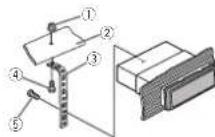
①Nut
②Firewallormetalsupport
③Metalstrap
④Screw
⑤Screw(M4×B)
■ Makes sure that the unit is installed so securely in place. An unstable installation may cause skipping or other functions.
DINRear-mount
1 Determinetheappropriateposition wheretheholesonthebracketandtheside oftheunitmatch.

Installation
2Tightentwoscrewsoneachside.

①Trusscrew(5mm×3mm)
②Mount nqbracket
③ Dashboard console
Removingtheunit
1Removethetrimring.

①riming
②Notchedtab
- Releasing the front panel allows easier access to the trim ring.
- When reacting the rim ring point the side with the scheduled tabdown.
2Insertthesuppliedextractionkeysinto bothsidesoftheunituntiltheyclickinto place.
3Pulltheunitoutofthedashboard.

Removingandre-attachingthe frontpanel
You can remove the front panel to protect your unit from theft.
Pressthedetachbuttonandpushthefront paneluowardandpullitlowardyou.
For details, roteroRemoving the front panel to protect your unit from the land Re- attaching the front page on page 5.
Installation
Installingthemicrophone
- OnlyforDEH-8450BT

CAUTION
It is extreme ydangerous to allow them micro- phonelactobecomewound around resteer- ingcolumnorshittlever. Besuretoinstallthe unit insuchaway that will not obstruct driving.
Note
Install them microphone in a position on and orientation that will enable it to pick up the voice of the person operating the system.
Wheninstallingthemicrophone onthesunvisor
1Installthemicrophoneonthemicro-phoneclip.
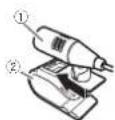
①Microphone
②Microphoneclip
2Installthemicrophonecliponthesun visor.
With the unvisor, install them microphone clip. (Lowering the unvisor reduces the voice recognition rate.)

①Microphonedip
②Clamp
Wheninstallingthemicrophone onthesteeringcolumn
1 Installthemicrophoneonthemicrophoneclip.
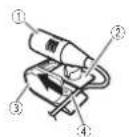
①Microphone
②Microphonebase
③Microphonic IP
④F them crophoneleadintothegroove.
- Microphone can be installed with using microphone clip. In this case, detach them microphone base from them microphone clip, to detach them microphone base from them microphone clip, slide them microphone base.
Installation
2Installthemicrophonecliponthesteeringcolumn.
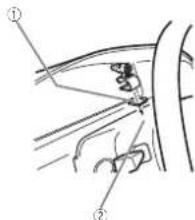

①Double-sidedtape
②Install nemicrophones:ipantherearsideo
theoeringcolumn.
③Clamo
Adjustingthemicrophoneangle

The microphoneanglecanoeadjusted.
Section
Appendix
Additionalinformation
Additionalinformation
Troubleshooting
SymptomCauseAction
| Thedisplay automatically returnstothc ordinary display. | Youdidnotperformanyoperationwithin about30seconds. | Performoperation again. |
| Theropcoat play range chargesun-expectoely. | Dependingontherepeatplay range,these lectoarange maychange whenanother folderortrackis beingselected orduringfast forwarding/reversing. | Selecttherecoat playrangeagain. |
| Asubfoldens notplayed back. | Subfoldenscan-notbe played whenFolderre-peat(folderre-peat)s selected. | Selectanotherre-peatplayrange. |
| NOXXXXappearswhana displays charged(NOTITLE,forax ame). | Thereisnoembaddedextinformation. | Switchthed splay orplayanother track/ft a. |
| Notextinformationcanbeobtained | • Switchthe broadcaststation.• Operatechis unit nameaswith pelgoodreceptioncondition. | |
| Thedisplay screen chargesat ransom. | Demomodels on. | • Pressanchold →DISPtocancel demomode.• Turnoff the demoisplaysetting. |
SymptomCauseAction
| Thedisplay screenchangesatrandomin-steadofris-playingtheclockcontinuouslyevenwiththeclockdisplayturnedon. | Demomodelison. | •Pressandhold⇒DISPlocanceldemomode.•Turnoffthedemodisp ayset-ting. |
| Thedisplay screenchangesatrandomexvonwiththedis-playatturnedon. | Demomodelison. | •Pressandhold⇒DISPlocanceldemomode.•Turnoffthedemodisp ayset-ting. |
| Theunitismalfunction-ing.Thereis inter-ference. | Youareusinga device,suches acelluar phone,that;transm laelec-tr Wave near theunit. | Moveelectr cal devices hatmay becausingthein-terferenceaway from theunit. |
SymptomCauseAction
| Thesound from the Bluetooth audiosource is not played back. | Thereisacallin progressona Bluetooth connectecellular phone. | ThesoundkII be playedbackwhen thecallisterminated. |
| ABluothcon connectedcellularphoncis currentlyioqing operated. | Donotoperate thecellularphone arthistima. | |
| Acalwas madewitha, Bluetoothconnectecellular phoneandthen immediatelyterminated.Asa result:communicationbetweenthisunit and thecellular chonewasnot terminated properly. | Raconnectthe Bluetoothconnectionbetween thisunitandthe cellularphone. | |
| Text information cannot bscroloc. | Displayscro-lingisstopped automatically when the temperaturearound thisunitis10°C orless. | Waituntil warmsbackup. |
| Movieplay-backs stoppedano thesimple displayappears. | Movieplayback isstoppeduto-matica lywhen thatemperature aroundthisunit is10°Corless. | Waituntil warmsbackup. |
SymptomCauseAction
| Soundfrom thatPodcan- notbeheard. | Theaudicou- putdirection mayswitchau- tomatical y when'ne Bluetoothand USBconnec- tonsareused atthesame lme. | UsernelPosto changetheaudio outpudirection. |
Errormessages
When you contact your dealer or your nearest Pioneer Service Center, besureton of the error message.
CDplayer
MessageCauseAction
| ERROR-07, 11,12,17,30 | Thed scisdirty Cleanthed sc. | |
| Thed scis scratched. | Replacethedisc. | |
| ERROR-10, 11,12,15, 17,30,A0 | Thereisane etricalonnechan caloror. | Turnt reignition switchOFFand backON,or switchtoaddifferentsource,then backtothoCD player. |
| ERROR-15 | Theinserted discisblank. | Replacethedisc. |
| ERROR-23 | Unsupported CD format. | Replacethedisc. |
Additionalinformation
MessageCauseAction
| FORMATREAD | Sometimestheralsadeleybetweenthestartofplaybackanswerwhenyoustarttohearanysound. | Waitunt lthemessagedisappearsandyounearsound. |
| NOAUDIO | Theinsorteddiscodocnotconlanaryplayatcfics. | Replacethedisc. |
| SKIPPED | TheinserteddiscountsDRMprotectedfiles. | Replacethedisc. |
| PROTECT | AllrefilesonteinsorteddisceareembeddedwithDRM. | Replacethedisc. |
Externalstoragedevice(USB,SD)/iPod
| MessageCauseAction | ||
| NODEVICENoUSBstoragedevicocorIPodisconnectec. | Connectiacom-pat bioUSBstoragedeviceIPod. | |
| FORMATREAD | Sometimestheroisadelaybetweenthestartofplaybackanwhenyoustarttohearanysound. | Walnut lithemssagodisapearsandyounearsound. |
MessageCauseAction
| NOAUDIOthereareno songs. | Transfertheaudio filesstethoUSB storagedevice andconnect. |
| Theconnectoc USBstoragedevicerehassecur- ityonaloid. | FollowthoUSB storagedevicein-structionslodis-aoiothosecurity. |
| SKIPPEDTheconnected USBstoragedevicocantins fi esembedded withWindows Media®DRM9/10. | Playanaudio le noternEmbedded withWindows MediaDRM9/10. |
| PROTECTAllthefilesin theUSBstorago devicoancem beededwith WindowsMedia DRM9/10. | Transferaudio filesnctam-bodiedwith WindowsMedia DRM9/10tothe USBstoragedevicandconnect. |
Additionalinformation
MessageCauseAction
| NOTCOM-PATIBLE | TheUSBdevice connectedtois notsupported bymisunit. | ConnectableUSB MassStorage Classcompliant device.Disconnect yourdeviceand replaceitwin a compatibleUSR storagedevice. |
| Non-compatible iPod | Disconnectyour deviceancro placeitwin a compatible iPod. | |
| Non-compatible SDstoragedevice | Removeyour deviceandreplaceit withaccompatible SDstoragedevice. |
MessageCauseAction
| CHECKUSBTheUSBconnectororUSB cablehasshort-circuited. | Checkthatthe USBconnectororUSB cableisnot caughtinsome-thingorgan-aged. |
| Theconnected USBstoragodoviocconsumos more than 500mA(max-mumallowable current). | Disconnect the USBstoragodoviocanddorctusell.Turnilhe gnitionswitcho OFF,thontoACC orONanother connectionly compliantUSB storagedevices. |
| TheIPodoperatescorrectly burdoesnot charge. | Makesurethe connectioncable fortheIPodhas notsnortedout (e.g., notcaught nmetalobjects), Afterchecking turnthe gnition switchOFFandnax:ON,orbis-connecttheIPod andreconnect. |
Appendix
Additionalinformation
MessageCauseAction
| ERROR-19Communication failed | ·Perform one of the following operations. -Turn the gnition switch Off and back ON. -Disconnector eject the external storage device. -Changeloadif-ferentsource. Then, return to the USBorSD source. ·Disconnect the cable from the iPod Oncelte iPod smain merusdis-played reconnect the iPodandresot it. |
| iPodfailure.Disconnectthe |
| cabiafromthe |
| iPod.Cricethe |
| iPod smain |
| monuldisis |
| played reconnect |
| theiPodandreset |
| it. |
| ERROR-23 USBstoragede-vicewasnolfor-mattedwithFAT12.FAT16orFAT32. | USBstoragede-viceshourdefor-mattedwithFAT12.FAT16orFAT32. |
MessageCauseAction
| ERROR-16ThePodfirmwareversionis old. | UpdatedatPod version. |
| iPodfailure.Disconnect the cablefromthe Pod.Oncethe Pod'smann monusidis played, reconnect the Podendresel it. | |
| STOPThereareno songsinthe currentlist. | Se ectal sthat containsings. |
| Notfound Norrelated songs. | Transfersongsto the Pod. |
Bluetoothdevice
MessageCauseAction
| ERROR-10Thepowerfailed forthe Bluetooth moduleofhisunil. | Turntherpition switchOFFand thentoACCor ON.Iftheeromnes-sagcisstildis-playedafter perform nglhe abovoaction, plicascontact yourdealeroran authorized PiorcorServ co Station. |
Additionalinformation
Handlingguidelines
Discsandplayer
Useonlydiscstnatfeatureetherofthefollowing twologs.


Use12-cmdiscs.Donotuse8-cmdiscscran adapterior8-cmdiscs.
Useonlyconventional,fullycirculardiscs.Denot useshapeddiscs.


Donot insert anything gother than a CD into the CD loadingslot.
Donoluse:cracked,chipped,warped,brother-wisedamaged:discsastheymaydamagetheplay-er.
UnfinalizedCD-R/RWdiscscannotbeplayed back.
Donotouchtherecordedsurfaceofthediscs.
Stored scs ntheircaseswnennotinuse.
Donotallachlabels, write on or apply chemicals to the surface of the discs.
TocleanaCD, w petnediscwithasoftclothoutwardfromthecenter.
Condensation may temporarily impair the player's performance. Lelitrestfloraboutorehourtoad-justloawarmertemperature. Also, wipeany campdiscsoftwithasoffcloth
Playbackofdiscosmaynotoepossiblebecauseof discharacteristics,d scformat,recordedapplication.playbackenvironment,storageconditions,andsoon.
Roadshocksmayinterruptdiscplayback.
When using disesthatcanbeprinted on acelsurfaces, check the instructions and the warnings of the discs. Depending on the scs, nser ingard ejecting may not be possible. Using such discs may result in damage to this equipment.
Don't attach commercially available labels or other materialstethed ses.
• Trediscsmaywarp making:nediscump ayable.
• Thalabels may come off during playback and preventejection of the scs, which may result in damage to the equipment.
Externalstoragedevice(USB,SD)
Address any quest or you have about your external storage device (USB, SD) to the manufacturer of the device.
Don et cleavethoexternalstoragodvice(USB.SD) nplaceswithhightemperatures.
Depending on the external storage device (USB, SD), then following product email occur.
• Operations may vary.
• The storage device may not be recognized.
- Filesmaynotbe played back properly.
USBstoragedevice
Connect or via USBhubarenotsupported.
Donctconnectanythingothorthana JSBstor agedevice.
Additionalinformation
FirmlysecuretheUSBstoragedevicewhendriving. DonotlettheUSBstoragedeviceta lontothe floor, where I maybecomejammed under the brakeoracceleratorpedal.
Depending on the USB storage device, the following problem may occur.
• The device may generate noise in the radio.
SDmemorycard
| This unit supports only the following types of SD memory cards. |
•SD
•miriSD
-microSD
•SDHC
Keen the SDmemorycardout of the each of children. Should the SDmemorycardes wallowed, consultadoctor immediately.
DonottouchtheconnectorsoftheSDmemory carddirectlywithyourfingersorwithanymetal device.
Donotin sort anything to north an an SD memory card into the SD cards lot. If a metal object (such as a coir) is inserted into the slot, their internal circuits may break and cause them all functions.
When inserting a miniSDormicroSD, use an adapter. Donotuseanadapter which has metal parts other than connectors exposed.
Donotin ser-tadamaged SD memorycardie g, warped, abelpee edoff/hasilmay not bejected fromthaslot.
Donottrytoforcear SDmemorycardintheSD cardslotasthecardorthisunitmayoedamaged.
When projecting an SD memory card, press and hold it until clicks, its dangerous for you to release your immediate after you pressor the card sthocard may shoot out of these lot and hitya in the face, etc. If the card shoots out of the slot, it may become lost.
iPod
To ensure proper operation, connected to connectorable from the Poddirectly to this unit.
Firmlysecure the Podwhandriving. Donollet the Podfallontothefloor, where tmaybecome jammedunderthebraxeoraccelerato pedal.
About!Podsettings
- When an iPod disconnected, this sun/changes the EQ (equalizer) setting of the iPod off in order to optimize head acoustics. When you disconnect the iPod, the EQ return to the original setting.
- You cannot set Repeat to off the Pod when using this unit. Repeat is automatically changed to All when the Pod is connected to this unit.
incompatible text saved on the Podwill not bed s played by the unit.
DualDiscs
Dual Discsaretwo-siderdiscslathavearecordableCDforaud cononesideandarecordable DVDforv decontheother.
Since the CDs de of Dual Discsis not physically compatible with the general CD standard, t may not be possible to play the CDs sidewith this unit.
Additionalinformation
Frequent cadingandojectingofaDualDiscmay result inscratchesorthedisc.Seriousscratches can eachoplaybackproblemsonthisunit. In some cases,a DualDiscmaybecomestuckinthe disc cadingslotandwillinoteject.Topreventthis, were recommendycurefrainfrom using DualDisc with thisunit.
Pleaserefe totheinformationfromthediscmanufacturerformoredetailedinformationabout DualDiscs.
CAUTION
Donot leavethediscs/external storage device (USB, SD) oriPodinplaces with high temperatures.
Compressedaudio compatibility(disc,USB,SD)
WMA
File extension: wma
B trate:48kbpsto320kbps(CBR),48kbpsto 384kops(VBR)
Sampling frequency: 32kHz, 44.1kHz, 48kHz
Windows/MediaAudioProfessional, Lossless, Voice/DRMStream/Streamw thvide: Notcompatible
MP3
Flaextension:mp3
B rate:8kopsto320kops(CBR),VBR
Sampling frequency:8kHz to 48kHz (32kHz, 44.1 kHz, 48kHz foremohasis)
Compatible ID3tagversion:1.0.1.1.2.2.3.2.4 (ID3tagVersion2.x)givenpriorityoverVersion 1.x.)
M3up aylist: Notcompatible
MP3i(MP3 interactive),mo3PRO;No:compatible
WAV
Fileextension.wav
Quantization bits:8and16(LPCM),4iMS
ADPCM)
Sampling frequency: 6kHz to 48kHz (LPCM).
22.05kHz and 44.1kHz(MS/ADPCM)
AAC
Compatible format: AACencoded by iTunes
Fileextension::m4a
Sampling frequency: 1.025kHz to 48kHz
Transmission rate: 16kbps to 320kbps, VBR
AppleLossless:Notcompatible
AACfilebough(fromtheiTunesStore(m4pfile extensions or) Notcompatible
Supplementalinformation
Only the first 32 characters scanned displayed as a filename (including the first extension) or folder name.
This unit may not operate correctly depending on the application used to encode WMA files.
Theromaybeas lightdelayattnestartoto ayback ofaudofliesembeddedwithirragedalaoraudio filesstonedonaUSBstoragedev celhalhasnumercoustoldemicarchies.
Appendix


Appendix
Additionalinformation
Disc
| Playablefolder hierarchy uptosghliers(Aprac-tica hierarchy slassnanwoltiers). |
| Playablefoldersupto98 |
| Playablefilesupto99 |
| Filesystem:ISO9660Level1and2,Romeo,Joliet |
| Multi-session playback:Compatible |
| Packetwnl tedatstransfer:Notcompatible |
| Regaradessoffthelengthofblanksectonsbe-tweenthesongstromtheorgina recording.com-pressedaudioiscosplaywithshortpause betweensongs. |
Externalstoragedevice(USB,SD)
| Playablefoicerhierarchyuptoeghtiers(Aprac- tica hierarchyslessthanwolters). |
| Playablefoicor disrupto500 |
| Playableflies upto15000 |
| Playbackofcopyrightprotectactfiles:Notcompa b e |
| Partitionedexliema storagedevice(USB.SD): Onlythefirstplayablepartitioncanboplayed. |
| Theremaybeaslightdelaywhenstartingplay- bacvoudiaulifisoneUSRsforagedevicewith nurercusfoldernarchies. |
SDmemorycard
| ThereisocompatibilityforMultiMediaCards(MMC) |
| Compatibilitywithal/SDmemorycardsisnotguaranteed. |
| Thisunit snotcompatiblewithSD-Audio. |
CAUTION
• Pioneeracceptsnoresponsibilityfordata
lostonUSBmemory/USBportableaudio
players/SDmemorycards/SDHCmemory
cards,evenifthaldataislostwhilethisunit
isused.
• Pioneer cannot guarantee compatibility with all USB mass storage devices and assumes nonresponsibility for any loss of data on mediaplayers, smartphones, other devices while using this product.
Additionalinformation
iPodcompatibility
This unitsupportsonlythefollowingiPodmodels. SupportediPodsoftwareversionsareshown below.Olderversionsmaynotbesuported.Medefor
- iPodtouch4thgeneration(softwareversion 4,7)
- iPodouch3ogeneration(softwareversion 3.1.1)
- iPodtouch2ndgeneration(softwareversion 2.1.1)
- iPodtouch1stgeneration(softwareversion 1.1)
- Podclassic:160GB(softwareversion2.0.2)
■Podclassic120G3(softwareversion2.0)
• iPodclassic(softwareversion 1.0)
■ iPodwith video(softwarevers on 1.2.3)
- Podnanosthgeration(SOFTwarevers or 1.0)
- Podnanobthgeneration(softwarevers or 1.0.1)
- iPodnano4thgeneration(softwarevers or 1.0)
- Podnano3rdgeneration (softwareversion 1.0)
- iPodnano2ndgeneration (softwareversion 1.3)
- iPodnano®stgeneration(softwareversion 1.3.1)
- iPhone4(softwareversion4.1)
■iPhone3GS(softwareversion3.0)
■iPhone3G(softwareversion7.0)
- iPhone(softwareversion',1,1)
Depending on the generation over the iPoc, some functions may not be available.
Operator smayvarydependingorthesoftware versionofiPod.
When using an iPod, an iPod Dock Connector to USB Cable is required.
A. Pioneer CD-U51 interfaceable is also available. Fordetails, consult your dealer.
About the file format compatibility, refer to the Pod manuals.
Audiobook.Podcast:Compatible

CAUTION
PioneeracceptsnerresponsibilitytordatalostontheiPod,evenifthatdataislostwhilethisunilisused.
Sequenceofaudiofiles
Theusercan notassignflocernumbersand specfyplaybacksequenceswiththisunit.
Exampleofahierarchy
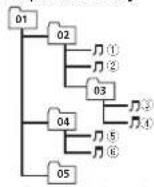
Level 1 Level 2 Level 3 Level 4
Folder Compressed audiofile 01to05:Folder number ①to⑥:Playback sequence
Disc
Folderselectionsequenceortheroperation may differ depending on the encoding or writing software.
Externalstoragedevice(USB,SD)
The playback sequence sthesameastherecorded sequence in the external storage device (USB.SD).
Tospecify the playback sequence, the following method is recommended.
Additionalinformation
①Createafilennamethatincludesnumbers thatspecifytheplaybacksequence(e.g., 001xxx.mo3and099yyy.mp3).
②Putthosefilesintoafolder.
[3] Savetheolderthatcontains:thefilestothe externalstoragedevice(USB,SD).
However, depending on the system environment, you may not be able to specify the playback sequence.
ForUSBportableaudioplayers, thesequence is different and depends on the player.
Bluetoothprofiles
InordertouseBluetoothwirelesstechnology, devicesmustbeablelointerpretcertainprofiles. Thisunitiscompatiblewiththefollowing profiles.
•GAP(GenericAccessProfile)
• SDP(ServiceDiscoveryProtocol)
- OPP(ObjectPushProfile)
- HFP(HandsFreeProfile)
• HSP(HeadSetProfile)
• PBAP(PhoneBookAccessProfile)
- A2DP(AdvancedAudioDistributionProfile)
- AVP(Audio/VideoProfile)
•AVRCP(Audio/VideoRemoteControlProfile)
1.0
Copyrightandtrademark
Bluetooth
The Bluetooth ^® wordmark and ogosareregis- leredtrademarksowned byBluetoothSIG, Inc. andanyuseofsuchmarksbyPIONEERCOR- PORATIONisunderlicense.Othertrademarks andtradenamesarethoseoftheirrespective owners.
iTunes
Apple and Tunes are trademarks of Apple Inc., registered in the U.S. and other countries.
MP3
Supply of this production by conveyalsicense for private non-commercial use and does not conveyalsicense or imply any height of this product in any commercial (i.e. revenue generating) realtime broadcasting/terrestrial, satellite, cable and orany other medial, broadcasting/streaming via internet, intranets and/or other networks nor therelectron content distributions systems, such as pay-audio audio-on-demand applications. An independent licensee such uses required. For details please visit http://www.mp3licensing.com.
WMA
WindowsMediaiseilheraregisteredtrademark ortrademarkofMicrosoftCorporationinthe UnitedStatesand/orothercountries. Thisproductincludestechroogyownedby MicrosoftCorporationandcannotbusedcor distributedwithoutalicensefromMicrosoft Licensing,Inc.
SDmemorycard
SDLogo saltrademarkof SD-3C, LLC. miniSDLogo saltrademarkof SD-3C, LLC. microSDLogo saltrademarkof SD-3C, LLC. SDHCLogo saltrademarkof SD-3C, LLC.
iPod&iPhone
iPhone,iPod,iPodclassic,iPodnano,and iPod toucharetrademarksofAppleInc..registered in the U.S.andother countries.
"Made for iPod" and "Made for iPhone" mean that electronic accessory has been designed to connect specifically by PodoriPhone, respectively, and has been certified by the developp to meet Apple performance standards. Apple is not responsible for the operation of this device or its compliance with safety and regulatory standards. Please note that the use of this device with PodoriPhone may affect wire ess performance.
Additionalinformation
Appendix


Appendix
Additionalinformation
Specifications
General
Ratedpowersource.....14.4VDC
(al owab evolbacerarge:
12.0V/14.4VDC
Groundingsystem..... Negativelype
Maximum consumer consumption
10.0A
DIN
Continuous power output
77W×2450Hz+150.00Hz
5%1HD,4Ωload,both char
no scriven)
load impedance 4Ω to 8Ω × 4
4Ω to 8Ω × 2 + 2Ω ×
Prooul maximal output level
4.0V
Equalizer(5-BandGraphic Equalizer)
Frequency.....10GHz/31GHz/1.25kHz/
3.15kHz/5kHz
Gain....±12dB
HPF
Frequency.....50Hz/63Hz/80Hz/100Hz
1254
Slope....-12dB/oct
Subwoster(mono):
Frequency.....50Hz/63Hz/80Hz/100Hz/
12517
Slope -18dB/arc
Gain....+6cPro-24dB
Phase......Normal/Reverse
Bassboest:
Gain +12dB to 0dB
CDplayer
System....Compactdiscaud osystem
Disabled isca....Compact disc
Signal-to-noise ratio.....94dB(1kHz)(IEC-A network)
Number of channels.....2(stereo)
MP3decodingforma....MP3G-1&2AudioLayer3
WMAdecodingformat....Ver.7,7.1,8,9,10,11,12(2ch
a.10
(Windows/Media Player)
AACdecodingformat.....MPFG-4AAC(Turesencoded
only(m4a)
(Ver. 9 Zandard er)
WAVsignFormat.....Linear-PCM&MSADPCM
(Non-compressed)
USB
USBstandardspecification
US32.0fullspeed
Maximum current supply
18
USBClass....MSC(MassStorageClass)
Filesystem....-AI'2HA16HA132
M-36ocodinglorma...., MPLG 1&2AudioLayer3
WMAdecodingformat....Ver.7,7.1.8.9,10.11,12(2ch
audio
(WindowsMediaPlayer)
AACdecodingformat.....MPEG-4AACiTunesen coded
only:(m4a)
(Ver.9 2andearlier)
WAVsignal formal.....Linea-PCM&MSADPCM
(Non-compressed)
SD
Comparable physics format
Version 2.00
(Windows/Media Player)
AACdeccdingnormal.....MPEG-IAAC(II)presencoded
only(m4a)
(Ver.9.2anceardier)
Additionalinformation
WAVs gnsfrcmat....LinearPCM&MSADPCM
(Non-compressed)
FMtuner
Frequency range.....87.5MHz;o108.0MHz
Usable sensitivity ..... 9 dBf (0.8μV/75Ω, mono, 3/V)
20dB)
Signal-to-ciseratio.....72dB(IEC-A network)
AMtuner
Freu jonevrango.....531kl lzto 1602kl lz(9kl lz)
530kl | zto1640kl | z/10kl | z
Usablesensitivity.....25μV(S/N:20dB)
Signal-to-reiseratio.....62dB(IEC-Anetwork)
Bluetooth(DEH-8450BTonly)
Version......Bluetooth3.0certified
Outoutower....+4dBmMaximum
(Powerclass2)
Note
Specificationsandnedesignaresubeclo
modificationswithoutnotice

natural_image
Two horizontal rounded rectangular shapes with rounded ends, no text or symbols present.
English
27En
Sección
01
Índice
01 Antesdecomenzar
ParteParte
| 1 | (color) | 8 | ∅/DISP OFF |
| 2 | LEVER@BAND/ | ∅(iPod) | |
| 3 | /DISP | 10 | SRC/OFF |
Usodeestaunidad
| ParteParte | ||
| 1 | Q (Isla)dt | MULTI-CON-TROL(M.C.) |
| 2 | Botóndeaperlu-ra | Ranuradeinser-ciónded scos |
| 3 | Conectoroen-tradaAUX(co-nectorestéreo de3.5mm) | 10^ (expulsar) |
| 4 | Ranuraparala tarjctademo-moriaSDExtra gaelpanelde antecropaaccosralaranuradelatarje-tacamomoriaSD. | |

PRECAUCIÓN
ParteOperación
USBmed anteelcableUSB.
OFF—15Minutes—30Minutes
FMstepipasodesintonladeFM)
OFF—USBmemory1—USBmemory2—SD card
Warningtone(ajusted tonodeadventral)
①PuertoUSB1
②PuertoUSB2
③Entradadeanlena
15cm
④Fusible(10A)
⑤Entradadelcabledealimentación
⑥Entradaremotaconectada
⑥ ⑩
①Pinza ②Abrazadera

MP3i(MP3interactive),mp3PRO:nocompatible
WAV
(Windows/MediaPlayer)
Forma.ecodecudilicacionAAC
MPFG-4/AC/sblood feedc
coniTunes)(.m4a)
(See 3.2 volatility issue)
Formatocese#e#WAV...PCM linea&MSADPCM
(Windows/MediaPlayer)
Forma:ce:deconficacionnA/C
MPFG-4/AC/solidocodificado
| ParteParte | |||
| 1 | Cor | 8 | DISP OFF |
| 2 | LEVER@BAND/ | (iPod) | |
| 3 | DISP | 10 | SRC/OFF |
| 4 | (Lista)11 | MULTI-CON-TROL (M.C.) | |
Seção
OFF—15Minutes—30Minutes
FMstep(PassodesintoniaFM)
OpassodesintoniaFMempregadopelasintonia porbuscapodeseralternadoentre100kHz, o passopredefinidoe50kHz.
Seasirloniaporbuscaforexecutataempassos de50kHz, asemissoraspoderãosersintonizadas deformarnprecisa. Sintonizeasemissorasutilizandoasirloniamanualouutilizenvarmente sintoniaporbusca.
1 Pressione M.C. paraseles oropassodes in on aFM.
1 Press oneM.C.paraselectionaroajuste. OFF—USBmemory1—USBmemory2—SD card
①PortaUSB1
②Portal USB2
③Entradadaantena
15cm
①Prercedordom crofore ②Presilha

①Filaduplaface
Audiobook. Podcast Compatical

CUIDADO
(Windows Media Player)
(Windows/MediaPlayer)
(Windows/Media Player)
部位部位
9kHz (9 kHz) - 10kHz (10 kHz)
2 按M.C.確認選擇
Contrast(顯示對比度設定)
T 轉動M.C.調整對比度
0至15随着重平增大或减小而显示。
2 按M.C.確認选择
(ABC) - BTAudio (BT音訊)
调整音量
1 轉到M.C.可调整音量。

注意
Tuning Mode (LVER調象設定)
您可指定功能至本機上的LEVER
OFF 15Minutes 30Minutes
操作本機
FM step (投誘類問隔)
9kHz (9 kHz) 10kHz (10 kHz)
Auto PI(自動PI複写)
OFF-USBmemory1-USBmemory2-SD card
Warning tone (警告音設定)
①LSR报1
②USB追2
③天線輸人
①USB追1 ②USB追2 ③天線輸入
150m
④ 保險絲 (10.4)
⑤ 重源線輸
⑥ 有線遮控输入
可連接實體線路的滙接器轉接器(另售)。
①麦克風夹
安装
②夹
將麥克風安裝在方向盤轉向機柱上時
1 將麥克風安裝在麥克風夾上。

①麦克風 ②麦克風座
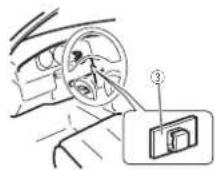
①雙面膠
natural_image
Two horizontal rounded rectangles side by side, no text or symbols present
معلومات إضافية
تقط

AM
(Windows Media Player)
(Windows Media Player)
iTunes (العربية) MPEG-4 AAC ...... AAC
(m4a.)
(العذار ٤,٢ وأفرم)
Linear PCM & MS ADPCM ..... WAV
(طيغ)
SD
(Windows Media Player)
Linear PCM & MS ADPCM WAV
(الجع)
FM
m = 311
一
(1)
od pa
D
1.9
m = 311
J
一、
du ha
15
1
C.
الر Contract
一}
od na
من
بيل النا
(1)
الرقمج
(اصد) il
od na
10 ص
جبل لات
(1.5.
الر نمج
الصد) il
od na
10
عل الاو
√
C
[1,3]
الرتد
[Illegible]
hone
[Non-Text]
代
、
1
iRho
20.35
[Non-Text]
(
[Unreadable]
1
HIFNO
le 3G
[Non-Text]
(
.
دار الار
e) IPF
one 3
The Ground Truth image displays a single, solid horizontal line. According to Rule 2 (UNDERSCORE & LINE RULES), this is a stylistic or background line, not a placeholder underscore. Therefore, the OCR result must ignore it and output nothing or only meaningful text. The provided OCR content is "____", which consists of four underscores. This is an incorrect interpretation of the line as a placeholder, violating the rule that stylistic lines must be ignored. The OCR has hallucinated placeholder underscores where none exist in the GT. Hence, the result is inconsistent with the Ground Truth.
(1)
(1,2,
المر نامج
[ै]
iPhor
[EMPTY]
[1]
[Unreadable]
751
- 1
•
صداره.
, iPod
بنا لجى
正
ب لوط
تُوْرِ بَدْ
الخصر:
الزنا
الله
للاك
الثبة
ف عمل
•
2.5
•
•
:
(No text)
The Ground Truth image displays a single, solid horizontal line. According to Rule 2 (UNDERSCORE & LINE RULES), if the GT contains lines used for stylistic emphasis or as background elements (like ruled paper), the OCR result must ignore them. The provided OCR content is "____", which consists of four underscores. This is an incorrect interpretation of the line as a placeholder symbol, violating the rule that stylistic lines must be ignored. Therefore, the OCR output hallucinated symbols where none should exist.
m = 311
m = 311
m = 311
dDock
من موصctl
الله
أ. فكله ب
od
(1)基因通过控制 通过控制
(五) 2017年
- 本说明仅供参考。
USB
الر. كان
1 + u1 - 1 = ( 1 + u) u1 < 1 = u
1 + u1 - 1 = ( 1 + u) u1 < 1 = u
m = 311
10.02
1
بخصو Pi
neer.
CD-IL
51
واجها
四、议案内容
(1)
- 本公司董事会
16
5.16
(No text)
1 + u1 - 1 = ( 1 + u) u1 < 1 = u
m = 311
.
-
od ع اخلة
التنباق را
الملغ
حول تو
علوست
m = 311
The Ground Truth image displays a single, solid horizontal line, which is a stylistic or background element (like a rule line on paper). According to Rule 2, such lines must be ignored by the OCR result. The provided OCR content is "____", which consists of underscores. Underscores are not equivalent to a solid line and are not permitted under the “Stylistic/Background Lines (Ignore)” rule. Outputting underscores for a stylistic line is incorrect because it misinterprets the line as a placeholder fill-in-the-blank area. Since the OCR output incorrectly rendered a stylistic line as underscores (which should be ignored), this violates the rule. Therefore, the OCR result is inconsistent with the Ground Truth.
单位:元
D
•
The Ground Truth image displays a single, solid horizontal line. According to Rule 2 (UNDERSCORE & LINE RULES), this is a stylistic or background line, not a placeholder underscore. Therefore, the OCR result must ignore it and output nothing or only meaningful text. The provided OCR content is "____", which consists of four underscores. This is an incorrect interpretation of the line as a placeholder, violating the rule that stylistic lines must be ignored. The OCR has hallucinated underscores where none should exist based on the GT's visual context. Hence, the OCR result is inconsistent with the Ground Truth.
广力云智慧零售收银系统
نواقى
:Podc
ast
1 + u1 - 1 = ( 1 + u) u1 < 1 = u
1 + u1 - 1 = ( 1 + u) u1 < 1 = u
1 + u1 - 1 = ( 1 + u) u1 < 1 = u
1 + u1 - 1 = ( 1 + u) u1 < 1 = u
1 + u1 - 1 = ( 1 + u) u1 < 1 = u
[Non-Text]
[Non-Text]
[Non-Text]
[Non-Text]
[Non-Text]
[Non-Text]
[Non-Text]
[Non-Text]
[Non-Text]
[Non-Text]
d iks
- 2017
1
2.1.4
- Rio
[Unreadable]
- 2017年
5
الصوص
PFO
.
دام هذا الج
اء است
-
ن تك
و نم فعد
حَى وَلَ
حَى وَلَ
[Non-Text]
[Non-Text]
[Non-Text]
[Non-Text]
[Non-Text]
[Non-Text]
[Non-Text]
[Non-Text]
[Non-Text]
[Non-Text]
[Non-Text]
[Non-Text]
[Non-Text]
[Non-Text]
[Non-Text]
[Non-Text]
[Non-Text]
[Non-Text]
[Non-Text]
[Non-Text]
[Non-Text]
[Non-Text]
[Non-Text]
[Non-Text]
[Non-Text]
[Non-Text]
[Non-Text]
[Non-Text]
[Non-Text]
[Non-Text]
[Non-Text]
[Non-Text]
[Non-Text]
[Non-Text]
[Non-Text]
[Non-Text]
[Non-Text]
[Non-Text]
[Non-Text]
[Non-Text]
[Non-Text]
[Non-Text]
[Non-Text]
[Non-Text]
[Non-Text]
[Non-Text]
[Non-Text]
معلومات إضافية
معلومات إضافية

USB ①
USB ②
③ نخل دوانى
100
④ المتصير (١٠ أمير)
⑤ نخل سلك الكهرباء
ال squad网格 Educational Training Program DISP OFF/ ⊙
(ROSE ELI WHITE) 27 •
(SCAND) SCAN •
(ROSE ELI WHITE) 27 •
| الiversified from the first of the year |
PH.B.Name, Ring tone, Auto answer
-
لGrid frust frust frust frust frust frust frust frust frust frust frust frust frust frust frust frust frust frust frust frust frust frust frust frust frust frust frust frust frust frust frust frust frust frust frust frust frust frust frust frust frust frust frust frust frust frust frust frust frust frust frus
-
M.C. لاختر المسوى المرغوب
Super bass Flat Custom2
(ضيط الموزن) G.EQ
التشفيل الجزء
)DEH-6450BT(
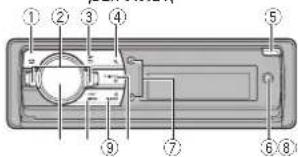

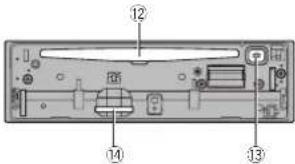
ال Dezء
172/1··/(A·/T/D).... frkts
(2) () = 15
(1)
.
2.13.4.5.6.7.8.9.10.11.12.13.14.15.16.17.18.19.20.21.
......
+ نسین ۲-کسین
معرانيامعكين
GAP (Generic Access Profile)
(二) 2.3.1 (Bamara, Haddas, Tama)
(6) ADB (Rexing, Bier, and Real-
(34) SDP (Service Discovery Protocol)
(بر وفیل ار سل داده) OPP (Object Push Profile)
y = 10, x = 2, y = 3.
نصب ميكروفن
DEH-8450B

Fa
صب
صب

ATصال DIN در عفب
USB 1 درگاه ①
USB ٢ مُرْكَهٍ ②
S_n = 1
(Bluetooth) Auto connect
• Special device • Special device • Bluetooth
(Bluetooth) Device INFO
Super bass—Flat—Custom2
(النظام اکوالازر) G.EQ
(مکت) Pause
Imported by an known kind
iPod - APP
IPod - AUDIO
Others—Classics—Popular—News&Inf
| الإستعمال | |
| FM-2 -FM-1 (AM) FB 1 | BAND |
| FB 1 | |
| MOG HANIN TESI (AM) FB 1 | LEVER |
| BA BIRCHETD (AM) FB 1 | LEVER |
| JH GAOHAT (AM) FB 1 | LEVER |
| JH GAOHAT (AM) FB 1 | LEVER |
| JH GAOHAT (AM) FB 1 | LEVER |
Visit us on the World Wide Web at
http://pioneer.jp/group/index-e.html
Pioneer Gulf.FZE
Pioneer Electronics Australia. Pty.Ltd
Pioneer Electronics Asiacentre.Pte
Pioneer (HK) Ltd.
Pioneer High Fidelity Taiwan Co., Ltd.
Pioneer International Latin America S.A.
http://www.pioneer-uae.com
http://www.pioneer.com.au/
http://www.pioneer.com.sg
http://www.pioneerhongkong.com.hk
http://www.pioneer-twn.com.tw
http://www.pioneer-latin.com
©2011PIONEERCORPORATION.
Allrightsreserved.
PIONEERCORPORATION
1-1, Shin-ogura, Saiwai-ku, Kawasaki-shi,
Kanagawa212-0031,JAPAN
PIONEERELECTRONICS(USA)INC.
P.O.Box1540,LongBeach,California90801-1540,U.S.A.
TEL:(800)421-1404
PIONEEREUROPENV
Haven1087,Keetberglaan1,B-9120Melsele,Belgium/Belgique
TEL:(0)3/570.05.11
PIONEERELECTRONICSASIACENTREPTE.LTD.
253AlexandraRoad,#04-01,Singapore159936
TEL:65-6472-7555
PIONEERELECTRONICSAUSTRALIAPTY.LTD.
5ArcoLane,Heatherton,Victoria,3202Australia
TEL:(03)9586-6300
PIONEERELECTRONICSOFCANADA, INC.
340FerrierStreet,Unit2,Markham,OntarioL3R2Z5,Canada
TEL:1-877-283-5901
TEL:905-479-4411
PIONEERELECTRONICSDEMEXICO,S.A.deC.V.
Blvd.ManuelAvilaCamacho13810piso
Col.LomasdeChapultepec,Mexico,D.F.11000
TEL:55-9178-4270
先锋股份有限公司
台北市內湖區瑞光路407號8樓
電話:(02)2657-3588
先锋電子(香港)有限公司
香港九龍長沙灣道909號5樓
電話:(0852)2848-6488
PrintedinChina
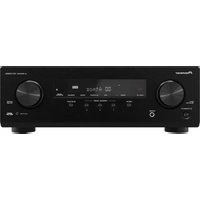
- Installation
- Additionalinformation
- Beforeyoustart
- ThankyouforpurchasingthisPIONEER product
- Aboutthisunit
- CAUTION:
- CAUTION
- Note
- Incaseoftrouble
- Demomode
- Important
- Aboutthismanual
- Operatingthisunit
- Remotecontrol
- Setupmenu
- 1Afterinstallationofthisunit,turnthe ignitionswitchtoON.
- 2TurnM.C.toswitchtoYES.
- 3PressM.C.toselect.
- 4Performthefollowingprocedurestoset themenu.
- 5Tofinishyoursettings,turnM.C.toselect
- YES.
- 6PressM.C.toselect.
- Notes
- Basicoperations
- Useandcareoftheremote control
- WARNING
- 5
- Menuoperationsidentical forfunctionsettings/audio adjustments/initialsettings/lists
- Tuner
- UsingPISeek
- UsingAutoPISeekforpreset stations
- Storingandrecallingstations foreachband
- Press(list).
- UseM.C.tostoretheselectedfrequency inthememory.
- UseM.C.toselectthedesiredstation.
- SwitchingtheRDSdisplay
- -Press ⊃/DISP.
- PTYlist
- News&Inf
- Popular
- Classics
- Others
- Usingradiotext
- Functionsettings
- 3TurnM.C.toselectthefunction.
- BSM(beststation or memory)
- Regional(regional)
- Local(localseektuning)
- News&Inf Popular Classics Others
- TrafficAnnounce(trafficannouncementstandoy)
- AlternativeFREQ(alternativefrequenciessearch)
- Newsinterrupt(newsprogram interruption)
- TuningMode(LEVERtuningsetting)
- CD/CD-R/CD-RWandexternal
- storagedevices(USB,SD)
- Displayingtextinformation
- Selectingandplayingfiles/ tracksfromthenamelist
- 1Press(list)toswitchtothefile/track namelistmode.
- 2UsebothLEVERandM.C.toselectthedesiredfilename(orfoldername).
- Browsingforasong
- 1Press 🔒 (list)toswitchtothetopmenu ofthelistsearch.
- 2UseM.C.toselectacategory/song.
- 1PressM.C.todisplaythemainmenu.
- 2TurnM.C.tochangethemenuoption andpresstoselectFUNCTION.
- Operating thisunit
- Playmode(repeatplay)
- CD/CD-R/CD-RW
- Randommode(randomplay)
- Linkplay(linker ay)
- Pause(pause)
- SoundRetriever(soundretriever)
- iPod
- M.C.
- Playingsongsrelatedtothe
- currentlyplayingsong
- 2TurnM.C.tochangethemode;pressto
- select.
- Operatingthisunit'siPod functionfromyouriPod
- Shufflemode(shuffle)
- Shuffleall(shuff ball)
- Linkplay(linkplay)
- Audiobooks(audiobookspeed)
- Audioadjustments
- 2TurnM.C.tochangethemenuoption andpresstoselectAUDIO.
- Fader/Balance(fader/balanceadjustment)
- PresetEQ(equal zerrecall)
- G.EQ(equalizeradjustment)
- Loudness(oudress)
- Subwoofer1(subwooferon/offsetting)
- Subwoofer2(subwooferadjustment)
- BassBooster(bassboost)
- HPF(highpassfilteradjustment)
- 50Hz—63Hz—80Hz—100Hz—125Hz
- SLA(sourceleveladjustment)
- UsingBluetoothwireless technology
- UsingBluetoothtelephone
- Settingupforhands-freephoning
- Connectionmenuoperation
- 1Pressandhold 🔒 todisplaytheconnectionmenu.
- 2TurnM.C.toselectthefunction.
- BluetoothAudio
- SettingupforBluetoothaudio
- Play( play )
- Phonemenuoperation
- PhoneBook(phonebook)
- PhoneFunction(phonefunction)
- Functionandoperation
- 1DisplayPhoneFunction.
- 2PressM.C.todisplaythefunctionmenu.
- Autoanswer(automaticanswering)
- Ringtone(ringtoneselect)
- PH.B.Nameview(phon abook nameview)
- Initialsettings
- 3TurnM.C.toselecttheinitialsetting.
- Languageselect(mult-language)
- Calendar(settingthedate)
- Clock(settingtheclock)
- EngineTimealert(e apsectimed splaysetting)
- FMstep(-M/tuningstep)
- AutoPI(autoPIslock)
- OFF—USBmemory1—USBmemory2—SD card
- Warningtone(wamingtonsetting)
- AUX(auxiliaryinput)
- Dimmer(dimmersetting)
- Contrast(displaycontrastsetting)
- S/Wcontrol(rearoutputandsubwoofersetting)
- Demonstration(de mod splaysetting)
- Ever-scroll(scroll modesetting)
- BTAUDIO(Bluetoothaudioactivation)
- Clearmemory(resett ngtheBluetoothwireless techno ogymodu e)
- BTVersioninfo.(Bluetoothversiondisplay)
- S/WUPDATE(updatingthesoftware)
- Otherfunctions
- UsinganAUXsource
- Usingdifferententertainment displays
- Switchingthedisplayindication
- 5TurnM.C.tochangethedisplay.
- Turningtheclockdisplayonoroff
- 4PressM.C.toselectthedesiredsetting.
- Selectingtheilluminationcolor
- Advancedoperationsusingspecial buttons
- Key Display Key&Display
- Selectingthekeycolorfromthe illuminationcolorlist
- 4TurnM.C.toselecttheilluminationcolor.
- Selectingthedisplaycolorfromthe illuminationcolorlist
- 3TurnM.C.toswitchtoDisplayandpress toselect.
- Selectingkeyanddisplaycolorfrom theilluminationcolorlist
- Customizingtheilluminationcolor
- Switchingthedisplayindicationand buttonillumination
- ●Pressandhold ©/DISPOFF.
- Installation
- Connections
- DINfront/rearmount
- DINFront-mount
- Insert themountingsleeve into the dashboard.
- 2Securethemountingsleevebyusinga screwdrivertobendthemetaltabs(90°)into place.
- 3Installtheunitasillustrated.
- DINRear-mount
- Determinetheappropriateposition wheretheholesonthebracketandtheside oftheunitmatch.
- 2Tightentwoscrewsoneachside.
- Removingtheunit
- 1Removethetrimring.
- 2Insertthesuppliedextractionkeysinto bothsidesoftheunituntiltheyclickinto place.
- 3Pulltheunitoutofthedashboard.
- Removingandre-attachingthe frontpanel
- Installingthemicrophone
- Wheninstallingthemicrophone onthesunvisor
- 2Installthemicrophonecliponthesun visor.
- Wheninstallingthemicrophone onthesteeringcolumn
- Adjustingthemicrophoneangle
- Errormessages
- Bluetoothdevice
- Handlingguidelines
- Discsandplayer
- Externalstoragedevice(USB,SD)
- USBstoragedevice
- DualDiscs
- Compressedaudio compatibility(disc,USB,SD)
- WMA
- MP3
- WAV
- AAC
- Supplementalinformation
- iPodcompatibility
- Sequenceofaudiofiles
- Disc
- Bluetoothprofiles
- Copyrightandtrademark
- Bluetooth
- iTunes
- SDmemorycard
- iPod&iPhone
- Specifications
- General
- CDplayer
- USB
- SD
- FMtuner
- AMtuner
- Bluetooth(DEH-8450BTonly)
- Índice
- Antesdecomenzar
- Usodeestaunidad
- PRECAUCIÓN
- OFF—15Minutes—30Minutes
- FMstepipasodesintonladeFM)
- Warningtone(ajusted tonodeadventral)
- FMstep(PassodesintoniaFM)
- CUIDADO
- Contrast(顯示對比度設定)
- 注意
- Tuning Mode (LVER調象設定)
- 操作本機
- FM step (投誘類問隔)
- Auto PI(自動PI複写)
- Warning tone (警告音設定)
- 安装
- 將麥克風安裝在方向盤轉向機柱上時
- 將麥克風安裝在麥克風夾上。
- معلومات إضافية
- نصب ميكروفن
- ATصال DIN در عفب
- (Bluetooth) Auto connect
- (Bluetooth) Device INFO
- http://pioneer.jp/group/index-e.html
- PIONEERCORPORATION
- PIONEEREUROPENV
Brand : PIONEER
Model : DEH-8450BT
Category : Receiver