
DEH-5450SD - Receiver PIONEER - Free user manual and instructions
Find the device manual for free DEH-5450SD PIONEER in PDF.


| Product Type | Car Stereo Receiver |
| Brand | Pioneer |
| Model | DEH-5450SD |
| Category | CD/Media Receiver |
| Color | Black |
| Dimensions (W x H x D) | 178 x 50 x 162 mm (7 x 2 x 6.4 in) |
| Weight | 1.3 kg (2.9 lbs) |
| Power Supply | 14.4 V DC (10.8-15.1 V allowable) |
| Maximum Power Output | 50 W x 4 |
| RMS Power Output | 22 W x 4 (at 4 Ω, 1% THD) |
| Audio Outputs | 2 Preamp outputs (Front, Rear/Sub) |
| CD Player | Yes, CD-R/RW compatible |
| Tuner | AM/FM with RDS |
| USB Port | Yes, front panel (USB 2.0, up to 32 GB FAT32) |
| SD Card Slot | Yes, front panel (SDHC, up to 32 GB) |
| AUX Input | Yes, 3.5 mm front panel |
| Remote Control | Yes, wired remote control included |
| Detachable Face | Yes, with case |
| Display | LCD with multi-line text |
| Equalizer | 3-band parametric EQ with presets |
| Security | Detachable face, security code |
| Operating Temperature | -20°C to +60°C |
Frequently Asked Questions - DEH-5450SD PIONEER
User questions about DEH-5450SD PIONEER
0 question about this device. Answer the ones you know or ask your own.
Ask a new question about this device
Download the instructions for your Receiver in PDF format for free! Find your manual DEH-5450SD - PIONEER and take your electronic device back in hand. On this page are published all the documents necessary for the use of your device. DEH-5450SD by PIONEER.
USER MANUAL DEH-5450SD PIONEER
REPRODUCTOR DE CD CON RECEPTOR RDS
CD PLAYER COM RDS
CD RDS 接收機
Use and care of theremole control 5
Menuoperationsidenticalforfunction
settings/audioadjustments/init a
settings/lists6
Tuner6
CD/CD-R/CD-RWandexternal storage
devices(USB,SD)7
Pod8
Audioadjustments10
UsingBluetoothwirelesstechnology10
Initial settings13
Otherfunctions14
03 Installation
Connections16
Installation17
Installing the microphone 19
Additionalinformation
Troubleshooting20
Errormessages20
Handlingguidelines22
Compressedaudiocompatibility/disc,USB,
SD)23
Podcompatibility24
Sequenceofaudiofiles24
Bluetoothprofiles25
Copyrightandtrademark25
Specifications25
Beforeyoustart
ThankyouforpurchasingthisPIONEER product
Toensure proper use, pleasereadthrough this manual before using this product. It is especially important that your read and observe WARN-
INGsandCAUTIONsinthismanual.Please keep them an unalinasafe and accessible place for future reference.
Aboutthisunit
CAUTION:
USEOFCONTROLORADJUSTMENTOR PERFORMANCE OF PROCEDURES OTHER THAN THOSE SPECIFIED HEREIN MAY RESULTIN HAZARDOUS RADIATION EXPOSURE.
CAUTION:
THEUSEOFOPTICALINSTRUMENTS WITHTHISPRODUCTWILLINCREASE EYEHAZARD.

CAUTION
- Donotallowthisunittcomeintocontact with liquids. Electricalsrockcouldresult. Also, damagetothisunit.smoke,andoverheatingcouldresultfromcontactwith liquids.
•Always keep the volume of when bought to hear outside sounds.
• Avoidexposuretomoisture. - If the battery is disconnected or discharged, any preset memory will be erased.
CAUTION
This product is a class1 laser product class ifound the Safety of laser products, IEC 60825-1:2007, and contains a class1 Laser module. To ensure continued safety done more can cover or better to obtain access to this product. Refer all servicing to qualified personnel.
CLASS 1 LASER PRODUCT
CAUTION—CLASS 1M INVISIBLE LASER RADIATION WHEN OPEN, DO NOT VIEW DIRECTLY WITH OPTICAL INSTRUMENTS
Note
Function setting operations are completed even if then menu cancelled before the operations are confirmed.
Incaseoftrouble
Should this unit fail to operate properly, please contact your dealer or nearest authorized PIONCERServiceStation.
Demomode
Important
- Failure to connect thered lead (ACC) of this unit to terminal coupled with ignition switch on/off operations may cad to battery drain.
- Remember that the featured monocontinu- usoperating when the careng inisturned off, it may drain battery power.

Beforeyoustart
The demostartsautomatically if you do not operate this run with about 30 seconds each was last operated or first ignitions which set to ACCorON while it is tumed off. To cancel the demomode press and hold □DISP□Press enhold □DISPlagaintostart. You can also deactivate demomode in the nit a settings. Select Demonstration (demodisplayselling) and lumofiredemocislay. For details, refer to final settings on page 13.
Aboutthismanual
• In the following instructions, USB memories, USB portable audio players and SD memory caros are collectively referred to "external storagedvices (USB, SD)". It only USB memories and USB portable audio players are indicated, they are collectively referred to "USB storagedvices".
- In this manual, iPod and iPhone will be referred to as "iPod".
Operatingthisunit
Headunit

(DEH-5450SD)

| PartPart | ||
| 1SRC/OFF(8) | AUXinpuljack(0.bimmstereojack) | |
| 2 | Q (1st)(9) | |
| 3LEVER | (6) | MULTI-CONTROL(M.C.) |
| 4Discleaningslot(1) | →DISP | |
| 5 | ▲ (c.pct) | 16 BAND/∅ (Pod) |
| 6 | PHONE(phone/onlook) | 18MIX |
| 7Detachbutton | (14) | SDmemorycardslotRemovethofrontpaneltoaccesstheSDmemorycardslot. |
| PartPart | ||
| 1SRC/OFF(4) | AUXinput jack(3.5mm starsbox jack) | |
| 2 q (list)(5) | ||
| 3 LEVER | 10 | MULTI-CONTROL(M.C.) |
| 4D scload ngslot(5) | DISP | |
| 5 ▲ (eject) | 12 | BAND/□ (iPod) |
| 6 CLOCK | 13 MIX | |
| 7 Detachbutton | 14 | SD-memory cards slotRemovethefront nanelloaccess theSDmemory cardslot. |
CAUTION
UseaPioneerUSBcablewhenconnectingthe USBaudioplayer/USBmemorydeviceasdevicesconnectedtotheunitdirectlywillprotrude out,whichisdangerous.
Section
02
Operatingthisunit
Donotuseunauthorizedproducts.
Remotecontrol
Remotecontrollerbuttonsmarkeow ththe samenumbersasontheunitoperaleinthe samewayasthecorrespondingunitbuttonregardlessofbuttonname.
(DEH-6450BT)

PartOperation
| 15VOLUME | Pressor increase/decrease volume. |
| 16MUTE | Pressomute Pressagainto unmute. |
| 17▲/▼/▲ | Pressopertormerualsook tuning,fastforward,reverse and racksearchcontrols. Also used for controlling functions. |
| 18 | Whileoperating the phone, presstoencacallore,ectar incoming call. |
| 19II | Pressopausoressume play back. |
PartOperation
| Presstostartalkingontha phonawhileoperatinga phone. | |
| LIST/ ENTER | Presstodiso aylnediscille, track to folder.orflicistoc pend ngorthesource. While theoperating menu, prostocontrolfunctions. |
(DEH-5450SD)

PartOperation
| #5VOLUME | Presstoincrease/decrease volume. |
| #6MUTE | Pressstomute, Pressaga nto unmute. |
| #7▲/▼/▲ | Pressstopertommanualsock tuning fastforward,reverse andtracksearch controls.Alscusactorcontrollingfunctions. |
| #8AUDIO | Presstoselectanaud of function. |
| #9II | Pressstopauseoresumeplay-back. |
Operatingthisunit
PartOperation
| 20 | FUNCTION | Presstoselectfunctions.Pressandro storecalcthainl t alsettingmenuwtherthe sourceareoff. |
| 21 | LIST/ENTER | Presstocisraynoclscctt a, trackit e, folder,orfile islope- pend ngonthisource. Whileinthecopratingmanu, pressocontrollfunctions. |
Setupmenu
When you turn the ignition switch to ON after installation, so up menu app cars on the display. You can set up them up options below.
1Afterinstallationofthisunit,turnthe ignitionswitchtoON.
SETUPappears.
2TurnM.C.toswitchtoYES.
■ If you don't operate for 30 seconds, the setup menu will not be displayed.
■ If you prefer not to set up at this time, turn M.C. los switch to NO.
If you select NO, you cannot setup in the setup menu.
3PressM.C.toselect.
4Performthefollowingprocedurestoset themenu.
Topreceeditothenextmenuoption.youneedto confirmyourselection.
Languageselect(multi-language)
1Turn M.C. to select the desired language.
English Español Português
2 PressM.C.toconfirmtheselection.
Calendar(settingthedate)
1TurnM.C.tochangetheyear
2PressM.C.toselectday.
3lumM.C.tochangetheday.
4 PressM.C. loselectmonth.
5lumM.C.tochangetnemonth
6 PressM.C.toconfirmtheselection.
Clock(settingtheclock)
1TumM.C. loadusthour.
2PressM.C.toselectminute
3|TumM.C. toad, ustminute.
4 PressM.C.toconfirmtheselection.
FMstep(FMturingsep)
TlumM.C.toselecttheHtuningstep.
50kHz(50kHz)—100kHz(100kHz)
2PressM.C.toconfirmtheselection.
AMstep(AMtuningstep)
TumM.C.toselecttheAMtuningstep.
9kHz(9kHz)—10kHz(10kHz)
2 PressM.C.toconfirmtheselection.
Contrast(display:contrastsetting)
1TurnM.C.load usl hecon rastlevel.
0to15isdisplayedasthelevelsincreasedor
decreased.
2PressM.C.loccorfimltheseleclor.
Demonstration(demoislaysetting)
1TumM.C. to set the mod splayto off.
2PressM.C.toconfirmthaselection.
Quit appears.
5Tofinishyoursettings,turnM.C.toselect
YES.
■If you prefer to change your setting again, turn
M.C.teswitchtoNO.

En
Operatingthisunit
6PressM.C.toselect.
Notes
- Because demonstration mode of the function for displaying stores, do not use this function while driving.
- You can setup them menu options in the initial settings. For details about these settings, refer to initial settings on page 13.
- You can cancel setup menu by pressing SRC/OFF.
Basicoperations
Important
- Handlegentlywhenremovingorattaching thefrontpanel.
- Avoid subjecting the front panel to excessive shock.
- Keep the front panel cut of direct sunlight and high temperatures.
• To avoid damaging the device or vehicle interior, removing any cables and devices attached to the front panel before detaching it.
Removing the front pane to protect your unit from theft
1 Pressthedelashoutlonloreleasethefront panel.
2 Push the front panel upward (Danther pull allowed) (If you.

3 Alwayskocethadetachedfrontpanelinaprotectiondevcesuchasaprotectioncase.
Re-attaching the front panel
TSlidothetrontpaneltotheloft. Makesureto insert the absolute the left side of the head unit into the least the front panel.

^2 Pressther ghts ocothefrontpanel until it is firmly sealed.
If you cannot attach the front panel to the head units successfully, makes sure that you are placing the front panel onto the head unit correctly. Forcing the front panel into place may result in damage to the front panel or head unit.
Turningtheuniton
1 PressSRC/OFFtotumneun ton.
Turningtheuniloff
T Pressandhold SRC/OFF until the unit turns off.
Operatingthisunit
Selectingasource
1PressSRC/OFFlocyclebetween:
TUNER (tuner)—CD (CD player)—USB (USB)/
iPod (iPod)—SD (SD memory card)—AUX
(AUX)—BTAudio(BTaudio)
Adjustingthevolume
1 TumM.C. to adjust new volume.

CAUTION
Forsafelyreasons, parkyourveh clewhenre-movingt:refrontpanel.
Notes
- Whenthisunit'sblue/whiteleadisconnectedtothevehicle'sauto-antennarelay controlterminal,thevehicle'santennaex lendswhenthisunit'ssourceisturnedcn. Toextracttheantenna,turnthesourcooff.
• IfplugandplayisonandeitheraniPhoneor iPodtouchisconnected, ilmaylakelimefor yoursourcetoswitch. Referto
USBplug&play(plugandplay)onpage13.
• BTAudio(BTaudio) isd sprayed only for DEH-6450BT.
Useandcareoftheremote control
Usingtheremotecontrol
1 Pointtheremolecontrol in the direction of the frontpanaltocerate.
When using the first time, pull out that Im protruding from the ray.
Replacing the battery
T1 Slidethetrayoutonthelbackoftneremote control.
2 Insert the battery with the plus (+) and minus (-) polesa ignored proeny.


WARNING
- Keep the battery out of the reach of children. Should the battery be swallowed, consulta doctor immediately.
- Batteries(batterypackor-batteriesinstalled) must not be exposed to excessive heats such as sunshine, fireorthelike.

CAUTION
• L'secneCR2025(3V) lithium battery.
- Remove the battery if the remote control is not used for month longer.
- Thereisadangerofexplosionifthebatteryis incorrectlyreplaced. Replaceonlywiththe sameorequivalenttype.
- Donothandlethebatterywithmetallictools.
- Donotstorethebatterywithmetal objects.
- If the battery leaks, wipe the remote control completely clean and install anew battery.
Operatingthisunit
- Whendsposingofusedbatteries,comply withgovernmentalregulationsorenvironmentalpublicinstitutions'rulesthataoply in yourcountry/area.
Important
- Donotstoretheremotecontrollingtemperaturesordirectsunlight.
- There not control may not function properly indirect sunlight.
- Donof either remote control fall onto the floor, where it may become jammed under the brake or accelerator pedal.
Menuoperationsidentical forfunctionsettings/audio adjustments/initialsettings/lists
| Returninggtothecneovicud splay Returninggtothec previouslist/category,(thetolder/ categoryonelevelhigher.) |
| 1Press =>/DISP. |
| Tum ngmecamocdisplayonoroff 1Pressenchold =>/DISP. |
| Returninggtothecordinarydisplay Cancelingrhoinitialsottingmonu 1PressBAND/. |
| Returninggtothecordarydssplayfromtheist/cat- egory 1PressBAND/. |
| Selectingafunctionorist TIlumM.C.orLEVER. • In this manual, "Turn M.C." is used to describe theoperat on usedoslectafunctionorlist. |
Tuner
Basicoperations

RDS
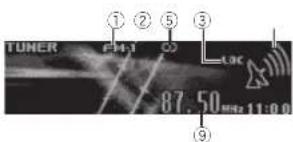
Non-RDSorAM
①Band indicator
②O-(stereolindicator
③LOCindicator
Appearswhen ocalseekturing son.
④Presetnumberindicator
⑤Signallevelindicator
⑥TEXT nd calor
Show:whentneradictextisreceived.
⑦PTYlabelindicator
⑧Programservicename
⑨Frequencyindicator
Operatingthisunit
Selectingaband
1 PressBAND/ until the desired band(FM-1)
FM-2 FM-3(forFMorAM) sdisplayed.
Marualturing(stepoystec)
1 Turn LEVER.
Seeking
1 TurnandholddownLEVER
•While-turningandholdingdownLEVER,
vcucarskipstations.Seoktuningstarts
assconasyourreleaseLEVER
UsingPISeek
The lunecanno.findasuitableslation,or the receptionstatusdeterorates,the unitautomaticallysearchesforadifferentstationwiththe same programming.During.research.Piseek is displayedandthesoundismuted.
UsingAutoPISeek for preset stations
When preset stations cannot be recalled, the unilcan beselloperformP Seek during preset recall.
• ThedefaultsettingforAutoPISeekisoff
Referlo AutoPI(autoP/seek)onpage13.
Storing and recalling stations for each band
1 Press(list).
Thepresetscreenisdisplayed.
2 UseM.C.tostorethe selectedfrequency inthememory.
Turntlochangethepreselnumber.Pressand holdloslore.
3 UseM.C.toselectthedesiredstation.
Turetochangethestation.Presstoselect.
■All stations stored for FMbandscanborecalled from reach independent FMbaro.
■You cant unothecannelupordown manually
bypassing or
■PressBAND/ or (ist)oreumtotheord-narydisplay.
Switching the RDS display
RDS(radiodatasystem)containsdigitalinformatonthathelpsearchfortheradiostations.
-Press / DISP.
PTYinformationandfrequencyorprogramserv
icename—songtleandartistname
■PTYinformationandhefrequencyanpearonthe
displayforeightseconds.
PTYlist
News&Inf
News (News), Affairs (Current affairs), Info (Info)
mation). Sport (Sports), Weather (Weather), Fi-
nance(Finance)
Popular
PopMus(Popularmusic), RockMus(Rock
music). EasyMus(Easyliston ng). OthMus
(Othormusic), Jazz(Jazz), Country(Country)
music).NatMus(Nationalmusic).Oldies(Oldies
Educate(Education) Drama(Drama) Culture
(Culture). Science (Science), Varied (Varied). Chil-
dren (Children's), Social (Social affairs), Religion
(Religion), Phone In (Phone in), Touring (Travel),
Leisure(Leisure),Document(Documentaries)
Operatingthisunit
Usingradiotext
Displayingradiotext
You can display the currently received radiotext
andthethreemostrecentradiotexts.
1 Pressandholddown a disf to display radio
text.
•Youcanturnoffradiotextdisplayypress
- When noradiated disreceived. NOTES
apcearsirthedisplay.
2 Turn LEVER left or right to recall the three
most recent radiotests.
3Press


Storingandrecallingradiotext
You can store a data from the radio text.
missionstoftheRTMemo1toRTMemo6keys.
1 D splavtheradiotextyouwanttostoreinthe
memory.
2Press a (list)
Thepresetscreen is displayed.
3 Use LEVER to store these selected roadmap.
Tumttochangethecresetnumber.Pressand
holddownM.C.testore
4 Use LEVER to select the desired adiote
Tum ttochangetheradiotext. Press M.C.to
select.
• Toreturn of the ordinary display press
BAND/or(Pst)
- Thelunerautomaticallystores.hethreeal
estradiotextbroadcastsreceived,replacing
theoldesttextwiththenewesttext.
Functionsettings
1PressM.C.todisplaythemainmenu.
2TurnM.C.tochangethemenuoption
andpresstoselectFUNCTION.
3TurnM.C.toselectthefunction.
Afterselecting,performthefollowingproce-
durestcsetthefunction.
• If AMoandisselected, only BSM Localand
TuningModeareavailable
BSM(beststation smemery)
BSM/beststations/memory/automatically/slores
thesixstronges stations in the order of their sio-
nalstroneth
1 PressM.C. botum BSMon.
Tocancel.pressM.C.again.
Regional(regional)
When AlternativeFREQisused, theregional
function limitstheselectionofstationstothose
broadcast ingregionalprograms.
1PressM.C.columtheregiera functiononor
off
Local(localseektuning)
Localseektunirpletsycutuneintoonlythose
radiationswithsuff clentlystron psignalstor
good reception
1PressM.C.totum location.
•Tocercel.pressM.C.again
2 TurnLEVERleftorrighttoselectthedesired
setting
FIV: Level 1—Level 2—Level 3—Level 4
AM:Level1 Level2
Theh ghestlevelsettingal ows recept onof
only the strongest stations, while lower levels
a lowthereceptionofweakerstations
PTYsearch(program type selection)
Operatingthisunit
Youcantune ntoastationusing?I?Y(program
(type)information.
1TurnLEVERleforight;select:thedesired
setting
News&Inf Popular Classics Others
2PressM.C.toegin.hesearch
The unit searches for a station broadcasting
that type of program: When astation is found,
ilsprogramservicena reisdisplayed
PTYiprogramtypeCode:informationis
listocinthefollowingsection.ReferioPTYlist
ontheoreviouspage
Tocancelthesearch.pressM.C.again.
The program of some estat or smaydiffer from
that indicated by the transmitted PTY.
Ifnostationisbroadcastingthetypeofore
gramyousearchedor,Notfoundisdisplayed
forabouttwosecondsandthentheturerre-
turnstothecoriginalstation.
TrafficAnnounce(trafficannouncementstandby)
1PressM.C.totumtrafficannouncement
standbyonoroff.
AlternativeFREQ(alternativefrequenciessearch)
Whenthetur can not get good reception, the
unitautomaticallysearchesforadifferentstation
inthesamenetwork.
T PressM.C.totumthealternativefrequencies
searchorandoff.
Newsinterrupt(newsprogram interruption)
1PressM.C.totumtheNEWSfunctiononer
off
TuningMode(LEVERtuningsetting)
YoucanassignafunctiontotheLEVERonthe
unit
SelectManual(manual tuning)totuneupor
down manuallyorselectPreset(presetchannel)
toswitchbetweenprasetchannels
1 Press M.C. to select Manual or Preset
CD/CD-R/CD-RWandexternal
storagedevices(USB,SD)
Basicoperations

(1) B trate/samplingfrequencyindicator
Snowsthebitratesamplingfrequencyof
thecurrenttrack(file)whenthecompressed
audioisplaying.
- When playing back vBR(variab/ebit
rate)-recordedAACfiles.theaveragebit
ratevalueisdisplayed However, denen
inarchesoftwareusedtodecodeA4C
file: VRRcuybodisprlaved
(2) Foldernumberindicator
Snowsteholdernumbercurrentlyplaying
when the compressed audio is playing.
③ Tracknumberindicator
④ PLAY/PAUSE indicator
⑤ S.Rtrvindicator
AppearswherSoundRelneverfunctionis
on
⑥ Songlime(progressbar)
⑦ Playtimeindicator
PlayingaCD/CD-R/CD-RW
1 Insert the discinted sc cadingslot with
theabelsidouc
EjectingaCD/CD-R/CD-RW
1 Press ▲(e|e:):
PlayinsonsonsonaUSBstoragedevice
1 UseaPioneerUSBcabletoconnecttheUSB
storagedevicatotheunit.
• PlugintheUSBstoragedeviceusingtheUSB
cable
Section
Operating thisunit
| StoppingplaybackoffilesonASBstoragedevice•YoumaydisconnecttheASBstoragedeviceat anytime. |
| PlayingsongsonanSDmemorycardTRemowothefrontpanel.2InsertanSDmemorycardintotheSDcard slot.Insert twiththecontactsurfacefacingdown, and pressonthecarountlittclicksandcompletelylocksintoplace.3Re-attachthefrontpanel.4Press SRC/OFF to select SD as the source.Playbackwillstart. |
| StoppingplaybackoffilesonanSDmemorycardTRemowothefrontpanel.2PressontheSDmemorycarduntil tclicks, TheSDmemorycardisjected.3PullouttheSDmemorycarc.4Re-attachthefrontpanel. |
| Selectinga'olderT]Pressor |
| Selectinga"rackT]TurnLEVER |
| FastforwardingoverversingT]TurnandholdkdovrLEVERlotherightor efl. |
| ReturningtrootfolderT]PressancholdBAND/ |
| SwitchingbetweencompressedaucioandCD DAT]PressBAND/ |
| SwitchingbetweenplaybackmemorydevicesYoucansw tchbetweenplaybackmemorydevices onUSBstoragedeviceswithmorethanoneMass StorageDevice-compatiblememorydevice.1]PressBAND/2.•Youcarswitchbetweenupto32different memorydevices. |
Notes
- When playing compressed audio, there is no sound during fast forward or reverse.
- DisconnectUSBstoragedevicesfromthe unitwhennotinuse.
Displayingtextinformation
Selecting the desired text information TPress ⊃/DISP.
TIPless DISP
- Depending on the version of Tunes used to write MP3 file to stand into a list of types, incompatible elements stored within an audio file may be displayed incorrectly.
- Textinformationitemsthatcanbechanged dependonthermedia.
Selectingandplayingfiles/ tracksfromthenamelist
1Press(list)toswitchtothefile/track namelistmode.
2UsebothLEVERandM.C.toselectthedesiredfilename(orfoldername).
| Changingthafloorfoldarname |
| TurnLEVER. |
| Playing |
| Whenafileortrackisselected,pressM.C. |
| Viewingalistofthefilestorfo dersinthese-lectedfolder |
| Whanafoldorisselected,pressM.C. |
| Playngasongintheselectedolder |
| Whenafolderisselected,pressantholdM.C. |
Functionsettings
1PressM.C.todisplaythemainmenu.
Operating thisunit
2TurnM.C.tochangethemenuoption andpresstoselectFUNCTION.
3TurnM.C.toselectthefunction.
Afterselecting, perform the following procedure durestosetthefunction.
Playmode(repeat play)
1 PressM.C. to select repeat play range. CD/CD-R/CD-RW
• Discrepeat-Repeatalltracks
- Trackrepeat—Repeat the current track
•Folderrepeat—Repeat:thecurrentfolder
Externalstoragedevice(USB,SD)
• Allrepeat—Repeata Ifiles
- Trackrepeat—Repeat the current file
•Folderrepeat Repeat: the current folder
Randommode(randomplay)
1 PressM.C.totumrandomplayonoroff.
Pause(pause)
1 PressM.C.topauseorresurre.
SoundRetriever(sound retriever)
Automatically enhances compressed audio and restores rich sound.
1 PressM.C.toselectthedes redsetting.
1—2—OFF(off)
OFF (off)—1—2 (MIXTRAX)
1 iseffective for low compression rates, and 2
iseffectively high compression rates.
iPod
Basicoperations

①Repeatindicator
②Songnumberindicator
③Shuffleindicator
④ PLAY/PAUSE indicator
⑤S.Rtrvindicator
AppearswhenSoundRetrieverfunctionis
on
©Songtime(progressbar)
⑦Playtimeindicator
PlayingsongsonaniPod
ConnectaniPodtotheUSBcableusingan
iPodDockConnector.
Selectingatrack(chapter)
TlumLEVER
Fastforwardingorreversing
T) Turn and hold down LEVER to the right or left.
Selectinganalburn
1 | Press


Notes
•TheiPodcannotbeturnedonoroffwhenthe controlmodeissettoAUDIO.
- Disconnectheadphonesfromthei Podbeforeconnectingittothisunit.
•TheiPodwillturnoffabouttwominutesafter theignitionswitchissettcoFF.
Operatingthisunit
Displayingtextinformation
Selecting the desired text information Press → DISP.
Browsingforasong
1Press(list)toswitchtothetopmenu ofthelistsearch.
2UseM.C.toselectacategory/song.
| Chang ngthenamsofthosongorcategory |
| 1TurnM.C.Playlists (playlists)—Artists (art sts)—Albums (albums)—Songs (songs)—Podcasts (pod-casts)—Genres (genres)—Composers (com-posers)—Audiobooks(audiobooks) |
| Playing |
| 1Whanesongisselected,pressM.C. |
| Viewingpal stofsongsintheselectedcategory |
| 1Whanacategory sselected,pressM.C. |
| Playingasong nt heselectedcategory |
| 1Whenacategory sselected,pressanthold M.C. |
| Searchingthei stbyaphabet |
| 1Whenallisto theselectadcategoryisdis-played press , toswtchtoa phabetsearch mode. |
| 2TurnM.C.toselectaletter. |
| 3PressM.C.todislaychealphabetcall st. |
Notes
- You can play playlists created with the PC application (MusicSphere). The application will be available on our website.
- Playliststhatyoucreateow-ththePCapplication(MusicSphere)ared splayedinabbreviatedform.
Playingsongsrelatedtothe currentlyplayingsong
You can play songstrom the following lists.
• Album list of the current playing artist
• Song list of the currently playing album
• Album list of the current playing genre
1PressandholdM.C.toswitchtolinkplay mode.
2TurnM.C.tochangethemode;pressto select.
- Artist – Plays an album of the artist currently being played.
• Album-Playsongfromthealbumcurrentlybeingplayed
- Genre—Playsanalbumfromthogen recurrentlybeingplayed.
Theselected song/album will be played after the currently playingsong.
Notes
- These elected song/album may be canceled if you operate functions soln erl ran link search (e.g. fast forward and reverse).
- Depending on the song selected to play, the end of the currently playing song and the beginning of these selected song/album may be cutoff.
Operatingthisunit'siPod functionfromyouriPod
You can list to the sound from your Pod applications using your car's speakers, when APP is selected.
This function is not compatible with the following Podmodels.
—iPodwithvideo
—iPodnanc1stoeneration
APPMode compatible with the following iPod models.
- iPoctouch4thgeneration(softwareversion 4.1orlater)
Operatingthisunit
- Podtouch3rdgeneration (softwareversion 3.0orlater)
- Podtouch2ndgeneration(softwarevers on 3.0orlater)
- Podtouch1stgeneration(softwarevers on 3.0orlater)
- Podnanobthgeneration(softwareversion 1.0orlater)
- Podnano5thgeneration(softwareversion 1.0.2clater)
• Phone4(softwareversion4.10ater)
• Phone3GS(softwareversion3.8orlater)
• Phone3G(softwareversion3.0orlater)
• Phone(softwareversion3.0orlater)
1PressBAND/ toswitch the control mode. - iPod – This unit's iPod function can be operated from the connected iPod.
- APP-Playbackthesoundfromyour iPodapplications.
- AUDIO – This unit's iPod function can be operated from this unit.
Functionsettings
1PressM.C.todisplaythemainmenu.
2TurnM.C.tochangethemenuoption andpresstoselectFUNCTION.
3TurnM.C.toselectthefunction. Afterselecting, perform the following procedure durestosetthefunction.
Playmode(repeatplay)
1 PressM.C. loselect arepeat playrange.
•RepeatOne-Repeatthecurrentsong
- RepeatAll-Repeatallsongsirthese-
lected list
Shufflemode(shuffle)
1 Press M.C. to select your favorites setting.
- ShuffleSongs-Playbacksongs in these-
lected listing and order.
- ShuffleAlbums—Playbacksongsfrom a random yselecteda buminorder.
- ShuffleOFF-Cancelrandomplay.
Shuffleall(shuttleall)
1 PressM.C.tolumshuffleallon. totumoff.setShufflemodeintheFUNCTIONmerutooff.
Linkplay(linko ay)
1 PressM.C. to diso ayt resetting mode.
2TurnM.C.tochangethamode;presstoselect. For details about these settings refer to playing songs related to the currently playingsong on this page.
Pause(pause)
TPressM.C.topauseomresume.
Audiobooks(audiobookspeed)
1 PressM.C. to select your favoritesetting
- Faster-Playbackataspeedfasterthan normal
• Normal-Playbacknormalspeed
- Slower-Playbackataspeeds overthan normal
SoundRetriever(soundretriever)
1 Press M.C. to select the desired setting 1—2—OFF (off)
OFF (off)—1—2 (MIXTRAX) 1 is effective for low compression rates, and 2 selectively for high compression rates.
Section
Operatingthisunit
Notes
- Switching the control model pod pauses song playback. Operatethei Podto resume playback.
- The following functions are still accessible from the unit even if the control mode is set to iPod/APP.
—Pausing —Fastforward/reverse —TrackUp/down nenthecontrolmodei onlyPauseorSoundR
- WhenthecontrolmodeissettoiPod/APP, onlyPauseorSoundRetriever savailable.
- The browsefunction cannot be operated from this unit.
Audioadjustments

①Audiodisplay Showstreaudioadjustmentstatus.
1PressM.C.todisplaythemainmenu.
2TurnM.C.tochangethemenuoption andpresstoselectAUDIO.
3TurnM.C.toselecttheaudiofunction.
Afterselecting, perform the following procedure to set the audio function.
Fader/Balance/fader/balanceadjustment
1 Press M.C. I display the setting mode.
^12 PressM.C.tocyclebetweenfader(front/rear) andbalance(left/right).
3 Turr M.C. load just the front/rear speaker balance.
• The front/rearspeakerba ance cannot be adjusted when herearoutpulsetting is
RearSP:S/W.RefertoS/Wcontrol(rear outputandsubwoofersetting)onpage14.
4 Turr M.C. to adjust the left/right speaker balance.
PresetEQ(equalizerrecall)
1 PressM.C. to display the setting mode.
2 Turn M.C. to select an equalizer curve.
Powerful—Natural—Vocal—Custom1—Custom2—Flat—Superbass
G.EQ(equalizer adjustment)
You can adjust the current selection of equalizer curvesetting as desired. Adjusted equalizer curve settings are stored in Custom10:Custom2.
- AseparateCustom1curve can be created for each source. If you make read, usments when a curve other than Custom2 is selected, the equalizer curves settings will bestored in Custom1.
- ACustom2curve that is common for all sources can be created. If you make it us, ments when the Custom2 curve selected, the Custom2 curve will be updated.
1 Recal ltheequal zercurveyouwanlloadjust.
2 PressM.Clodisplaythesettingmode.
3 PressM.C.tocycle between neutralizer and level.
4 Turn M.C. to select the equalizer band load just.
100Hz 315Hz 1.25kHz 3.15kHz 8kHz
TurnM.C.load just the equalizer curve.
+6 to -6 is displayed as the equalizer curve is increased/decreased.
Operatingthisunit
Loudness(floudness)
I outnesscompensatesfordeficiencies than low-frequency and high-frequency ranges at low volume.
1 PressM.C. to display the setting mode,
2 PressM.C. to turn out dnesson or off.
3 Turn M.C. to select the desired setting.
Low (low) — Mid (m o) — High (high)
Subwoofer1(subwooferon/offsetting)
This unitisequipped with asubwooferout which can be turned on or off.
TPressM.C.todisplaythesettingmode.
2 PressM.C.toturnsulowooferoutputoncroff.
3 Turn M.C. to select the phase for the sub-woofers. Input.
TurnM.C.tothelefttose electreversephase.
andReverseappears ntherisplay.Turr M.C.
tetherighttoselectnormalphase,andNor-
malappearsinthedisplay.
Subwoofer2(subwooferadjustment)
The cut-off frequency and output level can be adjusted when the subwoofer output is on.
Only frequencies overthanhaseintheselected rangcaroutputedfromthesubwoofer.
1PressM.C. display the setting mode.
2 PressM.C. locycle between the cut-off frequency and the output level for the subwoofer.
3TurnM.C.loselectthecut-offfrequency
50Hz—63Hz—80Hz—100Hz—125Hz
4 Turn M.C to adjust the output level for these sub woster.
The subwoo'er level increases or decreases
each time you turn M.C. +6 to -24 is displayed astnelevelis increased or decreased.
BassBooster(bassboost)
1 PressM.C.todisplaythesettingmode.
2TurnM.C.toselectaries relevel.
0to+6lsd splayedasthelevll sincreasedor decreased.
HPF(highcassfilteradjustment)
When you don ot wan lowsounds from the sub-wooferou tuffrequency rangetop i ay from the frontorrearspeakers, turn on the HPF (high pass
filter). Only frequenc eshigherthanthoseinthe selectedorangeareoutputfromthefrontorrear speakers.
①PressM.C.tod splaythesettingmode.
2 PressM.C.tcturnhighpassfilteronoroff.
3 TumM.C. to select the cut-off frequency.
50Hz—63Hz—80Hz—100Hz—125Hz
SLA(sourceleveladjustment)
SLA(Source eve adjustment)lets you adjust the volume level of each source to prevent radical changes in volume when switching between sources.
- Whenselecting FMastresource, you cannot switch to SLA.
- Settings are based on the HM volume level, which remains unchanged.
• The AM volume level can also be adjusted with this function.
1 PressM.C. lod splavthesettingmode.
2TumM.C.loadjust thesourcevolume.
Adjustmentrange:+4to-4
UsingBluetoothwireless technology
• OnlyforDEH-6450BT
UsingBluetoothhtelephone
Important
• Sincethisunit sonstandbytoconnect with yourcellularphoneviaBluetoothwireless technology, using it without the engine running and rain the battery power.
- Operations may vary depending on the kind of cellular phone.
Operatingthisunit
- Advanced operations that require attention on such as dialing numbers, them monitor, using the phonebook, etc., are prohibited while driving. Park your vehicle in a safe place when using these advanced operations.
Settingupforhands-freephoning
Before you can use the hands-free phoning function you must setup the unit for use with your cellular phone.
1Connection
OperatetheBluetoothtelephoneconnection menu.ReferlaConnectionmenuoperationon thispage.
2 Functionsettings
OperatetheBluetoothtelephonefunction menu.RefertoPhonemenuoperationonthe nextpage.
Basicoperations
| Makingaphonecall•Reforto/neveromeruoperationonthenextpage. |
| AnsweringanIncomingcall□Whenacallsreceived pressM.C. |
| Endingcall □PressPHONE. |
| Rejectingan incomingcall□Whenacallsreceived pressPHONE. |
| Answeringacallwaiting□Whenacallsreceived pressM.C. |
| Switchingbetweencallersonhold□PressM.C. |
| Cancelledcall waiting□PressPHONE. |
Adjusting the other party's listening volume
1TurnLEVERwhilelalkingthephone.
- When privatemodeison, this function is not available.
Turning private mode or off
1PressBAND/ whiletalkingonthephone.
Switchingtheinformationdisplay
1Press →DISPwhile talking on the phone.
Notes
- If private mode is selected on the cellular phone, hands-free phoning may not be available.
- Theestimated call time appears in the display(this may differ slightly from the actual call time).
Connectionmenuoperation
Important
- Besurelocparkyourvehicleinasafeplace and apply the parkingbrakewhen performing this operation.
- Connected devices may not operate properly if more than one Bluetooth device is connected at time (e.g. phone and separate audioplayer are connected simultaneously).
1PressandholdPHONEtodisplaythecon-
nection.
■You cannot operate this step during a call.
2TurnM.C.toselectthefunction.
Afterselecting, perform the following procedure to set the function.
Operatingthisunit
Devicelist(connectingordisconnectingadevice fromthedevicelist)
- When node device is selected the device list, this function is not available.
1PressM.C. todisplaythesettingmode.
2)IumM.C.toselectthenameofadeviceyou wanttoconnect/cisconnect. - PressandholdM.C. loswilch the Bluetooth device address and device name.
3 PressM.C. loconnect/disconnect theselected device.
Oncetheconnectionisestablished, Connected is displayed.
Deleted device(deleting a device from the device list) - When nodevical is selected nth device lists, this function is not available.
1PressM.C. to display the setting mode.
2 TumM.C. to select the name of a device you want to delete. - PressandholdM.C. to switch the Bluetooth device address and device name.
3 PressM.C.todisplayDeleteYES.
4 PressM.C.todelete device information from thedev celist. - While this function is in use, donotturnoff the engine.
Adddevice(connectinganawdevice)
1 PressM.C.tostar.searching.
• Tocance, press M.C. while searching
- If this unifall stofindanyavallablecellular phones. Notfound is displayed.
②TurnM.C.loselectadevicefromthedevice list.
- PressandholdM.C. to switch the Bluetooth device address and device name.
3 PressM.C.toconnecttheselecteddev ce.
• Tocompletetheconnection,checkthedevicename(PioneerBTUnit).Entertha PINcodeonyourdevicelfnecessary.
• PINcodeissetto0000asthedefault.You canchangethiscode.
- 6-digitnumberappearsonthedisplayof this sun t. Oncetheconnectionisestablished, thisnumberdisappears.
- If you are unaplet ocomplet the connection using this unit, usethedevicetoconnect to the unit.
- If three devices are already paired, Device Full is displayed and is not possible to perform this operation. In this case, delete a paired device first.
Specialdevice settingaspecialdevice)
Section
Operatingthisunit
Bluetooth devices that are difficult to establish a connection with are called special devices. If your Bluetooth device slides as special device, select the appropriate cond.
1PressM.C.1c displaythesettingmode.
- If three devices are already paired, Device Full scisplayed and it snot possio cto perform this operation. In this case, delete apained device first.
2)IumM.C.todisplayaspecialdev.co.Pressto select.
3 Turn M.C. to display this unit's device name, Bluetooth device address and PINcode.
4)Jscadevicetocconnecttothisunit.
- Tocomplete connection, check the device can a PioneerBTUnit and another PINcode on your device.
- PINcodeissetto0000asthedefault.You canchangethiscode.
Autoconnect(connectingtaBluetoothdevice automatically)
T) Press M.C. to turn automatic connection or off.
Visibility (setting visibility of this unit)
To check the availability of this unit from other devices, Bluetooth visibility of this unit can be turned on.
Press M.C.tctu rthevisi bily of this un ton or o f.
• Wh losetting Specialdevice Bluetooth visibility of this unit is turned temporarily.
Pincodeinput(PINcodeInput)
I connect your device to this utility a Bluetooth wireless technology you need loenlera PINcode by your device to verify reconnect on. The default code is 0000, out you can change it with this function.
1PressM.C. display the setting mode.
2 Turn M.C. to select number
3 PressM.C.lomovelhecurscrlothenex.posi- lion.
4 After inputting P Ncode, press and hold M.C. • After inputting pressing M.C. returns you to the PIN code input display, and you can change the PIN code.
DeviceINFO(Bluetooth deviceaddressdisplay)
1 PressM.C. to display the setting mode.
2 Turn M.C.left to switch to the Bluetooth device address.
TurningM.C.right returned to the device name.
BluetoothAudio
• OnlyforDEH-6450BT
Important
- Depending on the Bluetooth audio player connected to this unit, the available operations will be limited to the following twolvels:
—/2D³profile/advancedAudioDistribution Profile)/Youcanonlyplaybacksongsoryour audioplayer.
—AVRCPprofile/Audio/VideoRemoteControl Profile:Youcanperform playback, pause playback, so actsongs, etc.
- Since there are a number of Bluetooth audio players available on a remark, available operations will vary extensively very. When operating your player with this unit, refer to the instruction on manual that each with your Bluetooth audioplayer as well as this manual.
Operatingthisunit
• Information related to asong(suchasthe elapseoplayingtime,songlitle,songindex, etc.) cannot be displayed on this unit.
• Asthesignalfromyourcelularphonemay causenoise.avodusingitwhenyouarelisteningtosongsonyourBluetoothaudio player.
- When acallis progress on the cellular phone connected to this unit via Bluetooth wireless technology, the sound of the Bluetooth audioplayer connected to this unit is muted.
- When the Bluetooth audioplayerisin use, you cannot connect a Bluetooth telephone automatically.
- Playbackcontinuesevenifyouswitchfrom yourBluetoothaudiop ayertoanother sourcewhilelisteningtoasong.
SettingupforBluetoothaudio
Before you can use the Bluetooth audio function you must setup the unittor use with your Bluetooth audioplayer. This contains establishing a Bluetooth wireless connection between this unit and your Bluetooth audioplayer, and pairing your Bluetooth audioplayer with this unit.
Basicoperations

①Devicename Showsthedevicenameoftheconnected Bluetoothaudioplayer.
| - fastforwardingorreversingITumandholddownLEVER/otherightonleft. |
| SelectingarrackITumLEVER |
| Starting playbackTIPressBAND/ |
Functionsettings
1PressM.C.todisplaythemainmenu.
2TurnM.C.tochangethemenuoption andpresstoselectFUNCTION.
3TurnM.C.toselectthefunction.
Afterselecting, perform the following procedure costsetthefunction.
Play( play)
1 PressM.C. lstart playback
Stop(stop)
TPressM.C.testoptheplayback.
Pause(cause)
TPressM.C.toturnpauseon.
Phonemenuoperation
• Only for D11-64508T
Important
Bosuretoparkyouvehiclecinasateplaceand applytheparkingbrakewhenperformingthis operation.
1Press 📄 todisplaythephonemenu.
Operatingthisunit
2TurnM.C.toselectthefunction.
Afterselecting, performthe following procedure to set the function.
Missedcalls(missedcallhistory)
Dialedcalls(dialedcall history)
Receivedcalls(receivedcall history)
1PressM.C. display the phore number list
2TurnM.C.toselectanamorphonelumber
3 PressM.C.tomakecall.
• Todisplaydetailsaboutthecontactouse-
acted, press and hold M.C.
PhoneBook(phonebook)
• The phonebook in your cellular phones will be transferred automatically when the phone is connected to this unit.
- Depending on the last lularphone, the phone book may not be transformed automatically. In this case, operate your last phoneto transfer the phone book, The visibl ly of his unit snou aboon. Rafero Visibility (setting the visibl ly of his unit) on the previous page.
- Press M.C. to display SEARCH (alphabetical list).
2 Turn M.C. to select the first letter of the name you are looking for.
- PressancholdM.C. to select the desired character type.
3 PressM.C. tool a yaregisterecname ist.
4 Turn M.C. to select then a may you are looking for:
5 PressM.C. display the phore number list.
- Turn M.C. to select a phanenumber you want to call.
7 PressM.C.tornakecall.
PhoneFunction(phonefunction)
You can set Auto answer. Ring tone and PH.B.
Nameviewfromthismenu.For details,referto
Function and operation on this page.
Functionandoperation
1DisplayPhoneFunction
Refer to PhoneFunction(phonefunction) on this page.
2PressM.C.todisplaythefunctionmenu.
3TurnM.C.toselectthefunction.
Afterselecting, perform the following procedure to set the function.
Autoanswer(automaticanswering)
1 Press M.C. botumautomat cansweringonor off.
Ringtone(ringtonselect)
1PressM.C.olumberingloneproroff
PH.B.Nameview(phonebooknameview)
1 PressM.C. oswilchbetweenthelistof names.
Initialsettings
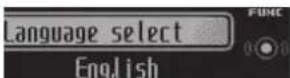
①
①Functiond splay
• Showsthefunctionstatus.
1PressandholdSRC/OFFuntiltheunit turnsoff.
2PressM.C.andholduntiltheinitialsettingmenuappearsinthedisplay.
Operatingthisunit
3TurnM.C.toselecttheinitialsetting.
Afterselecting, perform the following procedure to set the initial setting.
Languageselect(multi-language)
Foryourconvenience, this unit equips multiple language display. You can select the language best suited by your first language.
1 PressM.C. loselect the language.
PressM.C. to select these segments of the calen
darcisplayyouwishtoset.
Year—Day—Month
2 TumM.C. to set the case.
Clock(settingtheclock)
TPressM.C. to select the segment of the clock
disp ayyouwishtoset,
Hour—Minute
2TumM.C.teadjusttneclock
EngineTimealert(e aosedtimed splaysetting)
This setting a low salary outcome threshold of timethate apses from whether machine is turned and display the amount of elapsed time perset period.
Also,youwillhearalarm.
1 Press M.C. to select your favor tesetting. OFF—15 Minutes—30 Minutes
FMstep(FMtuningstep)
The FMturingstepemployedbyseekturingcan beswitchedbetween 100kHz, thepresatstep, arc50kHz.
Ifseektuning performed in 50kl Hzsteps, stationsmay be tuned in more easily. Turnestations with manual tuning or use seektuning again.
1PressM.C. to select the FM fun step.
TheAMturingstepcanbeswitchedbetween 9kl z,thepresetstep,and10kl z.Whenusingthe tunennNorth,CentralorSouthAmerica,reset theuringstep from 8kHz(531kHz to 1802kHz, lallowable)to10kl z(530kl zto16/0kl lallowable).
1 PressM.C.toselecttheAMtuningstep.
This setting allows you to switch your source
USB/iPodautomatically.
1 PressM.C.toturntheplugancplayfunction onoroff.
- ON-Whant USB storage device/iPod is connected, the source is automatically switched to USB/iPod if you should connect your USB storage device/ Pod. This unit's source slumped off.
• OFF-When USBstoragodvice/iPodis connected, Ihesourcedoes not switch to USB/iPod automatically. Pleasermanually changethosourceto USB/iPod.
Warningtone(warningtoresetting)
If the front panel is not detached from the head unity thinfoursecond soft turning off the ignition awarningonesounds. You can urn of the warning tone.
1 PressM.C.toturnthewarningtonoonoroff.
AUX(auxiliary input)
Activate this setting when using a auxiliary device connected to this unit.
TPressM.C.toturnauxiliarysettingpenrooff.
Dimmer(dimmersetting)
Section
Section
Operatingthisunit
Iopreventthedisplayfrombeingtoobrightat night, thedisplay sautomaticallydimmedwhen thecar'sheadl ghtsareturnedon.Youcantum thedimmeronoroft.
1PressM.C.ICIu rndimmeronoroff.
Contrast(displaycontrast setting)
1) Turn M.C. to adjust the contrast level. 0 to 15 is displayed at the level increase or decrease.
S/Wcontrol(rea output and subwoofersetting)
This unit's rearoutputrearspeakerleadsoutput and RCAearoutputcanbeuseforfull-range speaker(RearSP:F.Rangejsubwoo'er(Rear SP:S/W)connection Ifyouswitchtherearout settingtoRearSP:S/W,youcanconnectarear speakerleadsirectlytosubwoo'erwithoutfusing anauxiliaryamp.
T) PressM.C. to switch the rear output setting.
- When a subsayer is connected to the rear output, select RearSP: F.Range(full-ranges peaker).
- When asubwooferisconnectedtotherear output, selectRearSP:S/W(subwoofer).
• Ever if you change this setting, there will be no output unless you must subwoofer output (refer to Subwoofer1 (subwooferon/off setting) on page 10).
- If you change this setting subwoofer output in the audio window return to the factory settings.
• Bothrearspeaker lead outputs and RCArea output areas switched simultaneously in this setting.
Demonstration(demon displaysetting)
1PressM.C.tct.rnthedemodisp ayor croff
Ever-scroll(script modesetting)
WheseverscrollissettoON, recorded text information scrolling continuously in the display. Setto OFFify you prefer the information on loscrolljust once.
1PressM.C.column/eeverscrollonoroff
BTAUDIO(Bluetoothaudioactivation)
• This function is not available for DEH-5450SD You need to activate the BTAudiosourcein order to use Bluetooth audio player.
1 Press M.C. to turn the BT Audio source on or off.
Clearmemory(resettingtheBluetoothw roloss, technologymodule)
This function is not available for DFN-5450SD. Blue tooth dev cedata can be deleted Toprolact personal informal on, were recommend deleteing this scatabon for transferring the unit tooth porsons. The following settings will be deleted.
- phonebookentriesontheBluetoothtelephone
•presetnumbersontheBluetoothtelephone
- registrationassignment of the Blue soth tele- phone
• call history of the Bluetooth phone
• information of the connected Bluetooth telephone
• PINcode@theBluetooth device
1 PressM.C. loshow the confirmation display. YES is displayed. Clearing memory is now on standby.
If you donotwanttoresetphonememory turn
M.C. to display CANCELand press to select. Press M.C. to clear the memory.
Cleared so is played and these settings are deleted.
- While this function sin use denotes offtheengine.
BTVersioninfo.(Bluecolor hivers and display)
Operatingthisunit
- This function is not available for DEH-5450SD. You can display the system version of this unit and of Bluetooth module.
1 PressM.C.todisplaythe nformation.
- TurningM.C.orLEVERcyclesbetweenthe systemversionofthisunitandthatofthe Bluetoothmodule.
S/WUPDATE(upcaling:hesoftware)
- ThisfunctionisnotavailableforDEH 5450SD. Thisfunctionisusedtoupdatethisunitwiththe latestsoftware.Forinformationall'esoftware andupdating.refertocourwcos to.
- Neverturn the niloff with ethesoftware is being updated.
T PressM.C.todisplaythodatatransfermode. Follow:heon-screeninstructionslofinishup-datingthesoftware.
Otherfunctions
UsinganAUXsource
1InsertthestereominiplugintotheAUX inputjack.
2PressSRC/OFFtoselectAUXasthe source.
Note
AUXcannotbeselectedunlesstheauxiliarysettingisturneden.Formoredetails,refertoAUX(auxiliaryinput)onthepreviouspage.
Usingdifferententertainment displays
You can enjoy entertainment displays when listening to each sound source.
AdvancedoperationsusingtheMIX (MIXTRAX)button
MIXTRAXtechnologyisusedtoaddavarietyof soundeffectsbetweensongsforarrangingthe peusesbetweensongs.Itallowsyoutoen,yolis teningtomusicncnstop.
Connecting the currently playingsong and the next song together with source effects
1 PressMIXtolumtheMIXTRAXfunctiononor off.
- This function is only available when a file on an external storage device (USB, SD) or a surgeon Podis being played.
- This function is not available when the control model(ssetelloiPod/APP).
- Depending on the file/song, sound effects may not be able for adding.
- When the MIXTRAX function is turned on, the SoundRetrieversettingist runnadoff. Referto SoundRetriever(sound/retriever)onpage9.
Note
MIXTRAXincludesMIXTRAXilluminationfeaturethatwhenswitchedonchangestheilluminatedcolorsintmewiththeaudiotrack ifyou findthefeatureobistractingwhiledriving,please returnMIXTRAXilluminationtothedefaultsettingof"OFF".
Switchingthedisplaybackground accordingtothetypeofmusic
This function savallable only when the MIX-TRAX function is on. Refer to Connecting the currently playingsong and then next song together with sound effect on this page.
1PressM.C.todisplaythemainmenu.
2TurnM.C.tochangethemenuoption andpresstoselectENTERTAINMENT.
Operatingthisunit
3TurnM.C.toselectthefunction.
4PressM.C.todisplaytheMIXTRAX.
5TurnM.C.tochangethedisplay. MIXTRAX OFF
- When MIXTRAX is selected, the illumination colors selected in FlashingColor are displayed.
- WhenOFFisselected.theI luminationalcolor selectedfortheBackground isdisplayed.
Switchingthedisplayindication
1PressM.C.todisplaythemainmenu.
2TurnM.C.tochangethemenuoption andpresstoselectENTERTAINMENT.
3TurnM.C.toselectthefunction.
4PressM.C.todisplaytheBackground.
5TurnM.C.tochangethedisplay. Backgroundvisual—genre—backgroundpicture1—backgroundpicture2—backgroundpicture3—backgroundpicture4—simpledisplay—mov escreen—calendar
■Genredisplaychangesdependingorthegenrectmusic.
■Genredisp aymaynotoperatecorrectlydependingontheapplicl cnusedtoencodeaudiofiles.
Turningtheclockdisplayonoroff
1PressM.C.todisplaythemainmenu.
2TurnM.C.tochangethemenuoption andpresstoselectENTERTAINMENT.
3TurnM.C.toselectthefunction.
4PressM.C.toselectthedesiredsetting. Clockdisplay—elapsedlimedisplay—clockoff
■YoucanswitchthefunctionbypassingCLOCK (DEH-5460SDonly).
Selectingtheilluminationcolor
Thisunitisequippedwithmultiple colorillumination.Youcanselectdesireddolorsforthekeys anddisplayofthisunit.Youalsocancustomize thecolorsyouwantouse.
Selecting the flashing color from the illumination color list
You can change colors for the keys and display of this unit according to the type of music.
- This function is available only when the MIX-TRAX function is on. Referto Connecting the currently playings song and then next song together with sound effect on the previous page.
1PressM.C.todisplaythemainmenu.
2TurnM.C.tochangethemenuoption andpresstoselectILLUMI.
3TurnM.C.todisplayFlashingColorand presstoselect.
4TurnM.C.toselecttheilluminationcolor.
You can select one option from the following list.
- Changingthecoloraccordingtothetypef musicplayed(YoucanselectfromColor1to Color6andRandom.)
- Changing the color according to the level of lowsounds played (You can select from Color1 to Color6 and Random.)
•OFF(Nochange.)
Selectingthekeycolorfromthe illuminationcolorlist
You can select desired colors for the key so this unit.
Operatingthisunit
1PressM.C.todisplaythemainmenu.
2TurnM.C.tochangethemenuoption andpresstoselectILLUMI.
3TurnM.C.todisplayKeyandpresstose-lect.
4TurnM.C.toselecttheilluminationcolor.
You can select one option from the following list.
• 27 preset colors (WHITE to ROSE)
• SCAN(cyclethroughhallcolors)
• 3 sets of colors (WARM, AMBIENT, CALM)
• CUSTOM(customized illumination color)
Notes
- WhenSCANisselected, thesystemautomaticallycyclesthroughthe27presetcolors.
- When WARM is selected, the system automatically cycles through the warm colors.
- When AMBIENT is selected, the system automatically cycles through the ambient colors.
- When CALM is selected, the system automatically cycles through the calm colors.
- When CUSTOM is selected, the customized colorsaved is selected.
Selectingthedisplaycolorfromthe illuminationcolorlist
You can select the desired colors for the display of this unit.
1PressM.C.todisplaythemainmenu.
2TurnM.C.tochangethemenuoption andpresstoselectiLLUMI.
3TurnM.C.toswitchtoDisplayandpress toselect.
4TurnM.C.toselecttheilluminationcolor.
You can select one option from the following list
• 27 preset colors (WHITE to ROSE)
• SCAN(cyclathroughallcolors)
• 3 sets of colors (WARM, AMBIENT, CALM)
•CUSTOM(customizedilluminationcolor)
Note
For details about coloronthelist, refer to Selecting the key color from the illumination color list on this page.
Selectingkeyanddisplaycolorfrom theilluminationcolorlist
You can select the desired colors for the keys and display of this unit.
1PressM.C.todisplaythemainmenu.
2TurnM.C.tochangethemenuoption andpresstoselectILLUMI.
3TurnM.C.todisplayKey&Displayand presstoselect.
4TurnM.C.toselecttheilluminationcolor.
Youcanselectoneoptionfromthefollowinglist.
• 27 preset colors (WHITE to ROSE)
• SCAN(cyclathroughallcolors)
• 3 sets of colors (WARM, AMBIENT, CALM)
Notes
- You cannot select CUSTOM in this function.
- Once you select a color in this function, colors on the keys and display of this unit automatically switch to the color on selected.
- Fordetailsaboutcolorsontheelist, refer to Selectingthecycolorfromtheillumination colorlistonthispage.
Customizingtheilluminationcolor
1PressM.C.todisplaythemainmenu.
Section
Operatingthisunit
2TurnM.C.tochangethemenuoption andpresstoselectILLUMI.
3TurnM.C.todisplayKeyorDisplay.Press toselect.
4PressM.C.andholduntilthecustomizing illuminationcolorsettingappearsinthedisplay.
5PressM.C.toselecttheprimarycolor. R (red)—G (green)—B (blue)
6TurnM.C.toadjustthebrightnesslevel. Adjustmentrange:0to60
- You cannot select a level below 20 for all three of R (red), G (green), and B (blue) at the same time. - You can also scope form the same operation on other colors.
Notes
- You cannot create a custom illumination color when SCAN or set of colors (WARM, AMBIENT, or CALM) is selected.
- You can create custom illumination colors for both Key and Display.
Switchingthedisplayindication andbuttonillumination
Displayindicationandbuttonilluminationcan beswilchedonoroff.
●PressandholdMIX.
PressingancholdingMIXswitcheslihedisplay indicate onandbuttonilluminat oronoroff. ■Evenlithedisplayindicationisturnedoff operationcanbeconducted. Ifoperationisconducted whilethedislayindication soff,dispaywillight upforafawsacondsandthentumoffagain.
Installation
Connections

WARNING
• Usespeakersovero0W(outputvalue)and between4Ωto8Ω(impedancevalue).Do ncluse1Ωto3Ωspeakersforth sunit.
• The black cable ground. When installing this unitor power ramp (so separately), makesure lo connected the ground wire first. Ensure that the ground wire property connected from alapal part of the car's body. The ground wire of the power ramp and the one of this unitor any other ovice must be connected to the can separately with the front screws. If, hescrew for the ground wire cosons or fallout, it could result in fire generation and make formal function.

Other devices Metal parts of car's body (Another electronic device in the car)
**Non supplied for this unit.

Important
- When installing this unit in vehicle, without an ACC (accessory) position on the ignition switch, failure to connect thered cable to the terminal that detects operation of the ignition key may result in battery drain.

ACC position

No AOC position
- Usethisunitwithna12-voltbatteryandnegativegroundingonly.Failureretodosomayresultinafirenormalfunction.
- Topreventashort-circuit,overheatingnormal-function,besurelofollowthedirectors below.
—Disconnectthenegativetermina of the battery before installation.
—Secure chewing with the eclamosoradhesivetape. Wrapadhesivetape around wiring that comes into contact with metal parts to protect the wiring.
—Placea Icablesawayfrom movingparts, such nastneshiftleverandseatrails. —Placea Icablesawayfrom hotplaces, such asneart nehealerout el.
—Donotconnecttheyellowcablatothebattery bypassingitthroughtheholettotheengine compartment.
—Coveraryd sconnectencableconnectors withinsulatingtace.
—Donots shorten any cables.
—Nevercut the insulation of the power cable of this unit in order to share the power with other devices. The current capacity of the cable is limited.
—Useafuseoftheratingprescribed. —Neverwiretherenegativesbeakercabledirectly loground.
—Neverbandtogethernegativocablesofmulti- plespeakers.
- When this unit is on controls gna saresent through the blue/whitecable, Connect its caclothe system remote control of an external power ramp or vehicle's auto-antenna clay control terminal max 300mA 12VDC. Lithoheologic equipped with glassanlenna connect the anti-lenna booster power supply terminal.
- Neverconnecttheblue/whitecaplotothe powerterminal ofanexlernalpoweramp. Also, neverconnectittothepowerterminal oftheautoantenna. Dicingomayresultin batterydrainoramalfunction.
Installation
Thisunit

①USBport
②Antennainput
15cm
③Fuse(10A)
④Powercardinput
⑤Wiredremoleinput
Hard-wiredremotecontroladaptorcanbe connected(soldseparately).
⑥Microphoneinput(DEH-6450BTonly)
⑦Microphone(DEH-645CBTonly)
4m
⑧Rearoutput
⑨Frontoutput
@Subwooferoutput
⑪USBcable
1.5m
Powercord
Perform these connections when not connecting arearspeaker lead to asubwoofer.
flowchart
graph TD
    A["①"] --> B["②"]
    B --> C["③"]
    C --> D["④"]
    D --> E["⑤"]
    E --> F["⑥"]
    F --> G["⑦"]
    G --> H["⑧"]
    H --> I["⑨"]
    I --> J["⑩"]
    J --> K["⑪"]
    K --> L["⑫"]
    L --> M["⑬"]
    M --> N["⑭"]
    N --> O["⑮"]
    O --> P["⑯"]
    P --> Q["⑰"]
    Q --> R["⑱"]
    R --> S["⑲"]
    S --> T["⑳"]
    T --> U["㉑"]
    U --> V["㉒"]
    V --> W["㉓"]
    W --> X["㉔"]
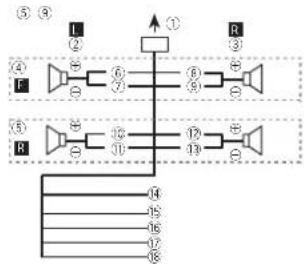
Perform these connections when using asub-wooter without the optional amplifier.

①Topewercordinput
② left
③Right
④Frontspeaker
⑤Rearspeaker
⑥White
⑦White/black
8Gray
Installation
⑨Gray/black
10Green
⑪Green/black
12Violet
(3)Violet/black
④ Black(chassisground)
Connecttoaclean, paint-freemetalocation.
15Yellow
Connecttotheconstant12Vsupplytermi
nal.
16Red
Connecttoterminalcontrolledbyignition switch(12VDC).
⑰Blue/white
Connectosystemcontrolterminalofthe poweramporauto-antennarelaycontroller(max.300mA12VDC).
18Orange/white
Connect to ghtingswitchterminal.
⑲Subwoofer(4Ω)
29 When using asubwooferof70W(2Ω) be sureloconnectthesubwoofertotheviolet and violet/blackleadsofthis/unit Donct connectanythingtotnegreenanogreen/blackleads.
②Notused.
22Subwoofer(4Ω)×2
Notes
- Witha2speakersystem, donotconnectanythingtothespeakerleadsthatarenotconnectedlospeakers.
- Changetheinitialsettingofthisunit.Roter toS/Wcontrol(rearoutputandsubwoofer selling)onpage14.
Thesulwooferoutputofthisunitismonau- ral.
Poweramp(soldseparately)
Perform these connections when using the optional amplifier.

flowchart
graph TD
    A["①"] --> B["②"]
    B --> C["③"]
    B --> D["④"]
    A --> E["⑤"]
    E --> F["⑥"]
    A --> G["⑦"]
    G --> H["⑧"]
    A --> I["⑨"]
    I --> J["⑩"]
    B --> K["⊕"]
    K --> L["⊕"]
    L --> M["⊕"]
    B --> N["⊕"]
    N --> O["⊕"]
    O --> P["⊕"]
    C --> Q["⊕"]
    Q --> R["⊕"]
    R --> S["⊕"]
    D --> T["⊕"]
    T --> U["⊕"]
    U --> V["⊕"]
    F --> W["⊕"]
    W --> X["⊕"]
    X --> Y["⊕"]
    G --> Z["⊕"]
    Z --> AA["⊕"]
    AA --> AB["⊕"]
    H --> AC["⊕"]
    AC --> AD["⊕"]
    AD --> AE["⊕"]
    J --> AF["⊕"]
①Systemremotecontrol
ConnecttBlueAwhitecable
②Poweramp(soldseparately)
③ConnectwithRCAcables(isocloseparately)
④ToRearoutput
⑤Rearspeaker
⑥ToFrontoutput
⑦Frontspeaker
⑧Tosubwooferoutput
⑨ Subwoofer
Installation
Important
- Checkal connection systems before final installation.
- Donotuseunauthorzedpartsasthismay cause malfunctions.
- Consu tyourdealerif installation requires drillingofholesorothermodificationscothe vehicle.
- Donotinstall this unit where: —itmayinterferewithoperatlonofthevehicle. —itmaycauseinjurytoapassengerasaresult of asudder stop.
Section
Installation
- These semiconductor laser will be damaged if to overheats. Install this unit away from hot places such as near the heater outlet.
- Optimumperformanceisobtainedwhenthe unitisinstaledatanangleoflessthan60°.

- When installing, to ensure propermost dispersal when using this unit, makes sure you loavcampspace which the carpancl and wrapanyloosocablessothey are not blocking hevents.

DINfront/rearmount
This unilcan be properly installed using either front-mount rear-mounted installation. Use commercially available parts when installing.
DINFront-mount
1 Insert themountingsleeve into the dashboard.
For installation in shallow spaces, use the supplied mountingsleeve. If there is enough space, use themountingsleevethat car new ththe vehicle.
2Securethemountingsleevebyusinga screwdrivertobendthemetaltabs(90°)into place.

①Dashbeare
②Mountingsleeve
3Installtheunitasillustrated.

①Nut
②Firewallormetalsupport
③Metalstrap
④Screw
⑤Screw(M4×B)
■ Makes sure that the unit is installed so securely in place. An unstable installation may cause skipping or other functions.
DINRear-mount
1 Determinetheappropriateposition wheretheholesonthebracketandtheside oftheunitmatch.

Installation
2Tightentwoscrewsoneachside.

①Trusscrew(5mm×3mm)
②Mount npracket
③ Dashboard console
Removingtheunit
1Removethetrimring.
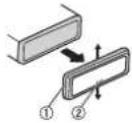
①riming
②Notchedtab
- Releasing the front panel allows access to the trim ring.
- When reat aching the rim ring point the sidewith ther stched tabdown.
2Insertthesuppliedextractionkeysinto bothsidesoftheunituntiltheyclickinto place.
3Pulltheunitoutofthedashboard.

Removingandre-attachingthe frontpanel
You can remove the front panel to protect your unit from theft.
Pressthedetachbuttonandpushthefront paneluowardandpullitlowardyou.
For details, roteroRemoving the front panel to protect your unit from the land Re-attaching the front page on page 5.
Installation
Installingthemicrophone
- OnlyforDEH-6450BT

CAUTION
Illisextreme ydangeroustoallowthemicro- phonelcactobecomewoundaroundtrestee- ingcolumnorshittlever.Besuretoinstallthe unitinsuchawaythalilwillnolobstructdriv- ing.
Note
Install them microphone in a position and orientation that will enable it to pick up the voice of the person operating the system.
Wheninstallingthemicrophone onthesunvisor
1Installthemicrophoneonthemicro-phoneclip.

①Microphone
②Microphoneclip
2Installthemicrophonecliponthesun visor.
With the unvisor, install them or phone clip. (Lowering the unvisor reduces the voice recognition rate.)

①Microphonedip
②Clamp
Wheninstallingthemicrophone onthesteeringcolumn
1 Installthemicrophoneonthemicrophoneclip.

①Microphone
②Microphonebase
③Microphone IP
④F them crophone lead into the groove.
- Microphone can be installed with a using microphone clip. In this case, detach the microphone base from the microphone clip, to detach the microphone base from the microphone clip, slide the microphone base.
Installation
2Installthemicrophonecliponthesteeringcolumn.


①Double-sidedtape
②Install them:orphanes:lipanthe:earsideo?
theoeringcolumn.
③Clamo
Adjustingthemicrophoneangle

The microphoneanglecanbeadjusted.
Section
Appendix
Additionalinformation
Additionalinformation
Troubleshooting
SymptomCauseAction
| Thedisplay automatically returnstothc ordinary display. | Youdidnotperformanyoperationwithin about30seconds. | Performoperation again. |
| Theropcoat play range chargesun-expectoely. | Dependingontherepeatplay range,these lectorange maychange whenanother folderortrackis beingselected orduringfast forwarding/reversing. | Selectthorecoat playrangeagain. |
| Asubfoldens notplayed back. | Subfoldenscan-notbe played whenFolderre-peat(folderre-peat)s selected. | Selectanotherre-peatplayrange. |
| NOXXXXappearswhana displays charged(NOTITLE,forax ame). | Thereisnoembaddedextinformation. | Switchthed splay orplayanother trackfli c. |
| Notextinformationcanbeobtained | • Switchthe broadcaststation.• Operatothis unit nareaswith pelgoodreceptioncondition. | |
| Thedisplay screen chargesat ransom. | Demomodes on. | • Pressanchold →DISPtocancel demomode.• Turnoff the demoisplayset ting. |
SymptomCauseAction
| Thedisplay screenchangesatrandomin-steadoflis-playingtheclockcontinuouslyevenwiththeclockdisplayturnedon. | Demomodelison. | •Pressandhold DISPlocanceldemomode.•Turnoffthedemodisplaysetting. |
| Thedisplay screenchangesatrandomovenwiththedis-playatturnedon. | Demomodelison. | •Pressandhold DISPlocanceldemomode.•Turnoffthedemodisplaysetting. |
| Theunitismalfunctioning.Thereisinterference. | Youareusingadevice,suchesacelluarphone,that,transm laelectrocwavesneartheunit. | Moveelectricaldeviceshatmaybecausingtheinterferenceawayfromtheunit. |
SymptomCauseAction
| Thesound from the Bluetooth audiosource is not played back. | Thereisacallin progressona Bluetooth connectecellular phone. | Thesoundkll be playedbackwhen thecallisterminated. |
| ABluothcon connectedceli- ulaphoncis currentlyyocing operated. | Donotoperate thecellularphone arthistima. | |
| Acal was madewthe Bluetoothconnectecellular phoneandthen immediatelyterminated.Asa result:commu-nicationbe-tweenhisunit andthecellu ar chonewasnot terminated properly. | Raconnectthe Bluetoothcon-rectionbetween thisunitandthe cellularphone. | |
| Text information cannot boscrolloc. | Displayscrol- ingisstopped automat cally whenthelemperaturearound thisunitis10°C orless. | Waituntil warmsbackup. |
| Movieplay-backs stoppedano thesimple displayappears. | Movieplayback isstoppedsu to-matica lywhen thatemperature aroundthisunit is10°Corless. | Waituntil warmsbackup. |
SymptomCauseAction
| Soundfrom thatPodcan- notbeheard. | Theaudou- putdirection mayswitchau- tomatical y when'he BluetoothUSBconnec- tonsareused atthesame lme. | UserheiPocto changetheaudio outpudirection. |
Errormessages
When you contact your dealer or your nearest Pioneer Service Center, besuretono the error message.
CDplayer
MessageCauseAction
| ERROR-07, 11,12,17,30 | Thed scisdirty. Cleanthed sc. | |
| Thed scis scratched. | Replacethedisc. | |
| ERROR-10, 11,12,15, 17,30,A0 | Thereisane etricalonnechan caloror. | Turnt reignition switchOFFand backON,or switchtoacifferentsource,then backtochoCD player. |
| ERROR-15 | Theinserted discisblank | Replacethedisc. |
| ERROR-23 | Unsupported CDformat. | Replacethedisc. |
Additionalinformation
MessageCauseAction
| FORMATREAD | Sometimestheralsadeleybetweenthestartofplaybackanswerwhenyoustarttohearanysound. | Waitunt lthemessagedisappearsandyounearsound. |
| NOAUDIO | Theinserteddiscodocnotconlanaryplayatctfics. | Replacethedisc. |
| SKIPPED | TheinserteddiscopcontainsDRMprotectedfiles. | Replacethedisc. |
| PROTECT | All thefilestontheinserteddiscareembeddedwithDRM. | Replacethedisc. |
Externalstoragedevice(USB,SD)/iPod
MessageCauseAction
| NODEVICEWhenplugand,playsoft,noUSBstoragedeviceonPodisconnectac. | •Turntherug andplaycn.•ConnectacompalbleUSBstoragedeviceiPoc. | |
| FORMATREAD | Sometimes therealsadeley between the startofplayback andwhenyou startfohearany sound. | Waitunt the messageadisappearsandyou nearsound. |
MessageCauseAction
| NOAUDIOthereareno songs. | Transfertheaudio filesstothsUSB storagedevice andconnect. |
| Theconnected USBstoragedevi-viehassecur- ityonaloid. | FollowtheUSB storagedevicin-structionslodis-aoiothosecurity. |
| SKIPPEDTheconnected USBstoragedevi-voccontains fi esembedded withWindows Media®DRM9/10. | PlayanaudioIle noternEmbedded withWindows MediaDRM9/10. |
| PROTECTAlltheFilest theUSstorago devicoancem beededwith WindowsMedia DRM9/10. | Transferaudio filesnctam-bodiedwith WindowsMedia DRM9/10tothe USBstoragedevi-viceandconnect. |
Additionalinformation
MessageCauseAction
| NOTCOM-PATIBLE | TheUSBdevice connectedtois notsupported bymisunit. | ConnectableUSBMessStorageClasscompliant device.Disconnect yourdeviceand replaceitwinacompatibleUSBstoragedevice. |
| Non-compactible iPod | Disconnectyour deviceancore placeitwinacompatiblePoc. | |
| Non-compactible SDstoragedevice | Removeyour deviceandreplaceit withaccompatibleSDstoragedevice. |
MessageCauseAction
| CHECKUSBTheUSBconnectororUSB cablehasshort-circuified. | Checkthatthe USBconnectororUSB cableisnot caughtinsome-thingosram-aged. |
| Theconnected USBstoragecoviocousumes more than 500mA(max-mumallowable currently) | Disconnect the USBstoragecoviocanddonct useit.Turnlthe gnitionswifcnto OFF,ThantoACC orONarother connectionly compliantUSB storagedevices. |
| TheIPodoper-atescorrectly burdoesnot charge | Makesurethe correctionable fortheiPodhas notsnortedout (e.g., notcaught nmetalobjects). Aftercheck ng, turnthe gnition switchOFFand naxON,arpls-connectthei Pod andreconnect. |
Appendix
Additionalinformation
MessageCauseAction
| ERROR-19Communicationfailed | ·Performnonofthefollowingoperations.-Turnthe gnitionswitchOFandbackON.-Disconnectorejecttheexternalstoragedevice.-Changelcadiferentsource.Then,returntotheUSBorSDsource.·DisconnectthecablefromtheiPod OncelheiPod smainmerusdisplayed.reconnectthoiPodandresotit. |
| iPodfailure.Disconnectthe |
| cabiafromthe |
| iPod.Cricethe |
| iPod smain |
| monuldisis |
| played reconnect |
| theiPodandreset |
| it. |
| ERROR-23 USBstoragede-vicewasnotfor-mattedwithFAT12.FAT16orFAT32. | USBstoragede-viceshourbefor-mattedwithFAT12.FAT16orFAT32. |
MessageCauseAction
| ERROR-16ThePodfirmwareversionis old. | UpdatedatPod version. |
| iPodfailure.Disconnect the cablefromthe Pod.Oncethe Pod'smain monusidis played, reconnect the Podandresel it. | |
| STOPThereareno songsinthe currentist. | Se ectal sthat contains songs. |
| Notfound Norrelated songs. | Transfersongsto the Pod. |
Bluetoothdevice
MessageCauseAction
| ERROR-10Thepowerfailed forthe Bluetooth moduleofhisunil. | Turntherpition switchOFFand thentoACCor ON.Iftheeromnes-sagcisstilldis- pleydafter perform nglhe abovoaction, plicascontact yourdealeroran authorized PiorcorServ co Station. |
Additionalinformation
Handlingguidelines
Discsandplayer
Useonlydiscstnatfeatureetherofthefollowing twologs.


Use12-cmdiscs.Donotuse8-cmdiscosran adapterior8-cmdiscs.
Useonlyconventional.fullycirculardiscs. Dorot useshapeddiscs.


Donot insert anything gother than a CD into the CD loadingslot.
Donoluse:cracked,chipped,warped,orother-wisedamaged:discosastheymaydamagetheplay-er.
UnfinalizedCD-R/RWdiscscannotbe ayed back.
Donotouchtherecordedsurfaceofthediscs.
Stored scs in:neircaseswnennotiruse.
Donotallachlabels, write on or apply chemicals to the surface of the discs.
TocleanaCDw petnediscowithasoftclothoutwardfromthecenter.
Condensation may temporarily impair the player's performance. Lelitrestfloraboutorehourtoad-justloawarmertemperature. Also, wipeany campdiscsoftwithasoftcloth
Playbackofdiscosmaynotoepossiblebecauseof disccharacteristics,d scformat,recordedapplication,playbackenvironment,storageconditions,andsoon.
Roadshocksmayinterruptdiscplayback.
When using discesthatcan be printed on apelsur faces, check their instructions and the warnings of the discs. Depending without discs, nserling and ejecting may rest possible. Using such discs may result in damage to this equipment.
Dorctattachcommerciallyavailablelanelor othermaterialstothed scs.
• Trediscsmaywarp making neciscump ayable.
• Thalabels may come off during playback and preventejection of the scs, which may result in damage to the equipment.
Externalstoragedevice(USB,SD)
Address any quest or you have about your external storage device (USB, SD) to the manufacturer of the device.
Don otleavethoexternalstorag device(USB.SD) in places with hightemperatures.
Depending on the external storage device (USB, SD), then following prob emsmayoccur.
• Operationary.
• The storage device may not be recognized.
- Filesmaynotbeplayedbackproperly
USBstoragedevice
Connect or via USBhubarenotsupported.
Dorctconnectanythingothorthana JSBstor agedevice.
Additionalinformation
FirmlysecuretheUSBstoragedevicewnendriving.DonotlettheUSBstoragedeviceta lnttothe floor,where Imaybecomejammedunderthe brakeoracceleratorpedal.
Depending on the USB storage device, the following problem may occur.
• The device may generate noise in the radio.
SDmemorycard
| This unit supports only the following types of SD memory cards. |
•SD
•miniSD
-microSD
•SDHC
Keep the SDmemorycardout of the each of children. Should the SDmemorycardes wallowed, consultadoctor immediately.
DonottouchtheconnectorsoftheSDmemory carddirectlywithyourfingersorwithanymetal device.
Donotin sort anythingothorthananSD memory card into the SD cardslot. If ametal object(such asacoir) is inserted into the slot, their internal circuits may break and cause a function.
When inserting a miniSDormicroSD, use an adapter. Donotuseanadapierwhich has metal partsotherthantheconnector exposed.
Donotin ser-tadamagedSDmemorycardie.g. warped, labelpeeledoffhasiltmaynotbejected fromthaslot.
DonottrytoforceanSDmemorycardintheSD cardslotasthecardorthisunitmaybedamaged.
When projecting an SD memory card, press that hold it until clicks, its dangerous for out release your immediate after you press on the card. The card may shoot out the slot and hit your face, etc. If the card shoots out the slot, it may become lost.
iPod
To ensure proper operation, correct the dock connectorable from the Poddirectly to this unit.
Firmly secure the Podwall and driving. Donollet the Podfall onto the floor, where it may become jammed under the braxe or accelerate pedal.
AboutiPodsettings
- When an iPod is connected, this sun切换es the EQ (equalizer) setting of the iPod off in order to optimize the acoustics. When you disconnect the iPod, the EQ return to the original setting.
- You cannot set Repeat to off the Pod when using this unit. Repeat automatically changed to All when the Pod disconnected to this unit.
incompatible text saved on the Podwill not bed s played by the unit.
DualDiscs
Dual Discsaretwo-siderdiscslathavearecordableCDforaud cononesideandarecordable DVDforvideoortheother.
Since the CDs deof Dual Discsis or physically compatible with the general CD standard, t may not be possible to play the CDs sidewith this unit.
Additionalinformation
Frequent cadingandojectingofaDualDiscmay result in scratchesonthedisc.Seriousscratches can each playback problemsonthisunit. In some cases, a DualDiscmay become stuck in the disc cading slot and will note object. To prevent this, were recommend you refrain from using DualDisc with this unit.
Pleaserefe totheinformationfromthedisc manufacturererformoredetailedinformationabout DualDiscs.
CAUTION
Donot leavethediscs/external storage device (USB, SD) oriPodinplaces with high temperatures.
Compressedaudio compatibility(disc,USB,SD)
WMA
File extension: wma
B trate:48kbpsfc320kbps(CBR),48kbpsto 384kops(VBR)
Sampling frequency:32kHz,44.1kHz,48kHz
Windows/MediaAudioProfessional, Lossless, Voice/DRMStream/Streamwithvideo: Notcompatible
MP3
Flaextension:mp3
B rate:8kbps to 320kops(CBR), VBR
Sampling frequency: 8kHz to 48kHz (32kHz, 44.1 kHz, 48kHz foremphasis)
Compatible ID3tagversion:1.0.1.1.2.2.2.3.2.4 (ID3tagVersion2.x)givenpriorityoverVersion 1.x.)
M3up aylist:Notcompatible
MP3i(MP3interactive),mo3PRO:Notcompatiob
WAV
Fileextension:wav
Quantization bits:8and16(PCM),4iMS
ADPCM)
Sampling frequency: 6kHz to 48kHz (LPCM).
22.05kHz and 44.1kHz(MS/ADPCM)
AAC
Compatible format: AACencedbyiTunes
Fileextension::m4a
Sampling frequency: 1.025kHz-48kHz
Transmission rate: 16kbps to 320kbps, VBR
AppleLossless:Notcompatible
AACfilebough(fromtheiTunesStore(m4pfile extensions or) Notcompatible
Supplementalinformation
Onlythefirst32characterscanoedisplayedasa filenameInc:udingthefi eextension)orafolder name.
This unit may not operate correctly depending on the application used to encode WMA files.
Theromaybeasl ghtdelayattnestartotp ayback ofaudofliesembeddedwithimagedalaoraudio filesstonedonaUSBstoragedev celhalasnumercoustoldermicrarchies.
Appendix


Appendix
Additionalinformation
Disc
Playablefolderhierarchyuptoeightliers(Aprac-tica hierarchyislesstnantwotliers).
Playablefolders:upto99
Playablefiles:upto999
Filesystem:ISO9660Level1and2,Romeo,Joliet
Multi-session playback: Compatible
Packetwntedatatransfer: Notcompatible
Regardless of the length of blank sections between the song from the original recording, compressed audio disc play with short pause between songs.
Externalstoragedevice(USB,SD)
Playable folder hierarchy uptoeightiers (Aprac-tica hierarchy is less than woliers).
Playablefolders:upto:500
Playablefiles:upto15000
Playbackofcopyright protectectfiles: Notcompatible
Partitionedexterna storagedevice(LSB,SD): Onlythe firstplayablepartitioncanbeplayed.
Theremaybeas ightde aywhenstartingplay-bac-otaudiofilasoneUSBstoragedev cewith numerousfolder hierarchies.
SDmemorycard
ThereisnocompatibilityforMultiMediaCards (MMC)
Compatibilitywithal SDmemorycardsisnot guaranteed.
This unit snotcompatible with SD-Audio.
CAUTION
• Pioneeracceptsnoresponsibilityfordata lostonUSBmemory/USBportableaudio players/SDmemorycards/SDHCmemory cards,evenifthaldalslostwhilethisunit isused.
• Pioneer cannot guarantee compatibility with all USB mass storage devices and assumes nonresponsibility for any loss of data on mediaplayers, smartphones, other devices while using this product.
Additionalinformation
iPodcompatibility
This unitsupportsonlythefollowingiPodmodels. SupportediPodsoftwareversionsaresnown below. Olderversions maynotbesuported. Madefor
- Podtouch4thgeneration(softwareversion 4,*)
- Pod-ouch3regeneration(softwareversion 3.1)
- iPodtouch2ndgeneration(softwarevers on 2.1)
- Podtouch1sgeneration(softwareversion 1.1)
• iPodclassic160GB(softwareversion2.0.2) - iPodclassic120G3(softwareversion2.0)
- iPodclassic(softwareversion1.0)
• iPodwithvideo(softwarevers on1.2.3) - iPodnano6thgeneration(softwareversion 1.0)
- iPodnano5thgeneration(softwareversion 1.0.1)
- Podnano4thgeneration(softwareversion 1.0)
- iPodnano3rdgeneration (softwareversion 1.0)
- iPodnano2ndgeneration (softwareversion 1.3)
- iPodnano's generation (software version 1.3.1)
- iPhone4 (softwareversion 4.1)
- iPhone3GS(softwareversion3.0)
- iPhone3G(softwareversion2.0)
- iPhone(softwareversion 1.1.1)
Depending on the generation inversion of the IPoc, some functions may not be available.
Operation may vary depending on the software version of iPod.
When using an iPod, an iPodDock Connector to USB Cable is required.
APioneerCD-IUS Interfaceable is also available. For details consult your dealer.
Acoutthe file/formatcompatibility.rebertone Podmanuals.
Audiobook Podcast: Compatible

CAUTION
Pioneeracceptsnerresponsibilityfordatalost onlheiPod,evenifthaldataislostiwhilethis unilisused.
Sequenceofaudiofiles
Theuser cannot assign to numbers and specify playback sequences with this unit.
Exampleofahierarchy

Level 1 Level 2 Level 3 Level 4
Folder Compressed audiofile 01to05:Folder number ①lo:Playback sequence
Disc
Folderselectionsequenceortheroperation may differ depending on the encoding or writing software.
Externalstoragedevice(USB,SD)
The playback sequence is the same as therecorded sequence in the external storage device (USB.SD).
Tospecifytheplaybacksequence, the following methodisrecommended.
①Createafilenamethat includes numbers that specify the playbacksequence(e.g., 001xxx.mp3and099yyy.mp3).
2 Pulthosefilesintoafolder.
3) Savethetolderthatcontainsthefiestothe externalstoragedevice(USB,SD).
Additionalinformation
However, depending on the system environment, you may not be able to specify the playback sequence.
For USB portable audioplayers, thesequence is different and dependent the player.
Bluetoothprofiles
InordetouseBluetoothwirelesstechnology, devicesmustbeablecinterprelcertainprofiles.Thisunitiscompatiblowithofollowing profiles.
•GAP(GenericAccessProfile)
• SDP(Service DiscoveryProtocol)
• OPP(ObjectPushProfile)
- HFP(HandsFreeProfile)
- HSP(HeadSetProfile)
• PBAP(Phone Book Access Profile)
• A2DP(AdvancedAudioDistributionProfile)
- AVP(Audio/VideoProfile)
•AVRCP(Audio/VideoRemoteControlProfile)
1.0
Copyrightandtrademark
Bluetooth
TheBluetooth wordmarkandlogosarccregisteredtrademarksownedbyBluetoothSIG,Inc. andanyuseofsuchmarksbyPIONEERCORPORATIONsunderlicense.Othertrademarks antracenamesarechoseoftheirrespective owners.
iTunes
Apple and iTunes are trademarks of Apple Inc., registered in the U.S. and other countries.
MP3
Supply of this product only conveys a licensed for private, non-commercial use and does not convey a licensed or imply any right to set this product in any commercial (e. revenue generating) realtime broadcasting (terrestrial satellite, cable and/or any other media). broadcasting/
streaming via internet, intranets and/or other networks or no the electronic content distribution systems, such as pay-audio audio-on-demand applications. An independent licensor such use is required. For details, please visit http://www.no3licensing.com.
WMA
WindowsMedialeitherareg.steredtrademark ortlademarkofMicrosoftCorporationinthe UnicoStatesand/orthercountries. ThisproductIncludes,echro ogyownedby MicrosoftCorporationandcannotbeusedor distributedwithoutaliconsetfrom Microsoft Licensing,Inc.
SDmemorycard
SDLogo satrademarkofSD-3C, IIC. miniSDLogo satrademarkofSD-3C, LLC. microSDLogo satrademarkofSD-3C, LLC. SDHCI logo satrademarkofSD-3C, IIC.
iPod&iPhone
iPhone iPod, iPodclassic, iPodnano, and iPod touchareltrademarks of Apple Inc., registered in the U.S. and other countries. "Made for iPod" and "Made for iPhone" mean that an electronic accessory has been designed to connect specifically to Podori Phone, respectively, and has been certified by the developperto meet Apple performance standards. Apple is not responsible for the operation of this device or is compliance with safety and regulatory standards. Please note that the use of this accessory with Podori Phone may affect wireless performance.
MIXTRAX
MIXTRAXisatrademarkofthePIONEERCOR- PORATION.
Additionalinformation
Specifications
General
| Rated power source......14.4VDC | |
| tallowable volhages range;12.5Vp to 14.4VDC) | |
| Grounding system......Nogal voltage | |
| Maximum current consumption......10.6A | |
| Dimensions(W×H×D):DIN | |
| Chassis......175mm×50mm×165mm | |
| Nose......188mm×58mm×18mm | |
| D | |
| Chassis......175mm×50mm×165mm | |
| Nose......170mm×46mm×16mm | |
| Weight......1.2kg | |
Audio
| Maximum power output...50W×4 | |
| 50W×2/Ω-70W×1/2Ω (nonsubwoofer) | |
| Continuous power output... | 95W×4(50Hz+15000Hz) 2%1HD/4Qload,bothchannel/sitvice |
| Load impedance... | 4Ω to 8Ω × 4 4Ω to 6Ω × 2 = ?Ω × 1 |
| Proo, maximum output level... | 4.0V |
| Equalizer(5 BandGraphic Equalizer): | |
| Frequency... | 100Hz/315Hz/1.26kHz/3.16kHz/8.4Hz |
| Gain... | =12dB |
| HPF | |
| Frequency... | 50Hz/63Hz/80Hz/100Hz/126Hz |
| Slope... | -12dB/oct |
| Subpower(mond): | |
| Frequency... | 50Hz/63Hz/80Hz/100Hz/126Hz |
| Slope... | -18dB/oct |
| Gain... | -6GPa-24dB |
| Phase... | Normal/-verse |
Bassooost;
Gain....+12dBto0dB
CDplayer
| System......Compostdiscaudiosystem |
| Enableddisc......Compactdisc |
| Signal-to-noise ratio......94d3(1kHz)(EC-Anetwork) |
| Number channels......2(stereo) |
| MP@decoding format......MPTC-1/2Audio. age=3 |
| WAVDecoding format......Ver 7,1,1,8,9,10,11,12(2ch audio) |
| (Windows Media Player) |
| AACdecoding format......MPFG-4/AC; Tunesencoded only(1mst) (Ver,9,2andearler) |
| WAVsigna format......Linear PCM&MSADPCM (No=compressed) |
USB
USB3standardspecification .....USB2.0fulspeed
Maximum current supply
| US3Class....MSC (Mass Storage Class) |
| Hiophysici....FA112 FA116 FA132 |
| MP5Decoding format....M'-LG-1&AudioLayer 3 |
| WAVDecoding format....Ver 7.1.1.8.9.10.11.12(2 audio)... |
| Windows Media Player |
| AACDecoding format....NPEG-AAC (Tunescoor only) (m4) (Ver.0.2andacler) |
| WAVSignal format....Lncar PCM&MSADPCM (Non-compressed) |
SD
Compatiolephysica format Version 2.00
Maximum memory capacity 32GB(terSDandSDHC)
Filesystem.....FAT12.FAT16.FAT32
MP3deccodingformat.....M7FE-1&2Audio aye3
WMAdecodinglorna...Ver.7,7.1,8.9,10,11,12(2ch audio)
(Windows Media Player)
AACdecodinglornat....MPEG-4AAC: Tunesencoded only(m/a)
(Ver.9.Zandeardier)
Appendix
Additionalinformation
WAVsigna format....linearPCM&MSADPCM
(Non-compressed)
FMtuner
Frequencyrange 87.5MI lzte108.0MI z
Usable sensitivity 9 dBf (0.8μV/75Ω mono, S/N:
30d3
Signal-to-noise ratio.....72dB(IEC-Anetwork)
AMtuner
Frequency range 631 kJ zto 602 kJ z(9k Jz)
530k |zto1640kl |z'0k |z|
Usablesensitivity.....25μV(S/N:20dB)
Signal-to-noisera.p....62d3(IEC-Anetwork)
Bluetooth(DEH-6450BTonly)
Version......Bluetooth3.0certified
Outputpower....-4dBmMaximum
(Powerclass2)
Note
Specificationsand.hedesignaresubiectlo
modificationswithoutnotice.

natural_image
Two horizontal rounded rectangular shapes with rounded ends, no text or symbols present.
English
27En
Sección
01
Índice
01 Antesdecomenzar
| ParteParte | ||
| 1SRC/OFF® | Correctorden-tradeAUX(co-nectorostécode3.5 mm) | |
| 2 | ○ (ista)® | / |
| 3LEVER | MULTI-CONTROL(M.C.) | |
| 4 | Ranuracoeinser-clóndecíscos | 10→DISP |
| 5 | ▲ (expuser) | 12BAND/∅(Pod) |
| 6 | PHONE(celétoro/coneclado) | 13MIX |
| 7Botóndoso tar | 14 | Ranuraparala targetadermemoríaSDExtra gaalpanelce antecoparaac-cedera aranurada atajatapamemonaSD |
| ParteParte | ||
| 1SRC/OFF® | ConectordecentracaAUX(co-nectorestéreode 3,5mm) | |
| 2 | lista® | / |
| 3LEVER | 10 | MULTI-CONTROL (M.C.) |
| 4 | Ranuradeinser-cióncodiscos | 11 |
| 5 | (expulsar) | 12 |
| 6CLOCK | 13MIX | |
| 7Botóndosoltar | 14 | Ranurapara la larjetadememoriaSD.Extraigae panel delantenoparaac-caderlaranura delatarjetade memoriaSD. |
Sección
Usodeestaunidad

PRECAUCIÓN
ParteOperación
memoria SD)—AUX (AUX)—BT Audio (audio
BT
Ajustece lo umer
①GireM.C.paraajustarelvolumren

PRECAUCIÓN
Pormot vosdeseguridad, detengasuveh'culo antesdocxtrae/epanelfrontal.
Notas
3PulseM.C.paravisualizarDeleteYES.
1 PulseM.C paraact varlapausea.
OFF—15Minutes—30Minutes
FMstep(pasodesirtoniadeFM)
①PuertoUSB
②Entradadeantena
15cm
③Fusible(10A)
④Entradadelcabledealimentación
⑤Entradaremotaconectada
Esposibleconectarun adaptador demando
adistanciafisicamenteconectado(sevende
porseparado).
⑥Entradamicrofono(sóloDEI-6450BT)
⑦ Microfono(soloDE11-6450BT)
4m
⑧ Sa datrasera
⑨ Sa dadelantera
10 Sa dadesubgraves
CableUSB
1,5m
Cabledealimentación
flowchart
graph TD
    subgraph Top
        L["①"] --> R["③"]
        F["④"] --> L
        F --> G["⑥"]
        G --> H["⑦"]
        H --> I["⑧"]
        I --> J["⑨"]
        J --> K["⑩"]
        K --> L
    end
    subgraph Bottom
        SW["⑫"] --> K
        SW --> I
        SW --> J
        SW --> K
        SW --> L
    end
    L --> G
    G --> H
    H --> I
    I --> J
    J --> K
    K --> L
    style Top fill:#f9f,stroke:#333
    style Bottom fill:#ccf,stroke:#333
①Alatomadelcabledealimentación
②Izquierda
③Derecna
④Altavozdelantero
⑤Altavoztrasero
⑥Blacco
⑦Blanco/negro
⑧Gris
⑨Gris/negro
10/Verde
11Verde/negro
2Violeta
13/Violeta/negro
⑭Negro(lomade:ierradelchasis)
Conectaraunapartemetalicalimpia, sin pintura.
⑮Amarillo
Conectaralterminaldealimentaciónconstantele12V.
⑯Ro o
Conectaral terminal controladopar a lave deencendido(12Voc).
17/Azul/blanco
Conectaral terminal ce control oelsistema del amplificacor-depotencia alterminalde control de reléde aarten (máx.500mA 12Vcc)
⑱Naranja/blanco
Conectaralterminalcelinterruptordeiluminación.
19Subgraves(4Ω)
©Alusarunaltavozdesubgravesde70W (2Ω).corectelmismoaloscabiesvioletay violeta/negrodeestaunidad. Noconecte nadaalcab everdenialverde/negro.
©Noseutiliza.
②Suograves(4Ω)x2
Notas
- Conunsisternade2altavoces, noconecte ningúnotcaparatoa assalidasdecable quenoesténconectadasalosaltavoces.
- Cambielaconfiguración inicialdeestauni-oad.ConsulteS/Wcontrol(ajustedelasalidaposteriorydelaltavozdesubgraves)enla página41.
Lasalidadegravesdeestaunidades monoaural.
Sección
Instalación
①Pinza ②Abrazadera
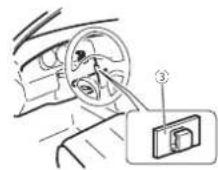
WindowsMediaAudioProfessionalLossless, Voice/DRM/Stream/Streamconvideo:ocompatible
MP3
MP3i(MP3interactive),mp3PRO:nocompatible
WAV
(Windows/MediaPlayer)
Forma.ocodecudilicacionAAC
MPFG-4/AC/salood firado
coniTunes)(.m4a)
(See 3.2 Statistical analysis)
FormatodeserialWAV...PCM line&MSADPCM
Class USB MS (Mass Storage Case
clasedea macenamicloma-
s. w.j
| ParteParte | ||
| 1SRC/OFF® | Correctordeen-tradeAUX(co-nectorostécode3.b.mm) | |
| 2 | ○ (Lista)® | / |
| 3LEVER | 10 | MULTI-CONTROL(M.C.) |
| 4 | Slotdocarrega-mentodedisco | 10 → DISP |
| 5 | ▲ (Tjetar) | 12 BAND/∅ (Pod) |
| 6 | PHONE(-one/No gancho) | 10 MIX |
| 7 | BotãoDeservicaixer | 10 S otparacartãocememóriaSDRemovaopelnelfrontalpenacas-saroslot paracartão dememória SD. |
| ParteParte | ||
| 1SRC/OFF® | Conector con-traca AUX(co-nector estéreode 3,5 mm) | |
| 2 | (L sta)(®) | / |
| 3LEVER | 10 | MULTI-CONTROL (M.C.) |
| 4 | Slot decarnega-monto cdo sco | 11 |
| 5 | ▲(Ejetar) | 12 |
| 6CLOCK | 13MIX | |
| 7 | Botão Desancai-xa | 14 |
Seção
SD—AUX (AUX)—BT Audio (Audio BT)
Ajustecovolume
Playlists(Listadereproclção)—Artists(Artistas)—Albums (Albums)—Songs (Músicas)—Podcasts (Podcasts)—Genres (Estilos)—
Composers(Compositores)—Audiobooks (Audiobooks)
OFF—15Minutes—30Minutes
FMstep(Passodes intonia FM)
Opassodesinton aFMempregadopelasinton a porouscapodeseraltemascentre100kHz, o passauredefinidoe50kHz.
Seasin'on aporbuscaforeseculadaempassos de50k-lz,asemissoraspedorãosersintorizadas deformainprecisa.Sinlon zeasemissorasutilizandoasinloniamanualoutlizenovamertea sintoniaporbusca.
1 Pressione M.C. parase lecionar oassodesin- Ioria FM.
①Prendedordomicrofone
②Presilha
Audiobook, Podcast: Compostivel

CUIDADO
(Windows/MediaPlayer)
(Windows Media Player)
Formalisisicocompetivel
Verso2.00
(Windowskided Player)
9kHz (9 kHz) - 10kHz (10 kHz)
2 按M.C.確認選挙
Contrast(顯示對比度設定)
T 轉動M.C.調整對比度
0至15随着重平增大或减小而显示。
2 按M.C.確認選挙
AUX (AUX) - BT Audio (BT音訊)
調整音量
1 辅助M.C可调整音量。

注意
Tuning Mode (LVER詞象設定)
您可指定功能至本機上的LEVER
- Track repeat—重逢日前山
OFF 15Minutes 30Minutes
FM step (已請與同限)
①USP埠
②天線輸入
15cm
③ 保險絲 (10A)
安装
④ 電源線輸入
⑤ 有線通控輸入
可连接實體線路的遙控器轉接器(另佳)
⑥麦克风输入(值DEH 6450BT)
⑦ 麦克函(件DEJ-6450BT)
4 m
⑧後否輸出
③前置输出
⑩ 重低音振器输出
①USB混编
1.5
電源線
①麥克風夾
安装
②夹
將麥克風安裝在方向盤轉向機柱上時
1 將麥克風安裝在麥克風夾上。

①聚克同
②聚克同座
③米克回火
④ 將麥克風導線安裝在清槽中。

①雙面摻
(Windows Media) must
MAC解码格式....MPDG-4AIC(受限iTunes霸
(048)
(6.2版和更舊版本)
natural_image
Two horizontal rounded rectangles side by side, no text or symbols present
معلومات إضافية
تقط

AM
(Windows Media Player)
iTunes (شغیر) MPEG-4 AAC ...... AAC تسیق ترمیز
(m4a.)
(الASPARD ٩,٣ و音频)
m = 311
USB
(Windows Media Player)
iTunes (العربية) MPEG-4 AAC ...... AAC
(m4a.)
(الASPDA, 9,7)
Linear PCM & MS ADPCM ..... WAV
(طوق)
SD
2.00 الإصدار
(Windows Media Player)
Linear PCM & MS ADPCM WAV
(الجع)
FM
مُلَّهِ مَرْتَةٍ مَرْتَةٍ
. Apple Inc. Exporting in touch
Jeopardy. Bluetooth SIG, Inc


• • _1 = _2 = _3 = _4 = _5 = _6 = _7 = _8 = _9 = _10 = _11 = _12 = _13 = _14 = _15 = _16 = _17 = _18 = _19 = _20 = _21 = _22 = _23 = _24 = _25 = _26 = _27 = _28 = _29 = _30
[Non-Text]
[Non-Text]
[Non-Text]
[Non-Text]
[Non-Text]
[Non-Text]
[Non-Text]
[Non-Text]
[Non-Text]
[Non-Text]
[Non-Text]
[Non-Text]
[Non-Text]
[Non-Text]
[Non-Text]
[Non-Text]
[Non-Text]
[Non-Text]
[Non-Text]
[Non-Text]
[Non-Text]
[Non-Text]
[Non-Text]
[Non-Text]
[Non-Text]
[Non-Text]
[Non-Text]
[Non-Text]
[Non-Text]
[Non-Text]
[Non-Text]
[Non-Text]
[Non-Text]
[Non-Text]
[Non-Text]
[Non-Text]
[Non-Text]
[Non-Text]
[Non-Text]
[Non-Text]
[Non-Text]
-
j
-
-
[Non-Text]
[Non-Text]
[Non-Text]
(五)
[Unreadable]
- 2017年
al
[Non-Text]
d
-
。
i
。
1
•
[Unreadable]
.
•
.
[Non-Text]
2017
•
[Non-Text]
-
注
-
.
il
.
2
21
i
الن
i
3
21
[Non-Text]
[Non-Text]
。
[Unreadable]
[Non-Text]
a
•
1
2
。
d
(No text)
i
•
[Unreadable]
•
•
[Non-Text]
[Non-Text]
[Non-Text]
[Non-Text]
[Non-Text]
[Non-Text]
[Non-Text]
[Non-Text]
[Non-Text]
[Non-Text]
[Non-Text]
[Non-Text]
[Non-Text]
[Non-Text]
[Non-Text]
[Non-Text]
[Non-Text]
[Non-Text]
[Non-Text]
[Non-Text]
[Non-Text]
[Non-Text]
[Non-Text]
[Non-Text]
[Non-Text]
[Non-Text]
[Non-Text]
[Non-Text]
[Non-Text]
[Non-Text]
[Non-Text]
[Non-Text]
[Non-Text]
[Non-Text]
[Non-Text]
[Non-Text]
[Non-Text]
[Non-Text]
[Non-Text]
[Non-Text]
[Non-Text]
[Non-Text]
[Non-Text]
[Non-Text]
[Non-Text]
• • _1 = _2 = _3 = _4 = _5 = _6 = _7 = _8 = _9 = _10 = _11 = _12 = _13 = _14 = _15 = _16 = _17 = _18 = _19 = _20 = _21 = _22 = _23 = _24 = _25 = _26 = _27 = _28 = _29 = _30
[Non-Text]
[Non-Text]
[Non-Text]
[Non-Text]
[Non-Text]
[Non-Text]
[Non-Text]
[Non-Text]
[Non-Text]
[Non-Text]
[Non-Text]
[Non-Text]
[Non-Text]
[Non-Text]
[Non-Text]
[Non-Text]
[Non-Text]
[Non-Text]
[Non-Text]
[Non-Text]
[Non-Text]
[Non-Text]
[Non-Text]
[Non-Text]
[Non-Text]
[Non-Text]
[Non-Text]
[Non-Text]
[Non-Text]
[Non-Text]
[Non-Text]
[Non-Text]
-
j
-
[Non-Text]
[Non-Text]
(五)
[Unreadable]
- 2017年
al
d
-
。
i
。
1
•
.
•
.
[Non-Text]
2017
•
[Non-Text]
注
-
.
il
.
2
21
الن
i
3
21
[Non-Text]
تشغيل هذا الجهاز
تش civil هذا但他از

العادلات الأولية | |
| 1 | أنتظيل ع.فيفيول للakhمن (الOmega Affiliate).SEARCH لحراز M.C. للاختيار أول حرفت الاسم qui تبعت عنهم.م.ل. للاختيار نوع الحرفالح舱ة. فيرشغيل الهانف الحدياني نكلي الهانف. بجب تنشigel(ج Spiط رovers هده predominance)Visibility Visibility بجر اتر. تحواد وده مهور.فقيام. خصصالية |
| audCompact الزر مع الاستثمارات في يقاب تنشيل OFF/SRC.audCompact الزر مع الاستثمارات في يقاب تنشيل OFF/SRC.audCompact المستراز على M.C.audCompact المستراز على M.C.aud Compact Retra.aud Compact Retra.aud Compact Retra.aud Compact Retra.aud Compact Retra.aud Compact Retra.aud Compact Retra.aud Compact Retra.aud Compact Retra.aud Compact Retra.aud Compact Retra.aud Compact Retra.aud Compact Retra.aud Compact Retra.aud Compact Retra.aud Compact Retra.aud Compact Retra.aud Compact Retra.aud Compact Retra.aud Compact Retra.aud Compact Retta.aud Compact Retta.aud Compact Retta.aud Compact Retta.aud Compact Retta.aud Compact Retta.aud Compact Retta.aud Compact Retta.aud Compact Retta.aud Compact Retta.aud Compact Retta.aud Compact Retta.aud Compact Retta.aud Compact Retta.aud Compact Retta.aud Compact Retta.aud Compact Retta.aud Compact Retta.aud Compact Retta.aud Compact Retta.aud Compact Rett.aud Compact Rett.aud Compact Rett.aud Compact Rett.aud Compact Rett.aud Compact Rett.aud Compact Rett.aud Compact Rett.aud Compact Rett.aud Compact Rett.aud Compact Rett.aud Compact Rett.aud Compact Rett.aud Compact Rett.aud Compact Rett.aud Compact Rett.aud Compact Rett.aud Compact Rett.aud Compact Rett.aud Compact Rett.aud Compact Ret t.aud Compact Rett.aud Compact Rett.aud Compact Rett.aud Compact Rett.aud Compact Rett.aud Compact Rett.aud Compact Rett.aud Compact Rett.aud Compact Rett.aud Compact Rett.aud Compact Rett.aud Compact Rett.aud Compact Rett.aud Compact Rett.aud Compact Rett.aud Compact Rett.aud Compact Rett.aud Compact Rett.aud Compact Rett.aud Compact Ret,aud Compact Ret,aud Compact Ret,aud Compact Ret,aud Compact Ret,aud Compact Ret,aud Compact Ret,aud Compact Ret,aud Compact Ret,aud Compact Ret,aud Compact Ret,aud Compact Ret,aud Compact Ret,aud Compact Ret,aud Compact Ret,aud Compact Ret,aud Compact Ret,aud Compact Ret,aud Compact Ret,aud Compact Ret,aud Compact Ret,aud Compact Ret,aud Compact Ret,aud Compact Ret,aud Compact Ret,aud Compact Ret,,aud Compact Ret,aud Compact Ret,aud Compact Ret,aud Compact Ret,aud Compact Ret,aud Compact Ret,aud Compact Ret,aud Compact Ret,aud Compact Ret,aud Compact Ret,aud Compact Ret,aud Compact Ret,aud Compact Ret,aud Compact Ret,aud Compact Ret,aud Compact Ret,aud Compact Ret,aud Compact Ret,aud Compact Ret,aud Compact Ret,aud Compact Ret,aud Compact Ret,aud Compact Ret,aud Compact Ret,aud Compact Ret,.aud Compact Ret,aud Compact Ret,aud Compact Ret,aud Compact Ret,aud Compact Ret,aud Compact Ret,aud Compact Ret,aud Compact Ret,aud Compact Ret,aud Compact Ret,aud Compact Ret,aud Compact Ret,aud Compact Ret,aud Compact Ret,aud Compact Ret,aud Compact Ret,aud Compact Ret,aud Compact Ret,aud Compact Ret,aud Compact Ret,aud Compact Ret,aud Compact Ret,aud Compact Ret,aud Compact Ret,aud Compact Ret,M.C.,aud Compact Ret,aud Compact Ret,aud Compact Ret,aud Compact Ret,aud Compact Ret,aud Compact Ret,aud Compact Ret,aud Compact Ret,aud Compact Ret,aud Compact Ret,aud Compact Ret,aud Compact Ret,aud Compact Ret,aud Compact Ret,aud Compact Ret,aud Compact Ret,aud Compact Ret,aud Compact Ret,aud Compact Ret,aud Compact Ret,aud Compact Ret,aud Compact Ret,aud Compact Ret,aud Compact Ret,aud Compact Ret,m.Aud Compact Ret,aud Compact Ret,aud Compact Ret,aud Compact Ret,aud Compact Ret,aud Compact Ret,aud Compact Ret,aud Compact Ret,aud Compact Ret,aud Compact Ret,aud Compact Ret,aud Compact Ret,aud Compact Ret,aud Compact Ret,aud Compact Ret,aud Compact Ret,aud Compact Ret,aud Compact Ret,aud Compact Ret,aud Compact Ret,aud Compact Ret,aud Compact Ret,aud Compact Ret,aud Compact Ret,aud Compact Ret,Aud 2014-2015-2016-2017-2018-2019-2020-2021-2022-2023-2024-2025-2026-2027-2028-2029-2030-2031-2032-2033-2034-2035-2036-2037-2038-2039-2040-2041-2042-2043-2044-2045-2046-2047-2048-2049-2050-2051-2052-2053-2054-2055-2056-2057-2058-2059-2060-2061-2062-2063-2064-2065-2066-2067-2068-2069-2070-2071-2072-2073-2074-2075-2076-2077-2078-2079-2080-2081-2082-2083-2084-2085-2086-2087-2088-2089-2090-2091-2092-2093-2094-2095-2096-2097-2098-2099-2100-2101-2102-2103-2104-2105-2106-2107-2108-2109-2110-2111-2112-2113-2114-2115-2116-2117-2118-2119-2120-2121-2122-2123-2124-2125-2126-2127-2128-2129-2130-2131-2132-2133-2134-2135-2136-2137-2138-2139-2140-2141-2142-2143-2144-2145-2146-2147-2148-2149-2150-2151-2152-2153-2154-2155-2156-2157-2158-2159-2160-2161-2162-2163-2164-2165-2166-2167-2168-2169-2170-2171-2172-2173-2174-2175-2176-2177-2178-2179-2180-2181-2182-2183-2184-2185-2186-2187-2188-2189-2190-2191-2192-2193-2194-2195-2196-2197-2198-2199-2200-2201-2202-2203-2204-2205-2206-2207-2208-2209-2210-2211-2212-2213-2214-2215-2216-2217-2218-2219-2220-2221-2222-2223-2224-2225-2226-2227-2228-2229-2230-2231-2232-2233-2234-2235-2236-2237-2238-2239-2240-2241-2242-2243-2244-2245-2246-2247-2248-2249-2250-2251-2252-2253-2254-2255-2256-2257-2258-2259-2260-2261-2262-2263-2264-2265-2266-2267-2268-2269-2270-2271-2272-2273-2274-2275-2276-2277-2278-2279-2280-2281-2282-2283-2284-2285-2286-2287-2288-2289-2290-2291-2292-2293-2294-2295-2296-2297-2298-2299-2300-2301-2302-2303-2304-2305-2306-2307-2308-2309-2310-2311-2312-2313-2314-2315-2316-2317-2318-2319-2320-2321-2322-2323-2324-2325-2326-2327-2328-2329-2330-2331-2332-2333-2334-2335-2336-2337-2338-2339-2340-2341-2342-2343-2344-2345-2346-2347-2348-2349-2350-2351-2352-2353-2354-2355-2356-2357-2358-2359-2360-2361-2362-2363-2364-2365-2366-2367-2368-2369-2370-2371-2372-2373-2374-2375-2376-2377-2378-2379-2380-2381-2382-2383-2384-2385-2386-2387-2388-2389-2390-2391-2392-2393-2394-2395-2396-2397-2398-2399-2400-2401-2402-2403-2404-2405-2406-2407-2408-2409-2410-2411-2412-2413-2414-2415-2416-2417-2418-2419-2420-2421-2422-2423-2424-2425-2426-2427-2428-2429-2430-2431-2432-2433-2434-2435-2436-2437-2438-2439-2440-2441-2442-2443-2444-2445-2446-2447-2448-2449-2450-2451-2452-2453-2454-2455-2456-2457-2458-2459-2460-2461-2462-2463-2464-2465-2466-2467-2468-2469-2470-2471-2472-2473-2474-2475-2476-2477-2478-2479-2480-2481-2482-2483-2484-2485-2486-2487-2488-2489-2490-2491-2492-2493-2494-2495-2496-2497-2498-2499-2500-2501-2502-2503-2504-2505-2506-2507-2508-2509-2510-2511-2512-2513-2514-2515-2516-2517-2518-2519-2520-2521-2522-2523-2524-2525-2526-2527-2528-2529-2530-2531-2532-2533-2534-2535-2536-2537-2538-2539-2540-2541-2542-2543-2544-2545-2546-2547-2548-2549-2550-2551-2552-2553-2554-2555-2556-2557-2558-2559-2560-2561-2562-2563-2564-2565-2566-2567-2568-2569-2570-2571-2572-2573-2574-2575-2576-2577-2578-2579-2580-2581-2582-2583-2584-2585-2586-2587-2588-2589-2590-2591-2592-2593-2594-2595-2596-2597-2598-2599-2600-2601-2602-2603-2604-2605-2606-2607-2608-2609-2610-2611-2612-2613-2614-2615-2616-2617-2618-2619-2620-2621-2622-2623-2624-2625-2626-2627-2628-2629-2630-2631-2632-2633-2634-2635-2636-2637-2638-2639-2640-2641-2642-2643-2644-2645-2646-2647-2648-2649-2650-2651-2652-2653-2654-2655-2656-2657-2658-2659-2660-2661-2662-2663-2664-2665-2666-2667-2668-2669-2670-2671-2672-2673-2674-2675-2676-2677-2678-2679-2680-2681-2682-2683-2684-2685-2686-2687-2688-2689-2690-2691-2692-2693-2694-2695-2696-2697-2698-2699-2700-2701-2702-2703-2704-2705-2706-2707-2708-2709-2710-2711-2712-2713-2714-2715-2716-2717-2718-2719-2720-2721-2722-2723-2724-2725-2726-2727-2728-2729-2730-2731-2732-2733-2734-2735-2736-2737-2738-2739-2740-2741-2742-2743-2744-2745-2746-2747-2748-2749-2750-2751-2752-2753-2754-2755-2756-2757-2758-2759-2760-2761-2762-2763-2764-2765-2766-2767-2768-2769-2770-2771-2772-2773-2774-2775-2776-2777-2778-2779-2780-2781-2782-2783-2784-2785-2786-2787-2788-2789-2790-2791-2792-2793-2794-2795-2796-2797-2798-2799-2800-2801-2802-2803-2804-2805-2806-2807-2808-2809-2810-2811-2812-2813-2814-2815-2816-2817-2818-2819-2820-2821-2822-2823-2824-2825-2826-2827-2828-2829-2830-2831-2832-2833-2834-2835-2836-2837-2838-2839-2840-2841-2842-2843-2844-2845-2846-2847-2848-2849-2850-2851-2852-2853-2854-2855-2856-2857-2858-2859-2860-2861-2862-2863-2864-2865-2866-2867-2868-2869-2870-2871-2872-2873-2874-2875-2876-2877-2878-2879-2880-2881-2882-2883-2884-2885-2886-2887-2888-2889-2890-2891-2892-2893-2894-2895-2896-2897-2898-2899-2900-2901-2902-2903-2904-2905-2906-2907-2908-2909-2910-2911-2912-2913-2914-2915-2916-2917-2918-2919-2920-2921-2922-2923-2924-2925-2926-2927-2928-2929-2930-2931-2932-2933-2934-2935-2936-2937-2938-2939-2940-2941-2942-2943-2944-2945-2946-2947-2948-2949-2950-2951-2952-2953-2954-2955-2956-2957-2958-2959-2960-2961-2962-2963-2964-2965-2966-2967-2968-2969-2970-2971-2972-2973-2974-2975-2976-2977-2978-2979-2980-2981-2982-2983-2984-2985-2986-2987-2988-2989-2990-2991-2992-2993-2994-2995-2996-2997-2998-2999-3000-3001-3001-3001-3001-3001-3001-3001-3001-3001-3001-3001 - [United States of the United States of the United States of the United States of the United States of the United States of the United States of the United States of the United States of the United States of the United States of the United States of the United States of the United States of the United States of the United States of the United States of the United States of the United States of the United States of the United States of the United States of the United States of the United States of the United States of the United States of theUnited States of the United States of the United States of the United States of the United States of the United States of the United States of the United States of the United States of the United States of the United States of the United States of the United States of the United States of the United States of the United States of the United States of the United States of the United States of the United States of the United States of the United States of the United States of the United States of the United States of The United States of the United States of the United States of the United States of the United States of the United States of the United States of the United States of the United States of the United States of the United States of the United States of the United States of the United States of the United States of the United States of the United States of the United States of the United States of the United States of the United States of the United States of the United States of the United States of the United States of The U.S. in the United States of the United States of the United States of the United States of the United States of the United States of the United States of the United States of the United States of the United States of the United States of the United States of the United States of the United States of the United States of the United States of the United States of the United States of the United States of the United States of the United States of the United States of the United States of the United States of the United Statesof the United States of the United States of the United States of the United States of the United States of the United States of the United States of the United States of the United States of the United States of the United States of the United States of the United States of the United States of the United States of the United States of the United States of the United States of the United States of the United States of the United States of the United States of the United States of the United States of the United States OF the United States OF the United States OF the United States OF the United States OF the United States OF the United States OF the United States OF the United States OF the United States OF the United States OF the United States OF the United States OF the United States OF the United States OF the United States OF the United States OF the United States OF the United States OF the United States OF the United States OF the United States OF the United States OF the United States OF the United States OF the United States of the United States OF the United States OF the United States OF the United States OF the United States OF the United States OF the United States OF the United States OF the United States OF the United States OF the United States OF the United States OF the United States OF the United States OF the United States OF the United States OF the United States OF the United States OF the United States OF the United States OF the United States OF the United States OF the United States OF the United States of the United States of the United States OF the United States OF the United States OF the United States OF the United States OF the United States OF the United States OF the United States OF the United States OF the United States OF the United States OF the United States OF the United States OF the United States OF the United States OF the United States OF the United States OF the United States OF the United States OF the United States OF the United States OF the United States OF the United States of the United States OF the United States of the United States OF the United States OF the United States OF the United States OF the United States OF the United States OF the United States OF the United States OF the United States OF the United States OF the United States OF the United States OF the United States OF the United States OF the United States OF the United States OF the United States OF the United States OF the United States OF the United States OF the United States OF the United States OF the United States of the United States of the United States of the United States OF the United States OF the United States OF the United States OF the United States OF the United States OF the United States OF the United States OF the United States OF the United States OF the United States OF the United States OF the United States OF the United States OF the United States OF the United States OF the United States OF the United States OF the United States OF the United States OF the United States OF the United States of the United States OF the United States OF the United States of the United States OF the United States OF the United States OF the United States OF the United States OF the United States OF the United States OF the United States OF the United States OF the United States OF the United States OF the United States OF the United States OF the United States OF the United States OF the United States OF the United States OF the United States OF the United States OF the United States OF the United States OF the United States of the United States OF the United States of the United States of the United States OF the United States OF the United States OF the United States OF the United States | |
[Non-Text]
[Non-Text]
[Non-Text]
[Non-Text]
4
m = 311
-
。
[Non-Text]
m = 311
[Unreadable]
7.22
[Non-Text]
Blue
Blu
1 + u1 - 1 = ( 1 + u) u1 < 1 = u
m = 311
10
من
شام هد
[Non-Text]
[Non-Text]
[Non-Text]
[Non-Text]
[Non-Text]
^*
(No text)
1 + u1 - 1 = ( 1 + u) u1 < 1 = u
m = 311
[Non-Text]
-
-
m = 311
广力云智慧零售收银系统
[Non-Text]
[Non-Text]
[Non-Text]
[Non-Text]
[Non-Text]
[Unreadable]
[Non-Text]
m = 311
m = 311
-
[Non-Text]
[Non-Text]
[Non-Text]
[Non-Text]
[Non-Text]
[Non-Text]
[Non-Text]
m = 311
m = 311
-
[Non-Text]
[Non-Text]
[Non-Text]
[Non-Text]
[Non-Text]
[Non-Text]
[Non-Text]
[Non-Text]
[Non-Text]
[Non-Text]
[Non-Text]
[Non-Text]
[Non-Text]
[Non-Text]
[Non-Text]
[Non-Text]
[Non-Text]
[Non-Text]
[Non-Text]
[Non-Text]
[Non-Text]
[Non-Text]
[Non-Text]
m = 311
-
-
-
-
-
-
-
-
-
-
(1)
-
-
-
-
.B
.B
.B
.B
.B

تشغيل هذا الجهاز
تشغيل هذا الجهاز

Super bass—Flat—Custom2
(ضيط الموزن) G.EQ
Others—Classics—Popular—News&Inf
2 اضغط على الم.С.
كُحْتِ الْهَدَةِ عَنْ مَحْطَةِ كَبْتِ نَوْعِ الْرَّنَامِجِ هَذَاٍ وَعَتَ لَعْلَّرِ عَلَى
Local, BSM √AM √AM √AM √AM
Tuning Mode
Ar


تشغيل هذا الجهاز
تشغيل هذا الجهاز
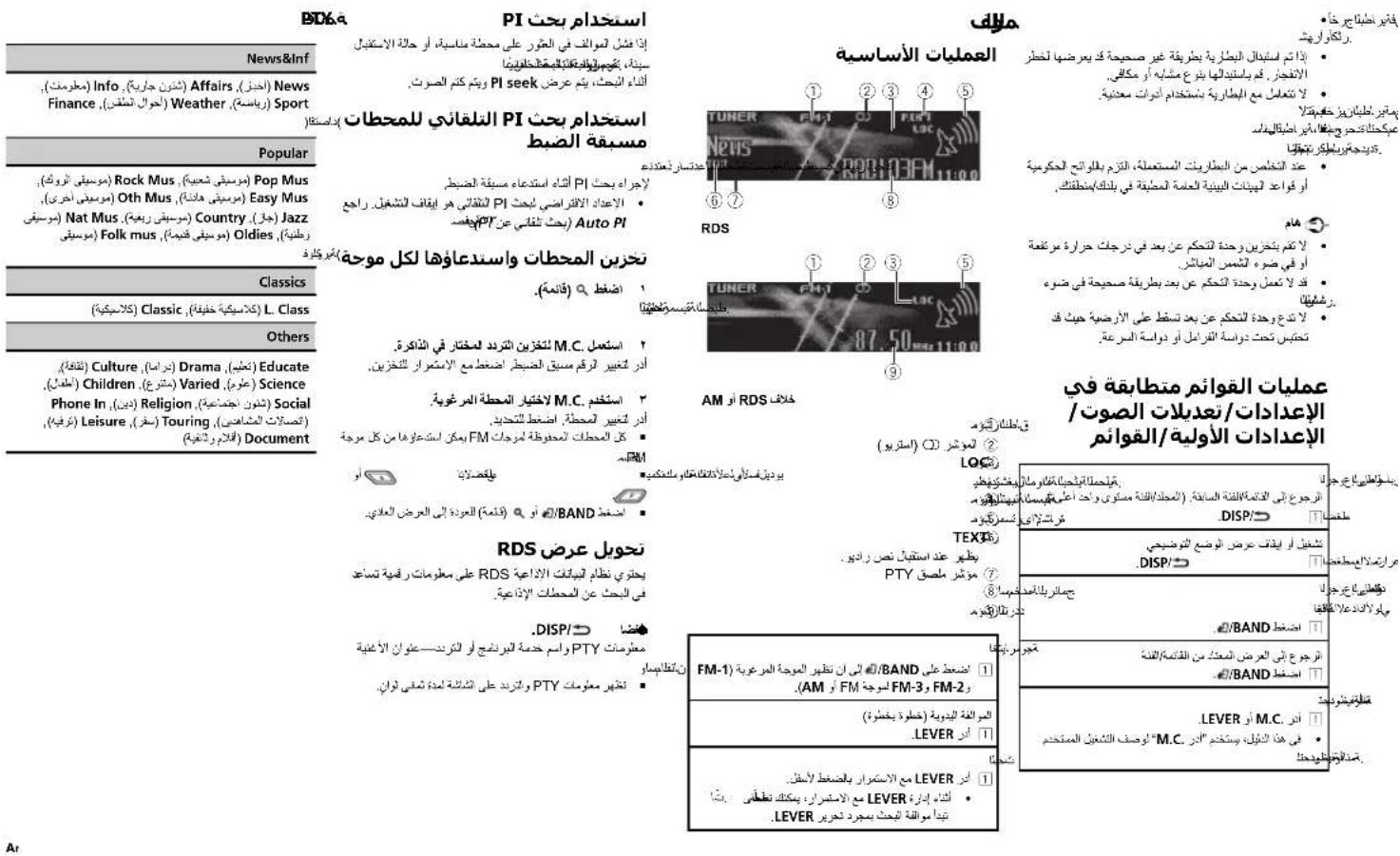
BTO6a
PI استخدام بحث
وحدة التحكم عن بعد
لادحولا

(Windows Media Player)
(Windows Media Player)
(Windows Media Player)
iTunes (الع) MPEG-4 AAC ...... AAC
(m4a.)
(الله, ١٠, نشر)
1.72/7.12 (الله)
51
±^17 ____
:HPF
175/1…/8…/27/3. frکتن
انحراف ٢٠-صيل، کتر
(###)
175/1…/n·(97)0.
انحراف
m = 311
•
;
-
[Non-Text]
-
a
[Non-Text]
[Non-Text]
[Non-Text]
[Non-Text]
[Non-Text]
[Non-Text]
[Non-Text]
[Non-Text]
[Non-Text]
[Non-Text]
[Non-Text]
[Non-Text]
[Non-Text]
[Non-Text]
[Non-Text]
[Non-Text]
[Non-Text]
[Non-Text]
[Non-Text]
[Non-Text]
[Non-Text]
[Non-Text]
[Non-Text]
[Non-Text]
[Non-Text]
[Non-Text]
[Non-Text]
[Non-Text]
[Non-Text]
[Non-Text]
[Non-Text]
[Non-Text]
[Non-Text]
[Non-Text]
[Non-Text]
[Non-Text]
[Non-Text]
[Non-Text]
[Non-Text]
[Non-Text]
[Non-Text]
[Non-Text]
[Non-Text]
[Non-Text]
[Non-Text]
[Non-Text]
[Non-Text]
[Non-Text]
[Non-Text]
[Non-Text]
[Non-Text]
[Non-Text]
[Non-Text]
[Non-Text]
[Non-Text]
[Non-Text]
[Non-Text]
[Non-Text]
[Non-Text]
[Non-Text]
[Non-Text]
[Non-Text]
[Non-Text]
[Non-Text]
[Non-Text]
[Non-Text]
[Non-Text]
[Non-Text]
[Non-Text]
[Non-Text]
[Non-Text]
[Non-Text]
[Non-Text]
[Non-Text]
[Non-Text]
[Non-Text]
[Non-Text]
[Non-Text]
[Non-Text]
广力云智慧零售收银系统
The image is too blurry to recognize any text content.
1
•
[Non-Text]
[Non-Text]
[Non-Text]
-
•
The image is too blurry to recognize any text content.
1
-
[Non-Text]
[Non-Text]
[Non-Text]
[Non-Text]
-
[Non-Text]
[Non-Text]
[Non-Text]
[Non-Text]
[Non-Text]
[Non-Text]
[Non-Text]
[Non-Text]
1
[Non-Text]
-
d
;
-
,
1
-
•
•
•
21
•
•
六、
•
•
•
。
•
•
-
-
•
•
[Non-Text]
•
,
•
[Non-Text]
•
。
广力云智慧零售收银系统
。
:
3
-
+
-
:
C
-
[Non-Text]
[Non-Text]
Fa
[Non-Text]
[Non-Text]
[Non-Text]
[Non-Text]
[Non-Text]
[Non-Text]
[Non-Text]
[Non-Text]
[Non-Text]
[Non-Text]
[Non-Text]
[Non-Text]
[Non-Text]
[Non-Text]
[Non-Text]
[Non-Text]
[Non-Text]
[Non-Text]
[Non-Text]
[Non-Text]
[Non-Text]
[Non-Text]
[Non-Text]
[Non-Text]
[Non-Text]
[Non-Text]
[Non-Text]
[Non-Text]
[Non-Text]
[Non-Text]
[Non-Text]
[Non-Text]
[Non-Text]
[Non-Text]
[Non-Text]
[Non-Text]
[Non-Text]
[Non-Text]
[Non-Text]
[Non-Text]
[Non-Text]
[Non-Text]
[Non-Text]
[Non-Text]
[Non-Text]
[Non-Text]
[Non-Text]
[Non-Text]
[Non-Text]
[Non-Text]
[Non-Text]
广力云智慧零售收银系统
The image is too blurry to recognize any text content.
1
•
[Non-Text]
[Non-Text]

اطلاعات بيشتر
اطلاعات بيشتر
ديسك
نصب ميكروقن
DEH-6450BT ققط براي

بیرون آوردن و نصب مجدد صفحه جلوبي
USB ①
②
دای سکتی متر
(امير) ③
④ ورودی سیم برق
al, al, al, al, al, al, al, al, al, al, al, al, al, al, al, al, al, al, al, al, al, al, al, al, al, al, al, al, al, al, al, al, al, al, al, al, al, al, al, al, al, al, al, al, al, al, al, al, al, al, al,
الله بُمْرَّهِ مُسْتَّةٍ وَلَجْدَّهِ لِيْنَّهُ أَمْنَّهُ مُسْتَّةٍ وَلَجْدَّهُ لِيْنَّهُ أَمْنَّهُ مُسْتَّةٍ وَلَجْدَّهُ لِيْنَّهُ أَمْنَّهُ مُسْتَّةٍ وَلَجْدَّهُ لِيْنَّهُ أَمْنَّهُ مُس ^2 وَلَجْدَّهُ لِيْنَّهُ أَمْنَّهُ مُسْتَّةٍ وَلَجْدَّهُ لِيْنَّهُ أَمْنَّهُ مُسْتَّةٍ وَلَجْدَّهُ لِيْنَّهُ أُمْنَّهُ مُسْتَّةٍ وَلَجْدَّهُ لِيْنَّهُ أُمْنَّهُ مُسْتَّةٍ وَلَجْدَّهُ لِيْنَّهُ أُمْنَّهُ مُسْتَّةٍ وَلَحْدَّهُ لِيْنَّهُ أُمْنَّهُ مُسْتَّةٍ وَلَحْدَّهُ لِيْنَّهُ أُمْنَّهُ مُسْتَّةٍ وَلَحْدَّهُ لِيْنَّهُ أُمْنَ’
Random, Color 6: Color 1
m = 12
Random, Color 6: Color 1
.
(بدون تغير) OFF •
( Connectivity of the Internet) Clear memory (Bluetooth)

استفاده از دستگاه
استفاده از دستگاه
(Bluetooth) Device INFO
m = 311
بستكاههاي Bluetooth
(Bluetooth) Auto connect
(Bluetooth Visibility) Bluetooth
Super bass—Flat—Custom2
(اللهاب)-(Classic) L Class
Others
Culture (درام Drama (اسوزش) Educate
(کوید) Children (انواع مخلف) Varied (عَمَى) Science
Phone In (مدهي) Religion (مسال اجتماعي) Social
Visit us on the World Wide Web at
http://pioneer.jp/group/index-e.html
Pioneer Gulf.FZE
Pioneer Electronics Australia. Pty.Ltd
Pioneer Electronics Asiacentre.Pte
Pioneer (HK) Ltd.
Pioneer High Fidelity Taiwan Co., Ltd.
Pioneer International Latin America S.A.
http://www.pioneer-uae.com
http://www.pioneer.com.au/
http://www.pioneer.com.sg
http://www.pioneerhongkong.com.hk
http://www.pioneer-twn.com.tw
http://www.pioneer-latin.com
©2011PIONEERCORPORATION.
Allrightsreserved.
PIONEERCORPORATION
1-1, Shin-ogura, Saiwai-ku, Kawasaki-shi,
Kanagawa212-0031,JAPAN
PIONEERELECTRONICS(USA)INC.
P.O.Box1540,LongBeach,California90801-1540,U.S.A.
TEL:(800)421-1404
PIONEEREUROPENV
Haven1087,Keetberglaan1,B-9120Melsele,Belgium/Belgique
TEL:(0)3/570.05.11
PIONEERELECTRONICSASIACENTREPTE.LTD.
253AlexandraRoad,#04-01,Singapore159936
TEL:65-6472-7555
PIONEERELECTRONICSAUSTRALIAPTY.LTD.
5ArcoLane,Heatherton,Victoria,3202Australia
TEL:(03)9586-6300
PIONEERELECTRONICSOFCANADA, INC.
340FerrierStreet,Unit2,Markham,OntarioL3R2Z5,Canada
TEL:1-877-283-5901
TEL:905-479-4411
PIONEERELECTRONICSDEMEXICO,S.A.deC.V.
Blvd.ManuelAvilaCamacho13810piso
Col.LomasdeChapultepec,Mexico,D.F.11000
TEL:55-9178-4270
先锋股份有限公司
台北市內湖區瑞光路407號8樓
電話:(02)2657-3588
先锋電子(香港)有限公司
香港九龍長沙灣道909號5樓
電話:(0852)2848-6488
PrintedinChina
- Installation
- Additionalinformation
- Beforeyoustart
- ThankyouforpurchasingthisPIONEER product
- Aboutthisunit
- CAUTION:
- CAUTION
- Note
- Incaseoftrouble
- Demomode
- Important
- Aboutthismanual
- Operatingthisunit
- Remotecontrol
- Setupmenu
- 1Afterinstallationofthisunit,turnthe ignitionswitchtoON.
- 2TurnM.C.toswitchtoYES.
- 3PressM.C.toselect.
- 4Performthefollowingprocedurestoset themenu.
- Languageselect(multi-language)
- Calendar(settingthedate)
- Clock(settingtheclock)
- FMstep(FMturingsep)
- AMstep(AMtuningstep)
- Contrast(display:contrastsetting)
- Demonstration(demoislaysetting)
- 5Tofinishyoursettings,turnM.C.toselect
- 6PressM.C.toselect.
- Notes
- Basicoperations
- Useandcareoftheremote control
- WARNING
- Menuoperationsidentical forfunctionsettings/audio adjustments/initialsettings/lists
- Tuner
- UsingPISeek
- UsingAutoPISeek for preset stations
- Storing and recalling stations for each band
- Press(list).
- UseM.C.tostorethe selectedfrequency inthememory.
- UseM.C.toselectthedesiredstation.
- Switching the RDS display
- -Press / DISP.
- PTYlist
- News&Inf
- Popular
- Usingradiotext
- Functionsettings
- CD/CD-R/CD-RWandexternal
- storagedevices(USB,SD)
- Operating thisunit
- Displayingtextinformation
- Selectingandplayingfiles/ tracksfromthenamelist
- 2TurnM.C.tochangethemenuoption andpresstoselectFUNCTION.
- iPod
- Browsingforasong
- Playingsongsrelatedtothe currentlyplayingsong
- 1PressandholdM.C.toswitchtolinkplay mode.
- 2TurnM.C.tochangethemode;pressto select.
- Operatingthisunit'siPod functionfromyouriPod
- 1PressM.C.todisplaythemainmenu.
- Playmode(repeatplay)
- Shufflemode(shuffle)
- Shuffleall(shuttleall)
- Linkplay(linko ay)
- Pause(pause)
- SoundRetriever(soundretriever)
- 2TurnM.C.tochangethemenuoption andpresstoselectAUDIO.
- 3TurnM.C.toselecttheaudiofunction.
- Fader/Balance/fader/balanceadjustment
- PresetEQ(equalizerrecall)
- G.EQ(equalizer adjustment)
- Loudness(floudness)
- Subwoofer1(subwooferon/offsetting)
- Subwoofer2(subwooferadjustment)
- 50Hz—63Hz—80Hz—100Hz—125Hz
- BassBooster(bassboost)
- HPF(highcassfilteradjustment)
- SLA(sourceleveladjustment)
- UsingBluetoothwireless technology
- UsingBluetoothhtelephone
- Settingupforhands-freephoning
- Connectionmenuoperation
- 1PressandholdPHONEtodisplaythecon-
- nection.
- 2TurnM.C.toselectthefunction.
- Visibility (setting visibility of this unit)
- DeviceINFO(Bluetooth deviceaddressdisplay)
- BluetoothAudio
- SettingupforBluetoothaudio
- 3TurnM.C.toselectthefunction.
- Phonemenuoperation
- PhoneBook(phonebook)
- PhoneFunction(phonefunction)
- Functionandoperation
- 1DisplayPhoneFunction
- 2PressM.C.todisplaythefunctionmenu.
- Autoanswer(automaticanswering)
- Ringtone(ringtonselect)
- PH.B.Nameview(phonebooknameview)
- Initialsettings
- 1PressandholdSRC/OFFuntiltheunit turnsoff.
- 3TurnM.C.toselecttheinitialsetting.
- EngineTimealert(e aosedtimed splaysetting)
- FMstep(FMtuningstep)
- Warningtone(warningtoresetting)
- AUX(auxiliary input)
- Dimmer(dimmersetting)
- Contrast(displaycontrast setting)
- S/Wcontrol(rea output and subwoofersetting)
- Demonstration(demon displaysetting)
- Ever-scroll(script modesetting)
- BTAUDIO(Bluetoothaudioactivation)
- Clearmemory(resettingtheBluetoothw roloss, technologymodule)
- BTVersioninfo.(Bluecolor hivers and display)
- S/WUPDATE(upcaling:hesoftware)
- Otherfunctions
- UsinganAUXsource
- 2PressSRC/OFFtoselectAUXasthe source.
- Usingdifferententertainment displays
- AdvancedoperationsusingtheMIX (MIXTRAX)button
- Switchingthedisplaybackground accordingtothetypeofmusic
- Switchingthedisplayindication andbuttonillumination
- ●PressandholdMIX.
- Installation
- Connections
- DINfront/rearmount
- DINFront-mount
- Insert themountingsleeve into the dashboard.
- 2Securethemountingsleevebyusinga screwdrivertobendthemetaltabs(90°)into place.
- 3Installtheunitasillustrated.
- DINRear-mount
- Determinetheappropriateposition wheretheholesonthebracketandtheside oftheunitmatch.
- 2Tightentwoscrewsoneachside.
- Removingtheunit
- 1Removethetrimring.
- 2Insertthesuppliedextractionkeysinto bothsidesoftheunituntiltheyclickinto place.
- 3Pulltheunitoutofthedashboard.
- Removingandre-attachingthe frontpanel
- Installingthemicrophone
- Wheninstallingthemicrophone onthesunvisor
- 2Installthemicrophonecliponthesun visor.
- Wheninstallingthemicrophone onthesteeringcolumn
- Adjustingthemicrophoneangle
- Errormessages
- Bluetoothdevice
- Handlingguidelines
- Discsandplayer
- Externalstoragedevice(USB,SD)
- USBstoragedevice
- DualDiscs
- Compressedaudio compatibility(disc,USB,SD)
- WMA
- MP3
- WAV
- AAC
- Supplementalinformation
- Disc
- SDmemorycard
- iPodcompatibility
- Sequenceofaudiofiles
- Bluetoothprofiles
- Copyrightandtrademark
- Bluetooth
- iTunes
- iPod&iPhone
- MIXTRAX
- Specifications
- General
- Audio
- CDplayer
- USB
- SD
- FMtuner
- AMtuner
- Bluetooth(DEH-6450BTonly)
- Índice
- Antesdecomenzar
- Usodeestaunidad
- PRECAUCIÓN
- Notas
- OFF—15Minutes—30Minutes
- FMstep(pasodesirtoniadeFM)
- Cabledealimentación
- Instalación
- CUIDADO
- 注意
- Tuning Mode (LVER詞象設定)
- 安装
- 電源線
- 將麥克風安裝在方向盤轉向機柱上時
- تشغيل هذا الجهاز
- تش civil هذا但他از
- (ضيط الموزن) G.EQ
- BTO6a
- PI استخدام بحث
- وحدة التحكم عن بعد
- اطلاعات بيشتر
- نصب ميكروقن
- بیرون آوردن و نصب مجدد صفحه جلوبي
- استفاده از دستگاه
- http://pioneer.jp/group/index-e.html
- PIONEERCORPORATION
- PIONEEREUROPENV
Brand : PIONEER
Model : DEH-5450SD
Category : Receiver