
GTM 35 - Browser GARMIN - Free user manual and instructions
Find the device manual for free GTM 35 GARMIN in PDF.


| Product type | GPS navigator |
| Brand | Garmin |
| Model | GTM 35 |
| Dimensions (L x H x D) | 12.5 x 7.5 x 2.0 cm |
| Weight | 180 g |
| Screen size | 4.3 inches (10.9 cm) diagonal |
| Screen resolution | 480 x 272 pixels |
| Power type | Built-in rechargeable lithium-ion battery |
| Battery life | Up to 4 hours |
| Main features | GPS navigation, traffic receiver, points of interest, voice guidance, route calculation |
| Preloaded maps | Western Europe (depending on version) |
| GPS receiver | High sensitivity |
| Connectivity | USB (charging and data transfer) |
| Mounting support | Suction cup for windshield or dashboard |
| Care and cleaning | Clean with a soft, dry cloth. Do not use abrasive products. |
| Operating temperature | From -10°C to 60°C |
| Safety | Do not expose to excessive heat. Use the provided charger. |
| Spare parts and repairability | Mounting support, USB cable, cigarette lighter charger available as options. |
| General information | 1 year warranty. Compatible with Garmin maps. |
Frequently Asked Questions - GTM 35 GARMIN
User questions about GTM 35 GARMIN
0 question about this device. Answer the ones you know or ask your own.
Ask a new question about this device
Download the instructions for your Browser in PDF format for free! Find your manual GTM 35 - GARMIN and take your electronic device back in hand. On this page are published all the documents necessary for the use of your device. GTM 35 by GARMIN.
USER MANUAL GTM 35 GARMIN
GTM ™ 35 traffic receiver

instructions ...... 3–7
instructions 8-12
GTM™ 35 Instructions
The Garmin® GTM 35 delivers Traffic Message Channel (TMC) information, including road conditions and traffic delays, to your GPS device. When traffic information is received, your GPS device displays traffic delays on the map. This information is used to avoid traffic delays and find the fastest routes.
The traffic information is broadcast over the FM Radio Data System (RDS). For coverage areas, refer to the Garmin Web site at www.garmin.com/fmtraffic.
NOTE: The GTM 35 and the GPS device must be in data range of an FM station transmitting TMC data to receive traffic information.
NOTE: Garmin is not responsible for the accuracy of the traffic information. The GTM 35 receives signals from the traffic service provider and displays that information on your GPS device.
Connecting Your GTM 35
NOTICE
Before mounting the device, see the Important Safety and Product Information guide for information about laws pertaining to windshield mounting.
- Remove the power cable from your GPS device, if necessary.
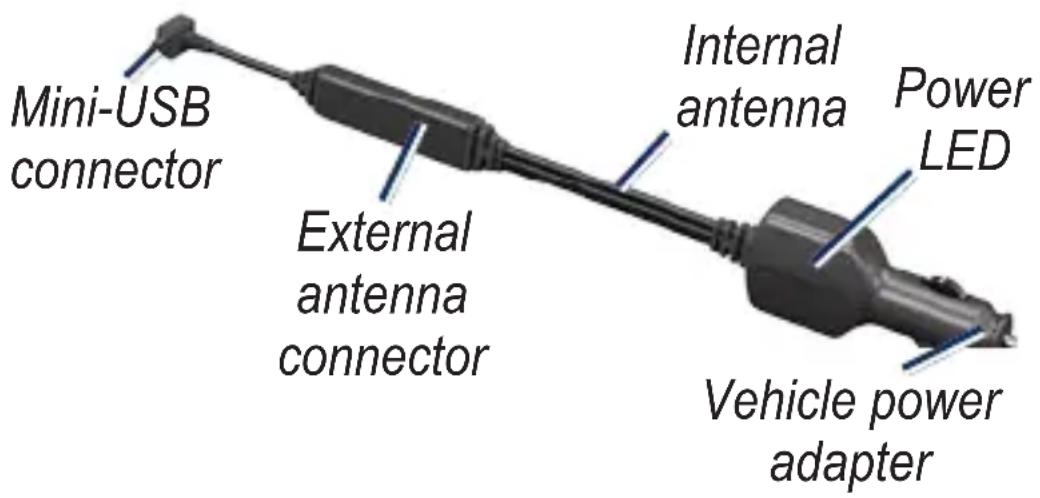
- Connect the small end of the GTM 35 to the mini-USB port on your GPS device.
-
Plug the vehicle power adapter on the GTM 35 into a power outlet in your vehicle.
-
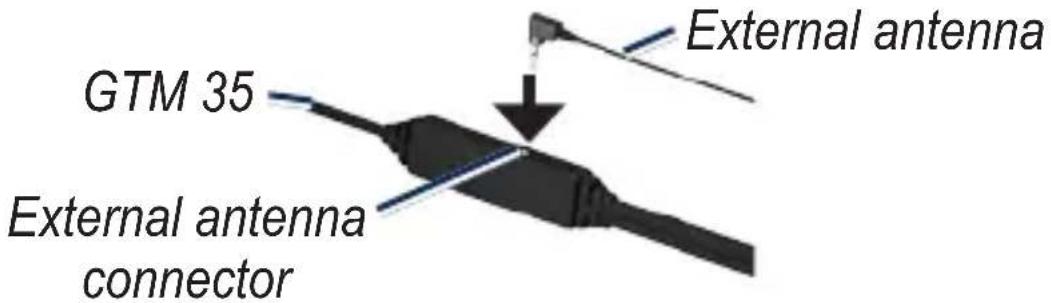
The internal antenna is sufficient in strong signal areas. An external antenna may have been included in the product box. To increase the signal range, connect the external antenna to the GTM 35. Use the attached suction cups to route the external antenna on the windshield vertically, if possible. Be sure not to obstruct the driver's view.
-
Route the GTM 35 so that it does not interfere with vehicle operating controls.
-
For added support, attach the additional suction cup anywhere on the GTM 35.
Testing Your GTM 35
- Observe the LED: When the GTM 35 is connected to power, the red LED is on. The GTM 35 may take up to five minutes to acquire data.
- Check the traffic icon: A traffic icon appears on the Map page of your GPS device when receiving traffic data. Touch the traffic icon to view the Traffic map. Touch the tab to see a list of traffic delays near your area. See the product documentation for your GPS device for more information.
TIP: If you have trouble receiving traffic information, you may be in a poor signal area. Drive your vehicle to an open area, out of garages and away from tall buildings. Connect the external antenna, if necessary.
NOTE: Heated (metalized) windshields could degrade the performance of the GTM 35.
Verify your service area
Touch Tools > Settings > Traffic
(> Subscriptions), and select a subscription to check service information.
Service and Subscription Information
Depending on your region, your traffic receiver receives traffic data through either a premium service or a free, public service. For information about your traffic service subscription, see the product packaging or the Traffic settings in the GPS device. The subscription activates automatically after your Garmin GPS device acquires satellite signals while receiving traffic signals from the service provider.
You can add other FM TMC subscriptions at any time. Check the Garmin Web site at www.garmin.com/fmtraffic for other available services.
Register Your GTM 35
To register your GTM 35, go to http://my.garmin.com and enter the 9-digit serial number printed on the tag attached to the GTM 35.
Warranty Information
Garmin's standard limited warranty applies to this accessory. Refer to the product documentation for your GPS device, or to the product information sheet to view the warranty as well as warnings and cautions, FCC compliance information, and the software license agreement.
Instructions relatives au GTM™ 35
Garmin® is a registered trademark and GTM™ is a trademark of Garmin Ltd. or its subsidiaries and may not be used without the express permission of Garmin. RDS-TMC Traffic Information Services France © ViaMichelin 2006.

© 2010 Garmin Ltd. or its subsidiaries
Garmin International, Inc. 1200 East 151st Street, Olathe, Kansas 66062, USA
Garmin (Europe) Ltd. Liberty House, Houndown Business Park, Southampton, Hampshire, SO40 9LR UK
Garmin Corporation No. 68, Jangshu 2nd Road, Sijhih, Taipei County, Taiwan
www.garmin.com


Part Number 190-01170-90 Rev. A
January 2010
Printed in Taiwan
Brand : GARMIN
Model : GTM 35
Category : Browser