ACT-WNP-RP-002 - Wi-Fi repeater Maxxter - Free user manual and instructions
Find the device manual for free ACT-WNP-RP-002 Maxxter in PDF.


User questions about ACT-WNP-RP-002 Maxxter
0 question about this device. Answer the ones you know or ask your own.
Ask a new question about this device
Download the instructions for your Wi-Fi repeater in PDF format for free! Find your manual ACT-WNP-RP-002 - Maxxter and take your electronic device back in hand. On this page are published all the documents necessary for the use of your device. ACT-WNP-RP-002 by Maxxter.
USER MANUAL ACT-WNP-RP-002 Maxxter
ACT-WNP-RP-002 WiFi-repeater, 300 mbps

natural_image
White electronic device with charging port and wireless signal display (no text or symbols visible)
English manual (p.13). More information and support please visit www.maxxter.biz

text_image
WPS Wi-Fi PROTECTED SETUPB: Handmatig instellen van de repeater
text_image
Currently connected to: Remarkable No Internet access Remarkable2 Internet access Wireless Network Connection Remarkable Connected ACT- WNP-RP-002 Information sent over this network might be visible to others. Connect automatically Connect Ziggo20144 Sitecom54066B Open Network and Sharing Centertext_image
Connect to a Network Type the network security key Security key: 12348765 Hide characters OK Canceltext_image
Windows Security The server 192.168.10.1 at Wireless Repeater requires a username and password. Warning: This server is requesting that your username and password be sent in an insecure manner (basic authentication without a secure connection). admin ...... Remember my credentials OK Canceltext_image
Advanced: Access Point 1 Repeater Client Auto. Configure LAN IP Address: ✓ Auto. Copy From Router: ✓ 3 (optioneel) Network Name (SSID): WNP-RP-002 Key Value: 12348765 Remote Network Name (SSID): Home router Auth. and Encryption: WPA2 ✓ WPA2 Cipher Suite: □ TKIP ✓ AES Pre-Shared Key Format: Passphrase ✓ Pre-Shared Key: password Site Survey| SSID | BSSID | Channel | Type | Auth. and Encryption | Signal | Select |
| Home router | 00:e0:61:45:73:cd | 11 (B+G+N) | AP | WPA-PSK/WPA2-PSK | ||
| Network 4 | 00:15:70:ad:e3:ec | 6 (B+G) | AP | WPA-PSK/WPA2-PSK | ○ | |
| Neighbours Net | 00:15:70:ad:e3:ed | 6 (B+G) | AP | WEP | ○ | |
| Public | 80:3f:5d:92:4a:14 | 11 (B+G+N) | AP | WPA2-PSK | ○ | |
| Router 23487ZXL | 00:e0:4b:a6:15:78 | 11 (B+G+N) | AP | WPA2-PSK | ○ | |
| Wifi63963 Home | 00:23:68:a3:38:91 | 6 (B+G) | AP | WEP | ○ |

Copyright © 2012-2013 MAXXTER. All rights reserved.
MAXXTER
text_image
Advanced: Access Point Repeater Client Auto. Configure LAN IP Address: ✓ Auto. Copy From Router: ✓← Network Name (SSID): WNP-RP-002 Key Value: 12348765 Remote Network Name (SSID): Home router Auth. and Encryption: WPA2 ✓ WPA2 Cipher Suite: □ TKIP ✓ AES Pre-Shared Key Format: Passphrase ✓ Pre-Shared Key: password ← Wachtwoord router Site Survey SSID BSSID Channel Type Auth. and Encryption Signal Senate Save/Apply Cancel Copyright © 2012-2013 MAXTER. All rights reserved.The operation is in progress, please wait for 39 seconds...
WARNING: Please DO NOT turn off or reboot the device during this time, otherwise your device may be damaged.
text_image
Currently connected to: Remarkable No Internet access Remarkable2 Internet access Wireless Network Connection Remarkable Connected Wifi Zolder Ziggo20144 Apple Niels Sitecom54066B ThomsonEyck Open Network and Sharing Centertext_image
Currently connected to: Remarkable No Internet access Remarkable2 Internet access Wireless Network Connection Remarkable Connected Wifi Zolder Connect automatically Connect Ziggo20144 Apple Niels Sitecom54066B Open Network and Sharing Centertext_image
DHCP Client Table - Windows Internet Explorer http://192.168.3.1/DHCPTable.asp LINKSYS® by Cisco DHCP Client Table To Sort by IP Address Client Name Interface IP Address MAC Address Expires Time LAN 192.168.3.101 40:D3:2D:79:82:9C 23:39:30 Delete android-c1f4252cf79bdc3f LAN 192.168.3.102 38:AA:3C:7C:BC:2B 05:44:08 Delete ryh LAN 192.168.3.103 14:5A:05:78:9F:EB 23:19:30 Delete PC LAN 192.168.3.104 78:E4:00:54:A2:2D 23:22:51 Delete telefoon LAN 192.168.3.105 A8:44:81:DC:AE:D0 23:50:41 Delete -iPhone LAN 192.168.3.106 18:34:51:EF:EB:A4 08:11:34 Delete LAN 192.168.3.108 78:A5:DD:03:AE:C4 14:43:04 Delete iPhone5 Wireless 192.168.3.110 BC:92:6B:16:43:60 21:40:12 Delete iPhonevan LAN 192.168.3.111 04:F7:E4:B8:3B:97 00:28:16 Delete LAN 192.168.3.125 B8:FF:61:DC:89:F0 07:32:14 Delete WNP-RP-002 LAN 192.168.3.127 00:E0:4B:BF:81:0C 22:35:05 Delete Refresh CloseSetup WiFi-Repeater in Repeater mode
This manual describes the steps you have to follow to setup your Maxxter WNP-RP-002 WiFi-repeater.
There are two ways to connect the repeater to your home router:
A: Via WPS (Wifi Protected Setup)
B: Manual setup
A: Connecting the repeater via WPS
-
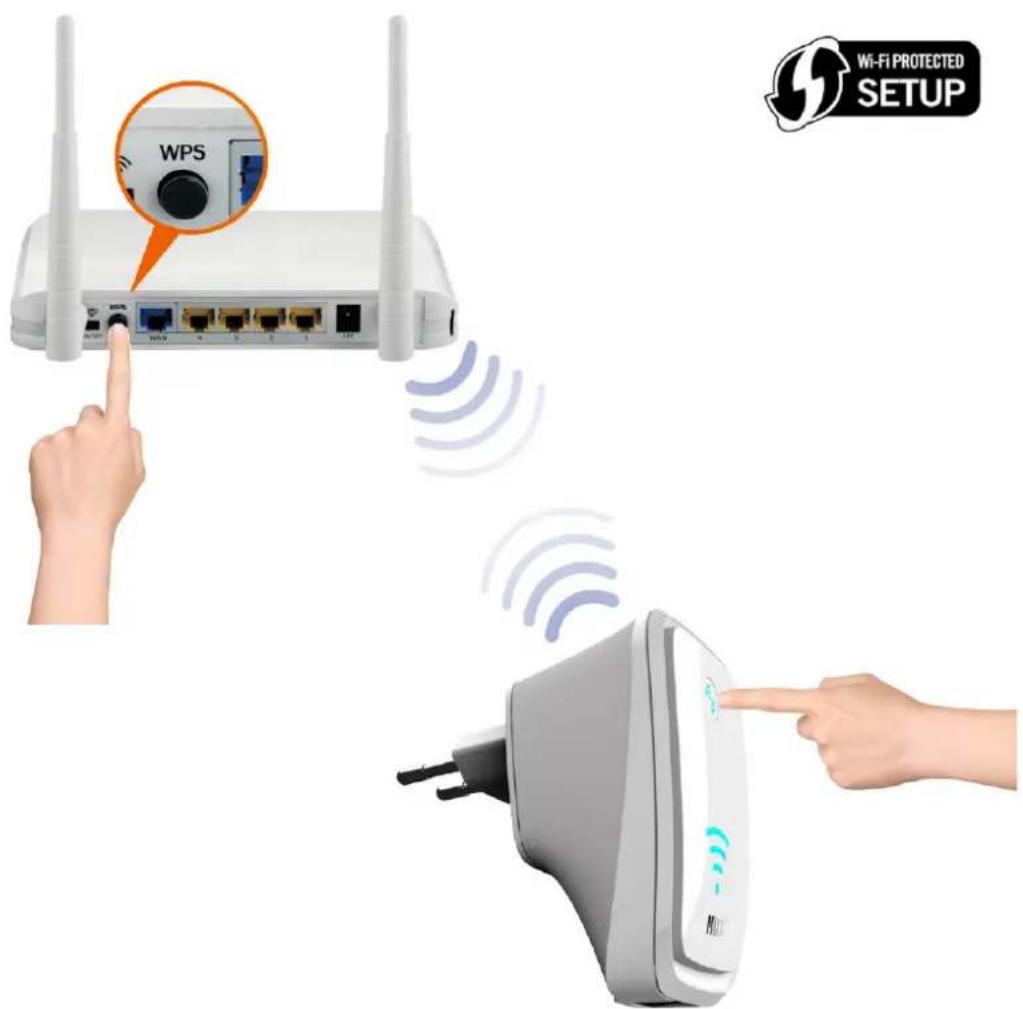
Press the WPS button on your router (Most routers have this feature, check your router manual for more information). On most routers a WPS indicator light will blink when WPS is activated.
-
Now also press the WPS button for 5 seconds on your repeater within one minute.
-
Your repeater will now automatically connect to your router. During this process the indicator lights on the repeater will blink frequently.
-
When the setup is complete and your repeater is ready for use, it will send out a network with exactly the same name (SSID) as your router.
-
The password for this wireless network will also be identical to the password of your router.
text_image
WPS Wi-Fi PROTECTED SETUPB: Manual setup of the repeater
Follow below steps to setup your repeater:
- Plug in the repeater in an available power outlet socket. Wait for about 1 minute until the repeater is booted up.
text_image
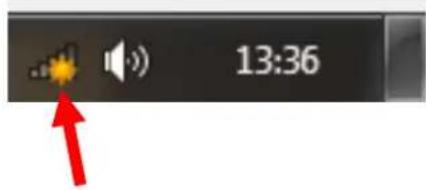
13:36- Click on the network icon (of) in the Windows taskbar to view the available wireless networks.
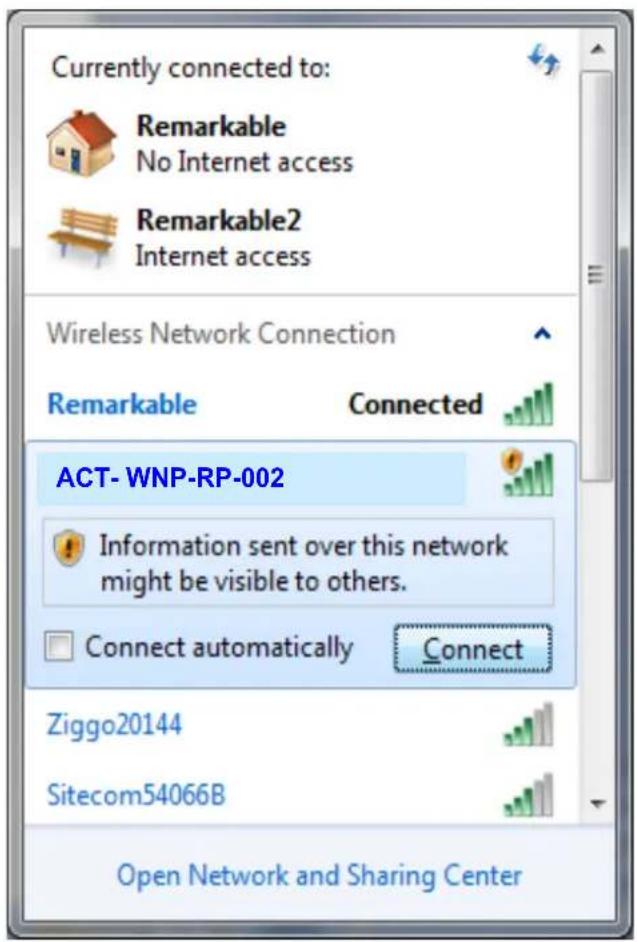
- The repeater network will be in this list, SSID is ACT-WNP-RP-002.
- Select the "ACT-WNP-RP-002" network (click on it) and choose "Connect" and wait for some seconds.
text_image
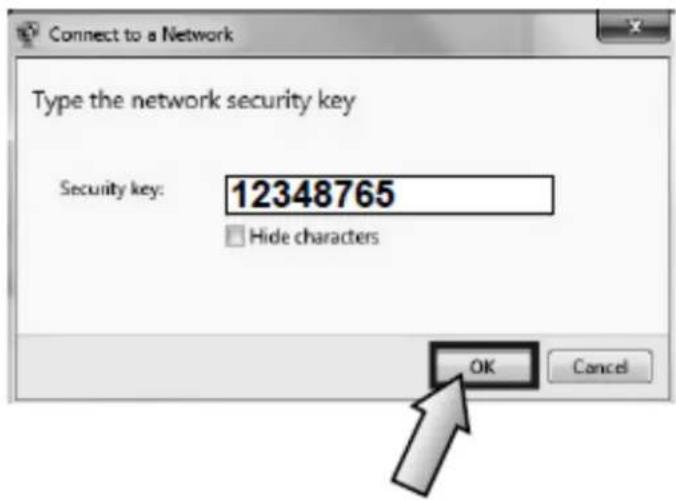
Currently connected to: Remarkable No Internet access Remarkable2 Internet access Wireless Network Connection Remarkable Connected ACT- WNP-RP-002 Information sent over this network might be visible to others. Connect automatically Connect Ziggo20144 Sitecom54066B Open Network and Sharing Center- You will be asked for a password. The password is: 12348765
text_image
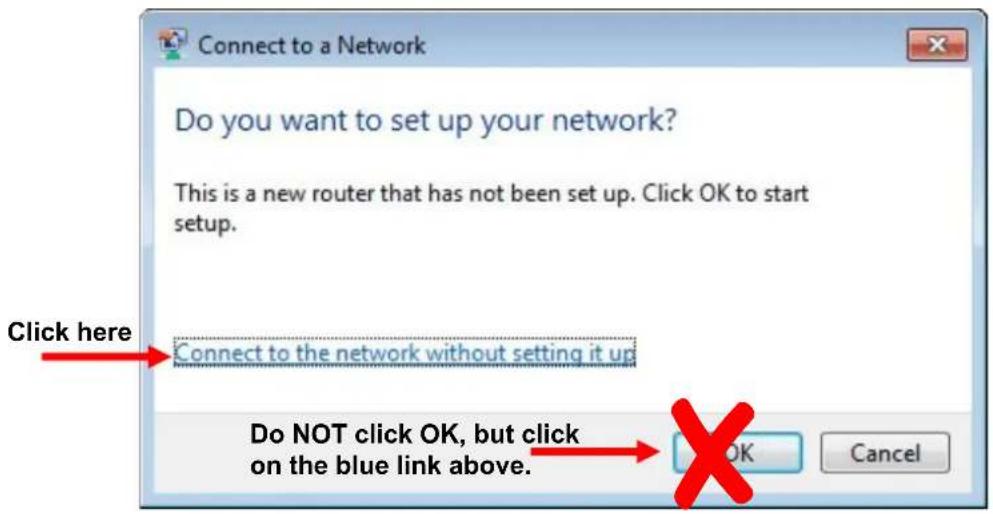
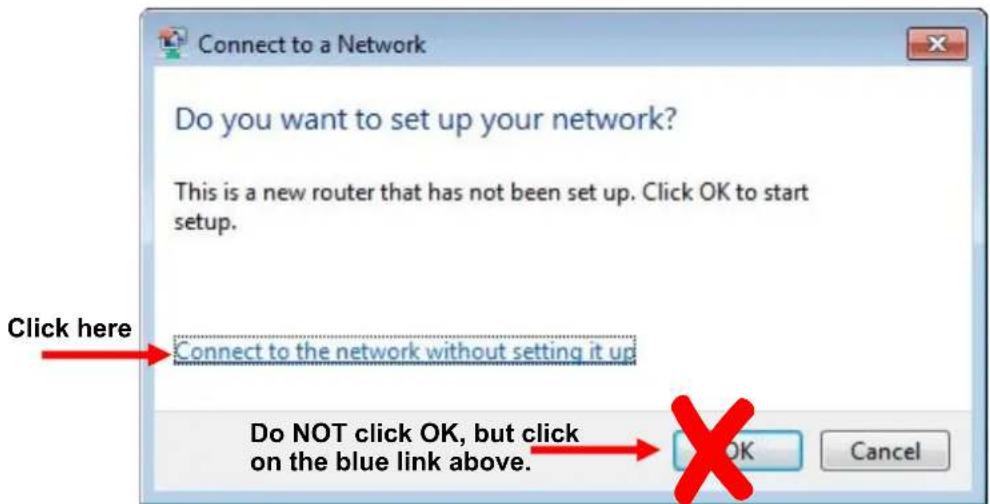
Connect to a Network Type the network security key Security key: 12348765 Hide characters OK Cancel- It is possible that Windows will ask for a PIN code when trying to connect to the repeater for the first time. Using a PIN to connect is not possible or this repeater. Please click on the blue link "connect to this network without setting it up" to enable normal password authentication. (Windows message may differ in different Windows versions)
text_image
Connect to a Network Do you want to set up your network? This is a new router that has not been set up. Click OK to start setup. Click here Connect to the network without setting it up Do NOT click OK, but click on the blue link above. OK Cancel- Windows will now establish a connection with the WiFi-Repeater. It might ask you to specify the network type. In most cases you can select "Home Network".
-
You are now connected to the network of the repeater and you are ready to open the setup page via your web browser (Internet Explorer, Firefox, Safari, etc)
-
Open your web browser (Internet Explorer, Firefox, Safari, etc) and type http://192.168.10.1 in the address bar (not in the Google search bar).

text_image
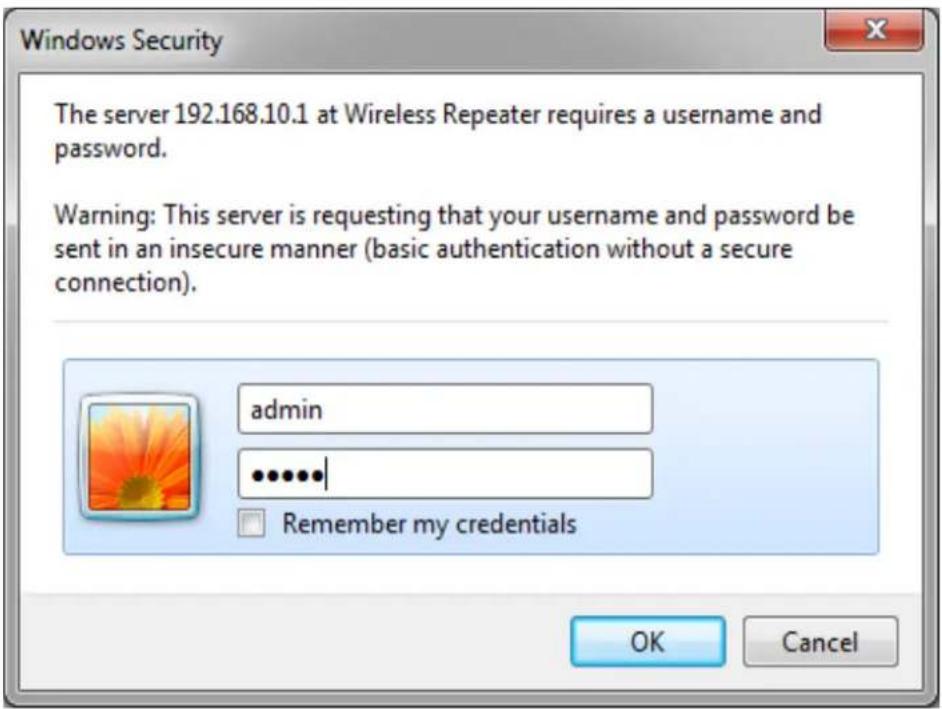
Wireless-N Router Webserver - W http://192.168.10.1/ File Edit View Favorites Tools Help Wireless-N Router Webserver- A window will now appear where you are prompted to enter a login and password. Standard login is "admin" and the password is also "admin" by default.
text_image
Windows Security The server 192.168.10.1 at Wireless Repeater requires a username and password. Warning: This server is requesting that your username and password be sent in an insecure manner (basic authentication without a secure connection). admin ...... Remember my credentials OK Cancel39. You are now in the main menu of the Maxxter WiFi-Repeater
MAXXTER
text_image
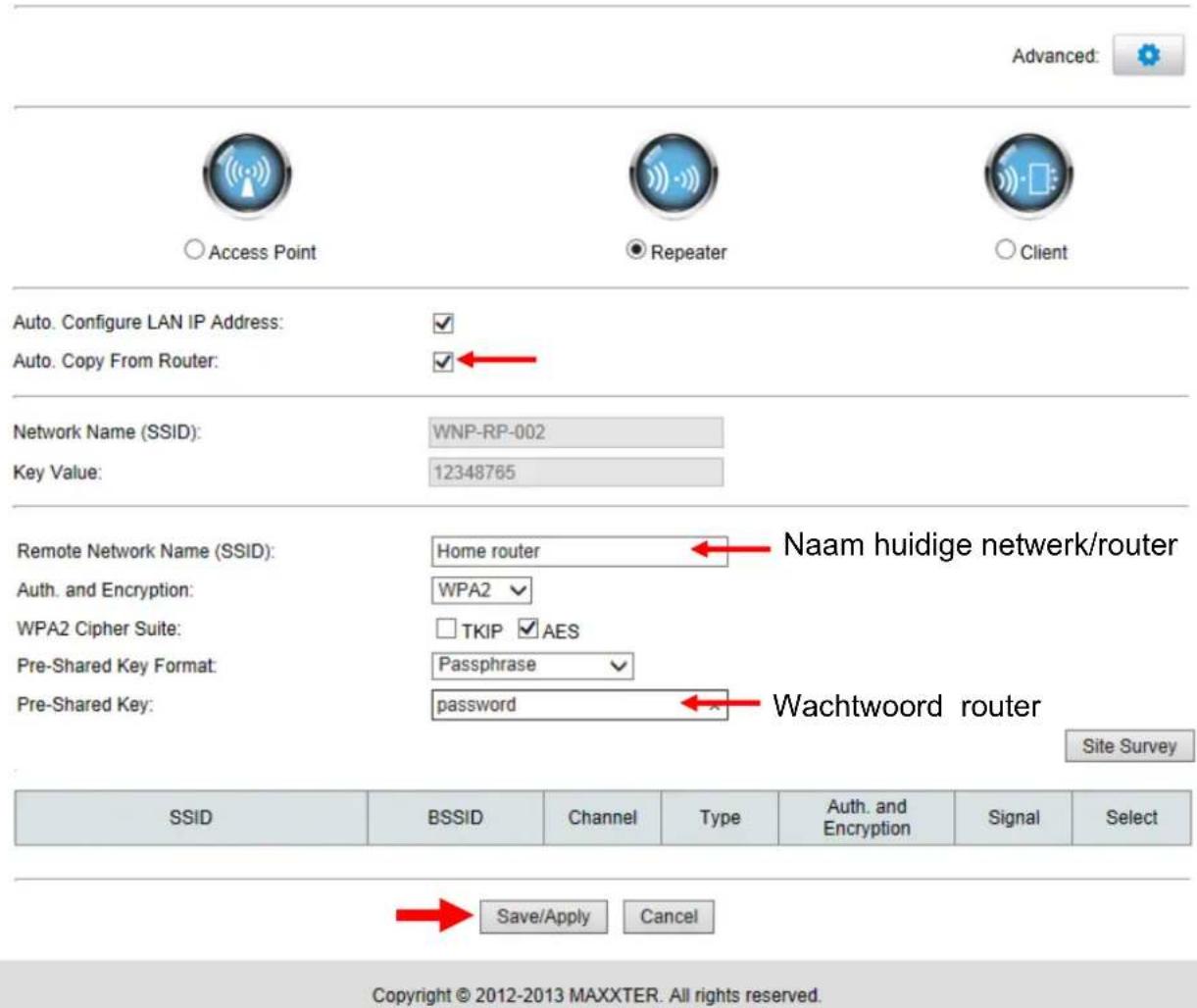
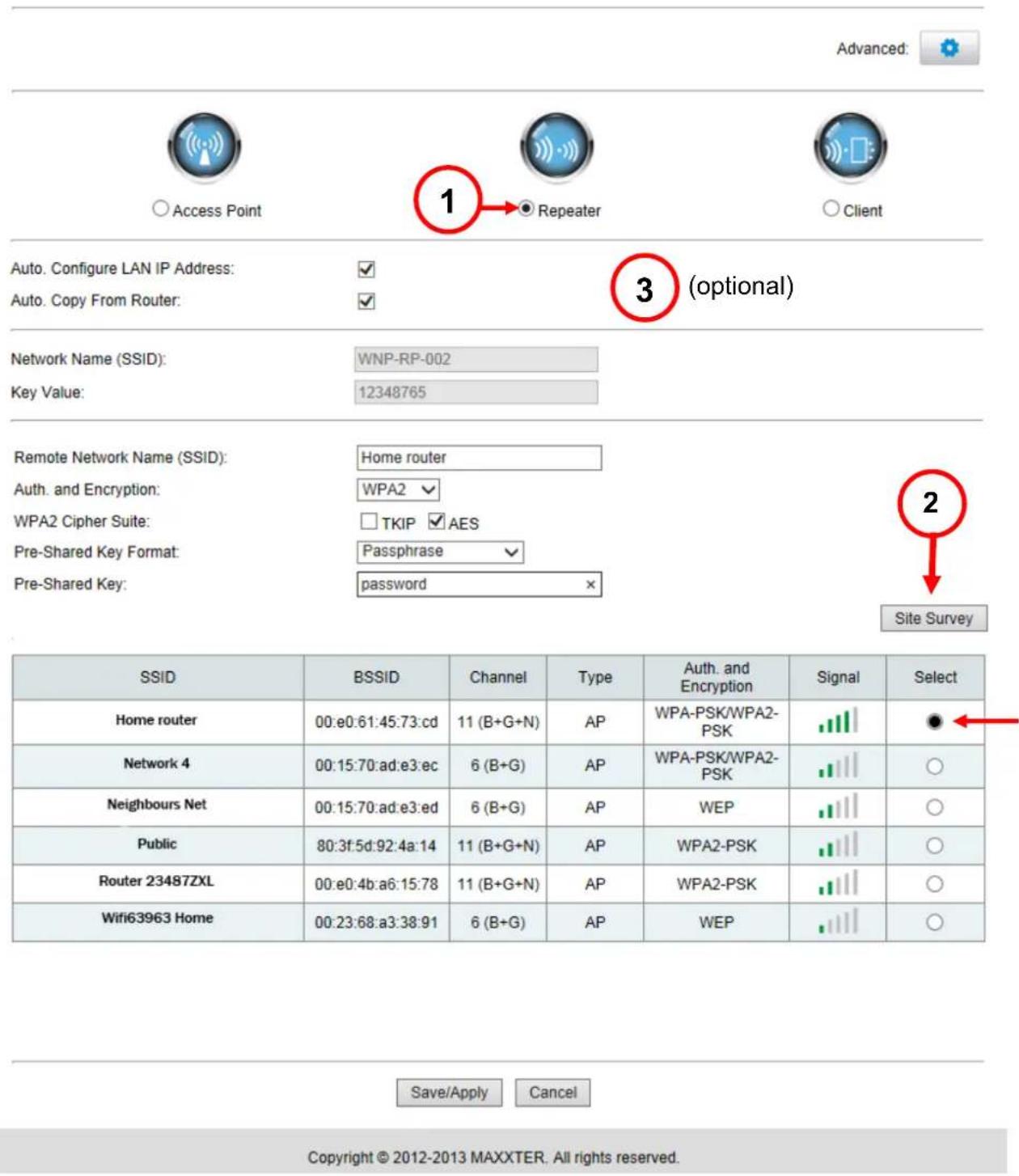
Advanced: Access Point 1 Repeater Client Auto. Configure LAN IP Address: ✓ Auto. Copy From Router: ✓ 3 (optional) Network Name (SSID): WNP-RP-002 Key Value: 12348765 Remote Network Name (SSID): Home router Auth. and Encryption: WPA2 ✓ WPA2 Cipher Suite: □ TKIP ✓ AES Pre-Shared Key Format: Passphrase ✓ Pre-Shared Key: password ✗ Site Survey SSID BSSID Channel Type Auth. and Encryption Signal Select Home router 00:e0:61:45:73:cd 11 (B+G+N) AP WPA-PSK/WPA2-PSK Network 4 00:15:70:ad:e3:ec 6 (B+G) AP WPA-PSK/WPA2-PSK Neighbours Net 00:15:70:ad:e3:ed 6 (B+G) AP WEP Public 80:3f:5d:92:4a:14 11 (B+G+N) AP WPA2-PSK Router 23487ZXL 00:e0:4b:a6:15:78 11 (B+G+N) AP WPA2-PSK Wifi63963 Home 00:23:68:a3:38:91 6 (B+G) AP WEP Save/Apply Cancel Copyright © 2012-2013 MAXTER. All rights reserved.- On the top of the page, choose "Repeater" (1)
- Click on the "Site Survey" button (2)
- You will now see a list of all available wireless networks that are found by the repeater. Your own personal WiFi-network should also be in this list.
Select your network in the column "Select" by checking the checkbox next to it.
MAXXTER
text_image
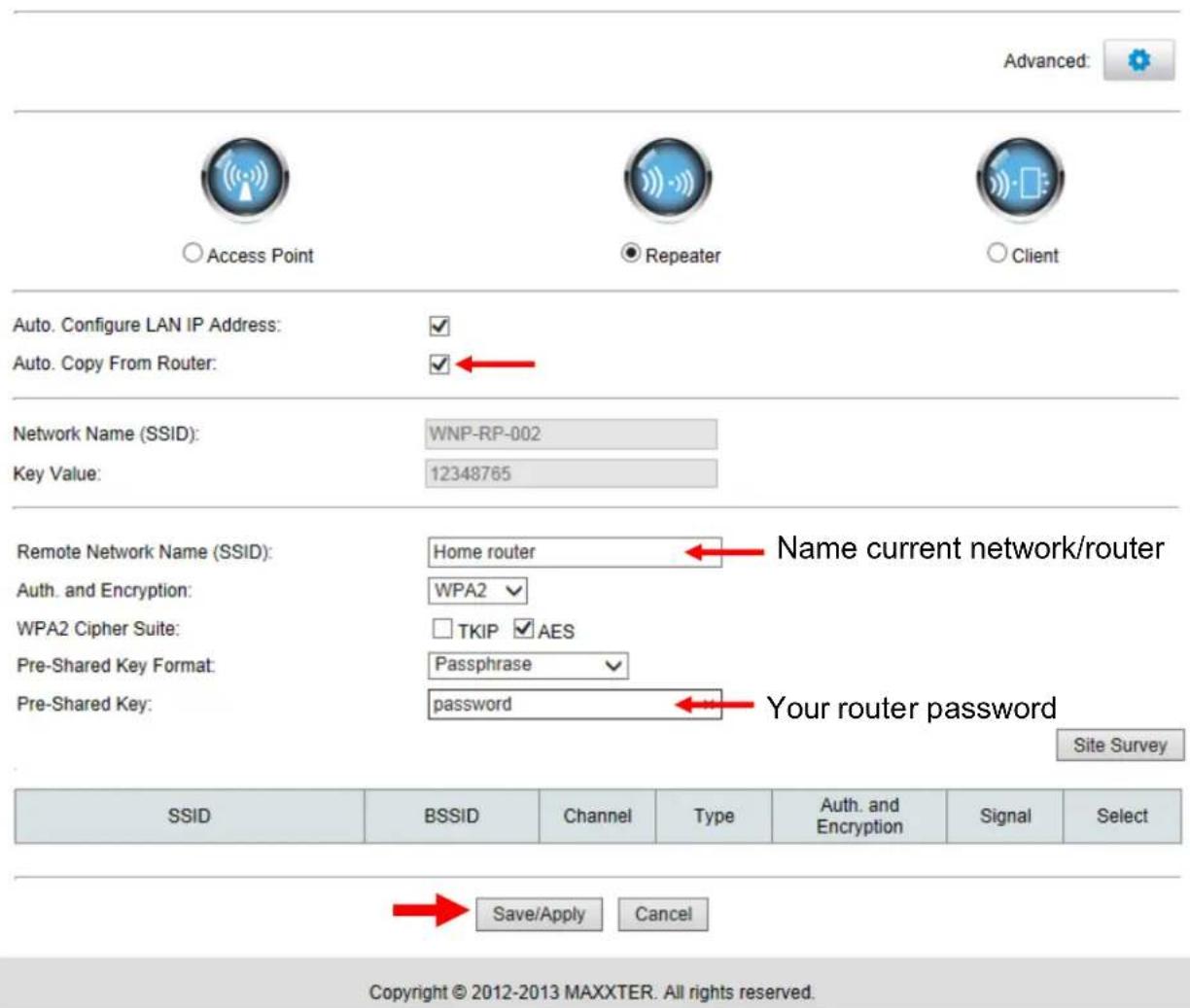
Advanced: Access Point Repeater Client Auto. Configure LAN IP Address: ✓ Auto. Copy From Router: ✓← Network Name (SSID): WNP-RP-002 Key Value: 12348765 Remote Network Name (SSID): Home router Auth. and Encryption: WPA2 ✓ WPA2 Cipher Suite: □ TKIP ✓ AES Pre-Shared Key Format: Passphrase ✓ Pre-Shared Key: password ← Your router password Site Survey SSID BSSID Channel Type Auth. and Encryption Signal Senate Save/Apply Cancel Copyright © 2012-2013 MAXTER. All rights reserved.- The name (SSID) of your current network/router will now be visible in the "Network name" field. Below you are asked to enter the password of your network. NOTE, this is case sensitive!
You do not have to change anything from the pre-entered settings. In above example you only have to enter the pre-shared key (the password). - Technically, the device is now ready for use. However, you do have the optional possibility to change the name (SSID) and password of the repeater network (3). This will influence the network name that will be visible on your Phone, tablet or PC. By unchecking the “Auto. Copy from SSID router” checkbox, you can choose any name and password you prefer. E.g. it is possible to give your repeater The name of the room it is used in most, like ‘wifi attic’ or ‘garden’. If you choose not to personalise the SSID, it will be named identical to your existing router, so all you equipment can switch between the repeater and router seamlessly.
- If you wish to get more easy access to the setup page of your repeater after the installation, you should make sure the "Auto. Config LAN IP address" checkbox is checked. This will makes sure your repeater gets a new IP address from your router, which enables you to
connect to it any time. If you unable this option, the repeater will keep using its fixed IP (192.168.10.1) after installation. For most users it is recommended to enable this option.
- If you have setup everything according to your preferences, press "Save/Apply".

http://192.168.10.1/countDownPage

Rebooting...
The operation is in progress, please wait for 39 seconds...
WARNING: Please DO NOT turn off or reboot the device during this time, otherwise your device may be damaged.
- The repeater will now reboot with all new settings. Do not remove the repeater from the power socket until it has completely finished rebooting.
- Your repeater is now ready for use.
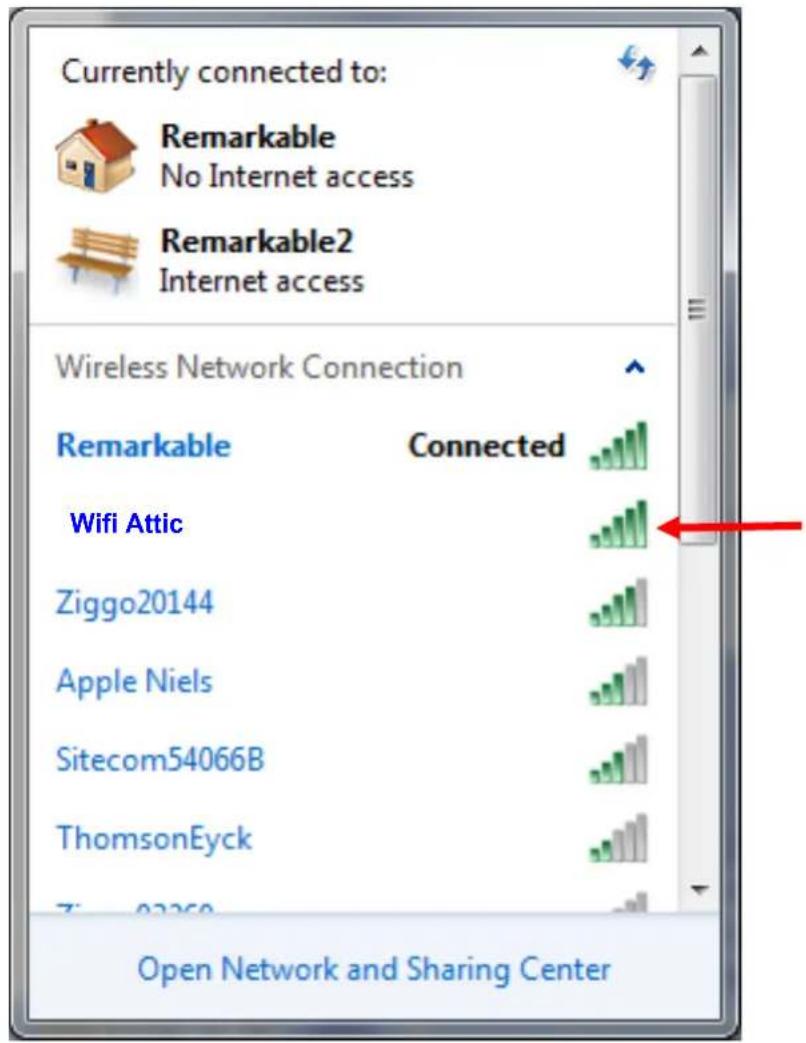
- Again click on the network icon ( of ) in the Windows taskbar to view the available wireless networks. If you did not make any changes to the repeater all your devices will automatically connect to it whenever the repeater is in range. When you personalised the network name of your repeater, it will be visible under its new name. In below example the repeater is visible as "Wifi Attic".
text_image
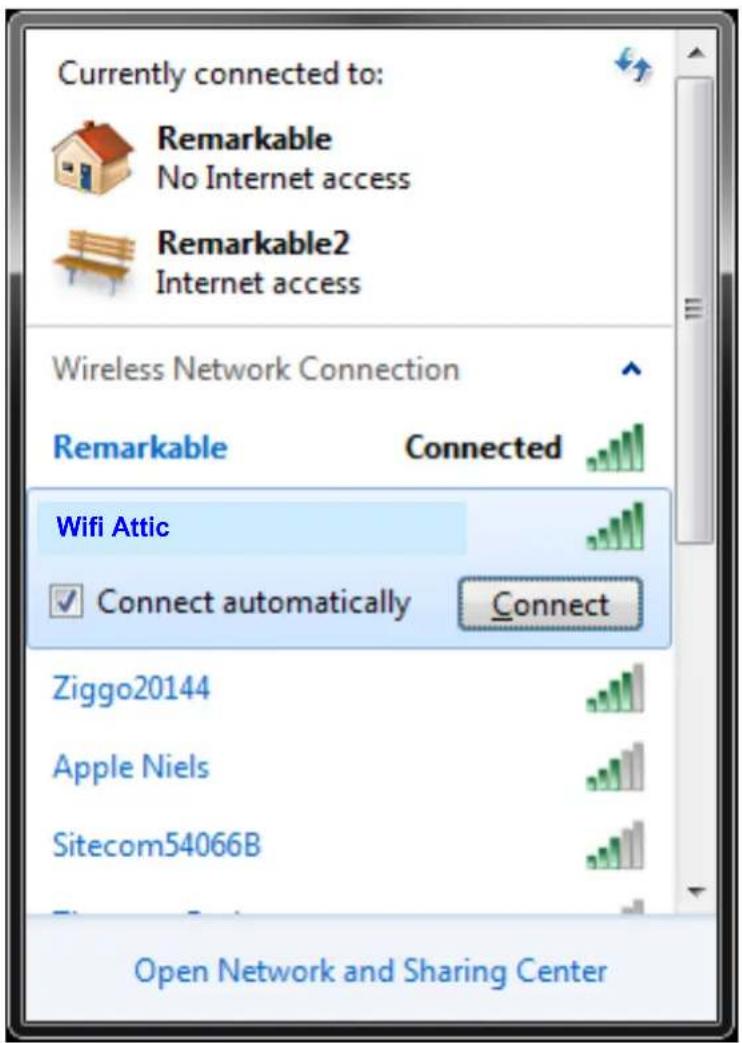
Currently connected to: Remarkable No Internet access Remarkable2 Internet access Wireless Network Connection Remarkable Connected Wifi Attic Ziggo20144 Apple Niels Sitecom54066B ThomsonEyck Open Network and Sharing Center- Select the repeater network (click on it) and make sure the "Connect automatically" option is enabled.
text_image
Currently connected to: Remarkable No Internet access Remarkable2 Internet access Wireless Network Connection Remarkable Connected Wifi Attic Connect automatically Connect Ziggo20144 Apple Niels Sitecom54066B Open Network and Sharing Center- Windows will ask to enter a password when you connect to the repeater network. Use the password you created for the repeater.
- Windows will now connect to the network of your repeater. Windows might again ask to select the network type. In most cases "Home Network" is the correct option.
- Your PC now has an internet connection via the repeater.
- You can safely unplug the repeater from its power socket; it will always keep its settings.
Resetting the repeater
If you need to reboot your repeater, it is possible to unplug it from the wall socket and plug it back in after some seconds. Or you can press the reset button in the side. In case you wish to perform a factory reset, please press and hold the reset button for 30 seconds. Afterwards the repeater will be sending out its original network name “ACT-WNP-RP-002” and you will be able to follow the installation procedure again.
Frequently asked question (FAQ)
7. Is an instructievideo available somewhere?
Yes, it is available on the Maxxter YouTube channel and on www.maxxter.biz http://www.youtube.com/watch?v=v9WAr6wf4CY&feature=player_embedded
8. I plugged in the repeater and connected to its network, but Windows tells me the connection has limited access or no internet access.
Your repeater needs to be setup before First use. This allows the repeater to conenct to your router. Only after the initial setup it is possible to use internet via the repeater. Please use this manual to setup your repeater.
9. Windows asks for a PIN code when I try to connect to the repeater network. Entering the password (12348765) is not working here.
Indee Windows can ask for a PIN code sometimes. However, for setting up this repeater using a PIN is not possible. Please click on the blue link "connect to this network without setting it up" to enable normal password authentication. (Windows message may differ in different Windows versions)
text_image
Connect to a Network Do you want to set up your network? This is a new router that has not been set up. Click OK to start setup. Click here Connect to the network without setting it up Do NOT click OK, but click on the blue link above. OK Cancel10. When I press "Site Survey" nothing is happening or the list of found networks is not complete or stays empty.
Wifi networks only send out their name (beacon) every 100 milliseconds. In theory this is possible that your network was just 'missed'. In this case it's usually enough to press the "Site Survey" button again, or to refresh the webpage (F5) and press the "Site Survey" button again.
11. This manual is made for Windows users; can I also install the repeater with my iPad?
Yes, that is possible. Follow the below steps to setup the repeater with your iPad (or any other tablet)
a. Plug the repeater into a wall socket on a location within the network range of the router.
b. Get your iPad/tablet and go to 'settings'
c. Have your iPad/tablet searching for wireless networks in range. It should find a network named: ACT-WNP-RP-002.
d. Connect your iPad/tablet to this network. The password is 12348765.
e. When your iPad/tablet is connected to the repeater network, you can close the settings screen of your iPad/Tablet.
f. Now open Safari/browser on your iPad/tablet and type 192.168.10.1 in the address field (not in the Google search field)
g. A login screen will now appear. Login is 'admin' and password is also 'admin'.
h. The setup page of the repeater will now be opened.
i. Now follow the on-screen instructions and/or follow the remaining steps in this manual.
12. I have correctly setup the repeater, but I still want to login to the settings page to change some details enabled the "Auto. Configure LAN IP address" option, but how do I find out on which IP-address I can connect to my repeater?
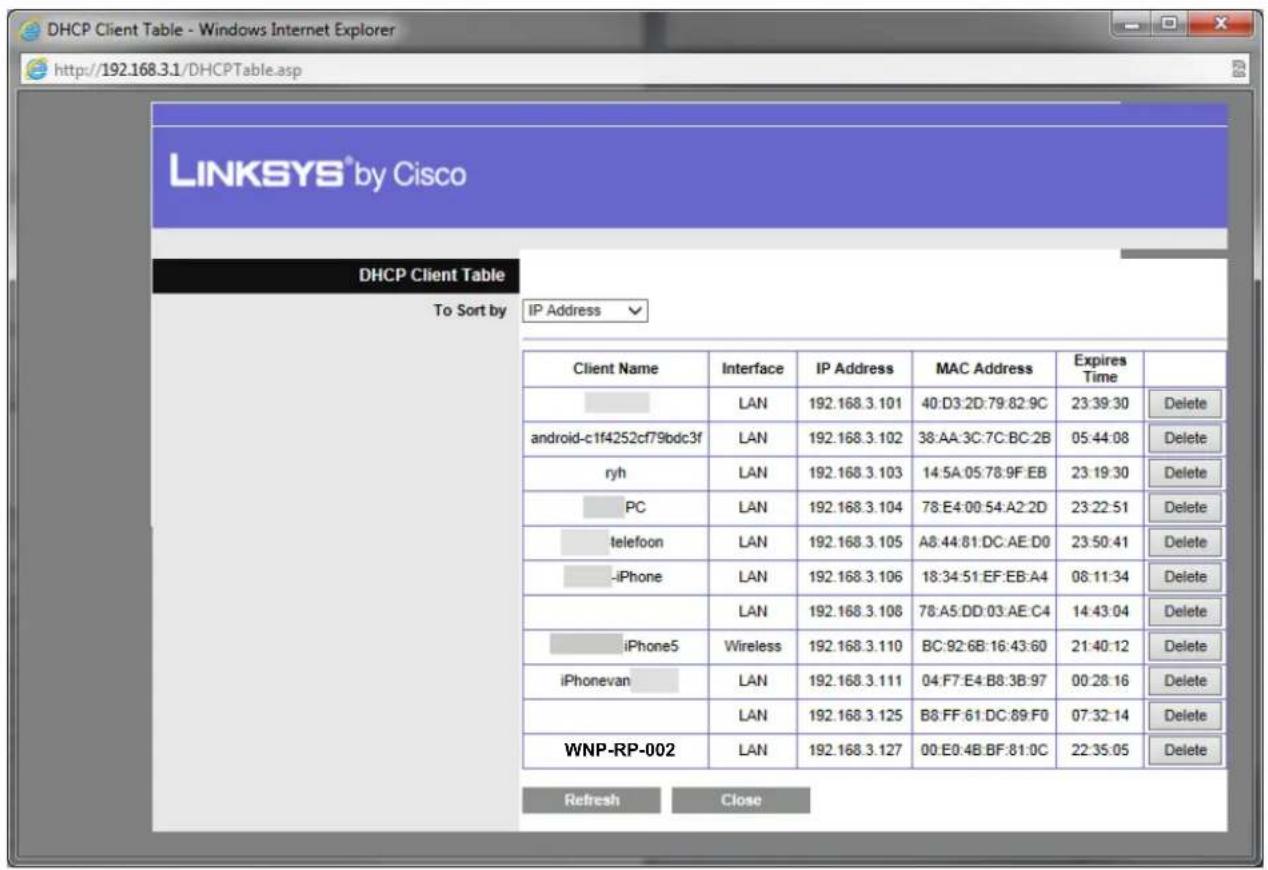
For this, you need to login to your router. You can do this by typing the IP-address of your router in your browser address field. This IP-address is usually printed on a sticker on the router itself. In the router menu, you open the "DHCP client list". In this list you can see which devices are currently connected to your router. Where to find and how to open this DHCP client list depends on your router brand and model. Check the user manual from your router for assistance if needed. The below example is from a Linksys router.
text_image
DHCP Client Table - Windows Internet Explorer http://192.168.3.1/DHCPTable.asp LINKSYS® by Cisco DHCP Client Table To Sort by IP Address Client Name Interface IP Address MAC Address Expires Time LAN 192.168.3.101 40:D3:2D:79:82:9C 23:39:30 Delete android-c1f4252cf79bdc3f LAN 192.168.3.102 38:AA:3C:7C:BC:2B 05:44:08 Delete ryh LAN 192.168.3.103 14:5A:05:78:9F:EB 23:19:30 Delete PC LAN 192.168.3.104 78:E4:00:54:A2:2D 23:22:51 Delete telefoon LAN 192.168.3.105 A8:44:81:DC:AE:D0 23:50:41 Delete -iPhone LAN 192.168.3.106 18:34:51:EF:EB:A4 08:11:34 Delete LAN 192.168.3.108 78:A5:DD:03:AE:C4 14:43:04 Delete iPhone5 Wireless 192.168.3.110 BC:92:6B:16:43:60 21:40:12 Delete iPhonevan LAN 192.168.3.111 04:F7:E4:B8:3B:97 00:28:16 Delete LAN 192.168.3.125 B8:FF:61:DC:89:F0 07:32:14 Delete WNP-RP-002 LAN 192.168.3.127 00:E0:4B:BF:81:0C 22:35:05 Delete Refresh CloseIn this list most connected devices can be identified by a name. The repeater will be recognisable by its name as well (192.168.3.127 in above example). Enter this IP-address in your browser to connect to the repeater settings page again.
Setup WiFi-Repeater in Repeater mode
A: Via WPS (Wifi Protected Setup)
natural_image
Hand pointing at a white wireless device labeled 'MIDI' with signal waves, no text or symbols on the device itself.text_image
Currently connected to: Remarkable No Internet access Remarkable2 Internet access Wireless Network Connection Remarkable Connected ACT- WNP-RP-002 Information sent over this network might be visible to others. Connect automatically Connect Ziggo20144 Sitecom54066B Open Network and Sharing Centertext_image
Connect to a Network Type the network security key Security key: 12348765 Hide characters OK Canceltext_image
Advanced: Access Point 1 Repeater Client Auto. Configure LAN IP Address: ✓ Auto. Copy From Router: ✓ 3 (optional) Network Name (SSID): WNP-RP-002 Key Value: 12348765 Remote Network Name (SSID): Home router Auth. and Encryption: WPA2 ✓ WPA2 Cipher Suite: □ TKIP ✓ AES Pre-Shared Key Format: Passphrase ✓ Pre-Shared Key: password Site Survey SSID BSSID Channel Type Auth. and Encryption Signal Select Home router 00:e0:61:45:73:cd 11 (B+G+N) AP WPA-PSK/WPA2-PSK Network 4 00:15:70:ad:e3:ec 6 (B+G) AP WPA-PSK/WPA2-PSK Neighbours Net 00:15:70:ad:e3:ed 6 (B+G) AP WEP Public 80:3f:5d:92:4a:14 11 (B+G+N) AP WPA2-PSK Router 23487ZXL 00:e0:4b:a6:15:78 11 (B+G+N) AP WPA2-PSK Wifi63963 Home 00:23:68:a3:38:91 6 (B+G) AP WEP Save/Apply Cancel Copyright © 2012-2013 MAXTER. All rights reserved.text_image
Advanced: Access Point Repeater Client Auto. Configure LAN IP Address: ✓ Auto. Copy From Router: ✓← Network Name (SSID): WNP-RP-002 Key Value: 12348765 Remote Network Name (SSID): Home router ← Name Netwerk/Router Auth. and Encryption: WPA2 ✓ WPA2 Cipher Suite: □ TKIP ✓ AES Pre-Shared Key Format: Passphrase ✓ Pre-Shared Key: password ← Router Password Site Survey SSID BSSID Channel Type Auth. and Encryption Signal Senate Save/Apply Cancel Copyright © 2012-2013 MAXTER. All rights reserved.The operation is in progress, please wait for 39 seconds...
WARNING: Please DO NOT turn off or reboot the device during this time, otherwise your device may be damaged.
text_image
Currently connected to: Remarkable No Internet access Remarkable2 Internet access Wireless Network Connection Remarkable Connected Wifi Attic Ziggo20144 Apple Niels Sitecom54066B ThomsonEyck Open Network and Sharing Centertext_image
Currently connected to: Remarkable No Internet access Remarkable2 Internet access Wireless Network Connection Remarkable Connected Wifi Attic Connect automatically Connect Ziggo20144 Apple Niels Sitecom54066B Open Network and Sharing Centertext_image
DHCP Client Table - Windows Internet Explorer http://192.168.3.1/DHCPTable.asp LINKSYS® by Cisco DHCP Client Table To Sort by IP Address Client Name Interface IP Address MAC Address Expires Time LAN 192.168.3.101 40:D3:2D:79:82:9C 23:39:30 Delete android-c1f4252cf79bdc3f LAN 192.168.3.102 38:AA:3C:7C:BC:2B 05:44:08 Delete ryh LAN 192.168.3.103 14:5A:05:78:9F:EB 23:19:30 Delete PC LAN 192.168.3.104 78:E4:00:54:A2:2D 23:22:51 Delete telefoon LAN 192.168.3.105 A8:44:81:DC:AE:D0 23:50:41 Delete -iPhone LAN 192.168.3.106 18:34:51:EF:EB:A4 08:11:34 Delete LAN 192.168.3.108 78:A5:DD:03:AE:C4 14:43:04 Delete iPhone5 Wireless 192.168.3.110 BC:92:6B:16:43:60 21:40:12 Delete iPhonevan LAN 192.168.3.111 04:F7:E4:B8:3B:97 00:28:16 Delete LAN 192.168.3.125 B8:FF:61:DC:89:F0 07:32:14 Delete LAN 192.168.3.127 00:E0:4B:BF:81:0C 22:35:05 Delete Refresh Closetext_image
WPS Wi-Fi PROTECTED SETUPtext_image
Currently connected to: Remarkable No Internet access Remarkable2 Internet access Wireless Network Connection Remarkable Connected ACT- WNP-RP-002 Information sent over this network might be visible to others. Connect automatically Connect Ziggo20144 Sitecom54066B Open Network and Sharing Centertext_image
Connect to a Network Type the network security key Security key: 12348765 Hide characters OK Canceltext_image
Connect to a Network Do you want to set up your network? This is a new router that has not been set up. Click OK to start setup. Cliquez ici Connect to the network without setting it up Ne cliquez pas sur OK, mais cliquez sur le lien ci-dessus. OK Canceltext_image
Windows Security The server 192.168.10.1 at Wireless Repeater requires a username and password. Warning: This server is requesting that your username and password be sent in an insecure manner (basic authentication without a secure connection). admin ...... Remember my credentials OK Canceltext_image
Advanced: Access Point 1 Repeater Client Auto. Configure LAN IP Address: ✓ Auto. Copy From Router: ✓ Network Name (SSID): WNP-RP-002 Key Value: 12348765 Remote Network Name (SSID): Home router Auth. and Encryption: WPA2 ✓ WPA2 Cipher Suite: TKIP ✓ AES Pre-Shared Key Format: Passphrase ✓ Pre-Shared Key: password Site Survey| SSID | BSSID | Channel | Type | Auth. and Encryption | Signal | Select |
| Home router | 00:e0:61:45:73:cd | 11 (B+G+N) | AP | WPA-PSK/WPA2- PSK | ||
| Network 4 | 00:15:70:ad:e3:ec | 6 (B+G) | AP | WPA-PSK/WPA2- PSK | Og | |
| Neighbours Net | 00:15:70:ad:e3:ed | 6 (B+G) | AP | WEP | Og | |
| Public | 80:3f:5d:92:4a:14 | 11 (B+G+N) | AP | WPA2-PSK | Og | |
| Router 23487ZXL | 00:e0:4b:a6:15:78 | 11 (B+G+N) | AP | WPA2-PSK | Og | |
| Wifi63963 Home | 00:23:68:a3:38:91 | 6 (B+G) | AP | WEP | Og |

Copyright © 2012-2013 MAXXTER. All rights reserved.
MAXXTER

text_image
Advanced: Access Point Repeater Client Auto. Configure LAN IP Address: ✓ Auto. Copy From Router: ✓← Network Name (SSID): WNP-RP-002 Key Value: 12348765 Remote Network Name (SSID): Home router ← Name current network/router Auth. and Encryption: WPA2 ✓ WPA2 Cipher Suite: □ TKIP ✓ AES Pre-Shared Key Format: Passphrase ✓ Pre-Shared Key: password ← Your router password Site Survey SSID BSSID Channel Type Auth. and Encryption Signal Senate Save/Apply Cancel Copyright © 2012-2013 MAXTER. All rights reserved.The operation is in progress, please wait for 39 seconds...
WARNING: Please DO NOT turn off or reboot the device during this time, otherwise your device may be damaged.
text_image
Currently connected to: Remarkable No Internet access Remarkable2 Internet access Wireless Network Connection Remarkable Connected Wifi grenier Ziggo20144 Apple Niels Sitecom54066B ThomsonEyck Open Network and Sharing Centertext_image
Currently connected to: Remarkable No Internet access Remarkable2 Internet access Wireless Network Connection Remarkable Connected Wifi grenier Connect automatically Connect Ziggo20144 Apple Niels Sitecom54066B Open Network and Sharing Centertext_image
Connect to a Network Do you want to set up your network? This is a new router that has not been set up. Click OK to start setup. Cliquez ici Connect to the network without setting it up Ne cliquez pas sur OK, mais cliquez sur le lien ci-dessus. OK Canceltext_image
DHCP Client Table - Windows Internet Explorer http://192.168.3.1/DHCPTable.asp LINKSYS® by Cisco DHCP Client Table To Sort by IP Address Client Name Interface IP Address MAC Address Expires Time LAN 192.168.3.101 40:D3:2D:79:82:9C 23:39:30 Delete android-c1f4252cf79bdc3f LAN 192.168.3.102 38:AA:3C:7C:BC:2B 05:44:08 Delete ryh LAN 192.168.3.103 14:5A:05:78:9F:EB 23:19:30 Delete PC LAN 192.168.3.104 78:E4:00:54:A2:2D 23:22:51 Delete telefoon LAN 192.168.3.105 A8:44:81:DC:AE:D0 23:50:41 Delete -iPhone LAN 192.168.3.106 18:34:51:EF:EB:A4 08:11:34 Delete LAN 192.168.3.108 78:A5:DD:03:AE:C4 14:43:04 Delete iPhone5 Wireless 192.168.3.110 BC:92:6B:16:43:60 21:40:12 Delete iPhonevan LAN 192.168.3.111 04:F7:E4:B8:3B:97 00:28:16 Delete LAN 192.168.3.125 B8:FF:61:DC:89:F0 07:32:14 Delete LAN 192.168.3.127 00:E0:4B:BF:81:0C 22:35:05 Delete Refresh CloseProduct Specifications
• Supported standards: IEEE 802.11n, IEEE 802.11g, IEEE 802.11b, IEEE 802.3, IEEE 802.3u
- Wireless transmission rate: max. 300 Mbps
- Ports: 1 x 10/100M RJ45
- Chipset: Realtek 8196E
• Frequency band: 2.4\~2.4835 GHz
• Channels: 1-13 (Europe)
• Power class: RF power 14 dBm (max. EIRP)
- Internal antenna gain (typical): 3 dBi ±1 dBi
• Receive sensitivity 11n : -70dBm@10% PER; 11g : -70dBm@10% PER; 11b: -85dBm@8% PER
- Spread Spectrum: DSSS
- Modulation: BPSK, QPSK, CCK and OFDM (BPSK/QPSK/16-QAM/ 64-QAM)
• Transmission distance: max. 100 m (indoor), 300 m (open air), depending on environment
• Power consumption: up to 3 W
• Supports 64/128bit WEP, complies with 128 bit WPA/WPA2
- Supported modes: Router mode, repeater mode, AP client mode
- Cascading: up to 5 levels (depending on usage environment)
- Dimensions: 90 x 40 x 60 mm (W x D x H)
- Net weight: 150 g
- Operating temperature: 0 \~ 40 °C
• Storage temperature: -40 \~ 70 °C
- Operating humidity: 10 \~ 90% non-condensing
• Storage humidity: 5 \~ 95% non-condensing

(ENG) Declaration of conformity
This product is tested and complies with the essential requirements of the laws of member states concerning R&TTE (1999/5/EC). The CE declaration can be found under www.maxxter.biz