
249401 - Coffee machine PRINCESS - Free user manual and instructions
Find the device manual for free 249401 PRINCESS in PDF.


| Product type | Filter coffee maker with built-in grinder |
| Brand | Princess |
| Model | 249401 |
| Maximum capacity | 10 cups |
| Water tank | Removable with level indicator (min/max) |
| Usable coffee types | Coffee beans or ground coffee |
| Built-in grinder | Yes, grind fineness adjustment |
| Coffee strength setting | 3 levels: mild, medium, strong |
| Timer function (delay) | Yes, start time setting |
| Keep warm | Automatic for 2 hours |
| Automatic shut-off | Yes, after 2 hours of inactivity |
| Display | Digital with clock and indicators (quantity, strength, keep warm, descaling, cleaning) |
| Coffee filter | Paper, size 1x4 |
| Coffee pot | Glass with level indicator |
| Hot plate | Yes, keeps pot warm |
| Descaling | Light indicator and built-in procedure |
| Grinder cleaning | Removable compartment, brush included |
| Included accessories | Brush/screwdriver for grinder cleaning |
| Power supply | 220-240 V ~ 50/60 Hz |
| Power | Approximately 1000 W |
Frequently Asked Questions - 249401 PRINCESS
User questions about 249401 PRINCESS
0 question about this device. Answer the ones you know or ask your own.
Ask a new question about this device
Download the instructions for your Coffee machine in PDF format for free! Find your manual 249401 - PRINCESS and take your electronic device back in hand. On this page are published all the documents necessary for the use of your device. 249401 by PRINCESS.
USER MANUAL 249401 PRINCESS
natural_image
Line drawing of a modern kitchen toaster with digital control panel and side-mounted dish (no text or symbols)

flowchart
graph TD
    A["Strength"] --> B["2 - 12"]
    B --> C["82211"]
    D["6347"] --> E["Hour"]
    E --> F["5"]
    G["Program"] --> H["Min"]
    I["I/O"] --> J["I/O"]


F

G

Gefeliciteerd!
C. Warmhoudindicator
D. Ontkalkingsindicator
E. Reinigingsindicator (maalcompartment)
Eerste gebruik
Voorbereiding
Reinig de accessoires: •
You have purchased a Princess product. Our aim is to provide quality products with a tasteful design and at an affordable price. We hope that you will enjoy this product for many years.
Description (fig. A - C)
Your 249401 Princess coffee maker has been designed for making coffee with coffee beans or ground coffee. The appliance is suitable for indoor use only. The appliance is suitable for domestic use only.
- On/off button / On/off indicator (coffee maker)
- On/off button / On/off indicator (grinding function)
- Coffee quantity selector
- Coffee strength selector
- PROGRAM button
- HOUR button
- MINUTE button
- Display
- Ground coffee fineness selector
- Coffee filter holder
- Filter holder assembly
- Release button (filter holder assembly)
- Coffee bean compartment
- Water reservoir
- Water level indicator
- Coffee pot
- Coffee level indicator
- Heating plate
- Grinding compartment
- Brush / screwdriver
- Descale button
A. Coffee quantity indicator
B. Coffee strength indicator
C. Keep-warm indicator
D. Descaling indicator
E. Cleaning indicator (grinding compartment)
Initial use
Preparation
Clean the accessories: •
- Clean the coffee pot in soapy water. Rinse the coffee pot.
-
Clean the coffee filter holder in soapy water. Rinse the coffee filter holder.
-
Clean the lid of the coffee bean compartment in soapy water. Rinse the lid of the coffee bean compartment.
- Thoroughly dry the accessories.
Clean the outside of the appliance with a • damp cloth. Dry the outside of the appliance with a clean, dry cloth.
Rinse the appliance.
Setting the clock (fig. B & C)
If the mains plug is inserted into the wall socket, the display (8) will light to indicate that the clock can be set. The clock can be adjusted at any time later on.
Repeatedly press the HOUR button (6) to set the hours.
Repeatedly press the MINUTE button (7) to set the minutes. The time is shown on the display (8).
Use
Filling the water reservoir (fig. D)
Before you proceed, we need you to pay attention to the following notes:
- Before filling the water reservoir, switch off the appliance and remove the mains plug from the wall socket.
- Do not fill the water reservoir with more water than required for making the coffee. Only use the amount of water required for making the coffee. The appliance automatically stops when the water reservoir is empty.
Before you proceed, we would like you to focus your attention on the following notes:
- Do not use the appliance without water in the water reservoir.
- Do not exceed the maximum mark when you fill the water reservoir. Make sure that the water level is always above the minimum mark during use.
- Only use cold water to fill the water reservoir.
- Do not use carbonated water or other liquids to fill the water reservoir.
- Do not pour water in the coffee bean compartment.
Open the cover (22).
Fill the water reservoir (14) with water up to the required mark on the water level indicator (15).
Do not fill the water reservoir with more • water than required for making the coffee. Only use the amount of water required for making the coffee. The appliance automatically stops when the water reservoir is empty. Close the cover (22).
Setting the coffee quantity (fig. B & C)
The coffee quantity selector (3) is used for setting the required coffee quantity. The coffee quantity selector (3) can be set to 2, 4, 6, 8 or 10 cups.
Note: The appliance can only be used when the display is activated. If the display is not activated, press any button to activate the display. The appliance is ready for use.
Repeatedly press the coffee quantity selector (3) to set the coffee quantity. The number of cups (A) is shown on the display (8).
Setting the coffee strength (fig. B & C)
The coffee strength selector (4) is used for setting the required coffee strength. The coffee strength selector (4) can be set to mild coffee (1 coffee bean), medium coffee (2 coffee beans) and strong coffee (3 coffee beans).
Note: The appliance can only be used when the display is activated. If the display is not activated, press any button to activate the display. The appliance is ready for use.
Repeatedly press the coffee strength selector (4) to set the coffee strength. The number of coffee beans (B) is shown on the display (8).
Setting the ground coffee fineness (fig. E)
The ground coffee fineness selector (9) is used for setting the required fineness of the ground coffee when using coffee beans. The ground coffee fineness selector (9) can be set to different positions from fine coffee grounds to coarse coffee grounds.
Turn the ground coffee fineness selector • (9) to the required position to set the fineness of the ground coffee.
Switching on and off (fig. B)
Note: The appliance can only be used when the display is activated. If the display is not activated, press any button to activate the display. The appliance is ready for use.
To switch on the appliance, press the on/off button (1). The on/off indicator (1) comes on.
To switch off the appliance, press the on/off button (1) again. The on/off indicator (1) goes off.
Grinding function (fig. B & F)
Note: The appliance can only be used when the display is activated. If the display is not activated, press any button to activate the display. The appliance is ready for use.
• To switch off the grinding function, first press the grinding function on/off button (2) and subsequently press the on/off button (1) to start making coffee. The on/off indicator (1) and the grinding function on/off indicator (2) come on.
To switch on the grinding function, press the grinding function on/off button (2). The grinding function on/off indicator (2) goes off.
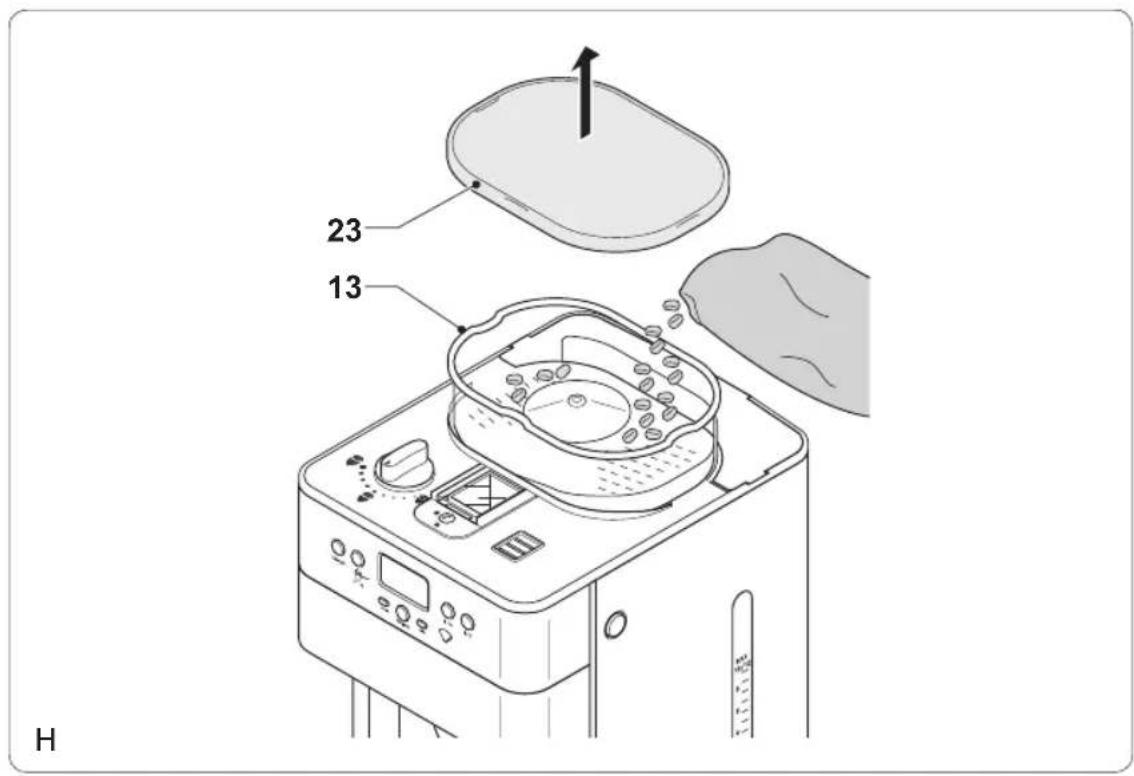
Making coffee with coffee beans (fig. A - H)
Before you proceed, we would like you to focus your attention on the following notes:
- Only use coffee beans that are suitable for the appliance.
- Only use paper coffee filters (1x4) that are suitable for the appliance.
Fill the water reservoir (14) with the required amount of water.
Do not fill the water reservoir with more • water than required for making the coffee. Only use the amount of water required for making the coffee. The appliance auto matically stops when the water reservoir is empty.
To use coffee beans, take the following • actions:
- Open the cover (23).
- Fill the coffee bean compartment (13) completely with coffee beans.
- Close the cover (23).
- Set the ground coffee fineness. Refer to the section "Setting the ground coffee fineness".
- Press the release button (12) to open the filter holder assembly (11).
- Place a suitable coffee filter in the coffee filter holder (10).
- Close the filter holder assembly (11) until the release button (12) clicks into place.
Note: The appliance can only be used when the display is activated. If the display is not activated, press any button to activate the display. The appliance is ready for use.
- Set the coffee quantity. Refer to the section "Setting the coffee quantity".
- Set the coffee strength. Refer to the section "Setting the coffee strength".
- Place the coffee pot (16) on the heating plate (18).
Switch on the appliance using the on/off button (1). The on/off indicator (1) comes on. After a few seconds, the appliance starts grinding the coffee beans and making the coffee.
To interrupt the process, press the on/off button (1).
If the process is completed, the appliance will beep and switch to keep-warm mode (C). The appliance can be switched off using the on/off button (1) or the appliance switches off automatically after 2 hours.
Allow the appliance to cool down completely.
Making coffee with ground coffee (fig. A, B, C, D & G)
Before you proceed, we would like you to focus your attention on the following notes:
- Only use ground coffee that is suitable for the appliance.
- Only use paper coffee filters (1x4) that are suitable for the appliance.
Fill the water reservoir (14) with the required amount of water.
Do not fill the water reservoir with more • water than required for making the coffee. Only use the amount of water required for making the coffee. The appliance automatically stops when the water reservoir is empty.
To use ground coffee, take the following actions:
- Press the release button (12) to open the filter holder assembly (11).
- Place a suitable coffee filter in the coffee filter holder (10).
- Put the required amount of coffee in the coffee filter.
- Close the filter holder assembly (11) until the release button (12) clicks into place.
- Place the coffee pot (16) on the heating plate (18).
Note: The appliance can only be used when the display is activated. If the display is not activated, press any button to activate the display. The appliance is ready for use.
Press the grinding function on/off button (2) to switch off the grinding function. The grinding function on/off indicator (2) comes on.
Switch on the appliance using the on/off button (1). The on/off indicator (1) comes on. The appliance starts making the coffee.
To interrupt the process, press the on/off button (1).
If the process is completed, the appliance will beep and switch to keep-warm mode (C). The appliance can be switched off using the on/off button (1) or the appliance switches off automatically after 2 hours.
Allow the appliance to cool down • completely.
Delay start function (fig. B & C)
The appliance has a delay start function which makes it possible to program the time for starting the coffee-making process.
Note: The appliance can only be used when the display is activated. If the display is not activated, press any button to activate the display. The appliance is ready for use.
Set the clock. Check whether the clock has already been set. If the clock has not been set, refer to the section "Setting the clock". Set the coffee quantity. Refer to the section "Setting the coffee quantity".
Set the coffee strength. Refer to the section • "Setting the coffee strength".
Keep the PROGRAM button (5) pressed • until the PROGRAM button indicator (5) flashes.
Repeatedly press the HOUR button (6) to set the hours.
Repeatedly press the MINUTE button (7) to set the minutes.
Press the PROGRAM button (5) to save the settings. The PROGRAM button indicator (5) comes on.
To interrupt the process, press the PROGRAM button (5) again. The PROGRAM button indicator (5) goes off.
Note: If you want to make coffee with ground coffee, switch off the grinding function before using the delay start function.
Cleaning and maintenance
Before you proceed, we need you to pay attention to the following notes:
- Before cleaning or maintenance, always switch off the appliance, remove the mains plug from the wall socket and wait until the appliance has cooled down.
- Do not immerse the appliance in water or any other liquids.
Before you proceed, we would like you to focus your attention on the following notes:
- Do not use aggressive or abrasive cleaning agents to clean the appliance.
- Do not use sharp objects to clean the appliance.
Regularly check the appliance for possible damage.
Clean the accessories: •
- Clean the coffee pot in soapy water.
- Clean the coffee filter holder in soapy water.
- Clean the lid of the coffee bean compartment in soapy water.
- Thoroughly dry the accessories.
Clean the outside of the appliance with a • damp cloth. Dry the outside of the appliance with a clean, dry cloth.
Store the appliance in a dry and frost-free • place, out of the reach of children.
Cleaning the grinding compartment (fig. C & I)
When grinding coffee beans, coffee powder can clog the grinding mechanism. The grinding compartment (19) must be cleaned when the warning symbol (E) is shown on the display (8). The grinding compartment (19) can be cleaned every 2 weeks to prevent the grinding mechanism from being clogged.
Before you proceed, we would like you to focus your attention on the following notes:
- Before cleaning the grinding compartment, take the following actions:
- Switch off the appliance.
- Remove the mains plug from the wall socket.
- Remove the coffee pot from the heating plate.
- Empty the coffee filter holder. Place a suitable coffee filter. Close the filter holder assembly.
Loosen the screw (24) using the • screwdriver (20).
- Open the cover (25).
- Clean the grinding compartment (19) using the brush (20).
- Close the cover (25).
- Tighten the screw (24) using the screwdriver (20).
Descaling the appliance (fig. A - D)
The appliance must be descaled when the descaling indicator (D) flashes on the display (8). If the appliance must be descaled, use a suitable descaling agent. Special descaling agents are available from our service station.
Note: Princess will not be responsible for any damage caused by descaling agents. Damage caused by not regularly descaling the appliance is not covered by the guarantee.
Before you proceed, we need you to pay attention to the following notes:
- Before descaling the appliance, remove the mains plug from the wall socket and wait until the appliance has cooled down.
- Do not immerse the appliance in water or any other liquids.
Before you proceed, we would like you to focus your attention on the following notes:
- Be careful when descaling the appliance to prevent damage to furniture or clothing.
- Do not use vinegar or vinegar concentrate to descale the appliance.
- Do not use citric acid to descale the appliance.
Fill the water reservoir (14) with a suitable - descaling agent.
Place the coffee pot (16) on the heating plate (18).
Insert the mains plug into the wall socket.
To take the following action, check whether the display (8) is lighted or not:
-DISPLAY LIGHTED: Keep the coffee quantity selector (3) and the coffee strength selector (4) pressed until the descaling indicator (D) lights continuously on the display (8) (fig. C).
-DISPLAY NOT LIGHTED: Press any button to light the display (8). Subsequently, keep the coffee quantity selector (3) and the coffee strength selector (4) pressed until the descaling indicator (D) lights continuously on the display (8) (fig. C).
Switch on the appliance using the on/off button (1).
Let the appliance run until 1/3 of the · descaling agent is in the coffee pot (16).
Switch off the appliance using the on/off button (1).
Let the descaling agent work for approximately 30 minutes.
Switch on the appliance using the on/off button (1).
Let the appliance run until the remaining descaling agent is in the coffee pot (16).
The appliance switches off when the water reservoir (14) is empty. The descaling indicator (D) disappears from the display (8).
Rinse the appliance twice according to the • below procedure:
- Fill the water reservoir (14) with clean water up to the maximum mark on the water level indicator (15).
- Place the empty coffee pot (16) on the heating plate (18).
- To take the following action, check whether the display (8) is lighted or not:
- DISPLAY LIGHTED: Keep the coffee quantity selector (3) and the coffee strength selector (4) pressed until the descaling indicator (D) lights continuously on the display (8) (fig. C).
- DISPLAY NOT LIGHTED: Press any button to light the display (8). Subsequently, keep the coffee quantity selector (3) and the coffee strength selector (4) pressed until the descaling indicator (D) lights continuously on the display (8) (fig. C).
- Switch on the appliance using the on/off button (1).
- Let all water run through the appliance. The appliance switches off when the water reservoir (14) is empty. The descaling indicator (D) disappears from the display (8).
Clean the outside of the appliance with a • damp cloth. Dry the outside of the appliance with a clean, dry cloth. The appliance is ready for use.
Safety instructions
General safety
- Read the manual carefully before use. Keep the manual for future reference.
- Only use the appliance and the accessories for their intended purposes. Do not use the appliance and the accessories for other purposes than described in the manual.
Do not use the appliance if any part or any accessory is damaged or defective. If a part or an accessory is damaged or defective, it must be replaced by the manufacturer or an authorised repair agent.
Children should be supervised to ensure that they do not play with the appliance. The use of this appliance by children or persons with a physical, sensory, mental or motorial disability, or lack of experience and knowledge can give cause to hazards. Persons responsible for their safety should give explicit instructions or supervise the use of the appliance.
Do not use the appliance near bathtubs, • showers, basins or other vessels containing water.
Do not immerse the appliance in water or other liquids. If the appliance is immersed in water or other liquids, do not remove the appliance with your hands.
Immediately remove the mains plug from the wall socket. If the appliance is immersed in water or other liquids, do not use the appliance again.
This appliance is intended to be used in domestic and similar applications such as staff kitchen areas in shops, offices and other working environments; farm houses; by clients in hotels, motels and other residential type environments; bed-and-breakfast type environments.
Electrical safety
Before use, always check that the mains voltage is the same as the voltage on the rating plate of the appliance.
The appliance is not intended to be operated by means of an external timer or separate remote-control system.
Connect the appliance to an earthed wall · socket. If necessary, use an earthed extension cable of a suitable diameter (at least 3 x 1 mm ^2 ).
Make sure that water cannot enter the contact plugs of the mains cable and the extension cable.
Always fully unwind the mains cable and the extension cable.
Make sure that the mains cable does not • hang over the edge of a worktop and cannot be caught accidentally or tripped over.
Keep the mains cable away from heat, oil and sharp edges.
Do not use the appliance if the mains cable or the mains plug is damaged or defective. If the mains cable or the mains plug is damaged or defective, it must be replaced by the manufacturer or an authorised repair agent.
Do not pull the mains cable to disconnect • the mains plug from the mains.
Disconnect the mains plug from the mains • when the appliance is not in use, before assembly or disassembly and before cleaning and maintenance.
Safety instructions for coffee makers
Do not use the appliance outdoors. Do not use the appliance in damp environments.
- Only use the appliance in frost-free environments if the appliance is filled with water.
Place the appliance on a stable and flat surface. - Place the appliance on a heat-resistant and splash-proof surface.
- Do not place the appliance on a hob.
- Do not place the appliance on hot surfaces or near open flames.
- Make sure that the appliance does not come into contact with flammable material.
- Keep the appliance away from heat sources.
- Be careful with hot water and steam to avoid burns.
- Store the appliance in a dry place when not in use. Make sure that children do not have access to stored appliances.
U.K. Wiring instructions
The wires in the mains lead are coloured in accordance with the following code:
BLUE
NEUTRAL
BROWN
LIVE
GREEN/YELLOW
EARTH
As the colours of the wire in the mains lead of this appliance may not correspond with the colour markings identifying the terminals on your plug, proceed as follows:
The wire which is coloured BLUE must be connected to the terminal which is marked with the letter N or coloured black.
The wire which is coloured BROWN must be connected to the terminal which is marked with the letter L or coloured red.
The wire which is coloured GREEN/YELLOW must be connected to the terminal which is marked with the letter E or ( ) and is coloured GREEN or GREEN/YELLOW.
If a 13Amp (BS1363) plug is used, a 13Amp (BS1362) fuse must be fitted, or if any other type of plug is used, a 13Amp fuse must be fitted, either in the plug or adaptor, or on the distribution board.
Warning! This appliance must be earthed.
Disclaimer
Subject to change; specifications can be changed without further notice.
Félicitations!


- Gefeliciteerd!
- Eerste gebruik
- Voorbereiding
- Description (fig. A - C)
- Initial use
- Preparation
- Setting the clock (fig. B & C)
- Use
- Filling the water reservoir (fig. D)
- Setting the coffee quantity (fig. B & C)
- Setting the coffee strength (fig. B & C)
- Setting the ground coffee fineness (fig. E)
- Switching on and off (fig. B)
- Grinding function (fig. B & F)
- Making coffee with coffee beans (fig. A - H)
- Making coffee with ground coffee (fig. A, B, C, D & G)
- Delay start function (fig. B & C)
- Cleaning and maintenance
- Cleaning the grinding compartment (fig. C & I)
- Descaling the appliance (fig. A - D)
- Safety instructions
- General safety
- Electrical safety
- Safety instructions for coffee makers
- U.K. Wiring instructions
- Disclaimer
- Félicitations!
Brand : PRINCESS
Model : 249401
Category : Coffee machine