
Shredstar MultiShred - Shredder HSM - Free user manual and instructions
Find the device manual for free Shredstar MultiShred HSM in PDF.


| Product Type | Cross-cut document shredder |
| Brand | HSM |
| Model | Shredstar MultiShred |
| Cut Type | Cross cut |
| Cut Size | 4 x 35 mm |
| Cutting capacity per session | 8 sheets of paper (80 g/m²) or 1 floppy disk or 1 CD or 1 credit card |
| Cutting speed | 25 mm/s |
| Power supply | 220-240 V / 50-60 Hz |
| Maximum operating time | 5 minutes |
| Dimensions (W x D x H) | 241 x 202 x 288 mm |
| Weight | 5.3 kg |
| Container volume | 3.5 L |
| Destructible materials | Paper, staples, paper clips, floppy disks, CDs, credit cards |
| Functions | Automatic start, reverse (REV), automatic stop in case of overload |
| Safety | Automatic stop in case of jam or overload, overheating protection (cool down 30 min) |
| Maintenance and cleaning | Clean with a soft cloth and non-corrosive soapy water, unplug before cleaning |
| Warranty | 2 years (excluding normal wear and damage from improper use) |
| Certifications | CE (Low Voltage Directive 2006/95/EC, EMC Directive 2004/108/EC) |
| Intended use | Destruction of confidential documents and data carriers |
| Recommended location | At least 10 cm from walls or furniture, out of reach of children |
Frequently Asked Questions - Shredstar MultiShred HSM
User questions about Shredstar MultiShred HSM
0 question about this device. Answer the ones you know or ask your own.
Ask a new question about this device
Download the instructions for your Shredder in PDF format for free! Find your manual Shredstar MultiShred - HSM and take your electronic device back in hand. On this page are published all the documents necessary for the use of your device. Shredstar MultiShred by HSM.
USER MANUAL Shredstar MultiShred HSM
Multishred one-4 all
BETRIEBSANLEITUNG
AKTENVERNICHTER
OPERATING INSTRUCTIONS
PAPER SHREDDER
NOTICE D'UTILISATION
DESTRUCTEUR DE DOCUMENTS
MANUALE OPERATIVO
DISTRUGGIDOCUMENTI
INSTRUCCIONES DE SERVICIO
DESTRUCTORA DE DOCUMENTOS
1 Proper use, warranty
The device is intended exclusively for shredding of fl oppy disks, CDs, credit cards and paper. Its sturdy drive mechanism is not damaged by paper clips and staples.
The warranty period for the document shredder is 2 years. This warranty excludes wear, damage due to improper handling, natural depreciation, and actions taken by third parties.
2 Safety instructions
- Read all instructions before start-up of the paper shredder. Save these instructions for later use.
- Follow all warnings and instructions marked on the product!

Risk of injury!
Do not reach into the paper feed slot.

Risk of injury by pulling in!
Keep long hair, loose articles of clothing, ties, scarves, jewellery etc. away from feed opening. Material with the tendency to form loops, e.g. tapes, strapping material, etc. must not be shredded.

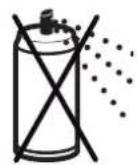

Risk of combustion!
Do not use cleaning agents or pressurized air sprays which contain infl ammable substances, as they could ignite.
Keep paper shredder out of the reach of children. This shredder should be operated only with an operator in attendance.

Switch the shredder off if it is damaged or not working correctly or before relocating or cleaning it and disconnect it from the mains.
Service work may only be carried out by HSM Customer Service or by the service technicians of our contractual partners.
• Make sure no liquid is spilled on or in the paper shredder.
- Make sure the mains plug is easily accessible.
- Before plugging in the mains plug, check that the voltage and frequency of your local mains supply correspond to those stated on the type plate.
- The shredder is for indoor use only and must not be placed near a heater or other heat source. The ventilation slots must not be blocked or covered and they must be at a distance of at least 4" (10 cm) away from walls or furniture.
3 Machine components
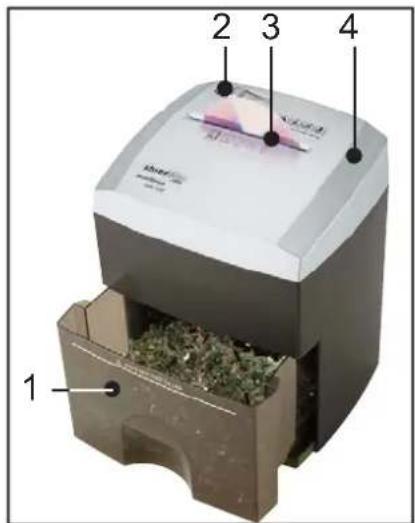
1 Cut material container
2 Slider switch
3 Feed opening
4 Cutting head
4 Operation

Set the sliding switch for automatic operation to "ON/AUTO".

- Only insert one fl oppy disk or one CD or one credit card or max. 8 sheets of paper.
▶ Cutting system starts automatically.
The material is drawn in and destroyed. The cutting device then switches off.
Only then load the next material.
Swit ching Multishred off

Set the sliding switch to "OFF".
5 Troubleshooting
Paper jam, device shutdown

If you feed in to much material (for example 2 CDs overlap in the cutting device), the device switches off automatically.
- Set the slider switch to "REV"
After a delay of 2 seconds, the cutting device runs in reverse and the material is pushed out. - Set the slider switch to "ON/AUTO" again.
- Do not put in more material than is allowed.
Shredded material container
Check the level in the shredded material container and empty it in good time, as otherwise the function of the cutting device could be impaired.
For all other malfunctions, check whether the cutting head was correctly positioned on the shredded material container before contacting our customer service. If the motor was overloaded, let the shredder cool down for 30 minutes before using it again.
6 Cleaning
Switch off the shredder and pull out the mains plug.
When cleaning only use a soft cloth and a mild soap-water solution. However, no water must enter the equipment.
7 Disposal / Recycling
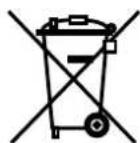
Electrical and electronic old devices contain a variety of valuable materials, but also hazardous substances which were required for function and safety. Incorrect disposal or handling can be dangerous to your health and
the environment. Never dispose of old devices in the household waste. Observe the current applicable regulations and use the collection points for returning and recycling electric and electronic devices. Dispose of all the packaging materials also in an environmentally-responsible way.
8 Technical data
| Cutting type Cross cut | |
| Shred size 1/8" x 1 1/8" (4 x 35 mm) | |
| Cutting ca pa ci ty per cycle | 1 floppy disc or 1 CDor 1 credit cardor 8 sheets of folded paper (80 g/m2) |
| Cutting speed 5 ft/min (25 mm/s) | |
| Voltage | 120 V / 60 Hz220-240 V / 50-60 Hz |
| Max. operating time 5 min | |
| Dimensions W x D x H | 9.5" x 8" x 11.4"(241 x 202 x 288 mm) |
| Weight 12 lbs. (5.3 kg) | |
| Volume of shredded material container 0.92 gal (3.5 l) | |
EC Declaration of Conformity
HSM GmbH + Co. KG, Austrasse 1 - 9, D-88699 Frickingen hereby declares that the machine, referred to here as document shredder HSM Multishred one-4 all
corresponds to the health and safety requirements of the following EC directives listed below due to its conception and design of the version in which it was put into circulation by us:
Low voltage directive 2006 / 95 / EEC
EMC directive 2004 / 108 / EC
Applied standards and technical specifications:
• EN 13857:2008 • EN 55014-1:2006
• EN 55014-2:1997 + A1:2001 • EN 61000-3-2:2006
• EN 61000-3-3:2008
Rolf Gasteier - Technical Director
Paperisilppuri HSM Multishred one-4 all
Skartovačka HSM Multishred one-4 all
88699 Frickingen / Germany
Tel. +49 7554 2100-0
Fax. +49 7554 2100 160
info@hsm.eu
www.hsm.eu
HSM (UK) Ltd.
14 Attwood Road / Zone 1
Burntwood Business Park
Burntwood
Staffordshire
WS7 3GJ
Tel. +44(0) 1543.272.480
Fax +44(0) 1543.272.080
info@hsmuk.co.uk
www.hsmuk.co.uk
HSM of America LLC
419 Boot Road
Downingtown, PA 19335
Tel. (484) 237-2308
(800) 613-2110
Fax (484) 237--2309
customerservice@hsmofamerica.com
info@hsmofamerica.com
www.hsmofamerica.com
HSM Polska SP. z.o.o.
ul. Emaliowa 28
02-295 Warszawa
Tel. +48 / 22 862 23 69 / 70
Fax +48 / 22 862 23 68
info@hsmpolska.com
www.hsmpolska.com
HSM France SAS
Parc de Genève
240, Rue Ferdinand Perrier
69800 SAINT-PRIEST
FRANCE
Tél: +33 (0) 810.122.633
Fax: +33 (0) 4.72.51.74.81
France@hsm.eu
HSM GmbH + Co. KG
Ofi cina Barcelona
C/Tona
Nave n° 15 "El Lago"
Pol. Ind. Monguit


- MULTISHRED ONE-4 ALL
- 1 PROPER USE, WARRANTY
- 2 SAFETY INSTRUCTIONS
- RISK OF INJURY
- RISK OF INJURY BY PULLING IN
- RISK OF COMBUSTION
- 3 MACHINE COMPONENTS
- 4 OPERATION
- SWIT CHING MULTISHRED OFF
- 5 TROUBLESHOOTING
- PAPER JAM, DEVICE SHUTDOWN
- SHREDDED MATERIAL CONTAINER
- 6 CLEANING
- 7 DISPOSAL / RECYCLING
- EC DECLARATION OF CONFORMITY
- HSM (UK) LTD
- HSM OF AMERICA LLC
- HSM POLSKA SP. Z.O.O
- HSM FRANCE SAS
- HSM GMBH + CO. KG
Brand : HSM
Model : Shredstar MultiShred
Category : Shredder