MTS - Blood pressure monitor MEDISANA - Free user manual and instructions
Find the device manual for free MTS MEDISANA in PDF.


User questions about MTS MEDISANA
0 question about this device. Answer the ones you know or ask your own.
Ask a new question about this device
Download the instructions for your Blood pressure monitor in PDF format for free! Find your manual MTS - MEDISANA and take your electronic device back in hand. On this page are published all the documents necessary for the use of your device. MTS by MEDISANA.
USER MANUAL MTS MEDISANA
Please read carefully!
Please fold out this page and leave it folded out for quick reference.
GB Unit and LCD display
1 Blood Pressure Indicator (green - yellow - orange - red)
② Blood Pressure Monitor
3 LCD screen (display)
4 Socket for mains adaptor
5 START button
6 M button (Memory Recall)
⑦ Battery Compartment (on underside)
8 Connector for the hose
9 Air Tube
10 Tension Cuff
11 Display of Date/Time
12 Display of Systolic Pressure
13 Display of Diastolic Pressure
14 Display of Pulse Rate
15 Pulse symbol
16 Memory Location number
17 Inflate to Measure symbol
18 Deflate to Measure symbol
19 Change Battery symbol
20 Arrhythmia display
natural_image
Simple line drawing of a human hand and arm with a device attached, no text or symbols present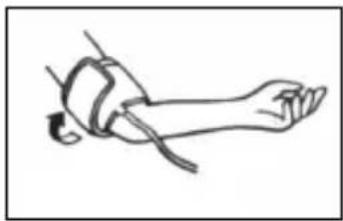
natural_image
Line drawing of a human leg in contact with a bandage, no text or symbols presentnatural_image
Line drawing of a person lying on the knee with a heart symbol indicating pressure or pressure point (no text or labels)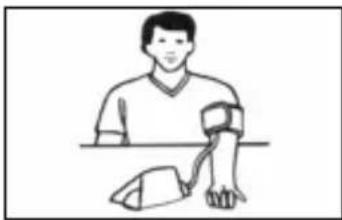
natural_image
Illustration of a person wearing a wristwatch and holding a device (no text or symbols present)natural_image
Symbol of a trash bin crossed with no text or numbers, representing waste sorting or recycling (no text present)Read the instruction manual carefully before using this device, especially the safety instructions, and keep the instruction manual for future use.
Should you give this device to another person, it is vital that you also pass on these instructions for use.
Explanation of symbols

This instruction manual belongs to this device.
It contains important information about starting up and operation.
Read the instruction manual thoroughly.
Non-observance of these instructions can result in serious injury or damage to the device.

WARNING
These warning notes must be observed to prevent any injury to the user.

CAUTION
These notes must be observed to prevent any damage to the device.

NOTE
These notes give you useful additional information on the installation or operation.

Classification: Type B applied part

Lot number

Manufacturer

Date of manufacture

text_image
!Safety Information
- The unit is intended only for use in the home.
- Consult your doctor prior to using the blood pressure monitor if you are concerned about health matters.
- Only use the unit for its intended purpose in accordance with the instruction manual.
- Warranty claims become void if the unit is misused.
- Please consult your doctor prior to using the unit if you suffer from illnesses such as arterial occlusive disease.
- The unit may not be used to check the heart rate of a pacemaker.
- Pregnant women should take the necessary precautions and pay attention to their individual circumstances. Please consult your doctor if necessary.
- If you experience discomfort during a measurement, such as pain in the upper arm or other complaints, press the START button ⑤ to release the air immediately from the cuff. Loosen the cuff and remove it from your arm.
- This device is not designed to be used by persons (including children) with limited physical, sensory or mental abilities, or by persons with insufficient experience and/or knowledge, unless under observation by a person responsible for their safety, or unless they have been instructed in the use of the device.
- Children must be supervised to ensure that they do not play with the device.
- The unit may not be operated in the vicinity of appliances that emit strong electric radiation such as radio transmitters, mobile phones or microwaves.
- Please do not attempt to repair the unit yourself in the event of malfunctions, since this will void all warranty claims. Only have repairs carried out by authorised service centres.
- Protect the unit against moisture. If liquid does manage to penetrate into the unit, remove the batteries immediately and do not continue to use the unit. In this case contact your specialist dealer or notify us directly.
- If the unit is not going to be used for a long period, please remove the batteries.

WARNING
Do not take any therapeutic measures on the basis of a self measurement. Never alter the dose of a medicine prescribed by a doctor.
Thank you very much
Thank you for your confidence in us and congratulations on your purchase! You have acquired a quality product with your purchase of the MEDISANA MTS upper arm blood pressure monitor. To ensure the best results and long-term satisfaction with your MEDISANA MTS blood pressure monitor, we recommend that you read the following operating and maintenance instructions carefully.
2.1 Items supplied and packaging
Please check first of all that the device is complete and is not damaged in any way. In case of doubt, do not use it and contact your supplier or your service centre.
The following parts are included:
• 1 Cuff with air hose
• 4 Batteries (AA type, LR 6) 1,5V
- 1 Storage bag
• 1 Instruction manual
• 1 MEDISANA Blood pressure monitor MTS
The packaging can be reused or recycled. Please dispose properly of any packaging material no longer required. If you notice any transport damage during unpacking, please contact your supplier without delay.

WARNING
Please ensure that the polythene packing is kept away from the reach of children! Risk of suffocation!
2.2 What is blood pressure?
Blood pressure is the pressure created in the blood vessels by each heart beat. When the heart contracts (= systole) and pumps blood into the arteries, it brings about a rise in pressure. The highest value is known as the systolic pressure and is the first value to be measured.
When the cardiac muscle relaxes to take in fresh blood, the pressure in the arteries also falls. Once the arteries are relaxed, a second reading is taken – the diastolic pressure.
2.3 How is blood pressure measured?
The MTS is a blood pressure unit which is used to measure blood pressure at the upper arm. The measurement is carried out by a microprocessor, which, via a pressure sensor, measures the vibrations resulting from the inflation and deflation of the cuff over the artery.
2.4 Why should you take your blood pressure at home?
MEDISANA has had many years of experience in the field of blood pressure measurement. The high precision of MEDISANA devices has been confirmed by extensive clinical tests, carried out according to strict international standards. One strong argument in favour of taking blood pressure at home is the fact that the readings are taken in familiar surroundings under relaxed conditions. The most important reading is the so-called „baseline value“, the one taken before breakfast, directly after getting up in the morning. As far as it is possible, you should always try to take your blood pressure at the same time and under the same conditions each day.
This ensures comparable results and helps in detecting the first signs of high blood pressure. If high blood pressure remains undetected, it increases the risk of further cardiovascular diseases.

THEREFORE WE RECOMMEND:
Take a blood pressure reading daily and on a regular basis, even if you are experiencing no apparent complaints.
2.5 Blood pressure classification
The following table shows the classification of high and low blood pressure, without taking age into consideration. This blood pressure assessment scale corresponds to the guidelines of the World Health Organisation (WHO).
Low blood pressure Normal blood pressure
systolic <100 systolic 100 - 139
diastolic <60 diastolic 60 - 89
Types of high blood pressure
mild medium serious
hypertension hypertension hypertension
systolic 140 – 159 systolic 160 – 179 systolic >_180
diastolic 90 – 99 diastolic 100 – 109 diastolic >_110

WARNING
Blood pressure that is too low represents just as great a health risk as blood pressure that is too high! Fits of dizziness may lead to dangerous situations arising (e.g. on stairs or in traffic)!
2.6 Fluctuations in blood pressure
There are many factors that can influence blood pressure. Readings can be affected seriously by stress, fear, heavy physical exertion or the time of day at which the measurements are taken. Your personal blood pressure values are subject to considerable fluctuation during the course of the day and the year. These fluctuations are particularly pronounced in the case of patients suffering from hypertension. Blood pressure is usually at its highest during physical exertion and at its lowest at night when you are asleep.
2.7 Influencing and evaluating readings
- Measure your blood pressure several times, then record and compare the results. Do not draw any conclusions from a single reading.
- Your blood pressure readings should always be evaluated by a doctor who is also familiar with your personal medical history. When using the unit regularly and recording the values for your doctor, you should visit the doctor from time to time to keep him updated.
- When taking readings, remember that the daily values are influenced by several factors. Smoking, consumption of alcohol, drugs and physical exertion influence the measured values in various ways.
• Measure your blood pressure before meals. - Before taking readings, allow yourself at least five minutes rest.
- If the systolic and diastolic readings seem unusual (too high or too low) on several occasions, despite correct use of the unit, please inform your doctor. This also applies to the rare occasions when an irregular or very weak pulse prevents you from taking readings.
3 Getting Started
3.1 Inserting/changing batteries
You must insert the batteries provided before you can use your unit. The lid of the battery compartment ⑦ is located on the underside of the unit. Open it, remove it and insert the 4 AA LR6 type 1.5 V batteries supplied. Ensure correct polarity when inserting the batteries (as marked inside the battery compartment). Close the battery compartment. Replace the batteries if the change battery symbol ⑲ appears on the display ③ or if nothing appears on the display after the unit has been switched on.

WARNING
BATTERY SAFETY INFORMATION
- Do not disassemble batteries!
- Remove discharged batteries from the device immediately!
- Increased risk of leakage, avoid contact with skin, eyes and mucous membranes! If battery acid comes in contact with any of these parts, rinse the affected area with copious amounts of fresh water and seek medical attention immediately!
- If a battery has been swallowed seek medical attention immediately!
- Replace all of the batteries simultaneously!
- Only replace with batteries of the same type, never use different types of batteries together or used batteries with new ones!
- Insert the batteries correctly, observing the polarity!
- Remove the batteries from the device if it is not going to be used for an extended period!
- Keep batteries out of children's reach!
- Do not attempt to recharge these batteries! There is a danger of explosion!
- Do not short circuit! There is a danger of explosion!
- Do not throw into a fire! There is a danger of explosion!
- Do not throw used batteries into the household refuse; put them in a hazardous waste container or take them to a battery collection point, at the shop where they were purchased!
3.2 Using a Mains Adaptor
Alternatively, you can use the unit with a special mains adaptor (MEDISANA Art.-No. 51125). This connects to the socket ④ provided at the back of the unit. In this case the batteries remain in the unit.
Inserting the connector into the back of the blood pressure monitor switches the batteries off mechanically. It is necessary, therefore, to plug the mains adaptor into the mains socket first of all and then to connect it to the blood pressure monitor. If the blood pressure monitor is no longer being used, first remove the connector from the blood pressure monitor and then pull the mains adaptor out of the mains socket. Doing this means that the date and time will not have to be reset each time.
3.3 Setting the date and time
- With the unit switched off, simultaneously press the START button ⑤ and the M button ⑥ to set the date and time. First of all the entry point for the month flashes (1, 2, 3... 12).
- Press the M button ⑥ repeatedly until the desired number for the month appears.
- Press the START button ⑤ again to accept the setting. Now the entry point for the date flashes.
- Proceed in exactly the same manner as described in point 2 when entering the date, hours and minutes.
- In each case, press the M button ⑥ to select and the START button ⑤ to accept the entry.
- The date and time are displayed continuously. If the batteries are changed the information is lost and the date and time must be set again.
3.4 Setting up the user memory
The MTS gives you the opportunity to assign readings to one of two user memories, each of which provides 60 memory slots.
Press the Start button ⑤ until the symbol for the U1 (USER) memory appears in the display ③. Press the M button ⑥ to choose between user/memory 1 U1 and user/memory 2 U2.
4 Operation
4.1 Fitting the cuff
natural_image
Simple line drawing of a human hand and arm with a device attached, no text or symbols present
natural_image
Line drawing of a human leg in contact with a bandage, no text or symbols presentFirst attach the free end of the cuff's air tube ⑨ to the designated connector ⑧ on the unit.
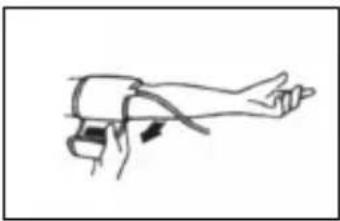
Open up the cuff to a ring and slip it over the bare left upper arm just above the elbow region. If wearing tight clothing, ensure that the circulation in the arm is not impaired when rolling up the sleeve. Please ensure that the cuff buckle is never positioned directly over the artery, as this can result in an incorrect blood pressure reading.
The tube should run along the centre of the inner arm towards the palm of the hand. Ensure that the cuff itself is not twisted in any way. Fasten the pressure cuff in such a way that it fits tightly but does not constrict the arm. Do this by passing the end through the buckle, pulling it tight and attaching it to the Velcro fastener. Only position the cuff on the right arm if it cannot be used on the left arm. Always carry out measurements on the same arm.
4.2 Correct position for taking readings
natural_image
Line drawing of a person lying on the knee with a heart symbol indicating pressure or pressure point (no text or labels)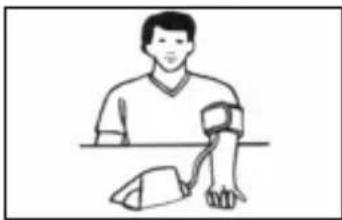
natural_image
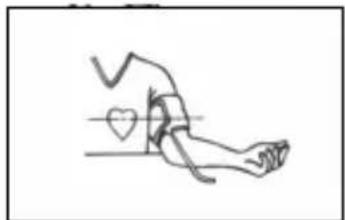
Illustration of a person wearing a wristwatch and holding a device (no text or symbols)Take readings while in a seated position. Relax your arm and rest it lightly on a surface such as a table. Relax during the measuring process: do not move or talk, as this can affect the results.
4.3 Taking a blood pressure measurement
- Switch the unit on by pressing the START button ⑤.
- If the START button ⑤ is pressed, a long beep is heard and all display characters are shown (display test). This test is used to check that the display is indicating properly and in full. The display shows the set memory (U1 or U2) and then the last reading appears. If no measurement has been taken, zeroes will appear next to the date and time.
- The unit is ready for measurement, the number 0 is displayed. It automatically inflates the cuff slowly in order to measure your blood pressure.
- The unit inflates the cuff until sufficient pressure has built up for a measurement. Then the unit slowly releases air from the cuff and carries out the measurement.
- When the measurement is finished, the cuff is deflated completely. The systolic and diastolic blood pressure and the pulse value with the pulse symbol 15 appear on the display 3. The blood pressure indicator 1 flashes next to the relevant coloured bar depending on the WHO blood pressure classification. If the unit has detected an irregular heartbeat, the arrhythmia display 20 also flashes. The readings are automatically saved in the selected memory (U1 or U2).
- The unit switches off automatically after about 1 minute. The unit may also be switched off using the START button ^⑤ .
4.4 Switching off the unit
The unit switches off automatically after about 1 minute, if no button is pressed during this period. It can also be switched off by pressing the START button ^5 . The time and the date are constantly shown in the display.
4.5 Error messages and error remedying
The battery change symbol 19 appears in the display:
The batteries are too low or empty. Replace all four batteries with new 1.5 V type AA LR6 batteries.
No display:
Check battery position or replace with new batteries.
Erratic measurements or EE is displayed:
Fit the cuff correctly.
Please assume the correct position.
Keep still during the measurement.
The unit is not suitable for people with an extremely irregular pulse.
5 Memory
5.1 Recording the results
This unit features 2 separate memories, each with a capacity of 60 memory slots. Results are automatically stored in the memory selected by the user. When the memory is full, the oldest reading is always the first to be deleted.
5.2 Displaying stored results
You can store up to 60 readings (blood pressure and pulse rate with the time and date) in either one of the memories (U1 and U2) in your blood pressure monitor. The measured values are stored automatically. Press the M button ⑥ to call up the measured values stored. First the name of the selected memory appears (U1 or U2) with details of the number of memory slots occupied. Press the START button ⑤ to switch to the other memory. Then the values from the previously stored measurement are displayed, together with the flashing blood pressure indicator. Repeatedly pressing the M button ⑥ displays the respective values measured previously. If you have reached the final entry and do not press a button, the unit automatically switches itself off after approximately 120 seconds in the memory recall mode.
Memory recall mode can be exited at any time by pressing the START button 5, which will also switch the unit off. The oldest value is deleted if 60 measured values have been stored in the memory and a new value is saved.
5.3 Deleting memory
If you are in memory recall mode, press and hold the M button ⑥ for approximately 8 seconds. All measured data stored will be deleted automatically after three beeps. Only noughts will be shown on the display instead of the measured values.
6.1 Cleaning and maintenance
- Remove the batteries before cleaning the unit.
- Never use strong detergents or hard brushes.
- Clean the unit with a soft cloth, moistened with mild soapy water. Do not let water enter the unit. After cleaning, only use the unit when it is completely dry.
- Remove the batteries from the unit if you do not wish to use it for an extended period of time, otherwise there is a risk of battery leakage.
- Do not expose the unit to direct sunlight, and protect it from dust and moisture.
- Only inflate the cuff when it is in position around the upper arm.
• Servicing and calibration
The unit has been calibrated by the manufacturer for a period of two years' use. In the case of commercial use, the unit must be serviced and recalibrated at least once every two years. This calibration will be charged for and can be carried out by an appropriate authority or an authorised service centre - in accordance with the regulations for users of medical equipment.
6.2 Disposal

natural_image
Symbol of a trash bin crossed with diagonal lines, no text or numbers presentThis product must not be disposed of together with domestic waste. All users are obliged to hand in all electrical or electronic devices, regardless of whether or not they contain toxic substances, at a municipal or commercial collection point so that they can be disposed of in an environmentally acceptable manner. Remove the batteries before disposing of the device/unit. Do not dispose of old batteries with your household waste, but at a battery collection station at a recycling site or in a shop. Consult your local authority or your supplier for information about disposal.
6.3 Guidelines / Standards
This blood pressure monitor meets the requirements of the EU standard for non-invasive blood pressure monitors. It is certified in accordance with EC Guidelines and carries the CE symbol (conformity symbol) "CE 0297".
The blood pressure monitor corresponds to European standards EN 60601-1, EN 60601-1-2, EN 1060, EN 14971 and EN 980.
The specifications of EU Guideline “93/42/EEC of the Council Directive dated 14 June 1993 concerning medical devices” are met.
Electromagnetic compatibility:
The device complies with the EN 60601-1-2 standard for electromagnetic compatibility. Inquire at MEDISANA for details on this measurement data.
Intended use:
This unit is suitable for non-invasive blood pressure measurement in adults (i.e., suitable for external use).
6.4 Technical specifications
Name and model : MEDISANA Blood pressure monitor MTS
Display system : Digital display
Memory slots : 2 x 60
Measuring method : Oscillometric
Voltage supply : 6 V=, 4 x 1.5V battery AA LR6
Measuring range blood pressure : 0 – 300 mmHg
Measuring range - pulse : 30 - 180 beats/min.
Maximum measuring deviation
of static pressure : ± 3 mmHg
Maximum measuring deviation
of pulse values : ± 5 % of the value
Pressure generation : Automatic with pump
Air release : Automatic
Autom. switch-off : After approx. 1 min.
Operating conditions : +5 °C to +40 °C,
<80 % max. relative humidity
Storage conditions : -20 °C to +55 °C,
<95 % max. relative humidity
Dimensions : approx. 144 mm x 102 mm x 56 mm
Cuff : ∅ 22 – 30 cm Adult cuff for average
upper arm circumference
Weight (approx.) : approx. 380 g incl. batteries
Item number : 51152
EAN number : 40 15588 51152 3
Accessories : Mains adapter
Art. No. 51125
Cuff, large 30 - 42 cm for adults with upper
arm of large circumference
Art.-No. 51126
CE 0297
In accordance with our policy of continual product improvement, we reserve the right to make technical and optical changes without notice.
Warranty and repair terms
Please contact your dealer or the service centre in case of a claim under the warranty. If you have to return the unit, please enclose a copy of your receipt and state what the defect is.
The following warranty terms apply:
- The warranty period for MEDISANA products is three years from date of purchase. In case of a warranty claim, the date of purchase has to be proven by means of the sales receipt or invoice.
- Defects in material or workmanship will be removed free of charge within the warranty period.
- Repairs under warranty do not extend the warranty period either for the unit or for the replacement parts.
- The following is excluded under the warranty:
a. All damage which has arisen due to improper treatment, e.g. nonobservance of the user instructions.
b. All damage which is due to repairs or tampering by the customer or unauthorised third parties.
c. Damage which has arisen during transport from the manufacturer to the consumer or during transport to the service centre.
d. Accessories which are subject to normal wear and tear as batteries, cuff etc..
- Liability for direct or indirect consequential losses caused by the unit are excluded even if the damage to the unit is accepted as a warranty claim.

MEDISANA AG
Jagenbergstraße 19
41468 NEUSS
GERMANY
The service centre address is shown on the attached leaflet.

REMARQUE IMPORTANTE! TOUJOURS CONSERVER!
natural_image
Simple line drawing of a human hand and arm with a device attached, no text or symbols present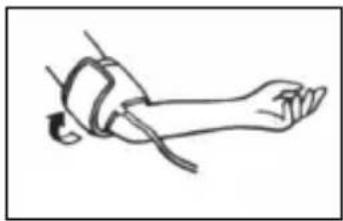
natural_image
Line drawing of a human leg in contact with a bandage, no text or symbols presentnatural_image
Line drawing of a person lying on the knee with a heart symbol indicating pressure or pressure point (no text or labels)
natural_image
Illustration of a person wearing a wristwatch and holding a device (no text or symbols)natural_image
Symbol of a trash bin crossed with diagonal lines, no text or numbers present6.3 Directives / Normes
natural_image
Two abstract black-and-white line drawings: one resembling a factory chimney, the other a stylized plant or structure (no text or symbols)Numero LOT
Produttore
Data di produzione

text_image
!Norme di sicurezza
natural_image
Simple line drawing of a hand pointing to the right (no text or symbols)
natural_image
Line drawing of a human leg in a seated position, showing posture and movement (no text or symbols)natural_image
Line drawing of a person lying on the knee with a heart symbol indicating pressure or pressure point (no text or labels)
natural_image
Illustration of a person wearing a wristwatch and holding a bag, with no visible text or symbolsnatural_image
Symbol of a trash bin crossed with a diagonal line, no text or numbers presentnatural_image
Simple line drawing of a human arm with a hand pointing (no text or symbols)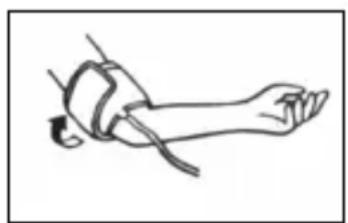
natural_image
Line drawing of a human leg in contact with wristband (no text or symbols)natural_image
Line drawing of a person lying on the knee with a heart symbol indicating pressure or pressure point (no text or labels)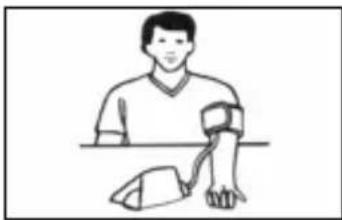
natural_image
Illustration of a person wearing a wristwatch and holding a device (no text or symbols)natural_image
Symbol of a trash bin crossed out by two diagonal lines, with no text or labels present.natural_image
Simple line drawing of a hand pointing to the right (no text or symbols)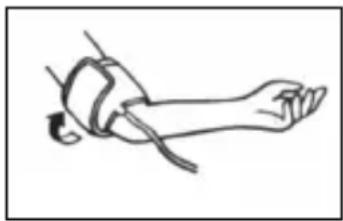
natural_image
Line drawing of a human leg in contact with a wristband, no text or symbols presentnatural_image
Line drawing of a person lying on the knee with a heart symbol indicating pressure or pressure point (no text or labels)
natural_image
Illustration of a person wearing a wristwatch and holding a device (no text or symbols)natural_image
Symbol of a trash bin crossed with no text or numbers, representing waste sorting or recycling (no text present)natural_image
Simple line drawing of an industrial plant with smokestacks and a zigzag base (no text or symbols)LOT-nummer
Producent
Productiedatum

text_image
!natural_image
Simple line drawing of a human hand and arm with a device attached, no text or symbols present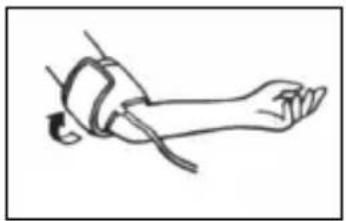
natural_image
Line drawing of a human leg in contact with a wristband, no text or symbols presentnatural_image
Line drawing of a person lying on the knee with a heart symbol indicating pressure or pressure point (no text or labels)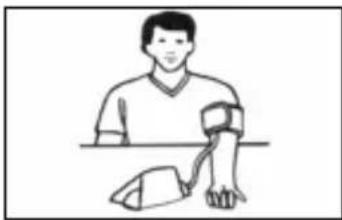
natural_image
Illustration of a person wearing a wristwatch and holding a device (no text or symbols)natural_image
Symbol of a trash bin crossed with diagonal lines, no text or numbers presentnatural_image
Line drawing of a human arm with a device attached, showing motion direction (no text or symbols)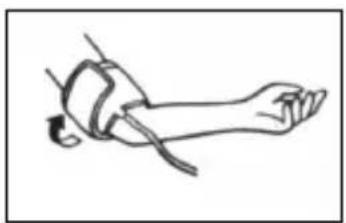
natural_image
Line drawing of a human leg in contact with wristband (no text or symbols)natural_image
Line drawing of a human leg with a heart symbol on the knee, no text or labels present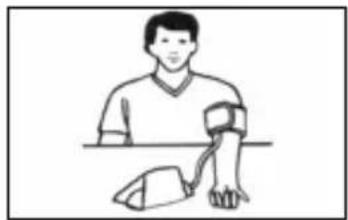
natural_image
Illustration of a person wearing a wristwatch and holding a device (no text or symbols present)natural_image
Symbol of a trash bin crossed with diagonal lines, no text or numbers presentnatural_image
Line drawing of a human arm with a hand pointing (no text or symbols)
natural_image
Line drawing of a person lying down with a bandage and arm (no text or symbols)natural_image
Line drawing of a person lying on the knee with a heart symbol indicating pressure or pressure point (no text or labels)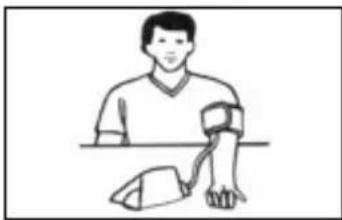
natural_image
Illustration of a person wearing a wristwatch and holding a device (no text or symbols)natural_image
Pure electrical circuit lines without any symbolsnatural_image
Simple line drawing of an industrial building with a chimney and a factory chimney (no text or symbols)Αριθμός LOT
Παραγωγόσ
natural_image
Line drawing of a human arm with a hand pointing (no text or symbols)
natural_image
Line drawing of a human leg in contact with wristband (no text or symbols)natural_image
Line drawing of a person lying on the knee with a heart symbol indicating pressure or pressure point (no text or labels)